Phantom Exit Guard
- Uzmanlar
- Sürüm: 1.19
- Güncellendi: 7 Ağustos 2026
- Etkinleştirmeler: 5

Phantom Exit Guard
Intelligent Trade Management Utility for MetaTrader 5
You open the trade. This EA handles everything after that.
Phantom Exit Guard is not a trading robot. It does not open positions. Instead, it monitors every trade on your chart (manual or from another EA) and applies professional-grade exit management that most retail traders simply cannot execute by hand.
Key Features
1. Automatic Breakeven
Once your trade reaches a configurable profit threshold (default: 200 Points), the EA moves your Stop Loss to entry price plus a small cushion (default: 20 Points). Your trade becomes secured instantly.
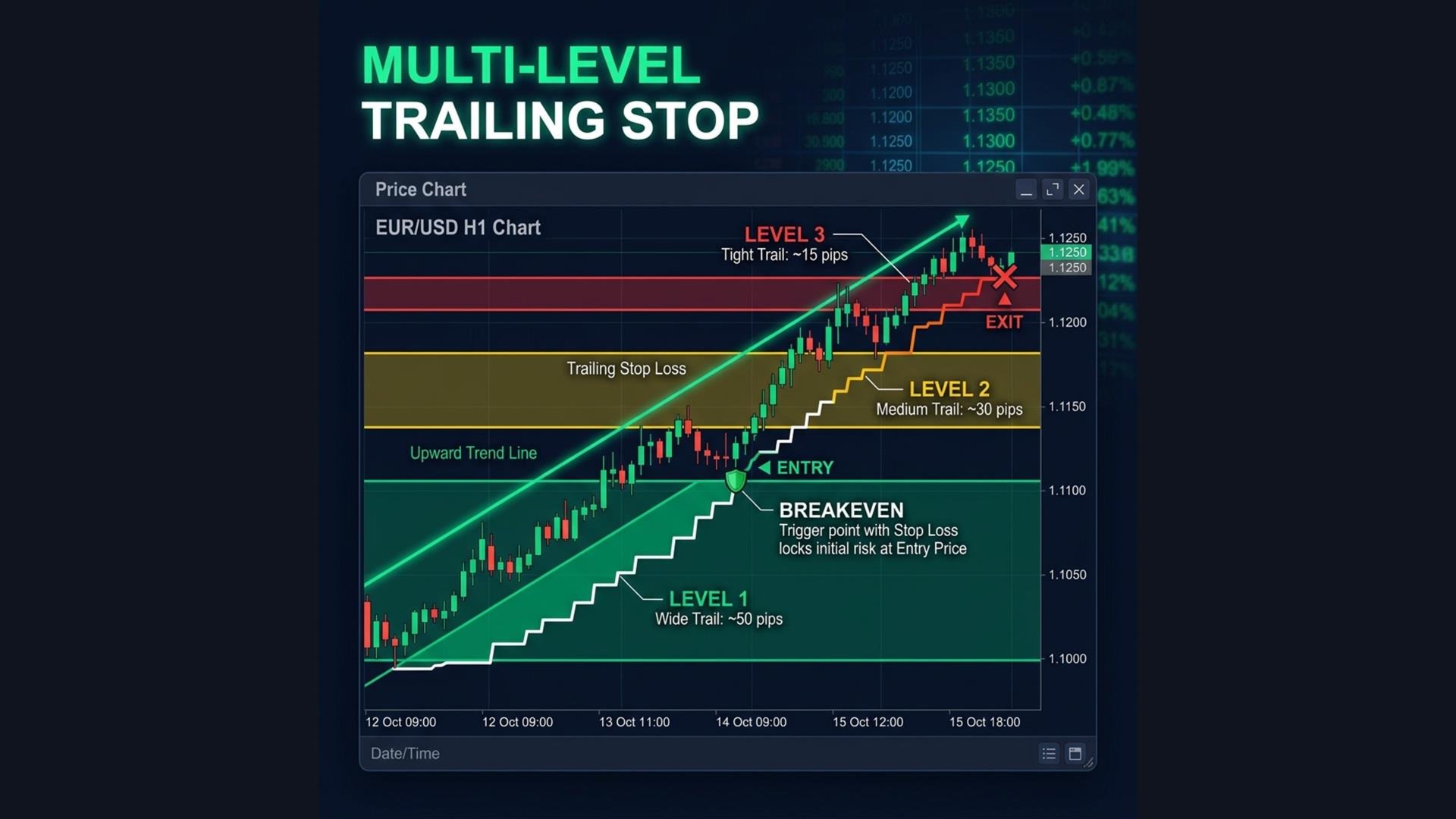
2. Multi-Level Dynamic Trailing Stop
Unlike a simple trailing stop that uses one fixed distance, this EA uses three progressive levels:
| Level | Activates At | Trail Distance | Purpose |
| Level 1 | 300 Points | 150 Points | Early protection, room to breathe |
| Level 2 | 500 Points | 100 Points | Tightening as profit grows |
| Level 3 | 800 Points | 50 Points | Maximum lock, riding the final push |
As your profit grows, the trailing stop automatically tightens. This captures the bulk of a trend move while giving the trade enough room in the early stages.
3. Stale Profit Detection
Derived from institutional "Smart Exit Brain" logic. The EA tracks your position's peak profit. If:
- Profit has not made a new high for X seconds (default: 300 seconds), OR
- Profit drops more than 20% from its peak while still in the green
The EA closes the trade automatically. This solves the universal problem of "watching winners turn into losers."
4. Time-Based Exit
Optional maximum hold time. If your trade has been open longer than X minutes (default: 480 = 8 hours), the EA closes it regardless of profit. Useful for day traders who do not want overnight exposure.
5. Emergency Loss Protection
If any position reaches a catastrophic loss threshold (default: -500 Points), the EA closes it immediately without waiting for the broker's Stop Loss server-side execution.
6. Drawdown Shield
If total account drawdown exceeds the configured maximum (default: 15%), the EA closes ALL positions and halts.
---
Breakeven
| Parameter | Default | Description |
| Enable Breakeven | true | Turn breakeven on/off |
| Activation | 200 Points | Profit threshold to trigger breakeven |
| Offset | 20 Points | Lock SL at entry + this many Points |
Multi-Level Trailing
| Parameter | Default | Description |
| Enable Trailing | true | Turn trailing on/off |
| Level 1 Activation | 300 Points | Profit to activate Level 1 |
| Level 1 Distance | 150 Points | Trail distance at Level 1 |
| Level 2 Activation | 500 Points | Profit to activate Level 2 |
| Level 2 Distance | 100 Points | Trail distance at Level 2 |
| Level 3 Activation | 800 Points | Profit to activate Level 3 |
| Level 3 Distance | 50 Points | Trail distance at Level 3 |
| Trail Step | 30 Points | Min price move to update SL |
Stale Profit
| Parameter | Default | Description |
| Enable Stale Detection | true | Turn stale detection on/off |
| Stale Duration | 300 seconds | Close if no new profit high for this long |
| Min Profit to Check | 30% | Only check if profit exceeds this % of TP |
| Peak Drop Threshold | 20% | Close if profit retraces this % from peak |
Time Exit
| Parameter | Default | Description |
| Enable Time Exit | false | Turn time exit on/off |
| Max Hold Time | 480 minutes | Auto-close after this many minutes |
Risk
| Parameter | Default | Description |
| Max Drawdown | 15% | Close everything if exceeded |
| Emergency Close | -500 Points | Instant close at this loss level |
---
How to Use
1. Open any chart in MetaTrader 5.
2. Attach Phantom Exit Guard to the chart.
3. Open trades manually or let your other EA open them.
4. Phantom Exit Guard will detect the positions and start managing exits automatically.
Intelligent Trade Management Utility for MetaTrader 5
You open the trade. This EA handles everything after that.
Phantom Exit Guard is not a trading robot. It does not open positions. Instead, it monitors every trade on your chart (manual or from another EA) and applies professional-grade exit management that most retail traders simply cannot execute by hand.
Key Features
1. Automatic Breakeven
Once your trade reaches a configurable profit threshold (default: 200 Points), the EA moves your Stop Loss to entry price plus a small cushion (default: 20 Points). Your trade becomes secured instantly.
2. Multi-Level Dynamic Trailing Stop
Unlike a simple trailing stop that uses one fixed distance, this EA uses three progressive levels:
| Level | Activates At | Trail Distance | Purpose |
| Level 1 | 300 Points | 150 Points | Early protection, room to breathe |
| Level 2 | 500 Points | 100 Points | Tightening as profit grows |
| Level 3 | 800 Points | 50 Points | Maximum lock, riding the final push |
As your profit grows, the trailing stop automatically tightens. This captures the bulk of a trend move while giving the trade enough room in the early stages.
3. Stale Profit Detection
Derived from institutional "Smart Exit Brain" logic. The EA tracks your position's peak profit. If:
- Profit has not made a new high for X seconds (default: 300 seconds), OR
- Profit drops more than 20% from its peak while still in the green
The EA closes the trade automatically. This solves the universal problem of "watching winners turn into losers."
4. Time-Based Exit
Optional maximum hold time. If your trade has been open longer than X minutes (default: 480 = 8 hours), the EA closes it regardless of profit. Useful for day traders who do not want overnight exposure.
5. Emergency Loss Protection
If any position reaches a catastrophic loss threshold (default: -500 Points), the EA closes it immediately without waiting for the broker's Stop Loss server-side execution.
6. Drawdown Shield
If total account drawdown exceeds the configured maximum (default: 15%), the EA closes ALL positions and halts.
---
Breakeven
| Parameter | Default | Description |
| Enable Breakeven | true | Turn breakeven on/off |
| Activation | 200 Points | Profit threshold to trigger breakeven |
| Offset | 20 Points | Lock SL at entry + this many Points |
Multi-Level Trailing
| Parameter | Default | Description |
| Enable Trailing | true | Turn trailing on/off |
| Level 1 Activation | 300 Points | Profit to activate Level 1 |
| Level 1 Distance | 150 Points | Trail distance at Level 1 |
| Level 2 Activation | 500 Points | Profit to activate Level 2 |
| Level 2 Distance | 100 Points | Trail distance at Level 2 |
| Level 3 Activation | 800 Points | Profit to activate Level 3 |
| Level 3 Distance | 50 Points | Trail distance at Level 3 |
| Trail Step | 30 Points | Min price move to update SL |
Stale Profit
| Parameter | Default | Description |
| Enable Stale Detection | true | Turn stale detection on/off |
| Stale Duration | 300 seconds | Close if no new profit high for this long |
| Min Profit to Check | 30% | Only check if profit exceeds this % of TP |
| Peak Drop Threshold | 20% | Close if profit retraces this % from peak |
Time Exit
| Parameter | Default | Description |
| Enable Time Exit | false | Turn time exit on/off |
| Max Hold Time | 480 minutes | Auto-close after this many minutes |
Risk
| Parameter | Default | Description |
| Max Drawdown | 15% | Close everything if exceeded |
| Emergency Close | -500 Points | Instant close at this loss level |
---
How to Use
1. Open any chart in MetaTrader 5.
2. Attach Phantom Exit Guard to the chart.
3. Open trades manually or let your other EA open them.
4. Phantom Exit Guard will detect the positions and start managing exits automatically.