Pending Order Grid MT5

The Pending Order Grid is a multi-symbol multi-timeframe script that enables multi-strategy implementation based on pending order grids. 

General Description 

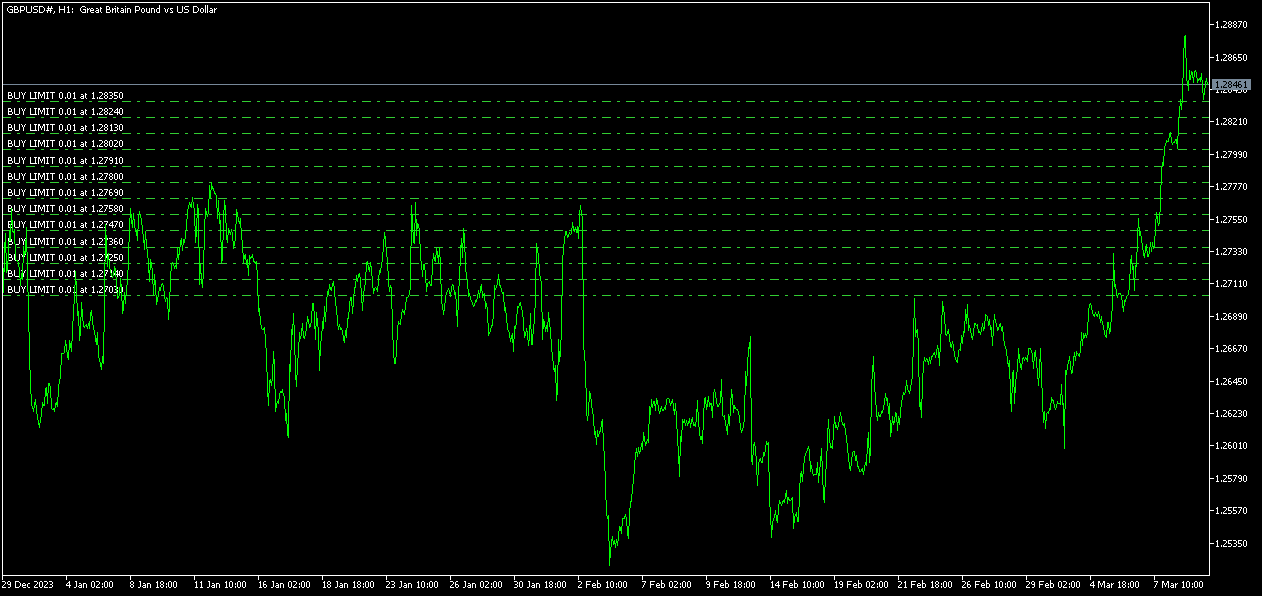
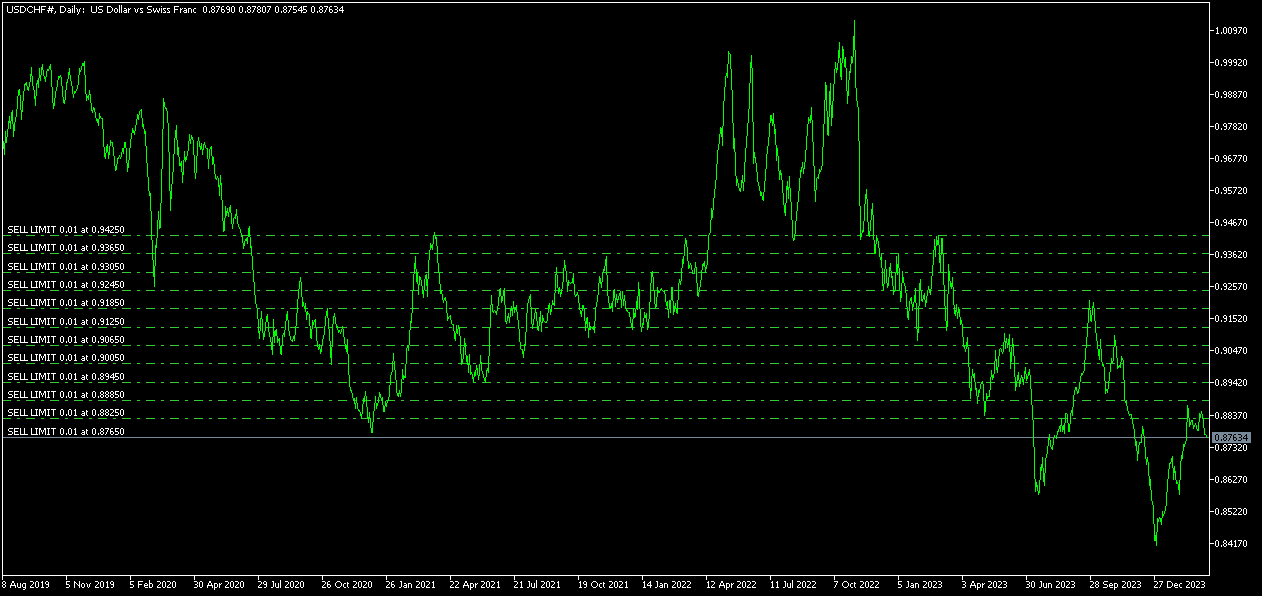
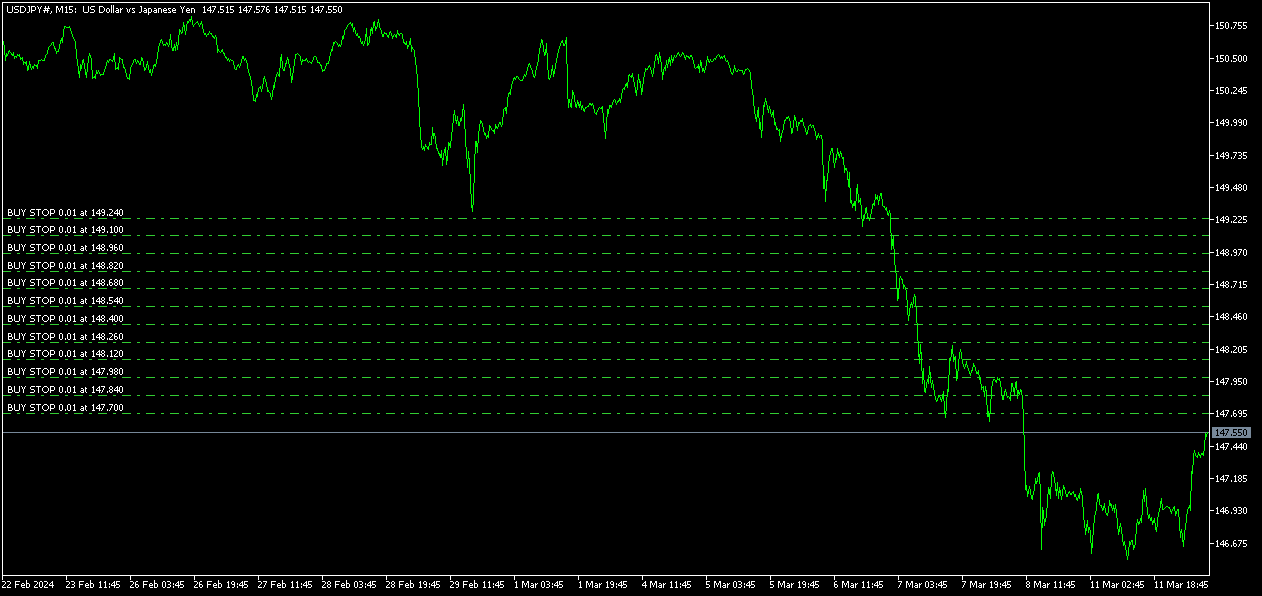
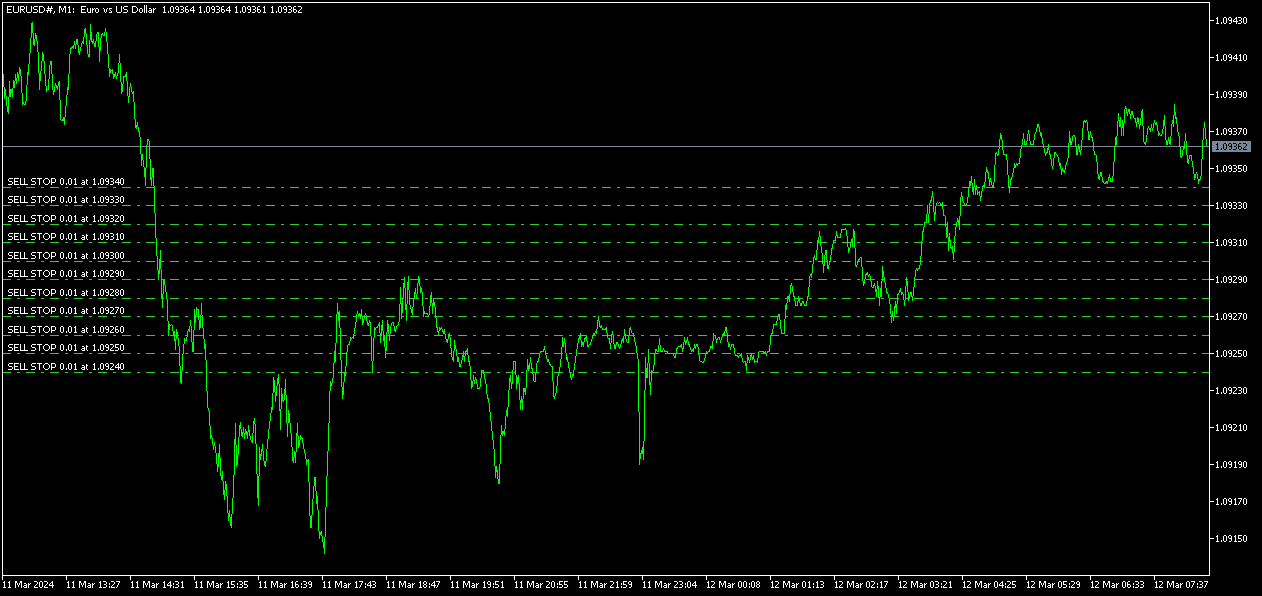
The Pending Order Grid allows the performing of a user-defined strategy through the creation of pending order grids. The script places pending orders of a given type (Buy Limit, Sell Limit, Buy Stop, or Sell Stop) at equidistant price levels to form each grid. The beginning and finish of every grid are defined by the Start Price and Stop Price input parameters, respectively. The user might set up different grids to exist simultaneously – it's only needed to execute the script multiple times at the chart window(s) of the intended symbol(s). 

Risk Management 

The volume used to place a pending order is chosen between a fixed and a variable lot size, available through the Volume and Free Margin % input parameters, respectively. If there isn't enough money in the account for the chosen volume, a request for placing the order is still sent to the trade server. The purpose is to allow the corresponding position opening if the free margin increases enough until the target price is reached. This increase could be due to an account deposit or position profit between the placing and triggering of the pending order. 

Input Parameters 

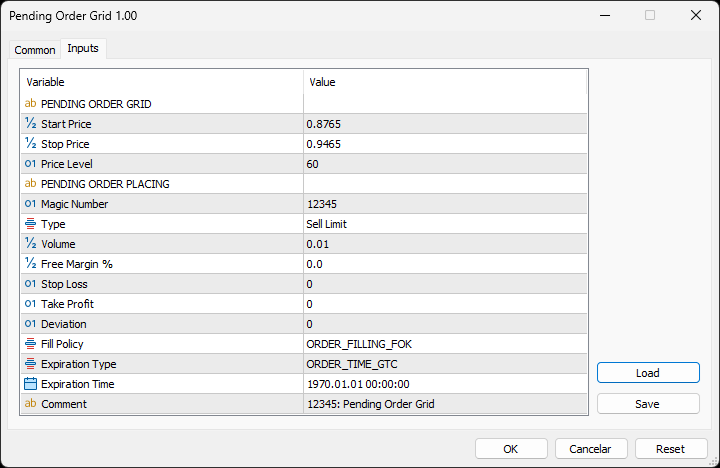
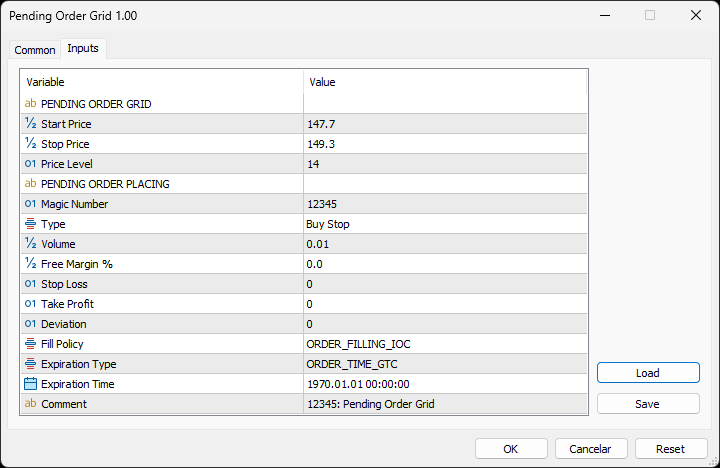
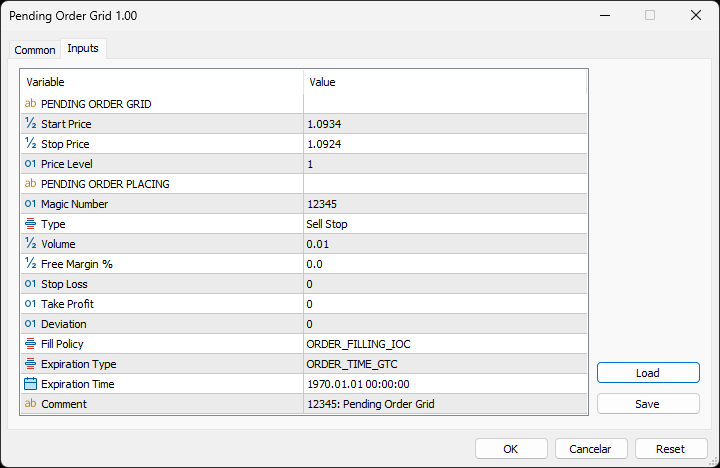
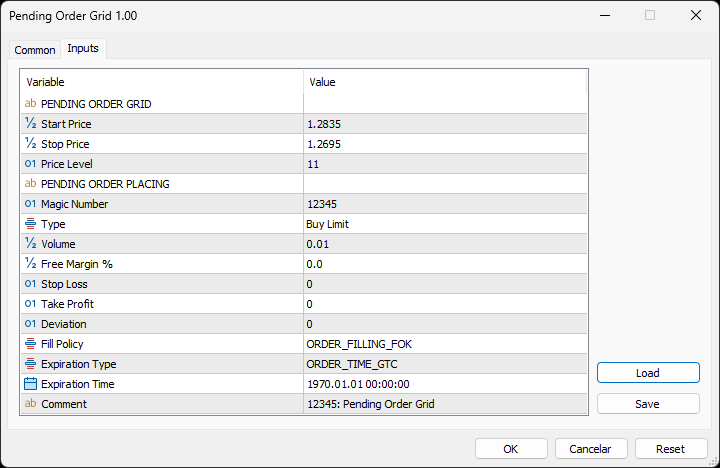
PENDING ORDER GRID 

  • Start Price: Price used to define the grid’s start. 
  • Stop Price: Price used to define the grid’s stop. 
  • Price Level: Distance used between pending orders of the same type (pips). 

PENDING ORDER PLACING 

  • Magic Number: Script’s identifier. 
  • Type: Pending order type used to form the grid. 
  • Volume: Lot size per deal (lots). 
  • Free Margin %: Percentage of account free margin used to calculate the lot size per deal (%). 
  • Stop Loss: Distance from the pending order's target price for placing a Stop Loss (pips). 
  • Take Profit: Distance from the pending order's target price for placing a Take Profit (pips). 
  • Deviation: Maximum allowed slippage from the requested price (pips). 
  • Fill Policy: Volume execution policy. 
  • Expiration Type: Order validity mode. 
  • Expiration Time: Order validity period (used only with the ORDER_TIME_SPECIFIED validity mode). 
  • Comment: Text message displayed in the Trade or History tabs of the Toolbox window and Objects list after placing a pending order (it only allows 31 characters).

Some of the available parameters accept values that lead to particular options. 

  • Price Level: A null value means that the target price is constant for all pending orders. 
  • Volume: A value lower than the minimum allowed volume by the broker is converted in this last. A value higher than the maximum available volume by the free margin is converted in this last. 
  • Free Margin %: A value whose volume doesn’t reach the minimum allowed volume by the broker is converted in this last. A value whose volume exceeds the maximum available volume by the free margin is converted in this last. 
  • Stop Loss or Take Profit: A null value means the parameter’s inactive function. Any value between 0 and the Stop Level is converted in this last. 

The input parameters that define the start and stop of the grid must obey a few rules. 

  • Both the limits of the grid must be selected: Start Price and Stop Price. 
  • Buy Limit or Sell Stop orders grid: The Start Price cannot exceed the Ask/Bid price minus the Stop Level, respectively. The Stop Price cannot exceed the Start Price. 
  • Sell Limit or Buy Stop orders grid: The Start Price must equate/exceed the Bid/Ask price plus the Stop Level, respectively. The Stop Price must equate/exceed the Start Price. 

Displayed Information 

The script possesses a vast number of messages to inform the user about errors and conditions changes that might occur during its execution. The messages are shown through the Alert function (by a pop-up window), its content includes: 

  1. The warning that an input parameter has been incorrectly set. 
  2. The info that the account doesn't have enough money for the chosen volume (see the Risk Management section above). 
  3. The info that the number of permitted orders by the broker has been reached. 
  4. The Trade Server Return Codes description. 
  5. The symbol’s quotes (immediately) before the trade request’s formation, followed by the symbol’s quotes (immediately) after the trade server’s decision. 
  6. The Runtime Errors description. 
  7. The standard function in the include file where the runtime error was detected (only relevant to the programmer). 

Note: Some elements of the list are displayed simultaneously (in the same text line): 4, 5 and 6; 6 and 7. 

Observations 

During high activity periods, the trade servers decision on whether a trade request is executed or rejected may suffer significant delays. Some data used in the request sent to the server might become incorrect, leading to the order’s rejection. When the server is evaluating a request and the symbol's quotes are updated, three cases might occur: 

  1. Pending order placing – the pending order’s target price becomes an incorrect distance. 
  2. Position opening/modifying – the position’s Stop Loss or Take Profit intended level becomes an incorrect distance. 
  3. Position modifying – the position’s Stop Loss or Take Profit previous level takes to its closing. 

The symbol’s quotes mentioned in the fifth element of the list in the Displayed Information section are especially useful here (since firsts usually differ from lasts). A careful analysis of these quotes, knowing the implication that certain quote changes have on the request’s evaluation, permits understanding the reason when these cases occur. To avoid the request’s rejection by the trade server due to “invalid stops” (cases 1 and 2), the prices/levels used should exceed the symbol’s Stop Level by a few pips. 

A Buy/Sell position is opened at the Ask/Bid price and closed at the Bid/Ask price. Since the position’s stop orders (Stop Loss and Take Profit) are triggered at this last price, in a pending order, they are calculated from the order's target price -/+ the current spread (Ask - Bid), respectively. 

When placing a pending order, the validity period can’t be less than 1 minute. During a grid creation, the script doesn’t place pending orders if the current time exceeds the Expiration Time minus 1 minute (when the validity period is previously selected). 

Conclusion 

The Pending Order Grid is a helpful and efficient tool regarding the manual creation of pending order grids, especially when the grids consist of a significant number of orders, enabling a simple and intuitive setting of the grids to form. 

Produits recommandés
The Realtime Statistics MT5  is an innovative tool designed for traders who want to keep track of their trading performance in real-time. This MetaTrader 5 Expert Advisor (EA) is packed with customizable features that allow you to monitor crucial trading statistics directly on your chart, ensuring you always have the insights you need to make informed trading decisions. Check out the Realtime Statistics MT5 User Guide Here Try out the  FREE  Realtime Statistics MT5 Demo  Here Key Features: Compr
Binance Trade Manager
Andrey Khatimlianskii
5 (3)
Binance Trade Manager — is an utility that allows you to transmit trade orders from your MetaTrader 5 to the Binance exchange. It will suite you if you want to use your favorite MetaTrader 5, getting all the benefits of trading cryptocurrencies directly on the exchange (low commission, high liquidity, absolute transparency, etc.) Binance Trade Manager can work in two modes: copying trades from a demo-account , which your MetaTrader 5 is connected to (cryptocurrencies must be available on this ac
Pending Order Grid EA MT5
Francisco Manuel Vicente Berardo
The Pending Order Grid is a multi-symbol multi-timeframe Expert Advisor that enables multi-strategy implementation based on pending order grids.  General Description   The Pending Order Grid allows the performing of a user-defined strategy through the creation of pending order grids. The Expert Advisor places pending orders of a given type (Buy Limit, Sell Limit, Buy Stop, or Sell Stop) at equidistant price levels to form each grid. The user might set up different grids to exist simultaneously
USD Scalper MT5
Joseph Anthony Aya-ay Yutig
OBTENEZ D'AUTRES EA GRATUITEMENT !!! OBTENEZ D'AUTRES EA GRATUITEMENT !!! OBTENEZ D'AUTRES EA GRATUITEMENT !!! OBTENEZ D'AUTRES EA GRATUITEMENT !!! OBTENEZ D'AUTRES EA GRATUITEMENT !!! USD Scalper MT5 est un Neural EA pour les paires USD. Ce produit est fait pour GBPUSD, EURUSD, AUDUSD, NZDUSD. De nouvelles paires pourraient être ajoutées à l'avenir. PAIRES ACTUELLES : GBPUSD EURUSD AUDUSD NZDUSD - SERA AJOUTÉ DANS LA PROCHAINE VERSION CONTRIBUTIONS: RISQUE POURCENTAGE DU RISQUE BAS
Equity Tracker MT5 Equity Tracker MT5 est un Expert Advisor de surveillance pour MetaTrader 5 qui rapporte l’activité de trading, l’état du compte et les conditions techniques via des messages de notification. L’Expert Advisor fonctionne indépendamment de la logique de trading et n’influence ni l’exécution des ordres ni la gestion des positions. Le produit n’ouvre, ne modifie et ne ferme aucune position. Il effectue uniquement des tâches d’observation et de notification. Objectif Equity Tracker
Build Your Trading Career with a Powerful & Intelligent Forex EA – Version 1.0  Take your trading to the next level with a smart, customizable, and battle-tested Expert Advisor built for serious traders. Whether you're a beginner looking to automate your edge or a professional seeking a reliable trading assistant — this EA is designed for you.  Dual-Strategy Engine for Maximum Flexibility This EA runs on two powerful and proven strategies , giving you full control and adaptability in any market
Titan Backup
Elies Noah Siebenpfeiffer
Présentation de Titan Backup : Prêt à améliorer vos performances de trading avec un système automatisé, conçu pour la précision et la flexibilité ? Découvrez Titan Backup , votre assistant de trading expert, conçu pour capturer des breakouts à fort potentiel en identifiant les zones d'accumulation . Ce puissant Expert Advisor (EA) excelle sur les marchés à forte volatilité comme le Nasdaq 100 et le Crypto 10 , offrant à la fois une automatisation complète et une assistance manuelle pour soutenir
Ex Gold MT5 EA
Richard Kofi Anim Darko
After You download the EA kindly join our telegram group below..... https://t.me/aFXeas EX GOLD MT5 EA is a unique fully automated Expert Advisor which uses a combination of price action and indicators to find profitable entries on the market. It uses an average of standard deviation to follow the trend for additional entries hence taking advantage of the trend. Its unique but simple parameter makes it suitable for beginners and experienced traders. The EA was designed to trade Gold on the M1,
FxWorldGodfathermq5
Afjal Hussain Swapan
roduct Overview Smart Grid Hedging EA is an advanced algorithmic trading system that combines   trend filtering ,   grid trading , and   hedging strategies   to create a robust automated trading solution. This Expert Advisor is designed for forex and commodity markets with special optimization for gold (XAUUSD) trading.   Core Features Dual Engine System Engine A : Specialized for buy (long) positions with independent magic number Engine B : Specialized for sell (short) positions with independ
Click Average EA
Jan Isaac Rodriguez Castro
Click Average EA – Smart Position Averaging for MT5  Simplify Your Trading Strategy with one-click position averaging! This expert advisor automatically calculates the weighted average price of your open positions and adjusts Take Profit levels dynamically—saving you time and maximizing efficiency. Key Features:  One-Click Averaging – Instantly balance multiple positions with a single button.  Weighted Price Calculation – Precise averaging based on volume for accurate TP placement.  Magic Numb
Bobot Scalper Gold
Richard Tolentino
BoBot Scalper — The New Era of Trend Scalping is Here. If you trade XAUUSD, indices, or fast-moving pairs… this EA is built for you. BoBot Scalper uses a refined MACD/LWMA engine to detect true trend continuation entries before the crowd. It reacts fast, manages risk cleanly, and locks profit using a step-based currency trailing system —one of the smartest trailing styles you’ll find in a scalping EA. It does NOT use martingale. It does NOT use grid. It does NOT spam trades. Instead, it builds p
Code Scalper
Ivan Simonika
This bot can classify ticks into classes from 0 to 64, after which after analyzing the tick micro-signals it determines which way to open a position. You can work with an expert only on real ticks how to optimize and test! When working, an expert uses position accounting in any mode, both netting (there can be only one position for one symbol) and with independent position accounting or hedging (there can be many positions for one symbol). Configurable bot parameters TypeFilling - Type of exe
The   DYJ GlobalForexTradeWarCandleShapeMT5   strategy: it is provided with one combined built-in indicators:   DYJ CandleShapeMT5   in order to determine the signals and has different inputs for Short and Long positions in order to improve its precision. The   DYJ CandleShapeMT5  contains 80 shapes, such as MORNING STAR, DOJI STAR, HARAMI CROSS,INVERT HAMMER,ENGULFING..... Most trading strategies put their emphasis on finding out when to enter the market. Whether it’s technical or fundamental,
EA Nation
Joseph Anthony Aya-ay Yutig
The Expert Advisors' strategy came from a Facebook Group EA Nation. The group has over 40k members. It opens a hedge trade for every new candle and opens grid when the position is on the losing side of the trade.  Average Grid = N                     = the sum of 6 bars before the current bar/ N Timeframe = it opens a new hedge trade when a new bar appears Auto Lot = 1 Lot means in $10,000 Lot Size will be 0.01 NO MORE HEDGE = When one side reaches to N trades, it won't open a hedge trade un
Gold Blue Dragon PRO
Jose Miguel De Sousa Castro
Gold Blue Dragon PRO Professional XAUUSD Grid & Basket Management Expert Advisor for MetaTrader 5. Gold Blue Dragon is a powerful and intelligent Expert Advisor designed for XAUUSD traders who want a structured, disciplined and fully automated approach to the market. Built around a refined combination of trend detection, controlled grid entries, basket-based risk management and dynamic profit protection, this EA is designed to help traders capture strong gold movements while keeping the strateg
This EA is for only Deriv Synthetic indices.  Forex MT4 Version here:   https://www.mql5.com/en/market/product/89114 Forex MT5 version here:  https://www.mql5.com/en/market/product/89113 Hello traders, I believe you all know that risk and money management along with psychology are the keys to success in trading. No matter how strong one’s strategy is, without these 3 criteria they will always face losses in the long run. I have created an EA to control our human behaviors. This EA will force u
GRID for MT5
Volodymyr Hrybachov
GRID for MT5 is a convenient tool for those who trade a grid of orders, designed for quick and comfortable trading in the FOREX financial markets. GRID for MT5 has a customizable panel with all the necessary parameters. Suitable for both experienced traders and beginners. It works with any brokers, including American brokers, requiring FIFO to close primarily previously opened transactions. The grid of orders can be either fixed - orders are opened with a fixed step, or have dynamic levels of op
Trade Time Manager MT5
Evgeniy Kravchenko
5 (1)
The EA opens and closes new orders on time. It can be used to implement trading scenarios of any complexity by creating a list of tasks.   There are two options for completing the task The task is executed on the specified date and time - it is executed once and is removed from the list. The task is executed with repetition on the specified day of the week and time - the task with repetitions is not removed from the list.   Panel settings Symbol - select the symbol for the trade function. Time -
MT5 → Telegram Notifier (Utility · Informers) Send trading events from MetaTrader 5 directly to Telegram. Perfect for journaling, team alerts, or remote monitoring. What it does Trade Open : posts BUY/SELL, BUY/SELL Limit, BUY/SELL Stop, lots, entry, SL/TP, local time. (Optional chart screenshot.) SL/TP Update : short message — only what changed (new SL or TP), posted as reply to the original trade message. Partial / Full Close : posts closed volume, price, Net P/L (swap + commission included),
Chart Navigator Pro
ELITE FOREX TRADERS LLC
Introducing the   Elite Chart Navigator   — your ultimate MetaTrader 5 Expert Advisor designed to revolutionize multi-symbol trading with seamless chart navigation and superior usability. Product Overview The   Elite Chart Navigator EA   is a sophisticated trading utility enabling rapid switching between multiple trading pairs through an intuitive on-chart button interface. Built for professional traders managing numerous instruments, this EA dramatically improves workflow efficiency, ensuring
QuantumGold Matrix
Mohammed Lamine Kasmi
QuantumXAU Matrix – Smart Gold Trading EA for MetaTrader 5 QuantumXAU Matrix is a powerful, fully automated Expert Advisor specifically designed for XAUUSD (Gold) on the MetaTrader 5 platform. It follows a smart averaging strategy with controlled risk management, aiming for consistent profits through adaptive lot sizing and precise trade timing. Symbol-specific : Trades only on XAUUSD for optimized performance Automated logic : Opens positions based on market distance and profit targets
SMC Trend Master EA PRO — Professional Smart Money Trading System Advanced Expert Advisor combining Trend Breakout Strategy with Smart Money Concept (SMC) confirmation. Developed and optimized for GOLD (XAUUSD) with excellent results on Forex majors. STRATEGY OVERVIEW The EA identifies strong trend breakouts and confirms entries using institutional trading zones: • **Order Blocks** — areas where smart money placed orders. • **Fair Value Gap
Risk Oracle - Expert Advisor Description Risk Oracle is a sophisticated yet user-friendly Expert Advisor (EA) designed for risk management and trade execution. This utility tool is tailored to assist traders in executing orders at optimal prices while managing risk efficiently, without the need to manually calculate volumes and other parameters. By automating these critical aspects, Risk Oracle simplifies the trading process and allows traders to focus on strategy and market analysis. All Produc
The Scalper Pro
Sahib Ul Ahsan
The Scalper Pro – Advanced Multi-Strategy Scalping Expert Advisor The Scalper Pro is a professional high-precision scalping Expert Advisor designed for traders who want a fast, intelligent and fully automated trading solution. The EA combines multiple price-action based strategies with advanced risk management and basket-level control to create a flexible trading system suitable for different market conditions. Built with performance, stability and precision in mind, The Scalper Pro is capable o
Managing Trades With Moving Average EA : Many Traders like using Moving Averages for trend confirmation , and timing Entry and Exits . ​ With Semi- Automatic Moving Average EA we provide effective way to manage open trades as per your Moving average strategy and uses MA as trailing stop loss.  ​ EA considers only closing price of candle therefore avoids stop outs caused by sudden  price fluctuations and helps to stay in trend longer.  ​ You can decide which MA to use and various settings of MA 
Smart Breakout Recovery EA Smart Breakout Recovery EA is an advanced automated trading system based on EMA trend filtering and Supply/Demand breakout logic. The EA identifies high-probability breakout and false-break opportunities, combined with a controlled recovery system to optimize trade management. Key Features: - Dual EMA trend confirmation (M15 + H1) - Breakout and False Break detection - Supply & Demand zone integration - Smart Recovery (Martingale-based) - Adjustable lot scaling
Sharp Edge
Md Wakiluzzaman Raz
Sharp Edge EA Sharp Edge EA is an automated trading system developed specifically for the XAUUSD (Gold) market. The EA utilizes a pure price action strategy, focusing on market structure and volatility patterns rather than traditional lagging indicators. It is designed to adapt to the current liquidity and price behavior of the precious metals market. Trading Strategy The core logic of Sharp Edge EA is based on structural price analysis. The algorithm identifies key levels and momentum shifts t
Quantum Nasdaq
Alex Rufino Da Silva
Before doing Backtesting, check the name of the nasdaq index symbol on your homebroker, for example: ustec, us100.cash, nas100... enter the name correctly in the subchart1Symbol option. Operates on H1 chart Quantum Nasdaq - O melhor consultor especialista para negociação na Nasdaq Automate Your Nasdaq Trading with Cutting-Edge AI Technology Are you tired of emotional trading decisions, missing out on opportunities, and struggling to maintain consistency in your Nasdaq trades? Imagine having a p
Product Name Scalper M1 Gold AI By June Short Description AI-powered Gold scalping EA for M1 timeframe. Fast, precise, and fully automated with adaptive learning system. Full Description Scalper M1 Gold AI Learning By June is a next-generation Expert Advisor designed for high-speed scalping on XAUUSD (Gold) using the M1 timeframe . Built with an advanced AI Learning Engine , this EA continuously analyzes market behavior, adapts to changing conditions, and executes trades with precision
FX28 Trader MT5
Tsvetan Tsvetanov
3 (1)
Présentation du FX28 Trader Dashboard - Votre gestionnaire de transactions ultime Découvrez tout le potentiel de votre expérience de trading avec le FX28 Trader Dashboard, un gestionnaire de transactions complet et intuitif conçu pour élever votre trading Forex à de nouveaux sommets. Que vous soyez un trader expérimenté ou que vous débutiez votre parcours financier, cet outil puissant a été développé pour simplifier vos activités de trading et améliorer votre processus de prise de décision. Car
Les acheteurs de ce produit ont également acheté
Trade Assistant MT5
Evgeniy Kravchenko
4.42 (208)
It helps to calculate the risk per trade, the easy installation of a new order, order management with partial closing functions, trailing stop of 7 types and other useful functions. Additional materials and instructions Installation instructions - Application instructions - Trial version of the application for a demo account Line function -   shows on the chart the Opening line, Stop Loss, Take Profit. With this function it is easy to set a new order and see its additional characteristics bef
Bienvenue sur Trade Manager EA, l’outil ultime de gestion des risques conçu pour rendre le trading plus intuitif, précis et efficace. Ce n’est pas seulement un outil d’exécution d’ordres ; c’est une solution complète pour la planification des trades, la gestion des positions et le contrôle des risques. Que vous soyez débutant, trader expérimenté ou scalpeur ayant besoin d’une exécution rapide, Trade Manager EA s’adapte à vos besoins, offrant une flexibilité sur tous les marchés, des devises et i
Local Trade Copier EA MT5
Juvenille Emperor Limited
4.96 (135)
Découvrez une expérience exceptionnellement rapide de copie de trades avec le   Local Trade Copier EA MT5 . Avec sa configuration facile en 1 minute, ce copieur de trades vous permet de copier des trades entre plusieurs terminaux MetaTrader sur le même ordinateur Windows ou Windows VPS avec des vitesses de copie ultra-rapides de moins de 0.5 seconde. Que vous soyez un trader débutant ou professionnel, le   Local Trade Copier EA MT5   offre une large gamme d'options pour le personnaliser en fonc
TradePanel MT5
Alfiya Fazylova
4.87 (153)
Trade Panel est un assistant commercial multifonction. L'application contient plus de 50 fonctions de trading pour le trading manuel et permet d'automatiser la plupart des tâches commerciales. Attention ! Les réductions sont limitées dans le temps, chaque mardi le prix augmentera de 5$ (jusqu'à 100$). Avant l'achat, vous pouvez tester la version de démonstration sur un compte de démonstration. Télécharger la version d'essai de l'application pour un compte de démonstration : https://www.mql5.com/
Version Bêta Le Telegram to MT5 Signal Trader est presque prêt pour la sortie officielle en version alpha. Certaines fonctionnalités sont encore en développement et vous pourriez rencontrer de petits bugs. Si vous rencontrez des problèmes, merci de les signaler, vos retours aident à améliorer le logiciel pour tout le monde. Telegram to MT5 Signal Trader est un outil puissant qui copie automatiquement les signaux de trading depuis des chaînes ou groupes Telegram vers votre compte MetaTrader 5 .
Farmed Hedge Yield Farming | All Markets (Manual - Hybrid - Semi/Automated EA) MULTI-ASSET SUPPORT Trade any asset available on your broker - Forex: Major, Minor, Exotic pairs - Crypto: BTC, ETH, XRP, SOL, BNB - Stocks: Apple, Tesla, Amazon, Google, etc. - Commodities: Gold, Silver, Oil, Gas - Indices: US30, NAS100, SPX500, DAX40 - Any CFD your broker offers VERIFIED TRADING RESULTS - Farmed Hedge Yield Axi Copy:  https://www.mql5.com/en/signals/2356376 - Farmed Hedge Yield Exn Copy:   https:/
Exp COPYLOT CLIENT for MT5
Vladislav Andruschenko
3.82 (34)
Copieur professionnel de trades pour MetaTrader 5 Un copieur de trades rapide, professionnel et fiable pour MetaTrader . COPYLOT permet de copier des trades Forex entre les terminaux MT4 et MT5 avec prise en charge des comptes Hedge et Netting . La version MT5 de COPYLOT prend en charge : - MT5 Hedge → MT5 Hedge - MT5 Hedge → MT5 Netting - MT5 Netting → MT5 Hedge - MT5 Netting → MT5 Netting - MT4 → MT5 Hedge - MT4 → MT5 Netting Version MT4 Description complète + DEMO + PDF Comment acheter Comme
Trade Dashboard MT5
Fatemeh Ameri
4.94 (123)
Tired of complex order placement and manual calculations? Trade Dashboard is your solution. With its user-friendly interface, placing orders becomes effortless, by a single click, you can open trades, set stop loss and take profit levels, manage trade lot size, and calculate risk to reward ratios, allowing you to only focus on your strategy. Say goodbye to manual calculations and streamline your trading experience with Trade Dashboard. Download  Demo Version  right now. You can find  Details of
HINN Lazy Trader
ALGOFLOW OÜ
5 (2)
Limited time offer: 20% off for a few days only!  - Annual subscription $360 instead of $450  - Lifetime plan $550 instead of $690 The core idea: using the user interface, you configure the parameters the chart must meet before entering a position (or positions), choose which entry models to use, and set the rules for when trading and planning should end. Lazy Trader  handles the rest: it  takes over all the routine chart watching and execution! full description  :: 3 key videos [1] ->  [2]   -
Trade copier MT5
Alfiya Fazylova
4.59 (41)
Trade Copier est un utilitaire professionnel conçu pour copier et synchroniser les commandesentre les comptes de trading. Les commandes sont copiées du compte/terminal du fournisseur vers le compte/terminal du destinataire, qui sont installés sur le même ordinateur ou vps. PROMOTION - Si vous avez déjà acquis le "Trade copier MT5", vous pouvez obtenir le "Trade copier MT4" gratuitement (pour la copie MT4 > MT5 et MT4 < MT5). Pour obtenir des informations plus détaillées sur les conditions, veuil
Footprint Chart Pro — Professional OrderFlow EA for MetaTrader 5 Version 6.34 | Professional tool for real traders | Institutional-Grade Visualization DEMO USERS - PLEASE SELECT EVERY TICK / REAL TICK WHEN TESTING AND YOU HAVE DOWNLOADED HISTORICAL DATA. IF YOU SEE A WAITING SCREEN AND IT IS NOT DOWNLOADING, IT MEANS YOU HAVE LOW HISTORICAL DATA. TRY 1 MIN AND 5 MIN FIRST ON 1 DAY DATA. ONE DAY DATA SHOULD BE THE NEWEST AND MOST CURRENT DATE. PLEASE WAIT UNTIL THE MARKET HAS ROLLED OVER PERIOD.
Copy Cat More Trade Copier MT5 (Chat Copieur MT5) est un copieur de trades local et un framework complet de gestion des risques et d'exécution conçu pour les défis commerciaux d'aujourd'hui. Des défis de prop firms à la gestion de portefeuille personnel, il s'adapte à chaque situation avec une combinaison d'exécution robuste, de protection du capital, de configuration flexible et de gestion avancée des trades. Le copieur fonctionne à la fois en mode Master (expéditeur) et Slave (récepteur), avec
The product will copy all telegram signal to MT5 ( which you are member) , also it can work as remote copier.  Easy to set up, copy order instant, can work with almost signal formats, image signal,  s upport to translate other language to English Work with all type of channel or group, even channel have "Restrict Saving Content", work with  multi channel, multi MT5 Work as remote copier: with signal have ticket number, it will copy exactly via ticket number. Support to backtest signal. How to s
Timeless Charts
Samuel Manoel De Souza
5 (4)
Timeless Charts est une solution de graphiques avancée conçue pour les traders professionnels qui ont besoin de graphiques personnalisés / unités de temps personnalisées – y compris les graphiques en secondes / unités de temps en secondes, les graphiques Renko / barres Renko, les graphiques en clusters / footprints et des outils avancés similaires à ceux disponibles sur les plateformes les plus populaires. Contrairement aux graphiques hors ligne traditionnels ou aux simples indicateurs personnal
Helios Pulse
Jonathan Mboya Kinaro
Helios Pulse v1.03 — Tableau de bord de probabilités en temps réel pour le trading manuel Helios Pulse transforme votre façon de lire le marché. Au lieu de jongler entre plusieurs fenêtres d'indicateurs et de décrypter des signaux contradictoires, vous obtenez une seule réponse claire : un pourcentage de probabilité en direct indiquant le biais directionnel actuel du marché, mis à jour en continu à chaque tick. Ceci n'est pas un énième panneau de flèches de signal. Helios Pulse est un moteur de
MT5 to Telegram Signal Provider est un utilitaire facile à utiliser et entièrement personnalisable qui permet l'envoi de signaux spécifiés vers un chat, un canal ou un groupe Telegram, transformant ainsi votre compte en fournisseur de signaux. Contrairement à la plupart des produits concurrents, il n'utilise pas d'importations DLL. [ Démonstration ] [ Manuel ] [ Version MT4 ] [ Version Discord ] [ Canal Telegram ]  New: [ Telegram To MT5 ] Configuration Un guide utilisateur étape par étape est
Trade Manager DashPlus
Henry Lyubomir Wallace
5 (13)
DashPlus est un outil de gestion de trading avancé conçu pour améliorer l'efficacité et la performance de vos transactions sur la plateforme MetaTrader 5. Il offre un ensemble complet de fonctionnalités, incluant le calcul des risques, la gestion des ordres, des systèmes de grilles avancés, des outils basés sur les graphiques et des analyses de performance. Fonctionnalités principales 1. Grille de récupération Implémente un système de grille flexible et de moyenne pour gérer les transactions dan
Seconds Chart MT5
Boris Sedov
4.59 (17)
Seconds Chart - un outil unique pour créer des graphiques en secondes dans MetaTrader 5 . Grâce à Seconds Chart , vous pouvez créer un graphique avec une période définie en secondes, offrant une flexibilité et une précision idéales pour l'analyse, indisponibles sur les graphiques standards en minutes ou en heures. Par exemple, la période S15 indique un graphique avec des bougies d'une durée de 15 secondes. Vous pouvez utiliser n'importe quels indicateurs et experts advisors compatibles avec les
Anchor Trade Manager
Kalinskie Gilliam
5 (2)
Anchor: The EA Manager A coordination system for traders running multiple EAs. Anchor ensures only one EA can trade at a time, preventing conflicting positions and keeping your portfolio safer. Attach Anchor to any chart. Configure your EAs and their magic numbers. Anchor handles the rest. Built for portfolios. Built for discipline. Built for prop firms. The Problem Running multiple EAs on the same account creates risk. Two gold EAs can open opposite positions on the same candle. Three EA
Trade Assistant 38 in 1
Makarii Gubaydullin
4.91 (23)
Outil multifonctionnel : Calculateur de Lot, Ordres Grid, Ratio R/R, Gestionnaire de Trades, Zones d'Offre et de Demande, Price Action et bien plus Version Démo   |   Manuel d'Utilisation L'Assistant de Trading   ne fonctionne pas dans le testeur de stratégies : vous pouvez télécharger la   Version Démo ICI  pour tester l' utilitaire . Contactez-moi   pour toute question  / idée d'amélioration / en cas de bug détecté Si vous avez besoin d'une version MT4, elle est disponible ici Simplifiez, acc
HINN MagicEntry Extra
ALGOFLOW OÜ
4.71 (14)
HINN MAGIC ENTRY – the ultimate tool for entry and position management! Place orders by selecting a level directly on the chart! full description   ::  demo-version  :: 60-sec-video-description Key features: - Market, limit, and pending orders - Automatic lot size calculation - Automatic spread and commission accounting - Unlimited partitial take-profits  - Breakeven and trailing stop-loss and take-profit  functions - Invalidation leves - Intuitive, adaptive, and customizable interface - Works
Trader Evolution
Siarhei Vashchylka
5 (7)
" Trader Evolution " - A utility designed for traders who use wave and technical analysis in their work. One tab of the utility is capable of money management and opening orders, and the other can help in making Elliott wave and technical analysis. Manual (Be sure to read before purchasing) | Version for MT4 Advantages 1. Trading in a few clicks. Immediate and pending orders are available in the panel 2. Money management. The program automatically selects the appropriate lot size 3. Simplifies
Poc Breakout Signal: The Ultimate Institutional Order Flow & Price Action System Elevate your trading with Poc Breakout, a comprehensive technical analysis tool designed to bridge the gap between retail trading and institutional market understanding. This all-in-one system combines powerful Buy/Sell signals, advanced Volume Profile analysis, real-time Order Flow (Depth of Market), and critical macroeconomic data to give you a clear, unambiguous edge in the markets. Poc Breakout Signal decodes c
Telegram to MT5 Coppy
Sergey Batudayev
5 (8)
Télégramme vers MT5 :   la solution ultime pour copier des signaux Simplifiez votre trading avec Telegram vers MT5, l'outil moderne qui copie les signaux de trading directement des canaux et chats Telegram vers votre plateforme MetaTrader 5, sans DLL. Cette solution puissante garantit une exécution précise des signaux, de nombreuses options de personnalisation, un gain de temps et une efficacité accrue. [ Instructions and DEMO ] Caractéristiques principales Intégration directe de l'API Telegram
Trade Manager DaneTrades
Levi Dane Benjamin
4.28 (29)
Trade Manager pour vous aider à entrer et sortir rapidement des transactions tout en calculant automatiquement votre risque. Y compris des fonctionnalités pour vous aider à éviter le sur-trading, le trading de vengeance et le trading émotionnel. Les transactions peuvent être gérées automatiquement et les mesures de performances du compte peuvent être visualisées dans un graphique. Ces fonctionnalités rendent ce panneau idéal pour tous les traders manuels et contribuent à améliorer la plateforme
Equity Protect Pro : Votre expert en protection de compte complet pour un trading en toute sérénité Si vous recherchez des fonctionnalités telles que la protection de compte, la protection des capitaux propres, la protection de portefeuille, la protection multi-stratégies, la protection des bénéfices, la prise de bénéfices, la sécurité de trading, les programmes de contrôle des risques, le contrôle automatique des risques, la liquidation automatique, la liquidation conditionnelle, la liquidatio
Custom Alerts MT5
Daniel Stein
5 (8)
Custom Alerts : Surveillez plusieurs marchés sans jamais manquer une configuration clé Présentation Custom Alerts est une solution dynamique pour les traders qui souhaitent surveiller plusieurs instruments de manière centralisée. En intégrant les données de nos outils phares — comme FX Power, FX Volume, FX Dynamic, FX Levels et IX Power — Custom Alerts vous alerte automatiquement des mouvements importants du marché sans avoir à surveiller plusieurs graphiques ou risquer de manquer des opportun
Grid Manual MT5
Alfiya Fazylova
4.9 (21)
Grid Manual est un panneau de trading permettant de travailler avec une grille d'ordres. L'utilitaire est universel, possède des paramètres flexibles et une interface intuitive. Il fonctionne avec une grille d'ordres non seulement dans le sens des pertes, mais aussi dans le sens de l'augmentation des profits. Le commerçant n'a pas besoin de créer et de maintenir une grille d'ordres, l'utilitaire le fera. Il suffit d'ouvrir une ordre et "Grid Manual" créera automatiquement une grille de ordres po
Ultimate Extractor
Clifton Creath
5 (9)
Ultimate Extractor - Professional Trading Analytics for MT5 *****this is the local HTML version of Ultimate Extractor. !!!!!it is not compatible with Cloud!!!! For the online version please reach out to me directly****** Ultimate Extractor transforms your MetaTrader 5 trading history into actionable insights with comprehensive analytics, interactive charts, and real-time performance tracking. What It Does Automatically analyzes your MT5 trading history across all Expert Advisors and generates
EA Auditor
Stephen J Martret
5 (1)
EA AUDITOR — EA and Signal Verification Tool for MetaTrader 5 EA Auditor is an independent analysis tool for traders evaluating Expert Advisors and trading signals on MetaTrader 5. It audits backtest reports, reviews posted developer signals, and cross-verifies the two against each other to help traders assess strategies before committing capital. The MQL5 market offers a wide range of Expert Advisors from many developers, with varying approaches, quality, and transparency. EA Auditor provides a
Plus de l'auteur
Double Trailing Stop MT5
Francisco Manuel Vicente Berardo
The Double Trailing Stop is a multi-symbol multi-timeframe Expert Advisor that allows the Stop Loss and Take Profit trailing of positions.  General Description   The Double Trailing Stop’s purpose is to secure profit and minimize losses of the opened positions. The Expert Advisor places stop orders (Stop Loss or Take Profit) at the Trailing Stop distance from the market price when the symbol's quote reaches/overcomes the Trailing Start distance from the position’s opening price (a single-time
Position Selective Close MT4
Francisco Manuel Vicente Berardo
The Position Selective Close is a multi-symbol multi-timeframe script used to close simultaneously various positions.  General Description   The Position Selective Close   possesses   three operation modes (Intersection,   Union   and All) that control the way   as   four position features (symbol, magic number,   type   and profit) are used. The modes, available through the Selection Mode input parameter, relate to the features, available through the “Select by Feature” and “Feature” input pa
FREE
Tick Data Record MT5
Francisco Manuel Vicente Berardo
The Tick Data Record is a multi-symbol multi-timeframe Expert Advisor that records tick data for later graphical representation and analysis.  General Description  The Tick Data Record offers a(n) alternative/complement to the online/offline price charts displayed through the MT4/MT5 platform. The Expert Advisor permits to write and save the current/history values of Time, Bid, Ask, Spread, Last and Volume to a text file (“.txt”). The idea is to copy/open the obtained register to/in a spreadshe

FREE
Tick Data Record MT4
Francisco Manuel Vicente Berardo
The Tick Data Record is a multi-symbol multi-timeframe Expert Advisor that records tick data for later graphical representation and analysis.  General Description   The Tick Data Record offers a(n) alternative/complement to the online/offline price charts displayed through the MT4/MT5 platform. The Expert Advisor   permits   to write and save the current/history values of Time, Bid, Ask, Spread, Last and Volume to a text file (“.txt”). The idea is to copy/open the obtained register to/in a spr
FREE
Order Selective Delete MT4
Francisco Manuel Vicente Berardo
The Order Selective Delete is a multi-symbol multi-timeframe script used to delete simultaneously various pending orders.  General Description   The Order Selective Delete   possesses   three operation modes (Intersection,   Union   and All) that control the way   as   three pending order features (symbol, magic   number   and type) are used. The modes, available through the Selection Mode input parameter, relate to the features, available through the “Select by Feature” and “Feature” input pa
FREE
Scientific Calculator MT5
Francisco Manuel Vicente Berardo
The Scientific Calculator is a script designed to compute science, engineering and mathematics expressions.  General Description   The expression to calculate must obey syntax rules and precedence order, being constituted by the following elements:   Integer and real numbers.  Mathematical operators for addition (+), subtraction (-), multiplication (*), division (/) and exponentiation (^).  Mathematical and trigonometric functions .  Curved parentheses (()) to define the precedence and contain
FREE
Scientific Calculator MT4
Francisco Manuel Vicente Berardo
The Scientific Calculator is a script designed to compute science, engineering and mathematics expressions.   General Description   The expression to calculate must obey syntax rules and precedence order, being constituted by the following elements:   Integer and real numbers.   Mathematical operators for addition (+), subtraction (-), multiplication (*), division (/) and exponentiation (^).   Mathematical and trigonometric functions .   Curved parentheses (()) to define the precedence and co
FREE
Position Selective Close MT5
Francisco Manuel Vicente Berardo
The Position Selective Close is a multi-symbol multi-timeframe script used to close simultaneously various positions.  General Description   The Position Selective Close   possesses   three operation modes (Intersection,   Union   and All) that control the way   as   four position features (symbol, magic number,   type   and profit) are used. The modes, available through the Selection Mode input parameter, relate to the features, available through the “Select by Feature” and “Feature” input pa
FREE
Environment State Info Print MT5
Francisco Manuel Vicente Berardo
The Environment State Info Print is a script to display the constants that describe the current runtime environment of a MQL5 program.  General Description   The constants are divided into four groups in the   Environment State section of the MQL5 documentation and each group is divided into enumerations/subgroups (with designations  “Integer”, “Double” or “String”). The script displays constants in two ways: a single constant or all group constants. The constants are obtained by selecting the


FREE
Environment State Info Print MT4
Francisco Manuel Vicente Berardo
The Environment State Info Print is a script to display the constants that describe the current runtime environment of a MQL4 program.  General Description   The constants are divided into four groups in the Environment State section of the MQL4  documentation and each group is divided into enumerations/subgroups (with designations “ Market Info”, “Integer”, “Double” or “String”). The script displays constants in two ways: a single constant or all group constants. The constants are obtained by
FREE
Order Selective Delete MT5
Francisco Manuel Vicente Berardo
The Order Selective Delete is a multi-symbol multi-timeframe script used to delete simultaneously various pending orders.  General Description   The Order Selective Delete   possesses   three operation modes (Intersection,   Union   and All) that control the way   as   three pending order features (symbol, magic   number   and type) are used. The modes, available through the Selection Mode input parameter, relate to the features, available through the “Select by Feature” and “Feature” input pa
FREE
Double Trailing Stop MT4
Francisco Manuel Vicente Berardo
The Double Trailing Stop is a multi-symbol multi-timeframe Expert Advisor that allows the Stop Loss and Take Profit trailing of positions.  General Description   The Double Trailing Stop’s purpose is to secure profit and minimize losses of the opened positions. The Expert Advisor places stop orders (Stop Loss or Take Profit) at the Trailing Stop distance from the market price when the symbol's quote reaches/overcomes the Trailing Start distance from the position’s opening price (a single-time
Multiple Position Opening MT4
Francisco Manuel Vicente Berardo
The Multiple Position Opening is a multi-symbol multi-timeframe script used to open simultaneously various positions.  Risk Management   The volume used to open a position is chosen between a fixed and a variable lot size, available through the Volume and Free Margin % input parameters, respectively. If there isn't enough money in the account for the chosen volume, this is reduced to the highest possible value (corresponding to free margin). If this reduction leads to a correct volume (if the
Pending Order Grid MT4
Francisco Manuel Vicente Berardo
The Pending Order Grid is a multi-symbol multi-timeframe script that enables multi-strategy implementation based on pending order grids.  General Description   The Pending Order Grid allows the performing of a user-defined strategy through the creation of pending order grids. The script places pending orders of a given type (Buy Limit, Sell Limit, Buy Stop, or Sell Stop) at equidistant price levels to form each grid. The beginning and finish of every grid are defined by the Start Price and Sto
Pending Order Grid EA MT4
Francisco Manuel Vicente Berardo
The Pending Order Grid is a multi-symbol multi-timeframe Expert Advisor that enables multi-strategy implementation based on pending order grids.  General Description   The Pending Order Grid allows the performing of a user-defined strategy through the creation of pending order grids. The Expert Advisor places pending orders of a given type (Buy Limit, Sell Limit, Buy Stop, or Sell Stop) at equidistant price levels to form each grid. The user might set up different grids to exist simultaneously
Multiple Position Opening MT5
Francisco Manuel Vicente Berardo
1 (1)
The Multiple Position Opening is a multi-symbol multi-timeframe script used to open simultaneously various positions.  Risk Management   The volume used to open a position is chosen between a fixed and a variable lot size, available through the Volume and Free Margin % input parameters, respectively. If there isn't enough money in the account for the chosen volume, this is reduced to the highest possible value (corresponding to free margin). If this reduction leads to a correct volume (if the
Pending Order Grid EA MT5
Francisco Manuel Vicente Berardo
The Pending Order Grid is a multi-symbol multi-timeframe Expert Advisor that enables multi-strategy implementation based on pending order grids.  General Description   The Pending Order Grid allows the performing of a user-defined strategy through the creation of pending order grids. The Expert Advisor places pending orders of a given type (Buy Limit, Sell Limit, Buy Stop, or Sell Stop) at equidistant price levels to form each grid. The user might set up different grids to exist simultaneously
Filtrer:
Aucun avis
Répondre à l'avis