Order Selective Delete MT4

The Order Selective Delete is a multi-symbol multi-timeframe script used to delete simultaneously various pending orders. 

General Description 

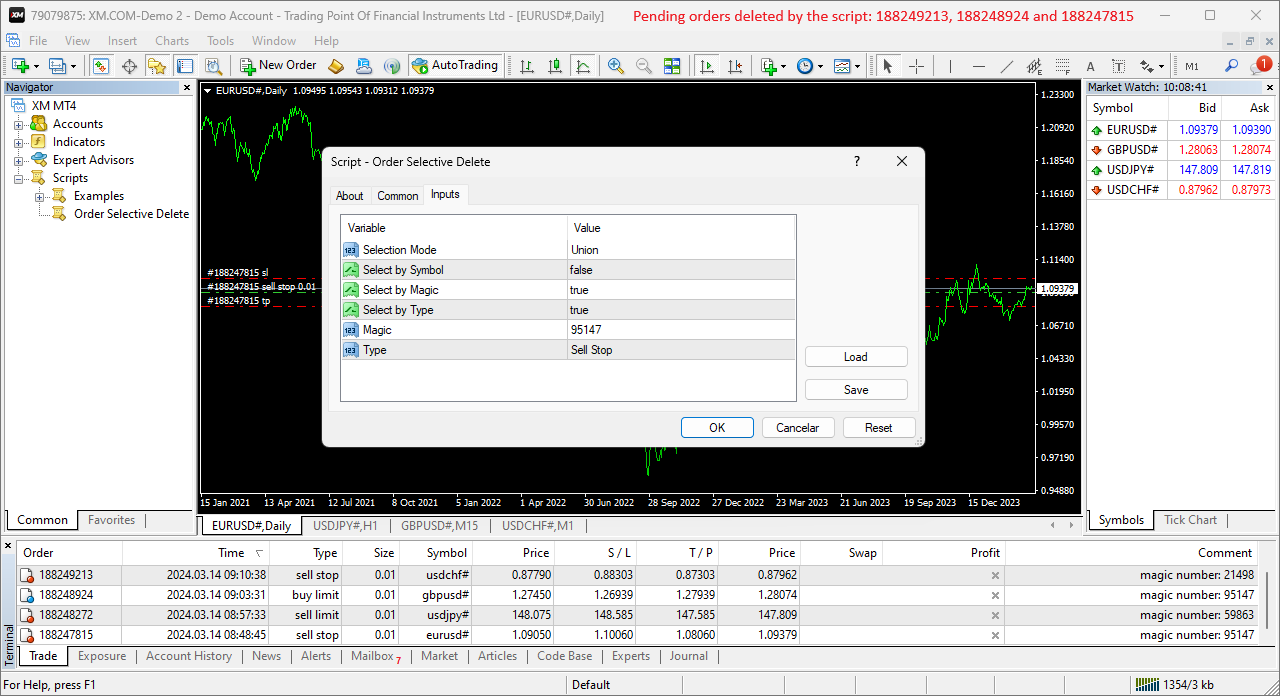
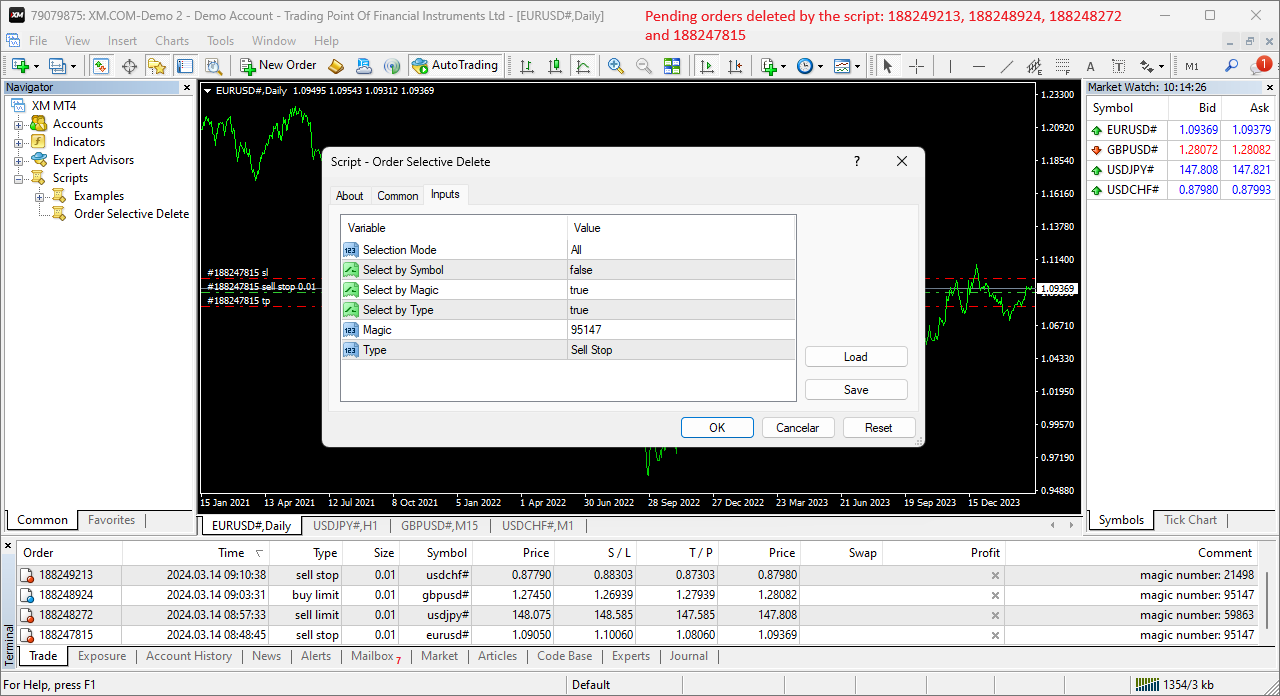
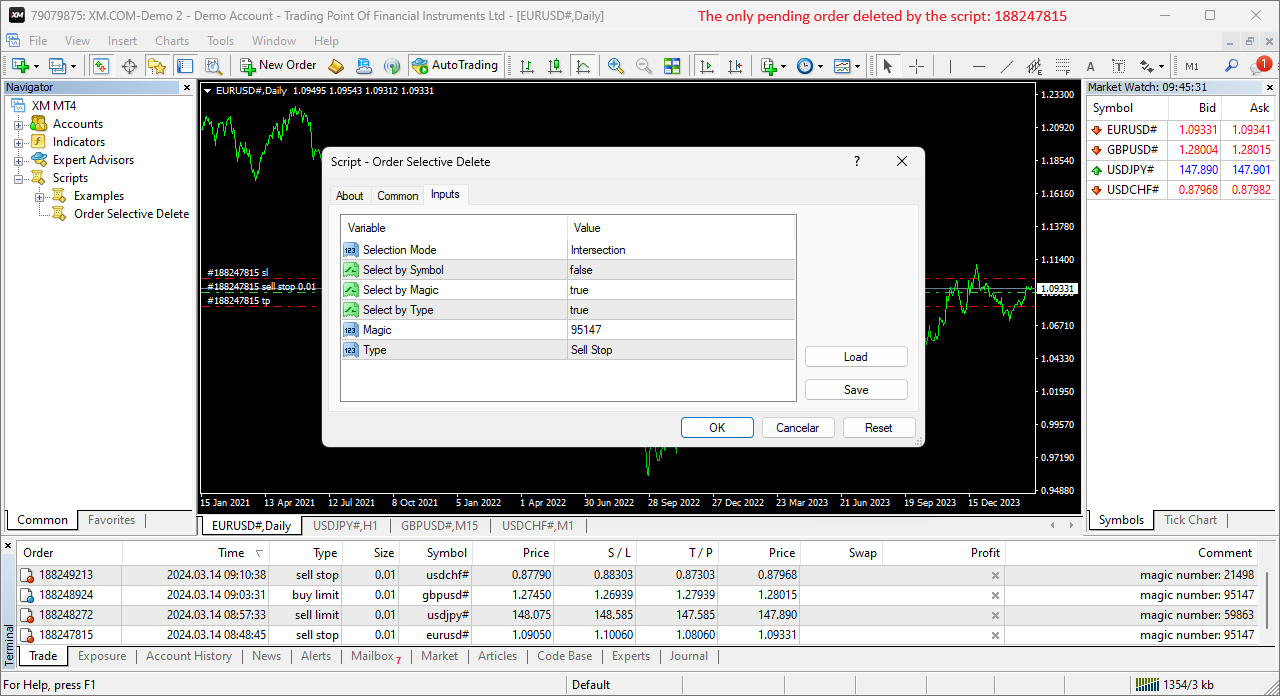
The Order Selective Delete possesses three operation modes (Intersection, Union and All) that control the way as three pending order features (symbol, magic number and type) are used. The modes, available through the Selection Mode input parameter, relate to the features, available through the “Select by Feature” and “Feature” input parameters, as follows: 

  • Intersection – contains only the pending orders whose features match all the features opted in the script. 
  • Union – contains all the pending orders whose features match at least a feature opted in the script. 
  • All – contains all the pending orders, regardless of any feature opted or not in the script. 

    The Intersection and Union operations in the script are similar to those in set theory, with the features selection and feature values representing the sets and set elements, respectively. 

    To use a given feature in the Intersection and Union modes, the respective “Select by Feature” needs to be activated, and the “Feature” needs to be selected with the intended value, except in the Select by Symbol case, whose value is always the chart’s symbol where the script is executed. 

    As an example of the script’s operation modes, consider four pending orders with different features and all the 3 modes with the same features setting (the type isn’t used): 


    Order 1 
    Order 2 
    Order 3 
    Order 4 
    Each mode 
    Symbol 
    AUDUSD 
    USDJPY 
    GBPUSD 
    USDJPY 
    USDJPY 
    Magic 
    14758 
    32978 
    67389 
    90336 
    32978 
    Type 
    Buy Limit 
    Buy Limit 
    Sell Stop 
    Sell Limit 
    --------------

    Each mode determines the following pending orders to delete: Intersection – order 2, Union – orders 2 and 4, and All – orders 1 to 4. 

    Input Parameters 

    • Selection Mode: Pending orders’ selection mode – Intersection/Union/All (see the General Description section above). 
    • Select by Symbol: Selection based on the pending order symbol. 
    • Select by Magic: Selection based on the pending order magic number. 
    • Select by Type: Selection based on the pending order type. 
    • Magic: Pending order magic number. 
    • Type: Pending order type. 

      Some of the available parameters accept values that lead to particular options. 

      • Select by Symbol, Select by Magic and Select by Type: The “true” value at just one of these parameters means that the Intersection and Union modes coincide. 
      • Magic: A null value means the pending orders placed manually or automatically with the 0-default value. 

        Displayed Information 

        The script possesses a few messages to inform the user about errors that might occur during its execution. The messages are shown through the Alert function (by a pop-up window), its content includes: 

        1. The warning that an input parameter has been incorrectly set. 
        2. The Trade Server Return Codes description. 
        3. The symbol’s quotes (immediately) before the trade request’s formation, followed by the symbol’s quotes (immediately) after the trade server’s decision (only relevant to the programmer). 
        4. The Runtime Errors description. 
        5. The standard function in the include file where the runtime error was detected (only relevant to the programmer). 

                Note: Some elements of the list are displayed simultaneously (in the same text line): 2 and 3; 4 and 5. 

                Conclusion 

                The Order Selective Delete is a helpful and efficient tool regarding the manual deletion of pending orders, especially when these reach a significant number, enabling a simple and intuitive selection of the orders to delete.

                Önerilen ürünler
                this EA draws vertical lines on the chart, either consecutive or alternating lines, depending on the input settings. Since vertical lines often represent time events, timing is important in trading. StartTime = D'2025.03.12 23:00';  // Starting point (time and date) NumberOfLines = 10;                    // Total number of lines to draw IntervalCandles = 1;                   // Interval in candles (must be > 0) IntervalMinutes = 30;                  // Interval in minutes (0 to disable) Directi
                FREE
                This indicator help to mark the high and low of the session Asian,London,Newyork , with custom hour setting This indicator is set to count from minute candle so it will move with the current market and stop at the designated hour and create a accurate line for the day. below is the customization that you can adjust : Input Descriptions EnableAsian Enables or disables the display of Asian session high and low levels. EnableLondon Enables or disables the display of London session high and
                FREE
                Remaining Time MT4
                Dhokiyas Money Map Investment Consultants - FZCO
                Candle Remaining Time MetaTrader 4 için Mum kapanışını kaçırmayın. Mükemmel zamanlama ile işlem yapın. MT4 Hassas Zamanlayıcı Candle Remaining Time Candle Remaining Time MetaTrader 4 için tasarlanmış hafif ve hassas bir zamanlama aracıdır. Mevcut mumun kalan süresini grafikte gerçek zamanlı olarak gösterir. Mum kapanış onayına dayalı stratejiler için geliştirilmiştir. Doğru zamanlama erken veya geç girişleri azaltır. Eğer stratejiniz mum kapanışına bağlıysa bu araç vazgeçilmezdir. Ana Özellikl
                FREE
                Update:ver1.53 (2023/08/16) ・概要と必要環境 手動発注もしくは他ツール等からの発注に対し、指値発注予約の複製を生成します。こちらは「発注操作の簡易化」に特化したものになります。発注判断となる分析は、資料を漁る、経験則を導く、他の分析ツールやEAを併用する等、利用者ご自身で頑張ってください。なお、ver1.28より、「決済後、自動で再発注する」機能が実装されました。(有償版でのみ有効化できます) ・導入と導入後の操作 導入そのものは簡単です。「自動売買可能なEA」として、適当なチャートにて動作させるだけです。(チャートの対象相場は問いません。このEAは、チャートを見ていません)。あとは、「このEAでのローカルコピー以外の発注」があれば、それに応じて「損失が出た場合に備えての追加取引の予約」という形で、指値発注が自動生成されます。 導入操作上の注意として、「本EAを、複数のチャートで動作」はできません。EAがチャート自体を見ておらず、注文状況だけを見ているため、複数のチャートで動かす意味もありません。また、ターミナルとEAの設定として「自動売買」を許可しない
                FREE
                The Saz_Timer indicator belongs to the Saz_Forex suite of professional indicators designed by Traders, for Traders. This indicator will show minutes and seconds of real time on the chart window. The indicator uses the OnTimer() event so it can update even while no ticks received on the chart. The text is shown toward the bottom right of the chart, encircled red in the screenshot. Inputs: Text Colour, allows selection of the colour for the text.
                FREE
                This indicator show the candle remaining time on the chart and/or in the corner of the window. It also display notificaton (popup and push) when a new candle is formed (optional). You configure the timer on candles and at chart corner. I don't need to explain the functions because are very simple. MT5 version:  https://www.mql5.com/pt/market/product/38470 Any doubt or suggestion to a new feature please comment. Enjoy!
                FREE
                PZ Trade Pad EA
                PZ TRADING SLU
                4.29 (31)
                This simple visual expert advisor allows you to trade easily from the chart. It handles risk management for you and can perform several useful tasks with your existing trades, saving time and making risk-management for each individual trade easier.  [ Installation Guide | Update Guide | Troubleshooting | FAQ | All Products   |  Get Help ] Trade easily from the chart Trade with precise risk management, hassle free Trade pending order with drag and drop price selection Set SL and TP levels with
                FREE
                A "simple design" trading panel, which is characterized by small byte size, low CPU usage, simple steps, and quick operation, 1 to 2 clicks to complete a functional operation, saving time and increasing efficiency . The panel is easy to use, and it is not complicated to set parameters, which is in line with traders' habits. At the same time, its compact- design, clear at a glance, and comprehensive functions are a powerful tool for manual trading! Key features of the panel:   Click "Bid Price"
                FREE
                DF Fib Trader Pro DF Fib Trader Pro, MetaTrader 4 için tasarlanmış otomatik bir işlem sistemidir. Giriş ve çıkış noktalarını tanımlamak için Fibonacci tabanlı fiyat seviyelerini trend ve yapı analiziyle birleştirir. EA hem uzun hem de kısa pozisyonları destekler ve yerleşik risk yönetimi parametreleri içerir. Temel Özellikler: • Giriş, SL ve TP noktalarını çizmek için Fibonacci geri çekilme ve uzatma mantığını kullanır. • Yapılandırılabilir lot büyüklüğü ve zarar durdurma/kâr alma seviyeleri •
                FREE
                MT4 için NAS100 Auto SL ve TP Maker ile tanışın: MetaTrader 4'te Nasdaq 100 piyasasında gezinen yatırımcılar için vazgeçilmez bir yardımcı olan NAS100 Auto SL ve TP Maker ile StopLoss ve TakeProfit ayarlarını bir daha asla kaçırmayın. Bu araç, StopLoss ve TakeProfit seviyelerinin yönetimini otomatikleştirmek için sorunsuz bir çözüm arayanlar için tasarlanmıştır. Temel Özellikler: Zahmetsiz Otomasyon: StopLoss ve/veya TakeProfit olmadan Nasdaq 100 işlemlerini otomatik olarak izler. Kullanıcı tar
                FREE
                Format Charts MT4
                Vital H B Engenharia Ltda
                If you use several charts open at the same time, you know how boring it is to apply formats to each chart individually. This script can change all open charts using a single command. Parameters: 1 - Choose symbol to put on charts: apply the selected symbol to all charts. If "current", it does not change the symbol; 2 - Choose timeframe or leave empty: apply the selected timeframe to all charts. If "CURRENT", it does not change the timeframe; 3 - Apply template to the charts: If true, apply the t
                FREE
                Virtual Assistant MINI   VIRTUALL ASSISTANT = MAKE YOUR TP AND SL VIRTUAL!   Tool meant to control your stop loss and take profit by converting them to virtual SL/TP (with support for TRAILING) Convert all SL and TP to virtual so your exits on trades are hidden from your broker! Run this EA on any graph, choose 1MIN timeframe (VA is autosaving data only on new bar detected, so graph TF equals to VA autosave period) !!! When using virtual trade exits, stable connection is needed for order executi
                FREE
                Rainbow MT4 is a technical indicator based on Moving average with period 34 and very easy to use. When price crosses above MA and MA changes color to green, it’s a signal to buy. When price crosses below MA and MA changes color to red, it’s a signal to sell. The Expert advisor ( Rainbow EA MT4) based on Rainbow MT4 indicator, as you can see in the short video below is now available here .
                FREE
                The only drawdown guardian that stops your other EAs from digging you deeper. PropMarshal monitors your account equity in real time and instantly closes all positions the moment a drawdown or profit target threshold is breached. But it doesn't stop there — it closes every chart on your platform too, cutting off any other Expert Advisors before they can open new trades and compound the damage. The Problem   PropMarshal   Solves Most prop firm traders run multiple EAs across multiple charts. When
                FREE
                Yardımcı program, strateji test cihazında stratejilerinizi manuel olarak test etmenize olanak tanır. Görselleştirme grafiğinde tek tıklamayla işlem yapın. Yardımcı programın en son sürümü, yatırımcıların ticaret stratejilerini manuel olarak test etmeleri için gelişmiş özellikler sunar. Strateji test cihazıyla artık ticaret stratejilerinizin etkinliğini simüle edilmiş bir ortamda değerlendirebilirsiniz. Bu işlevsellik, ticaret tekniklerinizin performansını analiz etmenize ve bunları ticaret becer
                FREE
                Smart Ruler
                Serhii Shevchuk
                4.83 (6)
                This tool is designed to measure the distance between two points on a chart and much more. List of measured values:  Distance in points  Profit (with and without spread)  Time difference  Percentage price change  Slope angle  Number of bars (various variations)  Ratio of distance in points to the reference value Features:  Snap to OHLC prices  Automatic color profile setting based on chart background color  Various types of pointers to choose from  Display of values ​​of selected points on th
                FREE
                This indicator alerts you when/before new 1 or 5 minute bar candle formed. In other words,this indicator alerts you every 1/5 minutes. This indicator is especially useful for traders who trade when new bars formed. *This indicator don't work propery in strategy tester.Use this in live trading to check functionality. There is more powerful Pro version .In Pro version,you can choose more timeframe and so on. Input Parameters Alert_Or_Sound =Sound ----- Choose alert or sound or both to notify y
                FREE
                Free automatic Fibonacci is an indicator that automatically plots a Fibonacci retracement based on the number of bars you select on the BarsToScan setting in the indicator. The Fibonacci is automatically updated in real time as new highest and lowest values appears amongst the selected bars. You can select which level values to be displayed in the indicator settings. You can also select the color of the levels thus enabling the trader to be able to attach the indicator several times with differe
                FREE
                Manual Zig-zag allows you to build a zig-zag with the mouse, to build it is necessary to turn on the zig-zag and left-click. The file must be placed in the \ MQL4 \ Indicators folder then in the terminal from the list of indicators put it on the chart. A zigzag can be built so that this zigzag can only be seen on the current time frame or in all halves at once. You can change the color and thickness of the line while on the chart without getting into the settings. You can quickly remove each
                FREE
                Smart Trade Monitor — Real-Time Position Tracking, P&L Analysis & Alert System   Real-Time Monitoring : Auto-tracks open/closed positions, displays yesterday’s & previous day’s P&L—no manual calculations!   Smart Alerts (Premium Only) : Instant push notifications + sound alerts for position changes—never miss a trading opportunity!   User-Friendly : One-click setup, key data displayed directly on charts for faster decisions.   Cross-Platform : Supports both MT4 & MT5, compatible with
                FREE
                Show Pips
                Roman Podpora
                4.26 (58)
                Bu bilgi göstergesi her zaman hesaptaki güncel durumdan haberdar olmak isteyenler için faydalı olacaktır. Gösterge, puan cinsinden kâr, yüzde ve para birimi gibi verilerin yanı sıra mevcut çiftin spreadini ve mevcut zaman diliminde çubuğun kapanmasına kadar geçen süreyi görüntüler. VERSİYON MT5 -   Daha kullanışlı göstergeler Bilgi satırını grafiğe yerleştirmek için birkaç seçenek vardır: Fiyatın sağında (fiyatın arkasında); Yorum olarak (grafiğin sol üst köşesinde); Ekranın seçilen köşesinde.
                FREE
                Smart Lot-Size Calculator And Trade Assistant for Mobile Trading Overview: This is the tool every trader in the market must have no matter if you are scalper, swing traders, day trader, or long term trader. This On-The-Go trading tool will help you stay disciplined and also stay free from daily trade management chores, Most traders face common problems like   1. Calculation of proper lot-size of a position to take controlled risk  2. Managing every trade and trailing stop-loss if trades goes in
                FREE
                SX Theme Setter is intended for changing chart appearance in 2 modes: - Gradient background mode: In this mode, the indicator creates a gradient background for your chart. Colors, steps and gradient type can be selected by user. - Color theme: Color theme mode provides more than 50 built-in different color themes which can be selected from a list. Most of these themes are converted from official color themes of real trading platforms of the past and present. Try them out and see if they suit
                FREE
                Индикатор "Стрелки" (Arrow Drawing Tool) Краткое описание: Удобный инструмент для рисования стрелок на графике с помощью кнопки и мыши. Позволяет визуально отмечать направления движения цены, уровни поддержки/сопротивления и важные ценовые зоны. Основные возможности: Простое управление   - кнопка "Стрелка" для активации режима рисования Автоматическая окраска   - зеленые стрелки для движения вверх, красные для движения вниз Настраиваемый дизайн   - регулируемая длина и угол наконечника стрелки Г
                FREE
                Position Selective Close MT4
                Francisco Manuel Vicente Berardo
                The Position Selective Close is a multi-symbol multi-timeframe script used to close simultaneously various positions.  General Description   The Position Selective Close   possesses   three operation modes (Intersection,   Union   and All) that control the way   as   four position features (symbol, magic number,   type   and profit) are used. The modes, available through the Selection Mode input parameter, relate to the features, available through the “Select by Feature” and “Feature” input pa
                FREE
                MT4 için R 2EMA Renk göstergesi, 2 EMA'nın geçişine dayalı sağlam alım satım sinyalleri sağlar. Anahtar noktaları Fiyat iki yeşil EMA'nın üzerine çıkıp kapandığında, bir alım satım sinyali oluşturur. Fiyat iki kırmızı EMA'nın üzerine çıkıp kapandığında, bir satış sinyali oluşturur. R 2EMA Renkli Forex göstergesi, ne zaman alım satım zamanı geldiğini belirlemeyi daha da kolaylaştırır 2 EMA satırı yeşile döndüğünde bir satın alma sinyali oluşur. 2 EMA çizgisi kırmızıya döndüğünde bir satış siny
                FREE
                Oynaklığa uyum sağlayarak, alım satım pozisyonlarını Ödüllendirmek için potansiyel Risk, Ortalama Gerçek Aralığa göre gösterilir. 'Al veya Sat' Düğmesine tıklandığında Risk-Ödül Kutuları gösterilir! ATR hesaplamasının bir faydası, bir işlemin ne zaman kapatılacağına dair zor bir kararın parçası olmayan bir meseleyle sevinin. Bu konu risk yönetimi kararınıza yardımcı olacaktır.  Özellikler Ortalama Gerçek Aralık, piyasadaki oynaklığı pip veya fiyat olarak ölçen yaygın olarak kullanılan bir göst
                FREE
                Get news
                Aleksander Gladkov
                5 (1)
                Utility for reading news from investing.com To access the site, you need to add WebRequest in the Options terminal menu on the Expert Advisors tab: https://sslecal2.investing.com If reading is successful, a message about writing the file is displayed. The INV_week_this.txt file is written to the MQL4\Files folder of the terminal and is kept up to date, updating data according to its own timer. The  INV_week_last.txt   file is recorded on Saturday and saves the news data of the previous week .
                FREE
                This product is based on the single indicator TREND MATE. Link: https://www.mql5.com/es/market/product/50082 The aim of this EA is to watch for all pairs in a single panel in order to have a quick view of changes or new uptrends/downtrends. It is possible to watch from your mobile by sending push notifications when changes appear. If you want to have all push notifications for even exit trends you may receive multiple messages.
                FREE
                IceFX’s TradeInfo is an utility indicator which displays the most important information of the current account and position. Displayed information: Information about the current account (Balance, Equity, Free Margin). Current spread, current drawdown (DD), planned profit, expected losses, etc. Number of open position(s), volume (LOT), profit. Today’s and yesterday’s range. Remaining time to the next candle. Last day profit information (with integrated IceFX ProfitInfo indicator). Risk-based LOT
                FREE
                Bu ürünün alıcıları ayrıca şunları da satın alıyor
                Local Trade Copier EA MT4
                Juvenille Emperor Limited
                4.96 (110)
                Local Trade Copier EA MT4 ile olağanüstü hızlı işlem kopyalama deneyimi yaşayın. Kolay 1 dakikalık kurulumuyla bu işlem kopyalayıcısı, aynı Windows bilgisayarda veya Windows VPS'te birden fazla MetaTrader terminali arasında işlemleri kopyalamanıza olanak tanır ve 0.5 saniyenin altındaki şimşek hızında kopyalama hızları sunar. Başlangıç seviyesinde veya profesyonel bir tüccar olsanız da, Local Trade Copier EA MT4 , spesifik ihtiyaçlarınıza göre özelleştirmek için geniş bir seçenek yelpazesi sunar
                Trade Manager EA’ye hoş geldiniz! Ticaretin daha sezgisel, hassas ve verimli hale gelmesi için tasarlanmış nihai risk yönetim aracı ile tanışın. Bu sadece bir emir verme aracı değil; ticaret planlaması, pozisyon yönetimi ve risk kontrolü için kapsamlı bir çözüm. İster yeni başlayan bir yatırımcı olun, ister deneyimli bir trader ya da hızlı emir gerektiren bir scalper, Trade Manager EA ihtiyaçlarınıza uyum sağlar ve forex, endeksler, emtialar ve kripto paralar dahil tüm piyasalarda esneklik sunar
                Trade Assistant MT4
                Evgeniy Kravchenko
                4.43 (195)
                It helps to calculate the risk per trade, the easy installation of a new order, order management with partial closing functions, trailing stop of 7 types and other useful functions. Additional materials and instructions Installation instructions   -   Application instructions   -   Trial version of the application for a demo account Line function -   shows on the chart the Opening line, Stop Loss, Take Profit. With this function it is easy to set a new order and see its additional characteris
                TradePanel MT4
                Alfiya Fazylova
                4.84 (95)
                Trade Panel, çok işlevli bir ticaret asistanıdır. Uygulama, manuel ticaret için 50'den fazla ticaret fonksiyonu içerir ve çoğu ticaret görevini otomatikleştirmeyi mümkün kılar. Satın almadan önce demo hesapta demo sürümü test edebilirsiniz. Demo hesap için uygulamanın deneme sürümünü indirin: https://www.mql5.com/en/blogs/post/750865 . Talimatların tamamı buraya . Ticaret. Tek tıklamayla ticaret işlemleri yapmayı sağlar: Risk otomatik hesaplaması ile bekleyen emirleri ve pozisyonları açmak. Bird
                Exp COPYLOT CLIENT for MT4
                Vladislav Andruschenko
                4.69 (65)
                MetaTrader 4 için profesyonel işlem kopyalayıcı MetaTrader 4 için hızlı, güvenilir ve profesyonel bir işlem kopyalayıcı. COPYLOT , MetaTrader 4 ve MetaTrader 5 terminalleri arasında Forex işlemlerinin kopyalanmasını sağlar ve farklı hesap türleri ile işlem senaryoları için esnek senkronizasyon sunar. COPYLOT MT4 sürümü şunları destekler: MetaTrader 4 → MetaTrader 4 MetaTrader 5 Hedge → MetaTrader 4 MetaTrader 5 Netting → MetaTrader 4   MT5 sürümü Tam açıklama + DEMO + PDF Nasıl satın alınır Nası
                MT4 to Discord Signal Provider , ticaret sinyallerini doğrudan Discord'a göndermek için tasarlanmış kullanıcı dostu ve tamamen özelleştirilebilir bir araçtır. Bu araç, ticaret hesabınızı etkili bir sinyal sağlayıcısına dönüştürür. Mesaj formatlarını tarzınıza uyacak şekilde özelleştirin! Kolay kullanım için önceden tasarlanmış şablonlardan seçim yapın ve hangi mesaj öğelerini dahil etmek veya çıkarmak istediğinize karar verin. [ Demo ] [ Kullanım Kılavuzu ] [ MT5 Versiyonu ] [ Telegram Versiyonu
                Custom Alerts AIO: Tüm Piyasaları Takip Et — Hiçbir Kurulum Gerekmez Genel Bakış Custom Alerts AIO , hiçbir ek yapılandırma gerektirmeyen, kullanıma hazır bir piyasa izleme çözümüdür. Gerekli tüm göstergeler — FX Power, FX Volume, FX Dynamic, FX Levels, IX Power — iç yapısına gömülüdür. Grafik görüntülemesi olmadan çalışır, bu da onu sessiz ve verimli bir şekilde gerçek zamanlı alarm üretimi için mükemmel hale getirir. Brokerınızın sunduğu tüm varlık sınıflarını destekler: Forex, Metaller, End
                Copy Cat More Trade Copier MT4 (Kopyacı MT4) sadece basit bir yerel trade kopyalayıcı değildir; günümüzün alım satım zorlukları için tasarlanmış eksiksiz bir risk yönetimi ve yürütme çerçevesidir. Prop firm sınavlarından kişisel hesap yönetimine kadar, güçlü yürütme, sermaye koruması, esnek yapılandırma ve gelişmiş işlem yönetimi ile her duruma uyum sağlar. Kopyalayıcı hem Master (gönderici) hem de Slave (alıcı) modlarında çalışır ve piyasa emirleri ile bekleyen emirlerin gerçek zamanlı senkroni
                THIS EA IS A SEMI-AUTO EA, IT NEEDS USER INPUT. Manual & Test Version Please TEST this product before   BUYING  and watch my video about it. Contact me for user support or bug reports, or if you want the MT5 version! MT5 Version I do not guarantee any profits or financial success using this EA. With this Expert Advisor, you can: Implement your own   Zone Recovery   strategy to capitalize on trending markets. Create   Grid   trading strategies, to profit from ranging markets. Place orders easil
                Exp SafetyLock PRO
                Vladislav Andruschenko
                4.57 (28)
                SAFETYLOCK , yatırımcıların mevcut açık pozisyonları için ters bir emir belirleyerek ani piyasa dönüşlerine karşı korunmalarını sağlar. Bir yatırımcı veya EA yeni bir pozisyon açtığında, SAFETYLOCK otomatik olarak bu pozisyona ters yönde bir bekleyen emir oluşturur. Pozisyon zarar etmeye başlarsa, bekleyen emir devreye girer ve pozisyonu kilitleyerek zararı sınırlamaya yardımcı olur. Bu EA, başlangıç pozisyonunu kapatma, takip eden durdurma (trailing stop) ile çalışarak kazançları maksimize etme
                Seconds Chart - MetaTrader 4 için saniye bazlı grafikler oluşturmanıza olanak sağlayan eşsiz bir araçtır. Seconds Chart sayesinde saniye cinsinden zaman dilimleriyle grafik oluşturabilir, standart dakika veya saatlik grafiklerde mümkün olmayan esneklik ve analiz hassasiyetine ulaşabilirsiniz. Örneğin, S15 zaman dilimi 15 saniyelik mum çubuklarını ifade eder. Tüm indikatörleri, uzman danışmanları ve komut dosyalarını standart grafiklerde olduğu gibi kolaylıkla kullanabilirsiniz. Standart araçları
                Close If Profit or Loss with Trailing for MetaTrader 4 — toplam kâr veya toplam zarar ile otomatik kapatma MetaTrader 4 için pratik bir işlem yönetimi aracıdır. Toplam kâr veya toplam zarar belirlediğiniz seviyeye ulaştığında, seçilen pozisyonları otomatik olarak kapatabilir. Expert Advisor açık işlemleri izler, değişken kâr/zarar sonucunu hesaplar, Trailing Profit kullanabilir ve pozisyonları manuel müdahaleden daha hızlı yönetmenize yardımcı olur. MetaTrader 4 hâlâ manuel trader’lar, scalper’
                Kopyalama Ustası MT4       MetaTrader 4 ve MetaTrader 5 terminalleri için bir ticaret kopyalama aracıdır. Her iki yönde de kopyalamayı destekler: MT4'ten MT5'e, MT5'ten MT4'e ve aynı tipteki hesaplar arasında MT4'ten MT4'e. Doğru çalışabilmesi için tüm terminallerin aynı PC veya VPS üzerinde çalışması gerekmektedir. [ Instruction  and Demo ]  MetaTrader 4'e kopyalamak için ayrı bir sürüm —       Kopyalama Ustası MT5       - gereklidir. Başlıca Özellikler: Kopyalama Modları Hem Master hem de Rec
                The product will copy all telegram signal to MT4   ( which you are member  ) , also it can work as remote copier.  Easy to set up, copy order instant, can work with almost signal formats, image signal, s upport to translate other language to English Work with all type of channel or group, even channel have "Restrict Saving Content", work with  multi channel, multi MT5 Work as remote copier: with signal have ticket number, it will copy exactly via ticket number. Support to backtest signal. How to
                News Filter EA: Advanced Algo Trading Assistant News Filter EA is an advanced algo trading assistant designed to enhance your trading experience. By using the   News Filter EA , you can integrate a Forex economic news filter into your existing expert advisor, even if you do not have access to its source code. In addition to the news filter, you can also specify   trading days   and   hours   for your expert. The News Filter EA also includes   risk management   and   equity protection   features
                Easy Trade – Akıllı, Basit ve Güçlü İşlem Yönetimi Easy Trade, riski kontrol altında tutmak ve işlemleri sorunsuz gerçekleştirmek isteyen MetaTrader kullanıcıları için hepsi bir arada işlem yönetim çözümüdür. Gerçek kullanıcı geri bildirimleriyle sıfırdan tasarlanan Easy Trade, işlemleri birden fazla sembolde yürütmeyi, izlemeyi ve yönetmeyi kolaylaştırır – iş akışınızı karmaşıklaştırmadan. İster manuel olarak scalping yapın ister küçük bir işlem portföyü yönetin, Easy Trade dikkatinizi olması
                Partial Closure EA MT4
                Juvenille Emperor Limited
                5 (3)
                Partial Closure EA MT4 , hesabınızdaki herhangi bir işlemi kısmen kapatmanıza olanak tanır. İşlemleri, lot büyüklüğünün seçilen bir yüzdesiyle ve/veya işlem biletiyle manuel olarak veya TP/SL seviyelerindeki belirli yüzdelerle otomatik olarak kapatabilir; bu, başlangıç lot büyüklüğünün yüzdesini en fazla 10 take profit ve 10 stop loss seviyesinde kapatır. Belirli magic numaralarını, yorumları veya sembolleri belirterek veya hariç tutarak hesabınızdaki tüm veya seçili işlemleri yönetebilir. İpu
                Unlimited Trade Copier Pro is a tool to copy trade remotely to multiple MT4, MT5 and cTrader accounts at different computers/locations over internet. This is an ideal solution for you if you are a signal provider and want to copy your trades to other receivers globally on your own rules. One provider can copy trades to multiple receivers and one receiver can get trade from multiple providers as well. The provider can even set the subscription expiry for each receiver, so that receiver will not b
                Trade copier MT4
                Alfiya Fazylova
                4.58 (33)
                Trade Copier, ticaret hesapları arasındaki işlemleri kopyalamak ve senkronize etmek için tasarlanmış profesyonel bir yardımcı programdır. Kopyalama, tedarikçinin hesabından/terminalinden alıcının aynı bilgisayarda veya vps'de kurulu olan hesabına/terminaline gerçekleşir. KAMPANYA - Eğer zaten "Trade copier MT5" aldıysanız, "Trade copier MT4"ü ücretsiz olarak alabilirsiniz (MT4 > MT5 ve MT4 < MT5 kopyalamalar için). Koşullar hakkında daha fazla bilgi almak için lütfen bizimle özel mesaj yoluyla i
                MT4 to Telegram Signal Provider , Telegram'a sinyal göndermeyi sağlayan ve hesabınızı bir sinyal sağlayıcısına dönüştüren kullanımı kolay ve tamamen özelleştirilebilir bir araçtır. Mesajların formatı tamamen özelleştirilebilir! Ancak basit kullanım için, önceden tanımlanmış bir şablonu seçebilir ve mesajın belirli kısımlarını etkinleştirebilir veya devre dışı bırakabilirsiniz. [ Demo ]  [ Kullanım Kılavuzu ] [ MT5 Sürümü ] [ Discord Sürümü ] [ Telegram Kanalı ]  New: [ Telegram To MT5 ] Kurulum
                The Expert Advisor will help you forward all pop-up alert with screenshot from  MetaTrader 4 to Telegram channel/ group, also forward all notifications to Telegram. Parameters  -  Telegram Bot Token - create bot on Telegram and get token.  -  Telegram Chat ID  - input your Telegram user ID,  group / channel ID  -  Forward Alert - default true, to forward alert.  -  Send message as caption of Screenshot - default false, set true to send message below Screenshot  How to setup and guide  - Telegram
                Telegram'dan MT4'e:   Nihai Sinyal Kopyalama Çözümü Telegram ile MT4'e   işlemlerinizi kolaylaştırın, DLL'lere ihtiyaç duymadan doğrudan Telegram kanallarından ve sohbetlerinden MetaTrader 4 platformunuza işlem sinyallerini kopyalamak için tasarlanmış son teknoloji yardımcı program. Bu sağlam çözüm, sinyallerin benzersiz hassasiyet ve özelleştirme seçenekleriyle sorunsuz bir şekilde yürütülmesini sağlayarak size zaman kazandırır ve verimliliğinizi artırır. [ Instructions and DEMO ] Temel Özellik
                Trade Dashboard simplifies how you open, manage, and control your trades, with built-in lot size calculation. It allows you to execute trades, manage risk, and control positions directly on the chart, with tools such as partial close, breakeven, and trailing stop. Designed to reduce manual work and help you stay focused on your trading decisions. A demo version is available for testing. Detailed explanations of features are provided within the MQL5 platform. Installation instructions are include
                Bu ürün, haber saatlerinde tüm uzman danışmanları ve manüel grafikleri filtreler, böylece manüel ticaret kurulumlarınızı veya diğer uzman danışmanlar tarafından girilen işlemleri yok edebilecek ani fiyat dalgalanmaları konusunda endişelenmenize gerek kalmaz. Bu ürün, herhangi bir haber yayınlanmadan önce açık pozisyonlarınızı ve bekleyen emirlerinizi yönetebilen tam bir sipariş yönetim sistemi ile birlikte gelir. The News Filter'ı satın aldığınızda, gelecekteki uzman danışmanlar için yerleşik ha
                Smart Channel M4
                Vahidreza Heidar Gholami
                The trend in the market can be predicted using trend lines but the problem is you don’t know where exactly the price is going to touch the trend line where you can put your pending orders on. Smart Channel Expert Advisor makes it possible to put an advanced channel around the price data, which can be configured to handle placing orders, opening and closing positions, managing risk per trade, spread, slippage, and trailing stop-loss and take-profit automatically. Features Money Management (Calcul
                Auto Trade Copier is designed to copy trades to multiple MT4, MT5 and cTrader accounts/terminals with 100% accuracy. The provider and receiver accounts must be on the same PC/VPS. With this tool, you can copy trades to receiver accounts on the same PC/VPS. All trading actions will be copied from provider to receiver perfectly. This version can be used on MT4 accounts only. For MT5 accounts, you must use Auto Trade Copier for MT5 . Reference: - For MT4 receiver, please download Trade Receiver Fre
                News filter, equity guard & session control for all your EAs — one tool, full protection Take a Break has evolved from a basic news filter into a comprehensive account protection solution . It pauses your other Expert Advisors during news events or based on custom filters. When trading resumes, it automatically restores your entire chart setup , including all EA settings. Why traders choose Take a Break One news filter for all your EAs — no more relying on individual built-in filters that may o
                Trading History - A program for trading and money management on the history of quotes in stratagy tester. It can work with pending and immediate orders, and is equipped with trailing stop, breakeven and take profit functions. Very good for training and testing different strategies. Manual (Be sure to read before purchasing) Advantages 1. Allows you to test any trading strategy in the shortest possible time 2. An excellent simulator for trading training. You can gain months of trading experience
                This EA Utility allows you to manage (with advanced filtering) unlimited open orders (manual or EA) with 16 trailing stop methods: fixed, percent, ATR Exit, Chandelier Exit, Moving Average, Candle High Low Exit, Bollinger Bands, Parabolic, Envelope, Fractal, Ichimoku Kijun-Sen, Alligator, Exit After X Minutes or Bars, RSI and Stochastic. The trailing stop can be either real or virtual, and you can exit fully or with a partial close percent on touch or bar close.  Moreover, you can add (overrid
                Telegram to MT4 Multi-Channel Copier copia automaticamente i segnali di trading dai tuoi canali Telegram direttamente in MetaTrader 4. Niente bot, niente estensioni del browser, niente copia manuale. Ricevi un segnale su Telegram e l'EA apre l'operazione sul tuo terminale in pochi secondi. Il prodotto include due componenti: un'applicazione Windows che ascolta i tuoi canali Telegram, e questo Expert Advisor che esegue i segnali sul tuo terminale MT4. È disponibile anche la versione MT5. Guida di
                Yazarın diğer ürünleri
                Multiple Position Opening MT5
                Francisco Manuel Vicente Berardo
                1 (1)
                The Multiple Position Opening is a multi-symbol multi-timeframe script used to open simultaneously various positions.  Risk Management   The volume used to open a position is chosen between a fixed and a variable lot size, available through the Volume and Free Margin % input parameters, respectively. If there isn't enough money in the account for the chosen volume, this is reduced to the highest possible value (corresponding to free margin). If this reduction leads to a correct volume (if the
                Pending Order Grid MT5
                Francisco Manuel Vicente Berardo
                The Pending Order Grid is a multi-symbol multi-timeframe script that enables multi-strategy implementation based on pending order grids.  General Description   The Pending Order Grid allows the performing of a user-defined strategy through the creation of pending order grids. The script places pending orders of a given type (Buy Limit, Sell Limit, Buy Stop, or Sell Stop) at equidistant price levels to form each grid. The beginning and finish of every grid are defined by the Start Price and Sto
                Double Trailing Stop MT5
                Francisco Manuel Vicente Berardo
                The Double Trailing Stop is a multi-symbol multi-timeframe Expert Advisor that allows the Stop Loss and Take Profit trailing of positions.  General Description   The Double Trailing Stop’s purpose is to secure profit and minimize losses of the opened positions. The Expert Advisor places stop orders (Stop Loss or Take Profit) at the Trailing Stop distance from the market price when the symbol's quote reaches/overcomes the Trailing Start distance from the position’s opening price (a single-time
                Tick Data Record MT4
                Francisco Manuel Vicente Berardo
                The Tick Data Record is a multi-symbol multi-timeframe Expert Advisor that records tick data for later graphical representation and analysis.  General Description   The Tick Data Record offers a(n) alternative/complement to the online/offline price charts displayed through the MT4/MT5 platform. The Expert Advisor   permits   to write and save the current/history values of Time, Bid, Ask, Spread, Last and Volume to a text file (“.txt”). The idea is to copy/open the obtained register to/in a spr
                FREE
                Tick Data Record MT5
                Francisco Manuel Vicente Berardo
                The Tick Data Record is a multi-symbol multi-timeframe Expert Advisor that records tick data for later graphical representation and analysis.  General Description  The Tick Data Record offers a(n) alternative/complement to the online/offline price charts displayed through the MT4/MT5 platform. The Expert Advisor permits to write and save the current/history values of Time, Bid, Ask, Spread, Last and Volume to a text file (“.txt”). The idea is to copy/open the obtained register to/in a spreadshe
                FREE
                Position Selective Close MT5
                Francisco Manuel Vicente Berardo
                The Position Selective Close is a multi-symbol multi-timeframe script used to close simultaneously various positions.  General Description   The Position Selective Close   possesses   three operation modes (Intersection,   Union   and All) that control the way   as   four position features (symbol, magic number,   type   and profit) are used. The modes, available through the Selection Mode input parameter, relate to the features, available through the “Select by Feature” and “Feature” input pa
                FREE
                Scientific Calculator MT5
                Francisco Manuel Vicente Berardo
                The Scientific Calculator is a script designed to compute science, engineering and mathematics expressions.  General Description   The expression to calculate must obey syntax rules and precedence order, being constituted by the following elements:   Integer and real numbers.  Mathematical operators for addition (+), subtraction (-), multiplication (*), division (/) and exponentiation (^).  Mathematical and trigonometric functions .  Curved parentheses (()) to define the precedence and contain
                FREE
                Position Selective Close MT4
                Francisco Manuel Vicente Berardo
                The Position Selective Close is a multi-symbol multi-timeframe script used to close simultaneously various positions.  General Description   The Position Selective Close   possesses   three operation modes (Intersection,   Union   and All) that control the way   as   four position features (symbol, magic number,   type   and profit) are used. The modes, available through the Selection Mode input parameter, relate to the features, available through the “Select by Feature” and “Feature” input pa
                FREE
                The Environment State Info Print is a script to display the constants that describe the current runtime environment of a MQL5 program.  General Description   The constants are divided into four groups in the   Environment State section of the MQL5 documentation and each group is divided into enumerations/subgroups (with designations  “Integer”, “Double” or “String”). The script displays constants in two ways: a single constant or all group constants. The constants are obtained by selecting the
                FREE
                The Environment State Info Print is a script to display the constants that describe the current runtime environment of a MQL4 program.  General Description   The constants are divided into four groups in the Environment State section of the MQL4  documentation and each group is divided into enumerations/subgroups (with designations “ Market Info”, “Integer”, “Double” or “String”). The script displays constants in two ways: a single constant or all group constants. The constants are obtained by
                FREE
                Scientific Calculator MT4
                Francisco Manuel Vicente Berardo
                The Scientific Calculator is a script designed to compute science, engineering and mathematics expressions.   General Description   The expression to calculate must obey syntax rules and precedence order, being constituted by the following elements:   Integer and real numbers.   Mathematical operators for addition (+), subtraction (-), multiplication (*), division (/) and exponentiation (^).   Mathematical and trigonometric functions .   Curved parentheses (()) to define the precedence and co
                FREE
                Order Selective Delete MT5
                Francisco Manuel Vicente Berardo
                The Order Selective Delete is a multi-symbol multi-timeframe script used to delete simultaneously various pending orders.  General Description   The Order Selective Delete   possesses   three operation modes (Intersection,   Union   and All) that control the way   as   three pending order features (symbol, magic   number   and type) are used. The modes, available through the Selection Mode input parameter, relate to the features, available through the “Select by Feature” and “Feature” input pa
                FREE
                Double Trailing Stop MT4
                Francisco Manuel Vicente Berardo
                The Double Trailing Stop is a multi-symbol multi-timeframe Expert Advisor that allows the Stop Loss and Take Profit trailing of positions.  General Description   The Double Trailing Stop’s purpose is to secure profit and minimize losses of the opened positions. The Expert Advisor places stop orders (Stop Loss or Take Profit) at the Trailing Stop distance from the market price when the symbol's quote reaches/overcomes the Trailing Start distance from the position’s opening price (a single-time
                The Multiple Position Opening is a multi-symbol multi-timeframe script used to open simultaneously various positions.  Risk Management   The volume used to open a position is chosen between a fixed and a variable lot size, available through the Volume and Free Margin % input parameters, respectively. If there isn't enough money in the account for the chosen volume, this is reduced to the highest possible value (corresponding to free margin). If this reduction leads to a correct volume (if the
                Pending Order Grid MT4
                Francisco Manuel Vicente Berardo
                The Pending Order Grid is a multi-symbol multi-timeframe script that enables multi-strategy implementation based on pending order grids.  General Description   The Pending Order Grid allows the performing of a user-defined strategy through the creation of pending order grids. The script places pending orders of a given type (Buy Limit, Sell Limit, Buy Stop, or Sell Stop) at equidistant price levels to form each grid. The beginning and finish of every grid are defined by the Start Price and Sto
                Pending Order Grid EA MT4
                Francisco Manuel Vicente Berardo
                The Pending Order Grid is a multi-symbol multi-timeframe Expert Advisor that enables multi-strategy implementation based on pending order grids.  General Description   The Pending Order Grid allows the performing of a user-defined strategy through the creation of pending order grids. The Expert Advisor places pending orders of a given type (Buy Limit, Sell Limit, Buy Stop, or Sell Stop) at equidistant price levels to form each grid. The user might set up different grids to exist simultaneously
                Pending Order Grid EA MT5
                Francisco Manuel Vicente Berardo
                The Pending Order Grid is a multi-symbol multi-timeframe Expert Advisor that enables multi-strategy implementation based on pending order grids.  General Description   The Pending Order Grid allows the performing of a user-defined strategy through the creation of pending order grids. The Expert Advisor places pending orders of a given type (Buy Limit, Sell Limit, Buy Stop, or Sell Stop) at equidistant price levels to form each grid. The user might set up different grids to exist simultaneously
                Filtrele:
                Değerlendirme yok
                Değerlendirmeye yanıt