RMT Execution Inspector


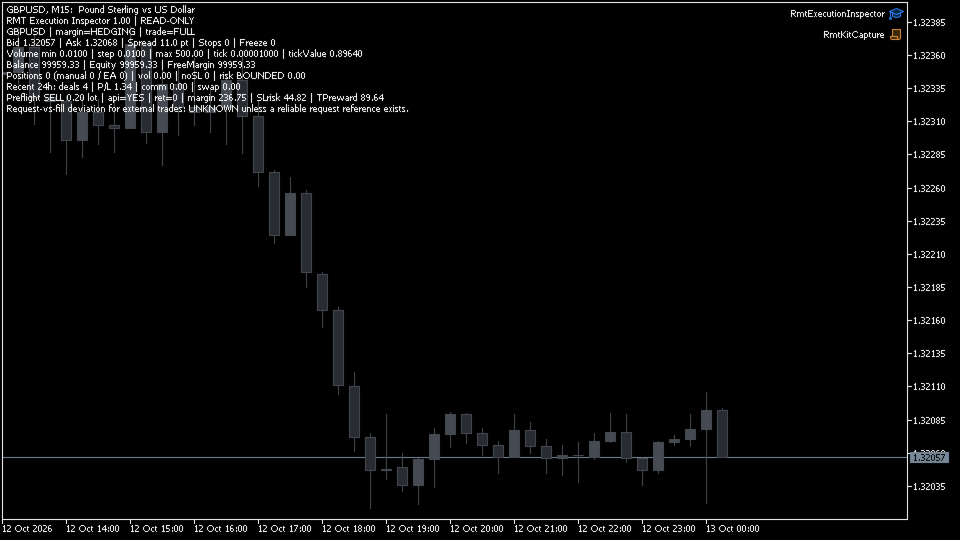
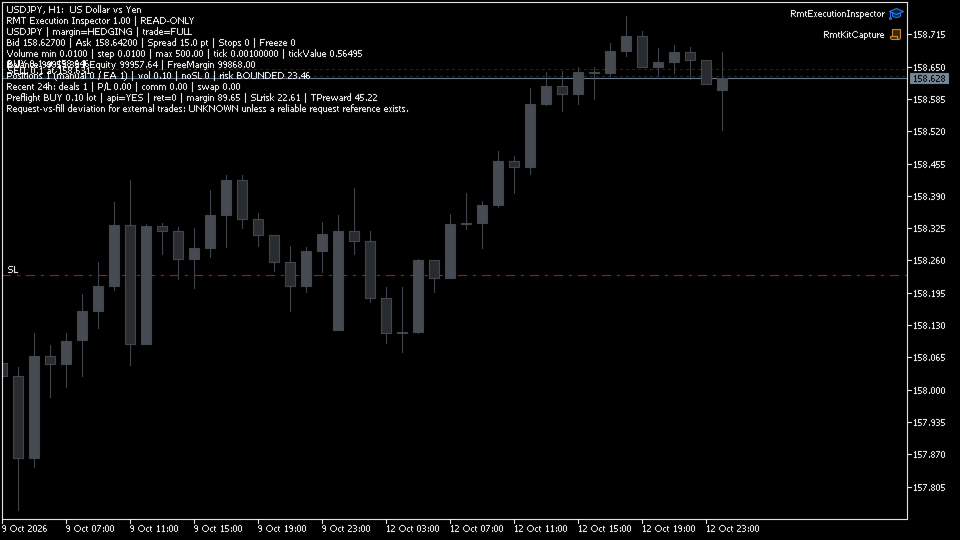
RMT Execution Inspector is a read-only diagnostics tool for MetaTrader 5. For one symbol it shows the broker's trading conditions, an OrderCheck preflight of a reference order, open positions with a missing-stop-loss flag, and recent trading costs — without ever sending an order.

The problem it solves

Before you trust an EA or a manual setup on a new broker or symbol, you need to know what the broker will actually accept: minimum lot, lot step, stop level, freeze level, spread, margin for your size, and whether any open position is running without a stop loss. MetaTrader spreads that information over several windows. RMT Execution Inspector puts it in one panel and never touches your trades.

What it shows (one symbol per instance)

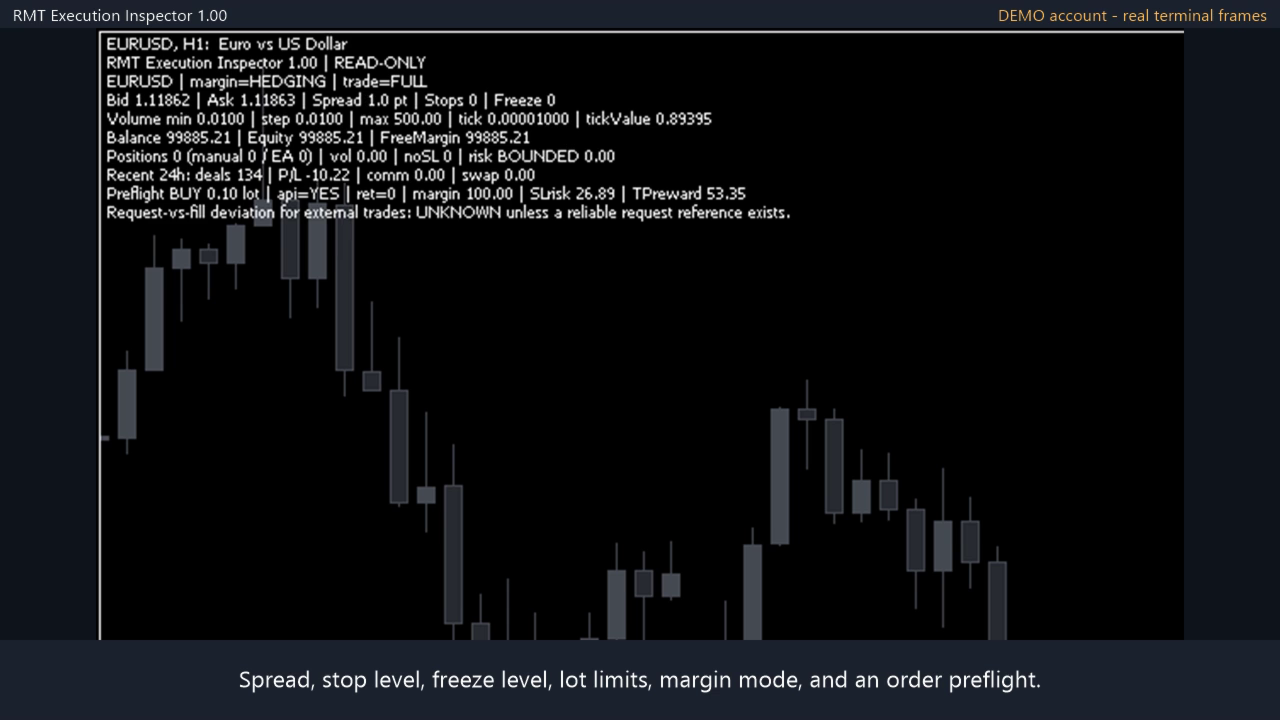
  • Trading conditions of the inspected symbol: bid, ask, spread in points, stop level, freeze level, minimum / step / maximum volume, tick size, tick value, account margin mode (netting or hedging) and symbol trade mode (full, close-only, disabled).
  • Account line: balance, equity and free margin.
  • Hypothetical preflight of a reference order you define (direction, volume, SL and TP distance): the terminal's OrderCheck() return code, the margin reported by OrderCalcMargin, and the money at risk to the SL and reward to the TP reported by OrderCalcProfit. The order is never sent.
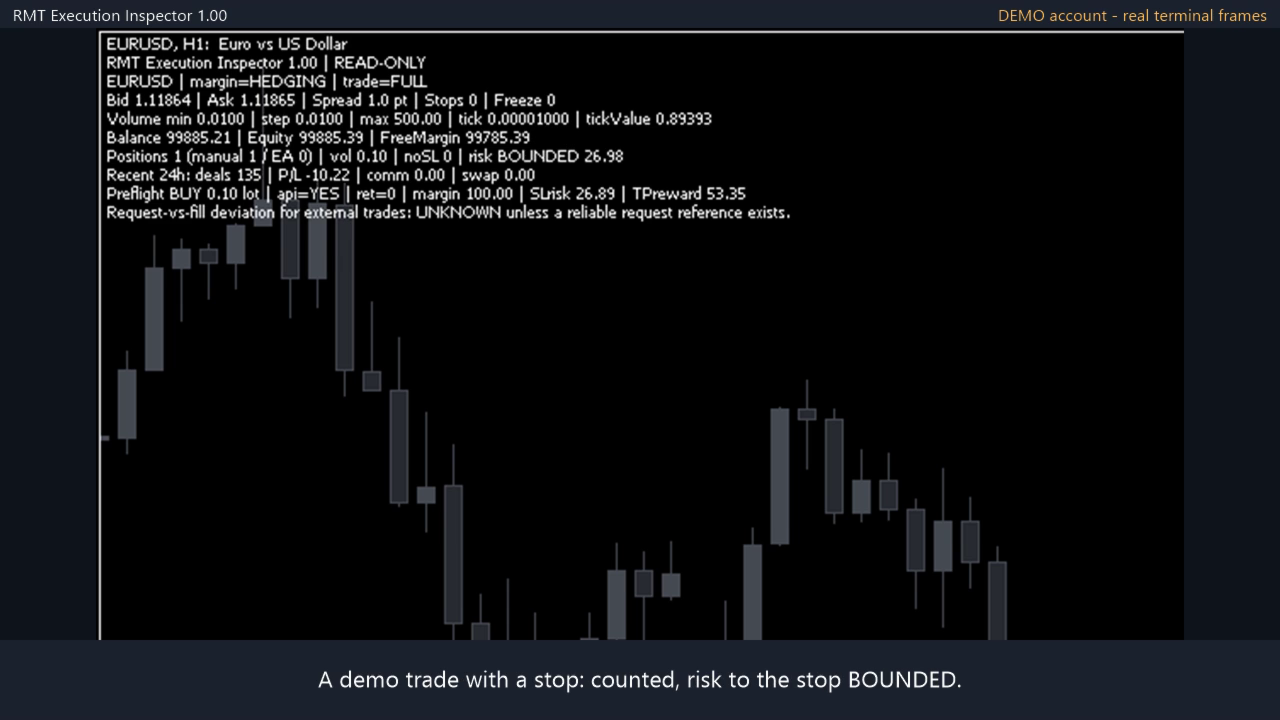
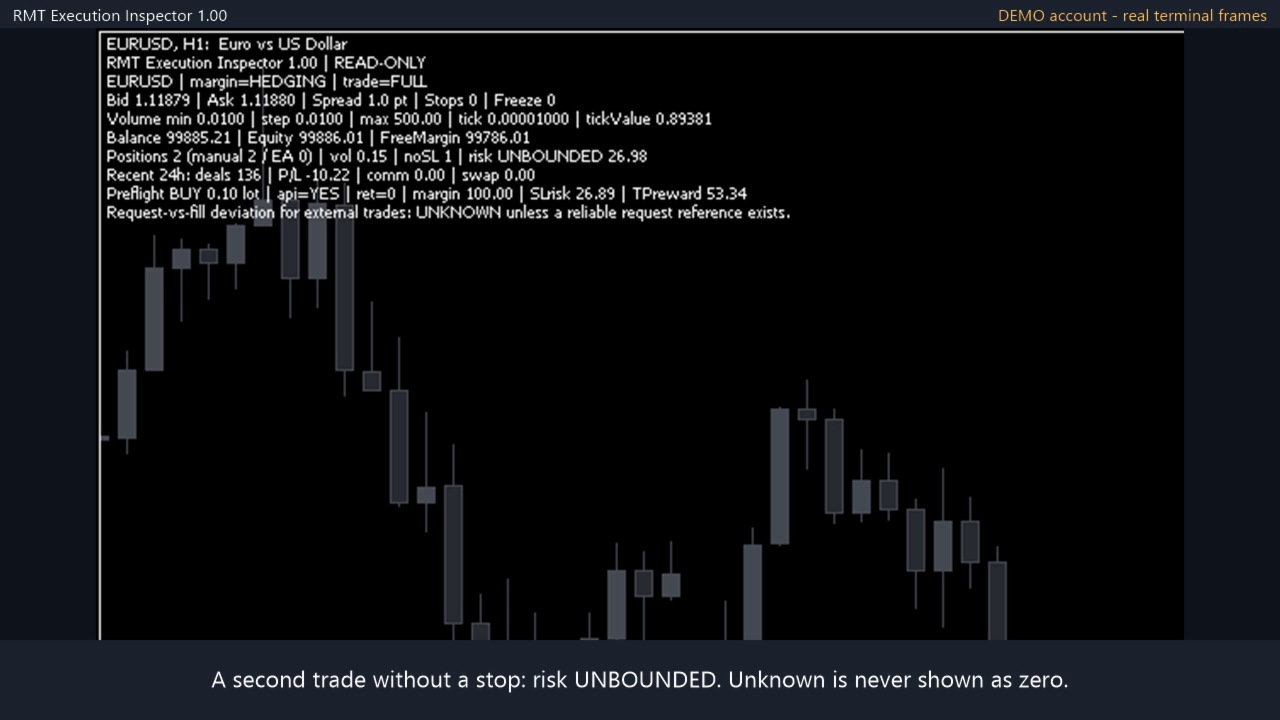
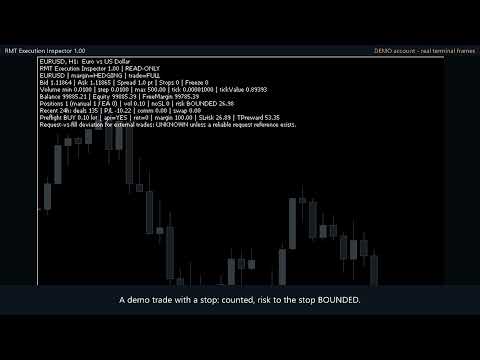
  • Open positions on the inspected symbol: count, manual vs EA split, total volume, number without a stop loss, and open risk to the stop in account currency. If any position has no stop loss the risk state reads UNBOUNDED; if a value cannot be calculated it reads UNKNOWN, never zero.
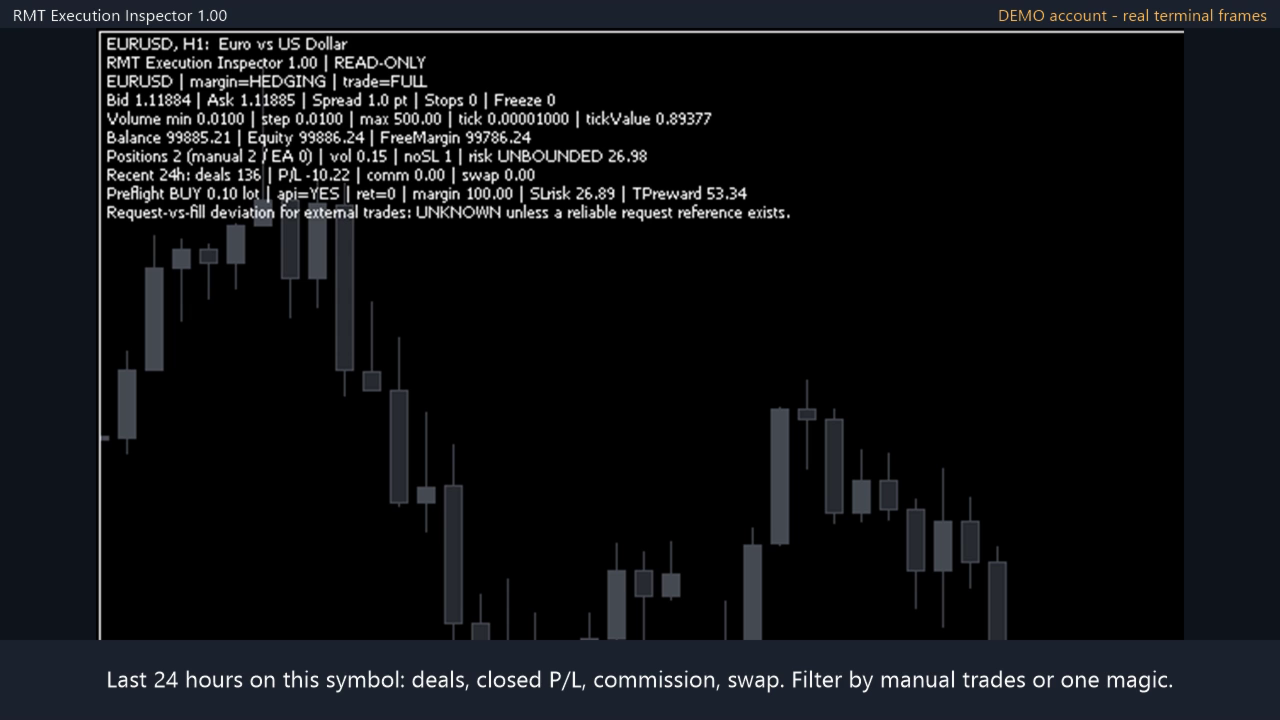
  • Recent history on the inspected symbol: number of deals, profit and loss, commission and swap over a look-back window you choose (1 to 720 hours).
  • Optional magic filter: all positions, manual only, or one EA's magic number.

How it works

Attach it to a chart. By default it inspects the chart symbol; you can type another symbol in the inputs. It refreshes on a timer (1 to 60 seconds) and after each trade event, prints the panel on the chart and logs changes to the Experts journal. To inspect several symbols, attach one instance per chart.

What kind of tool this is

It is a check you run before trading a symbol: what the broker allows and what the terminal answers for your order size. It is not a log of past fills: it does not measure slippage, latency or execution quality of orders already executed.

What it is not

  • It does not open, modify, close or hedge positions.
  • It does not predict slippage, spread or fill price. OrderCheck is the terminal's pre-check, not a promise that a real order will be filled.
  • It is not a whole-account portfolio monitor: positions and history are reported for the inspected symbol only.
  • It makes no profitability or performance claims.

Scope and safety

  • No DLLs, no WebRequest, no external services.
  • The source contains no OrderSend call and no trade library; read-only behaviour is covered by automated tests.
  • Screenshots are real demo-account panels.

Start on a demo account. Leveraged trading involves risk of loss.
Рекомендуем также
EA PERFORMANCE PANEL — your trading on one screen. Which robot is carrying the account, which one is bleeding, and what the months behind them look like, drawn over your chart. A balance is an average, and averages hide things. This reads your closed trades and splits that single number back apart, by Magic Number. This is the free edition. It runs on a live chart, on your real account, not only in the Strategy Tester. THE PROBLEM MetaTrader shows you one number: account profit. Run three EAs an
FREE
Smart Remote Trade Assistant MT5: Панель удаленной торговли через Telegram для MetaTrader 5 Smart Remote Trade Assistant MT5 — это продвинутая панель для MetaTrader 5, разработанная для трейдеров, которым необходимо быстро, безопасно и удаленно управлять своими операциями непосредственно из Telegram. Получите файл приложения Windows Bridge и инструкцию Файл Bridge необходим для подключения торговой панели Telegram к советнику MT5. Совместимо с Windows 10 и Windows 11 — 64-бит — и Windows Serv
MultiChart Pro
Pablo Filipe Soares De Almeida
MultiChart Pro – Инструмент управления графиками для MetaTrader 5 Этот советник (EA) позволяет автоматизировать открытие и настройку графиков в MetaTrader 5. Поддерживает настройку до четырех графиков с указанными таймфреймами и шаблонами, включая офлайн-графики. Функциональность Открытие графиков: Открывает до трёх дополнительных графиков (например, D1, M1, M15) и один офлайн-график (например, 10 секунд), а также настраивает текущий график (например, M5). Применение шаблонов: Применяет пользова
Is your trade at a loss? Does not matter ! You can use this Extra martingale tool.  In the set loss of your trade or your EA's trade , this tool will open another trade at a better price. It can also open multiple trades at different distances and with different lot sizes. Each trade will be assigned a TakeProfit. This tool has a lot of settings. You can set variable lot sizes, variable trade distances, variable TakeProfit sizes, maximum total profit or loss in money. You can also close trades
Trade Control Panel
Jerry Jilun Anak Liban
Trade Control Panel Function Normal One Click Function Close All Close All Profit Close All Loss Close All Pending Order Close All Sell Close All Buy Advance One Click Function 1.  Close Partial Lot Sell by Percent It will help you partial close for all open position by desire percent you wanted. No longer partial close one by one for every open position Manual input for desire percent 2. Close Partial Lot Buy by Percent It will help you partial close for all open position by desire percent
Horizontal Line Trade Assistant EA  Semi-Automated Trading Assistant      IMPORTANT :     On the main/purchased program a user can click on the Horizontal line and change it to Buy or Sell, and drag by double clicking on it. Please keep in mind that this option is not available on demo version, due to some restrictions/limitations of Strategy Tester, some Object related operations are not available in the  Strategy Tester. But, it will not prevent you from Testing, please drop an Object to chart
TradeGramBot
Mario Fuentes Valenzuela
Telegram Bot EA This Expert Advisor (EA) is a powerful tool that allows traders to receive Telegram notifications, manage Drawdown alerts, set up charts, and much more, all directly from the MetaTrader 5 platform. The Expert Advisor (EA) tool, integrated with Telegram, offers extensive customizable options to enhance your trading activities. The product allows you to display the signal name in the messages for easy tracking. It further provides the feature of sending the MQL5 link, either with
Haven MT5 to Telegram 2.0 — публикация сделок MT5 в Telegram Haven MT5 to Telegram — утилита для автоматической публикации торговых событий MetaTrader 5 в Telegram. Она отслеживает открытие и закрытие позиций, изменения Stop Loss и Take Profit, частичные закрытия и события отложенных ордеров. Сообщения могут дополняться скриншотами графика, Trade ID и результатом сделки. Инструкция   |   Другие мои продукты ->  ЗДЕСЬ . Что нового в Haven MT5 to Telegram  2.0 Версия V2 получила новый интерфейс и
Signal Provider Utility Pro (Telegram & Discord) The Professional Solution for Signal Providers. Automated Broadcasting | Smart GUI Panel | Performance Reports Stop managing your signals manually. Signal Provider Utility Pro is the realiable bridge between your MetaTrader 5 terminal and your community on Telegram and Discord. Designed for high-performance signal services, this tool gives you instant control over your broadcasts without ever needing to open the settings window. From real-time tr
AutoJournal MT5
Sergio Marquez Uroz
Ваш журнал сделок ведется за вас. Каждая закрытая сделка записывается автоматически — со скриншотом графика, полной статистикой и календарной панелью. 100% локально, без подписок. AutoJournal — это утилита, которая незаметно работает в фоновом режиме и превращает вашу торговую историю в профессиональный HTML-журнал. Никакого ручного ввода данных, никаких таблиц, никаких внешних сервисов: все создается и хранится на вашем собственном компьютере и работает одинаково, торгуете ли вы вручную или с п
Orydax Keldrix — XAUUSD Expert Advisor for MetaTrader 5 Turn a demanding market routine into a clear, automated process. Orydax Keldrix is a liquidity-structure breakout strategy for MetaTrader 5, with XAUUSD M15 as the recommended starting setup. It follows the market continuously, waits for a defined liquidity structure with room for expansion, and handles the trading workflow when its confirmation process is complete. It is designed for users seeking selective structure-based breakout exposu

T Manager, the ultimate trade management solution designed by traders for traders. If you are searching for a simple and efficient trade panel, trade manager, or trade assistant, you are at the right place.   The market contains a diverse number of those tools , but this one is designed by traders for traders . I designed this tool, and I am using it daily. Take my advice and stop buying tools blended with un-useful features that you will never use,   T Manager provides you with the essential y

Visual Trade Manager for MT5 is an interactive trade execution and position management tool designed for traders who want fast chart-based control over risk and execution. The panel provides a visual trade box with entry, stop and target lines directly on the chart. Position size is calculated from the selected risk percentage, and the tool supports both market execution and pending order placement. Main features - BUY and SELL switching directly from chart buttons - Draggable Entry, Stop and
XAUUSD Smart Strategy EA Price Action • Market Structure • Fibonacci • Smart Risk Management XAUUSD Smart Strategy EA is a professional MetaTrader 5 Expert Advisor designed specifically for Gold (XAUUSD) , combining Price Action, Market Structure, Dynamic Fibonacci analysis, trend confirmation, momentum filters, volatility analysis and advanced trade management into one integrated trading system. The EA is designed to identify structured trading opportunities rather than relying on a single tech
DGem Trade Manager Panel
Damien Jean Michel Gremillet
Trade Manager Panel ## Short description  Manage your manual trades with one click: automatic break-even, trailing stop, two-level partial close and risk-based lot sizing — all from a single on-chart panel. --- ## Full description Trade Manager Panel is an on-chart utility that takes care of your open trades so you can focus on the market instead of the order ticket. Drop it on any chart and it manages every position on that symbol automatically, while an interactive panel lets you size new
RiskPilot Pro
Mohamed Zein Mohamed Zein Soliman
RiskPilot Pro Plan risk clearly. Execute efficiently. Manage positions from one professional MT5 dashboard. RiskPilot Pro is a visual trade-planning and position-management utility for MetaTrader 5. It helps manual traders define risk before entry, calculate position size, place market or pending orders, and manage open positions from one chart panel. Important: RiskPilot Pro does not generate trading signals and does not choose trade direction. The trader defines the setup and remains responsib
One Click Trader  is a tool designed for MetaTrader 4 platform, which enables you to take your trading to the next level. It enables you to open, manage and close your trades in simple an efficient way by just one click of your mouse button. "-"   ,  "+"  change OCT window size  Up arrow minimizes the OCT panel Down arrow maximizes the OCT panel Right arrow displays the next panel with additional features Left arrow hides the panel with additional features Red  SELL  button enables you to open s
Добрый день, уважаемые трейдеры! Я ваш помощник в торговле. Кратко скажу, а затем расскажу о моих сильных сторонах: Я специализируюсь на управлении вашим портфелем, и независимо от того, с какой стороны вы открываете ордер, я могу немедленно добавить для вас разумные стоп-лоссы и скользящие стопы. 2. Я могу помочь вам избежать спекуляции и поспешных действий, устраняя с корня слабость человеческой природы, которая не позволяет придерживаться принципов. 3. Я отправлю вам уведомление на MT5 - кли
Broker XRay
Joao Jara Carvalho
BROKER XRAY — Аудит качества исполнения Узнайте, что скрывает ваш брокер. Оценка от A+ до F. Большинство трейдеров никогда не знают, тихо ли их брокер истощает их преимущество: расширение спреда на ролловере, асимметричное проскальзывание, скрытые реквоты, всплески задержки во время новостей. Broker XRay предоставляет дашборд в стиле Bloomberg, который отслеживает всё это в реальном времени. Запустите на 24 часа. Узнайте правду. Что измеряется (6 взвешенных параметров) Спред   — средний, максима
Click Risk
Evgenii Pchelintsev
Задай риск в %, кликни по графику (в режиме Market): клик – стоп, клик - тейк. Лот посчитается сам. ОПИСАНИЕ: Click Risk это минималистичная торговая панель прямо на графике MetaTrader 5. Ты задаёшь риск, кликаешь по трём ценам (в режиме Limit) и лот считается автоматически. Без калькуляторов, без ручного ввода лота, без окна ордера, без лишних действий. КАК ОТКРЫВАЕТСЯ СДЕЛКА 1. Задай риск в % кнопками − / + (по умолчанию шаг 0,5, его можно изменить в настройках, минимум 0,1). 2. Нажми BUY ил
FREE
Trade Panel HotKey – MT5 Scalping Utility Fast Trade Panel HotKey is a lightweight MT5 trading utility designed for traders who need to open, manage, and close positions as quickly as possible . The main purpose of this tool is to reduce the time between a trading decision and execution. Instead of moving the mouse, opening order windows, or manually modifying multiple positions, most important actions can be performed instantly through customizable keyboard hotkeys or directly from the compact
Why choose Trading Pal EA: This is a EA utility that auto-manage your   positions ' Stop-Loss (SL) and Take-Profits (TP) dynamically. When opening a single   position , it is easy to set the SL and TP manually. But when dealing with multiple   positions , it can be very tedious or   overwhelming   to fill in so many SL and TP values consistently, especially in a short span of time, like in scalping. Over time and after many such trades, trading itself can become a chore. That is where this EA c
Close Assistant 5
Gheis Mohammadi
5 (2)
Close Assistant (CA)  is a full featured utility for monitoring and closing a set of positions placed by trader or EA. It closes filtered orders in specified time or level or candle patterns or when a certain profit or loss of the total positions is reached. CA uses Zero Profit Lock function to save deposit when total profit falls to zero. Profit and loss levels can be set in fixed amount of account currency or percentage of balance or equity or margin. CA only monitors and works on filtered pos
Aizen Trade Manager Pro
Japhet Eisenhdorf Pascua Jabulin
Aizen Trade Manager Pro Professional Trade Management for Traders Running Multiple Positions Opening a trade is the easy part. Managing it correctly—especially when you have several positions open at the same time—is where consistency is won or lost. Aizen Trade Manager Pro is a professional button-driven trade management panel that runs directly on your MetaTrader 5 chart. It does not generate signals, predict market direction, or execute trading strategies. Instead, it simplifies every repetit
PROP PILOT — Prop Firm & Funded Account Risk Manager for MetaTrader 5 PropPilot — профессиональная система управления риском счета, ручного исполнения сделок и управления позициями в MetaTrader 5, разработанная для трейдеров, работающих с Prop Firm Evaluations, Funded Accounts и личными счетами со строгими лимитами риска. На таких счетах найти хороший вход недостаточно. Необходимо одновременно контролировать Daily Drawdown, Maximum Drawdown, открытую экспозицию, размер позиции, дневные лимиты,
Pattern Recognition EA - From Learn to Earn. The market repeats itself. This EA finds every past repeat of the current candle sequence - and lets history vote the direction. ONE SHAPE. EVERY REPEAT IN HISTORY VOTES. The last N candles on your signal timeframe form a shape. The EA scans the history you choose - a fixed number of bars or everything your broker provides - for the SAME shape, and checks what happened next, every single time. Only when enough repeats exist AND a clear majority of t
Blade Position Manager Pro – MT5 Trade Management Utility Take Control of Your Trades with One Professional Dashboard Blade Position Manager Pro is a MetaTrader 5 trade management utility designed to help traders manage open positions, control risk, protect floating profits, and simplify everyday trading operations. Whether you trade Gold (XAUUSD), Forex, indices, or other supported instruments, Blade Position Manager Pro provides practical tools for managing your trades from a compact, easy-to-
Помогает оставаться в пределах лимитов убытка фондированного или челлендж-счёта — с ремнём безопасности, который застёгивается сам. PRO автоматически отправляет приказ на закрытие каждой открытой позиции по символу графика в тот же миг, когда нарушен лимит дневного убытка или максимальной просадки, и не принимает нажатия собственных кнопок ордеров, пока счёт остаётся за пределами лимита. Плюс BUY / SELL в один клик с самым большим лотом, который разрешают ваши собственные правила прямо сейчас, и
A simple script that closes all current orders. Terminate once close all positions, so no worries about constantly closing your order. How to use : Drag the script from the navigator to the chart, and it will be activated. Do remember to enable algo trading to use this script. There are different version of the script that can choose whether to close all buy/sell posiitons, if you need this, do contact me in MQL5.
Утилита предназначена для отображения на графике маржинальных зон, построенных на основе маржинальных требований на фьючерсы Чикагской товарно-сырьевой биржи (CME). Данные зоны являются хорошими уровнями сопротивления и поддержки, что видно на представленных скриншотах. Настройка После установки необходимо разрешить URL http://update.marginzones.com в настройках терминала, чтобы разрешить загрузку обновлений маржинальных требований. Как использовать Дождитесь закрытия американской сессии выше зо
С этим продуктом покупают
Trade Assistant MT5
Evgeniy Kravchenko
4.43 (216)
Помогает рассчитать риск на сделку, простая установка нового ордера с помощью линий, управление ордерами с функциями частичного закрытия, 7 типов трейлинг-стопа и другие полезные функции. Дополнительные материалы и инструкции Инструкция по установке - Инструкция к приложению - Пробная версия приложения для демо счета Функция Линии   - отображает на графике линию открытия, стоп-лосс, тейк-профит. С помощью этой функции легко установить новый ордер и увидеть его дополнительные характеристики пе
Добро пожаловать в Trade Manager EA — лучший инструмент для управления рисками, предназначенный для упрощения, точности и эффективности торговли. Это не просто инструмент для размещения ордеров; это комплексное решение для удобного планирования торгов, управления позициями и усиленного контроля над рисками. Независимо от того, начинающий вы трейдер, опытный специалист или скальпер, нуждающийся в быстром исполнении, Trade Manager EA адаптируется к вашим потребностям и работает с любыми активами:
Local Trade Copier EA MT5
Juvenille Emperor Limited
4.94 (149)
Local Trade Copier EA MT5 — это быстрый и гибкий копировщик сделок для копирования и управления сделками между несколькими счетами MetaTrader 5 на одном компьютере с Windows или Windows VPS. Он сочетает локальную синхронизацию сделок с настройками на стороне Receiver для управления размером лота, рисками, фильтрацией сделок, сопоставлением символов, управлением сделками и защитой счета. Настройте терминалы Transmitter и Receiver примерно за 1 минуту и копируйте ручные сделки или сделки, открыты
Telegram to MT5 Multi-Channel Copier   автоматически копирует торговые сигналы из ваших Telegram- и Discord -каналов прямо в MetaTrader 5. Без ботов, без браузерных расширений, без ручного копирования. Сигнал приходит в Telegram или Discord — и советник открывает сделку в вашем терминале за считанные секунды. А перед тем как копировать канал, встроенный бэктестер покажет, что этот канал сделал бы на вашем счёте. Продукт состоит из двух компонентов: приложения для Windows, которое слушает ваши Te
================================================================================ POC BREAKOUT - V20.72. Full Professional Grade Toolkit ================================================================================ POC Breakout is a full MetaTrader 5 trading dashboard for discretionary traders who want breakout signals, Point of Control (POC) context, volume profiles, order flow, market structure, news, alerts, and advanced trade planning in one professional workspace. Attached directly to you
TradePanel MT5
Alfiya Fazylova
4.88 (170)
Trade Panel — это многофункциональный торговый помощник. Приложение содержит более 50 торговых функций для ручной торговли и позволяет автоматизировать большинство торговых операций. Инструкция к приложению: https://www.mql5.com/ru/blogs/post/756476 Пробная версия приложения для демо-счета: https://www.mql5.com/ru/blogs/post/750864 Как установить приложение: https://www.mql5.com/ru/blogs/post/750096 Как тестировать приложение в визуальном режиме: https://www.mql5.com/ru/blogs/post/770274 Как уст
The Patch
Mian Rameez Ali
The Patch It never opens a trade. It walks behind the ones that did. Every open position, every pending order — checked twice a second for the one thing that's easy to forget: a stop, a target. Found bare, it doesn't ask. It writes the missing number in, measured in points from wherever the position began, and moves on to the next. No strategy, no opinion on direction. Just the quiet assumption that nothing should ever sit on the market unprotected — not because someone decided it shouldn't,
Floor Watch
Syed Tauqeer Hussain Shah
Floor Watch One number, watched every thirty seconds: how far equity has fallen since the day began — or since its highest point, if it's told to trail the peak instead of the open. Cross the line and it doesn't argue. Every open position closes, every pending order vanishes, and anything that slips through afterward gets shut the moment it appears. Not asked. Removed. The floor holds until the clock turns 5 AM Pakistan time — then, and only then, does the day start over. One rule. No except
Копируйте сигналы из Telegram по своим торговым правилам Telegram to MT5 Signal Trader автоматически копирует текстовые торговые сигналы из открытых и закрытых каналов и групп Telegram в MetaTrader 5. Управляйте несколькими поставщиками сигналов и счетами MT5 из одного приложения для компьютера, задавая индивидуальные параметры риска и торговли для каждого поставщика . Для копирования не нужны бот Telegram и настройка API. Просто войдите в свой аккаунт Telegram по номеру телефона или QR-коду и в
Power Candles Strategy Scanner — самооптимизирующийся инструмент для поиска настроек по нескольким инструментам Power Candles Strategy Scanner использует тот же самооптимизирующийся движок, что и индикатор Power Candles — для всех символов в вашем Market Watch, одновременно. На одной панели отображается информация о том, какие символы в данный момент являются статистически торгуемыми, какая стратегия выигрывает на каждом из них, оптимальная пара Stop Loss / Take Profit, а также отправляется увед
The product will copy all telegram signal to MT5 ( which you are member) , also it can work as remote copier.  Easy to set up, copy order instant, can work with almost signal formats, image signal,  s upport to translate other language to English Work with all type of channel or group, even channel have "Restrict Saving Content", work with  multi channel, multi MT5 Work as remote copier: with signal have ticket number, it will copy exactly via ticket number. Support to backtest signal. How to s
Одна покупка — все мои индикаторы для MT4 и MT5, уже доступные и выпущенные в будущем, без дополнительной оплаты. После покупки свяжитесь со мной, чтобы узнать, как их получить. Планируется повышать цену на 50$ после каждых 10 покупок, до 999$. Действует цена Market на момент оформления покупки. Сохраните индикатор, которому доверяете. Автоматизируйте работу с ним. Ваш сигнал. Ваши правила. Ваше исполнение. У вас уже есть надежный индикатор MT5, но приходится следить за графиком, ждать сигнала,
Welcome to ENTRY IN THE ZONE with SMC MULTI TIMEFRAME SPECIAL BENEFIT / FOR OUR MQL5 CUSTOMERS FREE ACCESS TO THE NEW TOOL  — COMING SOON — Learn more on our official website  : https://www.fableedge.net Entry In The Zone with SMC Multi Timeframe is a real-time market analysis tool based on Smart Money Concepts (SMC), designed to analyze market structure, price direction, and key trading zones. It supports both Single-Timeframe and Multi-Timeframe Analysis, providing a clearer view of overall ma
Quant AI Agents
Ho Tuan Thang
5 (1)
Quant AI Agents are independent trading Expert Advisors. Instead of trading using a fixed strategy like other conventional EAs, Quant AI Agents   is a   multi-agent AI trading framework   that turns natural-language strategy prompts into live.  WANT THE SAME RESULTS AS MY LIVE SIGNAL?   Use the exact same brokers I do:   IC MARKETS , IC TRADING   .  Unlike the centralized stock market, Forex has no single, unified price feed.  Every broker sources liquidity from different providers, creating un
Daily Trading Limiter
AL MOOSAWI ABDULLAH JAFFER BAQER
5 (8)
• Please test the product in the Strategy Tester before purchasing to understand how it works. • If you face any issues, contact me via private message—I’m always available to help. • After purchase, send me a screenshot of your order to receive a FREE EA as a gift. Daily Trading Limiter — the rule you cannot break Every trader knows the number. Three trades. Two percent. One bad day and stop. And every trader has watched themselves take the fourth trade anyway. The problem was never knowing th
Grid Manual MT5
Alfiya Fazylova
4.73 (22)
Grid Manual — это торговая панель для работы с сеточными стратегиями. Утилита универсальная, имеет гибкие настройки и понятный интерфейс. Работает с сеткой ордеров не только в сторону усреднения убытков, но и в сторону наращивания прибыли. Трейдеру не нужно создавать и сопровождать сетку ордеров, это сделает утилита. Достаточно открыть ордер и Grid manual автоматически создаст ему сетку ордеров и будет сопровождать его до самого закрытия. Полная инструкция и демо-версия здесь . Основные особенно
Telegram To MT5 Ultra
Mirel Daniel Gheonu
5 (5)
Telegram To MT5 — копировщик сигналов Превратите торговые сигналы из ваших Telegram-каналов в реальные ордера MT5 — автоматически, на любом количестве счетов, с полным контролем над риском и правилами. Telegram To MT5 связывает VIP / сигнальные каналы, на которые вы уже подписаны в Telegram, с вашим терминалом MetaTrader 5. Бесплатное приложение-компаньон для ПК читает сообщения (даже из каналов, которые не допускают ботов), а этот советник исполняет их на вашем счёте — применяя ваши настройки р
VirtualTradePad PRO SE MT5 — профессиональный торговый центр управления для MetaTrader 5 VirtualTradePad PRO SE — это премиальная торговая панель и рабочая среда управления сделками на графике для MetaTrader 5 . Она создана для трейдеров, которым нужны более быстрое исполнение, более понятный контроль позиций, структурированное управление сделками, визуальное планирование уровней и профессиональный рабочий процесс прямо с графика. Это не просто панель BUY / SELL. PRO SE объединяет ручную торговл
Seconds Chart MT5
Boris Sedov
4.61 (18)
Seconds Chart - уникальный инструмент для создания секундных графиков в MetaTrader 5 . С помощью Seconds Chart вы можете построить график с таймфреймом, заданным в секундах, получая идеальную гибкость и точность анализа, недоступную на стандартных минутных или часовых графиках. Например, таймфрейм S15 обозначает график со свечами продолжительностью 15 секунд. Вы можете использовать любые индикаторы и советники с поддержкой пользовательских символов. Работать с ними так же удобно, как и на станда
FUTURES ORDERFLOW FOOTPRINT CHART Professional OrderFlow EA for MetaTrader 5 Version 1.01| Professional tool for real traders | Institutional-Grade Visualization STRATEGY TESTER USERS - PLEASE SELECT EVERY REAL TICK WHEN TESTING AND YOU HAVE DOWNLOADED HISTORICAL DATA. IF YOU SEE A WAITING SCREEN AND IT IS NOT DOWNLOADING, IT MEANS YOU HAVE LOW HISTORICAL DATA. TRY 1 MIN AND 5 MIN FIRST ON 1 DAY DATA. ONE DAY DATA SHOULD BE THE NEWEST AND MOST CURRENT DATE. PLEASE WAIT UNTIL THE MARKET HAS ROL
Exp COPYLOT CLIENT for MT5
Vladislav Andruschenko
3.97 (35)
Профессиональный копировщик сделок для MetaTrader 5 Быстрый, профессиональный и надежный копировщик сделок для MetaTrader . COPYLOT позволяет копировать сделки Forex между терминалами MT4 и MT5 с поддержкой счетов Hedge и Netting . Версия COPYLOT для MT5 поддерживает: - MT5 Hedge → MT5 Hedge - MT5 Hedge → MT5 Netting - MT5 Netting → MT5 Hedge - MT5 Netting → MT5 Netting - MT4 → MT5 Hedge - MT4 → MT5 Netting Версия MT4 Полное описание + DEMO + PDF Как купить Как установить Как получить файлы жур
Trade Dashboard MT5
Fatemeh Ameri
4.94 (135)
Trade Dashboard simplifies how you open, manage, and control your trades, with built-in lot size calculation. It allows you to execute trades, manage risk, and control positions directly on the chart, with tools such as partial close, breakeven, and trailing stop. Designed to reduce manual work and help you stay focused on your trading decisions. A demo version is available for testing. Detailed explanations of features are provided within the MQL5 platform. Installation instructions are include
Anchor Trade Manager
Kalinskie Gilliam
5 (9)
Your EAs cannot see each other, but Anchor can. Anchor gives you one place to coordinate your EAs, manage risk, and decide when trading is allowed. It works alongside the trading bots you already use without any changes to them. The Problem One EA opens a trade. Then another starts trading. The next thing you know, you wake up to multiple grids built across your account. Each EA may be doing exactly what it was designed to do, but together they can place far more risk on your account than you in
Trade Manager DaneTrades
Levi Dane Benjamin
4.23 (30)
Trade Manager, который поможет вам быстро входить и выходить из сделок, автоматически рассчитывая риск. Включает функции, которые помогут предотвратить чрезмерную торговлю, торговлю из мести и эмоциональную торговлю. Сделками можно управлять автоматически, а показатели эффективности счета можно визуализировать в виде графика. Эти функции делают эту панель идеальной для всех трейдеров, занимающихся ручной торговлей, и помогают улучшить платформу MetaTrader 5. Многоязычная поддержка. Версия для МТ
The News Filter MT5
Leolouiski Gan
4.78 (23)
Этот продукт фильтрует всех экспертных советников и ручные графики во время новостей, так что вам не нужно беспокоиться о внезапных скачках цены, которые могут разрушить ваши ручные торговые настройки или сделки, введенные другими экспертными советниками. Этот продукт также поставляется с полной системой управления ордерами, которая может обрабатывать ваши открытые позиции и ордера на ожидание перед выпуском новостей. После покупки   The News Filter   вам больше не придется полагаться на встроен
Astro Trade MT5
Indra Maulana
5 (8)
25% discount on the release of the tool: only for the next 3 buyers Send a message to receive a demo version. AstroTrade Trading Assistant AstroTrade is a comprehensive multi-functional trading utility developed for the MetaTrader 5 platform. It integrates essential tools for trade execution, risk management, and technical monitoring into a single unified interface. The application is designed to assist traders in managing their daily operations through a visual and structured environment. Vi
Premium Trade Manager - Торговая панель со встроенным коучем Premium Trade Manager помещает торгового коуча прямо в ваш график, а под ним работает полноценный движок исполнения. Настройте сделку так, как вы всегда это делаете, затем позвольте Max, вашему ИИ-наставнику по трейдингу, прочитать именно эту настройку с учётом вашего живого счёта и дать чёткое заключение до того, как вы входите: соответствует ли стоп дисциплинированному подходу, разумен ли риск, не выходит ли высоковолатильный релиз ч
YuClusters
Yury Kulikov
4.93 (43)
Внимание: Ознакомиться с работой программы можно с помощью бесплатной версии  YuClusters DEMO . YuClusters это профессиональная система анализа рынка. Для трейдера открываются уникальные возможности анализа потока ордеров, объемов торговли, движения цены используя различные графики, профили, индикаторы, графические объекты. YuClusters оперирует данными на основе ленты сделок или тиковой информации, в зависимости от того, что доступно в котировках финансового инструмента.  YuClusters позволяет с
Торговая панель для MetaTrader 5 — профессиональная торговля в один клик с графика и клавиатуры Мощная торговая панель для активного ручного трейдинга, которая позволяет открывать, сопровождать и закрывать сделки значительно быстрее и удобнее, чем стандартными средствами MetaTrader. Панель создана для тех, кто хочет получить полный контроль над позициями, ордерами, прибылью и торговыми сценариями в одном рабочем пространстве. Это не просто вспомогательная утилита. Это полноценный торговый интер
Signal TradingView to MT5 Pro Automator Мгновенное профессиональное исполнение между TradingView и MetaTrader 5 Автоматизируйте свою торговую стратегию с помощью самого надежного моста связи между алертами TradingView и реальным исполнением в MT5. Разработанный для трейдеров, которым требуются скорость, гибкость и безупречное управление рисками, этот советник (Expert Advisor) превращает любое сообщение с алертом в точный рыночный или лимитный ордер. ПРЕИМУЩЕСТВА И СИЛЬНЫЕ СТОРОНЫ Универсальный д
Другие продукты этого автора
RMT Capital Firewall
Denis David Garcia Camejo
RMT Capital Firewall is a risk guard for MetaTrader 5. It watches daily loss, drawdown, an equity floor, open risk and positions without a stop loss, warns before a limit, and — only if you authorise it — closes the positions in the scope you chose and stays latched until you re-arm. Every decision is recorded as a structured audit line in the Experts journal. The problem it solves A daily-loss or drawdown rule is easy to write down and hard to keep when a position is running against you, or whe
RMT Exposure & Stress Matrix shows what all the open positions of your account add up to: net and gross exposure per currency and per symbol in your account currency, and what you would lose if every position moved 1, 2 or 3 ATR against you or one currency moved 1 %. It is read-only and never sends an order. The problem it solves Three trades that look independent can be the same bet. Long EURUSD, long GBPUSD and long gold are all short the dollar. The Trade tab lists positions one by one; it d
RMT Strategy Health Monitor reads the closed trades of one EA, or of your manual trading, from the account history and tells you whether the recent run is still consistent with that strategy's own earlier trades. It resamples the baseline inside the terminal and shows where the recent result falls. Read-only. The problem it solves Every strategy has losing runs. The hard question while one is happening is whether it is a normal bad patch or the strategy has stopped working. Looking at the equit
RMT Position Guardian
Denis David Garcia Camejo
RMT Position Guardian is a trade manager for MetaTrader 5 positions that are already open: automatic breakeven, trailing stop and partial close, for manual trades or for one EA's magic number. It opens nothing, never closes a position completely and leaves every position outside the scope you chose untouched. The problem it solves You open a trade by hand, or an EA opens it, and then you have to watch it: move the stop to breakeven, trail it, take part of the profit. Doing it by hand means sitti
RMT Visual Trade Planner
Denis David Garcia Camejo
RMT Visual Trade Planner is a position size calculator and order planner for MetaTrader 5: you plan a trade with three lines on the chart. Drag the stop loss and take profit, and it shows the lot size for your risk, the money at risk, the reward and the margin. The order is sent only after you press SEND and then CONFIRM. The problem it solves Working out the lot size for a given stop and a given risk takes a calculator, and a mistake there costs more than a bad entry. The order window of MetaTr
Фильтр:
Нет отзывов
Ответ на отзыв