Smart Remote Trade Assistant MT5

Smart Remote Trade Assistant MT5: Remote Trading Panel via Telegram for MetaTrader 5

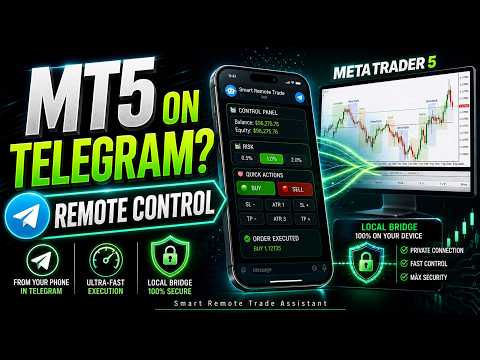
Smart Remote Trade Assistant MT5 is an advanced panel for MetaTrader 5, designed for traders who need to control their operations quickly, securely, and remotely directly from Telegram.

It is necessary to use a Windows Bridge App (Tutorial and download available Here) for compatibility with Windows 10 and Windows 11 (64-bit). For VPS environments, use Windows Server 2016 or later

This is the introductory price, as we are still in the beta phase. The price will increase every 10 sales. Hurry and get your copy now!

Unlike traditional MQL5 panels—which function solely within the trading terminal—this assistant allows you to place orders, adjust risk, configure entry parameters, manage open trades, view chart snapshots, and control key trading functions simply by tapping buttons on the Trade Assistant interface on your phone, or by directly typing commands just as if you were chatting. (The integrated text recognition feature is currently in Beta mode, though it is under constant development and improvement.)

The system operates via an encrypted local bridge, ensuring the connection remains secure within the user's own environment. It is not a trading robot that makes decisions on your behalf; rather, it is a remote execution, control, and management tool created for traders seeking greater speed, convenience, and control over their trading operations and risk management within MT5.


  • Remote control of MetaTrader 5 directly from Telegram.Order execution via chat commands. (Currently under development; being continuously improved to recognize and interpret a wider range of text inputs in both Spanish and English.)
  • Visual control panel accessible within Telegram—either on your mobile device or via the Telegram Desktop App for Windows—enabling rapid trade management.
  • Configuration of risk parameters, Stop Loss (SL), Take Profit (TP), and Risk-to-Reward ratios. (Supports various methods such as ATR, Highs/Lows, placing SL at the low of the last 'x' candles plus a buffer, etc.)
  • Supports up to 5 distinct Take Profit levels per trade, intelligently distributing the selected risk across these targets.
  • Chart snapshots sent directly to your Telegram chat.
  • Selection of trading symbols and timeframes directly from the remote panel.
  • Loading and removal of technical indicators directly via Telegram.
  • Comprehensive management of open trades, including setting Break-Even points, closing trades for profit, and closing all positions for a specific symbol or across the entire trading account.
  • Encrypted local bridge ensuring a highly secure connection.
  • Ideal for traders utilizing a VPS, or for those who prefer not to be constantly tethered to their computer or desk—offering complete freedom of movement!
  • Monitoring and visual display of trading sessions.
  • This is not an automated trading robot; it is a remote assistant designed for control, execution, and management purposes.
  • We are currently in the Beta phase; the Account Guard sub-panel has not yet been developed. We will be adding a News Filter, a Drawdown Monitor, and more to make it Prop Firm-friendly.


Control your trading on MetaTrader 5 from Telegram—wherever you are. Smart Remote Trade Assistant MT5 was created to solve one of the biggest problems faced by active traders: the constant reliance on a PC to execute, modify, or monitor trades. Many trading panels on MQL5 are useful, yet they share a clear limitation: you must be physically seated in front of your computer or laptop monitor.

With Smart Remote Trade Assistant MT5, you can place market orders, configure visual setups, adjust risk levels, modify Stop Loss (SL) and Take Profit (TP) levels, select trading symbols, switch timeframes, load indicators, view chart snapshots, and manage your trades—all quickly and conveniently—directly from Telegram on your mobile phone.

Simply tap the buttons on the trading panel within your phone interface, or type out commands as if you were speaking* directly to your trading assistant (*Text recognition currently supports English and Spanish; this feature is continuously being improved to understand the widest possible range of trading terms).

You can open a buy position, request an image of the current chart, change the active trading symbol, load a specific indicator, close profitable trades, or set up a trade based on a specific risk-to-reward ratio.

The major advantage lies in its remote control capability. You no longer need to constantly log in to your VPS, you aren't tethered to your monitor, and you won't miss out on trading opportunities simply because you don't have your trading terminal right in front of you.

Your MT5 terminal continues to run on your local computer or VPS, while you maintain full control over its core functions directly through Telegram.

The system establishes a connection via an encrypted local bridge, designed to ensure a secure link within the user's own environment. This facilitates a more secure channel of communication between Telegram and MetaTrader 5, without unnecessarily exposing the tool to external vulnerabilities.

Smart Remote Trade Assistant MT5 does not promise guaranteed profits, nor does it trade on your behalf. Instead, it offers you something far more valuable: speed, control, organization, and remote access to your trading panel.

It is a tool specifically designed for traders who already possess a solid trading strategy but are seeking a more efficient method for executing and managing their trades.

If you have ever missed a trade entry because you weren't sitting at your computer, if you’ve had to log into your VPS just to make a minor adjustment to an open trade, or if traditional MT5 trading panels have fallen short because they function only while you are physically inside the terminal—then this trading assistant was built with you in mind. Smart Remote Trade Assistant MT5 transforms Telegram into a remote control center for your trading on MetaTrader 5.

You can place orders, check your account status, switch symbols, select timeframes, display sessions, request chart screenshots, manage open trades, and prepare visual setups—all without relying directly on your computer screen. While other panels are limited to buttons within MT5, this system adds a true remote layer. You can work from your mobile device, receive confirmations, execute actions, and maintain control over your trading with greater convenience.

It is ideal for traders who use a VPS, those who monitor multiple sessions, traders who prefer not to keep the terminal open constantly, and users seeking a more practical dashboard than traditional trading assistants.

The remote panel for traders who require real, remote control over MT5.

Smart Remote Trade Assistant MT5 is a professional tool for MetaTrader 5 that combines a visual dashboard, rapid execution, risk management, and remote control via Telegram.

Designed for traders who value speed, security, and convenience, this assistant allows you to control key trading functions without having to remain constantly seated in front of your terminal.

From Telegram, you can send commands, open trades, configure risk settings, adjust levels, select symbols, switch timeframes, request chart screenshots, load indicators, and manage active positions.

Its key differentiator: Smart Remote Trade Assistant MT5 extends your control to your mobile device whenever you step away from your desk, providing remote access via an encrypted local connection secured by a safe bridge.

It is a practical solution for traders who monitor the market throughout the day, users who need to react quickly, and individuals seeking a more flexible experience than a traditional trading panel.

More control. Less dependence on your computer. A better workflow—and greater peace of mind.


Другие продукты этого автора
Telegram2MT5 Signal Copier — Автоматизируйте копирование сигналов из Telegram напрямую в MetaTrader 5 С Telegram2MT5 Signal Copier каждый сигнал, который вы получаете в Telegram, исполняется мгновенно и автоматически на вашем счёте MetaTrader 5. Быстро, надёжно и полностью настраиваемо. Получите файл Windows Bridge APP и руководство Файл моста необходим для подключения локальной веб-панели к советнику MT5 EA  Совместимо с Windows 10 & Windows 11 — 64 бит — а также с Windows Server, начиная с 20
News Filter EA that send you a Push notification to your MT4 phone APP and TURN OFF MT4 Automatically Before News.  This EA doesn't work in backtest From 1.7 version  the EA have  Close all trades before news functions added. You only need to allow that url in MT4 options: To see the url and how to add it to MT4, visit this post: https://www.mql5.com/en/blogs/post/754402 When Metatrader is turned off, it saves the status of all the charts, indicators and Expert Advisors that you have in them
Simple and Easy MT4 Trade Panel by Winidecorw I created this EA to make your life easier by making it easier and faster to open your trades. The price will increase progressively, take advantage now! Simplify Your Trading with the Simple and Easy MT4 Trade Panel Are you tired of wasting time setting up each trade in MetaTrader 4? With the simple and easy MT4 trading dashboard, taking your trading to the next level has never been so quick and easy! This Trade Assistant dashboard is the Simple an
This EA creates two buttons in a panel that you can drag to any part of the chart (simply click on the panel and drag with the mouse to the part of the chart you want) with which you can close all the open operations in the account with a simple click, or close only the trades that are currently in profit. Check out my new trade dashboard assistant :  Simple and Easy MT4 Trade Panel Tell me if you like the product and how it could be improved, Thanks :) 
FREE
This indicator uses a formula based on bollinger bands to determine if the market is in Range or not. It can be used to filter entries and not operate in a sideways market. It has a minimum value of 0.2 from which it could be operated, although you can modify it in the options to adjust it to your trading style or the market you use. If the histogram below is red, the market is in range, if it is green, volatility is higher.
FREE
MT5 Visual Theme Indicator – Clean Chart and Full Customization Enhance the appearance of your charts in MetaTrader 5 with this fully customizable visual indicator, designed to provide a clean, modern, and easy-to-read trading environment. This indicator does not generate signals or open trades. Its sole function is to optimize chart visualization to help you analyze the market with greater clarity. If you find this useful, please leave a 5-star rating and follow me for future tools, indicators,
FREE
This MT4 EA created by me to help you test Your Manual Trading strategies. The EA Automatically place: SL TP Trail SL Break-Even M.Basket Trail SL based on the distance of an EMA Lot or Lot multiplier And the multiple possible combinations. Once configured, you only have to hit the buttons The EA will place the Lot, the SL, TP, Basket, or Trail automatically so that you can focus on your strategy. The EA will work in Backtest or Live Trading, Real, or Demo.
The Average Daily Range Levels indicator shows the ADR levels on the chart as if they were supports and resistances and is updated daily. By default the indicator uses the 5-day average of the daily range. There are several strategies that suggest that these levels can be used to determine where the price can bounce and it is often said that the price can typically move 75% of the ADR. In future versions I may add alerts at each level Can you suggest any changes? Greetings!
Forex Sentiment Trader PRO EA
Salvador Martinez Ramos
5 (2)
I have created this  MT4 Tool EA to test if it is more profitable to trade in favor of the mass sentiment of traders or it is better to go against it. Remember to authorize Myfxbook url in WebRequest options in MT4 .  Features: Market Sentiment update every 30 minutes SL TP BreakEven Trail SL Daily Target Profit Max Daily DrawDown (Useful for prop firm) Max Spread Filter Time Filter Custom Trade Comments Protection in case a pair is not read correctly from the web (Prevents improper closing or o
Trend Hunter Beast MT5 Indicator Easy to follow the overall trend by looking at a higher timeframe. Simple entry when the arrow appears. Exits are made on the opposite arrow, or you can place a stop loss below the last low or high, and a stop loss as desired. Applies to any Forex asset, although it is recommended to use pairs with low spreads. You can also use it on crypto assets or indices such as the SP500, etc. Check the trend on higher timeframes such as D1 and H1, and enter in the same d
Фильтр:
Нет отзывов
Ответ на отзыв