TradeGramBot

Telegram Bot EA

This Expert Advisor (EA) is a powerful tool that allows traders to receive Telegram notifications, manage Drawdown alerts, set up charts, and much more, all directly from the MetaTrader 5 platform.


The Expert Advisor (EA) tool, integrated with Telegram, offers extensive customizable options to enhance your trading activities. The product allows you to display the signal name in the messages for easy tracking. It further provides the feature of sending the MQL5 link, either with new orders or at order closure, thereby increasing the traceability of the trading process. This integration ensures comprehensive communication, augmenting the ability to manage trading operations effectively. It is essential to note that the EA permits you to enable or disable these functions, offering flexibility to suit individual trading preferences. Whether you are an experienced trader or a novice in the field, this tool can contribute to optimizing your trading decisions and strategies.


Main features:

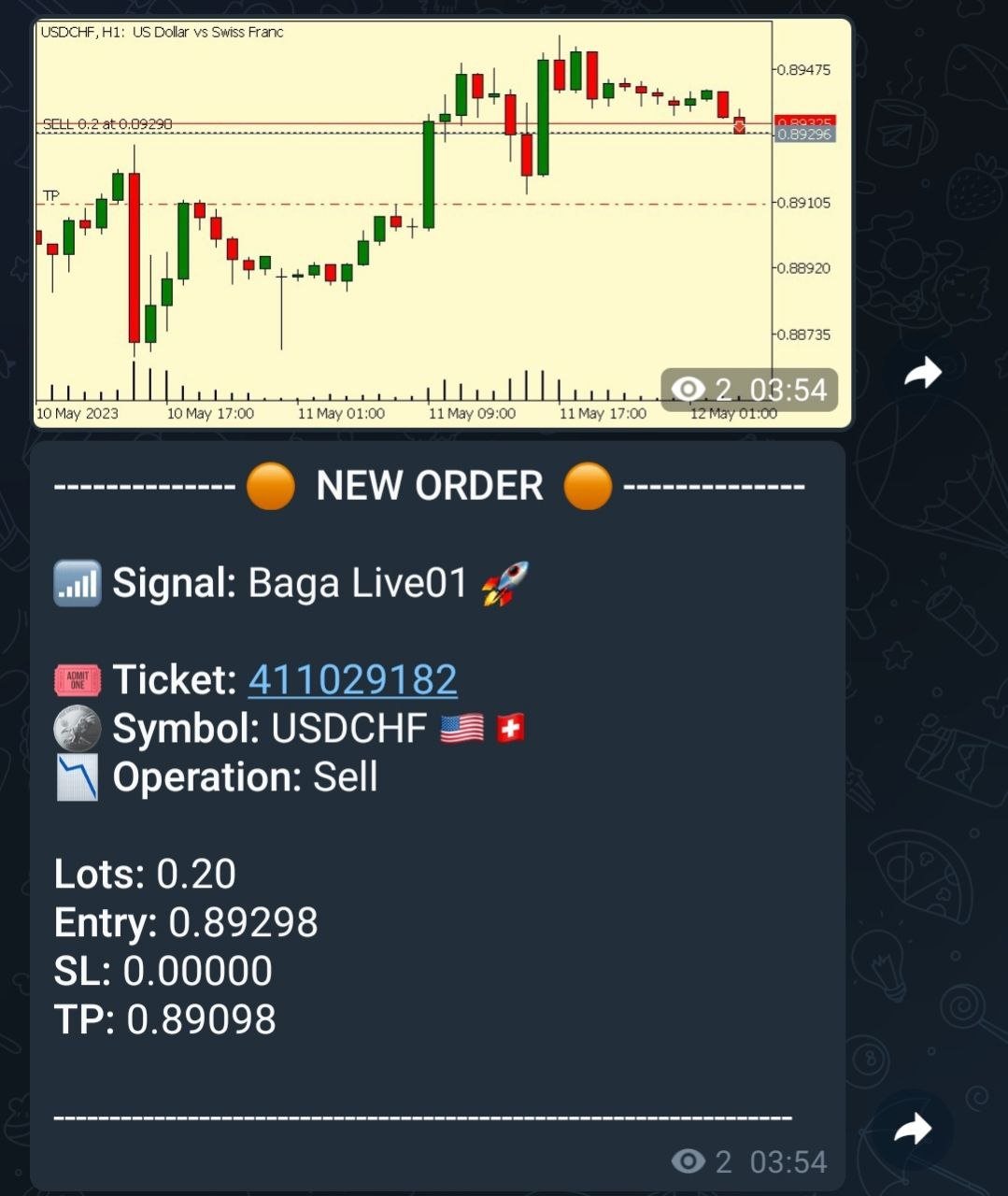
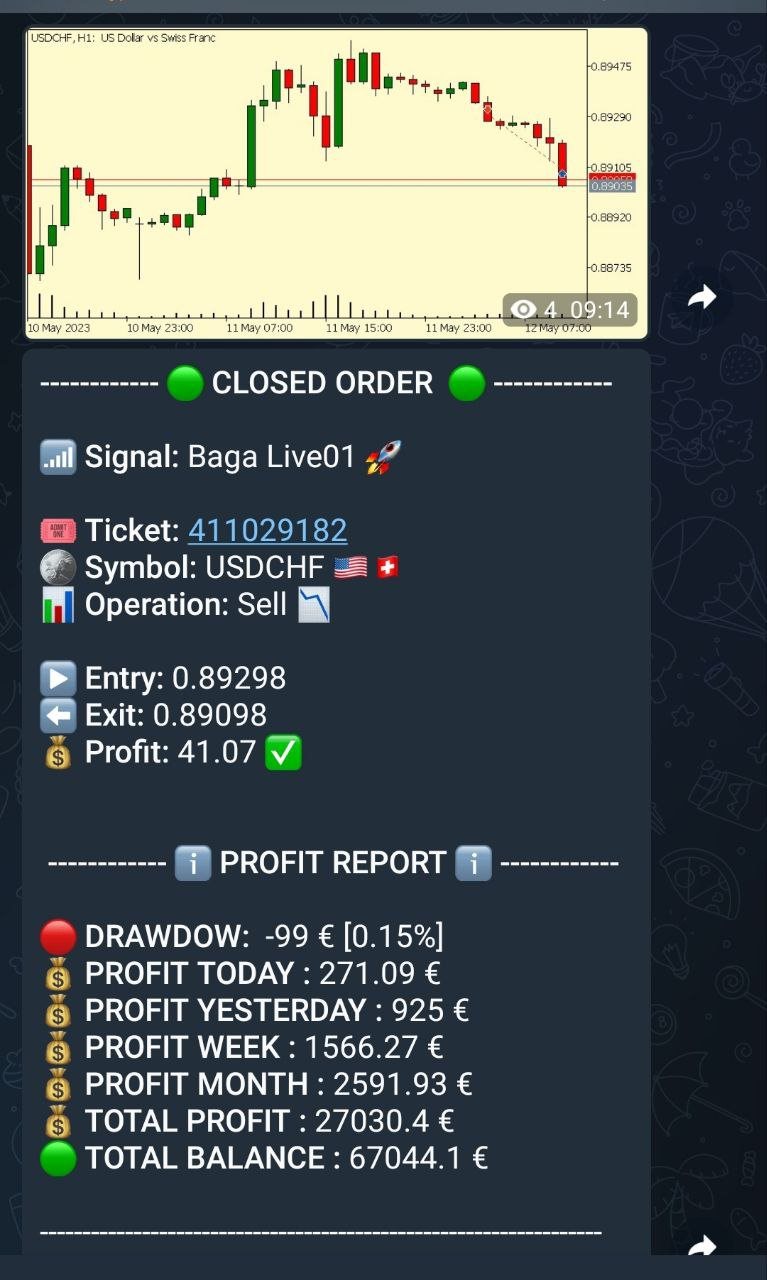
  • Telegram Notifications: The EA can send trade opening and closing notifications via Telegram, including the ability to send charts of the trades.
  • Chart Setup: Traders can select the timeframe and color of the charts that the EA generates and sends.
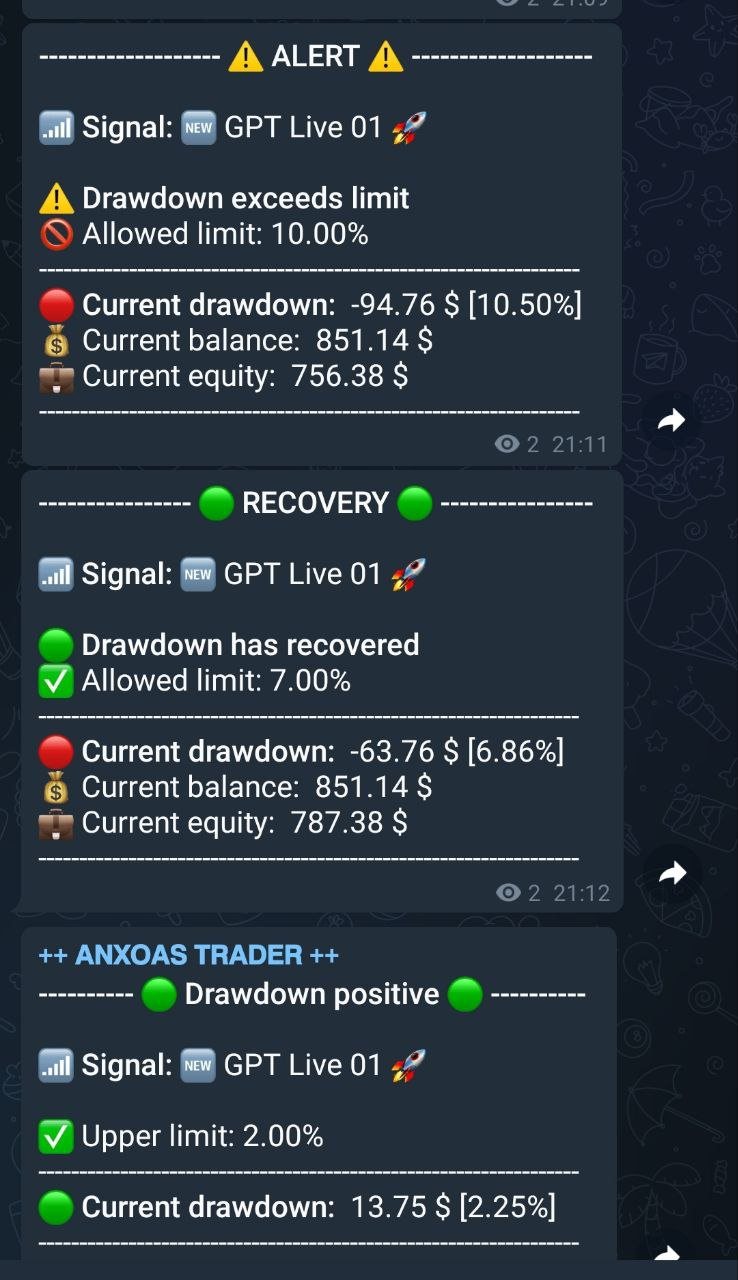
  • Drawdown Alerts: The EA can manage and send alerts based on Drawdown levels, both positive and negative.Daily Reports: The EA can send daily reports to a Telegram channel and it is possible to set the exact time for these reports.
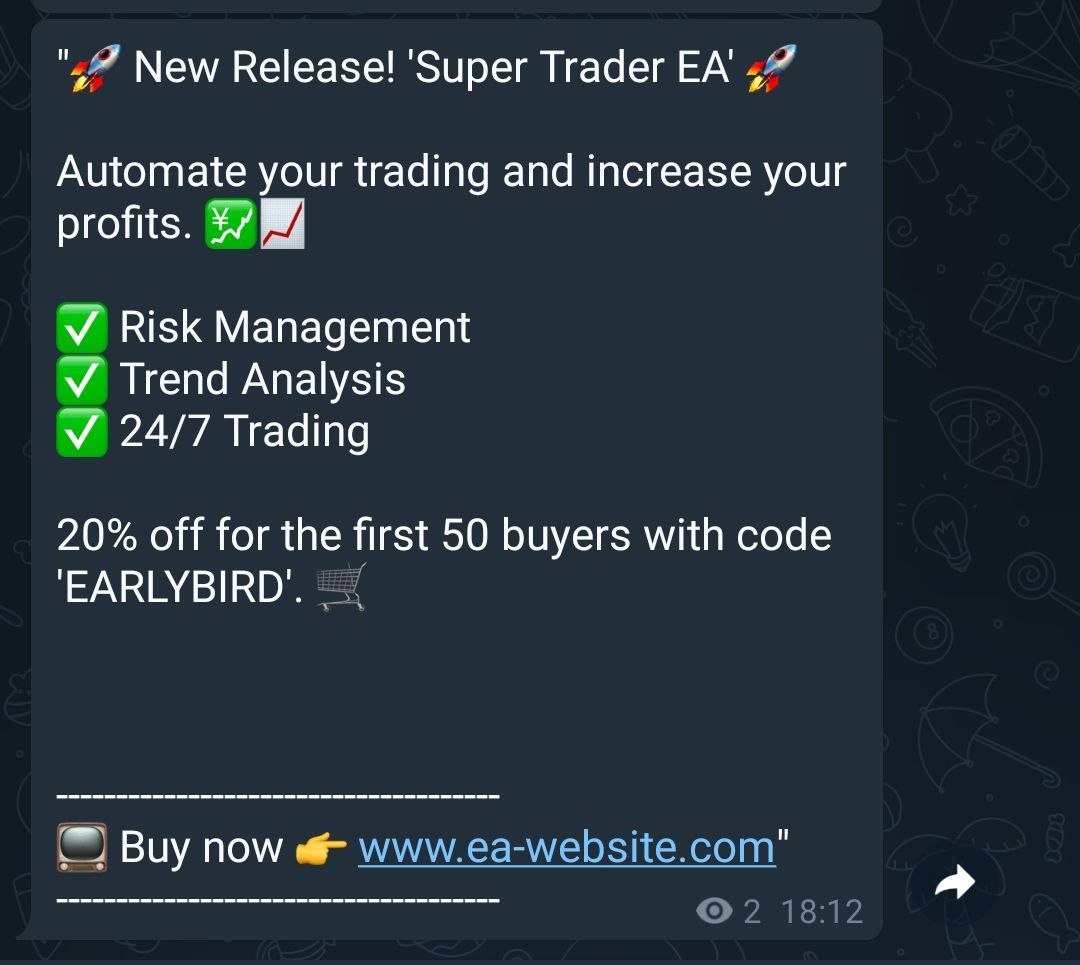
  • Custom Messages: Traders can set up and schedule the sending of custom messages, such as market updates or Youtube video links.
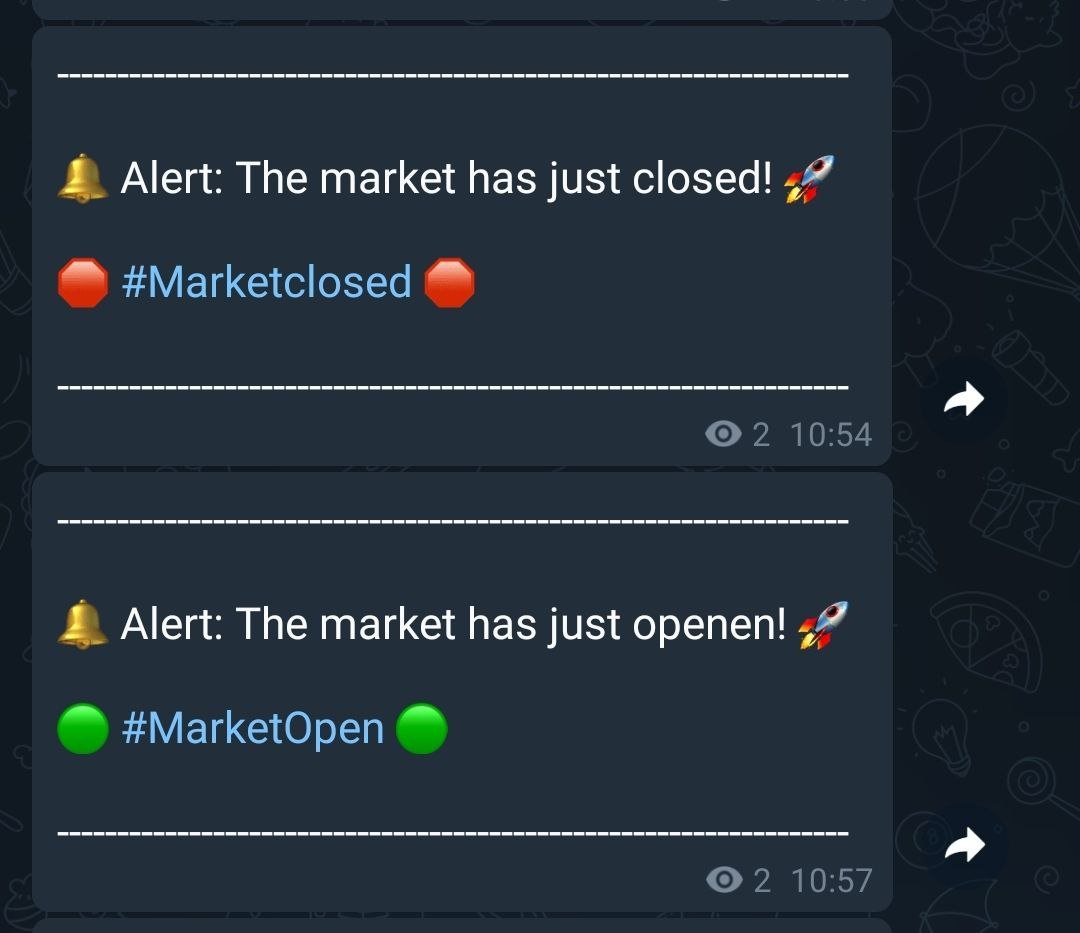
  • Market Alerts: The EA can send market opening and closing alerts.

IMPORTANT INITIAL PARAMETERS:

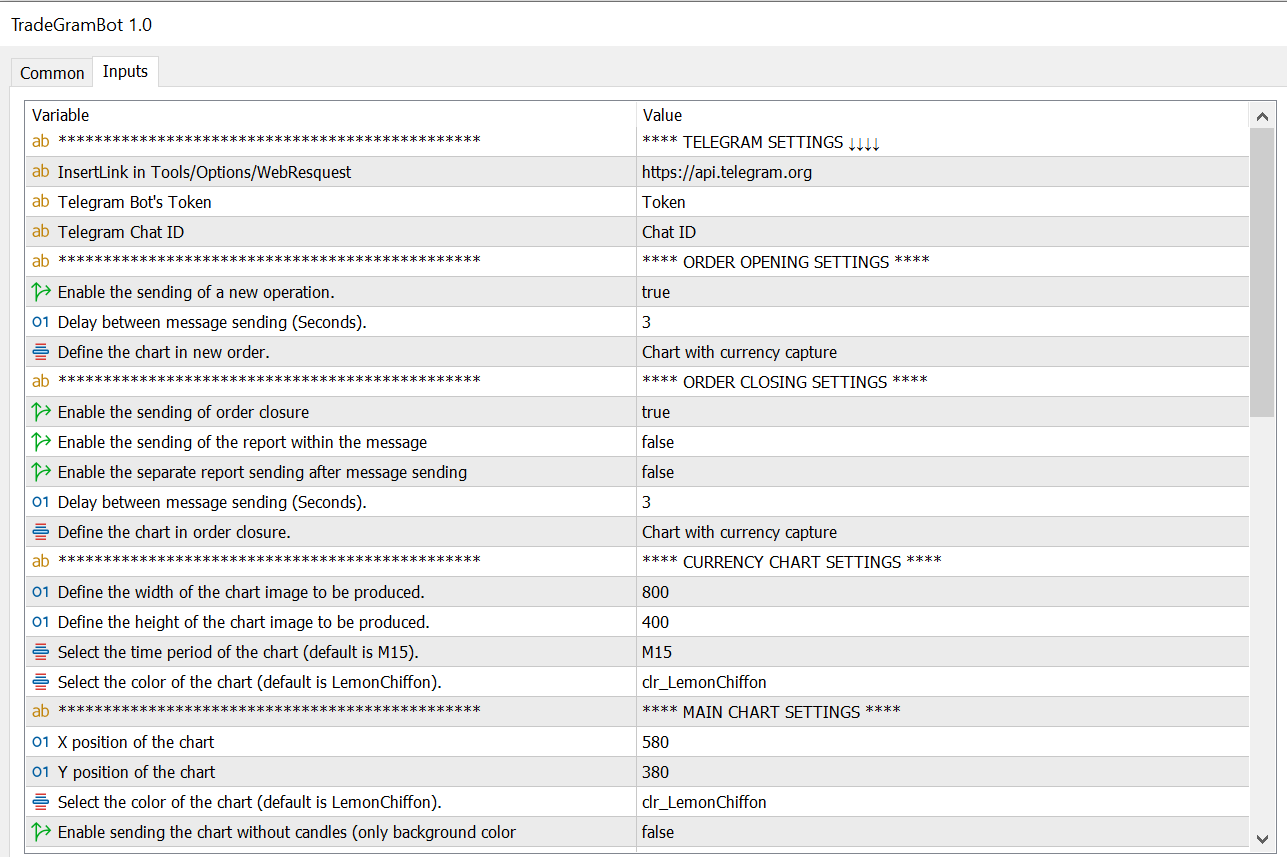
Enter the address (https://api.telegram.org) to allow the EA to send the notifications.


The path to enter the address is /Tools/Options/WebResquest


***** EA CONFIGURATION PARAMETERS *****

  • Telegram Bot's Token : Here you should enter the Telegram bot token that will be used to send the notifications.
  • Telegram Chat ID : Here you should enter the Telegram chat ID where the notifications will be sent.


ORDER OPENING CONFIGURATION

  • Enable the sending of a new operation : This value enables or disables the sending of notifications when a new operation is opened.
  • Delay between message sending (Seconds) : This is the delay in seconds between sending messages.
  • Define the chart in new order : This enumeration defines the type of chart that will be obtained with the notifications. It can be none, a chart with the capture of the currency of the new order, or the main chart.

ORDER CLOSING CONFIGURATION

  • Enable the sending of order closure : This value enables or disables the sending of notifications when an operation is closed.
  • Enable the sending of the report within the message : This value  enables or disables the sending of the report within the message.
  • Delay between message sending (Seconds) : This is the delay in seconds between sending messages for closing operations.
  • Define the chart in order closure : This is the input value to select the type of chart that will be produced when closing orders.

CURRENCY CHART CONFIGURATION

  • Define the width of the chart image to be produced : This value defines the width of the chart image to be produced.
  • Define the height of the chart image to be produced : This value defines the height of the chart image to be produced
  • Select the time period of the chart (default is M15) : Allows to select the time period of the chart.
  • Select the color of the chart (default is LemonChiffon) : Selects the color of the chart.

MAIN CHART CONFIGURATION

  • X position of the chart : This value defines the X position of the chart that captures on the screen.
  • Y position of the chart : This value defines the Y position of the chart that captures on the screen.
  • Select the color of the chart (default is LemonChiffon) : Selects the color of the chart for open operations.
  • Enable sending the chart without candles (only background color for EA) : This value enables or disables the sending of the chart without candles, displaying only the background color.

CONFIGURATION LINK AND NAME OF THE MQL5 SIGNAL

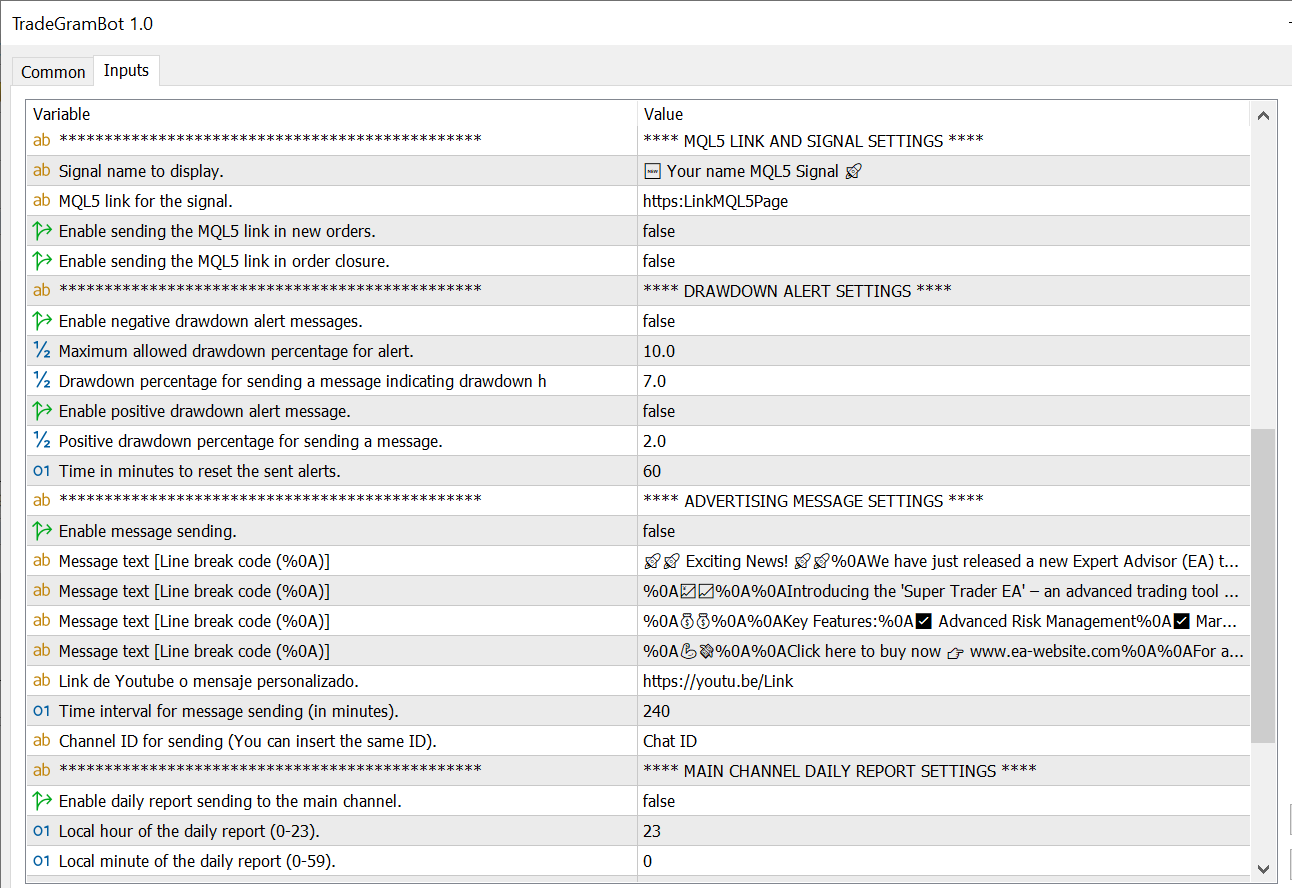
  • Signal name to display : Name of the signal to display in the message.
  • MQL5 link for the signal : Link to the MQL5 signal.
  • Enable sending the MQL5 link in new orders : This value enables or disables the sending of the MQL5 link in new orders integrating it into the message.
  • Enable sending the MQL5 link in order closure : This value enables or disables the sending of the MQL5 link in the orders that are closed, integrating it into the message.

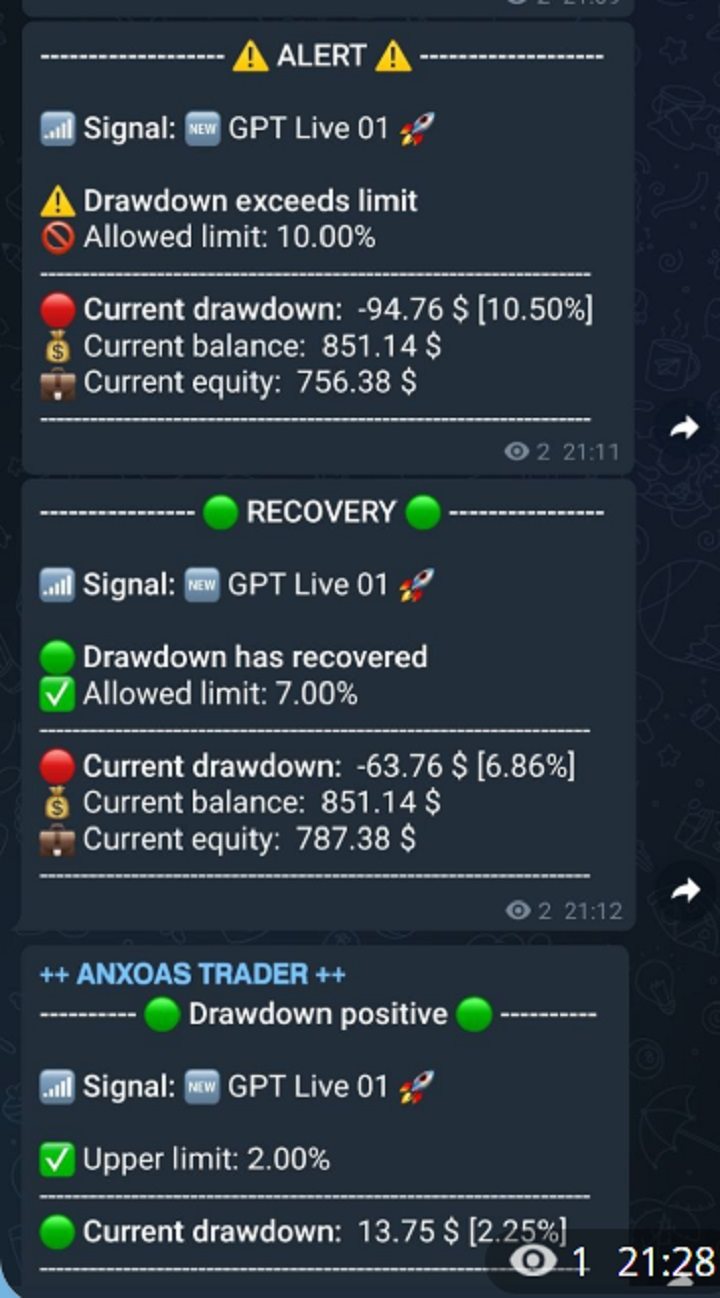
DRAWDOWN ALERT CONFIGURATION

  • Enable negative drawdown alert messages : This value enables or disables the warning of negative drawdown alerts.
  • Maximum allowed drawdown percentage for alert : This value is the percentage to activate the alert when it reaches the indicated drawdown value.
  • Drawdown percentage for sending a message indicating drawdown has recovered : This value is the percentage to activate the recovery alert when the drawdown reaches the indicated value.
  • Enable positive drawdown alert message : This value enables or disables the warning of positive drawdown alerts.
  • Positive drawdown percentage for sending a message : This value is the percentage to activate the positive drawdown alert when it reaches the indicated value.
  • Time in minutes to reset the sent alerts : This value resets by default every 60 minutes the alert to resend it notifying that it continues in negative or positive.

CONFIGURATION OF PERSONAL MESSAGE SENDINGS

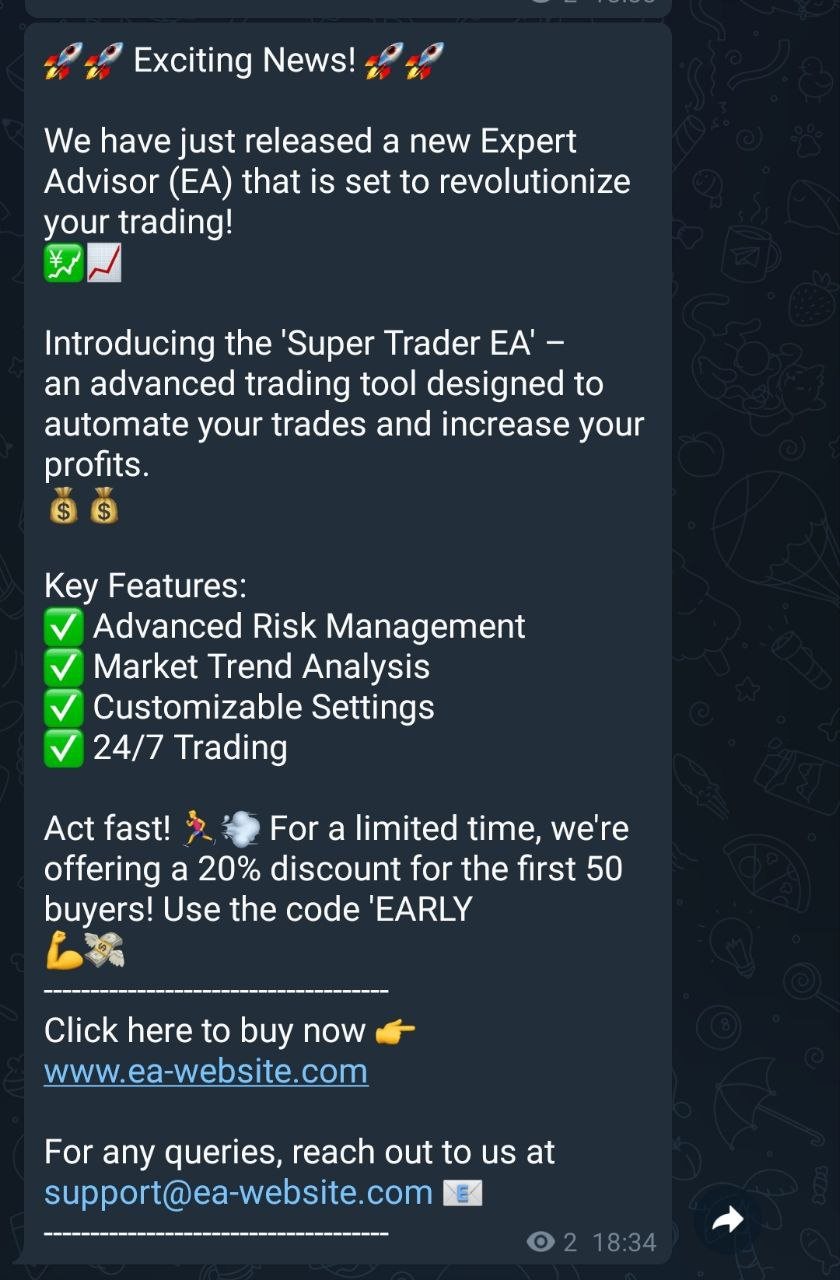
  • Enable message sending : This value enables or disables the sending of a customized message.
  • Message text [Line break code (%0A)] : Text of the message (add %0A for a line break).
  • Youtube link or customized message : Here you can add a link to your EA or if you want there is another line to add more text within the message.
  • Time interval for message sending (in minutes) : This value indicates the time in minutes when the message will be sent (By default, it will be sent every 240 minutes if the message is enabled).
  • Channel ID for sending (You can insert the same ID) : Here you can put the ID of another channel where the message will be sent in case you are not interested in sending it to the main channel that you configured at the beginning of the configuration.

CONFIGURATION OF DAILY REPORT ON MAIN CHANNEL ID

  • Enable daily report sending to the main channel : This value enables or disables the sending of the daily profit or loss report.
  • Local hour of the daily report (0-23) : Local computer hour for sending the message.
  • Local minute of the daily report (0-59) : Local computer minute for sending the message.

CONFIGURATION OF DAILY REPORT IN ANOTHER CHANNEL ID

  • Enable daily report sending to another channel: This value enables or disables the sending of the daily profit or loss report in a second, separate channel with the hour and minute configuration of the previous channel.
  • Channel ID for sending (INSERT ID OF ANOTHER CHANNEL): Here you can put the ID of another channel where the message will also be sent.

EXTRA SETTINGS

  • Enable market opening and closing alert: This value enables or disables the sending of alert messages for market opening and closing, as well as setting the market opening and closing hours.
  • Local market opening hour (0-23): Local computer hour for sending the market opening message.
  • Local market opening minute (0-59): Local computer minute for sending the market opening message.
  • Local market closing hour (0-23): Local computer hour for sending the market closing message.
  • Local market closing minute (0-59): Local computer minute for sending the market closing message.

Each of these points allows customization of how the EA interacts with Telegram and how it handles operations and reports. This allows for detailed control over the notifications and messages that are sent via the Telegram bot.

To see the bot in action and understand its functionality, you can view the signal messages on our MQL5 channel at https://t.me/Livebaga
Contact:
For any query or suggestion, please contact @Mario_Box on Telegram.

Warning:
Trading currencies and other financial instruments carries a high level of risk. Ensure you fully understand the risks involved before using this EA.



Рекомендуем также
**Bneu Prop Firm Challenge Manager Pro** is a trading utility for MetaTrader 5 designed to assist traders participating in proprietary trading firm evaluation challenges. The utility monitors account metrics, tracks challenge progress, and provides protection features to help maintain compliance with challenge rules. **Main Features** **Prop Firm Presets** - Pre-configured rule sets for common proprietary trading firms - FTMO preset with corresponding rule parameters - MyForexFunds (MFF) pres
Автоматический расчет торгового лота с учетом Stop Loss (в пипсах) и процента риска от баланса счета. Панель советника расположена на графике слева вверху. На панели советника вы можете выбрать размер стоп-лосса в пипсах и процент риска от баланса. Вы можете установить отклонение от текущей цены в пипсах для отложенных ордеров. Красный цвет указывает на сумму в валюте депозита, которую вы можете потерять при срабатывании стоп-лосса, эта сумма не включает комиссии, свопы и налоги.    Данный
Why choose Trading Pal EA: This is a EA utility that auto-manage your   positions ' Stop-Loss (SL) and Take-Profits (TP) dynamically. When opening a single   position , it is easy to set the SL and TP manually. But when dealing with multiple   positions , it can be very tedious or   overwhelming   to fill in so many SL and TP values consistently, especially in a short span of time, like in scalping. Over time and after many such trades, trading itself can become a chore. That is where this EA c
Утилита для управления открытыми позициями и отложенными ордерами. Встроенный трейлинг стоп имеет пять режимов и семь инструментов. Есть виртуальный стоп лосс и виртуальный тейк профит, которые можно свободно передвигать по графику. С помощью встроенного симулятора торговли, вы можете проверить, как работает советник в тестере стратегий. Руководство к советнику UTralVirtualMT5 можно найти в разделе "Обсуждение". В тестере МТ5, ручное передвижение виртуальных линий SL и TP по графику не работает
SMT Trade Planner — профессиональный калькулятор рисков и панель исполнения ордеров прямо на графике MetaTrader. Он рассчитывает размер лота на основе ваших настроек риска, отображает визуальные линии входа, Stop Loss и Take Profit, которые можно перетаскивать на графике, проверяет сделку по настраиваемым правилам риска и позволяет исполнять сделки одним кликом.   Принцип работы Прикрепите Trade Planner к любому графику. Панель отображает информацию о счете и кнопки быстрого выбора риска. На гра
One Click Trader  is a tool designed for MetaTrader 4 platform, which enables you to take your trading to the next level. It enables you to open, manage and close your trades in simple an efficient way by just one click of your mouse button. "-"   ,  "+"  change OCT window size  Up arrow minimizes the OCT panel Down arrow maximizes the OCT panel Right arrow displays the next panel with additional features Left arrow hides the panel with additional features Red  SELL  button enables you to open s
DeletePendingOrder
Konstantin Chernov
5 (1)
Скрипт для удаления отложенных ордеров Если Вам необходимо удалить все установленные отложенные ордера, то этот скрипт избавит Вас от рутинных действий! Входные параметры скрипт не запрашивает. Разрешите авто-торговлю перед запуском скрипта. Использование: Запустите скрипт на графике. Если Вам необходимо указать какие-нибудь параметры, то используйте скрипт с входными параметрами https://www.mql5.com/ru/market/product/627 Версию для MetaTrader 4 можно скачать здесь: https://www.mql5.com/ru/marke
FREE
MultiChart Pro
Pablo Filipe Soares De Almeida
MultiChart Pro – Инструмент управления графиками для MetaTrader 5 Этот советник (EA) позволяет автоматизировать открытие и настройку графиков в MetaTrader 5. Поддерживает настройку до четырех графиков с указанными таймфреймами и шаблонами, включая офлайн-графики. Функциональность Открытие графиков: Открывает до трёх дополнительных графиков (например, D1, M1, M15) и один офлайн-график (например, 10 секунд), а также настраивает текущий график (например, M5). Применение шаблонов: Применяет пользова
EA is parsing trade signals from Telegram bot and executes it in MT5 terminal. To configure you need to complete the following steps: Specify the bot tokein in input settings. Specify a list of key words used for detecting a type of signal (Buy/Sell), for entry price and for stops. Specify default settings for stops and lot size in case incoming signal don't include these details.
Скрипт для удаления отложенных ордеров Если Вам необходимо удалить все установленные отложенные ордера, то этот скрипт избавит Вас от рутинных действий! Разрешите авто-торговлю перед запуском скрипта. Использование: Запустите скрипт на графике. Входные параметры: Language of messages displayed (EN, RU, DE, FR, ES) - язык вывода сообщений (английский, русский, немецкий, французский, испанский). Use Magic: (0 - ignore Magic, else - only this Magic) - магик не учитывать - 0, иначе удаляются ордера
Trade Guardian Risk Manager is a MT5 utility Expert Advisor dedicated to risk control and equity protection. Many know how to trade. Few know when to stop. Trade Guardian formalizes discipline and mechanically enforces your limits when emotions or over-exposure take over. Risk management utility No trading logic — Does NOT open trades : does not open positions, does not provide signals, contains no strategy, and does not guarantee results. Operating principle — Equity Monitoring + rule enf
BuyLimit and SellLimit MQ5 buttons Продукт BuyLimit and SellLimit Buttons открывает любую комбинацию отложенных ордеров Buy Limit и Sell Limit и закрывает все имеющиеся отложенные ордера. Входные параметры DeleteAllPendings ; при true все отложенные ордера (для текущей валюты) могут быть удалены. BuyLimit ; при true могут быть открыты ордера Buy Stop. SellLimit ; при true могут быть открыты ордера Sell Stop. InitLot ; начальный размер лота. LotCoeff ; увеличить/уменьшить размер следующего лота
Is your trade at a loss? Does not matter ! You can use this Extra martingale tool.  In the set loss of your trade or your EA's trade , this tool will open another trade at a better price. It can also open multiple trades at different distances and with different lot sizes. Each trade will be assigned a TakeProfit. This tool has a lot of settings. You can set variable lot sizes, variable trade distances, variable TakeProfit sizes, maximum total profit or loss in money. You can also close trades
One Click Close MT5 is an EA which allows you close orders quickly. EA display on chart two buttons. The first button "Close All Positions" is using to close all opened orders. The second button "Close Profit Positions" is using to close only profitable orders. EA is closing orders for all available symbols, not only for chart symbol. In EA params you can set distance from upper chart frame (Y Offset) and from left chart frame (X Offset). For installation EA it is only need to copy One Click Clo
FREE
T Manager, the ultimate trade management solution designed by traders for traders. If you are searching for a simple and efficient trade panel, trade manager, or trade assistant, you are at the right place.   The market contains a diverse number of those tools , but this one is designed by traders for traders . I designed this tool, and I am using it daily. Take my advice and stop buying tools blended with un-useful features that you will never use,   T Manager provides you with the essential y
Stop And Close
Tetyana Shcherba
2.75 (4)
Утилита (советник) создана для мониторинга и контроля общей просадки или общей прибыли, а также закрытия всех позиций по достижению заданных уровней или времени с возможностью отключения автоматических советников, работающих в том же терминале. Умеет отслеживать состояние всего аккаунта, а также отдельно выбранных пар. Работает с позициями, открытыми вручную или открытыми советниками. Отслеживаются открытые сделки в реал-тайме и ранее закрытые, которые были совершены после начала мониторинга. Мо
Общие сведения Скрипт показывает информацию о торговом счете и текущем финансовом инструменте. Информация о торговом счете: Account - номер счета и тип (Real, Contest или Demo); Name - имя владельца счета; Company - название компании, предоставляющей доступ для торговли; Server - название торгового сервера; Connection State - состояние соединения; Trade Allowed - разрешена ли торговля на счете в данный момент; Experts Allowed - разрешена ли торговля советниками; Balance - баланс счета; Equity -
Complete Pending Orders Grid System открывает любые комбинации отложенных ордеров Buy Stop, Sell Stop, Buy Limit и Sell Limit и закрывает все существующие отложенные ордера. Просто перетащите скрипт на график необходимой валютной пары. Перед установкой всех отложенных ордеров открывается окно ввода входных параметров: DeleteAllPendings – при true все отложенные ордера (для данной валюты) удаляются. BuyStop – при true открывается ордер Buy Stop. SellStop – при true открывается ордер Sell Stop. Bu
Friday Monday MT5
Konstantin Kulikov
3.71 (7)
Этот эксперт торгует на недельном ГЭПе (разрыве цены), открывая сделки в пятницу перед закрытием рынка и закрывая сделки в понедельник в первой половине дня. Эксперт работает с одного чарта по всем валютным парам: EURUSD, GBPUSD, USDCHF, AUDUSD, USDCAD, EURJPY, EURCHF, EURAUD, EURCAD, EURNZD, GBPJPY, GBPCHF, GBPAUD, GBPCAD, CHFJPY, AUDJPY, CADJPY, AUDCHF, AUDCAD, AUDNZD. Если символы в "Обзоре рынка" имеют суффикс, то укажите его в параметре эксперта "Symbol_suffix". Версия для МТ4 >>> Chat <<<
Добрый день, уважаемые трейдеры! Я ваш помощник в торговле. Кратко скажу, а затем расскажу о моих сильных сторонах: Я специализируюсь на управлении вашим портфелем, и независимо от того, с какой стороны вы открываете ордер, я могу немедленно добавить для вас разумные стоп-лоссы и скользящие стопы. 2. Я могу помочь вам избежать спекуляции и поспешных действий, устраняя с корня слабость человеческой природы, которая не позволяет придерживаться принципов. 3. Я отправлю вам уведомление на MT5 - кли
Close In Quick Script
Mathew Louis Sau Kinminja
The Close In Quick Script is an optimized, high-performance MQL5 script designed to swiftly close all open positions for the current chart's symbol on the MetaTrader 5 platform. Engineered for speed and reliability, it leverages asynchronous trading, minimal system checks, and robust error handling to ensure seamless trade closure. Whether you're a day trader, scalper, or portfolio manager, this script is an essential tool for efficiently managing and exiting trades. Key Features: Asynchronous t
FREE
Six Stars    it is a Secure Automated Software for trade 6 values ​​simultaneously. Six Stars   It is optimized for the majors Do not use this robot at the same time as others, it is a multi-value robot, therefore it manages 6 pairs simultaneously. The architecture is a Fully Automatic Autonomous Robot Expert capable of independently analyzing the market and making trading decisions   Six Stars   Have 6 neurals nets to used the correct algoritm in the correct market situation Six Stars     It
Этот инструмент поможет вам закрыть все открытые ордера одним щелчком мыши, просто нажмите «Закрыть все». Если вы хотите закрыть только прибыльные ордера, нажмите кнопку «Закрыть прибыльные», после нажатия все плавающие ордера будут закрыты; Если вы хотите закрыть только ордера с плавающими убытками, нажмите кнопку «Закрыть убыточные», после нажатия все ордера с плавающими убытками будут закрыты.
Cerberus Equity Watcher
Samuel Bandi Roccatello
5 (3)
Cerberus the Equity Watcher — это инструмент управления рисками, который постоянно отслеживает средства на вашем счете и позволяет избежать крупных просадок, вызванных неисправными советниками или вашим эмоциональным поведением, если вы являетесь дискреционным трейдером. Это чрезвычайно полезно для систематических трейдеров, которые полагаются на советники, которые могут содержать ошибки или могут плохо работать в неожиданных рыночных условиях. Cerberus позволяет вам установить минимальное значе
Online Accounts Manager MT5
Kyra Nickaline Watson-gordon
5 (1)
OneClick Online Account Manager is a powerful utility that helps you to manage all your accounts from a centralized panel. It is suitable for all single account traders and specially for multiple accounts traders. The utility help you to : Monitor status of all accounts on a private web page. Some information such as account connection status, account profit, DD, Balance, Equity, Margin Level, Number of positions and orders, Daily and Weekly profit/loss and also overall summation of all these p
Trade Control Panel
Jerry Jilun Anak Liban
Trade Control Panel Function Normal One Click Function Close All Close All Profit Close All Loss Close All Pending Order Close All Sell Close All Buy Advance One Click Function 1.  Close Partial Lot Sell by Percent It will help you partial close for all open position by desire percent you wanted. No longer partial close one by one for every open position Manual input for desire percent 2. Close Partial Lot Buy by Percent It will help you partial close for all open position by desire percent
This EA help trader to manage his pending orders, when you place many Pending Orders this utility monitor them and when of them get filed (executed) the EA cancel and delete all rest of pending orders, to avoid  opening of all of pending orders at the same time , and lose your risk management. this utility is very useful for trader when he /she is not available on the desk.
Phoenix MT5 Telegram Notifier is a trading utility that integrates with both MetaTrader5 and Telegram. The utility publishes all your trades as signals in your channels or groups. This allows you to track in real time what is happening with your account via Telegram. Notifications for : Opened order Closed order Modified order Parameters : Telegram Bot Token - create a bot on Telegram and get a token Telegram Chat Id  - input your Telegram group/channel Id Notify for opened order - notifies wh
Chart Time Plus MT5
Isaac Montesinos Valdes
Description:   -   Chart Time + Indicator is very simple and easy, but it can be very important to control the time before opening any manual trade. This indicator shows the time in a panel between 3 different options. Can be possible to move the panel with mouse or with fixed coordinates on the chart. Input Parameters:   -   Local Time : Enable Local Time if you want to show it (Personal Computer Time).   -   Server Time : Enable Server Time if you want to show it (Broker Time).   -   GMT Time
CloseAllPosition
Konstantin Chernov
4 (2)
Скрипт для закрытия позиций Если Вам необходимо быстро закрыть несколько позиций, то этот скрипт избавит Вас от рутинных действий! Входные параметры скрипт не запрашивает. Разрешите авто-торговлю перед запуском скрипта. Использование: Запустите скрипт на графике. Если Вам необходимо указать максимальное отклонение или количество попыток для закрытия, то используйте скрипт с входными параметрами https://www.mql5.com/ru/market/product/625 Версию для MetaTrader 4 можно скачать здесь: https://www.m
FREE
С этим продуктом покупают
Trade Assistant MT5
Evgeniy Kravchenko
4.42 (208)
Помогает рассчитать риск на сделку, простая установка нового ордера с помощью линий, управление ордерами с функциями частичного закрытия, 7 типов трейлинг-стопа и другие полезные функции. Дополнительные материалы и инструкции Инструкция по установке - Инструкция к приложению - Пробная версия приложения для демо счета Функция Линии   - отображает на графике линию открытия, стоп-лосс, тейк-профит. С помощью этой функции легко установить новый ордер и увидеть его дополнительные характеристики пе
Добро пожаловать в Trade Manager EA — лучший инструмент для управления рисками, предназначенный для упрощения, точности и эффективности торговли. Это не просто инструмент для размещения ордеров; это комплексное решение для удобного планирования торгов, управления позициями и усиленного контроля над рисками. Независимо от того, начинающий вы трейдер, опытный специалист или скальпер, нуждающийся в быстром исполнении, Trade Manager EA адаптируется к вашим потребностям и работает с любыми активами:
TradePanel MT5
Alfiya Fazylova
4.86 (148)
Trade Panel — это многофункциональный торговый помощник. Приложение содержит более 50 торговых функций для ручной торговли и позволяет автоматизировать большинство торговых операций. Внимание приложение не работает в тестере стратегий. Перед покупкой вы можете протестировать демоверсию на демо-счете. Демоверсия здесь . Полная инструкция здесь . Торговля. Позволяет совершать торговые операции в один клик: Открыть отложенные ордера и позиции с автоматическим расчетом риска. Открыть несколько ордер
Бета-версия Telegram to MT5 Signal Trader почти готов к официальному альфа-релизу. Некоторые функции все еще находятся в разработке, и вы можете столкнуться с небольшими ошибками. Если вы заметите проблемы, пожалуйста, сообщите о них, ваша обратная связь помогает улучшать программное обеспечение для всех. Telegram to MT5 Signal Trader — мощный инструмент, который автоматически копирует торговые сигналы из каналов и групп Telegram прямо в ваш счёт MetaTrader 5 . Поддерживаются как публичные, так
Trade Dashboard MT5
Fatemeh Ameri
4.97 (117)
Tired of complex order placement and manual calculations? Trade Dashboard is your solution. With its user-friendly interface, placing orders becomes effortless, by a single click, you can open trades, set stop loss and take profit levels, manage trade lot size, and calculate risk to reward ratios, allowing you to only focus on your strategy. Say goodbye to manual calculations and streamline your trading experience with Trade Dashboard. Download  Demo Version  right now. You can find  Details of
MT5 to Telegram Signal Provider — это простой в использовании полностью настраиваемый инструмент, который позволяет отправлять определённые сигналы в чат, канал или группу Telegram, превращая вашу учётную запись в провайдера сигналов . В отличие от большинства конкурирующих продуктов, он не использует импорт DLL. [ Демо ]   [ Руководство ] [ Версия MT4 ] [ Версия для Discord ] [ Канал в Telegram ]  New: [ Telegram To MT5 ] Настройка Доступно пошаговое руководство пользователя . Никаких знаний A
Copy Cat More Trade Copier MT5 (Копи-Кот MT5) — это локальный торговый копировщик и полная система управления рисками и исполнения, разработанная для современных торговых задач. От испытаний проп-фирм до управления личным портфелем, он адаптируется к любой ситуации с сочетанием надежного исполнения, защиты капитала, гибкой настройки и продвинутой обработки сделок. Копировщик работает как в режиме Мастер (отправитель), так и в режиме Слейв (получатель), с синхронизацией в реальном времени рыночны
Ultimate Extractor - Professional Trading Analytics for MT5 *****this is the local HTML version of Ultimate Extractor. Check out Ultimate Extractor Cloud on mql5 for the Cloud version****** Ultimate Extractor transforms your MetaTrader 5 trading history into actionable insights with comprehensive analytics, interactive charts, and real-time performance tracking. What It Does Automatically analyzes your MT5 trading history across all Expert Advisors and generates detailed HTML reports with inte
VERIFIED TRADING RESULTS - Farmed Hedge Yield Axi Copy:  https://www.mql5.com/en/signals/2356376 - Farmed Hedge Yield Exn Copy:   https://www.mql5.com/en/signals/2356404 - Farmed Hedge Yield V Copy:  https://www.mql5.com/en/signals/2357156 Contact me via private message to receive the User Manual and Setup. * Thai Lauguage Support Available Farmed Hedge Yield Farming - Professional Pair Trading Dashboard (Manual - Hybrid - Semi/Automated EA) VERSION 3 - WILD HARVEST UPDATE Trading Approac
The News Filter MT5
Leolouiski Gan
4.74 (19)
Этот продукт фильтрует всех экспертных советников и ручные графики во время новостей, так что вам не нужно беспокоиться о внезапных скачках цены, которые могут разрушить ваши ручные торговые настройки или сделки, введенные другими экспертными советниками. Этот продукт также поставляется с полной системой управления ордерами, которая может обрабатывать ваши открытые позиции и ордера на ожидание перед выпуском новостей. После покупки   The News Filter   вам больше не придется полагаться на встроен
The product will copy all telegram signal to MT5 ( which you are member) , also it can work as remote copier.  Easy to set up, copy order instant, can work with almost signal formats, image signal,  s upport to translate other language to English Work with all type of channel or group, even channel have "Restrict Saving Content", work with  multi channel, multi MT5 Work as remote copier: with signal have ticket number, it will copy exactly via ticket number. Support to backtest signal. How to s
Trade Manager DaneTrades
Levi Dane Benjamin
4.36 (28)
Trade Manager, который поможет вам быстро входить и выходить из сделок, автоматически рассчитывая риск. Включает функции, которые помогут предотвратить чрезмерную торговлю, торговлю из мести и эмоциональную торговлю. Сделками можно управлять автоматически, а показатели эффективности счета можно визуализировать в виде графика. Эти функции делают эту панель идеальной для всех трейдеров, занимающихся ручной торговлей, и помогают улучшить платформу MetaTrader 5. Многоязычная поддержка. Версия для МТ
Custom Alerts AIO: Универсальный сканер рынка — Без настройки Обзор Custom Alerts AIO — это самый быстрый и простой способ отслеживать рыночные сигналы в реальном времени на множестве инструментов без дополнительной настройки и без необходимости покупать другие продукты. В состав входят все необходимые индикаторы от Stein Investments, что делает этот инструмент идеальным решением «всё в одном» для трейдеров, ценящих простоту и эффективность. Просто установите на график и сразу получайте сигнал
Smart Stop Manager – автоматизированное управление стоп-лоссами с профессиональной точностью Обзор Smart Stop Manager — это исполнительный модуль линейки Smart Stop, созданный для трейдеров, которым требуется структурированное, надежное и полностью автоматизированное управление стоп-лоссами по нескольким открытым позициям одновременно. Панель непрерывно отслеживает активные сделки, рассчитывает оптимальный уровень стоп-лосса на основе рыночной структуры Smart Stop и автоматически обновляет сто
Smart Stop Scanner – многоактивный интеллектуальный сканер стоп-лоссов Общее описание Smart Stop Scanner предоставляет профессиональный контроль стоп-лоссов на любом рынке. Он анализирует рыночную структуру, определяет значимые пробои и формирует ключевые защитные уровни по Forex, Золоту, Индексам, Металлам, Криптовалютам и другим инструментам. Все данные отображаются в одном чистом, информативном и DPI-адаптивном панели для максимальной ясности и скорости принятия решений. Как определяется с
Pulsar Terminal — продукт компании Pulsar Technologies, торговая марка Astralys LLC . Pulsar Terminal — это утилита-дополнение для MetaTrader 5. Это визуальный интерфейс в сочетании с инструментами исполнения в сопутствующем приложении подключённом к вашему счёту MetaTrader 5 через Expert Advisor . Мы используем сопутствующее приложение для максимального расширения возможностей инструмента и предоставления более продвинутого визуального интерфейса и рабочего процесса, чем стандартные панели MT5
Exp COPYLOT CLIENT for MT5
Vladislav Andruschenko
3.82 (34)
Trade copier for MT5 - копировщик позиций/СДЕЛОК/ордеров для МetaТrader 5  из МТ4/МТ5) Для копирования на терминал MetaTrader 5 между терминалами МТ5 - МТ5, МТ4 - МТ5  для версии COPYLOT MT5 ( или МТ4 - МТ4 МТ5 - МТ4 для версии COPYLOT MT4). Версия МT4 Полное описание +DEMO +PDF Как купить Как установить    Как получить файлы журналов   Как тестировать и оптимизировать    Все продукты от Expforex Вы также можете копировать сделки в терминал МТ4 (МТ4 - МТ4, МТ5 - МТ4):    COPYLOT CLIENT for M
Anchor: The EA Manager A coordination system for traders running multiple EAs. Anchor ensures only one EA can trade at a time, preventing conflicting positions and keeping your portfolio safer. Attach Anchor to any chart. Configure your EAs and their magic numbers. Anchor handles the rest. Built for portfolios. Built for discipline. Built for prop firms. The Problem Running multiple EAs on the same account creates risk. Two gold EAs can open opposite positions on the same candle. Three EA
Risk Manager for MT5
Sergey Batudayev
4.35 (17)
Советник Риск Менеджер для МТ5, очень важная и по моему мнению необходимая программа для каждого трейдера. С помощью данного советника вы сможете контролировать  риск на вашем торговом счету. Контроль риска и прибыли может осуществляться как в  денежном $ эквиваленте так и в % процентном. Для работы советника просто прикрепите его на график валютной пары и выставите значения допустимого риска в валюте депозита или в % от текущего баланса.   [ Инструкция с описанием настроек ] Функции советника
Риск-менеджер позволяет контролировать свою торговую активность и защищать от убытков. Настройки теперь организованы в логические группы, что упрощает конфигурацию различных параметров риска. При превышении любого лимита риск-менеджер может принудительно закрыть открытые позиции, остановить работу других советников и даже полностью закрыть терминал, чтобы предотвратить эмоциональную торговлю, не соответствующую вашей торговой стратегии. Настройки Risk Manager Защита Счета Check min equity limit
Telegram to MT5: Идеальное решение для копирования сигналов Упростите свою торговлю с Telegram to MT5 — современным инструментом, который копирует торговые сигналы прямо из каналов и чатов Telegram на вашу платформу MetaTrader 5, без необходимости использования DLL. Это мощное решение обеспечивает точное исполнение сигналов, широкие возможности настройки, экономит время и повышает вашу эффективность. [ Instructions and DEMO ] [ FAQ ] Ключевые возможности Прямая интеграция с Telegram API Аутенти
Trade Manager DashPlus
Henry Lyubomir Wallace
5 (13)
DashPlus – это продвинутое средство для управления торговлей, разработанное для повышения эффективности и результативности торговли на платформе MetaTrader 5. Оно предлагает широкий набор функций, включая расчет рисков, управление ордерами, продвинутые системы сеток, инструменты на основе графиков и аналитику производительности. Основные функции Восстановительная Сетка Внедряет систему усреднения и гибкую сетку для управления сделками в неблагоприятных рыночных условиях. Позволяет стратегически
Telegram To MT5 Receiver
Levi Dane Benjamin
4.53 (15)
Копируйте сигналы из любого канала, участником которого вы являетесь (в том числе частного и ограниченного), прямо на свой MT5. Этот инструмент был разработан с учетом потребностей пользователей и предлагает множество функций, необходимых для управления и мониторинга сделок. Этот продукт представлен в простом в использовании и визуально привлекательном графическом интерфейсе. Настройте свои параметры и начните использовать продукт в течение нескольких минут! Руководство пользователя + Демо  |
Take a Break MT5
Eric Emmrich
4.75 (24)
One tool to protect all your EAs — news filter, equity protection, time filter and more — free demo available Take a Break has evolved from a basic news filter into a comprehensive account protection solution. It pauses your other Expert Advisors during news events or based on custom filters. When trading resumes, it automatically restores your entire chart setup , including all EA settings. Typical use cases: One news filter for all your EAs. Pause trading during news or high volatility — and c
YuClusters
Yury Kulikov
4.93 (43)
Внимание: Ознакомиться с работой программы можно с помощью бесплатной версии  YuClusters DEMO . YuClusters это профессиональная система анализа рынка. Для трейдера открываются уникальные возможности анализа потока ордеров, объемов торговли, движения цены используя различные графики, профили, индикаторы, графические объекты. YuClusters оперирует данными на основе ленты сделок или тиковой информации, в зависимости от того, что доступно в котировках финансового инструмента.  YuClusters позволяет с
Trade Assistant 38 in 1
Makarii Gubaydullin
4.91 (23)
Многофункциональная утилита: калькулятор лота, сеточные ордера, индикатор Price Action, менеджер ордеров, рассчёт R/R, и многое другое Демо-веpсия  |   Инструкция  |   Версия для MT4 Утилита не работает в тестере стратегий: вы можете скачать демо-версию ЗДЕСЬ , чтобы протестировать продукт перед покупкой. Напишите мне  если есть вопросы / идеи по улучшению / в случае найденного бага Упроситите и сделайте вашу торговлю быстрее, при этом расширяя стандартные возможности терминала. 1. Открытие но
ManHedger MT5
Peter Mueller
4.8 (5)
THIS EA IS A SEMI-AUTO EA, IT NEEDS USER INPUT. Manual & Test Version Please TEST this product before BUYING  and watch my video about it. The price of the ManHedger will increase to 250$ after 20 copies sold. Contact me for user support or bug reports or if you want the MT4 version! MT4 Version  I do not guarantee any profits or financial success using this EA. With this Expert Advisor, you can: Implement your own Zone Recovery strategy to capitalize on trending markets. Create Grid trading s
EasyTrade MT5
Alain Verleyen
5 (2)
Easy Trade – Умное, простое и мощное управление сделками Easy Trade — это универсальное решение для управления сделками в MetaTrader для тех, кто хочет держать риск под контролем и обеспечить максимально плавное исполнение ордеров. Созданный с нуля на основе обратной связи от трейдеров, Easy Trade позволяет легко открывать, отслеживать и управлять сделками по множеству символов — без лишней сложности. Независимо от того, скальпируете ли вы вручную или управляете несколькими позициями, Easy Tra
Это визуальная торговая панель, которая помогает вам легко размещать сделки и управлять ими, избегая человеческих ошибок и повышая вашу торговую активность. Он сочетает в себе простой в использовании визуальный интерфейс с надежным подходом к управлению рисками и положением [ Руководство по установке | Руководство по обновлению | Устранение неполадок | FAQ | Все продукты ] Удивительно простой в использовании Торгуйте легко с графика Торгуйте с точным управлением рисками, без проблем Сохранение
Active Lines
Yury Kulikov
5 (2)
Внимание :  Демо-версию для ознакомления и тестирования можно скачать здесь .  Демо-версия не позволяет совершать торговые операции и может быть запущена только на одном графике. Active Lines - мощный профессиональный инструмент для работы с линиями на графике. Active Lines предоставляет широкий набор действий для событий, связанных с пересечением ценой линий. Например: оповестить, открыть/модифицировать/закрыть позицию, разместить/удалить отложенные ордера. Active Lines позволяет к одной линии
Фильтр:
Нет отзывов
Ответ на отзыв