LogicFlow Scanner Dashboard MT5
- Индикаторы
- Версия: 1.0
- Активации: 10

LogicFlow Scanner Dashboard MT5
Professional Multi-Symbol and Multi-Timeframe Signal Dashboard for MetaTrader 5
What is LogicFlow Scanner?
If you trade multiple symbols, you already know the problem. You open one chart, check it, switch to another, check that one too — and by the time you finish, you may have already missed the signal on the first chart. It is exhausting, slow, and easy to miss opportunities.
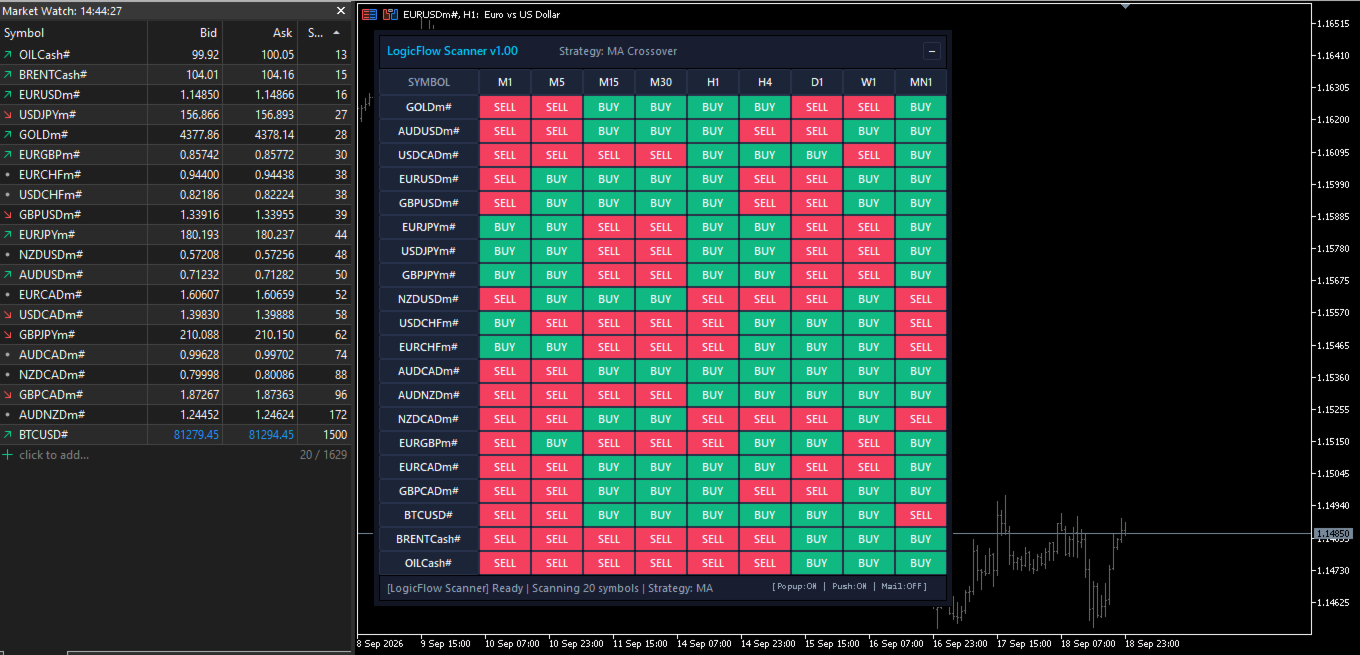
LogicFlow Scanner Dashboard MT5 solves this problem completely. It continuously scans all your favorite symbols and timeframes simultaneously, presenting them inside a single, intuitive, color-coded dashboard directly on your chart. One quick glance and you immediately know where trading opportunities are forming — without opening dozens of separate windows.
Built specifically for Deriv Synthetic Indices (Boom 300, Boom 500, Boom 1000, Crash 300, Crash 500, Crash 1000), and equally effective on Forex pairs, Gold, Crypto, and Market Indices.
Key Advantages
- Full Market Overview: Monitor up to 50 symbols across all 9 MetaTrader 5 timeframes (M1 to MN1) simultaneously.
- 100% Non-Repainting Signals: Confirmed on candle close so signals never shift, vanish, or mislead you after the bar closes.
- Ultra Lightweight & Fast: Engineered with background time-slicing to eliminate platform freezes, lag, or memory bloat.
- Multi-Channel Alerts: Real-time instant alerts delivered via Mobile Push Notifications, Pop-up alerts with audio, and Email.
- Built-in Anti-Spam Filter: Intelligent cooldown timer prevents repeated alert spamming for the same symbol.
- Click-to-Chart Navigation: Click any cell in the dashboard to instantly open and inspect that specific chart and timeframe.
How the Dashboard Works
Once attached to any chart, the scanner renders an intuitive matrix where each row represents a symbol and each column represents a timeframe. Every cell displays the live signal state using a clear color code:
- Green Cell: Valid BUY signal is currently active.
- Red Cell: Valid SELL signal is currently active.
- Gray Cell: Neutral / No signal at the moment. Market is quiet or consolidating.
- Yellow Pulse: A brand new signal just appeared, highlighting immediately to catch your attention.
The grid updates automatically in real time without requiring manual refreshes or button clicks.
Two Built-in Signal Strategies
LogicFlow Scanner comes pre-configured with two classic, battle-tested trading strategies:
1. Moving Average Crossover (Trend Momentum)
Detects bullish and bearish momentum shifts when a fast moving average crosses a slow moving average.
- Default setting: EMA 9 / EMA 21 (optimized for Boom and Crash spike/trend continuation setups).
- Supports all calculation methods: EMA, SMA, SMMA, and LWMA.
- Fully configurable fast and slow periods.
2. RSI Overbought & Oversold (Mean Reversion)
Identifies extreme price extensions and high-probability market reversal zones using the Relative Strength Index.
- Buy Signal: RSI falls into oversold territory and curves back up.
- Sell Signal: RSI climbs into overbought territory and curves back down.
- Customizable RSI period and threshold levels (Default: 14 period, 70/30 levels).
Multi-Channel Smart Alerts
You never have to sit in front of your monitors all day waiting for setups to trigger. Configure flexible notification channels:
- Mobile Push Notifications: Instant alerts sent directly to your MetaTrader 5 app on iOS/Android.
- Terminal Pop-up Alerts: Desktop audio-visual alert dialog box.
- Email Notifications: Signals forwarded straight to your email inbox.
- Configurable Alert Cooldown: Set the minimum interval between repeated alerts (default: 60 seconds) to keep your notifications clean.
Reliable Signals — Zero Repainting
A major flaw in many multi-symbol dashboards is repainting — signals appearing during an open candle only to disappear when price retraces. LogicFlow Scanner defaults to strict Bar Close Confirmation mode:
- Signals are only registered after a candle has officially closed.
- Every signal shown in the dashboard is 100% permanent and verified.
- An optional real-time tick mode is also available for aggressive scalpers who need instant tick triggers.
Complete Input Parameters Reference
1. Strategy & Signal Settings
- Signal Method: Choose between MA Crossover or RSI Reversal.
- Fast MA Period: Period for the fast moving average (Default: 9).
- Slow MA Period: Period for the slow moving average (Default: 21).
- MA Method: Moving average formula: Exponential (EMA), Simple (SMA), Smoothed (SMMA), Linear Weighted (LWMA).
- RSI Period: Lookback period for RSI calculations (Default: 14).
- RSI Overbought Level: Upper threshold for sell signals (Default: 70).
- RSI Oversold Level: Lower threshold for buy signals (Default: 30).
2. Symbol Selection
- Symbol Source: Choose between automatic Market Watch or Custom Manual List.
- Manual Symbol List: Enter custom symbols separated by commas (e.g. Boom 1000 Index, Crash 1000 Index, Boom 500 Index, EURUSD, XAUUSD ).
3. Signal Timing & Verification
- Signal Trigger: Bar Close (Recommended, 100% no-repaint) or Real-Time (instant tick evaluation).
4. Alert Channels & Notifications
- Pop-up Alert: Enable/disable desktop pop-up window.
- Push Notification: Enable/disable instant alerts to MT5 mobile app.
- Email Notification: Enable/disable email dispatch.
- Alert Cooldown: Minimum time gap in seconds before re-alerting the same symbol and timeframe (Default: 60 seconds).
5. Dashboard Appearance & Position
- Horizontal Position (X): Pixel distance from chart corner (Default: 15).
- Vertical Position (Y): Pixel distance from chart corner (Default: 25).
- Maximum Visible Rows: Number of rows displayed on screen (0 = show all symbols).
Quick Product Facts
- Platform: MetaTrader 5 (MT5).
- Product Type: Multi-Symbol & Multi-Timeframe Indicator.
- Monitored Symbols: Up to 50 symbols simultaneously.
- Timeframes Supported: All 9 standard MT5 timeframes (M1, M5, M15, M30, H1, H4, D1, W1, MN1).
- Included Strategies: Moving Average Crossover and RSI Overbought/Oversold.
- Repainting: None (default Bar Close mode).
- VPS Compatible: Yes, runs 24/7 seamlessly on any Windows VPS.
- Current Version: 1.00.
Frequently Asked Questions
Do I need to keep MetaTrader 5 open?
Yes. Like all MetaTrader indicators, LogicFlow Scanner operates directly within your terminal. To receive push alerts to your phone while away, run MetaTrader 5 on your PC or a VPS.
Does it work on a VPS?
Yes, perfectly. It operates smoothly on low-resource virtual private servers without consuming heavy CPU or RAM.
Will it freeze or slow down my MetaTrader 5?
No. LogicFlow Scanner uses an asynchronous background loading system. It loads symbol histories incrementally, keeping your charts fluid and responsive at all times.
Which chart should I attach it to?
Attach it to any single chart (for instance, Boom 1000 M1 or EURUSD H1). The scanner independently tracks all configured symbols and timeframes regardless of the host chart.
Version History
- v1.00: Initial official release. Includes multi-symbol multi-timeframe color grid, MA Crossover and RSI strategies, popup/push/email alerts with anti-spam cooldown, Bar Close zero-repaint mode, and full Deriv Synthetic + Forex support.
Customer Support
For technical inquiries, parameter configuration assistance, or feature requests, please post in the product Comments section or send a direct private message via MQL5.com.