Quick Trade Entry and Position sizer

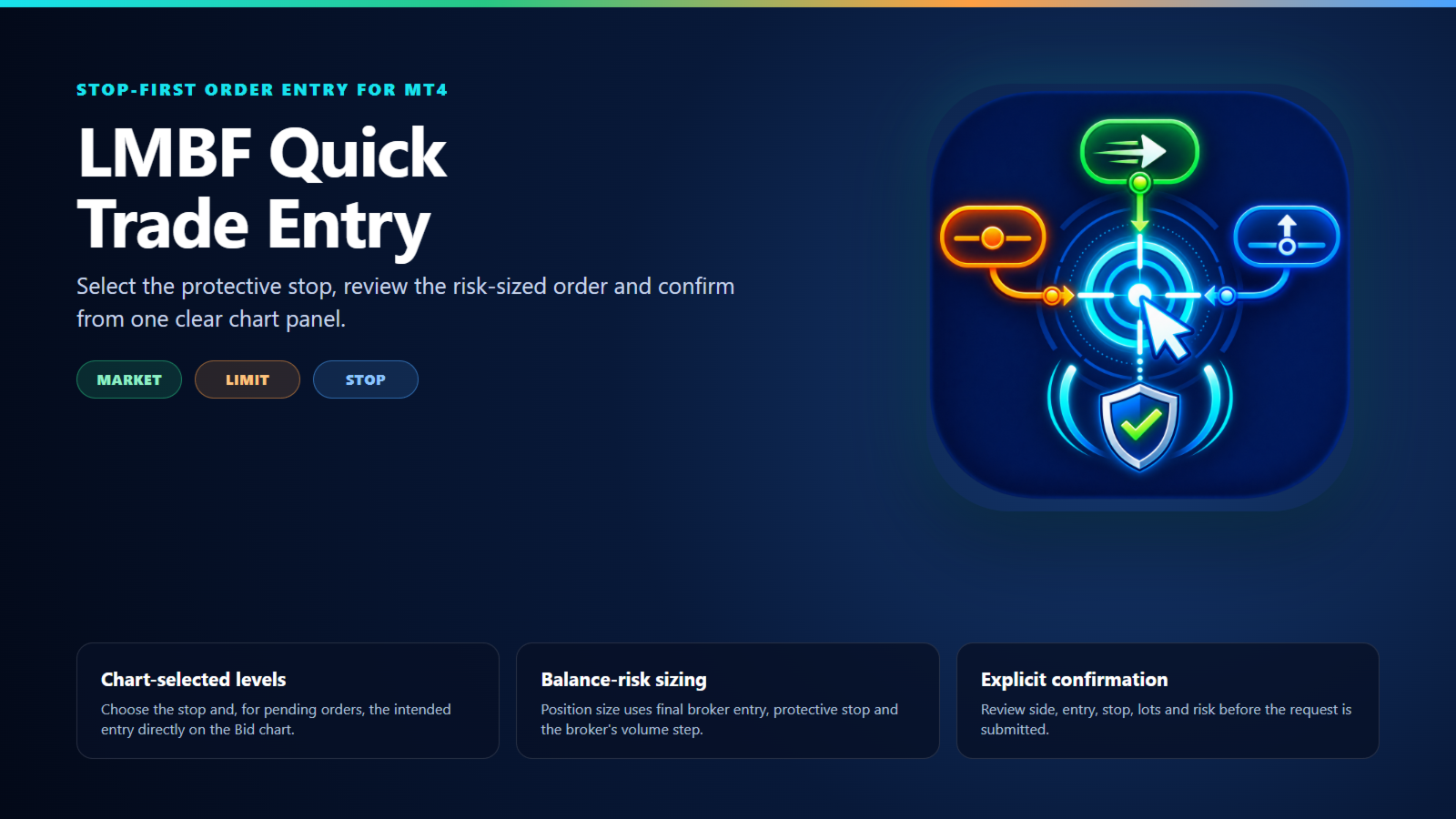
LMBF Quick Trade Entry is a stop-first, risk-sized order-entry indicator for MetaTrader 4.

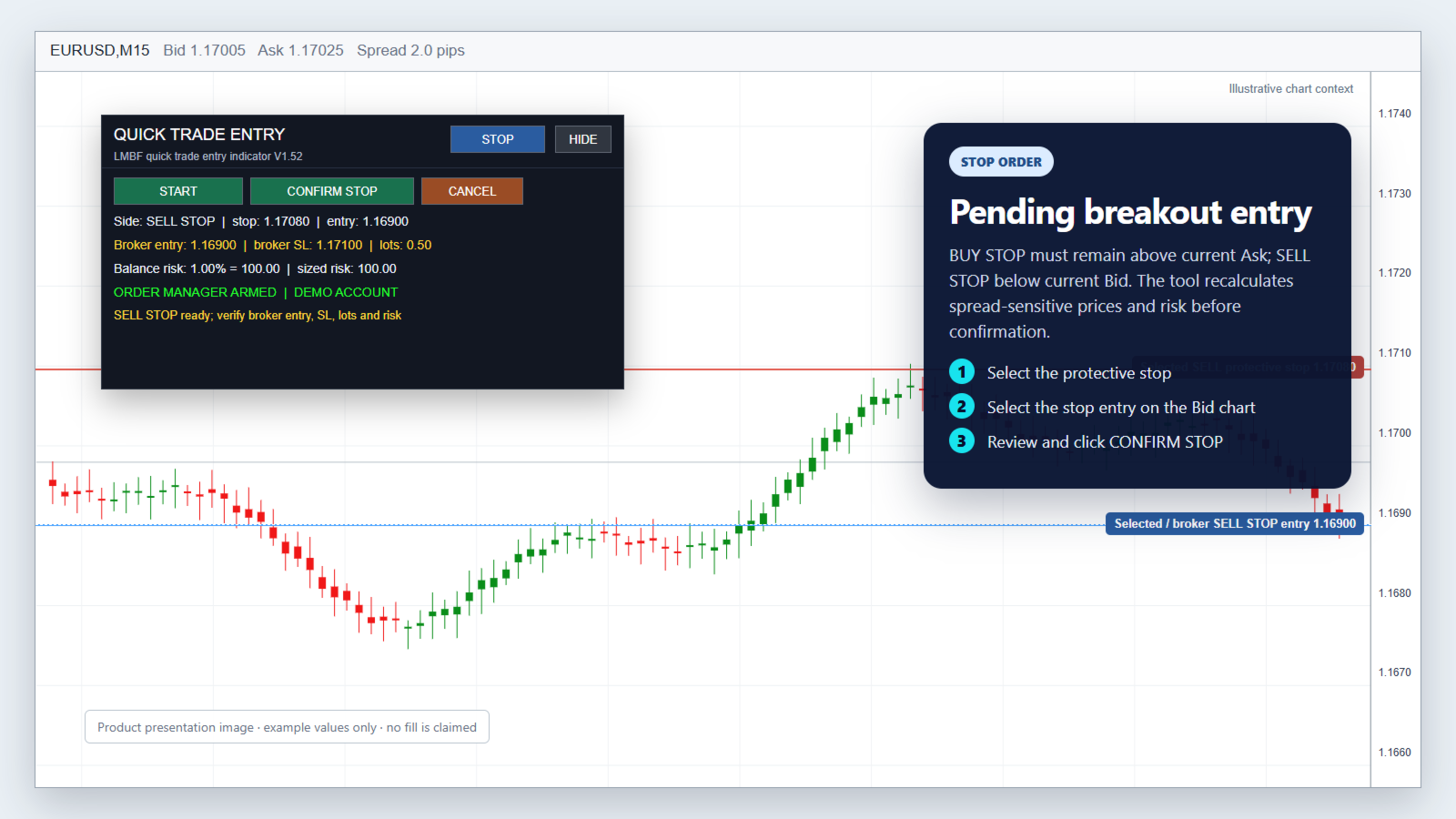
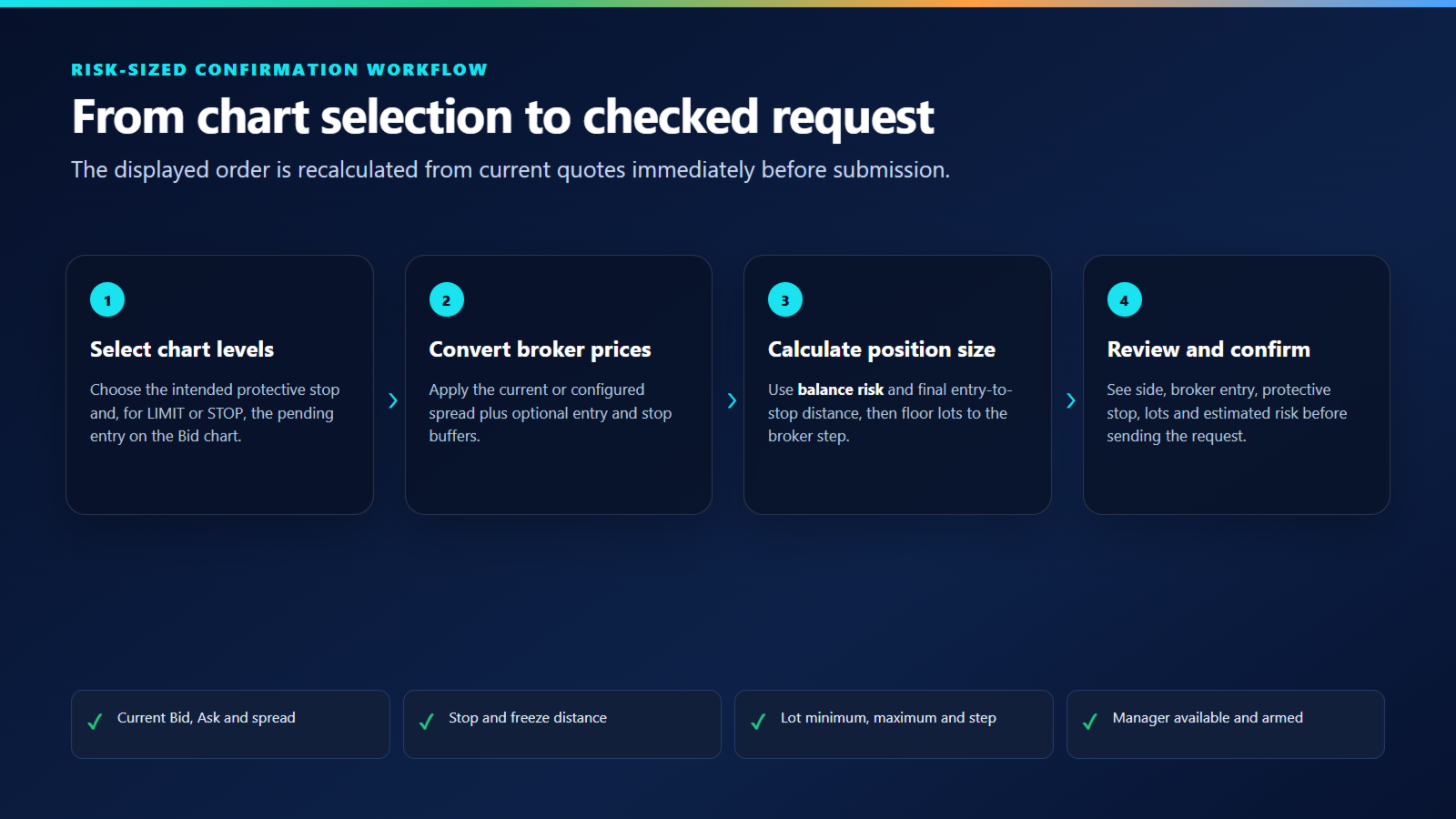
Choose MARKET, LIMIT or STOP, select the required price level or levels directly on the chart, review the calculated order details and confirm. The panel shows the inferred direction, broker entry, protective stop, position size and estimated balance risk before a request is submitted.

The indicator does not generate trading signals or choose trades. It helps a discretionary trader turn an existing trade decision into a clearly reviewed order request.

Required execution companion

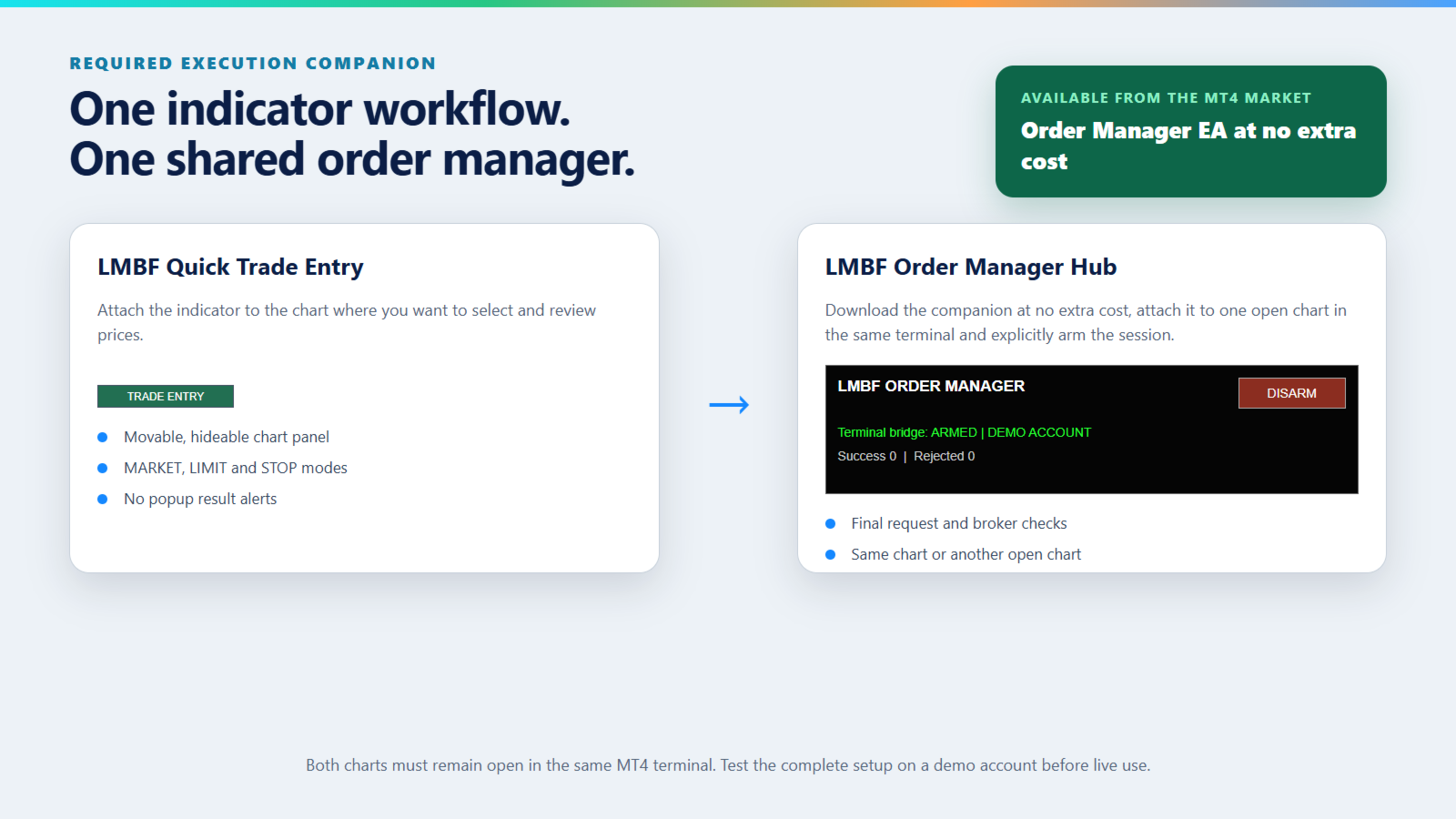
Quick Trade Entry works with LMBF Order Manager Hub, which is available for download from the MetaTrader 4 Market at no extra cost. The manager must be installed in the same MT4 terminal, attached to one open chart and armed before the indicator can submit an order request. This is so the Quick Trade Entry can be installed as an indicator, even though another EA may already exist on the same chart.

There is no additional purchase required for the Order Manager EA.

The indicator performs the chart workflow and publishes the final confirmed request. The manager checks the request and performs the supported MT4 order operation. No DLL, WebRequest or external service is used.

Three order modes

Market order

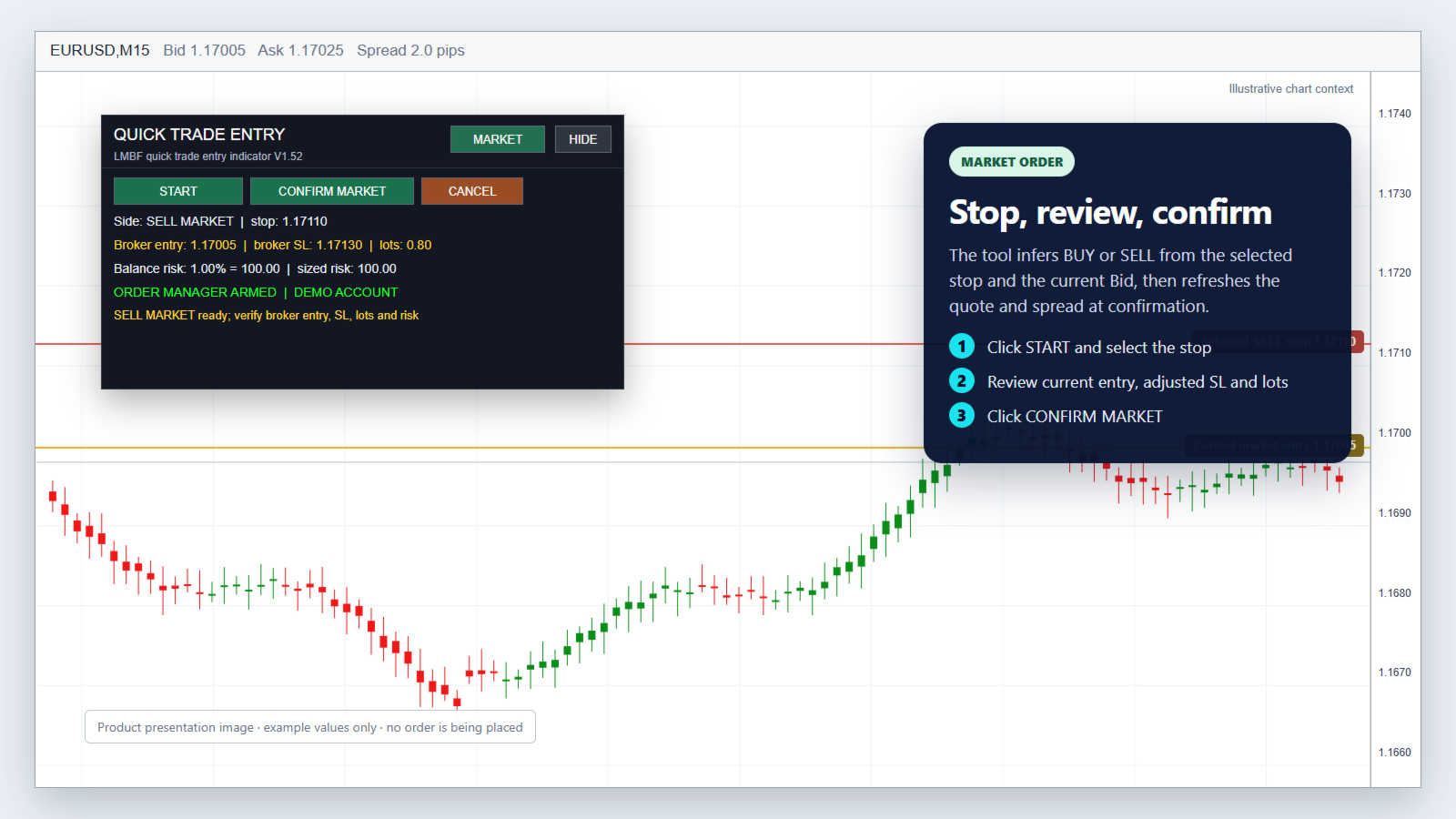
  1. Select MARKET and click START.
  2. Click the intended protective stop on the main chart.
  3. Review the inferred BUY or SELL direction, current entry, broker stop, lots and risk.
  4. Click CONFIRM MARKET.

The current Bid, Ask and spread are refreshed at confirmation. A stop below Bid selects BUY; a stop above Bid selects SELL.

Limit order

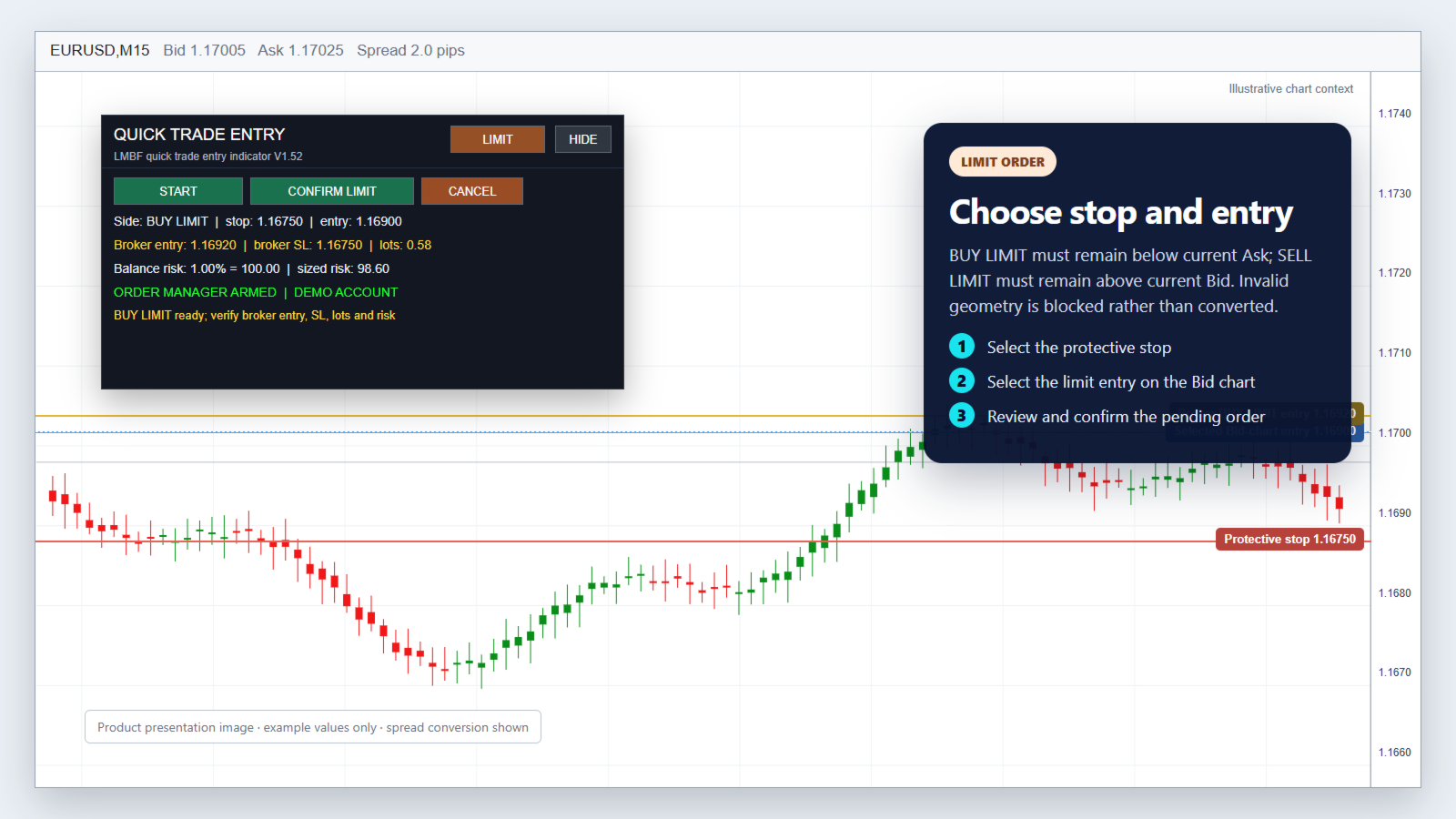
  1. Select LIMIT and click START.
  2. Click the intended protective stop on the Bid chart.
  3. Click the intended limit entry on the Bid chart.
  4. Review the final values and click CONFIRM LIMIT.

A protective stop below the entry selects BUY LIMIT. A protective stop above the entry selects SELL LIMIT. BUY LIMIT must remain below current Ask and SELL LIMIT above current Bid by the broker minimum distance.

Stop order

  1. Select STOP and click START.
  2. Click the intended protective stop on the Bid chart.
  3. Click the intended stop entry on the Bid chart.
  4. Review the final values and click CONFIRM STOP.

A protective stop below the entry selects BUY STOP. A protective stop above the entry selects SELL STOP. BUY STOP must remain above current Ask and SELL STOP below current Bid by the broker minimum distance.

Invalid pending-order geometry is blocked. The indicator does not silently convert the request into another order type.

Balance-risk position sizing

Position size is calculated from current account balance, the selected risk percentage and the final distance between broker entry and protective stop.

The result is floored to the broker lot step so rounding does not increase the requested risk. Broker minimum and maximum volume limits are checked. The panel shows both the balance-risk budget and estimated risk for the normalized position size.

Bid-chart and spread conversion

MT4 charts display Bid prices. Quick Trade Entry converts chart selections into broker prices using the spread available when the order is confirmed.

  • A BUY protective stop uses the selected Bid-chart stop, adjusted by the optional stop buffer.
  • A SELL protective stop adds current spread and the configured buffers because the stop is triggered on Ask.
  • BUY LIMIT and BUY STOP entries add current spread and the optional spread buffer to the selected Bid-chart entry.
  • SELL LIMIT and SELL STOP use the selected Bid-chart entry.

UseCurrentSpread is enabled by default. A manual spread and optional maximum-spread ceiling are also available.

Confirmation and checks

Every order requires an explicit confirmation from the panel. Immediately before submission, the indicator refreshes quotes and rechecks:

  • selected order type and direction;
  • entry and protective-stop geometry;
  • current spread and configured buffers;
  • broker stop and freeze distance;
  • tick size, tick value and risk-sized volume;
  • broker minimum, maximum and lot step;
  • manager availability and armed state.

The LMBF Order Manager Hub then applies its own connection, permission, margin, risk, spread, exposure and broker-validity checks. A protective stop is included with the create request. There is no deliberate unprotected-order fallback.

Clear chart controls

  • MARKET, LIMIT and STOP use separate configurable button colours.
  • The full panel can be hidden and restored from a compact TRADE ENTRY control.
  • Drag the title bar or collapsed control to move the panel.
  • Panel position and visibility are remembered across timeframe changes by default.
  • Selected chart levels remain visible while the panel is collapsed.
  • Results and validation problems appear in the panel and Experts log without MT4 popup alerts.

Setup

  1. Download LMBF Order Manager Hub at no extra cost, then install and attach it to one MT4 chart.
  2. Enable AutoTrading and allow trading for the manager EA.
  3. Review the manager limits and click ARM. Its panel should display ARMED.
  4. Attach LMBF Quick Trade Entry to the chart where you want to select prices.
  5. Confirm that the Quick Trade Entry panel shows ORDER MANAGER ARMED.
  6. Test MARKET, LIMIT and STOP workflows on a demo account using the smallest practical volume before live use.

The manager chart and indicator chart must remain open in the same MT4 terminal. They may be the same chart or different charts.

Main inputs

Order and risk

  • ClientInstanceId: unique mailbox identifier for this indicator instance.
  • SlippagePoints: requested slippage for order creation.
  • TradeComment: comment supplied with the create request.
  • DefaultOrderMode: initial MARKET, LIMIT or STOP selection.
  • RiskPercent: percentage of current balance used for position sizing.
  • MaximumRiskPercent: upper limit accepted by the indicator.

Spread and price conversion

  • UseCurrentSpread: use current Ask minus Bid when true.
  • ManualSpreadPoints: manual spread used when current-spread mode is disabled.
  • SpreadBufferPoints: extra points added to spread-adjusted entries and sell stops.
  • StopBufferPoints: optional extra distance applied to the protective stop.
  • MaximumSpreadPoints: optional spread ceiling; zero disables the ceiling.

Panel

  • ShowPanelInitially: choose expanded or collapsed first display.
  • RememberPanelVisibility: retain expanded or collapsed state.
  • AllowPanelDrag: allow mouse movement of the panel.
  • RememberPanelPosition: retain the moved position.
  • PanelCorner, PanelX and PanelY: initial panel location.
  • MarketModeButtonColor, LimitModeButtonColor and StopModeButtonColor: independent selector colours.
  • Additional inputs control panel, text, line and button appearance.

Important

LMBF Quick Trade Entry is an order-entry tool, not a trading strategy or signal service. It does not guarantee that an order will be accepted, filled at a requested price or protected from slippage, gaps or broker execution rules.

The trader remains responsible for the symbol, account, direction, entry, stop, risk percentage and final confirmation. Always verify every displayed value and test the complete setup on a demo account before live use.
Рекомендуем также
Market Monitor
Rodrigo Rethka Goncalves
Market Monitor – Smart Asset Performance Dashboard for MT4 Turn your MetaTrader 4 into a professional trading intelligence center! Market Monitor is a powerful monitoring tool that displays, in real time, the most relevant performance metrics of each symbol being traded — helping you make faster, smarter, and more strategic decisions. What Does This Indicator Do? Market Monitor scans all open and historical orders, consolidates the data by symbol, and displays everything in visual pa
"Ichimoku Waves Meter"  Измеритель Волн Ишимоку  это професиональный инструмент для графического анализа с использованием действительных интерпретаций Ichimoku kinkōhyō! это графическая программа, позволяющая быстро и просто измерить пропорции между указанными точками на графике цены. Предлагаемый показатель ценового и временного диапазона является основным инструментом для анализа графика в соответствии со стратегией Ichimoku на платформе MT4. За короткий промежуток времени с помощью данного ин
Утилита отслеживает ваши текущие советники и управляет стоп-уровнями. Вы можете настроить, какие именно советники и валюты отслеживать. Утилита предназначена в основном для советников, которые, на ваш взгляд, плохо справляются с управлением стоп-уровнями. Установите нулевое магическое число, если вы хотите, чтобы советник отслеживал также и сделки, совершенные вручную. Поддержка скрытых уровней стоп-лосс и тейк-профит Поддержка динамического стоп-лосс на основе ATR Поддержка уровня безубытка для
Одна диаграмма. Полный контроль. Перестаньте тратить время на управление объектами, цветами и настройками для каждой диаграммы отдельно.       Chart Sync Manager   , вы можете       синхронизируйте, копируйте и управляйте всеми вашими графиками MetaTrader       мгновенно — с помощью всего одной панели и нескольких сочетаний клавиш. Нарисуйте один раз и обновляйте везде. Открывайте и закрывайте диаграммы одним щелчком. Поддерживайте чистоту рабочего пространства с помощью       Управление объекта
Rainbow MT4 is a technical indicator based on Moving average with period 34 and very easy to use. When price crosses above MA and MA changes color to green, it’s a signal to buy. When price crosses below MA and MA changes color to red, it’s a signal to sell. The Expert advisor ( Rainbow EA MT4) based on Rainbow MT4 indicator, as you can see in the short video below is now available here .

FREE
Harvest GOLD USES THE TREND WAVE INDICATOR AND IT CAN IDENTIFY THE BEGINNING AND THE END OF A NEW WAVE TREND MOVEMENT. AS AN OSCILLATOR, THE INDICATOR IDENTIFIES THE OVERBOUGHT AND OVERSOLD ZONES. IT WORKS GREAT TO CATCH THE SHORT TERM PRICE REVERSALS AND USES A MARTINGALE STRATEGY TO CLOSE ALL TRADES IN PROFIT. USE DEFAULT SETTINGS ON H1 OR HIGHER TIME FRAME ON ANY PAIR FOR MORE ACCURATE TRADES WHY THIS EA : Smart entries calculated by 3 great strategies The EA can be run on even a $30000
Program for automatic placement of stop loss and take profit orders. Values are calculated as points distance from open price. BreakEven option is also included. all options could be applied to BUY, SELL separately or together. Enter values ​​in points in the fields on the right side of the menu and press dedicated button to aplly your settings. If in doubt, The instruction is displayed in the tooltip.
FREE
Эта утилита автоматически чертит трендовый канал на графике цены. Для интервала времени от указанной даты и до текущего бара начерченный канал является почти оптимальным. Помещая начало канала у более отдаленного исторического экстремума цены, вы получаете визуализацию более долгосрочного тренда. Наклон канала не является непрерывной величиной, а принимает одно из дискретных значений (в формате AxB, где A - это количество пунктов цены (поинтов), а B - количество таймфреймов). Эта программа работ
"Ichimoku Waves Meter"  Измеритель Волн Ишимоку  это професиональный инструмент для графического анализа с использованием действительных интерпретаций Ichimoku kinkōhyō! это графическая программа, позволяющая быстро и просто измерить пропорции между указанными точками на графике цены. Предлагаемый показатель ценового и временного диапазона является основным инструментом для анализа графика в соответствии со стратегией Ichimoku на платформе MT4. За короткий промежуток времени с помощью данного ин
Индикатор Crypto_Forex "Auto FIBO Pro" - отличный вспомогательный инструмент в торговле! - Индикатор автоматически рассчитывает и размещает на графике уровни Фибоначчи и локальные линии тренда (красного цвета). - Уровни Фибоначчи указывают ключевые области, где цена может развернуться. - Наиболее важными уровнями являются 23,6%, 38,2%, 50% и 61,8%. - Вы можете использовать его для скальпинга на разворот или для торговли по зональной сетке. - Существует множество возможностей улучшить вашу текущ
Fibo Color Levels
Marlon Campos da Silva
4 (4)
Fibo Color Levels - прекрасный инструмент для любителей Фибоначчи. Позволяет настроить предпочтительные значения, стили и форматы на каждом уровне, а также отметить уровни цветом в соответствии с из важностью. Fibo Color Levels не добавляет уровни коррекции Фибоначчи автоматически . Цель индикатора в другом. Необходимо вручную добавить уровни коррекции Фибоначчи на график. Используйте стандартный инструмент MT4 для добавления уровней Фибоначчи, используйте значения свинг-максимума и/или свинг-ми
QuickClose поможет немедленно закрыть все прибыльные ордера ОДНИМ НАЖАТИЕМ КНОПКИ. Работает очень быстро. Вы можете выбрать один или все символы для закрытия. Быстрая работа утилиты обеспечит более оперативное управление вашей торговлей. Этот советник может быстро закрыть все ордера на покупку и на продажу по указанному символу или по всем. Кнопки с названиями символом предназначены для закрытия ордеров. Доступны функции ручного и автоматического закрытия. Функция автоматического закрытия закрыв
EasyInsight MT4
Alain Verleyen
5 (1)
EASY Insight – Умный трейдинг начинается здесь Обзор А что если бы вы могли просканировать весь рынок — Форекс, золото, криптовалюты, индексы и даже акции — всего за несколько секунд, полностью без ручного просмотра графиков? EASY Insight — это ваш инструмент экспорта, готовый к работе с искусственным интеллектом, который превращает данные индикаторов в реальные торговые сигналы. Создан для трейдеров, уставших терять время на догадки и визуальный хаос, он обеспечивает полный обзор рынка в одно
SI Connect
Daniel Stein
5 (3)
SI Connect - это утилита, которая устанавливает соединение с нашими серверами для использования FX Volume. Технические инструкции по подготовке вашего терминала к использованию SI Connect Разрешите веб-запросы и вставьте https://stein.investments в список разрешенных URL в вашем терминале Опции -> Подкатегория советников . Вам нужен только один экземпляр советника на терминал, но он должен постоянно работать в фоновом режиме, чтобы получать последние данные из нашего центра обработки данных. В
FREE
Quantum Falcon Signal Free is a smart visual trading indicator for MetaTrader 4 designed for Forex and Gold traders. The indicator combines: • Trend analysis • RSI momentum confirmation • MACD momentum filtering • ATR volatility filtering • Higher timeframe confirmation • Smart exit signal detection Main Features: • Smart Buy and Sell signals • Exit Buy / Exit Sell alerts • Real-time dashboard on chart • Professional candle arrows • Multi-timeframe trend confirmation • ATR market volatility filt
FREE
ProfRoboTrading Dashboard MultiSymbol is Expert Advisor  a lightweight on-chart control panel that provides a clear overview of your trading account and open positions across multiple symbols. The dashboard displays key account metrics, summarizes open BUY/SELL orders and lots per symbol, calculates profit for Day/Week/Month, and offers quick manual close actions directly from the table. Key features Multi-symbol table   (symbols list configurable). Account metrics panel:   Balance, Equity, Mar
С легкостью возьмите под контроль свою торговую рутину с революционным менеджером времени сделок. Этот мощный инструмент автоматизирует выполнение ордеров в назначенное время, изменяя ваш подход к торговле. Создавайте персонализированные списки задач для различных торговых действий, от покупки до выставления ордеров, без ручного вмешательства. Руководство по установке и вводу данных Trades Time Manager Если вы хотите получать уведомления о работе советника, добавьте наш URL в терминал MT4/MT5 (с
EARLY REMINDER: The Starting price is 65 price will rise soon up to 365$ and then 750$ after first 10 copies of sales. Grab this offer now! Introduction Hello, traders! Welcome to the demonstration of the Forex Beast Indicator , a comprehensive tool designed to assist aspiring traders in navigating the complexities of the forex market. This indicator incorporates seven essential components to provide a well-rounded trading experience: Moving Averages Colored Zones Support and Resistance Levels
VR Cub
Vladimir Pastushak
VR Cub это индикатор что бы получать качественные точки входа. Индикатор разрабатывался с целью облегчить математические расчеты и упростить поиск точек входа в позицию. Торговая стратегия, для которой писался индикатор, уже много лет доказывает свою эффективность. Простота торговой стратегии является ее большим преимуществом, что позволяет успешно торговать по ней даже начинающим трейдерам. VR Cub рассчитывает точки открытия позиций и целевые уровни Take Profit и Stop Loss, что значительно повы
Heaven Assistant: Упрощение управления MT4 Упростите управление платформой MetaTrader 4 (MT4) с помощью Heaven Assistant . Этот советник (EA) является надежным инструментом, позволяющим контролировать и настраивать ваше торговое окружение эффективно и удобно. Основные характеристики: Открытие нескольких пар: Быстрый доступ к большинству валютных пар, как основных, так и второстепенных, плюс экзотические пары. Возможность открытия индексов, металлов и криптовалют одним кликом. Изменение шаблона:
Уникальный индикатор, реализующий профессиональный и количественный подход к торговле на возврате к среднему. Он использует тот факт, что цена отклоняется и возвращается к среднему предсказуемым и измеримым образом, что позволяет использовать четкие правила входа и выхода, которые значительно превосходят неколичественные торговые стратегии. [ Installation Guide | Update Guide | Troubleshooting | FAQ | All Products ] Четкие торговые сигналы Удивительно легко торговать Настраиваемые цвета и разме
Market View MT4
Kyra Nickaline Watson-gordon
5 (1)
Definition : Market View is a dashboard (scanner) to view price graphs of all symbols and all timeframes at a glance. The utility is designed user friendly and added a wide range of customization options. Main features of Market View : Visual settings window on the chart Customizable list of symbols and timeframes Different shapes : Real Candles, Schematic Candles, Arrows Customizable number of candles Changeable size of dashboard (scanner) Highlight timeframes with gaps on candles Open approp
The Arrow Scalper
Fawwaz Abdulmantaser Salim Albaker
1 (2)
Dear Friend..  I share with you this simple Expert Adviser .. it is full automatic  this Expert Adviser following the trend of the pair you install on or any stocks or indices , it is works like that: - when the trend on H4 chart show a start of up trend the expert will wait till the 15M & 1H charts show an up trend the EA will open a buy order directly , and do the same for down trend and open a sell order the buy or sell  order lot size and take profit and stop loss will measured manually  by
FREE
实盘交易盈利,回测年化125%,回撤25%,交易量少,不是经常下单,挂起后要有耐心。没有多牛的技术,只是一套简单的交易策略,贵在长期坚持,长期执行。我们有时候就是把自己高复杂,想想我们交易的历程,你就会发现,小白好赚钱,当你懂得越多的时候也是亏损的开始,总是今天用这个技术,明天用那个指标,到头来发现,没有一个指标适合你。其实每个技术指标都是概率性的,没有100%的胜率。很多技术指标你要融合一套交易策略,资金仓位控制,止损止盈比例,一套策略下来下一步你做的就是执行力了,必须要坚决执行你的交易策略,如果不能坚持的话最终还是在亏损。说实话不是每个人都有好的心态和执行力,所以我们做出来这款ea自己来用,发现时间久了扭亏为盈了,那现在就拿出来给大家分享,让更多的人来达到自己的盈利目标。购买后留下邮箱或添加软件里的qq,我们会根据你的资金来调整软件参数。 经测试过的柱数 14794 用于复盘的即时价数量 51321985 复盘模型的质量 n/a 输入图表错误 213935 起始资金 10000.00 点差 当前 (54) 总净盈利 12583.42 总获利 37630.02 总亏损 -25046.
THIS PRODUCT CAN NOT BE TEST IN STRATEGY TESTER. PLEASE TRY DEMO VERSION: https: //www.mql5.com/en/market/product/58082 FIRST 10 COPIES AT 30 USD, NEXT PRICE WOULD BE 50 USD RISK AND TRADE MANAGER RISK AND TRADE MANAGER   is an advanced trading panel designed for manual trading.   Utility helps to manage trades effectively and efficiently with a single click. MAIN FEATURES Convert and display Stop Loss (SL)   Pips into % and amount to view the clear picture of the trades if SL hits. Fund alloca
Snake NW
Sergei Shishaev
5 (1)
Канальный индикатор "Snake" . Отлично показывает точки входа и выхода. Не перерисовывает! Хорошо подойдет для стратегий с сетками (усреднения), стратегий с пирамидами (стратегий добора), обычной торговли по тренду, торговли на коррекции. Для любых типов инструментов:   валюты, нефть, металлы, криптовалюты. Для любых таймфреймов:   от M1 до D1 . Для любых стилей торговли:   скальпинг, интрадэй, свинг, долгосрок . Используйте в сочетании с трендовым индикатором, чтобы исключить риски входа про
Corporate Report
Pavel Verveyko
5 (1)
Программа (скрипт) выводит на монитор информацию о корпоративных отчетах и дивидендах акций; информация скачивается с сайта   investing.com: Дата отчета Прибыль на акцию (EPS) Доход (Revenue) Рыночная капитализация Размер дивидендов Дата выплаты дивидендов Дивидендный доход Продукт нельзя протестировать в тестере   (так как там нет возможности получать информацию из интернета). Перед использованием :   н еобходимо добавить   2   URL  https://ru.investing.com/earnings-calendar/Service/getCalenda
This EA is based on the relationship between the three currencies, interaction, and thus hedging, I now find the most ideal pair of currencies is the default parameter of the three pairs of currencies, On the parameters Parameter setting is very simple, "Huoli" is profitable n USD. Users can determine the number of orders according to the funds of the account.
TSim
Sergey Kruglov
Утилита  TSim   позволяет симулировать ручную торговлю в Тестере Стратегий MetaTrader 4. В панеле можно устанавливать размеры лота, тейпрофита и стоплосса. Панель имеет кнопки Sell   и Buy для выставления рыночных ордеров, а также кнопки CloseSell, CloseBuy и CloseAll для быстрого закрытия ордеров. Под панелью отображается список открытых ордеров. Внимание. Панель работает только в Визуальном режиме Тестера Стратегий MetaTrader 4.
FREE
Pmr
Thierry, Jean Minkowski
Introduction PMR (Prix Moyen de Revient) est  un algorithme conçu pour MetaTrader 4 (MT4) . Cet outil innovant vous permet de suivre et d'analyser les prix moyens de vos positions et ordres dans vos comptes de trading. Que vous soyez un trader débutant ou un professionnel, PMR est conçu pour vous aider à mieux comprendre vos coûts de transaction et à optimiser vos stratégies de trading. Fonctionnalités Clés Calcul du Prix Moyen de Revient   : Positions Acheteuses et Vendues Ouvertes   : Affiche
С этим продуктом покупают
Добро пожаловать в Trade Manager EA — лучший инструмент для управления рисками, предназначенный для упрощения, точности и эффективности торговли. Это не просто инструмент для размещения ордеров; это комплексное решение для удобного планирования торгов, управления позициями и усиленного контроля над рисками. Независимо от того, начинающий вы трейдер, опытный специалист или скальпер, нуждающийся в быстром исполнении, Trade Manager EA адаптируется к вашим потребностям и работает с любыми активами:
Exp COPYLOT CLIENT for MT4
Vladislav Andruschenko
4.69 (65)
Профессиональный копировщик сделок для MetaTrader 4 Быстрый, профессиональный и надежный копировщик сделок для MetaTrader 4 . COPYLOT позволяет копировать сделки Forex между терминалами MetaTrader 4 и MetaTrader 5 , обеспечивая гибкую синхронизацию для разных типов счетов и сценариев торговли. Версия COPYLOT MT4 поддерживает: MetaTrader 4 → MetaTrader 4 MetaTrader 5 Hedge → MetaTrader 4 MetaTrader 5 Netting → MetaTrader 4   Версия MT5 Полное описание + DEMO + PDF Как купить Как установить Как по
Local Trade Copier EA MT4
Juvenille Emperor Limited
4.96 (111)
Опыт экстремально быстрого копирования сделок с помощью Local Trade Copier EA MT4 . Благодаря простой установке в течение 1 минуты этот копировщик сделок позволяет вам копировать сделки между несколькими терминалами MetaTrader на одном компьютере с Windows или на Windows VPS с крайне быстрыми скоростями копирования менее 0.5 секунды. Независимо от того, новичок вы или профессиональный трейдер, Local Trade Copier EA MT4 предлагает широкий спектр опций, чтобы настроить его под ваши конкретные пот
Trade Assistant MT4
Evgeniy Kravchenko
4.43 (197)
Помогает рассчитать риск на сделку, простая установка нового ордера с помощью линий, управление ордерами с функциями частичного закрытия, 7 типов трейлинг-стопа и другие полезные функции. Дополнительные материалы и инструкции Инструкция по установке   -   Инструкция к приложению   -   Пробная версия приложения для демо счета Функция Линии   - отображает на графике линию открытия, стоп-лосс, тейк-профит. С помощью этой функции легко установить новый ордер и увидеть его дополнительные характери
The product will copy all telegram signal to MT4   ( which you are member  ) , also it can work as remote copier.  Easy to set up, copy order instant, can work with almost signal formats, image signal, s upport to translate other language to English Work with all type of channel or group, even channel have "Restrict Saving Content", work with  multi channel, multi MT5 Work as remote copier: with signal have ticket number, it will copy exactly via ticket number. Support to backtest signal. How to
TradePanel MT4
Alfiya Fazylova
4.84 (95)
Trade Panel — это многофункциональный торговый помощник. Приложение содержит более 50 торговых функций для ручной торговли и позволяет автоматизировать большинство торговых операций. Инструкция к приложению + видео-инструкции: https://www.mql5.com/ru/blogs/post/756476 Пробная версия приложения для демо-счета: https://www.mql5.com/ru/blogs/post/750864 Как установить приложение: https://www.mql5.com/ru/blogs/post/750096 Как тестировать приложение в визуальном режиме: https://www.mql5.com/ru/blogs/
Telegram to MT4 Coppy
Sergey Batudayev
4.09 (11)
Telegram to MT4: Идеальное решение для копирования сигналов Упростите свою торговлю с Telegram to MT4 — современным инструментом, который копирует торговые сигналы прямо из каналов и чатов Telegram на вашу платформу MetaTrader 4, без необходимости использования DLL. Это мощное решение обеспечивает точное исполнение сигналов, широкие возможности настройки, экономит время и повышает вашу эффективность. [ Instructions and DEMO ] [ FAQ ] [ How atach logs properly ] [ Settings descrition ] Ключевые
Trade copier MT4
Alfiya Fazylova
4.6 (35)
Trade Copier — это профессиональная утилита, предназначенная для копирования и синхронизации сделок между торговыми счетами. Копирование происходит от счета/терминала поставщика к счету/терминалу получателя, которые установлены на одном компьютере или vps. АКЦИЯ - Если вы уже приобрели "Trade copier MT4", вы можете получить "Trade copier MT5" бесплатно (для копирования MT4 > MT5 и MT4 < MT5). Для получения более подробной информации об условиях, пожалуйста, свяжитесь с нами через личные сообщени
Prop Guardian Risk Manager MT4 – Drawdown, Risk & Hedge Protection for Prop Firm and Managed Accounts Prop Guardian Risk Manager is a professional risk-control utility for MetaTrader 4, designed for prop firm traders, money managers and anyone who wants strict account-level risk protection. It does not generate trading signals, strategy entries or trading decisions. Instead, it runs in the background, monitors your account risk and can automatically block new exposure, close managed trades or ac
X2 Copy MT4
Liubov' Shkandrii
Быстрый. Точный. Инновационный. Технологичный. Откройте для себя мгновенное копирование сделок с революционным X2 Copy MT4. Всего за 10 секунд простой установки вы получите мощный инструмент для синхронизации сделок между терминалами MetaTrader на одном компьютере или Windows VPS с беспрецедентной скоростью. Управляете несколькими счетами, следуете сигналам или масштабируете свою стратегию — X2 Copy MT4 адаптируется к вашему рабочему процессу с непревзойдённой точностью и контролем. Работайте бы
News Filter EA: Advanced Algo Trading Assistant News Filter EA is an advanced algo trading assistant designed to enhance your trading experience. By using the   News Filter EA , you can integrate a Forex economic news filter into your existing expert advisor, even if you do not have access to its source code. In addition to the news filter, you can also specify   trading days   and   hours   for your expert. The News Filter EA also includes   risk management   and   equity protection   features
Riskless Pyramid
Snapdragon Systems Ltd
5 (1)
Introduction This powerful MT4 trade mangement EA offers a way potentially to aggressively multiply trade profits in a riskfree manner. Once a trade has been entered with a defined stoploss and take profit target then the EA will add three pyramid add-on trades in order to increase the overall level of profit. The user sets the total combined profit target to be gained if everything works out. This can be specified either as a multiple of the original trade profit or as a total dollar amount. Fo
The News Filter
Leolouiski Gan
5 (25)
Этот продукт фильтрует всех экспертных советников и ручные графики во время новостей, так что вам не нужно беспокоиться о внезапных скачках цены, которые могут разрушить ваши ручные торговые настройки или сделки, введенные другими экспертными советниками. Этот продукт также поставляется с полной системой управления ордерами, которая может обрабатывать ваши открытые позиции и ордера на ожидание перед выпуском новостей. После покупки The News Filter вам больше не придется полагаться на встроенные
Grid Manual MT4
Alfiya Fazylova
4.71 (17)
Grid Manual — это торговая панель для работы с сеточными стратегиями. Утилита универсальная, имеет гибкие настройки и понятный интерфейс. Работает с сеткой ордеров не только в сторону усреднения убытков, но и в сторону наращивания прибыли. Трейдеру не нужно создавать и сопровождать сетку ордеров, это сделает утилита. Достаточно открыть ордер и Grid manual автоматически создаст ему сетку ордеров и будет сопровождать его до самого закрытия. Полная инструкция и демо-версия здесь . Основные особенно
Unlimited Trade Copier Pro - это мощный инструмент для удаленного копирования сделок между несколькими счетами MetaTrader 4/MetaTrader 5, расположенными удаленно друг от друга, по сети интернет. Это идеальное решение для провайдеров сигналов, которые хотят поделиться своей торговлей с другими трейдерами по всему миру. Один поставщик может копировать сделки на неограниченное количество счетов-получателей, а один получатель также может копировать сделки неограниченного количества провайдеров. Пост
Скачать рабочую пробную версию Copy Cat More (Копи Кэт Мор) — копировщик сделок (Trade Copier) MT4 — это не просто локальный копировщик сделок; это полноценная система управления рисками и исполнения (risk management and execution framework), созданная для современных торговых задач. От челленджей проп-фирм (prop firm) до управления личным портфелем — он адаптируется к любой ситуации благодаря сочетанию надёжного исполнения, защиты капитала, гибкой настройки и продвинутой обработки сделок. Ко
Trading History MT4
Siarhei Vashchylka
5 (9)
Trading History - Программа для торговли и управления капиталом на истории котировок в тестере стратегий. Может работать с отложенными и немедленными ордерами, оснащена функциями трейлинг стопа, безубытка и тейкпрофита. Очень хорошо подходит для тренировок и тестирования различных стратегий. Инструкция/Мануал ( Обязательно читайте перед приобретением ) Преимущества 1. В кратчайшие сроки позволяет протестировать любую торговую стратегию 2. Отличный тренажёр для тренировок трейдинга. Можно получи
Trade Dashboard MT4
Fatemeh Ameri
4.96 (54)
Trade Dashboard simplifies how you open, manage, and control your trades, with built-in lot size calculation. It allows you to execute trades, manage risk, and control positions directly on the chart, with tools such as partial close, breakeven, and trailing stop. Designed to reduce manual work and help you stay focused on your trading decisions. A demo version is available for testing. Detailed explanations of features are provided within the MQL5 platform. Installation instructions are include
Custom Alerts AIO: Универсальный сканер рынка — Без настройки Обзор Custom Alerts AIO — это самый быстрый и простой способ отслеживать рыночные сигналы в реальном времени на множестве инструментов без дополнительной настройки и без необходимости покупать другие продукты. В состав входят все необходимые индикаторы от Stein Investments, что делает этот инструмент идеальным решением «всё в одном» для трейдеров, ценящих простоту и эффективность. Просто установите на график и сразу получайте сигнал
Trade Manager MT4 DaneTrades
Levi Dane Benjamin
4.09 (11)
Trade Manager, который поможет вам быстро входить и выходить из сделок, автоматически рассчитывая риск. Включает функции, которые помогут предотвратить чрезмерную торговлю, торговлю из мести и эмоциональную торговлю. Сделками можно управлять автоматически, а показатели эффективности счета можно визуализировать в виде графика. Эти функции делают эту панель идеальной для всех трейдеров, занимающихся ручной торговлей, и помогают улучшить платформу MetaTrader 4. Многоязычная поддержка. Версия MT5  |
MT4 к Telegram Signal Provider - это простой в использовании и полностью настраиваемый инструмент, который позволяет отправлять сигналы в Telegram, превращая ваш аккаунт в поставщика сигналов. Формат сообщений полностью настраиваем! Однако для простого использования вы также можете выбрать предопределенный шаблон и включать или отключать определенные части сообщения. [ Демо ]  [ Руководство ] [ Версия для MT5 ] [ Версия для Discord ] [ Телеграм-канал ]  New: [ Telegram To MT5 ] Настройка Шаг за
Trade Reverse Copie4
Chukwuemeka Kingsley Anyanwu
5 (1)
Feel free to contact me for any extra features :) [SEE MT5 VERSION  https://www.mql5.com/en/market/product/128846 The Local Reverse Copier is an Expert Advisor designed to synchronize positions between a Master account and a Slave account with a twist: it reverses the trades. When a buy position is opened on the Master account, the EA opens a sell position on the Slave account, and vice versa. This allows for a unique form of trade copying where positions are mirrored in opposite directions bet
Lot Architect — Trade Panel and Position Size Calculator for MT4 Lot Architect is a trade panel and risk-based position size calculator for MetaTrader 4. It helps calculate lot size from the selected risk, displays trade parameters before entry, and supports Market, Limit and Stop orders from the chart. The utility is designed for traders who want a structured workflow for position sizing, stop-loss placement, take-profit planning and order execution. Purpose Before opening a trade, a trader nee
LMBFWatchlist is an interactive tool for Metatrader 4 that lets you create and manage watch lists directly on your Metatrader charts. ‌Functionality includes: ‌Add an unlimited number of watch lists with names of your choice Add different groups of watchlists for different time frames Add comments for symbols that always appear on the chart when that symbol is selected. Easily identify which symbols have comments against them. See watch lists instantly synchronise across all open charts that hav
Ultimate Partial Profit EA
BLAKE STEVEN RODGER
4.67 (3)
This EA Utility delivers a robust solution for managing an unlimited array of open orders, both manual and automated. It enables customizable partial profit levels utilizing metrics such as pips, ratios, ATR (Average True Range), and profit amounts for precise trade management. The utility features an advanced on-screen display, offering clear visualization of all orders and their profit levels to enhance strategic decision-making and control. To evaluate its performance and interface, the EA s
PZ Trade Pad Pro MT4
PZ TRADING SLU
3.67 (3)
Это визуальная торговая панель, которая помогает вам легко размещать сделки и управлять ими, избегая человеческих ошибок и повышая вашу торговую активность. Он сочетает в себе простой в использовании визуальный интерфейс с надежным подходом к управлению рисками и положением [ Руководство по установке | Руководство по обновлению | Устранение неполадок | FAQ | Все продукты ] Удивительно простой в использовании Торгуйте легко с графика Торгуйте с точным управлением рисками, без проблем Сохранение
RS Trade Copier - сверхбыстрый локальный копировщик сделок с полноценным графическим интерфейсом. Хватит вбивать номера счетов вручную. Никаких 200+ непонятных параметров в настройках. Надёжный и гибкий инструмент для копирования торговых операций между несколькими терминалами MT4 и MT5. Подходит как опытным трейдерам и сигнал-сервисам, так и частным инвесторам. Позволяет синхронизировать торговлю от одного или нескольких источников к одному или нескольким приёмникам с высокой точностью и минима
Strategy Builder offers an incredible amount of functionality. It combines a trade panel with configurable automation (covert indicators into an EA), real-time statistics (profit & draw down) plus automatic optimization of SL, TP/exit, trading hours, indicator inputs. Multiple indicators can be combined into an single alert/trade signal and can include custom indicators, even if just have ex4 file or purchased from Market. The system is easily configured via a CONFIG button and associated pop-up
VirtualTradePad PRO SE MT4 — расширенная торговая панель и рабочее пространство на графике для MetaTrader 4 VirtualTradePad PRO SE — это профессиональная торговая панель и рабочая среда управления сделками для MetaTrader 4 . Она помогает трейдерам быстрее открывать, сопровождать, защищать, закрывать и анализировать сделки из одного интерфейса на графике. Продукт создан для активных ручных трейдеров, которым нужно больше, чем простой набор кнопок. PRO SE объединяет исполнение в один клик, отложен
Telegram to MT4 Multi-Channel Copier   автоматически копирует торговые сигналы из ваших Telegram-каналов прямо в MetaTrader 4. Без ботов, без браузерных расширений, без ручного копирования. Сигнал приходит в Telegram — и советник открывает сделку в вашем терминале за считанные секунды. Продукт состоит из двух компонентов: приложения для Windows, которое слушает ваши Telegram-каналы, и этого советника, который исполняет сигналы в терминале MT4. Также доступна версия для MT5   здесь . Руководство
Другие продукты этого автора
LMBFWatchlist is an interactive tool for Metatrader 4 that lets you create and manage watch lists directly on your Metatrader charts. ‌Functionality includes: ‌Add an unlimited number of watch lists with names of your choice Add different groups of watchlists for different time frames Add comments for symbols that always appear on the chart when that symbol is selected. Easily identify which symbols have comments against them. See watch lists instantly synchronise across all open charts that hav
LMBF Order Manager Hub LMBF Order Manager Hub is the free execution companion for compatible LMBF trading indicators on MetaTrader 4. MetaTrader 4 allows only one Expert Advisor on a chart, while a chart can host several indicators. This utility lets compatible LMBF indicators send confirmed order requests to one shared Expert Advisor. The manager can be attached to one chart while client indicators run on the same chart or on other open charts in the same MT4 terminal. The manager is an executi
FREE
Use this indicator to ensure all your open charts are constantly displaying the same time frame. Change the time frame in any one chart and watch the others instantly change to the same time frame. Also allows scrolling of candles in one chart to be replicated in all other synchronized charts. Analyze correlation between different symbols by linking charts together on the same time frame Display a vertical marker move across all your open charts, so you can quickly compare price action at the sa
FREE
The LMBFPositionSize indicator is a simple way to quickly determine the position size appropriate for your prospective trade interactively on your Metatrader 4 charts. When you first add the indicator to your chart, you will be given the option to set parameters including: the account balance to use in the calculation and a percentage of the balance you are prepared to risk.  Once attached to your chart, the indicator is available for you to use whenever you want and will continue to use these p
Completely change the way you use Metatrader 4 forever and give new meaning to using profiles and templates. Just attach the indicator to your open charts (e.g. include in your default template) and customised templates so you can do the following: Switch between different templates effortlessly without fear of losing any of the graphical objects (horizontal S&R, areas of supply and demand, text annotations) drawn on your charts Close a chart  and then watch it remember all the graphical objects
If you like to see different time frames for the same symbol side by side on your terminal, then this is the indicator for you. Attach the indicator to all chart instances for the symbol of interest. Then see any additions, edits or deletions made on graphical objects instantly replicated to all other open charts for the same symbol. Object types replicated include: trend lines, horizontal lines, vertical lines, rectangles, triangles, ellipses, arrows, text boxes and labels.
This may just look like another indicator for identifying and displaying supply and demand, but dig-in further and you will discover it has much more to offer. In addition to the complete flexibility for displaying zones, consider the identification of recent support or resistance, the back-testing capability to help you learn how to identify the best supply and demand zones to trader from, the continuously updated trend information for all time frames, times from around the world displayed on
Use this tool to plan your trades directly on your charts and get instant feedback on account risk, trade risk to reward and  required position size. Plus, purchase LMBF Executor separately to easily convert planned trades into orders and manage them from your charts. Features include: Plan multiple trades for one or more symbols visually on your charts at one time, either on the same of different time frames. Use your mouse to drag levels to change entry, stop loss and take profit levels.  See
LMBF Executor
Graeme Dakers
5 (1)
**IMPORTANT** THIS TOOL REQUIRES YOU TO FIRST PURCHASE "Graphical Trade Planner" https://www.mql5.com/en/market/product/56702. Without it, this tool will do nothing of any use. -------------------------- Use "Graphical Trade Planner"  to plan your trades directly on your charts and get instant feedback on account risk, trade risk to reward and  required position size. Plus, purchase LMBF Executor separately to easily convert planned trades into orders and manage them from your charts. Features i



LMBF Drawing Tools LMBF Drawing Tools is a fast, mouse-driven toolkit for placing precise rays, shapes and notes on MetaTrader 4 charts. Marking a chart should be quick and accurate. LMBF Drawing Tools lets you select a drawing mode from a compact on-chart panel and then click directly on the chart. Rays can snap to the exact high, low, open or close of a candle. Rectangles, circles and two types of text annotation are also available from the same panel. It is designed for chart analysis, planni
Фильтр:
Нет отзывов
Ответ на отзыв