Drawing Tools

LMBF Drawing Tools

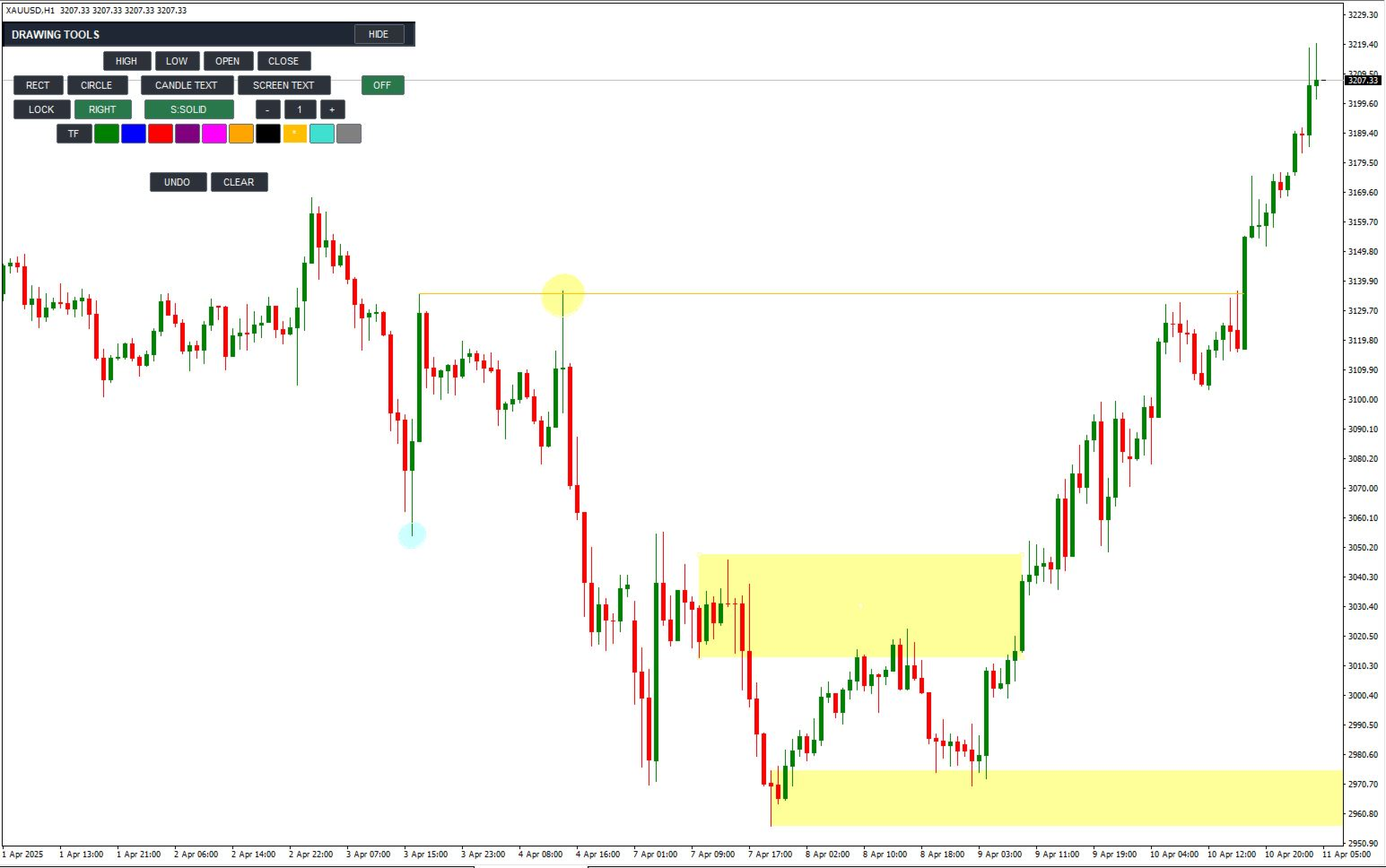
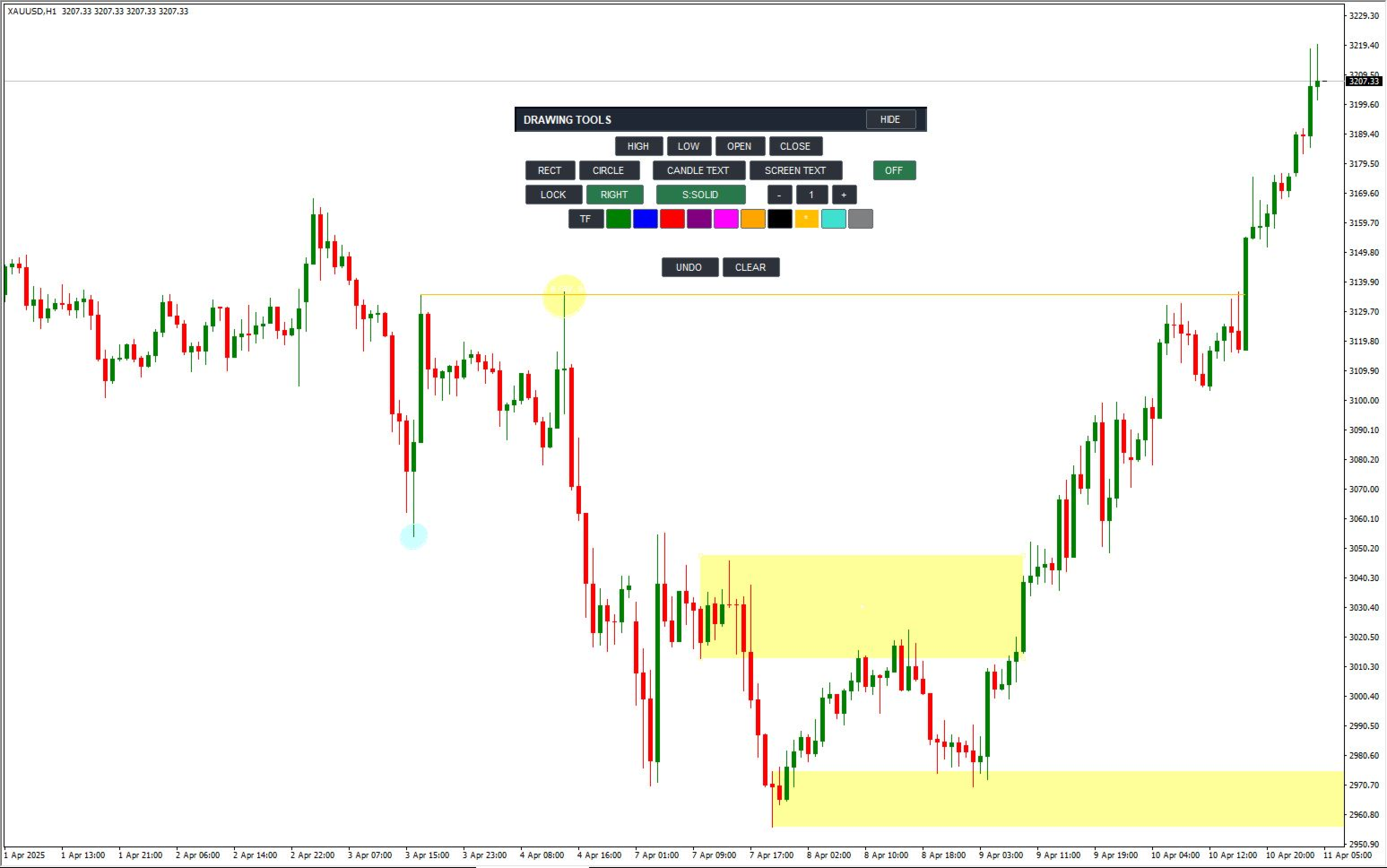
LMBF Drawing Tools is a fast, mouse-driven toolkit for placing precise rays, shapes and notes on MetaTrader 4 charts.

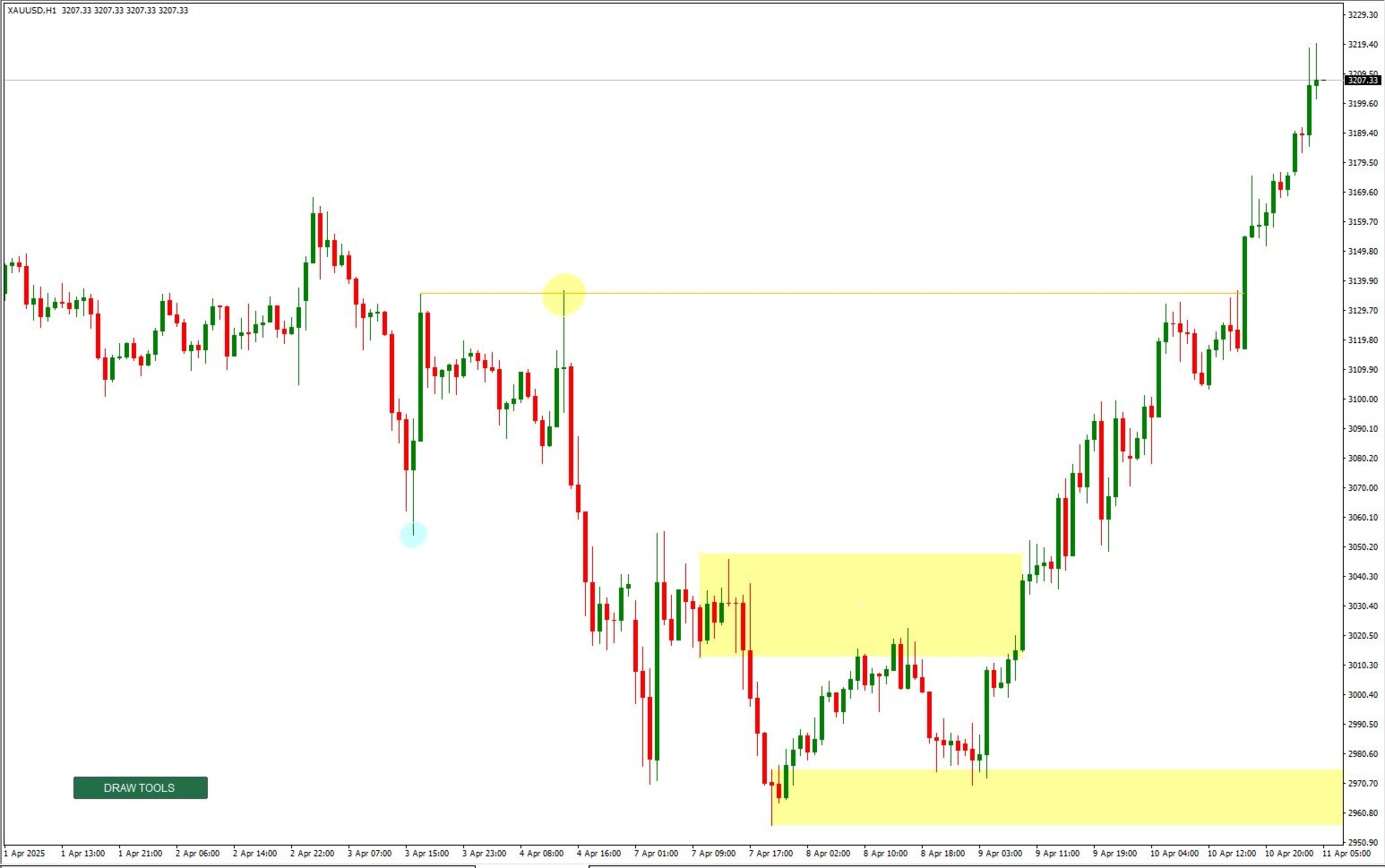
Marking a chart should be quick and accurate. LMBF Drawing Tools lets you select a drawing mode from a compact on-chart panel and then click directly on the chart. Rays can snap to the exact high, low, open or close of a candle. Rectangles, circles and two types of text annotation are also available from the same panel.

It is designed for chart analysis, planning, teaching and journaling. It creates standard MT4 objects, uses no DLLs and never opens, modifies or closes trades.

Main advantages

  • Accurate candle-price selection: place a horizontal ray at the exact high, low, open or close of the candle you click.
  • Fast mouse workflow: select a tool, click the chart and continue your analysis without opening MT4 object-property windows.
  • Three ray endpoint choices: stop at a second point, stop when a completed candle body reaches the level, or project a long distance.
  • Left or right direction: project rays and rectangles into future price action or back through chart history.
  • Automatic timeframe colours: instantly see the timeframe on which a level was created.
  • Clean chart layout: collapse the full panel to one small DRAW TOOLS button and move either the collapsed or expanded panel with the mouse.

Precise candle rays

Select HIGH, LOW, OPEN or CLOSE and click a candle. The new ray is placed at that candle's exact selected price. A small active-tool label follows the cursor so you can always see which action is waiting for a click.

Choose one of three endpoint methods:

  • 2ND: the candle sets the price and a second click sets the exact time boundary.
  • HIT BODY: the ray stops at the first completed candle whose open-to-close body reaches the ray price. If a right-facing ray has not yet been touched, the indicator continues checking newly completed candles.
  • LONG: the ray continues across the chart in the selected direction.

The RIGHT/LEFT control applies to all new candle rays. Ray style can be cycled through solid, dash, dot, dash-dot and dash-dot-dot. Width can be changed from the panel by clicking minus or plus, or by typing a value from 1 to 5. MT4 displays patterned line styles at width 1; the selected width is retained for the next solid line.

Automatic and manual colours

New rays and text can use an automatic timeframe colour map. Defaults are MN1 green, W1 blue, D1 red, H4 purple, H1 magenta, M30 orange, M15 black, M5 amber and M1 turquoise.

All colours are configurable. The panel also offers manual colour swatches, and completed objects keep their original colour.

Rectangle tool

RECT creates a price zone from two candle selections. Click above or in the upper part of a candle to use its high, or below or in the lower part to use its low. The indicator compares both selected prices and automatically places the higher price at the top and the lower price at the bottom, regardless of click order.

Rectangles have three extension methods:

  • 3RD: use a third click to set the exact time boundary.
  • HIT BODY: extend until the first completed candle body overlaps the rectangle's price range.
  • LONG: extend for a configurable number of years.

RIGHT and LEFT determine the extension direction. Rectangles use a separate palette of light colours so candles remain easy to see. The default fill is light yellow and is drawn behind the candles.

Circle tool

CIRCLE uses two clicks. The first click sets the centre. Move the pointer in any direction and click again to set the radius. A live preview follows the mouse before the second click.

The indicator measures the chart's horizontal and vertical pixel scales and corrects the native MT4 ellipse so that it appears as a circle rather than a flattened or stretched shape. Completed circles use the same light-colour palette as rectangles and behave as one drawing for moving, deleting, UNDO and CLEAR.

Text and annotation tools

  • CANDLE TEXT: places a note at a candle time and chart price. The note moves naturally when the chart is scrolled.
  • SCREEN TEXT: fixes a note to a position in the chart window while candles scroll underneath it.

Select a text mode, type the note and click the required position. Long text wraps automatically at word boundaries. Use the | character or the literal characters \n to force a new line. Wrapped lines are managed as one note, so UNDO, CLEAR or deleting one line removes the complete annotation.

Simple controls and object management

  • LOCK: keeps the selected mode active for repeated drawings. With LOCK off, a completed drawing returns the tool to OFF.
  • Right-click: cancels the active or unfinished drawing and returns the tool to OFF. Normal right-click behaviour is retained when no tool is active.
  • UNDO: first cancels an unfinished selection; otherwise removes the most recently created object owned by this instance.
  • CLEAR: removes all completed drawings owned by this instance.
  • HIDE: collapses the panel to one DRAW TOOLS button. The B key can also toggle the panel.
  • Move: drag the expanded panel by its title area, or drag the collapsed DRAW TOOLS button. Chart scrolling is suspended only while a panel drag is taking place.

A new attachment starts collapsed to keep the chart clear. Panel visibility and position are retained when the chart symbol or timeframe changes. Multiple copies can be separated with different InstanceId values.

Input parameters

Ray appearance and behaviour

  • InitialMode: drawing mode selected when the indicator loads. OFF is the recommended default.
  • InitialLock: enables repeated-placement mode at startup when true.
  • RayStyle: initial style for new rays: solid, dash, dot, dash-dot or dash-dot-dot.
  • RayWidth: initial line and shape-border width. Values are limited to 1 through 5.
  • UseTimeframeColorsInitially: uses the automatic timeframe colour map when true.
  • InitialManualRayColor: initial manual colour used when automatic timeframe colours are disabled.
  • StopAtCandleBodyInitially: compatibility option for older presets. When true, HIT BODY overrides the initial ray-extension choice.
  • BodyRayRightInitially: selects RIGHT when true or LEFT when false for new rays and rectangles.
  • InitialRayExtension: initial ray endpoint method: second point, candle-body contact or long projection.
  • RayInBackground: places new rays behind chart candles when true.
  • RaySelectable: allows completed objects to be selected and edited with normal MT4 controls.
  • DeleteRaysOnRemoval: removes all drawings owned by this instance when the indicator is removed. When false, completed drawings remain on the chart.

Rectangle and circle appearance

  • RectangleColor: initial light palette colour shared by new rectangles and circles.
  • RectangleFilled: fills new rectangles and circles when true.
  • RectangleInBackground: draws shape fills behind chart candles when true.
  • InitialRectangleExtension: initial rectangle endpoint method: third point, candle-body contact or long projection.
  • RectangleLongYears: extension length for LONG rectangles and the temporary projection used while HIT BODY waits for contact. Accepted range is 1 to 25 years.
  • CircleScaleCorrection: optional correction for terminal or display scaling differences. The normal value is 1.0 and the accepted range is 0.5 to 2.0.

Text tools

  • InitialText: initial note shown in the text-entry field.
  • TextFontName: font used for new candle and screen text.
  • TextFontSize: font size for new notes. Values are limited to 6 through 36.
  • TextWrapCharacters: approximate maximum characters per automatically wrapped line. Values are limited to 8 through 120.
  • TextLineSpacingPixels: vertical spacing between wrapped lines. Values are limited to 8 through 60 pixels.
  • TextMaximumLines: maximum wrapped lines in one note. Values are limited to 1 through 50.
  • TextInBackground: places new text behind other chart objects when true.

Timeframe colour map

  • MN1RayColor: colour used for objects created on the monthly chart. Default: green.
  • W1RayColor: colour used for objects created on the weekly chart. Default: blue.
  • D1RayColor: colour used for objects created on the daily chart. Default: red.
  • H4RayColor: colour used for objects created on the four-hour chart. Default: purple.
  • H1RayColor: colour used for objects created on the one-hour chart. Default: magenta.
  • M30RayColor: colour used for objects created on the 30-minute chart. Default: orange.
  • M15RayColor: colour used for objects created on the 15-minute chart. Default: black.
  • M5RayColor: colour used for objects created on the five-minute chart. Default: amber.
  • M1RayColor: colour used for objects created on the one-minute chart. Default: turquoise.
  • OtherTimeframeRayColor: fallback colour for any timeframe not listed above. Default: grey.

Toolbar appearance and instances

  • InstanceId: unique identifier for object ownership. Use a different value for each independent copy on the same chart.
  • ToolbarX: horizontal offset from the chart centre before the panel is moved manually.
  • ToolbarY: initial distance from the top of the chart.
  • ButtonHeight: height of the toolbar buttons. The effective minimum is 18 pixels.
  • ActiveButtonColor: background colour of selected toolbar buttons.
  • IdleButtonColor: background colour of inactive toolbar buttons.
  • TitleBarColor: background colour of the expanded panel title bar.
  • ButtonTextColor: colour of button captions and panel text.
  • BorderColor: colour of panel and button borders.
  • ActiveCursorColor: colour of the active-tool cursor label and temporary selection markers.

Important

LMBF Drawing Tools is a chart drawing and annotation utility. It does not analyse the market, recommend entries, guarantee results or manage trades. The user remains responsible for all trading and analysis decisions.
Рекомендуем также
RelicusRoad Daily Pivots — индикатор дневных pivot-точек для MetaTrader 4 и MetaTrader 5, который делит диапазон предыдущего дня на уровни Фибоначчи и продлевает их выше и ниже этого диапазона, от минус 100 до плюс 200 процентов. Вместо классических floor pivots предыдущий завершённый диапазон трактуется как шкала, где минимум — это 0%, а максимум — 100%. Девятнадцать уровней выводятся как компактные цветные маркеры у правого края графика, поэтому размер сегодняшнего движения читается как доля и
FREE
User Manual Download link: https://ontrd.com/our-books/ For all who are asking about indicator  ON Trade Numerology Station It obtain about 16 numerology strategies it make together completed unit control your trading . Basic strategies to work with it are 3 strategies statistics about them are the following : 1. RBA levels success rate more then 95%. 2. FF more then 96%  3.RBA SUN 98% We will not say 100 % as they are .. Ratio rates as following :  1.Rba levels more then 1/3 to 1/6 . 2.FF MORE
YK-Fibo Pivot Indicator: Trade Smarter with Fibonacci Pivot Points The YK-Fibo Pivot Indicator is a powerful technical analysis tool that combines the precision of Fibonacci retracements with the insights of Pivot Points. Whether you're a novice or seasoned trader, this indicator empowers you to spot profitable opportunities in the market with ease. Why Choose YK-Fibo Pivot? Pinpoint Support & Resistance: By calculating Fibonacci levels based on the previous day's high, low, and close prices, y
Индикатор Crypto_Forex "Auto FIBO Pro" - отличный вспомогательный инструмент в торговле! - Индикатор автоматически рассчитывает и размещает на графике уровни Фибоначчи и локальные линии тренда (красного цвета). - Уровни Фибоначчи указывают ключевые области, где цена может развернуться. - Наиболее важными уровнями являются 23,6%, 38,2%, 50% и 61,8%. - Вы можете использовать его для скальпинга на разворот или для торговли по зональной сетке. - Существует множество возможностей улучшить вашу текущ
Master Dot for MetaTrader 4 Detect Volatility Exhaustion Before the Market Returns to Balance Master Dot is a professional non-repainting indicator designed to detect moments when price moves beyond its statistically expected volatility range. These situations often occur during sharp market impulses, liquidity grabs or temporary emotional moves, when price departs from its normal trading conditions. Instead of following trends, Master Dot highlights volatility exhaustion — moments where the mar
Embark on the pinnacle of Binary Options evolution. Our indicator isn't just adaptive—it's relentless. Picture a ninja riding a serpent, shadowing its every move; that's how this tool trails the market trend, unwavering till the end. Built upon the foundational prowess of the Ichimoku indicator and honed with an array of fine-tuned oscillators, it epitomizes accuracy and precision. Dive deep without getting lost in the Ichimoku's intricacies—our indicator simplifies the process for you. Perhaps
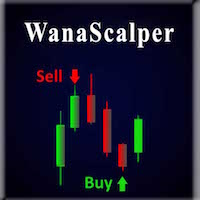
A scalping indicator based on mathematical patterns, which on average gives signals with relatively small SL, and also occasionally helps to catch big moves in the markets (more information in the video) This indicator has three main types of notifications: The first type warns of a possible/upcoming signal on the next bar The second type indicates the presence of a ready signal to enter the market/open a position The third type is for SL and TP levels - you will be notified every time price re
VR Cub
Vladimir Pastushak
VR Cub это индикатор что бы получать качественные точки входа. Индикатор разрабатывался с целью облегчить математические расчеты и упростить поиск точек входа в позицию. Торговая стратегия, для которой писался индикатор, уже много лет доказывает свою эффективность. Простота торговой стратегии является ее большим преимуществом, что позволяет успешно торговать по ней даже начинающим трейдерам. VR Cub рассчитывает точки открытия позиций и целевые уровни Take Profit и Stop Loss, что значительно повы
EARLY REMINDER: The Starting price is 65 price will rise soon up to 365$ and then 750$ after first 10 copies of sales. Grab this offer now! Introduction Hello, traders! Welcome to the demonstration of the Forex Beast Indicator , a comprehensive tool designed to assist aspiring traders in navigating the complexities of the forex market. This indicator incorporates seven essential components to provide a well-rounded trading experience: Moving Averages Colored Zones Support and Resistance Levels
BPS Panel Breakout Pro Scalper Solution Panel This indicator is part of the   RPTrade Pro Solutions  systems. BPS Panel   is a daily trend indicator using Price Action, Dynamic Support and Resistances. It's designed to be used by anyone, even the absolute beginner in trading can use it. NEVER repaints . Indications are given   from close to close . Designed to   be used alone , no other indicators are required. Gives you the trend and potential Take Profit at the beginning of the day. How doe
This is an arrow indicator without a future function,developed based on the most advanced profit trading algorithms.It has the most innovative and advanced dual trend analysis module, as well as the latest and highly effective market trend prediction algorithm.Trends are your friends, and following larger trends can earn the maximum profit in foreign exchange. This indicator helps traders identify current trends and track them. Someone once made a profit of 10 times in a week by relying on it.No
Chart Patterns Detect 15 patterns (Ascending Triangle, Descending Triangle, Rising Wedge, Falling Wedge, Bullish Flag, Bearish Flag, Bullish Rectangle, Bearish Rectangle Symmetrical triangle, Head and Shoulders, Inverted Head and Shoulders, Triple top, Triple Bottom, Double Top, Double Bottom) Use historical data to calculate the probability of each pattern to succeed (possibility to filter notification according to the chance of success) gives graphic indication about the invalidation level and
Alpha Trend sign - это мой давний и очень популярный торговый инструмент, который проверяет нашу торговую систему и четко сигнализирует о транзакциях, которые не дрейфуют.   Основные функции:   • В зависимости от того, показывает ли рынок активную область, показатели могут быть очень интуитивными, чтобы определить, является ли текущая конъюнктура трендовой или шоковой.   И в соответствии с индикатором стрелка врезается на рынок, зеленая стрела подсказывает купить, красная стрела подсказывает
Daily Candle Predictor - это индикатор, который предсказывает цену закрытия свечи. Прежде всего индикатор предназначен для использования на графиках D1. Данный индикатор подходит как для традиционной форекс торговли, так и для торговли бинарными опционами. Индикатор может использоваться как самостоятельная торговая система, так может выступать в качестве дополнения к вашей уже имеющейся торговой системе. Данный индикатор производит анализ текущей свечи, рассчитывая определенные факторы силы внут
Сложно найти и дефицит по частоте, дивергенции являются одним из самых надежных торговых сценариев. Этот индикатор автоматически находит и сканирует регулярные и скрытые расхождения, используя ваш любимый осциллятор. [ Руководство по установке | Руководство по обновлению | Устранение неполадок | FAQ | Все продукты ] Легко торговать Находит регулярные и скрытые расхождения Поддерживает много известных генераторов Реализует торговые сигналы на основе прорывов Отображает подходящие уровни стоп-
"Тренд - друг трейдера" . Это одна из самых известных пословиц в трейдинге, потому что правильное определение тренда может помочь заработать. Однако проще сказать о торговле по тренду, чем сделать, потому что многие индикаторы основаны на развороте цены, а не на анализе тренда. Они не очень эффективны при определении периодов тренда или в определении того, сохранится ли этот тренд. Мы разработали индикатор Trendiness Index , чтобы попытаться решить эту проблему. Индикатор определяет силу и напра
POWER FLOW PRO — Binary Options Edition For the first time ever, the POWER FLOW PRO cumulative dominance logic is specially optimized for Binary Options trading. POWER FLOW PRO is a smart real-time pressure-flow indicator designed to detect aggressive market momentum and short-term directional dominance for fast Binary Options entries. The system analyzes: Real-time buying pressure Real-time selling pressure Momentum candle strength Cumulative dominance flow Continuation pressure to generate hig
Shark Surfer - индикатор нового поколения, который использует хорошо зарекомендовавшую себя торговлю по тренду. Подходит как для скальпинга, так и для средне- и долгосрочной торговли. Shark Surfer проанализирует выбранную вами валютную пару и нарисует место рекомендуемого входа в сделку, тейк-профит и стоп-лосс. Shark Surfer подходит для торговли по всем валютным парам и на всех таймфреймах. Имеет email и push-уведомления о появившихся торговых сигналах. Торговой стратегией индикатора является п
Apex Fibo Tracer — Умный инструмент авто-Фибоначчи Apex Fibo Tracer — профессиональный аналитический индикатор, автоматизирующий один из самых эффективных методов технического анализа — уровни коррекции Фибоначчи. Инструмент сочетает высокоточный алгоритм ZigZag и динамическое построение сетки Фибо, обеспечивая мгновенную и точную визуализацию структуры рынка прямо на графике. Большинство трейдеров тратят драгоценные секунды на ручную настройку уровней Фибоначчи во время высокой волатильности. A
There are 8 types of this indicator. Consisted of 1. Bullish and Bearish Engulfing 2. Morning and Evening Star 3. Three Green Soldiers and Three Red Crows 4. Three Inside Up and Down 5. Three Outside Up and Down 6. Bullish and Bearish Harami 7. Tweezers Top and Bottom 8. Piercing and Dark cloud cover Signal Filter :: 1. The appearance of the candle stick 2. SMA 3. 2EMA :: EMA Fast and EMA Slow 4. RSI N otification :: 1. Via screen 2. Email 2. Phone For trading 1. Scaling 2. Binary options 3.
Индикатор поддержки и сопротивления для бинарных опционов Этот индикатор разработан специально для торговли бинарными опционами и отлично показывает откаты от уровней поддержки и сопротивления. Сигналы появляются на текущей свече. Красная стрелка, направленная вниз, указывает на потенциальную возможность продажи, а синяя стрелка, направленная вверх, предлагает возможности для покупки. Все, что вам нужно настроить, это цвет сигнальных стрелок. Рекомендуется использовать его на таймфреймах M1-M5,
Next level of trend trading here. Possibility 75%, the indicator analyzes the current market to determine short (small dot), middle (circle with a dot inside) and long (cross with a circle and a dot inside) trends.  Wingdings characters of  Aqua color represents the beginning of the UP trend. Wingdings characters of  Orange color represents the beginning of the DOWN trend. Possibility 75% Indicator will improve your trading in the world of forex, commodities, cryptocurrencies and indices.
This is a new strategy for SUPPLY DEMAND areas It is based on a calculation using the tick volume to detect the big price action in market for both bear /bull actions this smart volume action candles are used to determine the supply and demand areas prices in between main supply and demand lines indicate sideway market  up arrows will be shown when prices moves above the main supply and the secondary supply lines Down arrows will be shown when prices moves below the main demand and the secondary
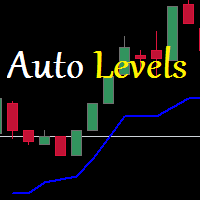
Auto Level данный инструмент умеет определять уровни поддержки и сопротивления . искать и отображать когда цена пробила уровень а когда оттолкнулась от него. индикатор может пригодится если вы используете в своей торговле уровни поддержки сопротивления или же максимумы и минимумы цены тогда он на много упростит вам работу и поможет быстрее и точнее определить отскок или пробой уровня текущий тренд или тенденцы. синяя линия снизу тренд восходящий красная линия сверху тренд на понижение 
Индикатор показывает потенциальный направление тренда по циклично-волновой зависимости. Таким образом, все лучи пересечения будут оптимальными лучами, в направлении которых ожидается движение цены с учетом периода индикатора. Лучи можно использовать как направление потенциального движения рынка. Но не надо забывать, что подход должен быть комплексным, сигналы индикатора требуют дополнительной информации для входа в рынок.
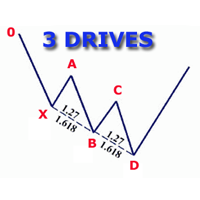
Индикатор определяет и отображает на графике гармоничный паттерн 3 Движения (3 Drives), согласно схеме, приведенной на скриншоте. Выделение паттерна производится по вершинам индикатора ZigZag (включен в ресурсы, не требует дополнительной установки). В момент распознавания паттерна выводится сообщение во всплывающем окне, отправляются оповещения на мобильное устройство и электронный почтовый ящик. Индикатор выделяет не только завершенную фигуру, но и момент ее формирования. На этапе формирования
反转边缘系统 — профессиональный индикатор разворота вершин и дна для MetaTrader 5. Он определяет потенциальные зоны разворота тренда, генерирует четкие торговые сигналы и фильтрует их с помощью анализа тренда на нескольких таймфреймах для уменьшения ложных сетапов. Индикатор отображает рыночный настрой в реальном времени: Сильный бычий настрой Сильный медвежий настрой Слабый бычий настрой Слабый медвежий настрой Конфликт быков 和 медведей Каждый сигнал поставляется с заранее заданными уровнями 止盈 (TP)
Индикатор FiboZag - перенесите индикатор на график и уровни Фибоначчи будут построены автоматически по последнему развороту ZigZag-а. Основное преимущество заключается в корректном построении уровней Фибоначчи и разметке ценовых уровней. Простое, визуальное и эффективное использование. Индикатор не перерисовывается и не запаздывает. Работает на всех валютных парах и на всех таймфреймах.
BSA indicator is a ZigZag based indicator. This indicator is used to find the reversal level of the price. You can use the existing risk ratio and calculation timeframe in the entries by optimizing them according to your usage preference.  In lower time frames, the indicator can repaint. For healthier results, you can detect the least repainting by observing for a while according to the graphic you will apply.
Здравствуйте, я Альфред (Alfred), и я хочу представить вам один интересный индикатор. Он зависит от линий Фибоначчи, но у него есть секрет, который я использую. С помощью индикатора FiboRec вы сможете узнавать множество полезной информации о рынке, такие как: Особенности Сможете избежать вхождения во время турбуленции рынка. Сможете открывать ордера только по общему тренду. Будете знать, является ли тренд сильным или слабым. Используемые типы сигналов и таймфреймы Этот индикатор можно использо
С этим продуктом покупают
Local Trade Copier EA MT4
Juvenille Emperor Limited
4.96 (111)
Local Trade Copier EA MT4 — это быстрый и гибкий копировщик сделок для копирования и управления сделками между несколькими счетами MetaTrader 4 на одном компьютере с Windows или Windows VPS. Он сочетает локальную синхронизацию сделок с настройками на стороне Receiver для управления размером лота, рисками, фильтрацией сделок, сопоставлением символов, управлением сделками и защитой счета. Настройте терминалы Transmitter и Receiver примерно за 1 минуту и копируйте ручные сделки или сделки, открыты
Добро пожаловать в Trade Manager EA — лучший инструмент для управления рисками, предназначенный для упрощения, точности и эффективности торговли. Это не просто инструмент для размещения ордеров; это комплексное решение для удобного планирования торгов, управления позициями и усиленного контроля над рисками. Независимо от того, начинающий вы трейдер, опытный специалист или скальпер, нуждающийся в быстром исполнении, Trade Manager EA адаптируется к вашим потребностям и работает с любыми активами:
Exp COPYLOT CLIENT for MT4
Vladislav Andruschenko
4.69 (65)
Профессиональный копировщик сделок для MetaTrader 4 Быстрый, профессиональный и надежный копировщик сделок для MetaTrader 4 . COPYLOT позволяет копировать сделки Forex между терминалами MetaTrader 4 и MetaTrader 5 , обеспечивая гибкую синхронизацию для разных типов счетов и сценариев торговли. Версия COPYLOT MT4 поддерживает: MetaTrader 4 → MetaTrader 4 MetaTrader 5 Hedge → MetaTrader 4 MetaTrader 5 Netting → MetaTrader 4   Версия MT5 Полное описание + DEMO + PDF Как купить Как установить Как по
Trade Assistant MT4
Evgeniy Kravchenko
4.43 (197)
Помогает рассчитать риск на сделку, простая установка нового ордера с помощью линий, управление ордерами с функциями частичного закрытия, 7 типов трейлинг-стопа и другие полезные функции. Дополнительные материалы и инструкции Инструкция по установке   -   Инструкция к приложению   -   Пробная версия приложения для демо счета Функция Линии   - отображает на графике линию открытия, стоп-лосс, тейк-профит. С помощью этой функции легко установить новый ордер и увидеть его дополнительные характери
Telegram to MT4 Multi-Channel Copier   автоматически копирует торговые сигналы из ваших Telegram- и Discord -каналов прямо в MetaTrader 4. Без ботов, без браузерных расширений, без ручного копирования. Сигнал приходит в Telegram или Discord — и советник открывает сделку в вашем терминале за считанные секунды. А перед тем как копировать канал, встроенный бэктестер покажет, что этот канал сделал бы на вашем счёте. Продукт состоит из двух компонентов: приложения для Windows, которое слушает ваши Te
TradePanel MT4
Alfiya Fazylova
4.84 (95)
Trade Panel — это многофункциональный торговый помощник. Приложение содержит более 50 торговых функций для ручной торговли и позволяет автоматизировать большинство торговых операций. Инструкция к приложению: https://www.mql5.com/ru/blogs/post/756476 Пробная версия приложения для демо-счета: https://www.mql5.com/ru/blogs/post/750864 Как установить приложение: https://www.mql5.com/ru/blogs/post/750096 Как тестировать приложение в визуальном режиме: https://www.mql5.com/ru/blogs/post/770274 Как уст
Trade copier MT4
Alfiya Fazylova
4.62 (37)
Trade Copier — это профессиональная утилита, предназначенная для копирования и синхронизации сделок между торговыми счетами. Копирование происходит от счета/терминала поставщика к счету/терминалу получателя, которые установлены на одном компьютере или vps. Перед покупкой вы можете протестировать демо-версию на демо-счете. Демо-версия здесь . Полная инструкция здесь . Основной функционал и преимущества: Русифицированный интерфейс, поддержка на русском языке. Поддерживает копирование МТ4 > МТ4, МТ
Trade Indicator Assistant is a powerful MT4 utility designed to turn indicators into automated trading systems. Its main feature is the ability to automatically detect an indicator’s   BUY and SELL signal buffers , without requiring you to know the buffer numbers, search through indicator settings, or modify the indicator source code. Bonus Indicator: After purchasing Trade Indicator Assistant, contact me to receive Trade Signal Pro completely free as a bonus indicator. [Download Demo Version]
Копир->Удобное и быстрое взаимодействие с интерфейсом, пользователи могут использовать его сразу       ->>>> Рекомендуется использовать на компьютерах Windows или VPS Windows Функции: Разнообразные и персонализированные настройки копирования сделок: 1. Различные режимы лота могут быть установлены для различных источников сигналов. 2. Различные источники сигналов могут быть установлены для прямого и обратного копирования сделок. 3. Сигналы могут быть установлены с комментариями. 4. Следует ли ка
Telegram to MT4 Coppy
Sergey Batudayev
4.09 (11)
Telegram to MT4: Идеальное решение для копирования сигналов Упростите свою торговлю с Telegram to MT4 — современным инструментом, который копирует торговые сигналы прямо из каналов и чатов Telegram на вашу платформу MetaTrader 4, без необходимости использования DLL. Это мощное решение обеспечивает точное исполнение сигналов, широкие возможности настройки, экономит время и повышает вашу эффективность. [ Instructions and DEMO ] [ FAQ ] [ How atach logs properly ] [ Settings descrition ] Ключевые
Скачать рабочую пробную версию Copy Cat More (Копи Кэт Мор) — копировщик сделок (Trade Copier) MT4 — это не просто локальный копировщик сделок; это полноценная система управления рисками и исполнения (risk management and execution framework), созданная для современных торговых задач. От челленджей проп-фирм (prop firm) до управления личным портфелем — он адаптируется к любой ситуации благодаря сочетанию надёжного исполнения, защиты капитала, гибкой настройки и продвинутой обработки сделок. Ко
News Filter EA: Advanced Algo Trading Assistant News Filter EA is an advanced algo trading assistant designed to enhance your trading experience. By using the   News Filter EA , you can integrate a Forex economic news filter into your existing expert advisor, even if you do not have access to its source code. In addition to the news filter, you can also specify   trading days   and   hours   for your expert. The News Filter EA also includes   risk management   and   equity protection   features
Trade Dashboard MT4
Fatemeh Ameri
4.96 (55)
Trade Dashboard simplifies how you open, manage, and control your trades, with built-in lot size calculation. It allows you to execute trades, manage risk, and control positions directly on the chart, with tools such as partial close, breakeven, and trailing stop. Designed to reduce manual work and help you stay focused on your trading decisions. A demo version is available for testing. Detailed explanations of features are provided within the MQL5 platform. Installation instructions are include
Take a Break
Eric Emmrich
5 (31)
Take a Break pauses your Expert Advisors when trading is a bad idea: before news, after a daily loss, outside your trading hours, or when a rule you wrote yourself says so. When the pause is over, your EAs simply continue. Account protection for all your EAs in one tool: news filter, drawdown and equity protection, time filter and custom rules. One EA on one chart protects the whole account, the free indicator gives every chart its own rules on top. Free demo | What is new in 26.09 | Support Ass
EchoTrade Telegram Signal Backtester VALIDATE TELEGRAM SIGNALS IN MINUTES - STOP GUESSING, START BACKTESTING Stop blowing accounts on "VIP" signals that don't deliver. The EchoTrade Telegram Signal Backtester is the professional solution to audit, verify, and optimize any Telegram signal provider's performance on historical data. Most signal providers show you their wins but hide their losses. This tool reveals the naked truth. By combining a powerful Data Manager (included) with an advanced MT4
The Multicharts Crosshair draws a cross hair in any linked chart. The indicator can be used for comparison of symbol price levels in different time frame or to compare candles of different instruments in the same time frame How it works: It can works from every linked charts where the indicator is installed towards the others or from the chart where is istalled towards the following linked charts . It can be shown just pressing a the key of keyboard. After installing the indicators in the char
MT4 к Telegram Signal Provider - это простой в использовании и полностью настраиваемый инструмент, который позволяет отправлять сигналы в Telegram, превращая ваш аккаунт в поставщика сигналов. Формат сообщений полностью настраиваем! Однако для простого использования вы также можете выбрать предопределенный шаблон и включать или отключать определенные части сообщения. [ Демо ]  [ Руководство ] [ Версия для MT5 ] [ Версия для Discord ] [ Телеграм-канал ]  New: [ Telegram To MT5 ] Настройка Шаг за
Trend Support Resistance Tool
ISO Financial Services
4.73 (11)
Smart Trend Line Alert - это профессиональный индикатор трендовых линий, а также линий поддержки/сопротивления с функцией алерта. Он призван помочь трейдерам легко управлять многими графиками и символами без постоянного слежения за монитором. Особенности Оповещение о пробое свечи, о касании ценовых линий и оповещения по времени; Превращение только что построенной или любой выбранной линии в линию оповещения одним кликом (трендовые и горизонтальные линии или трендовые линии по углу); История опо
The product will copy all telegram signal to MT4   ( which you are member  ) , also it can work as remote copier.  Easy to set up, copy order instant, can work with almost signal formats, image signal, s upport to translate other language to English Work with all type of channel or group, even channel have "Restrict Saving Content", work with  multi channel, multi MT5 Work as remote copier: with signal have ticket number, it will copy exactly via ticket number. Support to backtest signal. How to
Trade Manager MT4 DaneTrades
Levi Dane Benjamin
4.09 (11)
Trade Manager, который поможет вам быстро входить и выходить из сделок, автоматически рассчитывая риск. Включает функции, которые помогут предотвратить чрезмерную торговлю, торговлю из мести и эмоциональную торговлю. Сделками можно управлять автоматически, а показатели эффективности счета можно визуализировать в виде графика. Эти функции делают эту панель идеальной для всех трейдеров, занимающихся ручной торговлей, и помогают улучшить платформу MetaTrader 4. Многоязычная поддержка. Версия MT5  |
VirtualTradePad mt4 Extra
Vladislav Andruschenko
4.85 (61)
Торговая Панель для торговли в 1 клик.  Работа с позициями и ордерами!  Торговля с  чарта  (график) или с  клавиатуры . С помощью нашей торговой панели Вы можете торговать   в один клик с графика   и совершать торговые операции в   30   раз быстрее стандартного управления в MetaTrader.  Автоматические расчеты параметров и функции, которые облегчают жизнь трейдеру и помогают трейдеру вести свою торговую деятельность в разы быстрее и удобнее. Графические подсказки и полная информация по торговым с
FCK CurrencyStrength Pro
Patel Hitendrakumar Mahendrabhai
Hi Friends, " FCK Currency Strength Pro " is a auto & semi auto trading expert with direction of pair. Buy-Sell separate or multi currency in one click. The strategy of  FCK Currency Strength Pro  is a combination of custom indicator, Trendlines, Support & Resistance levels ( Price Action ) and most important secretive trading algorithm mentioned above. Download News Ex4 and csv file You need the following SDSnews.ex4 in MQL4/Libraries and the daylightsavings.csv in MQL4/Files. Only 4 of 5 copi
CloseIfProfitorLoss with Trailing
Vladislav Andruschenko
4.88 (32)
Close If Profit or Loss with Trailing для MetaTrader 4 — автоматическое закрытие по общей прибыли или убытку Надёжная торговая утилита для MetaTrader 4, которая автоматически закрывает позиции, когда общая прибыль или общий убыток достигает заданного уровня. Советник контролирует открытые сделки, считает плавающий результат, может использовать трейлинг прибыли и помогает закрывать позиции быстрее, чем ручная реакция трейдера. MetaTrader 4 до сих пор активно используют ручные трейдеры, скальперы
Partial Closure EA MT4
Juvenille Emperor Limited
5 (3)
Partial Closure EA MT4 позволяет частично закрывать любую сделку на вашем счёте вручную, по выбранному проценту от объёма лота и/или по номеру тикета, либо автоматически — на указанных уровнях TP/SL, закрывая определённый процент от первоначального объёма лота на до 10 уровнях take profit и 10 уровнях stop loss. Он может управлять всеми или выбранными сделками на вашем счёте, указывая или исключая определённые magic-номера, комментарии или символы. Совет: Загрузите бесплатную демо-версию совет
RS Trade Copier - сверхбыстрый локальный копировщик сделок с полноценным графическим интерфейсом. Хватит вбивать номера счетов вручную. Никаких 200+ непонятных параметров в настройках. Надёжный и гибкий инструмент для копирования торговых операций между несколькими терминалами MT4 и MT5. Подходит как опытным трейдерам и сигнал-сервисам, так и частным инвесторам. Позволяет синхронизировать торговлю от одного или нескольких источников к одному или нескольким приёмникам с высокой точностью и минима
Smart Copy Local MT4
Kyra Nickaline Watson-gordon
5 (7)
Smart Copy is an Easy-to-Use EA that supports Multi Copying Metatrader4 and Metatrader5 and Local/Remote Copying. (Remote Version is coming soon) Free version is available on Smart Copy Local Free MT4 Specifications :     Real Time, Multi Terminal - Multi Account - MT4/MT5 trade copying     Copy from netting to hedge and hedge to netting is supported.     Fast and instant copy     All settings are input visually.     Easy modifying symbol names, prefix, suffix     Enable/Disable copying s
Want automatically to put the pending order, take profit and stop loss? This EA will do it on your behalf! The Fibo Heart EA strategy will place limit order after the ‘check point’ breakout. The position will be triggered when the price make a successful retest. If not, the pending order will automatically deleted after price hit certain level. You also have option to enable market order (instant execution) and custom take profit in the inputs setting. This EA must be attached with Fibo Heart In
Trade Copier Global: The name speaks for itself. This copier allows you to copy orders between MT4 terminals even if they are not installed on the same computer. Features Copying trades between MT4 terminals around the world with a short delay. Automatically recognizes symbol prefixes. Can connect many Slaves to the same Master. Supports pending and market orders. Supports partial order close (with limitations, see below) Can send messages and notifications to the Slaves from the Master Several
Unlimited Trade Copier Pro - это мощный инструмент для удаленного копирования сделок между несколькими счетами MetaTrader 4/MetaTrader 5, расположенными удаленно друг от друга, по сети интернет. Это идеальное решение для провайдеров сигналов, которые хотят поделиться своей торговлей с другими трейдерами по всему миру. Один поставщик может копировать сделки на неограниченное количество счетов-получателей, а один получатель также может копировать сделки неограниченного количества провайдеров. Пост
King Trade Copier MT4
Mohammed Maher Al-sayed Mohammed Ahmed Saleh
5 (1)
King Trade Copier соединяет терминалы MetaTrader, запущенные на одном компьютере или VPS. Сделки, открытые на одном счёте, появляются на остальных. Файл содержит обе роли, поэтому одна и та же загрузка становится отправителем или получателем в зависимости от значения, которое вы зададите параметру Mode. На каждом графике панель показывает, отправляет этот терминал сигналы или принимает их, называет счёт на другой стороне, считает получателей, которые ответили, и показывает возраст последнего си
Другие продукты этого автора
LMBFWatchlist is an interactive tool for Metatrader 4 that lets you create and manage watch lists directly on your Metatrader charts. ‌Functionality includes: ‌Add an unlimited number of watch lists with names of your choice Add different groups of watchlists for different time frames Add comments for symbols that always appear on the chart when that symbol is selected. Easily identify which symbols have comments against them. See watch lists instantly synchronise across all open charts that hav
LMBF Order Manager Hub LMBF Order Manager Hub is the free execution companion for compatible LMBF trading indicators on MetaTrader 4. MetaTrader 4 allows only one Expert Advisor on a chart, while a chart can host several indicators. This utility lets compatible LMBF indicators send confirmed order requests to one shared Expert Advisor. The manager can be attached to one chart while client indicators run on the same chart or on other open charts in the same MT4 terminal. The manager is an executi
FREE
Use this indicator to ensure all your open charts are constantly displaying the same time frame. Change the time frame in any one chart and watch the others instantly change to the same time frame. Also allows scrolling of candles in one chart to be replicated in all other synchronized charts. Analyze correlation between different symbols by linking charts together on the same time frame Display a vertical marker move across all your open charts, so you can quickly compare price action at the sa
FREE
The LMBFPositionSize indicator is a simple way to quickly determine the position size appropriate for your prospective trade interactively on your Metatrader 4 charts. When you first add the indicator to your chart, you will be given the option to set parameters including: the account balance to use in the calculation and a percentage of the balance you are prepared to risk.  Once attached to your chart, the indicator is available for you to use whenever you want and will continue to use these p
Completely change the way you use Metatrader 4 forever and give new meaning to using profiles and templates. Just attach the indicator to your open charts (e.g. include in your default template) and customised templates so you can do the following: Switch between different templates effortlessly without fear of losing any of the graphical objects (horizontal S&R, areas of supply and demand, text annotations) drawn on your charts Close a chart  and then watch it remember all the graphical objects
If you like to see different time frames for the same symbol side by side on your terminal, then this is the indicator for you. Attach the indicator to all chart instances for the symbol of interest. Then see any additions, edits or deletions made on graphical objects instantly replicated to all other open charts for the same symbol. Object types replicated include: trend lines, horizontal lines, vertical lines, rectangles, triangles, ellipses, arrows, text boxes and labels.
This may just look like another indicator for identifying and displaying supply and demand, but dig-in further and you will discover it has much more to offer. In addition to the complete flexibility for displaying zones, consider the identification of recent support or resistance, the back-testing capability to help you learn how to identify the best supply and demand zones to trader from, the continuously updated trend information for all time frames, times from around the world displayed on
Use this tool to plan your trades directly on your charts and get instant feedback on account risk, trade risk to reward and  required position size. Plus, purchase LMBF Executor separately to easily convert planned trades into orders and manage them from your charts. Features include: Plan multiple trades for one or more symbols visually on your charts at one time, either on the same of different time frames. Use your mouse to drag levels to change entry, stop loss and take profit levels.  See
LMBF Executor
Graeme Dakers
5 (1)
**IMPORTANT** THIS TOOL REQUIRES YOU TO FIRST PURCHASE "Graphical Trade Planner" https://www.mql5.com/en/market/product/56702. Without it, this tool will do nothing of any use. -------------------------- Use "Graphical Trade Planner"  to plan your trades directly on your charts and get instant feedback on account risk, trade risk to reward and  required position size. Plus, purchase LMBF Executor separately to easily convert planned trades into orders and manage them from your charts. Features i
LMBF Quick Trade Entry is a stop-first, risk-sized order-entry indicator for MetaTrader 4. Choose MARKET, LIMIT or STOP, select the required price level or levels directly on the chart, review the calculated order details and confirm. The panel shows the inferred direction, broker entry, protective stop, position size and estimated balance risk before a request is submitted. The indicator does not generate trading signals or choose trades. It helps a discretionary trader turn an existing trade d
Фильтр:
Нет отзывов
Ответ на отзыв