AI Sentinel Portfolio
- Эксперты
- Версия: 1.0
- Активации: 5

AI Sentinel Portfolio v1.00 – Dual AI‑Filtered Scalping Portfolio
The AI Sentinel Portfolio is a professional, fully automated trading system that combines 21 carefully validated scalping strategies with a groundbreaking dual‑layer artificial intelligence filter.
Before every trade, the EA consults DeepSeek and ChatGPT (with automatic fallback) to rate the setup on a confidence scale of 0–100. Trades that do not meet your customisable confidence threshold are blocked, while high‑confidence trades can optionally be boosted with increased position size.
A built‑in phantom trade tracker shows exactly how many blocked trades would have hit stop‑loss or take‑profit, giving you complete transparency into the AI’s real‑world performance.
All strategies are generated and validated in EA Studio using robust walk‑forward and Monte Carlo analysis. Trade management is handled entirely by the EA’s proven rule‑based logic – the AI acts strictly as a pre‑entry filter, never interfering with open positions.
Key Features
• 21 diversified scalping strategies – each with independent entry/exit logic, stop‑loss and take‑profit levels, trailing stops, and opposite‑signal reversal capabilities.
• Dual AI confidence filter – DeepSeek primary, ChatGPT automatic fallback. The AI provides a score (0‑100) for every trade signal based on current market conditions.
• Adjustable confidence threshold – set your own minimum score to allow a trade. Block all low‑probability setups, or let everything through with minimal filtering.
• AI confidence lot boosting – automatically double (or any custom multiplier) the position size when the AI rates a trade above a user‑defined confidence level.
• Maximum lot cap – always respects a hard limit on position size, regardless of the AI boost.
• Phantom trade statistics – see exactly how many AI‑blocked trades would have been winners or losers, displayed directly in the on‑chart stats panel.
• Full portfolio protection suite – spread filter, session time filter, daily loss / drawdown limits, equity protection, and entry suspension on limit breach.
• Integrated economic news filter – avoids trading during high‑impact and/or medium‑impact news events for configured currencies.
• Advanced risk and money management – fixed lot or %‑risk per trade, with automatic lot calculation.
• Trailing stop and breakeven logic – independent per strategy.
• Hidden stop‑loss / take‑profit option – protects against broker hunting.
• Comprehensive on‑chart dashboard – real‑time position stats, trading performance, active protections, upcoming news, and AI phantom statistics.
• Prop‑firm compatible – consistent lot sizing, hidden stops, strict daily loss/drawdown limits.
AI Filter Details
The AI Sentinel Portfolio uses your own API keys (not included) to connect directly to DeepSeek and OpenAI.
When a strategy generates an entry signal, the EA sends current market data (symbol, timeframe, recent price action, spread) to the AI, which instantly returns a confidence rating. If the score is below your threshold, the trade is cancelled and recorded in the phantom tracker. If both APIs fail, the trade is allowed with a neutral score, so the EA never stops trading due to a temporary connection issue.
Important: The AI filter is entirely optional. When disabled, the EA trades all 21 strategies unfiltered, exactly as they performed in EA Studio’s validation.
Requirements
• MetaTrader 5 (hedging account).
• The EA must be allowed to make web requests. Please add the following URLs to Tools → Options → Expert Advisors → “Allow WebRequest for listed URL”:
• You need your own API key from DeepSeek (https://platform.deepseek.com) and/or OpenAI (https://platform.openai.com). The EA works with only one key – the second is a fallback.
• A stable internet connection for the AI filter. All other functions work offline.
• Recommended timeframe: M15 (designed for XAUUSD but works on any liquid symbol).
Backtesting Note
The AI filter and phantom trade tracker are live‑only features. They require a live internet connection and access to the DeepSeek/OpenAI APIs, which cannot be simulated in the Strategy Tester.
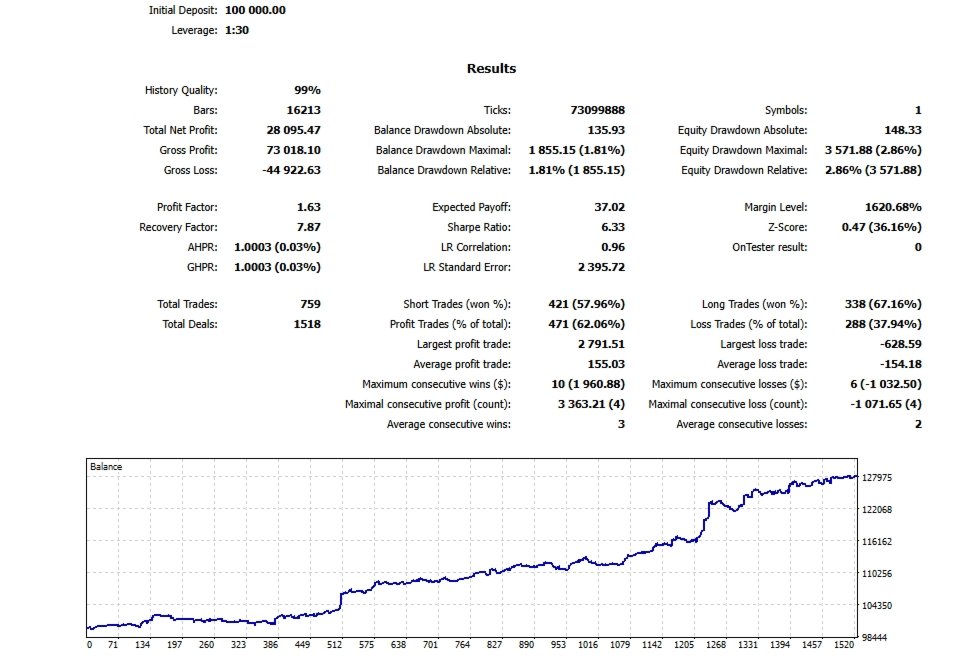
Backtesting will run the 21 base strategies with all standard protections (spread filter, session filter, news filter, etc.) but without the AI confidence filter and without the phantom statistics.
The base strategies have been individually validated in EA Studio using walk‑forward analysis, Monte Carlo robustness tests, and out‑of‑sample verification. The AI filter is designed to be an optional enhancement on top of these already‑tested strategies, and should be evaluated on a demo account first to observe its real‑world impact.
Input Parameters
The EA is fully configurable through more than 50 input parameters, logically grouped:
- Entry Settings – lot size, magic number base.
- Trading Session – open/close times, Friday close, Sunday trading.
- Entry Protections – max spread, max open positions, max open lots.
- Daily Protections – max daily loss, max daily drawdown, daily reset hour.
- Account Protections – min/max equity, max equity drawdown.
- News Filter – priority, currencies, before/after minutes.
- AI Filter – enable/disable, API keys, model names, confidence threshold, lot boost multiplier, max lot cap.
- Phantom Trade Stats – show/hide phantom statistics.
- Stats – position stats, robot stats toggles.
Setup Instructions
1. Attach the EA to an M15 chart of your chosen symbol (XAUUSD recommended).
2. Set your preferred lot size or risk percent.
3. If using the AI filter, enter your DeepSeek and/or OpenAI API key(s) and set InpUseAIFilter = true.
4. Add the required WebRequest URLs in MT5’s options.
5. Adjust the confidence threshold to your liking (start with 20 for moderate filtering).
6. Run on a demo account first to observe the AI behaviour and phantom statistics.
The phantom stats will show you exactly how many trades the AI blocked and whether those blocked trades would have hit stop‑loss or take‑profit – an invaluable tool for fine‑tuning the AI threshold.
Disclaimer
Trading forex, commodities, and CFDs involves substantial risk of loss and is not suitable for every investor. Past performance does not guarantee future results. The AI filter is an experimental tool and should be used with caution. Always test any EA thoroughly on a demo account before live deployment. The developer assumes no responsibility for any financial losses incurred while using this software.
Copyright: Forex Software Ltd. – Portfolio strategies generated with EA Studio (https://eas.forexsb.com). AI filter, phantom tracker and dashboard enhancements are custom additions.