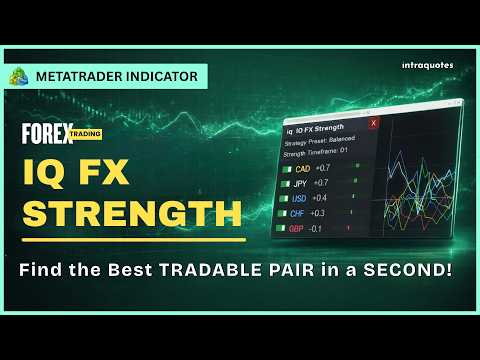
IQ FX Strength MT5
- Индикаторы
-
INTRAQUOTES
 ➡️Important Links:
🔸All Indicator & Script List: https://www.mql5.com/en/users/somfx/seller - Версия: 1.5
- Обновлено: 15 октября 2026
- Активации: 5
IQ FX Strength answers the single most important question in trading: "Who is truly driving the market right now?"
Designed with a stunning Hybrid UI, this tool separates true trend moves from market noise, allowing you to catch "Explosive" moves before the crowd sees them.
We don't offer free or bonus indicators in exchange of reviews from you. You won't need any free products with this indicator to make it work. ;) Enjoy!
Get lifetime access for $149 today - save $50 before the price increases to $199 after the next 10 sales!
- IQ FX Strength User Manual & Guide: Here
- MT4 Version: Here
- Explore All Indicator Strategies: Here
- MQL5 Channel - For daily market insights & updates: Join here.
- Explore all the indicators at one place: Welcome Page
Disclaimer:
- Read the full product description before purchasing.
- Due to regulatory and compliance restrictions, our service, including personalized technical support and one-on-one troubleshooting, is unavailable in India, Pakistan, and Bangladesh. Products purchased from these regions are ineligible for these services after purchase. For setup, operation, and troubleshooting guidance, please refer to the user manual.
- Intraquotes products are sold exclusively on MQL5. We never contact users privately, sell off-platform, or provide personal trading advice.
1. How does IQ FX Strength help?
Spot the Strongest & Weakest Currencies Instantly - Eliminates guesswork by scanning the entire market to show you which currencies are in high demand and which are losing strength.
Identify High-Probability Setups - Always pairs the single strongest currency against the weakest (e.g., Strong EUR + Weak USD = High-probability Buy on EURUSD).
Save Screen Time - No need to flip through 28 different charts, everything is calculated and visualized in one clean panel.
Avoid False Breakouts & Ranges - Helps you stay out of choppy, dead markets by showing when currencies lack momentum.
Trade with Institutional Flow - Aligns your trades with real multi-market currency volume rather than isolated candlestick patterns.
2. Indicator Usage:
- Compatible only with live forex charts and not offline charts or custom "artificial" symbols created via EAs or scripts.
- Indicator operates only on standard MetaTrader 4 / MetaTrader 5 platforms. Third-party or modified environments are not supported.
- Does not provide Data Window values or buffers for EA integration.
- Indicator supports all the 28 forex major and minor symbols. Your broker must support all of them. Indicator will only work on the following pairs. Hence add the indicator to any one of the following symbol's live chart: EURUSD, GBPUSD, USDJPY, USDCHF, AUDUSD, USDCAD, NZDUSD, EURGBP, EURJPY, EURCHF, EURAUD, EURCAD, EURNZD, GBPJPY, GBPCHF, GBPAUD, GBPCAD, GBPNZD, CHFJPY, AUDJPY, AUDCHF, AUDCAD, AUDNZD, NZDJPY, NZDCHF, NZDCAD, CADJPY, CADCHF
2. Indicator Features
- 28-Pair Live Analytics Engine: Continuously tracks all 8 major world currencies (USD, EUR, GBP, JPY, AUD, NZD, CAD, CHF).
- Multi-Timeframe Formula: Combines short-term (M5), medium-term (H1), and long-term (H4) trends for rock-solid signal reliability.
- Pre-Built Strategy Profiles: Easily switch between Balanced, Scalper (high sensitivity), and Swing (trend focus) modes.
- Interactive UI & Themes: Modern dark and light theme options, customizable graph heights, and single-click currency isolation switches.
- Real-Time Breakout Alerts: Instant desktop popups and mobile push notifications when a major currency divergence begins.
4. Indicator Installation and Alert
Installation: Go to MT4/MT5 Terminal —> Toolbox —> Market —> Purchased —> Click Install. Drag the indicator from the Navigator window onto a fresh blank chart.
Mobile Alerts: In MT4/MT5, press Ctrl + O —> Open Notifications tab —> Enter your MetaQuotes ID from your mobile app —> Test connection.
5. Indicator Settings
Apply Line Smoothing: Smooths out jagged price movements so you can see clear, clean trend directions.
Smoothing Strength: How heavily filtered you want the strength curves to look.
Broker Prefix / Suffix: Enter your broker’s custom pair naming format (e.g., m or .ecn)
Select Strategy Profile: Choose your trading style:
Master Alert Switch: Turns alerts on or off.Balanced (Default): Great all-around balance across short, medium, and higher timeframes.
Scalper: Prioritizes faster M5 moves for quick in-and-out intraday setups.
Swing: Prioritizes H1 and H4 trends for longer multi-day positions.
Custom: Allows you to manually type your own timeframe percentage weights.
Show Desktop Popups: Displays on-screen alert notifications inside MetaTrader.
Send Mobile Push Notifications: Sends instant notifications directly to your phone's MetaTrader app.
Explosion Threshold: Controls how far apart the strongest and weakest currencies must separate before firing an alert. Lower values give early alerts; higher values give confirmed, massive trend alerts.
Graph Line Thickness: Switch between normal and bolder lines for higher visibility on large monitors.
Dashboard Window Height: Set your default subwindow height (Standard or Larger).
Graph Grid Colors (Dark / Light): Customize grid background line colors to fit your preferred workspace theme.
Currency Colors: Customize individual line colors for all 8 currencies.
Indicator Backtesting:
Live Chart Recommended: The IQ FX Strength indicator processes live data feeds from 28 different pairs across 3 timeframes simultaneously. Because the standard MetaTrader Strategy Tester cannot simulate real-time synchronization of 28 separate market feeds at once, backtesting will show limited functionality. The indicator is built for live forward trading and market execution on live charts.
6. How to use IQ FX Strength? (Simple Strategy)
Step 1- Pick Your Currency Pair
Look at the left-side dashboard list.
Pick the Top Currency (Strongest / Green) and the Bottom Currency (Weakest / Red).
Example: If GBP is at the top and JPY is at the bottom, your target pair is GBPJPY.
Step 2- Confirm Graph Divergence
Check the graph lines on the right:
- The strong currency line should be sloping upward.
- The weak currency line should be sloping downward.
If the lines are overlapping each other or flat, wait for clear separation.
Step 3- Entry Trigger
Switch to your favorite entry chart (e.g., M5 or M15) on your target pair.
Look for price action confirmation (such as a moving average pullback or a key support/resistance breakout) in the direction of the strong currency:
- Strong Base + Weak Quote = BUY
- Weak Base + Strong Quote = SELL
Step 4- Exit & Take Profit
Take profit when the two currency lines flatten out, begin curving back toward each other, or when the currency rankings begin to flip.
7. How to set Alert Explosion
Explosion Threshold (Alert Sensitivity): This setting controls how much momentum is required to trigger a trading alert. The indicator constantly measures the distance (or gap) between the 1st Strongest currency and the 8th Weakest currency. When the strongest currency surges upward and the weakest currency dumps downward, and the distance between them crosses your Explosion Threshold, the indicator fires a "Trend Explosion" alert.
Lower Value (e.g., 0.20 - 0.50): Highly sensitive. You will get early alerts the moment currencies begin to separate. Great for scalpers, but may result in some false signals during ranging markets.
Higher Value (e.g., 0.80 - 1.50+): Strict filtering. You will only receive alerts when a massive, confirmed trend breakout is happening. Great for swing traders who only want to be notified of massive momentum shifts.
User Manual Explains the following topics in full details:
1. Input Parameters:- System Settings
- Calculation Weights/Strategy Presets for Scalper, Swing Traders, Day Traders
- Alert Management
- Interface Settings with Dashboard and Color customization options.
2. Trading Strategy:
How to Use IQ FX Strength? Explained in the User Manual (check above for the link)
3. Understanding the Timeframe Weights:
The Calculation Weights section gives you full control over how the "Total Strength" is calculated. Think of these inputs like a Volume Mixer on a sound system. You decide which timeframe should be "loudest" in the final signal.
4. How it works (The Ratio Logic):
The weights work as a Ratio, not a fixed number. The indicator sums up your weights and calculates the percentage influence of each.
5. Visual Behavior Explained: Zoom vs. Squeeze
- How it Works
- Why is this better?
- What You Will Receive
- How This Helps You Trade?
7. Alert Sensitivity Guide: Setting Your Explosion Threshold
Bonus: A Quick Reference Table
End note:
Indicator Technical Support: Message here
Risk Disclosure:
Trading financial markets carries inherent risks and may not be suitable for every investor. This indicator is designed as a tool to assist in trading decisions but does not guarantee profits or prevent losses, which could exceed your initial investment. Past performance is not a reliable indicator of future outcomes. Users are encouraged to fully understand the risks and seek independent financial advice if needed. Any trading decisions made using this indicator are at the user's discretion and responsibility.
Related keywords: currency strength, forex currency strength, forex market, multi-currency strength tool, ai currency strength indicator, top currency strength indicator, powerful currency strength detecting tool