CopyMasterPro MT5

5
# CopyMaster Pro Trade Copier

## What Is This

CopyMaster Pro is a local trade copying tool that syncs trades between multiple MT4/MT5 terminals. One account trades, others follow automatically. No server needed, no VPS required. Works on a single computer with multiple terminals.

## What It Does

Copies trades from one account to others. You open a gold position on Account A, Account B and C will follow. You close on A, others close too. Simple as that.

## Why This One

**Free** — No monthly fees, no subscription, no hidden charges. Download it and it is yours.

**Private** — All data stays on your computer. Nothing goes through third party servers. Your trading info remains yours.

**Easy** — Works out of the box. Click a few buttons in the interface and you are set. No config files, no command lines.

**Cross Platform** — MT4 and MT5 can copy from each other. You run MT5 as master, your friend follows on MT4. Works fine.

## Main Features

**Flexible Lot Sizing** — Copy by multiplier, fixed lots, or auto calculate based on balance ratio. Small accounts can safely follow large ones.

**Smart Symbol Matching** — Different brokers name symbols differently. XAUUSD might be GOLD somewhere else, or have a suffix. The system figures it out automatically. You can also set manual mappings.

**Reverse Copy** — Think a signal source always loses money? Turn on reverse mode. They buy, you sell.

**Risk Controls** — Set limits on max lot size, max positions, max drawdown percentage. Copying stops automatically when limits are hit.

**UI Scaling** — Interface size is adjustable from 50% to 200%. Works great on high-DPI screens or small monitors.

**Independent Settings** — Each account saves its own settings file. Multiple receivers won't overwrite each other's configuration.

## Who Should Use This

- Traders managing multiple personal accounts
- Those helping friends or clients with their accounts
- People sharing signals within a small group
- Testing execution speed across different brokers

## Who Should Not

- Those building large scale commercial copy trading services — this is a local tool, no remote support
- Ultra low latency high frequency strategies — local file sync has about 500ms delay
- Anyone needing complex permission management or billing systems

---

## Detailed Usage Guide

### Installation

1. After purchasing from the MQL5 Market, the EA will be installed automatically in your terminal
2. Find CopyMaster Pro under "Expert Advisors" in the Navigator panel
3. Drag the EA onto any chart
4. Confirm the settings in the popup parameters window and click OK

### Input Parameters

When dragging the EA onto a chart, a parameters window will appear:

| Parameter | Default | Description |
|-----------|---------|-------------|
| Language | English | Interface language, English or Chinese |
| Panel X | -1 | Horizontal panel position, -1 means auto-center |
| Panel Y | 10 | Vertical panel position, pixels from top |
| UI Scale % | 100 | Interface scaling, range 50-200. Increase for high-DPI screens, decrease for small monitors |

These parameters are set once at load time. All other configuration is done through the interface.

### Main Interface

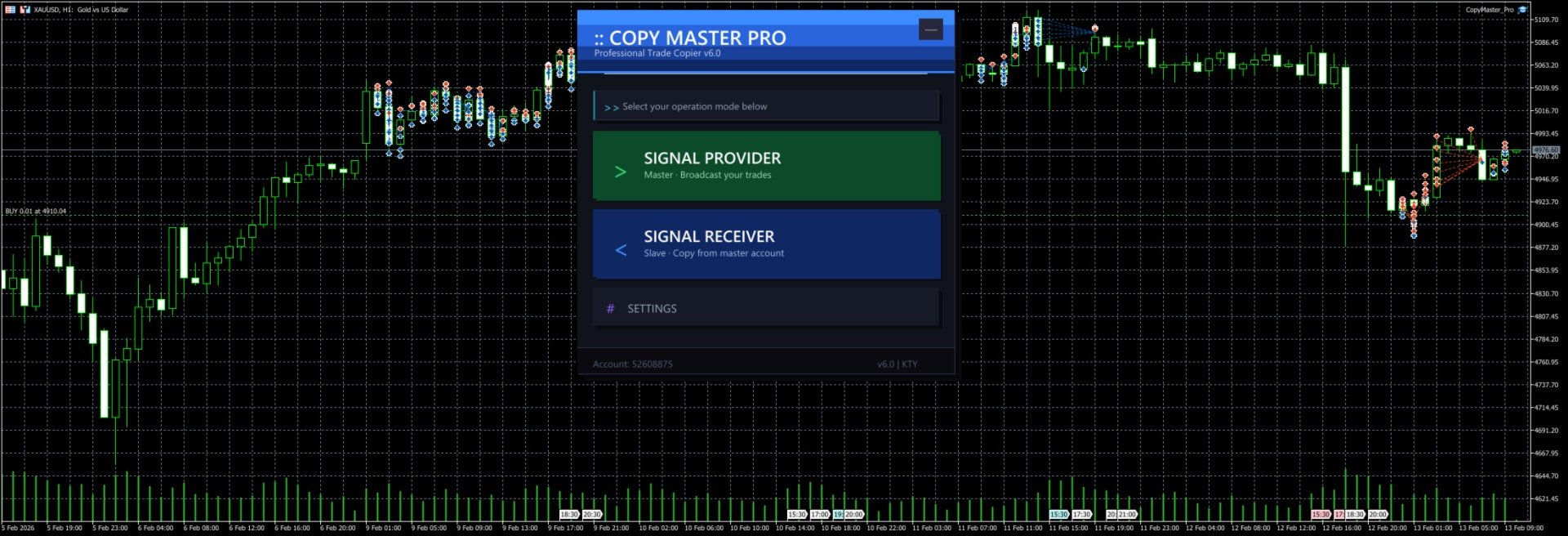
After launch you will see the selection screen with three options:

- **Signal Provider** — Your account acts as the signal source, broadcasting trades to other accounts
- **Signal Receiver** — Your account follows trades from another signal source
- **Settings** — Configure lot sizing, risk controls, symbol mapping and other parameters

The `--` button in the top right corner minimizes the panel to a floating bar. Click `[]` on the floating bar to restore.

### Signal Provider Mode

1. Click "Signal Provider" on the main screen
2. Enter a server name (e.g. `MySignal` or `Gold_Strategy`). This name will appear in the receiver's server list
3. Click the "Start" button
4. Trade normally. All open and close operations are broadcast automatically
5. The panel shows real-time position count and online follower count
6. Click "Stop" to end broadcasting
7. Click "Back to Menu" at the bottom to switch modes

Notes:
- Server name cannot be empty
- Do not start multiple providers with the same server name on the same computer
- Closing the EA or switching charts will automatically stop broadcasting and clean up signal files

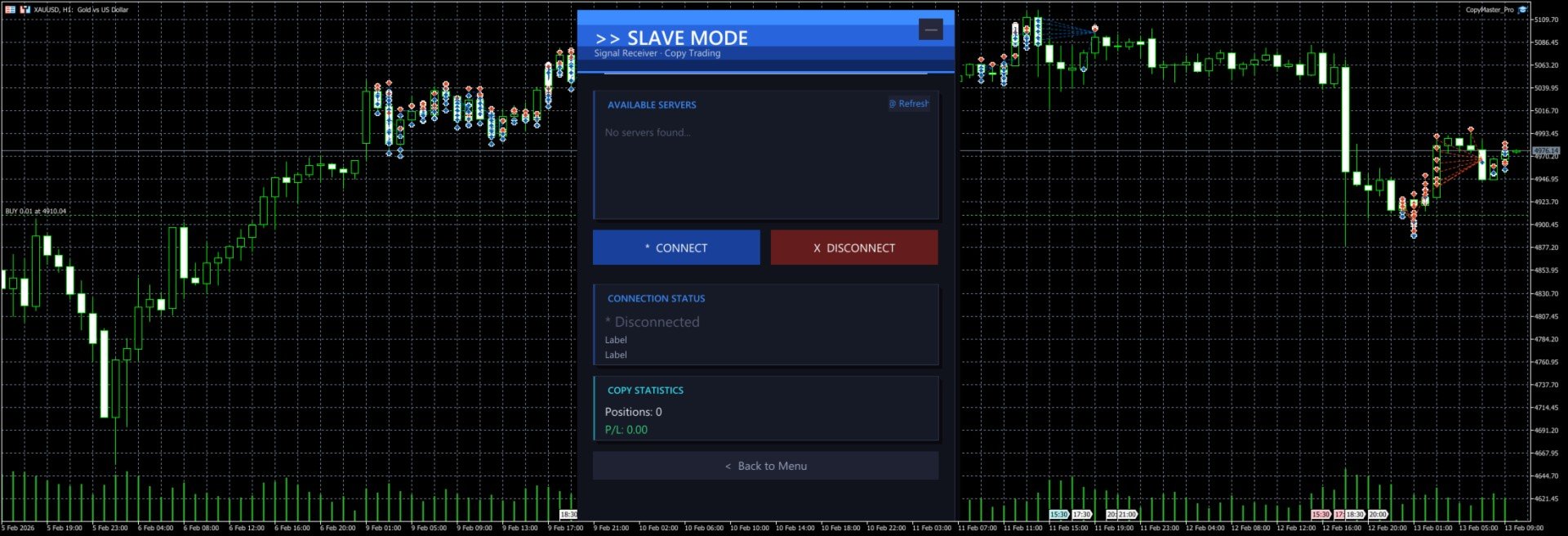
### Signal Receiver Mode

1. Click "Signal Receiver" on the main screen
2. The system automatically scans for available signal servers and displays them in the list
3. Click a server name in the list to select it (selected server is highlighted)
4. Click "Connect" to start copying
5. The panel shows real-time connection status, copied position count and profit/loss
6. Click "Disconnect" to stop copying (existing positions will not be closed automatically)
7. If no servers appear in the list, click "Refresh" to rescan

Notes:
- You must select a server before connecting
- After connecting, new positions from the signal source are copied automatically. When the source closes a position, the copied position is closed too
- Positions that existed before connecting are not copied. Only new trades after connection are processed
- Copied orders have a `CMP_` prefix in their comment field for easy identification

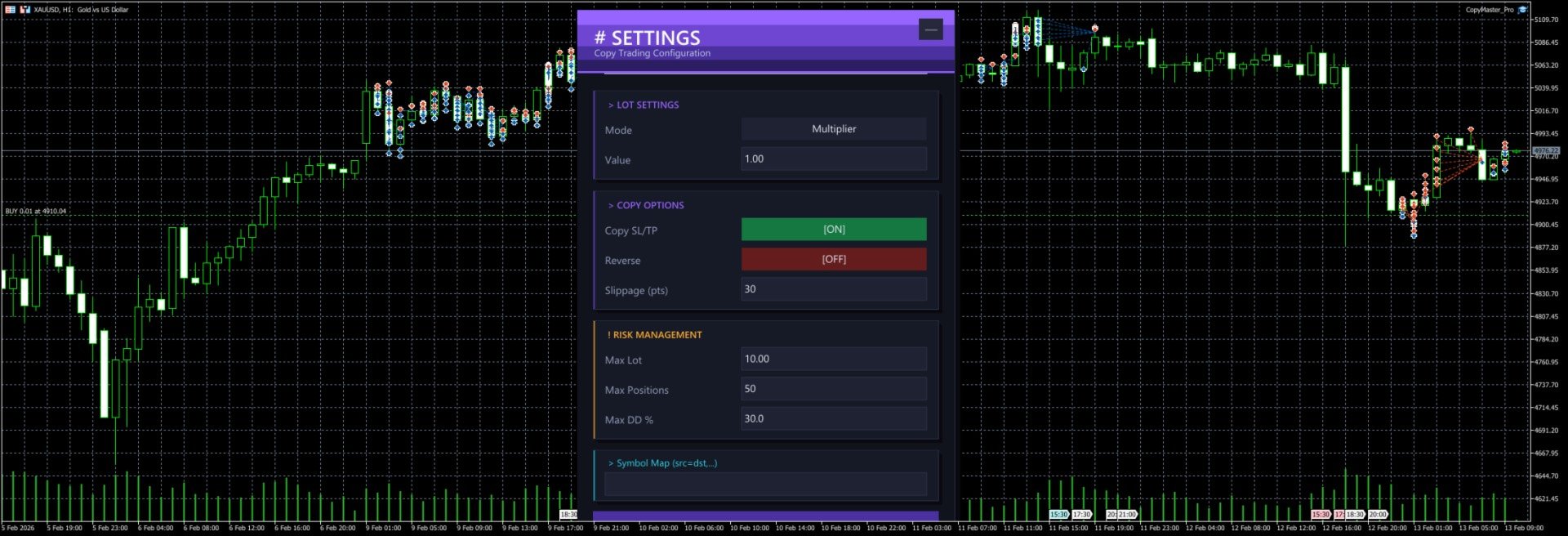
### Settings Panel

Click "Settings" on the main screen to open the configuration page. All changes require clicking "Save Settings" to take effect.

#### Lot Settings

**Mode** — Click the button to cycle through three modes:

| Mode | Description | Example |
|------|-------------|---------|
| Multiplier | Multiply the source lot size by a factor | Source opens 0.5 lots, multiplier is 2.0, copy opens 1.0 lots |
| Fixed | Use a fixed lot size regardless of source | Source opens 1.0 lots, fixed is 0.1, copy opens 0.1 lots |
| Risk % | Auto-calculate lot size based on account balance and risk percentage | Balance 10000, risk 1%, system calculates appropriate lot size |

**Value** — The number used with the selected mode. For multiplier mode enter the factor (e.g. 1.0, 0.5, 2.0), for fixed mode enter the lot size (e.g. 0.01, 0.1), for risk mode enter the percentage (e.g. 1, 2, 5).

#### Copy Options

**Copy SL/TP** — When enabled, copies the stop loss and take profit from the signal source. When disabled, positions are opened without SL/TP. Enabled by default.

**Reverse** — When enabled, buy signals become sell orders and vice versa. SL and TP are also swapped. Disabled by default.

**Slippage (pts)** — Maximum allowed slippage in points. Too small may cause order failures, too large may result in poor fill prices. Default is 30 points, usually no need to change.

#### Risk Management

**Max Lot** — Maximum lot size per copied trade. Even if the calculated lot exceeds this value, it will be capped. Default 10.0 lots.

**Max Positions** — Maximum number of copied positions. No new positions are opened once this limit is reached. Default 50.

**Max DD %** — Maximum drawdown percentage. When (Balance - Equity) / Balance exceeds this ratio, no new positions are opened. Default 30%.

#### Symbol Mapping

**Symbol Map** — Manually specify symbol mappings in the format `source=destination`, separated by commas for multiple pairs.

Examples:
- `XAUUSD=GOLD` — Signal source's XAUUSD trades as GOLD locally
- `XAUUSD=GOLD,EURUSD=EURUSDm` — Multiple mappings
- `NAS100=USTEC,US30=DJ30` — Index symbol mapping

If left empty, the system will try to match automatically:
1. First tries using the source symbol name directly
2. Tries removing common suffixes (.pro, .ecn, .std, etc.)
3. Tries auto-mapping common symbols (XAUUSD to GOLD, NAS100 to USTEC, etc. across 20 groups)

### Cross-Platform Usage

MT4 and MT5 can copy from each other as long as they run on the same computer.

Common setups:
- MT5 provider → MT4 receiver
- MT4 provider → MT5 receiver
- MT5 provider → Multiple MT4/MT5 receivers

When copying across platforms, symbol names may differ. Configure symbol mappings in settings or rely on the auto-matching feature.

### Typical Use Cases

#### One-to-Many Copying

You run the provider on MT5. Three friends each run a receiver on their own MT4/MT5. You trade normally, their accounts follow automatically. Each person can set their own lot multiplier based on their account size.

#### Multi-Account Sync

You have 3 accounts at different brokers. Run the provider on your main account, receivers on the other two. Open one trade, all three accounts open simultaneously.

#### Reverse Copying

You notice a friend has a very low win rate. Have them run the provider, you run the receiver with reverse mode enabled. They lose, you win.

### FAQ

**Q: Receiver cannot see any servers?**
Make sure the provider is running and shows "Broadcasting" status. Both terminals must be on the same computer. Click the Refresh button to retry.

**Q: Orders fail to open?**
Check if the symbol is matched correctly, if the account balance is sufficient, and if the lot size is within the broker's allowed range. Check the Journal tab in MT4/MT5 for detailed error messages.

**Q: How much latency?**
Typically around 500 milliseconds (timer interval). Perfectly fine for intraday and swing trading. Not suitable for millisecond-level high frequency strategies.

**Q: What happens to existing positions after disconnecting?**
After disconnecting, copied positions that are already open will not be closed automatically. You need to manage them manually.

**Q: Where are settings saved?**
Settings are saved in `CopyMaster/settings_{account_number}.ini` in the MT4/MT5 common data folder. Each account has its own file, so multiple receivers won't overwrite each other.

**Q: Interface too big or too small?**
Adjust the `UI Scale %` parameter in the EA settings. Range is 50-200. 100 is default size, 150 enlarges by 50%, 75 shrinks by 25%. Requires reloading the EA after changing.

---

CopyMaster Pro v1.2 | Copyright 2026, KUM TONG YU
Отзывы 2
MQchez1
45
MQchez1 2026.02.14 04:17 
 

It works very well, simple and effective. Thank you for this. :)

Рекомендуем также
Easy Correlations Indicator The Easy Correlations Indicator is designed to help traders analyze the relationship between two correlated instruments. By monitoring the distance between their Relative Strength Index (RSI) values, the indicator highlights situations where one instrument has moved significantly further than the other. This creates potential trading opportunities: Sell the stronger instrument (overstretched RSI) Buy the weaker instrument (lagging RSI) Because the positions are opened
FREE
PROMETHEUS TECHNICAN VERSION Free | By THE SONS A gift from The Sons — no strings, no trial, no expiry. Every trader deserves access to professional-grade market intelligence. That belief is why Prometheus Technical Version exists, and why it costs nothing. Consider it our handshake to the trading community. What You're Getting This is not a simplified tool dressed up as a gift. Prometheus Technican Version is a fully built, institutional-quality technical analysis indicator running a dual-model
FREE
GOM Trade Manager
Wannapach Chinnaprapa
GOM Trade Manager helps you execute trades the way you want it. Works on all instruments Forex, Commodities, & Crypto. It helps you with lot calculations, spread addition and balance calculations so you can just focus on actual trading. For automatic planned management and protection >> check out GOM Trade Manager Pro . ------------------------------------------NOTABLE FEATURES------------------------------------------ You set everything based on bid price, which is the price of the candles
FREE
Free automatic Fibonacci is an indicator that automatically plots a Fibonacci retracement based on the number of bars you select on the BarsToScan setting in the indicator. The Fibonacci is automatically updated in real time as new highest and lowest values appears amongst the selected bars. You can select which level values to be displayed in the indicator settings. You can also select the color of the levels thus enabling the trader to be able to attach the indicator several times with differe
FREE
Общее описание Этот индикатор — усовершенствованная версия классического канала Дончия с добавлением практических функций для реальной торговли. Помимо стандартных трёх линий (верхняя, нижняя и средняя), система определяет пробои и отображает их на графике стрелками, показывая только линию, противоположную текущему направлению тренда для более чистого восприятия. Индикатор включает: Визуальные сигналы : цветные стрелки при пробое Автоматические уведомления : всплывающие окна, push и email Фильтр
FREE
Представляем NAS100 Auto SL и TP Maker для MT5: Никогда больше не пропустите установку StopLoss и TakeProfit с нашим NAS100 Auto SL и TP Maker, незаменимым помощником для трейдеров, работающих на рынке Nasdaq 100 в MetaTrader 5. Этот инструмент предназначен для тех, кто ищет беспроблемное решение для автоматизации управления уровнями StopLoss и TakeProfit. Ключевые особенности: Эффективная автоматизация: Автоматически отслеживает сделки Nasdaq 100 без StopLoss и/или TakeProfit. Динамически ре
FREE
Swing Points Pro v2 – Enhanced Highs and Lows Indicator with Push Notifications Overview : The Swing Points Pro v2 indicator is a powerful and reliable tool designed to help traders identify critical swing highs and lows on their charts. Whether you trade Forex, Stocks, or Crypto, this updated version provides advanced features to enhance your market analysis, with real-time push notifications for key market movements. Key Features : Accurate Swing Identification : Pinpoints major swing highs a
FREE
Fvg Edge
Ahmad Meftah Abdulsalam Alawwami
5 (3)
FVG Smart Zones – Бесплатная версия Индикатор обнаружения гэпов справедливой стоимости для MetaTrader 5 (MT5)   Ищете настоящий торговый инструмент, а не просто очередной случайный индикатор? FVG Smart Zones – Бесплатная версия дает вам профессиональное понимание рынка, автоматически обнаруживая гэпы справедливой стоимости (FVG) и выделяя зоны с высокой вероятностью торговли прямо на вашем графике.   Создано для трейдеров, следующих: Концепции умных денег (SMC) Концепции торговли I
FREE
Our offer also includes a free panel — Indicator Panel — which allows you to show or hide indicators created by BOToBRACIA. High and Low Points is a practical technical analysis indicator that plots levels corresponding to the highs and lows from previous periods (day / week / month) — levels that, in the Smart Money Concepts (SMC) and ICT approach, are treated as liquidity zones, while in classical technical analysis they serve as potential support and resistance levels. Indicator settings: •
FREE
VM Auto SLTP Basic
Van Minh Nguyen
5 (1)
VM Auto SLTP Basic - Intelligent Trade Management for Scalpers Enhance your scalping strategy to a higher level. VM Auto SLTP Basic automatically manages Stop Loss and Take Profit for orders that are opened manually or by other Expert Advisors. This tool does not open trades on its own, allowing you to maintain full control while enjoying precise risk management. Full documentation available in the product blog:   [User Guide] Key Features SL/TP based on ATR or fixed price Automatic SL move to B
FREE
MT5 Trade Manager
Anthony Dewayne Wasome
MT5 Trade Manager is a MetaTrader 5 trade management panel designed to provide order execution, position monitoring, and risk control tools within a single interface. It operates as an on-chart dashboard with multiple pages for different trading functions. The tool is designed to support manual trading by centralizing trade operations and account monitoring in one place without requiring external applications. Interface Structure The dashboard is organized into six main sections: Dashboard Provi
FREE
RULEBOOK – The Ultimate Trading Dashboard & AI Coach (NEW UPDATE) Before you read everything below, let me tell you in one sentence what Rulebook is: It's a comprehensive MetaTrader trading dashboard and journal platform, but unlike TradeZella or other journal services, there are absolutely no monthly fees – you pay once and use it for a lifetime. Transform your MetaTrader 5 into a professional, data-driven trading cockpit!   Rulebook   is the bridge between your MetaTrader and a state-of-t
FREE
Norion Daily Key Levels is a professional indicator designed to display the most relevant price reference levels of the trading day in a clear and objective way. The indicator automatically plots essential daily levels such as: Previous day close Current day open Daily high Daily low In addition, the indicator allows the inclusion of other custom daily reference levels, making it adaptable to different trading styles and market strategies. These levels are widely used by professional traders as
FREE
Core function Intelligent transaction management one-click opening and closing operation, which supports user-defined lots to set multiple closing modes: all closing, closing by direction and closing by profit and loss status. Professional risk control, real-time risk monitoring and spread control to avoid high-cost trading environment. Visual control panel has an intuitive graphical interface, and all functions can be operated with one button to display position information, profit and loss sta
FREE
Этот небольшой инструмент поможет вам определить управление рисками с помощью простого перетаскивания линии на графике. Он показывает фактический размер лота, рассчитанный на основе % счета или фиксированной суммы денег непосредственно на линии. Все, что вам нужно сделать, это активировать линию, нажав клавишу «t» на клавиатуре, и перетащить линию к точке стоп-лосса. Вот и все. В настройках вы можете определить цвет и толщину линии и текста, а также расстояние от текста до строки и справа, а т
FREE
Risk5Percent is a custom indicator for MetaTrader 5 designed to help you manage your risk exposure precisely. By entering the desired risk percentage and the number of lots used, it calculates and displays the corresponding price level on the chart that represents your maximum anticipated loss (e.g., 5%), automatically considering contract and tick size for the selected instrument. Key Features: Custom settings for trade direction (long/short), risk percentage, and lot size. Automatic adjus
FREE
VFI Quantum
Nikita Berdnikov
5 (1)
Представляем VFI (Volume Flow Indicator) – индикатор для торговли, который анализирует соотношение объема и движения цены для выявления ключевых торговых возможностей. Индикатор отображает силу и направление потока объемов, предоставляя четкие сигналы о потенциальных точках входа и выхода. Сигналы формируются на основе пересечения нулевой линии, пересечения линии VFI и ее экспоненциальной скользящей средней (EMA), а также при выходе индикатора из зон перекупленности и перепроданности. Внимание!
FREE
FlatBreakout  MT5 (Бесплатная версия) Детектор флэта и пробоев для MT5 — только для GBPUSD FlatBreakout   MT5  — это бесплатная версия профессионального индикатора FlatBreakoutPro MT5, специально предназначенная для анализа флэта и поиска точек пробоя только по паре   GBPUSD . Идеально для трейдеров, которые хотят познакомиться с уникальной фрактальной логикой FlatBreakout MT5  и протестировать сигналы пробоя диапазона на реальном рынке. Для кого этот продукт Для трейдеров, предпочитающих торгов
FREE
RSI abcd
Francisco Gomes Da Silva
4.33 (3)
RSI ABCD Pattern Finder: Technical Strategy 1. How the Indicator Works Combines the classic RSI with automatic detection of ABCD harmonic patterns . Key Components Standard RSI (adjustable period) Peak and Trough Markers (arrows) ABCD Patterns (green/red lines) Overbought (70) and Oversold (30) Filters 2. MT5 Setup period = 14 ; // RSI period size = 4 ; // Maximum pattern size OverBought = 70 ; // Overbought level OverSold = 30 ; // Oversold level Filter = USE_FILTER_ YES ; // Confirmation filte
FREE
Important Lines
Terence Gronowski
4.88 (24)
Индикатор отображает линии пивот, уровни максимума, минимума и закрытия предыдущего дня, а также минимум и максимум предыдущего часа. Нужно просто установить этот индикатор на график, чтобы отобразить все эти важные линии, нет необходимости настраивать множество отдельных индикаторов. Почему важны определенные линии Максимум и минимум предыдущего дня : эти уровни используются для торговли на дневном графике. Очень часто, если цена становится выше или ниже минимума/максимума предыдущего дня, про
FREE
This Tradepanel is an Utility for Traders Who want ot use Basic MoneyManagement for Calculation of Lotsize  I have created the basic edition only to give an Overview with Limited Functionality Full Features are available with  Auto TradePanel  Pro. (This is Only Because it can not be Tested in Strategy Tester ).  Complete Description is available at  "Auto TradePanel Pro".  in This Version Basic Functionality ( Calculation of Lotsize ) open /close Positions is working in the same way as in Pro
FREE
BKT Pro Tooco Многофункциональный инструмент для определения уровней поддержки и сопротивления в MetaTrader 5, использующий четыре алгоритма обнаружения сигналов в режиме реального времени без перерисовки подтверждённых сигналов. BKT Pro Tooco — индикатор поддержки и сопротивления для MetaTrader 5, разработанный для трейдеров, которым требуется надёжное определение зон в различных рыночных структурах. Индикатор предлагает четыре независимых метода обнаружения, позволяя подобрать алгоритм под пре
FREE
Индикатор Mirror Chart для MT5 — это индикатор наложения, специально разработанный для проецирования второго финансового инструмента непосредственно на основное окно графика. Этот инструмент незаменим для трейдеров, которые полагаются на корреляционный анализ, поскольку он визуализирует ценовые движения двух разных инструментов в реальном времени. В отличие от традиционных индикаторов наложения, этот индикатор использует интеллектуальную, динамическую логику центрирования и масштабирования. Он п
FREE
by installing this indicator you can create a horizontal line with the click of a button press Q = to create a horizontal line at the location of mouse pointer press W = to delete all existing horizontal lines press E = to delete the horizontal line nearest to your mouse pointer WANT SIMILAR INDICATOR for PRICE ALERT ?? CHECK OUT MY OTHER PRODUCTS  https://www.mql5.com/en/market/product/165765 by default the line is blue with dashes and price highlighted on the line, but its fully customizable
FREE
Индикатор MA Color Candles MA Color Candles — это индикатор для визуального отображения рыночного тренда путем окрашивания свечей на графике. Он не добавляет объектов и не искажает котировки, а изменяет цвет реальных свечей в зависимости от состояния двух скользящих средних. Это позволяет быстро оценить направление цены и использовать индикатор как фильтр в стратегиях. Принцип работы Бычий тренд: быстрая MA выше медленной, медленная MA растёт (зелёные свечи). Медвежий тренд: быстрая MA ниже мед
FREE
High Low Open Close
Alexandre Borela
4.98 (44)
Если вам нравится этот проект, оставьте 5-звездочный обзор. Данный показатель рисует открытые, высокие, низкие и закрывающие цены на указанные период и его можно отрегулировать для специфического часового пояса. Это важные уровни, которые выглядят многие институциональные и профессиональные трейдеры и могут быть полезны для вас, чтобы знать места, где они могут быть больше активный. Доступные периоды: Предыдущий день. Предыдущая неделя. Предыдущий месяц. Предыдущий квартал. Предыдущий год. Или
FREE
Вот краткая, практичная и удобная версия описания на русском языке для публикации на MQL5: Dynamic Market Profile (DMP) — Настраиваемые профили объема Dynamic Market Profile позволяет мгновенно и вручную анализировать профиль объема любого участка графика. Больше не нужно ограничиваться жесткими рамками дневных или недельных профилей — вы сами выбираете конкретное движение, консолидацию или волну тренда для анализа. Индикатор позволяет одновременно строить до 5 независимых зон с помощью интеракт
FREE
Manual Assistant MT5
Igor Kotlyarov
4.75 (4)
Manual Assistant MT5  -  это профессиональный инструмент для ручной торговли, который сделает ваш трейдинг быстрым и комфортным. Оснащена всеми необходимыми функционалами, которые позволят открывать, сопровождать и закрывать ордера и позиции одним кликом. Имеет простой и понятный интерфейс и подойдет как профессионалу, так и новичку. Панель позволяет выставлять ордера на покупку и продажу одним нажатием на кнопку. Основные возможности панели  Работает с любыми торговыми инструментами. Панель п
FREE
This indicator is especially for the binary trading. Time frame is 1 minutes and exp time 5 or 3 minutes only. You must be use martingale 3 step. So you must put lots size is 10 % at most. You should use Mt2 trading platform to connect with my indicator to get more signal without human working. This indicator wining rate is over 80% but you may get 100% of profit by using martingale 3 step. You should use MT2 Trading Platform to connect meta trader platform and binary platform . You can get mt2
FREE
Enhanced Volume Profile: The Ultimate Order Flow & Liquidity Analysis Tool Overview Enhanced Volume Profile is an indicator for MetaTrader 5 that displays the traded volume at specific price levels over a defined period. It separates the total volume into buy and sell components, presenting them as a side-by-side histogram on the chart. This allows users to observe the volume distribution and the proportion of buy and sell volumes at each price level. Graphics Rendering The indicator uses the
FREE
С этим продуктом покупают
Trade Assistant MT5
Evgeniy Kravchenko
4.43 (214)
Помогает рассчитать риск на сделку, простая установка нового ордера с помощью линий, управление ордерами с функциями частичного закрытия, 7 типов трейлинг-стопа и другие полезные функции. Дополнительные материалы и инструкции Инструкция по установке - Инструкция к приложению - Пробная версия приложения для демо счета Функция Линии   - отображает на графике линию открытия, стоп-лосс, тейк-профит. С помощью этой функции легко установить новый ордер и увидеть его дополнительные характеристики пе
Добро пожаловать в Trade Manager EA — лучший инструмент для управления рисками, предназначенный для упрощения, точности и эффективности торговли. Это не просто инструмент для размещения ордеров; это комплексное решение для удобного планирования торгов, управления позициями и усиленного контроля над рисками. Независимо от того, начинающий вы трейдер, опытный специалист или скальпер, нуждающийся в быстром исполнении, Trade Manager EA адаптируется к вашим потребностям и работает с любыми активами:
Local Trade Copier EA MT5
Juvenille Emperor Limited
4.96 (142)
Опыт экстремально быстрого копирования сделок с помощью Local Trade Copier EA MT5 . Благодаря простой установке в течение 1 минуты этот копировщик сделок позволяет вам копировать сделки между несколькими терминалами MetaTrader на одном компьютере с Windows или на Windows VPS с крайне быстрыми скоростями копирования менее 0.5 секунды. Независимо от того, новичок вы или профессиональный трейдер, Local Trade Copier EA MT5 предлагает широкий спектр опций, чтобы настроить его под ваши конкретные по
Бета-версия Telegram to MT5 Signal Trader почти готов к официальному альфа-релизу. Некоторые функции все еще находятся в разработке, и вы можете столкнуться с небольшими ошибками. Если вы заметите проблемы, пожалуйста, сообщите о них, ваша обратная связь помогает улучшать программное обеспечение для всех. Telegram to MT5 Signal Trader — мощный инструмент, который автоматически копирует торговые сигналы из каналов и групп Telegram прямо в ваш счёт MetaTrader 5 . Поддерживаются как публичные, так
TradePanel MT5
Alfiya Fazylova
4.88 (162)
Trade Panel — это многофункциональный торговый помощник. Приложение содержит более 50 торговых функций для ручной торговли и позволяет автоматизировать большинство торговых операций. Перед покупкой вы можете протестировать демоверсию на демо-счете. Скачать пробную версию приложения для демонстрационного аккаунта: https://www.mql5.com/ru/blogs/post/750864 . Полная инструкция здесь . Торговля. Позволяет совершать торговые операции в один клик: Открыть отложенные ордера и позиции с автоматическим р
Farmed Hedge Yield Farming | All Markets (Manual - Hybrid - Semi/Automated EA) MULTI-ASSET SUPPORT Trade any asset available on your broker - Forex: Major, Minor, Exotic pairs - Crypto: BTC, ETH, XRP, SOL, BNB - Stocks: Apple, Tesla, Amazon, Google, etc. - Commodities: Gold, Silver, Oil, Gas - Indices: US30, NAS100, SPX500, DAX40 - Any CFD your broker offers VERIFIED TRADING RESULTS - Farmed Hedge Yield Axi Copy:  https://www.mql5.com/en/signals/2356376 - Farmed Hedge Yield Exn Copy:   https:/
Telegram to MT5 Multi-Channel Copier автоматически копирует торговые сигналы из ваших Telegram-каналов напрямую в MetaTrader 5. Никаких ботов, никаких браузерных расширений, никакого ручного копирования. Вы получаете сигнал в Telegram, и советник открывает сделку на вашем терминале за несколько секунд. Продукт включает два компонента: приложение для Windows, которое слушает ваши Telegram-каналы, и этот советник, который исполняет сигналы на терминале MT5. Также доступна версия для MT4. Руководст
Power Candles Strategy Scanner — самооптимизирующийся инструмент для поиска настроек по нескольким инструментам Power Candles Strategy Scanner использует тот же самооптимизирующийся движок, что и индикатор Power Candles — для всех символов в вашем Market Watch, одновременно. На одной панели отображается информация о том, какие символы в данный момент являются статистически торгуемыми, какая стратегия выигрывает на каждом из них, оптимальная пара Stop Loss / Take Profit, а также отправляется увед
================================================================================ POC BREAKOUT - V20.72. Full Professional Grade Toolkit ================================================================================ POC Breakout is a full MetaTrader 5 trading dashboard for discretionary traders who want breakout signals, Point of Control (POC) context, volume profiles, order flow, market structure, news, alerts, and advanced trade planning in one professional workspace. Attached directly to you
Exp COPYLOT CLIENT for MT5
Vladislav Andruschenko
3.97 (35)
Профессиональный копировщик сделок для MetaTrader 5 Быстрый, профессиональный и надежный копировщик сделок для MetaTrader . COPYLOT позволяет копировать сделки Forex между терминалами MT4 и MT5 с поддержкой счетов Hedge и Netting . Версия COPYLOT для MT5 поддерживает: - MT5 Hedge → MT5 Hedge - MT5 Hedge → MT5 Netting - MT5 Netting → MT5 Hedge - MT5 Netting → MT5 Netting - MT4 → MT5 Hedge - MT4 → MT5 Netting Версия MT4 Полное описание + DEMO + PDF Как купить Как установить Как получить файлы жур
Anchor Trade Manager
Kalinskie Gilliam
5 (5)
Anchor: The EA Manager Run your full EA portfolio without conflicts, without stacked risk, and without watching every chart yourself. Anchor coordinates up to 64 Expert Advisors on a single account, including daily loss protection built for prop firm rules. Attach Anchor to any chart. Type your EA names and magic numbers in one line. Click OK. Anchor begins coordinating immediately. Built for portfolios. Built for prop firms. Built for discipline. The Problem Running multiple EAs on the same acc
Trade copier MT5
Alfiya Fazylova
4.59 (49)
Trade Copier — это профессиональная утилита, предназначенная для копирования и синхронизации сделок между торговыми счетами. Копирование происходит от счета/терминала поставщика к счету/терминалу получателя, которые установлены на одном компьютере или vps. АКЦИЯ - Если вы уже приобрели "Trade copier MT5", вы можете получить "Trade copier MT4" бесплатно (для копирования MT4 > MT5 и MT4 < MT5). Для получения более подробной информации об условиях, пожалуйста, свяжитесь с нами через личные сообщени
Footprint Chart Pro — Professional OrderFlow EA for MetaTrader 5 Version 6.34 | Professional tool for real traders | Institutional-Grade Visualization DEMO USERS - PLEASE SELECT EVERY TICK / REAL TICK WHEN TESTING AND YOU HAVE DOWNLOADED HISTORICAL DATA. IF YOU SEE A WAITING SCREEN AND IT IS NOT DOWNLOADING, IT MEANS YOU HAVE LOW HISTORICAL DATA. TRY 1 MIN AND 5 MIN FIRST ON 1 DAY DATA. ONE DAY DATA SHOULD BE THE NEWEST AND MOST CURRENT DATE. PLEASE WAIT UNTIL THE MARKET HAS ROLLED OVER PERIOD.
Торговая панель для MetaTrader 5 — профессиональная торговля в один клик с графика и клавиатуры Мощная торговая панель для активного ручного трейдинга, которая позволяет открывать, сопровождать и закрывать сделки значительно быстрее и удобнее, чем стандартными средствами MetaTrader. Панель создана для тех, кто хочет получить полный контроль над позициями, ордерами, прибылью и торговыми сценариями в одном рабочем пространстве. Это не просто вспомогательная утилита. Это полноценный торговый интер
EasyInsight AIO MT5
Alain Verleyen
4.92 (12)
EASY Insight AIO – Всё-в-одном для умного и простого трейдинга Обзор Представьте, что вы можете просканировать весь рынок — Форекс, золото, криптовалюты, индексы и даже акции — всего за несколько секунд, без ручного просмотра графиков, сложной установки или настройки индикаторов. EASY Insight AIO — это ваш идеальный инструмент экспорта для трейдинга с поддержкой искусственного интеллекта. Он предоставляет полный снимок рынка в одном аккуратном CSV-файле — готовом к мгновенному анализу в ChatGP
The product will copy all telegram signal to MT5 ( which you are member) , also it can work as remote copier.  Easy to set up, copy order instant, can work with almost signal formats, image signal,  s upport to translate other language to English Work with all type of channel or group, even channel have "Restrict Saving Content", work with  multi channel, multi MT5 Work as remote copier: with signal have ticket number, it will copy exactly via ticket number. Support to backtest signal. How to s
Premium Trade Manager - Торговая панель со встроенным коучем Premium Trade Manager помещает торгового коуча прямо в ваш график, а под ним работает полноценный движок исполнения. Настройте сделку так, как вы всегда это делаете, затем позвольте Max, вашему ИИ-наставнику по трейдингу, прочитать именно эту настройку с учётом вашего живого счёта и дать чёткое заключение до того, как вы входите: соответствует ли стоп дисциплинированному подходу, разумен ли риск, не выходит ли высоковолатильный релиз ч
Trade Manager DaneTrades
Levi Dane Benjamin
4.28 (29)
Trade Manager, который поможет вам быстро входить и выходить из сделок, автоматически рассчитывая риск. Включает функции, которые помогут предотвратить чрезмерную торговлю, торговлю из мести и эмоциональную торговлю. Сделками можно управлять автоматически, а показатели эффективности счета можно визуализировать в виде графика. Эти функции делают эту панель идеальной для всех трейдеров, занимающихся ручной торговлей, и помогают улучшить платформу MetaTrader 5. Многоязычная поддержка. Версия для МТ
EA Auditor
Stephen J Martret
5 (4)
EA Auditor is an independent analysis tool for traders evaluating Expert Advisors and trading signals on MetaTrader 5. It audits backtest reports, reviews posted developer signals, and cross-verifies the two against each other to help traders assess strategies before committing capital. The MQL5 market offers a wide range of Expert Advisors from many developers, with varying approaches, quality, and transparency. EA Auditor provides a consistent, data-driven framework for reviewing them, answer
ВРЕМЕННАЯ СКИДКА  -40% !    Всего $30 вместо $50 за бессрочную версию!   Максимальный реальный дисконт! HINN MAGIC ENTRY - лучший инструмент для входа и менеджмента позиций! Выставляет ордера через выбор уровня на графике! полное описание    ::    demo-версия    ::   60-sec-video-description Основные функции: - Рыночные, лимитные и отложенные ордера -  Автоматический подсчет лоттажа  -  Автоматический учет спреда и комиссий -  Неограниченное количество промежуточных тейков для позиций - Перев
Seconds Chart MT5
Boris Sedov
4.61 (18)
Seconds Chart - уникальный инструмент для создания секундных графиков в MetaTrader 5 . С помощью Seconds Chart вы можете построить график с таймфреймом, заданным в секундах, получая идеальную гибкость и точность анализа, недоступную на стандартных минутных или часовых графиках. Например, таймфрейм S15 обозначает график со свечами продолжительностью 15 секунд. Вы можете использовать любые индикаторы и советники с поддержкой пользовательских символов. Работать с ними так же удобно, как и на станда
ВРЕМЕННАЯ СКИДКА  -40% ! Всего  $470 вместо $790!  Максимальный реальный дисконт! ТОЛЬКО ДО 22.08 Суть: используя юзер-интерфейс вы настраиваете параметры, которым должен соответствовать график до входа в позицию(позиции), настраиваете какие входные модели использовать, настраиваете правила по которым надо завершать торговлю и планирование. А всю рутину по наблюдению за графиком и исполнению Lazy Trader берет на себя. полное описание  :: 3 ключевых видео [1] -> [2] -> [3]  :: [ ДЕМО-ВЕРСИЯ ] Чт
Welcome to ENTRY IN THE ZONE WITH SMC MULTI TIMEFRAME Entry In The Zone with  SMC Multi Timeframe  is a professional trading indicator built on Smart Money Concepts (SMC), combining market structure analysis with a No Repaint BUY / SELL signal system in a single indicator. It helps traders understand market structure more clearly, identify key price zones, and focus on higher-quality trading opportunities. By combining Multi-Timeframe Analysis, Points of Interest (POIs), and real-time signals, t
Скачать рабочую демо-версию Copy Cat More (Копи Кэт Мор) — копировщик сделок (Trade Copier) MT5 — это локальный копировщик сделок и полноценная система управления рисками и исполнения, созданная для современных торговых задач. От челленджей проп-фирм (prop firm) до управления личным портфелем — он адаптируется к любой ситуации благодаря сочетанию надёжного исполнения, защиты капитала, гибкой настройки и продвинутой обработки сделок. Копировщик работает в обоих режимах — Мастер (Master, отправи
Quant AI Agents
Ho Tuan Thang
5 (1)
Quant AI Agents are independent trading Expert Advisors. Instead of trading using a fixed strategy like other conventional EAs, Quant AI Agents   is a   multi-agent AI trading framework   that turns natural-language strategy prompts into live.  WANT THE SAME RESULTS AS MY LIVE SIGNAL?   Use the exact same brokers I do:   IC MARKETS , IC TRADING   .  Unlike the centralized stock market, Forex has no single, unified price feed.  Every broker sources liquidity from different providers, creating un
EA Performance Tracker (AESTracker) A clean, modern dashboard that shows exactly how your trades and EAs are performing — right on your chart. It reads your full account history automatically and breaks down the numbers by magic number / strategy. Display only — it does not place any trades. What it shows - Account header: live Balance, Equity, and Open (floating) P/L - Profit summary: gross profit, net profit, and the exact commission & swap deducted - Key stats: win rate, profit factor, exp
Trade Dashboard MT5
Fatemeh Ameri
4.95 (131)
Trade Dashboard simplifies how you open, manage, and control your trades, with built-in lot size calculation. It allows you to execute trades, manage risk, and control positions directly on the chart, with tools such as partial close, breakeven, and trailing stop. Designed to reduce manual work and help you stay focused on your trading decisions. A demo version is available for testing. Detailed explanations of features are provided within the MQL5 platform. Installation instructions are include
The News Filter MT5
Leolouiski Gan
4.78 (23)
Этот продукт фильтрует всех экспертных советников и ручные графики во время новостей, так что вам не нужно беспокоиться о внезапных скачках цены, которые могут разрушить ваши ручные торговые настройки или сделки, введенные другими экспертными советниками. Этот продукт также поставляется с полной системой управления ордерами, которая может обрабатывать ваши открытые позиции и ордера на ожидание перед выпуском новостей. После покупки   The News Filter   вам больше не придется полагаться на встроен
Trader Evolution
Siarhei Vashchylka
5 (7)
"Trader Evolution" - Утилита, предназначенная для трейдеров, которые используют в своей работе волновой и технический анализ. Одна вкладка утилиты способна управлять капиталом и открывать ордера, а другая - помогать в построении волн Эллиотта, уровней поддержки и сопротивления, а также линий тренда. Инструкция/Мануал ( Обязательно читайте перед приобретением ) | Версия для МТ4 Преимущества 1. Торговля в несколько кликов. В панели доступны немедленные и отложенные ордера 2. Управление капиталом
YuClusters
Yury Kulikov
4.93 (43)
Внимание: Ознакомиться с работой программы можно с помощью бесплатной версии  YuClusters DEMO . YuClusters это профессиональная система анализа рынка. Для трейдера открываются уникальные возможности анализа потока ордеров, объемов торговли, движения цены используя различные графики, профили, индикаторы, графические объекты. YuClusters оперирует данными на основе ленты сделок или тиковой информации, в зависимости от того, что доступно в котировках финансового инструмента.  YuClusters позволяет с
Другие продукты этого автора
# QuickTrade Panel - Professional Trading Panel ## Overview QuickTrade Panel is a professional quick trading panel designed for MT5, integrating market orders, pending orders, iceberg orders, grid orders, smart close functions, and history statistics analysis. It helps traders execute various trading operations quickly and analyze trading performance in depth. ## Core Features ### 1. Market Orders - One-click buy/sell with real-time Ask/Bid prices - Quick lot switching with 6 preset lot siz
FREE
# QuickTrade Panel - Professional Trading Panel ## Overview QuickTrade Panel is a professional quick trading panel designed for MT5, integrating market orders, pending orders, iceberg orders, grid orders, smart close functions, and history statistics analysis. It helps traders execute various trading operations quickly and analyze trading performance in depth. ## Core Features ### 1. Market Orders - One-click buy/sell with real-time Ask/Bid prices - Quick lot switching with 6 preset lot siz
FREE
# CopyMaster Pro Trade Copier ## What Is This CopyMaster Pro is a local trade copying tool that syncs trades between multiple MT4/MT5 terminals. One account trades, others follow automatically. No server needed, no VPS required. Works on a single computer with multiple terminals. ## What It Does Copies trades from one account to others. You open a gold position on Account A, Account B and C will follow. You close on A, others close too. Simple as that. ## Why This One **Free** — No monthl
FREE
Фильтр:
tore507
50
tore507 2026.05.18 04:49 
 

Пользователь не оставил комментарий к оценке

MQchez1
45
MQchez1 2026.02.14 04:17 
 

It works very well, simple and effective. Thank you for this. :)

Ответ на отзыв