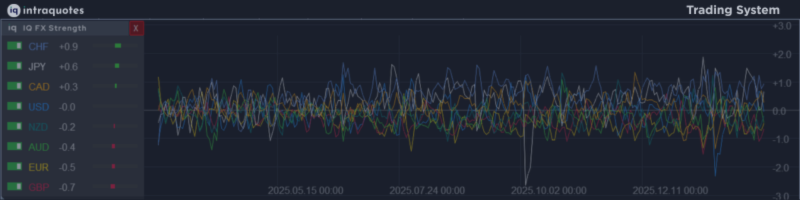

IQ FX Strength answers the single most important question in trading: "Who is truly driving the market right now?"
System Requirement: For higher accurate signal and optimal, smoother performance of this indicator without any lag, a good CPU (with RAM of at least 8GB or above) and fast internet connection is highly recommended.
IQ FX Strength is an AI-POWERED currency strength indicator built with a custom statistical model, not a generic formula.
- Smart design for new-gen traders
- Delivers smarter, data-driven strength analysis with improved clarity and reduced noise.
- The clean, ADHD-friendly dashboard focuses only on what matters most, keeping your workspace efficient and distraction-free.
- With a one-click button, instantly show or hide currencies for full control and flexibility.
- Premium performance, currently offered at a standard launch price, grab it before it’s too late.
© 2026 Intraquotes.
Version: 1.5
⭐️ IQ FX Strength - New Version Released
Version 1.5 - Focuses on professional stability, clearer signal, user convenience options, and a more detailed interface.
✅ Recent Update Includes -
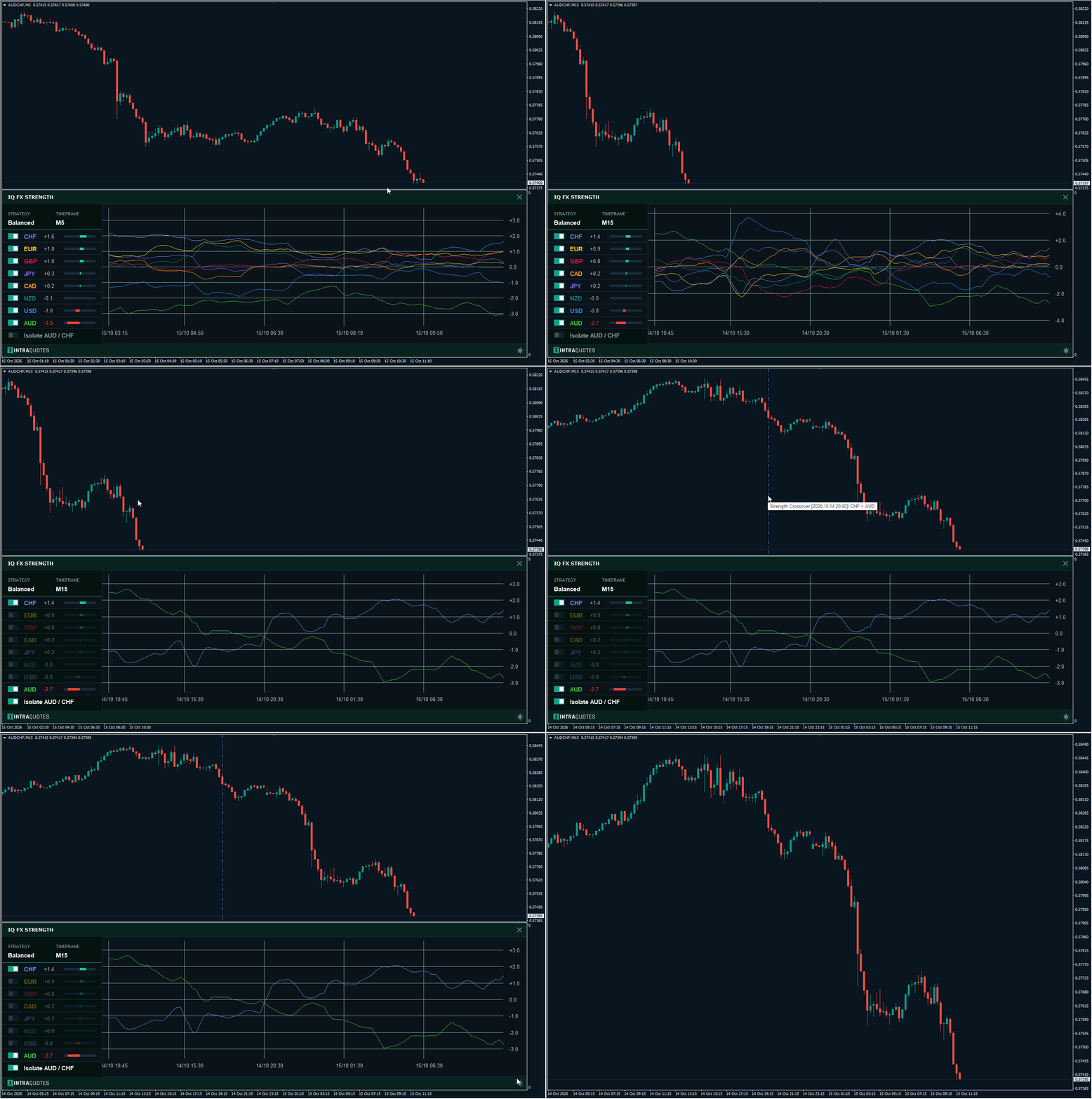
- Crossover Signal now mapped directly on the chart - Indicator now auto-plots symbol crossover vertical timelines directly on the main symbol chart for enhanced trading precision and better signal.
- Isolate Strongest vs. Weakest Currency Strength- One-click option added on the dashboard to automatically isolate the strength signal of the strongest vs. the weakest currency.
- Date/Time Formatting- Intelligent date/time formatting on the graph for clearer understanding.
- Universal Broker Compatibility – Added manual Prefix and Suffix settings so the indicator works correctly with any broker symbol format (such as .ecn , .pro , m- , etc.).
- Strategy Dashboard Info – The dashboard now shows the active strategy preset and calculation timeframe, so you can instantly confirm your current settings.
- Improved Chart View – Expanded graph area plus a starting vertical line with timestamp to show exactly where the current data history begins.
- Platform Safety Protection – If the connection is too slow to load all required market data (28 symbols), the indicator will close safely to prevent MetaTrader from freezing.
- Improved Preloading Experience – Clearer loading screen showing data synchronization progress.
Input Parameters Guide
▶ SYSTEM SETTINGS
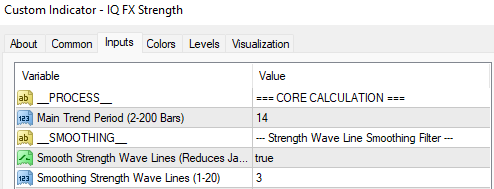
- Calculation Period: This controls the calculation horizon used to normalize volatility.
High values (e.g., 20-30): Filters out short-term noise to show the broader trend stability (good for Swing Trading).
- Enable Line Smoothing: Toggles the visual noise filter.
False: Shows raw, jagged tick data (only for advanced analysis).
- Smoothing Intensity: Controls the intensity of the smoothing curve.
💡Tips: Increase this value if you want to eliminate "jitter" and see only the core trend direction.
----------------------------------------------------------------------------------------------------------------------------------------------------------
▶ CALCULATION WEIGHTS / STRATEGY PRESETS


This indicator blends three timeframes to calculate total power.
Select Strategy: (Preset strategy)
- PRESET BALANCED: Balanced → Default
- PRESET SCALPER: Scalper → High Sensitivity
- PRESET SWING: Swing → Trend Focus
- PRESET CUSTOM: Custom → Use Manual Inputs Below
- Weight_M5: Importance of the 5-Minute timeframe. Increase this if you are a Scalper looking for immediate entries.
- Weight_H1: Importance of the 1-Hour timeframe. This is the "Anchor" for most Intraday traders.
- Weight_H4: Importance of the 4-Hour timeframe. Increase this if you are a Swing Trader who wants to filter out short-term corrections.
▶ ALERT MANAGEMENT

- Master Alert Switch- EnableAlerts: Master switch to turn all signals On/Off.
- Show Popups- PopupAlerts: Displays a pop-up window with sound in MT4 when a signal occurs.
- Send Mobile Push- PushNotif: Sends the signal directly to your MT4 Mobile App via push notification.
- Explosion Threshold- ExplodeGap: The "Explosion" sensitivity threshold.
1. This measures the distance between the strongest and weakest currencies.
2. Higher value (e.g., 5.0+): Strict filter. Fewer signals, but higher probability of a massive breakout.
3. Lower value (e.g., 3.0): More signals, catches moves earlier, but requires more manual filtering.
-------------------------------------------------------------------------------------------------------------------------------------------------------
▶ INTERFACE SETTINGS
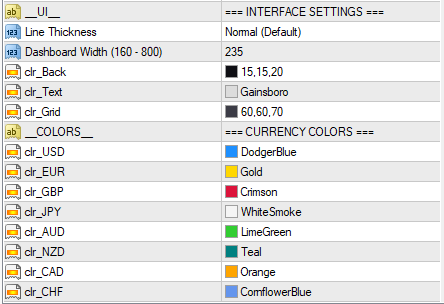
- Dashboard Width: Adjusts the width of the Dashboard panel in pixels. Increase this if you use a 4K monitor or large font scaling.
- Colors: Fully customizable color palette for the background, text, and individual currency lines to match your chart template.
Trading Strategy: How to Use IQ FX Strength
1. The "Explosion" Setup (Trend Following)This is the primary signal for catching momentum breakouts.
✔ Identify: Look at the Dashboard. Find the top Currency (Green) and bottom Currency (Red).
✔ The Gap: Ensure the numeric gap between them is wide (> 4.0).
✔ The Trigger: Wait for the lines to "Explode" apart, one angling sharply up, the other sharply down.
✔ Action: If EUR is top and JPY is bottom, look for Buy setups on EURJPY.
2. The "Crossover" Reversal (Swing)
✔ Identify: Watch for extreme readings (e.g., USD is at +5.0 and overextended).
✔ The Signal: Wait for the line to curl and cross back towards the zero line, while a weaker currency crosses up.
✔ Action: This indicates momentum exhaustion. Look for reversals or pullbacks.
3. The "Zero-Line" Filter (Confluence)
✔ Logic: The 0.0 line represents equilibrium.
✔ Buy Filter: Only take buys on a pair if the Base Currency is > 0 and Rising, and Quote Currency is < 0 and Falling.
✔ Avoid: Never trade a pair if both currencies are moving in the same direction or stuck together at the 0 line (Choppy Market).
Understanding the Timeframe Weights
The Calculation Weights section gives you full control over how the "Total Strength" is calculated. Think of these inputs like a Volume Mixer on a sound system. You decide which timeframe should be "loudest" in the final signal.
The input range is 0.0 to 10.0.
→ 0.0: The timeframe is completely ignored (0% Influence).
→ 1.0: Standard influence.
→ 10.0: Maximum influence (The engine will react almost entirely to this timeframe).
-----------------------------------------------------------------------------------------------------------------
How it works (The Ratio Logic):
The weights work as a Ratio, not a fixed number. The indicator sums up your weights and calculates the percentage influence of each.
Example 1: The Balanced Setup (Default)
Weight_M5 = 2.0
Weight_H1 = 5.0
Weight_H4 = 3.0
Result: The H1 Trend (50%) is the main driver, supported by the H4 Bias (30%), with M5 (20%) added for entry timing.
Example 2: The Pure Scalper Setup
Weight_M5 = 8.0 (High Priority)
Weight_H1 = 2.0 (Low Priority)
Weight_H4 = 0.0 (Ignored)
Result: The indicator becomes extremely fast and sensitive. It will show strength based almost entirely on the last few candles of the M5 chart. 80% of the signal comes from M5.
Example 3: The Swing Trader Setup
Weight_M5 = 0.0 (Ignored)
Weight_H1 = 4.0
Weight_H4 = 6.0
Result: Short-term noise is completely removed. The lines will be very smooth and will only cross when a major trend shift occurs.
Summary:
To make the indicator Faster/More Reactive: Increase M5, Decrease H4.
To make the indicator Smoother/More Stable: Increase H4, Decrease M5.
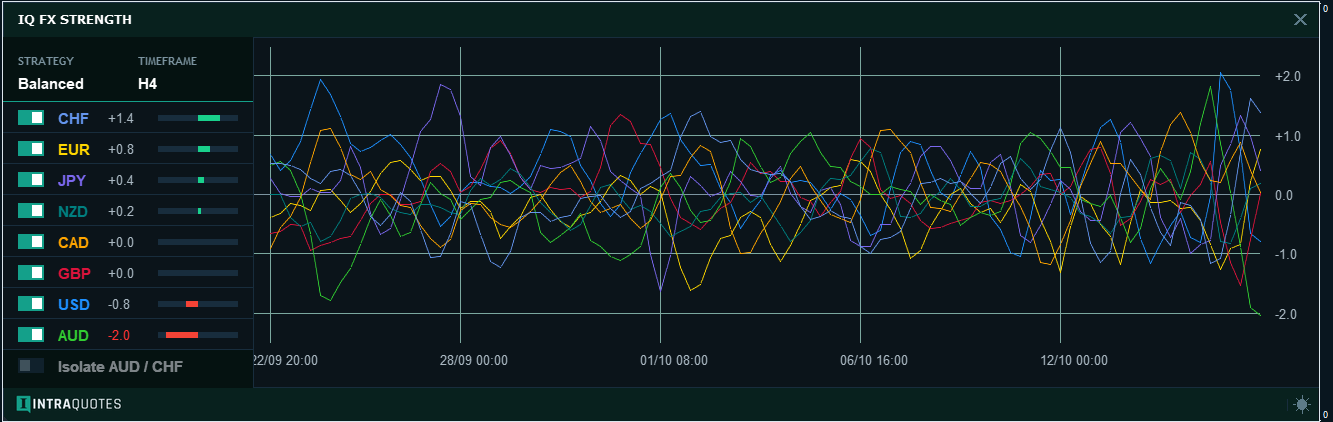
Visual Behavior Explained: Zoom vs. Squeeze
You may notice the graph looks different on different timeframes. This is normal behavior based on the History Depth setting
On Lower Timeframes (e.g., M1/M5): It covers a short period of time. The graph will look "Zoomed In" showing detailed micro-movements (check the below image for reference). 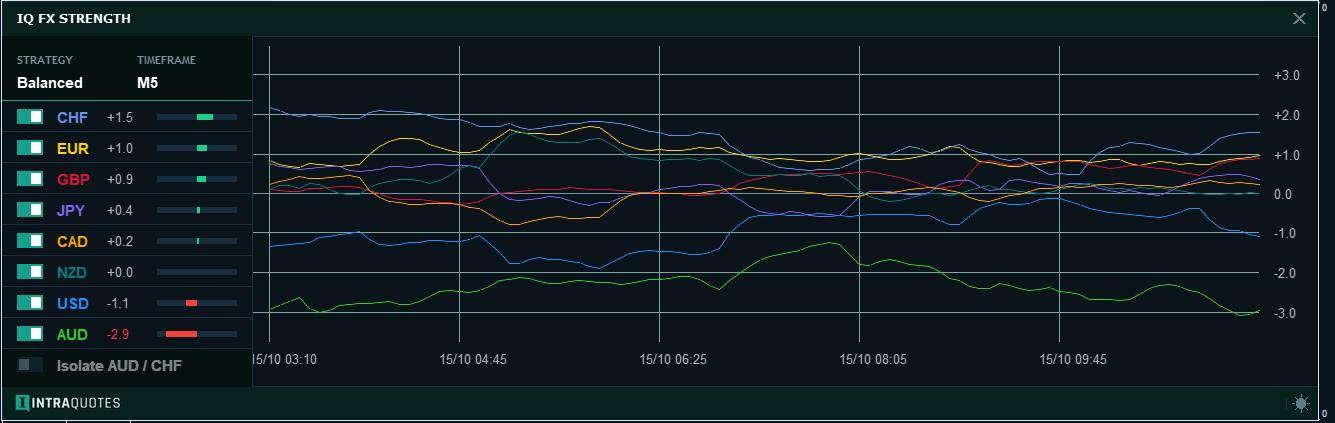
On Higher Timeframes (e.g., H1/H4/D1): It covers months of data. The graph will look "Squeezed" to fit that massive amount of trend history into one screen (check the below image for reference).
Limitation: Performance Protection System
To ensure your MetaTrader terminal remains fast and stable, this indicator includes a built-in safety system:
- Single Instance: You cannot accidentally add the indicator twice to the same chart.
- Terminal Limit: You can use the indicator on a maximum of 5 Charts simultaneously. This prevents CPU overload from processing 100+ currency pairs at once.
- Safety Timeout: If your internet connection or CPU is too slow to load the data within 60 seconds, the indicator will safely shut down to prevent platform freezing.
The "Explosive" Alert System Explained
How it Works:
Unlike standard indicators that alert you on simple crossovers (which often lead to false signals in ranging markets), the IQFS uses a professional dual-filter logic:
- The Gap Filter: It constantly monitors the distance between the Strongest Currency (Topmost) and the Weakest Currency (Bottom-most). The gap must exceed your ExplodeGap setting.
- The Momentum Lock: This is the safety check. The system verifies that the Strongest currency is actively pushing UP and the Weakest is actively diving DOWN.
What You Will Receive?
When an explosion is detected, you receive an instant alert :
- Desktop: A Pop-up window with sound (e.g., "IQFS EXPLOSION: GBP vs JPY").
- Mobile: A Push Notification sent immediately to your phone (if enabled).
How This Helps You Trade?
- By Filtering Noise: It ignores slow, grinding trends and only alerts you to high-momentum, impulsive moves.
- By Saving Your Time: You don't need to stare at 28 charts. The system scans the entire market and tells you exactly which pair (e.g., GBPJPY) is moving right now.
- By Catching Breakouts: This specific logic is designed to catch the start of a news spike or a volume breakout, getting you into the trade when the market is moving fastest.
Alert Sensitivity Guide: Setting Your Explosion Threshold
The Explosion Threshold (Input: ExplodeGap) controls how "strict" the alert system is. It measures the numeric distance (Gap) between the Strongest and Weakest currencies.Recommended Settings based on Strategy Preset:
Level 0.5 – 1.5 (Scalper Mode)B
- Best for: Scalper Preset (M5 Weights).
- Behavior: Triggers on small, quick bursts of momentum.
- Why: In the fast-paced M1/M5 world, trends start with small gaps. A low threshold (e.g., 0.8) ensures you get the alert at the very start of the move, before the price runs away.
- Best for: Balanced Preset (Default).
- Behavior: The "Goldilocks" zone. Triggers only when a trend is clearly established.
- Why: This filters out market noise and consolidation. A gap of 3.0+ confirms that the move is not just a random spike, but a sustained intraday push.
Level 5.0+ (Swing Trading Mode)
- Best for: Swing Preset (H1/H4 Weights).
- Behavior: Triggers rarely, only on massive breakouts or structural shifts.
- Why: For swing trading, you want to ignore normal market breathing. A high threshold ensures you are only alerted when a major trend shift is happening (e.g., Central Bank news or Weekly reversals)
Quick Reference Table:
| Trading Style | Strategy Preset | Recommended Gap |
|---|---|---|
| Scalping (M1-M5) | Scalper | 0.5 - 1.2 |
| Day Trading (M15-H1) | Balanced | 2.0 - 4.0 |
| Swing Trading (H4+) | Swing | 5.0+ |
Important Note Regarding Strategy Tester Please Note
Due to the advanced nature of the IQFS, backtesting in the Strategy Tester is disabled.
Why?
This indicator analyzes 28 Currency Pairs across 3 Timeframes simultaneously (Totaling 84 data streams) to calculate true currency strength. The Strategy Tester environment is designed to simulate only one pair at a time and cannot handle this massive multi-currency data load without freezing or crashing.
How to Test?
To see the indicator in action, simply drag and drop it onto any Live or Demo trading account chart after purchase. It will instantly calculate history and display the strength lines for you to review. Make sure you have a proper high-speed internet connection to load the data. Also, you can check our videos to know how this indicator performs on live chart.
Pro-Tip: How to Resolve "Stuck" Data (Fast Sync Guide)
Because IQ FX Strength calculates data across 28 symbols and 3 different timeframes, your MetaTrader terminal must sometimes be "nudged" to download this massive amount of history from the broker’s server.
If your preloading screen shows symbols under the "STUCK ON BROKER" list, follow these 3 simple steps to reach 100% instantly:
- Open the Stuck Chart: Click the [ OPEN STUCK CHART ] button on the preloader (or manually open a new chart for the symbol listed in red).
- Trigger the History Download: On that new chart, simply click through the M5, H1, and H4 timeframe buttons at the top of your terminal.
- Why? Clicking the timeframes forces MetaTrader to "demand" that specific history from the broker immediately.
- Return & Refresh: Go back to the chart where IQ FX Strength is attached and click the [ FORCE REFRESH ] button.
The indicator will perform a fresh scan, recognize the newly downloaded data, and immediately move the progress bar to 100%.
Note: You only need to do this once. After the data is stored on your computer, the indicator will load nearly instantly every time you open it in the future.
Note on Symbol Switching & Data Synchronization:
IQ FX Strength utilizes a sophisticated 28-symbol matrix calculation. When switching between different currency charts, your MetaTrader terminal must re-prioritize data streams from the broker's server.
What to expect: You may notice the currency rankings shift for 1–3 seconds immediately after changing a chart. This is a standard procedure while the terminal performs a 'Data Handshake' to ensure all 28 symbols are perfectly aligned with the new chart’s timeline.
Pro-Tip: For the most stable experience, keep your 'Market Watch' window open with the Major Forex pairs visible. This forces MetaTrader to keep the data feed active and ensures instant, flicker-free updates when switching symbols.
▶ Click Here for Basic Indicator Troubleshoot Guide.
If you're new here, click here to join our Official MQL5 Channel for daily market analysis, updates and offers on our indicators.
Also Check out: Seller Page | Welcome PostDisclaimer:
• Trading involves financial risk. Know all the risks before investing. Read all the Terms & conditions of each of the product pages before purchasing indicators.
• Our products are available only on mql5.com.
• We never contact anyone or sell our products privately.
• We do not provide any personal trading advice.
• We do not sell any of the Intraquotes products on Telegram or any other platform or website.
©intraquotes | DO NOT COPY THIS CONTENT
RISK DISCLOSURE
Trading financial markets carries inherent risks and may not be suitable for every investor. This indicator is designed as a tool to assist in trading decisions but does not guarantee profits or prevent losses, which could exceed your initial investment. Past performance is not a reliable indicator of future outcomes. Users are encouraged to fully understand the risks and seek independent financial advice if needed. Any trading decisions made using this indicator are at the user's discretion and responsibility.


