Momentum Pulse EA
- Experts
- 버전: 1.0
- 활성화: 10

Momentum Pulse EA trades the signals of the Momentum Pulse indicator automatically. The complete Momentum Pulse signal engine is built into the EA: every closed bar is coloured in one of nine momentum states, and a change of state becomes a buy or sell signal with its own Entry, Stop Loss and three take-profit levels. The EA takes those trades with risk-based position sizing, banks profit in steps at TP1 / TP2 / TP3 and manages the rest with breakeven and an ATR trailing stop. One chart can trade a single symbol or a whole portfolio.
Signal engine (identical to the Momentum Pulse indicator)
- Composite momentum value from five components over an hours-based window: directional efficiency, candle body pressure, location in the recent range, fast/slow EMA trend bias and impulse.
- Nine states from Extreme Bearish to Extreme Bullish. Delta mode for forex and metals, Strength mode for indices, crypto and other markets (Auto picks the mode per symbol); all thresholds are adjustable.
- Three signal types, each with its own switch: activation (neutral to bullish/bearish), acceleration (same direction, stronger state) and flip (bullish to bearish or back).
- Signal filters: cooldown between same-direction signals, volume above its average, Fibonacci market structure (swing highs/lows, uptrend / downtrend / range, buys only in the lower half of a range and sells only in the upper half), minimum reward-to-risk, optional "recommended signals only", and a higher-timeframe filter (block signals against the higher timeframe, or trade only in its direction) that uses closed higher-timeframe bars only.
- Signals are evaluated on closed bars only: no intrabar entries and no repainting. With the same inputs, every signal of the EA matches an arrow of the Momentum Pulse indicator; the EA-only options (trading hours, spread, minimum strength) only decide which of those signals are traded.
Trade levels from every signal
- Stop loss from the Fibonacci structure (beyond the swing low/high plus one ATR), capped at a maximum ATR distance; ATR fallback when no structure is found.
- TP1 at a fixed R multiple, TP2 at the structure target (extended in a trend), TP3 as an extension of TP2.
- Take-profit modes: close everything at TP1, TP2 or TP3, or partial: close a chosen share at TP1, another share at TP2 and let the rest run to TP3.
- Breakeven with a lock-in profit when TP1 is reached, stop to TP1 when TP2 is reached, ATR trailing stop (always, after TP1 or after TP2), close on an opposite signal, optional exit when momentum returns to neutral, optional time exit after N bars.
- Optional minimum stop distance in ATR and minimum momentum strength of the signal bar (light, medium, strong or extreme).
- Before every entry the EA checks that the price has not already passed the stop or TP1, and that all levels respect the broker's stop and freeze levels.
Single symbol or portfolio
- Enter a list such as USTEC,US500 or XAUUSD,USDJPY,BTCUSD to trade all of them from one chart, each with its own signal engine, or leave the list empty to trade the chart symbol.
- Broker names are found automatically: suffixes (".a", "m", ".pro", ...) and common index and crypto names (USTEC / NAS100 / US100, US500 / SPX500, DE40 / GER40 / DAX40, BTCUSD / BITCOIN, ...). A fully tradable variant is preferred over a close-only one.
- The signal timeframe is an input, so the chart can show any timeframe.
- Max positions per symbol and in total, and an optional max number of new trades per day.
Money management and protection
- Risk % per trade: the lot size is calculated from the stop-loss distance, or use a fixed lot. Lots respect the broker's minimum, maximum, step and volume limit plus an optional max lot.
- Free margin is checked before every order; the volume is reduced or the trade is skipped instead of sending an order that would be rejected.
- Daily loss limit (no new trades for the rest of the day, optionally close the EA's positions) and max equity drawdown from the peak (close the EA's positions and pause).
- Max spread in points or as a % of the stop distance, trading hours, Friday close and a trading-session check; a signal that closes while the market is shut is traded at the re-open of the next bar.
On the chart
- Chart candles painted in the nine momentum states, buy / sell arrows and the Entry, SL, TP1, TP2 and TP3 lines of the latest signal.
- Panel in the Momentum Pulse style: auto-trading status with a one-click pause, balance, equity, open and today's P/L, closed trades, win rate and profit factor, the live momentum, last signal and position of every symbol, and the trade plan of the latest signal. Dark, Navy and Light themes, collapsible and movable; the position and theme are remembered per chart.
- Popup, push and e-mail notifications for signals and trades.
Default settings
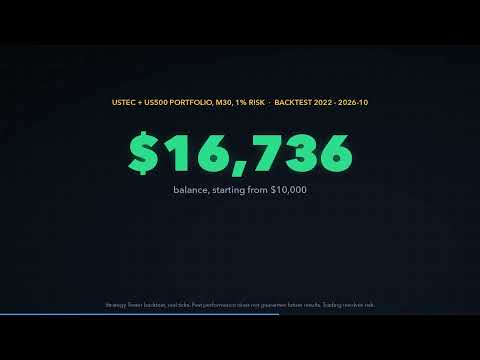
The defaults trade the two US index CFDs USTEC (Nasdaq 100) and US500 (S&P 500) on M30 signals with 1% risk per trade, only between 14:00 and 19:00 server time (the European afternoon and the US morning session on brokers whose server runs at GMT+2 / GMT+3), the H4 filter in "block signals against the higher timeframe" mode, partial exits (50% at TP1, 30% at TP2, the rest at TP3), an ATR trailing stop after TP1 and a spread filter of 20% of the stop distance. In our Strategy Tester research (real ticks, 2022 to October 2026) the momentum signals on these indices were profitable inside this session window and not outside it, The signal and exit settings were chosen on 2022-2024 and then checked on 2025-2026; the session window itself comes from the hourly statistics of the whole period. Backtest results do not guarantee future results; test the EA on a demo account with your broker's symbols and server time first.
How to use
- Attach the EA to any chart (for example USTEC M30) and allow Algo Trading. The chart symbol and timeframe do not matter: the EA trades the Symbols list on the signal timeframe.
- Check the Symbols list against your broker's Market Watch (NAS100 / US100 and SPX500 are recognised automatically), or enter your own list. Leave it empty to trade the chart symbol.
- If your broker's server time is not GMT+2 / GMT+3, shift the trading hours so they still cover the US morning session, or switch the hours filter off for other markets.
- Choose the risk per trade. With several symbols, keep it small, because several positions can be open at the same time.
- Use a different magic number for each chart if you run the EA on more than one chart.
Works on hedging and netting accounts. No DLLs and no external files.