TXBeeBox Statistics Panel

Here is the English translation of the product description, formatted for clarity and easy reading:

The TXBeeBox Statistics Panel is an account and trading performance visualization and statistics tool designed for MetaTrader 5.

When an account simultaneously trades multiple symbols, runs multiple EAs, or uses a mix of automated and manual trading, simply viewing the MT5 order list often makes it difficult to quickly grasp the overall performance. This panel organizes scattered account and trading data into clear curves, statistical tables, and categorized views. It helps traders review their trading performance from multiple dimensions, including the account, timeframes, trading symbols, and Magic IDs.

The panel supports an account overview, real-time positions, multi-timeframe performance summaries, symbol statistics, Magic ID strategy statistics, and account information viewing. In a single interface, users can observe account fund status, historical profit and loss (P&L) changes, trading lot size changes, win rates, profit/loss ratios, holding times, and the results of different strategies.

Note: This product is positioned as a data statistics and visual analysis tool. It does not provide trading signals, nor does it guarantee any trading results.

Key Features

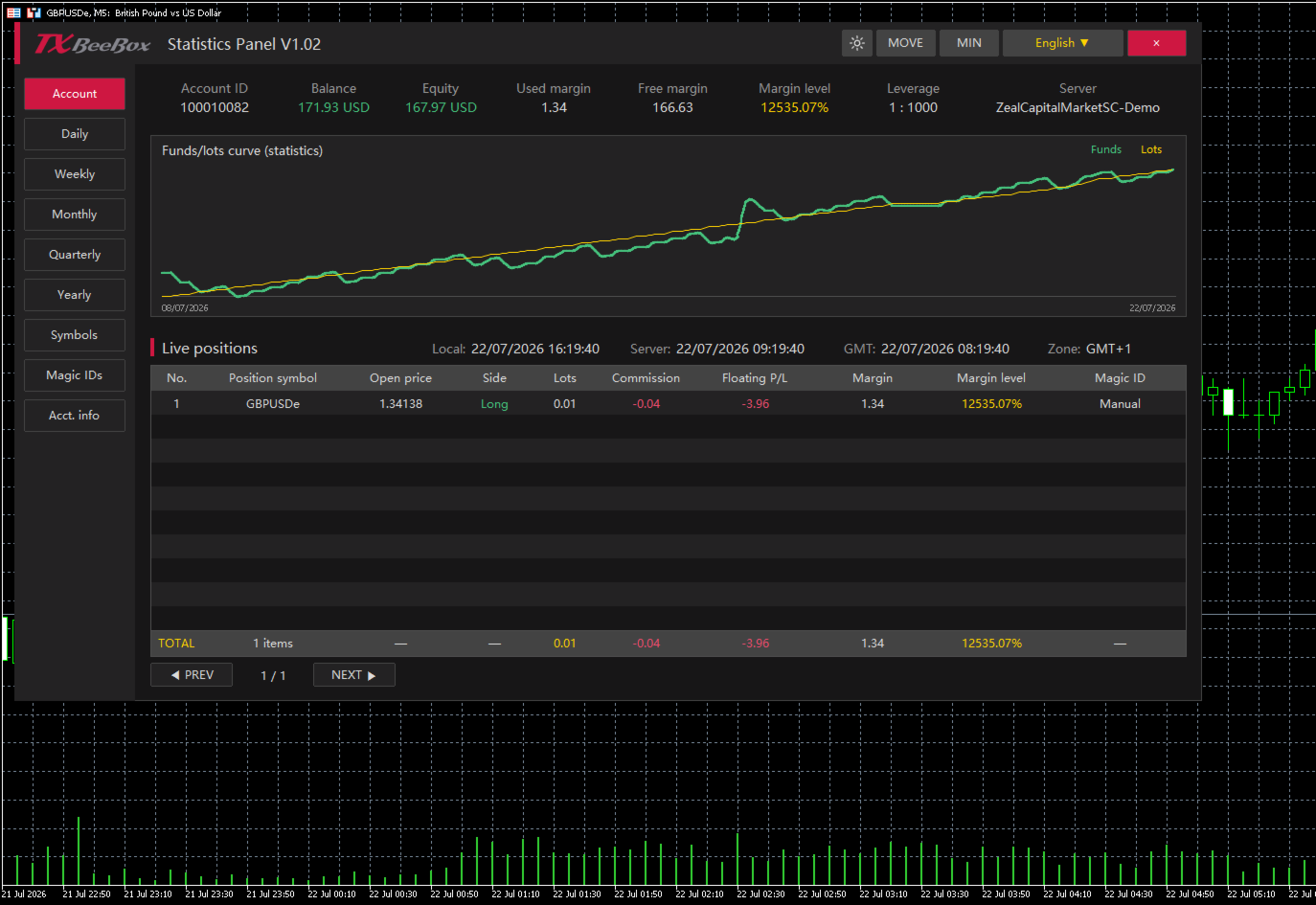
  • Key Account Data: Displays account balance, equity, used margin, free margin, margin level, leverage, and the trading server.

  • Real-Time Position Monitoring: Displays trading symbol, open price, buy/sell direction, lots, commission, floating P&L, used margin, margin level, and Magic ID.

  • Funds and Lots Curves: Plots fund or P&L changes against trading lot size changes on the same timeline, making it easy to compare trading volume with account performance.

  • Multi-Timeframe Statistics: Supports summarizing historical trading data by day, week, month, quarter, and year.

  • Symbol Statistics: Analyzes the contribution of different markets to account results based on the trading symbol.

  • Magic ID Statistics: Separately calculates the performance of different EAs, strategies, and manual trades.

  • Risk and Efficiency Indicators: Provides data such as return rate, maximum floating profit, maximum floating loss, win rate, profit/loss ratio, and holding times.

  • Dark and Light Themes: Allows users to switch display styles based on the chart background or personal preference.

  • Panel Controls: Supports moving, minimizing, closing, language selection, and table pagination.

  • Multi-Timezone Display: Simultaneously displays local time, server time, GMT time, and the current timezone.

Account Overview

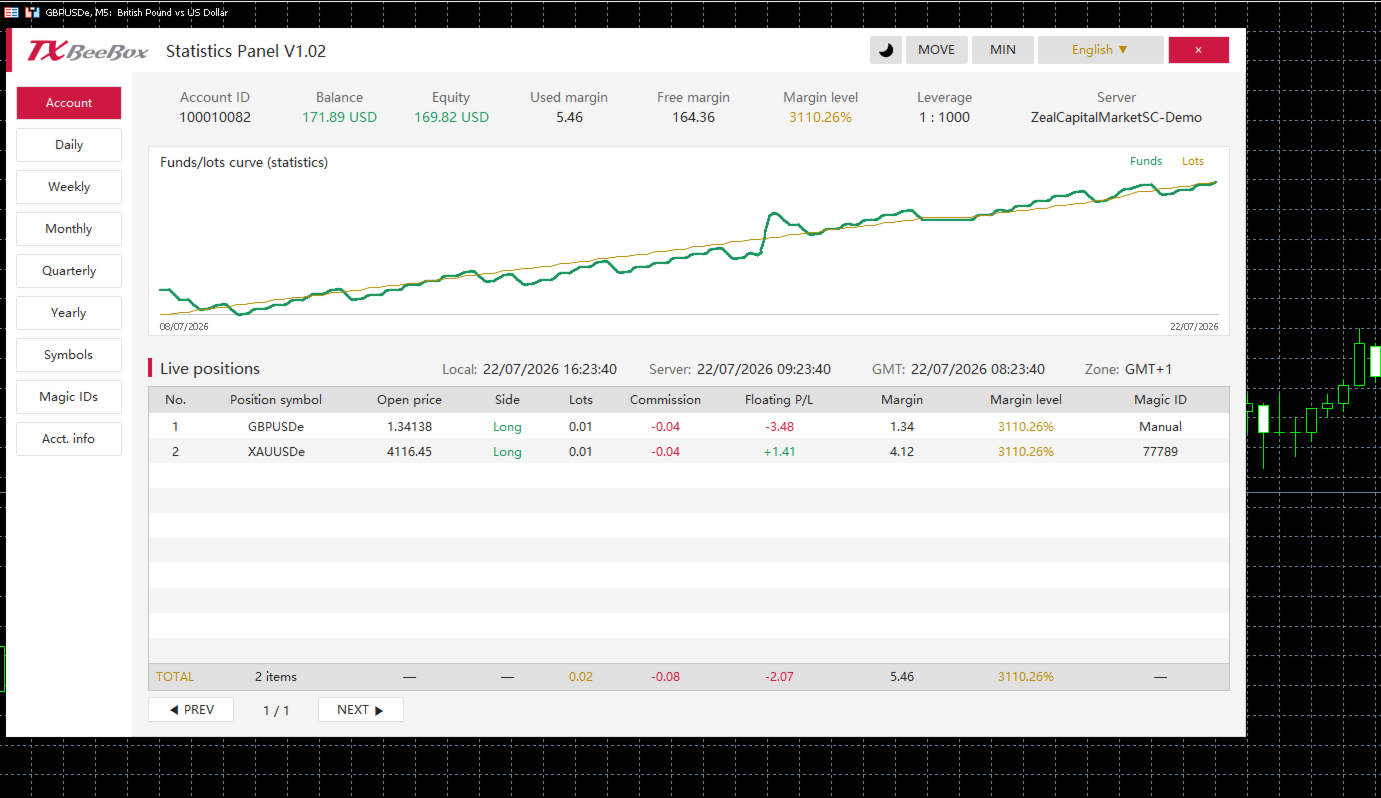
The Account page centrally displays the primary fund data for the current account:

  • Account ID: Trading account number

  • Balance: Account balance

  • Equity: Account equity

  • Used margin: Used margin

  • Free margin: Free margin

  • Margin level: Margin level

  • Leverage: Account leverage

  • Server: Trading server

The account page also includes the funds/lots curve and a real-time position table. The TOTAL row at the bottom of the table summarizes the current number of positions, total lots, total commissions, floating P&L, and margin data.

Multi-Timeframe Performance Statistics

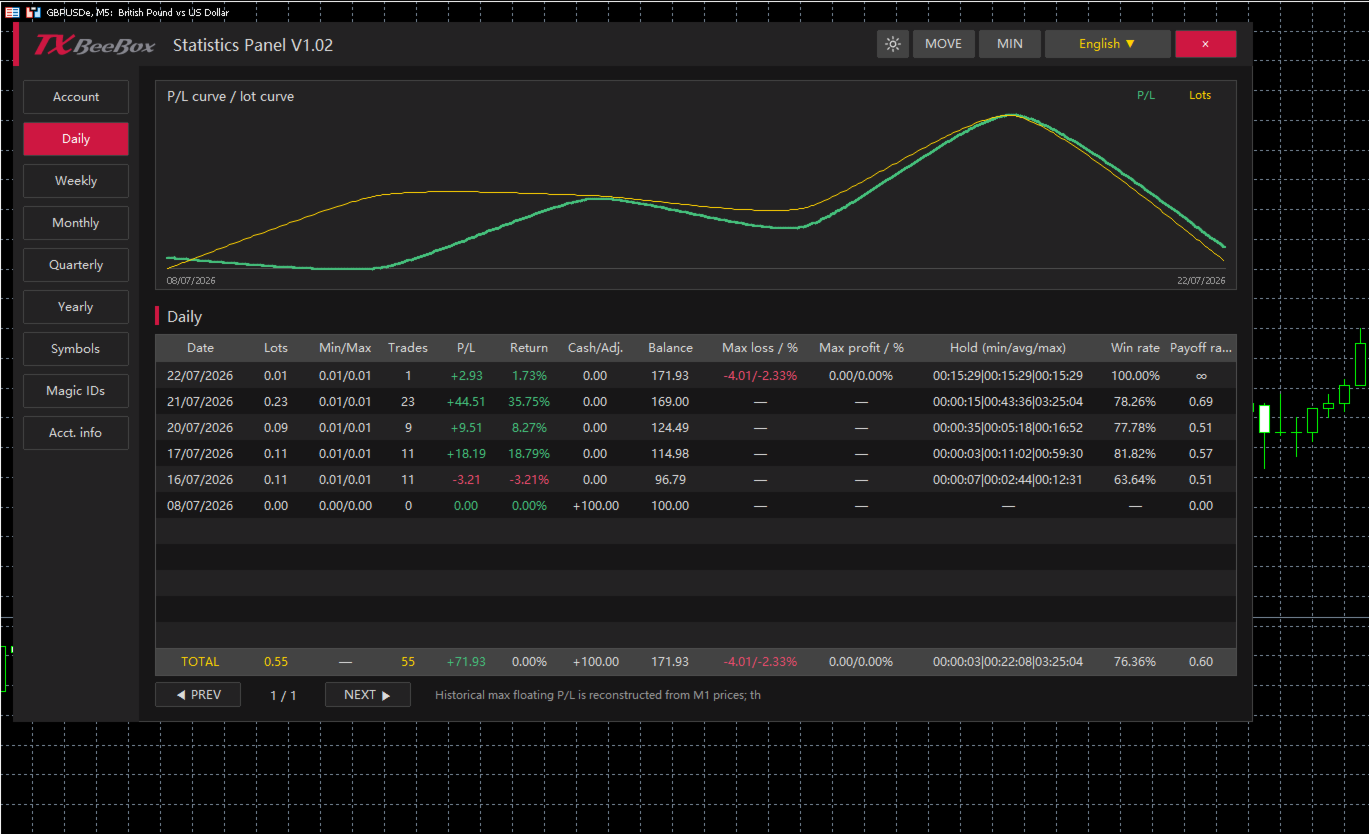
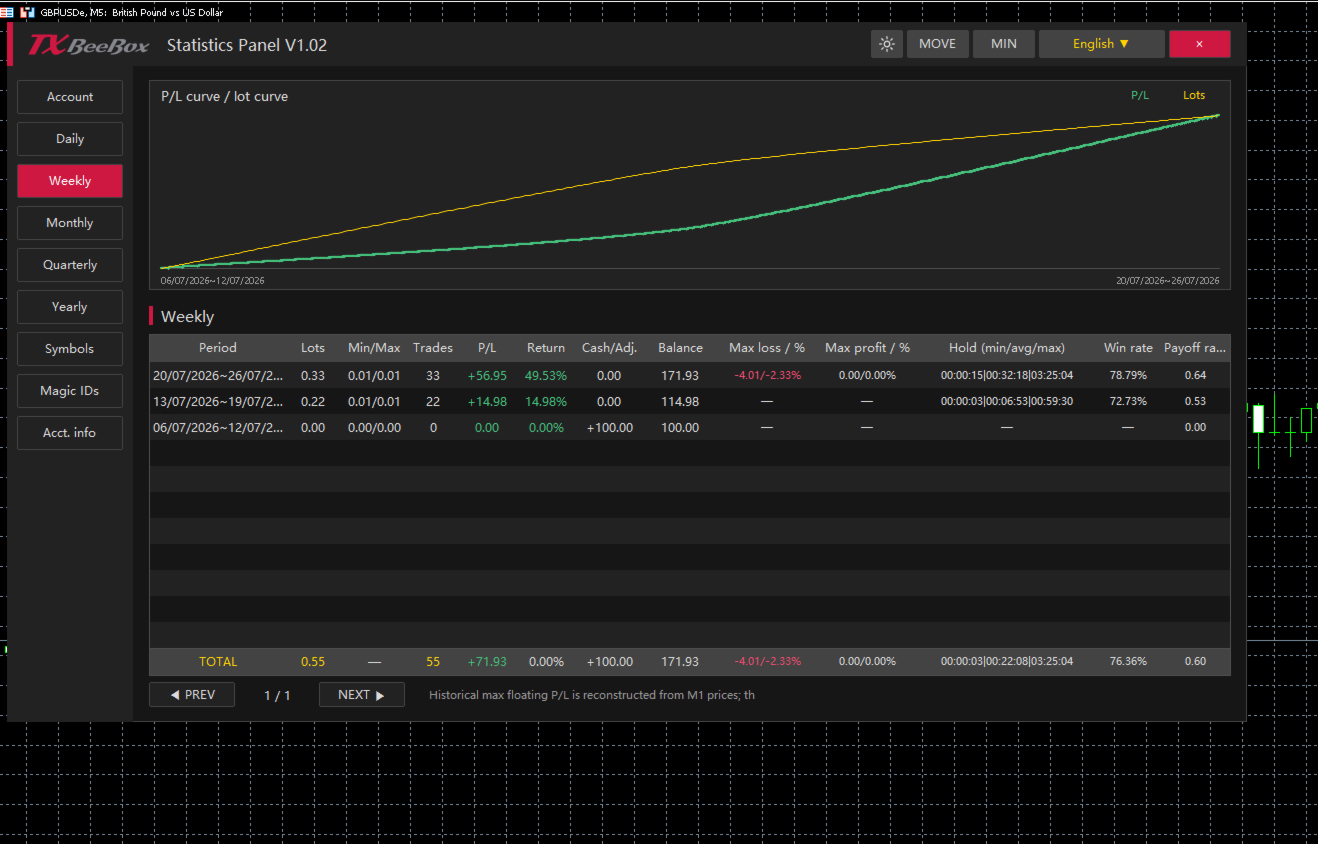
The Daily, Weekly, Monthly, Quarterly, and Yearly pages share a consistent statistical structure, summarizing trading performance by trading day, calendar week, calendar month, quarter, and year, respectively.

For each period, you can view:

  • Cumulative trading lots

  • Minimum and maximum single-trade lot sizes

  • Number of trades

  • Period P&L

  • Period return rate

  • Deposits, withdrawals, or balance adjustments

  • End-of-period balance

  • Maximum floating loss and its percentage

  • Maximum floating profit and its percentage

  • Minimum, average, and maximum holding times

  • Win rate

  • Profit/Loss ratio

Users can first review the Yearly, Quarterly, or Monthly pages to understand long-term trends, and then use the Weekly and Daily pages to pinpoint specific changes.

Symbols and Magic ID Statistics

The Symbols page aggregates data by trading symbol, making it ideal for accounts trading multiple currency pairs, gold, indices, or other markets simultaneously. Users can compare trading volumes, P&L, win rates, profit/loss ratios, and holding times across different symbols.

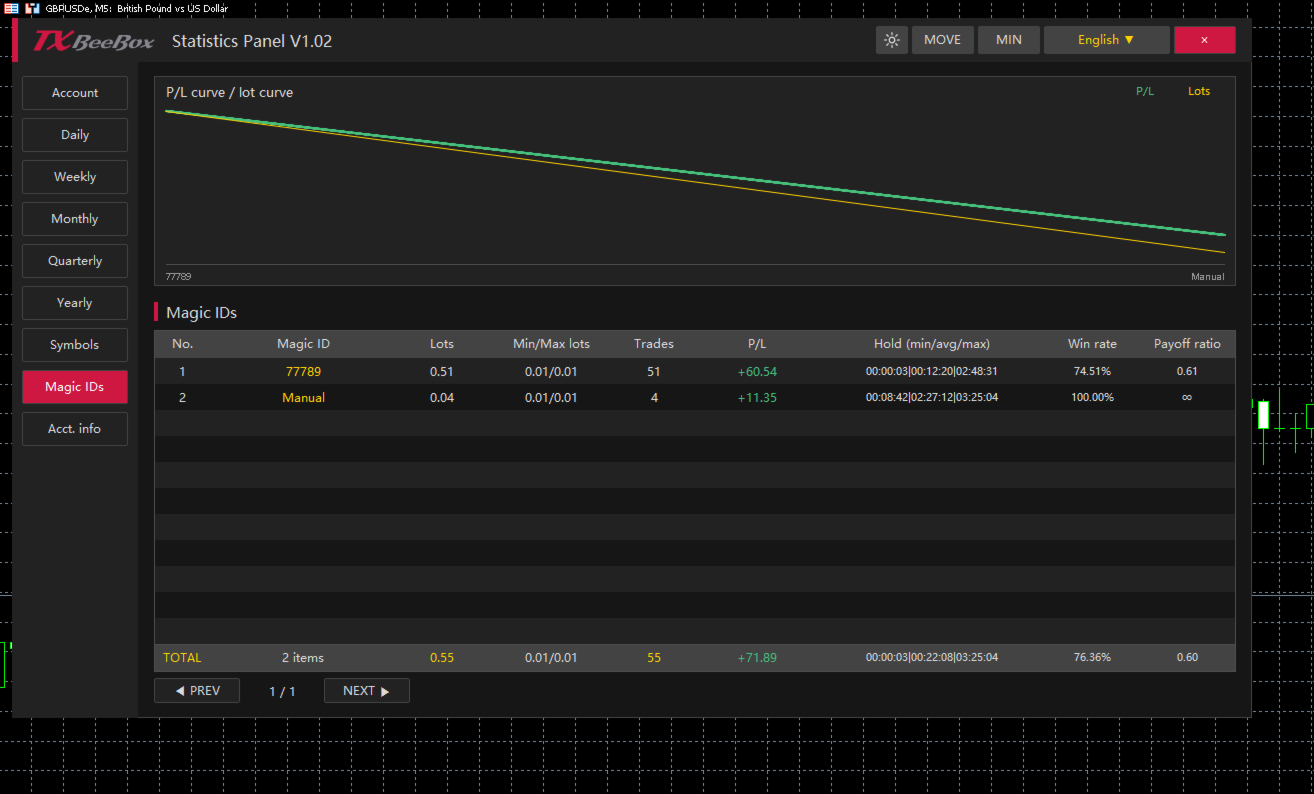
The Magic IDs page categorizes statistical data based on order Magic IDs. Since different EAs typically use different Magic IDs, you can individually review each strategy's:

  • Cumulative lots

  • Minimum and maximum trading lots

  • Number of trades

  • P&L results

  • Minimum, average, and maximum holding times

  • Win rate

  • Profit/Loss ratio

The Manual category in the panel is used to separately group manual trades, making it easy to compare the performance of EA (automated) trading against manual trading.

How to Use

  1. Find the TXBeeBox Statistics Panel in the MT5 Navigator and attach it to any chart.

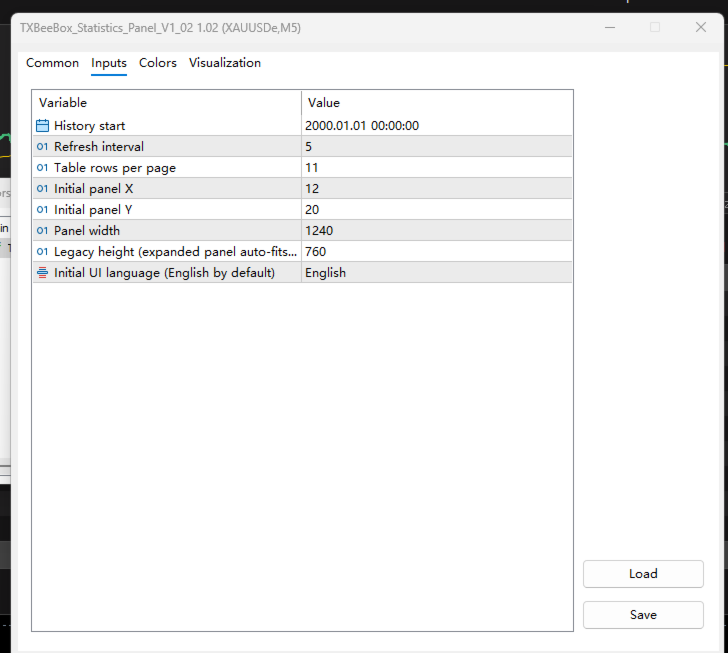
  2. Set your preferences, including the history start time, refresh interval, rows per page, panel position, and panel width.

  3. Open the Account page to view your account status, funds curve, and real-time positions.

  4. Use the Daily, Weekly, Monthly, Quarterly, and Yearly pages to review your performance across multiple timeframes.

  5. Use the Symbols and Magic IDs pages to determine the contribution of specific trading symbols, EAs, or manual trades to your overall account results.

  6. Switch between light and dark themes to match your chart background.

おすすめのプロダクト
Spread Costs refers to the amount of the loss caused by the spread, and Swap Benefits refers to the amount of the income gained by overnight positions. Spread Costs is an important indicator for short-term traders, especially for scalping traders, and Swap Benefits is an important indicator for long-term traders. Since the spreads and swaps on the MetaTrader 5 platform are all expressed in points, we need to convert it into the amount expressed in the account currency. This tool can display the
Telegram to MT5 Pro — 高度なTelegramシグナルコピー機(自動修正・マルチTP・リスク管理・完全トレード管理) Telegram to MT5 Pro — プロフェッショナル Telegram シグナルコピーツール Telegram to MT5 Pro は、TelegramのシグナルをMetaTrader 5アカウントへ自動で直接実行する高性能トレードコピーシステムです。リスク管理、執行、トレード管理を完全に制御できます。 本システムは2つのコンポーネントで構成されています: • MetaTrader 5内で動作するExpert Advisor(EA) • Telegramと接続しシグナルをローカルでEAへ送信するコンパニオンデスクトップアプリ 両方は同じPC上で動作する必要があります。MQL5の制限によりEAはTelegramへ直接接続できません。ブリッジがTelegram処理を担当し、EAが取引を実行します。 サポートとインストール支援 完全なPDFインストール&ユーザーガイドが提供されます。 サポート内容: • 完全PDFユーザーガイド(全設定説明)
Martingale panel MT5
Mohammadbagher Ramezan Akbari
In this article, we would like to introduce the trade panel product with the Martingale panel. This panel is made in such a way that it can meet the needs of traders to a great extent. This trade panel actually consists of two trade panels at the same time, with the first one you can take positions with certain profit and loss limits, and with the second one, you can have positions with profit limits but without loss limits. When positions lose, a new position will be added based on the settings
Atlas Trade Desk MT5 Atlas Trade Desk MT5 is a visual trade panel, risk manager and lot calculator for manual MetaTrader 5 traders. Plan market and pending orders directly on the chart, calculate position size from your selected risk, adjust Entry, Stop Loss and Take Profit visually, and manage open positions from one clean dashboard. The tool is built for discretionary traders who want faster order preparation, clearer risk control and safer position management without switching between multipl
Signal Provider Utility Pro (Telegram & Discord) The Professional Solution for Signal Providers. Automated Broadcasting | Smart GUI Panel | Performance Reports Stop managing your signals manually. Signal Provider Utility Pro is the realiable bridge between your MetaTrader 5 terminal and your community on Telegram and Discord. Designed for high-performance signal services, this tool gives you instant control over your broadcasts without ever needing to open the settings window. From real-time tr
Powerful and beautiful trading panel helps you in scheduling or placing multiple trades based on your presets in a single click. It is designed to execute orders immediately or schedule trades in advance to be executed at certain time using multiple filters to avoid non favorable market conditions (wide spread, reduced leverage etc.). Additional functionality developed to sycnhronize two instances of the expert over the internet (Master - Slave Mode), which means trader can open the panel in loc
Just Copier MT5
Agung Imaduddin
4.75 (4)
"Just copier" is designed to copy trading without any complicated settings. The copy can be done in one PC. One EA can be set as master (provider) or slave (receiver). The receiver lot can be set to multiple providers lots. Please also check this product at fxina.hostingerapp.com.  Any type of copy is available. MT4 -> MT5 MT4 -> MT4 MT5 -> MT5 MT5 -> MT4 If you want to copy MT4 -> MT5 or MT5 -> MT4, please purchase "Just copier" for MT4 and "Just copier" for MT5 separately. Just Copier can copy
セミオートマーティンシステム 導入 このツールは半自動マーティン取引に使用され、パネルをクリックして注文すると、EAがポジションを管理します トランザクションの方向を決定し、残りはEA管理に任せてください 自動マーティン、設定されたグリッドに従って倉庫を追加し、この機能を無効にすることもできます ワンクリック清算 1つのキーロック機能 時間制御 警告音プロンプト 特性 トレーディングチャート:任意 取引可能な通貨:任意 自動テイクプロフィットクロージング バックテストに使用できます クリアパネルディスプレイ パラメータ 主な設定パラメータ LogLevel = LOG_LEVEL_INFO; //ログの書き込みレベル UseAutoMagic = true; //マジックナンバーを使用するかどうか MagicNumber = 6; //マジックナンバー0-2000を設定します ロット= 0.01; //初期取引量 UseMartin = true; // Martin関数を使用するかどうか ブースター= 1.7; //増加の倍数 NetGap = 10; //グリッドの
This Expert Advisor monitors all open positions across all symbols in MetaTrader 5. Whenever a Stop Loss (SL) or Take Profit (TP) is manually set or adjusted on any position, the EA automatically applies that value to all other open positions , regardless of symbol or order type (Buy/Sell). This ensures consistent and synchronized SL and TP levels across your account. Perfect for mobile trading via tablet or smartphone!
このアドバイザーは、複数のペアをワンクリックで取引できるダッシュボードです。 クリック   開ける   選択したペアの注文を開くボタン。 クリック   近い   選択したペアの注文を閉じるボタン。 注文ロットはユーザーが入力した番号です。正の数は買い注文に対応し、負の数は売り注文に対応します。 部分的に閉じるのではなく、注文全体を閉じるには、   「CLOSE」 ボタンをクリックします。クロージングアクションはロット数とは関係ありません。 マジックインプットを 0 に設定すると、アドバイザーが同時に手動注文を閉じるのを手伝ってくれます。 エントリーマジックを別のアドバイザーのマジックで構成すると、アドバイザーは、別のアドバイザーがオープンした注文を同時にクローズするのに役立ちます。 三角生垣   ワンクリックで。 取引シンボルはカスタマイズ可能です。市場観察からインポートするか、ユーザーが入力します。 禁止: Magic - アドバイザーのマジックナンバー。 MaxLots: 最大ロット。ロット数がこのMaxLotsを超える場合、注文ロットはMaxLotsとなります。 StopLo
Session Panel for MT5 Session Panel is a free MT5 indicator that gives you a fast and convenient live overview of the major trading sessions directly from the chart. Monitor Tokyo, London, and New York session times, see which session is currently active, track countdowns to the next session, and view session overlap information in one compact dashboard. Built for traders who want better market timing, clearer session awareness, and a cleaner chart workflow in live market conditions. Session Pan
FREE
Chart Copilot
George Angelo Boutselis
Chart Copilot は、トレーダーがより迅速に取引を行い、保有ポジションを管理し、チャートから直接あらゆる種類のアラートを設定できるよう設計されたトレーディングアシスタントです。これらの機能はすべて、グラフィカルパネルと対話型チャットボットの両方からアクセスできます。 追加資料とセットアップ手順: トライアル版  - セットアップ手順 チャットボット Chart Copilotは、大規模な言語モデルを実行する専用サーバーを備えています。そのため、独自のAPIキーを作成する必要はなく、インストール後すぐにチャットボットと対話できます。 Chart Copilotは、皆さんがよくご存知の一般的なチャットボットとは異なり、取引に関連する操作を直接実行できます。例えば、次のような質問をすることができます。 現在のチャートのボラティリティに影響を与えるニュースイベントの30分前にリマインダーを設定してください。 過去の取引履歴を確認し、改善点を教えてください。 チャート上のサポートラインとレジスタンスラインを検索し、価格がそれらを突破した際にアラートを設定してください。 昨日のレンジの高
Trade Manager は、リスクを自動的に計算しながら、取引を迅速に開始および終了するのに役立ちます。 過剰取引、復讐取引、感情的な取引を防止する機能が含まれています。 取引は自動的に管理され、アカウントのパフォーマンス指標はグラフで視覚化できます。 これらの機能により、このパネルはすべてのマニュアル トレーダーにとって理想的なものとなり、MetaTrader 5 プラットフォームの強化に役立ちます。多言語サポート。 MT4バージョン  |  ユーザーガイド + デモ Trade Manager はストラテジー テスターでは機能しません。 デモについてはユーザーガイドをご覧ください。 危機管理 % または $ に基づくリスクの自動調整 固定ロットサイズを使用するか、ボリュームとピップに基づいた自動ロットサイズ計算を使用するオプション RR、Pips、または価格を使用した損益分岐点ストップロス設定トレーリングストップロス設定 目標に達したときにすべての取引を自動的に終了するための 1 日あたりの最大損失 (%)。 過度のドローダウンからアカウントを保護し、オーバートレードを防ぎます
Telegram Signal Sender MT5を紹介します。これは、取引シグナルを直接Telegramチャンネルに送信するプロセスを自動化するために設計された強力なユーティリティです。このツールは、フォロワーとのコミュニケーションを強化し、取引アラートの共有を効率化したいと考えている新進気鋭のシグナルプロバイダーや確立されたシグナルプロバイダーに最適です。 Telegram Signal Sender MT5を使用することで、トレーダーはエンゲージメントの向上と市場機会の迅速な普及の恩恵を受けることができます。ユーザーは、応答時間と調整の大幅な改善を報告しており、これにより取引により集中でき、シグナルの手動投稿にかかる時間を減らすことができます。 MQL製品のインストールガイド | MT4/MT5で購入したMQL製品の更新 | 一般的なトラブルシューティングガイド | インジケーター設定 / ガイド 主な機能 チャート上のダッシュボード:リアルタイムの情報パネルをチャート上に直接表示し、瞬時に状況を把握できます。 自動シグナル配信:取引シグナル(買い/売り、ストップロス、テイクプ
Chart Manager は、MetaTrader 5 向けのマルチチャートワークスペース管理ツールです。分離チャートウィンドウをターミナル周囲に柔軟なグリッドレイアウトで配置し、各ウィンドウを手動でリサイズ・配置することなく、複数の銘柄とタイムフレームを同時に監視できます。ワークスペースを一度設定すれば、あとは市場に集中できます。 スクリーンショット付きの詳細記事: Chart Manager — 完全ガイド インジケーターシグナルとマルチシンボルスクリーニングについては、同じ著者の Symbol Screener をご覧ください。 Chart Manager は2つの主要機能に特化しています: Window Layout — 分離チャートウィンドウをターミナルの任意の辺(Right、Left、Top、Bottom)にスナップし、列数・行数・間隔・余白を調整可能なグリッドに配置します。 SubCharts — メインチャートのサブウィンドウにコンパクトなマルチタイムフレームのミニチャートを表示し、追加のチャートを開くことなく各タイムフレームの値動きを素早く確認できます。 Chart
DragSL Pro – The Ultimate Auto Stop Loss Management Tool! DragSL Pro is an innovative trading script designed to help traders manage their Stop Loss (SL) more easily and efficiently. With its automated features, you can adjust SL for all positions , including both open and pending orders , without the hassle of manual adjustments. Key Features: Drag & Adjust SL Easily – Move Stop Loss for all positions in one execution. Supports Open & Pending Orders – Works for both active trades and pendin
Trade Assistant AI MT5 Trade Assistant AI MT5 is a professional manual trading assistant for MetaTrader 5, created for traders who want a cleaner, faster, and more structured way to manage their trading workflow from one chart panel. This tool helps you plan trades, calculate risk, place manual orders, manage open positions, and stay more organized during live market conditions. It is built for traders who want better control, not unnecessary complexity. Important: Trade Assistant AI MT5 is not
MQL5ブログ: https://www.mql5.com/en/blogs/post/761446 MT4版: https://www.mql5.com/en/market/product/136790 MT5版: https://www.mql5.com/en/market/product/136791 Time Wizardは、スピード、タイミング、そして執行コントロールを一つの洗練されたダッシュボードで実現したいトレーダーのために開発された、プロフェッショナルなトレーディングアシスタントです。 このエキスパートアドバイザーは、イベントベースのトレーディング、スケジュール執行、そして高速な半自動注文管理のために設計されています。注文を事前に準備し、正確な執行時間を設定し、複数の指値注文を発注し、ストップロスとテイクプロフィットでリスクを管理し、チャート上のコンパクトなインターフェースからすべてを監視できます。 経済イベント、セッション開始、ブレイクアウト、あるいは独自のカスタムスケジュールなど、どのようなタイミングで取引を行う場合でも、Time Wizardは構造と規律に
Recovery Manager Panel MT5 is a manual order management panel for traders who want to manage open positions directly from the chart in a clearer and more organized way. This tool is not a signal robot. It does not predict market direction, generate entry signals, or trade automatically based on market forecasts. Instead, it helps traders work with positions that are already open. You can calculate possible recovery lot sizes, view estimated target levels on the chart, and use available floating
HELIOS Trade Panel — MetaTrader 5 用のオールインワン取引管理センター。高速取引、資金保護、ポジション管理、強力なマルチ時間枠アラートスキャナーを1つのパネルに統合。   ワンクリック取引 • リスク%による自動ストップロス計算付き BUY / SELL 成行注文 • マウスでの予約注文設定:Entry / SL / TP ラインを直接チャートでドラッグ • ポジション開設後の自動可視化(線 + 損益ゾーン) • チャート上の入場ラベル横に「編集」()と「確認」()ボタン ️ 資金保護 • Margin Guard:有効証拠金不足時、ロットが自動的に利用可能数量に減少(5% 安全バッファ付き)— 「資金不足」エラーがなくなる • Daily Drawdown Lock:日次損失閾値到達時、リセットまで新規エントリーをブロック • Tick-Value ロット計算:ポジションは常に設定したリスク% に一致 ポジション管理 • 損益分岐点(BE)、オフセットpipsを設定可能 • トレーリングストップ、起動距離設定 • 部分利確 TP1 /
LT Trade Copy MT5 - 高性能・高速コピートレードツール LT Trade Copy MT5は、同一PC上またはローカルネットワーク(LAN)内において、MetaTrader 5(およびMetaTrader 4)のターミナル間で、最小限のレイテンシー(遅延)と絶対的な正確さをもって取引を複製(コピー)する必要があるトレーダーのために開発された、高性能なインジケーター/ツールです。 資金管理を行うアカウントマネージャー、シグナルプロバイダー、または複数のブローカーで同時に取引を行うトレーダーなど、あらゆるニーズに対して完全なコントロールを提供します。 主な機能 デュアルモード (Sender/Receiver): 同一のExpert Advisor(EA)を「送信側(シグナル送信)」または「受信側(シグナル受信・執行)」として切り替えて使用できます。 完全な互換性: ヘッジ(Hedge)口座とネット(Netting)口座の間でも問題なく動作します。 多彩なロット設定: 倍率(マイルティプライヤー): 送信側のロット数に対して、比例してボリュームを増減させます。 固定ロ
PDA FX One-Click Trade Manager – Your Essential Trading Utility Unlock a new level of trading efficiency with PDA FX One-Click Trade Manager – a must-have utility tool designed for serious forex traders. Whether you're scalping, day trading, or managing swing positions, this panel gives you full control in a clean, lightweight interface. One-Click Execution – Instantly place Buy or Sell orders with minimal delay and full accuracy. Smart TP & SL Management – Modify all open trades with a sing
Control Panel mette a disposizione una semplificata ed avanzata gestione dedicata per ogni singolo mercato Forex, CFD, Materie Prime, Indici Azionari, Metalli Preziosi, Prodotti Energetici, Azioni & Crypto Valute, dal trade pad si posso aprire posizioni e ordini pendenti, visualizzare tutti i dati relativi alla quantità delle posizioni Buy, Sell e di tutti i trade oltre alla quantità espressa in lotti anche per i posizionamenti hedge indicando il valore espresso in lotti relativo all’esposizion
Virgilio is a multifunction control panel consisting of several panels, each of which performs one of the most useful functions used by traders. Its aesthetic is unique, designed to blend into any working environment and offer a user experience that makes work even more enjoyable. Its operativity is simple and intuitive, developed with attention to details to be as userfriendly as possible. Its main panel displays all the basic account and chart data. The first panel offers the user the possib
Object Synchronizer MT5 : Better focus/analysis of the price chart in many timeframes. Are you bored to save and load template many times for the same symbol for many chart timeframes? Here is the alternative. With this indicator, you enjoy creating objects across many charts, you can modify the same object in any chart, you can delete the same object in any chart. All objects you created/modified are always synchronized across all chart windows (with the same symbol). Save your time, you can fo
**Forex Trade Manager Pro MT5** **Trade Manager MT5** は、MetaTrader 5向けの包括的なトレード管理ユーティリティです。トレードを計画する瞬間から決済する瞬間まで、ポジションのあらゆる側面を完全にコントロールできます。リスクを真剣に考えるトレーダー、つまり規律を築き始めた初心者から、複数のポジションにわたって瞬時の実行を必要とするプロのスキャルパーまで、幅広く対応できるように設計されています。 このツールは任意のチャートに装着でき、クリーンでコンパクトなパネルを表示します。チャート上に直接、ドラッグ可能な水平線を使用して、意図するエントリー、ストップロス、テイクプロフィットの各レベルをマークします。Trade Managerは、定義されたリスクに基づいて正しいポジションサイズを即座に計算し、ストップロスとテイクプロフィットの値をpipsと口座通貨でリアルタイムに表示し、計画中のトレードのリスク・リワード比率を表示します。手動計算は一切必要ありません。リスクを一度定義すれば、ツールが残りのすべてを処理します。 **ポジ
Visual Position Risk Tool
AL MOOSAWI ABDULLAH JAFFER BAQER
• Please test the product in the Strategy Tester before purchasing to understand how it works. • If you face any issues, contact me via private message—I’m always available to help. • After purchase, send me a screenshot of your order to receive a   FREE EA   as a gift. Position Risk Tool — Professional Risk Management & Visual Trade Planning for MetaTrader 5 Short Description Plan every trade with confidence using an advanced visual Risk:Reward planner, built-in position size calculator, dragg
「スキャルピング スケールイン」は、スキャルピングでは 1 秒を争うため、S/L および T/P の配置を気にせず、固定距離の初期位置でスケーリングしたいスキャルパー向けに設計されたユーティリティ ツールです。 仕組み: EA の入力タブで希望の値を設定します。具体的には、T/P に配置するリスク対報酬、S/L の幅 (ピップ単位) を設定します。また、次の次のストップ注文までの距離 (位置のスケール) です。 MT5 で [買い/売り] を手動でクリックすると、EA が自動的に SL と TP を設定し、同時に新しい逆指値注文を SL と等しい距離 (ピップ単位) で同じ方向に設定します (つまり、買う場合は S/L が 5 ピップス)。 、次の買いストップ注文は、最初のエントリー価格より 5 ピップス上に配置されます)。保留中のストップ注文が約定されると、前のポジションは損益分岐点まで追跡され、S/L が前の取引のエントリーレベルで新しいストップ注文が発注されます。  基本的に、このツールは、積極的な動きを捕捉する均等に分散されたスケールインを利用します。 入力パラメータの説
Professional Trade Manager for MetaTrader 5 Designed for manual trading with automated risk and trade management Very easy to use with a clean and user-friendly interface Helps improve execution quality and reduces common trade management mistakes Main Features Automatic lot calculation based on risk percentage (Money Management) Fast and accurate trade management directly on the chart Automatic Stop Loss and Take Profit placement Break-even function (move SL to entry after defined profit is re
RISK CONTROL MANAGER Now You can have the same control over risk management as big trading rooms, institutional investors and hedge funds. Managing risk is a fundamental operation for your brokerage.  Choose your maximum desired risk exposure in percentage to Your account, set it on the RISK CONTROL MANAGER, the EA will check and make sure that You'll never exceed that. When You ignore the trading risk, and you leave your operations open, that potentially could lead to catastrophic trade expos
このプロダクトを購入した人は以下も購入しています
Trade Assistant MT5
Evgeniy Kravchenko
4.43 (214)
取引 ごとのリスクの 計算、新規注文 の 簡単 な 設置、部分的 な 決済機能 を 持 つ 注文管理、 7 種類 のトレーリングストップなど 、便利 な 機能 を 備 えています 。 追加の資料と説明書 インストール手順   -   アプリケーションの手順   -   デモアカウント用アプリケーションの試用版 ライン機能 チャート上にオープニングライン、ストップロス、テイクプロフィットを表示します。この機能により、新規注文を簡単に設定することができ、注文を出す前にその特徴を確認することができます。   リスク計算 リスク計算機能は、設定されたリスクとストップロス注文のサイズを考慮して、新規注文のボリュームを計算します。ストップロスの大きさを自由に設定できると同時に、設定したリスクを守ることができます。 Lot calc ボタン - リスク 計算 を 有効 / 無効 にします 。 Risk フィールドでは 、必要 なリスクの 値 を 0 から 100 までのパーセンテージまたは 預金通貨 で 設定 します 。 設定」 タブで 、 リスク 計算 の 種類 を 選択 します :「 $ 通
TradePanel MT5
Alfiya Fazylova
4.88 (162)
Trade Panelは多機能なトレーディングアシスタントです。アプリには手動取引用の50以上のトレーディング機能が搭載されており、ほとんどの取引作業を自動化することができます。 購入前に、デモアカウントでアプリのデモ版をテストすることができます。デモアカウント用のアプリの試用版をダウンロードするには、次のリンクをご利用ください: https://www.mql5.com/en/blogs/post/750865 。 完全な手順 こちら 。 取引。 ワンクリックで取引操作を行うことができます: リスクを自動計算して指値注文やポジションを開く。 複数の注文やポジションをワンクリックで開く。 注文のグリッドを開く。 保留中の注文やポジションをグループごとに閉じる。 ポジションの方向を反転(Buyを閉じてSellを開く、またはSellを閉じてBuyを開く)。 ポジションをブロックする(不足している量のポジションを開くことでBuyとSellのポジション量を等しくする)。 すべてのポジションを部分的にワンクリックで閉じる。 すべてのポジションの利食い(Take Profit)および損切り(Sto
Farmed Hedge Yield Farming | All Markets (Manual - Hybrid - Semi/Automated EA) MULTI-ASSET SUPPORT Trade any asset available on your broker - Forex: Major, Minor, Exotic pairs - Crypto: BTC, ETH, XRP, SOL, BNB - Stocks: Apple, Tesla, Amazon, Google, etc. - Commodities: Gold, Silver, Oil, Gas - Indices: US30, NAS100, SPX500, DAX40 - Any CFD your broker offers VERIFIED TRADING RESULTS - Farmed Hedge Yield Axi Copy:  https://www.mql5.com/en/signals/2356376 - Farmed Hedge Yield Exn Copy:   https:/
Power Candles Strategy Scanner - 自動最適化型マルチシンボル設定ファインダー パワーキャンドル・ストラテジー・スキャナーは 、パワーキャンドル・インジケーターを駆動するのと全く同じ自己最適化エンジンを、マーケットウォッチに登録されているすべての銘柄に対して並行して実行します。1つのパネルで、現在統計的に取引可能な銘柄、各銘柄で勝率の高い戦略、最適なストップロス/テイクプロフィットの組み合わせが表示され、新たなシグナルが発生した瞬間に通知が届きます。 このツールは、Stein Investmentsのエコシステムの一部です。  18種類以上のツールをすべて閲覧し、AIを活用したセットアップの推奨を受け取り、  https://stein.investments でコミュニティに参加しましょう 市場動向を網羅。銘柄ごとに3,000件以上の自動最適化。2種類のアラート。ワンクリックでチャートを切り替えて即座にアクション。 なぜこれが必要なのか 多くのマルチ銘柄スキャナーは、 価格の動き (ボラティリティ、変動率、銘柄ごとのRSI)を表示するだけです。それ
================================================================================ POC BREAKOUT - V20.72. Full Professional Grade Toolkit ================================================================================ POC Breakout is a full MetaTrader 5 trading dashboard for discretionary traders who want breakout signals, Point of Control (POC) context, volume profiles, order flow, market structure, news, alerts, and advanced trade planning in one professional workspace. Attached directly to you
Footprint Chart Pro — Professional OrderFlow EA for MetaTrader 5 Version 6.34 | Professional tool for real traders | Institutional-Grade Visualization DEMO USERS - PLEASE SELECT EVERY TICK / REAL TICK WHEN TESTING AND YOU HAVE DOWNLOADED HISTORICAL DATA. IF YOU SEE A WAITING SCREEN AND IT IS NOT DOWNLOADING, IT MEANS YOU HAVE LOW HISTORICAL DATA. TRY 1 MIN AND 5 MIN FIRST ON 1 DAY DATA. ONE DAY DATA SHOULD BE THE NEWEST AND MOST CURRENT DATE. PLEASE WAIT UNTIL THE MARKET HAS ROLLED OVER PERIOD.
EASY Insight AIO – スマートで手間いらずな取引のオールインワンソリューション 概要 数秒で市場全体——FX、ゴールド、暗号資産、指数、さらには株式まで——を、手作業のチャート確認や複雑なセットアップ・インジケーター導入なしにスキャンできたらどうでしょうか? EASY Insight AIO はAIトレードのための究極のプラグ&プレイ型エクスポートツールです。市場全体のスナップショットを、クリーンなCSVファイルで一括出力。ChatGPT、Claude、Gemini、Perplexityなど、さまざまなAIプラットフォームで即座に解析できます。 ウィンドウの切り替えやグラフのごちゃごちゃしたオーバーレイはもう不要。自動エクスポートされる純粋で構造化されたインサイトだけで、無駄なチャート監視に悩まされず、スマートなデータ主導の判断に集中できます。 なぜEASY Insight AIOなのか? 本当のオールインワン • セットアップ不要、インジケーターのインストール不要、チャートへのオーバーレイ不要。インストールして起動し、エクスポートするだけです。 マルチアセット対
The product will copy all telegram signal to MT5 ( which you are member) , also it can work as remote copier.  Easy to set up, copy order instant, can work with almost signal formats, image signal,  s upport to translate other language to English Work with all type of channel or group, even channel have "Restrict Saving Content", work with  multi channel, multi MT5 Work as remote copier: with signal have ticket number, it will copy exactly via ticket number. Support to backtest signal. How to s
Premium Trade Manager - コーチ内蔵型トレードパネル Premium Trade Manager は、AIトレーディングコーチをあなたのチャートの中に置き、その下に完全な執行エンジンを備えたツールです。いつも通りにトレードをセットアップし、あなた専任のAIトレーディングコーチ Max にそのセットアップをそのまま読み取らせて、発注前に率直な見解を伝えてもらいましょう。ストップの幅が規律あるアプローチに合っているか、リスクサイズは適切か、高影響のニュースイベントが数分後に迫っていないか、プロップファームの制限に近づいていないか。その下には、クリックの後をすべて処理するエンジンが備わっています。ワンクリックのリスクサイズ計算による発注、チャート上でドラッグして組み立て、発注後も動かせるプラン、最大4段階の分割利確、7種類のトレール方式、リアルタイムのプロップファームコンプライアンス、ニュースガード、そしてコストを自ら採点するスプレッド機能。判断はあなたが下す。Max がもう一度確認する。後のことはすべてパネルが担う。 購入前に実際に触れて試せます。 ブラウザ上でライブ
LIMITED SUMMER SALE -40% ! ONLY $470 insead of $790!  Maximum real discount! The core idea: using the user interface, you configure the parameters the chart must meet before entering a position (or positions), choose which entry models to use, and set the rules for when trading and planning should end. Lazy Trader  handles the rest: it  takes over all the routine chart watching and execution! full description  :: 3 key videos [1] ->  [2]   ->  [3] What can it do? - Understands Larry Williams
Quant AI Agents are independent trading Expert Advisors. Instead of trading using a fixed strategy like other conventional EAs, Quant AI Agents   is a   multi-agent AI trading framework   that turns natural-language strategy prompts into live.  WANT THE SAME RESULTS AS MY LIVE SIGNAL?   Use the exact same brokers I do:   IC MARKETS , IC TRADING   .  Unlike the centralized stock market, Forex has no single, unified price feed.  Every broker sources liquidity from different providers, creating un

YuClusters
Yury Kulikov
4.93 (43)
Attention: You can view the program operation in the free version  YuClusters DEMO .  YuClusters is a professional market analysis system. The trader has unique opportunities to analyze the flow of orders, trade volumes, price movements using various charts, profiles, indicators, and graphical objects. YuClusters operates on data based on Time&Sales or ticks information, depending on what is available in the quotes of a financial instrument. YuClusters allows you to build graphs by combining da
FUTURES ORDERFLOW FOOTPRINT CHART Professional OrderFlow EA for MetaTrader 5 Version 1.01| Professional tool for real traders | Institutional-Grade Visualization STRATEGY TESTER USERS - PLEASE SELECT EVERY REAL TICK WHEN TESTING AND YOU HAVE DOWNLOADED HISTORICAL DATA. IF YOU SEE A WAITING SCREEN AND IT IS NOT DOWNLOADING, IT MEANS YOU HAVE LOW HISTORICAL DATA. TRY 1 MIN AND 5 MIN FIRST ON 1 DAY DATA. ONE DAY DATA SHOULD BE THE NEWEST AND MOST CURRENT DATE. PLEASE WAIT UNTIL THE MARKET HAS ROL
あなたがメンバーである任意のチャネルから(プライベートおよび制限されたものを含む)シグナルを直接あなたのMT5にコピーします。  このツールは、トレードを管理し監視するために必要な多くの機能を提供しながら、ユーザーを考慮して設計されています。 この製品は使いやすく、視覚的に魅力的なグラフィカルインターフェースで提供されています。設定をカスタマイズして、数分で製品を使用を開始できます! ユーザーガイド + デモ  | MT4版 | Discord版 デモを試してみたい場合は、ユーザーガイドにアクセスしてください。 Telegram To MT5 受信機は、ストラテジーテスターで動作しません! Telegram To MT5の特徴 複数のチャネルから一度にシグナルをコピー プライベートおよび制限されたチャネルからシグナルをコピー BotトークンまたはChat IDは必要ありません   (必要に応じて使用することができます) リスク%または固定ロットを使用して取引 特定のシンボルを除外 すべてのシグナルをコピーするか、コピーするシグナルをカスタマイズするかを選択 すべてのシグナルを認
AI Agent Supervisor is NOT an Expert Advisor. AI Agent Supervisor   is a   multi-agent AI risk & portfolio supervisor   that watches every EA on your account and intervenes in real time.  WANT AN AI PORTFOLIO MANAGER WATCHING YOUR FLEET 24/7?   Run your fleet on the same brokers I do:   IC MARKETS , IC TRADING   .  Unlike the centralized stock market, Forex has no single, unified price feed.  Every broker sources liquidity from different providers, creating unique data streams. The Supervisor r
QCML Assistant
Maxime Turcotte-lafreniere
QCML Assistant MT5 Your Trading. Our Assistant. Your Edge. Looking for a tool that completely transforms your experience on MetaTrader 5? QCML Assistant is the all-in-one solution built by traders, for traders. Just one tool installed on your chart, and you get access to an ultra-complete, ultra-fast, and ultra-simple trading platform. No more hours wasted setting up your workspace. No more complicated trade entries. With QCML Assistant, everything becomes simple, smooth, and efficient right fro
Ultimate Extractor - Professional Trading Analytics for MT5 *****this is the local HTML version of Ultimate Extractor. !!!!!it is not compatible with Cloud!!!! For the online version please reach out to me directly****** Ultimate EA manager also now available when you use cloud pro and above for free!! Ultimate Extractor transforms your MetaTrader 5 trading history into actionable insights with comprehensive analytics, interactive charts, and real-time performance tracking. What It Does Automa
*** available for free for cloud pro users and above****  Ultimate EA Manager is a utility for traders running multiple Expert Advisors on a single MT5 terminal. It does not place trades itself — it coordinates the EAs you already use.     Features:   - Auto-detect every EA attached to charts in your terminal, grouped by EA name   - Slot management: cap how many EAs may hold open positions concurrently (waiting EAs pause until a slot frees up)   - Account-level drawdown circuit breake
Royal Copier
Janet Abu Khalil
5 (1)
Royal Copier — プロフェッショナル MT5 トレードコピー EA Royal Copier は、MetaTrader 5 用のプロフェッショナルなローカルリアルタイムトレードコピー EA です。 現在は 1 つの MT5 Expert Advisor の中に両方の機能が統合されています。 入力設定から、EA を Master モード または Client モード のどちらで動作させるかを選ぶだけです。 つまり、同じ EA を送信元口座でも受信先口座でも使用でき、元のコピー動作をそのまま維持します。 Royal Copier は以下の一般的な組み合わせで口座間コピーをサポートします。 MT5 から MT5 MT5 から MT4 MT4 から MT4 MT4 から MT5 MT4 とコピーする場合は、 MT4_Copier を使用してください。 仕組み Royal Copier は、同じ Windows PC 上の共有ファイルを使用して動作するローカルコピー EA です。 EA が Master モード に設定されている場合、送信元口座を監視し、すべての取引アクティビティを共
VOLUME BUBBLES ORDERFLOW FOOTPRINT PROFESSIONAL Expert Advisor for MetaTrader 5 Complete Feature Documentation Introduction: Volume Bubbles OrderFlow Footprint Professional is an advanced order flow visualization tool designed for the MetaTrader 5 platform. It provides institutional-grade market analysis through real-time volume bubbles visualization, volume profiling, and sophisticated order flow analysis. This Expert Advisor transforms raw market data into actionable trading intelligence, hel
Custom Alerts AIO:マルチマーケット監視を一括で実現 — 設定不要ですぐに使えるインテリジェントツール 概要 Custom Alerts AIO は、追加のインジケーター設定が不要で、インストール後すぐに利用できる高機能マーケットスキャナーです。FX Power、FX Volume、FX Dynamic、FX Levels、IX Power を内部にすべて統合し、主要なすべての資産クラス(為替、金属、指数、暗号資産)を一括監視できます。MetaTrader の仕様により、株式は個別のシンボルとして追加可能ですが、一般的には利用頻度は低めです。 1. なぜ Custom Alerts AIO を選ぶべきか 追加ライセンス不要 • 必要なすべての Stein Investments インジケーターが内蔵されており、すぐに使用可能です。 • チャートに表示されるグラフィックは省略されており、アラート生成に特化した構成です。 市場を広範囲にカバー • 為替、金属、暗号資産、株価指数に対応(株式は手動追加可能)。 • シンボル名を入力する必要はなく、プロパティで資産クラス
Prop Firm Os
Gayathiri Gopalakrishnan
5 (1)
PROP FIRM OS Structured Trading Assistant for MetaTrader 5 PROP FIRM OS is a structured trading assistant designed for MetaTrader 5 users who prefer rule-based market analysis and organized trading workflows. The Expert Advisor combines market analysis tools, scanner functions, dashboard monitoring, alerts, risk-control settings, and trade management features inside one system. PROP FIRM OS is designed to help traders follow selected rules, filters, and monitoring conditions during trading activ
Becktester Telegram Signals Custom Becktester Telegram Signals Custom is an advanced version of the regular Becktester Telegram Signals, created for traders who want not only to parse Telegram signals and backtest them in MetaTrader 5, but also to test custom post-entry trade management logic that goes far beyond the standard version. The regular Becktester Telegram Signals already allows you to connect to Telegram, read real channel messages, parse Buy/Sell, Entry, Stop Loss and Take Profit dat
ManHedger MT5
Peter Mueller
4.83 (6)
THIS EA IS A SEMI-AUTO EA, IT NEEDS USER INPUT. Manual & Test Version Please TEST this product before BUYING  and watch my video about it. The price of the ManHedger will increase to 250$ after 20 copies sold. Contact me for user support or bug reports or if you want the MT4 version! MT4 Version  I do not guarantee any profits or financial success using this EA. With this Expert Advisor, you can: Implement your own Zone Recovery strategy to capitalize on trending markets. Create Grid trading s
This is exactly what the name says. Visual strategy builder . One of a kind. Turn your trading strategies and ideas into Expert Advisors without writing single line of code. Generate mql source code files with a few clicks and get your fully functional Expert Advisors, which are ready for live execution, strategy tester and cloud optimization. There are very few options for those who have no programming skills and can not create their trading solutions in the MQL language. Now, with Bots Builde
Discord Signal Notifications — это мощный инструмент для трейдеров, проповодов и управляющих счетами, который автоматически отправляет все ваши торговые события в канал или чат Discord. Главное преимущество — Глобальный мониторинг. Вам не нужно устанавливать советник на каждый график. Достаточно запустить одну копию утилиты на одном любом окне, и она будет отслеживать действия по всем инструментам и всем счетам в вашем терминале одновременно. Основные возможности Глобальный мониторинг счёта Ути
Crystal Trade Manager – Advanced MT5 Risk and Trade Control Utility Overview Crystal Trade Manager (CTM) is a professional MetaTrader 5 utility designed for risk management, trade automation, and instant execution control. It provides traders with an integrated system for protecting equity, managing daily drawdowns, controlling lot sizes, and applying automation features such as automatic SL/TP, break-even, and trailing stop. The tool is suitable for manual traders, prop-firm challenge particip
Global Investing FX Terminal は、MetaTrader 5 向けのオールインワン FX ダッシュボードです——中央銀行政策金利、CFTC COT ポジション、キャリーランキング、経済サプライズ、オプションスキュー、リテールセンチメント、相関まで、合計 13 のアナリティクスパネルを、ちらつきのない単一キャンバス上に表示し、単一の EA から 10 秒ごとに更新します。外部ソフトウェア不要です。 プロの FX 分析には、通常は別々のプラットフォームに分散しているデータへの同時アクセスが欠かせません。レートデリバティブ、政府統計ポータル、ブローカーのスワップ仕様、オプションデスク——このEAはそれらすべてを、実際に売買判断を下すトレーディングターミナルの単一画面に集約します。 ダッシュボードの表示内容 マーケットオーバービュー FX ペアテーブル — G10 全 28 ペアに加え、ブローカーの Market Watch に NOK/SEK クロスが存在する場合はそれも含めた最大 36 ペアのリアルタイム Bid/Ask。各行にはスプレッド、日次・週次変化、pip
ATTENTION For a free trial version, visit my website. Manual QUANTUM RiskGuard Management — Your ultimate ally for uncompromising trading. Lot Calculator — Automatic lot size calculation. Quantum — Automatic risk to maximize profits and reduce drawdowns. Automatic Journal — Included and freely downloadable from my website. Automatic Screenshot — Two screenshots: one at entry and one at exit. Partial Profit — Smartly managed partial exits. Smartphone Trading — Place orders from your mobile, mana
This EA Utility allows you to manage (with advanced filtering) unlimited open orders (manual or EA) with 16 trailing stop methods: fixed, percent, ATR Exit, Chandelier Exit, Moving Average, Candle High Low Exit, Bollinger Bands, Parabolic, Envelope, Fractal, Ichimoku Kijun-Sen, Alligator, Exit After X Minutes or Bars, RSI and Stochastic. The trailing stop can be either real or virtual, and you can exit fully or with a partial close percent on touch or bar close.  Moreover, you can add (override
フィルタ:
レビューなし
レビューに返信