TXBeeBox Statistics Panel

Here is the English translation of the product description, formatted for clarity and easy reading:

The TXBeeBox Statistics Panel is an account and trading performance visualization and statistics tool designed for MetaTrader 5.

When an account simultaneously trades multiple symbols, runs multiple EAs, or uses a mix of automated and manual trading, simply viewing the MT5 order list often makes it difficult to quickly grasp the overall performance. This panel organizes scattered account and trading data into clear curves, statistical tables, and categorized views. It helps traders review their trading performance from multiple dimensions, including the account, timeframes, trading symbols, and Magic IDs.

The panel supports an account overview, real-time positions, multi-timeframe performance summaries, symbol statistics, Magic ID strategy statistics, and account information viewing. In a single interface, users can observe account fund status, historical profit and loss (P&L) changes, trading lot size changes, win rates, profit/loss ratios, holding times, and the results of different strategies.

Note: This product is positioned as a data statistics and visual analysis tool. It does not provide trading signals, nor does it guarantee any trading results.

Key Features

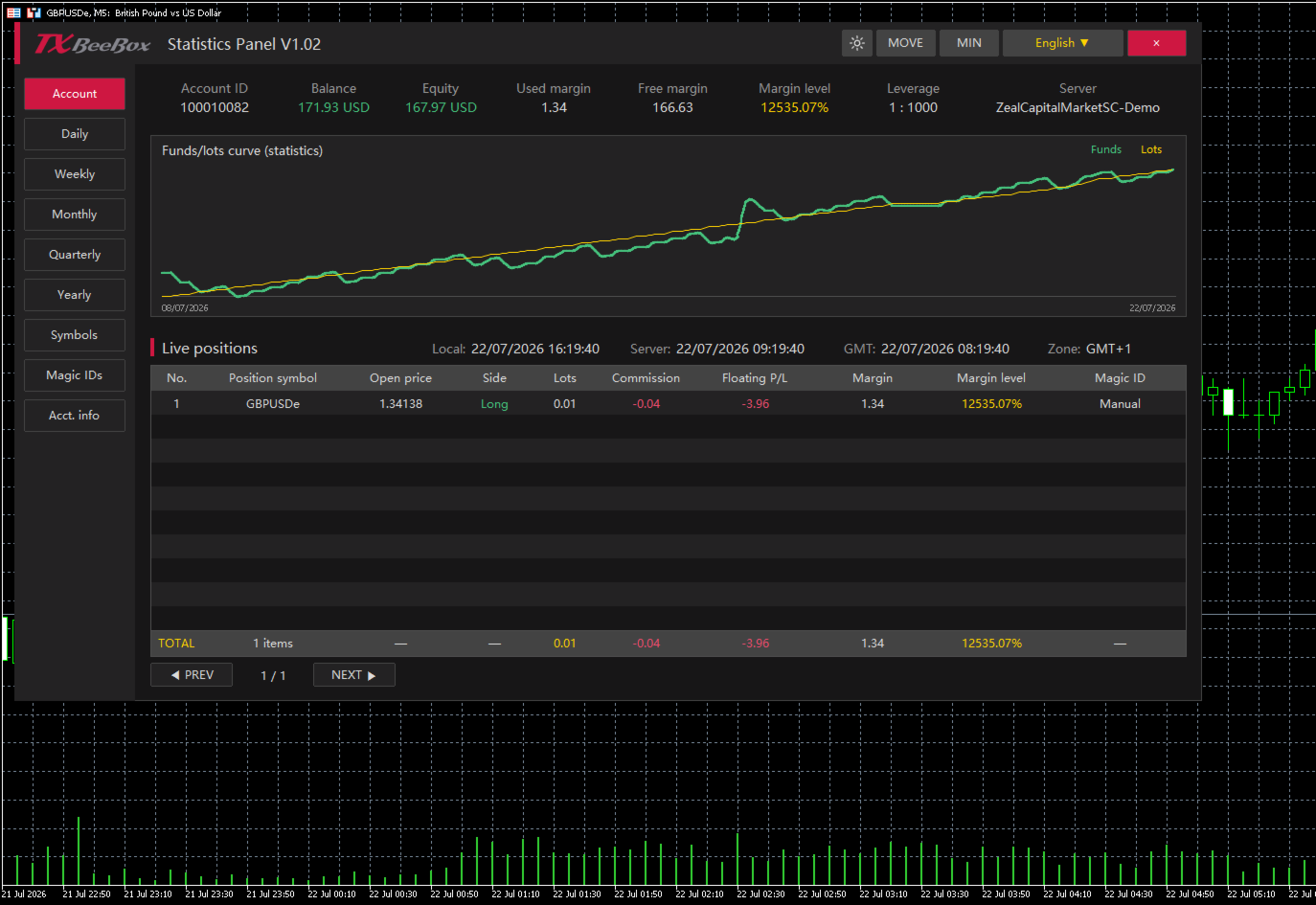
  • Key Account Data: Displays account balance, equity, used margin, free margin, margin level, leverage, and the trading server.

  • Real-Time Position Monitoring: Displays trading symbol, open price, buy/sell direction, lots, commission, floating P&L, used margin, margin level, and Magic ID.

  • Funds and Lots Curves: Plots fund or P&L changes against trading lot size changes on the same timeline, making it easy to compare trading volume with account performance.

  • Multi-Timeframe Statistics: Supports summarizing historical trading data by day, week, month, quarter, and year.

  • Symbol Statistics: Analyzes the contribution of different markets to account results based on the trading symbol.

  • Magic ID Statistics: Separately calculates the performance of different EAs, strategies, and manual trades.

  • Risk and Efficiency Indicators: Provides data such as return rate, maximum floating profit, maximum floating loss, win rate, profit/loss ratio, and holding times.

  • Dark and Light Themes: Allows users to switch display styles based on the chart background or personal preference.

  • Panel Controls: Supports moving, minimizing, closing, language selection, and table pagination.

  • Multi-Timezone Display: Simultaneously displays local time, server time, GMT time, and the current timezone.

Account Overview

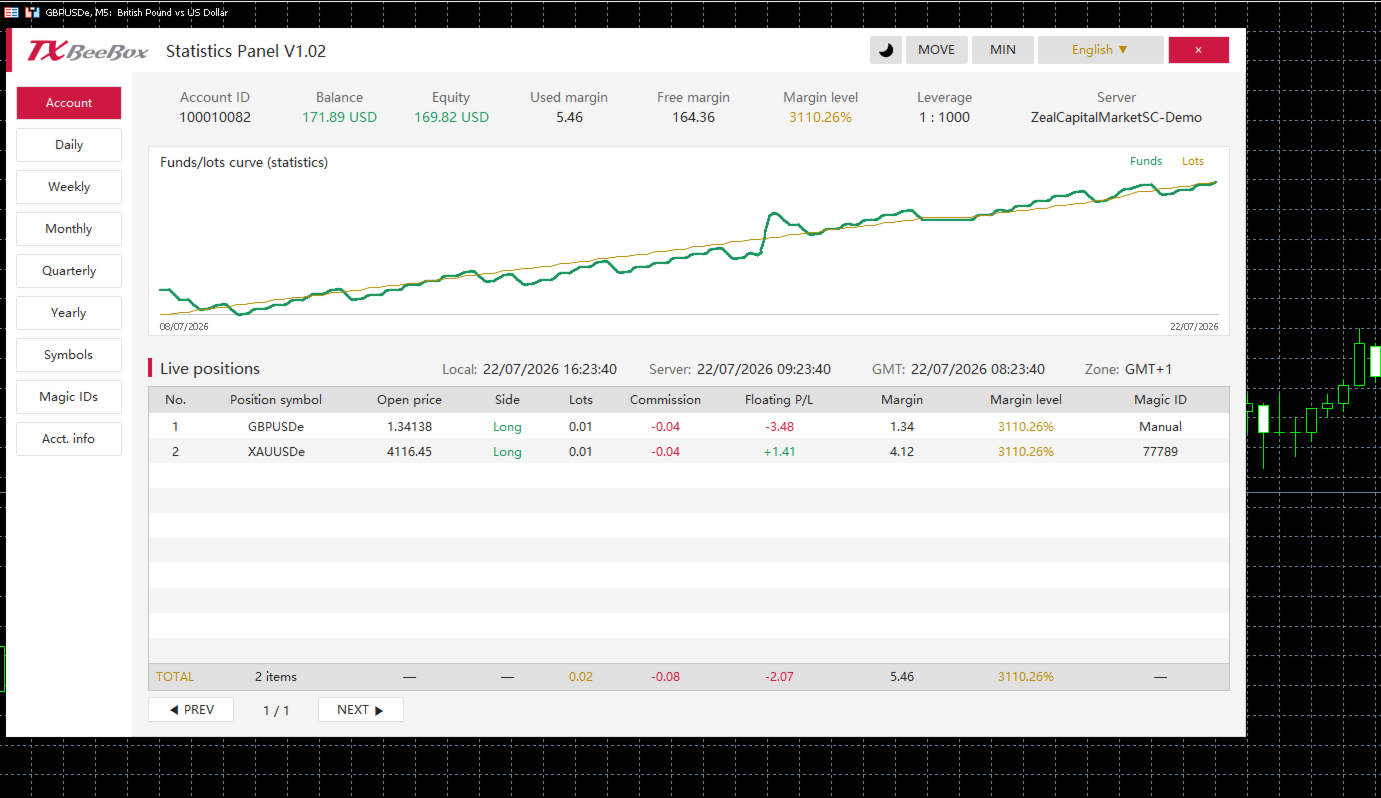
The Account page centrally displays the primary fund data for the current account:

  • Account ID: Trading account number

  • Balance: Account balance

  • Equity: Account equity

  • Used margin: Used margin

  • Free margin: Free margin

  • Margin level: Margin level

  • Leverage: Account leverage

  • Server: Trading server

The account page also includes the funds/lots curve and a real-time position table. The TOTAL row at the bottom of the table summarizes the current number of positions, total lots, total commissions, floating P&L, and margin data.

Multi-Timeframe Performance Statistics

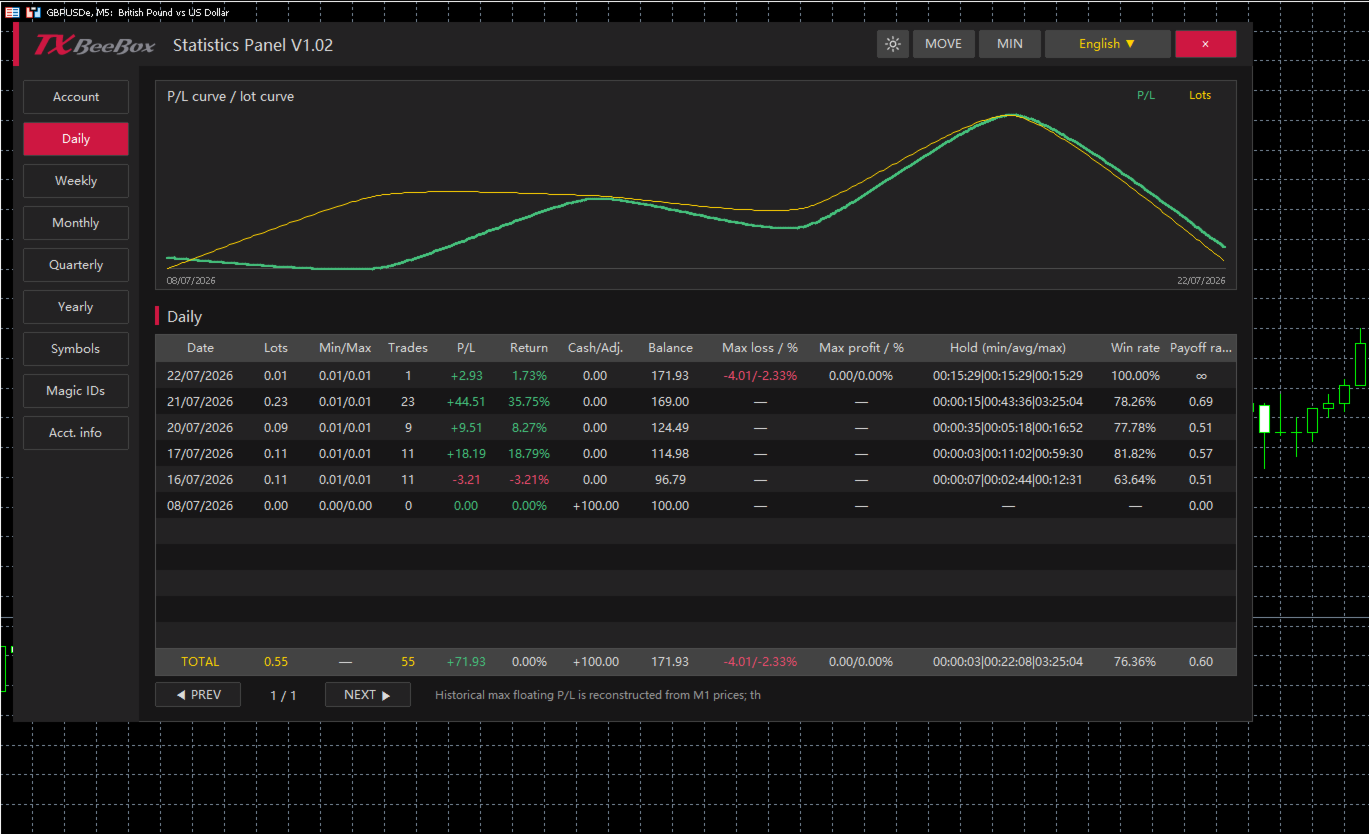
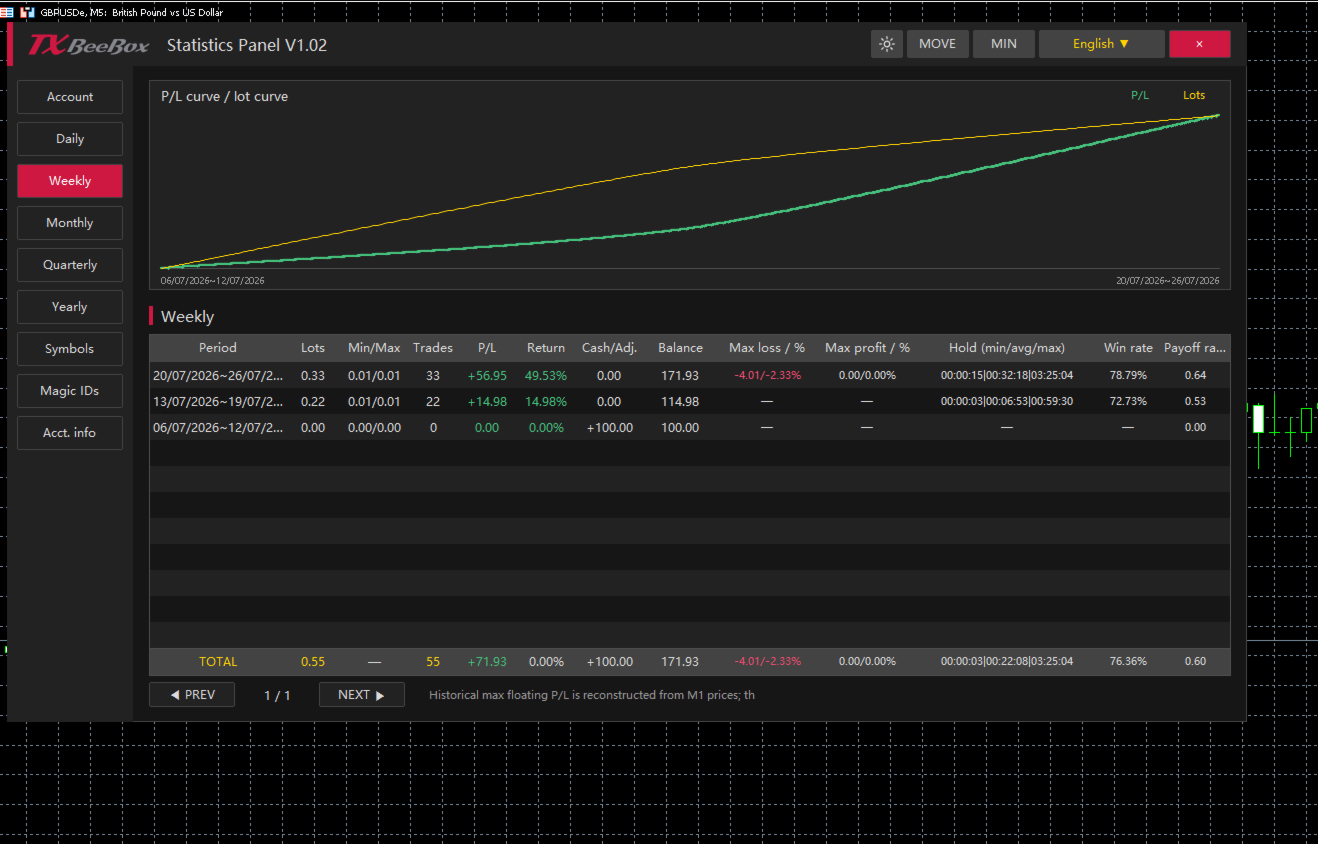
The Daily, Weekly, Monthly, Quarterly, and Yearly pages share a consistent statistical structure, summarizing trading performance by trading day, calendar week, calendar month, quarter, and year, respectively.

For each period, you can view:

  • Cumulative trading lots

  • Minimum and maximum single-trade lot sizes

  • Number of trades

  • Period P&L

  • Period return rate

  • Deposits, withdrawals, or balance adjustments

  • End-of-period balance

  • Maximum floating loss and its percentage

  • Maximum floating profit and its percentage

  • Minimum, average, and maximum holding times

  • Win rate

  • Profit/Loss ratio

Users can first review the Yearly, Quarterly, or Monthly pages to understand long-term trends, and then use the Weekly and Daily pages to pinpoint specific changes.

Symbols and Magic ID Statistics

The Symbols page aggregates data by trading symbol, making it ideal for accounts trading multiple currency pairs, gold, indices, or other markets simultaneously. Users can compare trading volumes, P&L, win rates, profit/loss ratios, and holding times across different symbols.

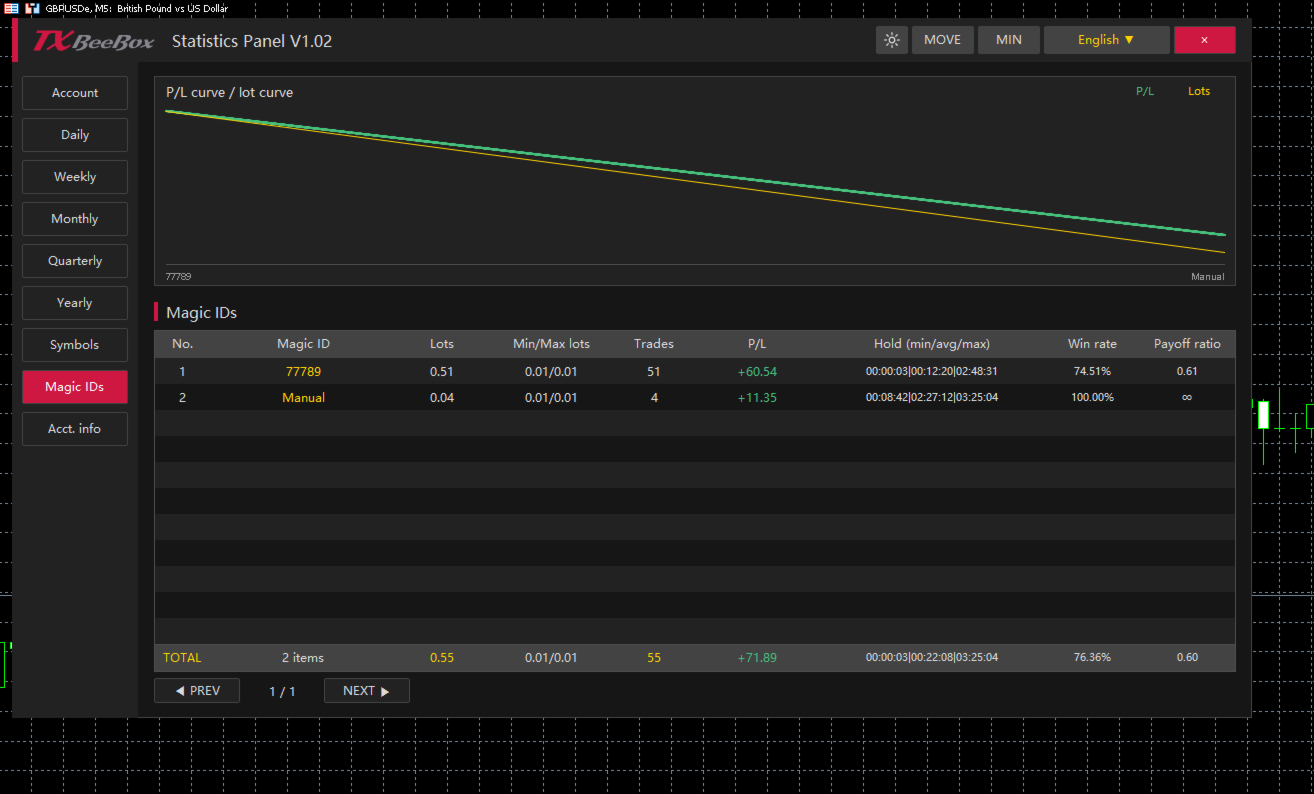
The Magic IDs page categorizes statistical data based on order Magic IDs. Since different EAs typically use different Magic IDs, you can individually review each strategy's:

  • Cumulative lots

  • Minimum and maximum trading lots

  • Number of trades

  • P&L results

  • Minimum, average, and maximum holding times

  • Win rate

  • Profit/Loss ratio

The Manual category in the panel is used to separately group manual trades, making it easy to compare the performance of EA (automated) trading against manual trading.

How to Use

  1. Find the TXBeeBox Statistics Panel in the MT5 Navigator and attach it to any chart.

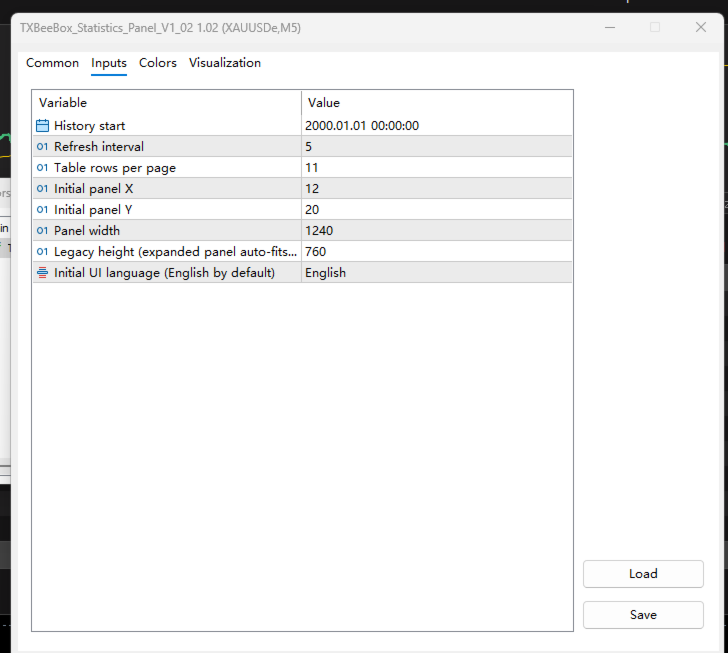
  2. Set your preferences, including the history start time, refresh interval, rows per page, panel position, and panel width.

  3. Open the Account page to view your account status, funds curve, and real-time positions.

  4. Use the Daily, Weekly, Monthly, Quarterly, and Yearly pages to review your performance across multiple timeframes.

  5. Use the Symbols and Magic IDs pages to determine the contribution of specific trading symbols, EAs, or manual trades to your overall account results.

  6. Switch between light and dark themes to match your chart background.

Produtos recomendados
Powerful and beautiful trading panel helps you in scheduling or placing multiple trades based on your presets in a single click. It is designed to execute orders immediately or schedule trades in advance to be executed at certain time using multiple filters to avoid non favorable market conditions (wide spread, reduced leverage etc.). Additional functionality developed to sycnhronize two instances of the expert over the internet (Master - Slave Mode), which means trader can open the panel in loc
Xiao Dan Kuai Pao is a fast and clean one-click order panel for MetaTrader 5. Open and manage your trades instantly, with Stop Loss and Take Profit placed automatically — no more typing TP distances by hand. Key features: - One-click buttons: BUY, SELL, CLOSE, BREAK EVEN - Custom Stop Loss and Take Profit (in points) — set any distance you want - Flexible risk/reward — combine SL and TP freely to build any ratio, such as 1:1, 1:2, 1:3, 1:4 or 1:5 - Real-time price display (Bid) - Bar countdown t
Just Copier MT5
Agung Imaduddin
4.75 (4)
"Just copier" is designed to copy trading without any complicated settings. The copy can be done in one PC. One EA can be set as master (provider) or slave (receiver). The receiver lot can be set to multiple providers lots. Please also check this product at fxina.hostingerapp.com.  Any type of copy is available. MT4 -> MT5 MT4 -> MT4 MT5 -> MT5 MT5 -> MT4 If you want to copy MT4 -> MT5 or MT5 -> MT4, please purchase "Just copier" for MT4 and "Just copier" for MT5 separately. Just Copier can copy
Risk calculator for MetaTrader 5. Precision Position Calculator is a MetaTrader 5 utility that helps calculate trade volume based on the risk configured by the user. The panel allows the user to work with Entry, Stop Loss and up to three Take Profit levels directly on the chart. Main description Precision Position Calculator is a utility for MetaTrader 5 designed to help calculate the volume of a trade before opening it. The panel allows the user to configure risk, select the order type, set th
Spread Costs refers to the amount of the loss caused by the spread, and Swap Benefits refers to the amount of the income gained by overnight positions. Spread Costs is an important indicator for short-term traders, especially for scalping traders, and Swap Benefits is an important indicator for long-term traders. Since the spreads and swaps on the MetaTrader 5 platform are all expressed in points, we need to convert it into the amount expressed in the account currency. This tool can display the
Recovery Manager Panel MT5 is a manual order management panel for traders who want to manage open positions directly from the chart in a clearer and more organized way. This tool is not a signal robot. It does not predict market direction, generate entry signals, or trade automatically based on market forecasts. Instead, it helps traders work with positions that are already open. You can calculate possible recovery lot sizes, view estimated target levels on the chart, and use available floating
Telegram to mt5 pro
Janet Abu Khalil
4 (4)
Telegram to MT5 Pro — Copiador avançado de sinais do Telegram com Auto-Fix, Multi-TP, controlo de risco e gestão completa de operações Telegram to MT5 Pro — Copiador profissional de sinais do Telegram Telegram to MT5 Pro copia automaticamente sinais de trading do Telegram diretamente para a sua conta MetaTrader 5 em tempo real, com controlo total de risco, execução e gestão de operações. O sistema é composto por dois componentes: • Expert Advisor (EA) dentro do MetaTrader 5 • Aplicação bridge q
Martingale panel MT5
Mohammadbagher Ramezan Akbari
In this article, we would like to introduce the trade panel product with the Martingale panel. This panel is made in such a way that it can meet the needs of traders to a great extent. This trade panel actually consists of two trade panels at the same time, with the first one you can take positions with certain profit and loss limits, and with the second one, you can have positions with profit limits but without loss limits. When positions lose, a new position will be added based on the settings
Sistema SemiAuto Martin introduzir Esta ferramenta é usada para negociação Martin semiautomática, clique no painel para colocar um pedido e o EA gerenciará a posição Basta decidir a direção da transação e deixar o resto para a gestão da EA Martin automático, adicionar armazém de acordo com a grade definida, você também pode desativar esta função Liquidação com um clique Uma função de bloqueio de tecla controle do tempo Aviso sonoro de alerta característica Gráfico de negociação: qualquer Mo
Atlas Trade Desk
Bernhard Wurzlbauer
Atlas Trade Desk MT5 Atlas Trade Desk MT5 is a visual trade panel, risk manager and lot calculator for manual MetaTrader 5 traders. Plan market and pending orders directly on the chart, calculate position size from your selected risk, adjust Entry, Stop Loss and Take Profit visually, and manage open positions from one clean dashboard. The tool is built for discretionary traders who want faster order preparation, clearer risk control and safer position management without switching between multipl

Trade manager gtm
Gayan Indika Honnanthara Acharige
GTM Panel is a manual trade panel for MetaTrader 5. It does not generate signals and it does not open a single trade on its own. You decide what to trade and when — the panel places it, protects it, follows it, and closes it in one press instead of ten. It is built around one thing most panels treat as an afterthought: pending orders . Four independent limit slots sit beside the market scope, each with its own colour, its own price, its own lots, its own SL and TP, and its own line on the chart.
SL AutoMover
Muhammad Fadhlan
DragSL Pro – The Ultimate Auto Stop Loss Management Tool! DragSL Pro is an innovative trading script designed to help traders manage their Stop Loss (SL) more easily and efficiently. With its automated features, you can adjust SL for all positions , including both open and pending orders , without the hassle of manual adjustments. Key Features: Drag & Adjust SL Easily – Move Stop Loss for all positions in one execution. Supports Open & Pending Orders – Works for both active trades and pendin
Signal Provider Utility Pro (Telegram & Discord) The Professional Solution for Signal Providers. Automated Broadcasting | Smart GUI Panel | Performance Reports Stop managing your signals manually. Signal Provider Utility Pro is the realiable bridge between your MetaTrader 5 terminal and your community on Telegram and Discord. Designed for high-performance signal services, this tool gives you instant control over your broadcasts without ever needing to open the settings window. From real-time tr
Session panel
Timo Mario Hoffmann
Session Panel for MT5 Session Panel is a free MT5 indicator that gives you a fast and convenient live overview of the major trading sessions directly from the chart. Monitor Tokyo, London, and New York session times, see which session is currently active, track countdowns to the next session, and view session overlap information in one compact dashboard. Built for traders who want better market timing, clearer session awareness, and a cleaner chart workflow in live market conditions. Session Pan
FREE
Volatility Regime Monitor is a professional MetaTrader 5 dashboard for classifying current volatility with transparent, measurable context. It combines ATR, recent bar-range statistics and historical percentiles to show whether the market is compressed, normal or expanding without generating entry signals. MAIN FEATURES • ATR and recent range context • Historical volatility percentile state • Compression, normal and expansion classification • Historical regime table • Transparent thresholds and
Apresentando o Telegram Signal Sender MT5, uma ferramenta poderosa projetada para automatizar o processo de envio de sinais de negociação diretamente para o seu canal do Telegram. Esta ferramenta é perfeita tanto para provedores de sinais aspirantes quanto estabelecidos que buscam aprimorar sua comunicação com os seguidores e agilizar o compartilhamento de alertas de negociação. Com o Telegram Signal Sender MT5, os traders podem se beneficiar de um maior engajamento e uma disseminação mais rápid
Trade Manager DaneTrades
Levi Dane Benjamin
4.23 (30)
Trade Manager para ajudá-lo a entrar e sair rapidamente de negociações enquanto calcula automaticamente seu risco. Incluindo recursos para ajudar a evitar negociações excessivas, negociações de vingança e negociações emocionais. As negociações podem ser gerenciadas automaticamente e as métricas de desempenho da conta podem ser visualizadas em um gráfico. Esses recursos tornam este painel ideal para todos os traders manuais e ajudam a aprimorar a plataforma MetaTrader 5. Suporte multilíngue. Vers
AW Metatrader to Telegram MT5
AW Trading Software Limited
5 (1)
Um sistema automatizado para enviar notificações para que nenhum de seus assinantes perca seus eventos de negociação do seu terminal de negociação. Um utilitário que envia notificações ao mensageiro do Telegram sobre quaisquer operações de negociação em sua conta. Instruções passo a passo para conectar o utilitário a um canal no Telegram ->   AQUI   / MT4 ->   AQUI Vantagens: Fácil configuração e instruções detalhadas, Possibilidade de enviar screenshots ajustáveis, Texto de notificação persona
BUY SELL  MOUSE KEYBOARD – A Velocidade do Click no Coração do Mercado Financeiro.  No turbilhão do mercado financeiro atual, onde cada fração de segundo pode definir o lucro ou a perda, contar com ferramentas ultrapassadas é simplesmente inviável. A tecnologia avança em ritmo exponencial, e suas operações precisam acompanhar esse mesmo dinamismo. Apresentamos o    BUY SELL  MOUSE KEYBOARD , a ferramenta inteligente que transforma a complexidade da mesa de operações em agilidade pura. Chega de p
Um EA no lugar de uma dúzia de ferramentas: assistente de trading, gestor de risco e 17 indicadores em um único painel. Coloque no gráfico e tenha tudo à mão.   Preço de lançamento: primeiras 20 cópias por $49, depois $99. 50% de desconto, só agora.   OPERE COM UM CLIQUE O lote é calculado sozinho a partir do risco em % do saldo — chega de calculadoras. Stop por fractal de qualquer TF ou manual, take por R:R, fechamentos parciais TP1/TP2/TP3, breakeven em um clique, trailing por swings. Ordem pe
The utility is designed for manually placing the first order in trading with a user-defined magic number that corresponds to the magic number of the currently running EA. You can choose the direction for opening an order and open it using "The First Orders". After that, disable "The First Orders" and enable your trading expert, which picks up the newly placed order and considers it to be its own, managing it accordingly. Trading experience helps traders to better determine the trade direction th
Trade Copilot - Painel semiautomático de gestão de risco para Ouro (XAUUSD) e qualquer instrumento Trade Copilot é um painel de negociação semiautomático criado para traders manuais que desejam a disciplina de um EA sem abrir mão do controle sobre suas próprias entradas. Você decide a direção e o nível; o painel calcula automaticamente o tamanho do risco, posiciona o stop-loss, gerencia o take-profit e protege a operação. PRINCIPAIS RECURSOS - Cálculo de lote baseado em risco - escolha Risco
Este consultor é um painel de negociação de um clique para vários pares. Dar um click       ABRIR       Botão para abrir pedidos para pares selecionados. Dar um click       APROXIMAR       Botão para fechar pedidos dos pares selecionados. O lote do pedido é o número inserido pelo usuário. Um número positivo corresponde a uma ordem de compra, um número negativo corresponde a uma ordem de venda. Clique no botão   FECHAR   para fechar o pedido inteiro em vez de um fechamento parcial. A ação de fec
SmartTrade EA is a manual trading panel that docks on the chart. It brings order entry, position management, risk limits, statistics, the economic calendar and price alerts into one interface, so you can open, protect and close a trade without leaving the chart or opening a dialog. It is a tool, not a strategy. It does not place trades on its own and does not generate signals. Every entry is yours. What it handles is the work after the click: moving stops, closing in parts, and keeping you ins
PDA FX One-Click Trade Manager – Your Essential Trading Utility Unlock a new level of trading efficiency with PDA FX One-Click Trade Manager – a must-have utility tool designed for serious forex traders. Whether you're scalping, day trading, or managing swing positions, this panel gives you full control in a clean, lightweight interface. One-Click Execution – Instantly place Buy or Sell orders with minimal delay and full accuracy. Smart TP & SL Management – Modify all open trades with a sing
This Expert Advisor monitors all open positions across all symbols in MetaTrader 5. Whenever a Stop Loss (SL) or Take Profit (TP) is manually set or adjusted on any position, the EA automatically applies that value to all other open positions , regardless of symbol or order type (Buy/Sell). This ensures consistent and synchronized SL and TP levels across your account. Perfect for mobile trading via tablet or smartphone!
Trade Assistant AI MT5 Trade Assistant AI MT5 is a professional manual trading assistant for MetaTrader 5, created for traders who want a cleaner, faster, and more structured way to manage their trading workflow from one chart panel. This tool helps you plan trades, calculate risk, place manual orders, manage open positions, and stay more organized during live market conditions. It is built for traders who want better control, not unnecessary complexity. Important: Trade Assistant AI MT5 is not
The “Summary Risk Target” indicator is designed to show the total number of transactions made on a single pair. The transactions counted include active positions as well as pending orders . By setting a stop loss for each trade, this indicator displays the total potential risk (loss) that may be incurred. This helps traders easily understand their overall risk exposure without the need for manual calculations. Likewise, for take profit , if the TP level is defined—either in terms of pips or at a
FREE
Object Synchronizer MT5 : Better focus/analysis of the price chart in many timeframes. Are you bored to save and load template many times for the same symbol for many chart timeframes? Here is the alternative. With this indicator, you enjoy creating objects across many charts, you can modify the same object in any chart, you can delete the same object in any chart. All objects you created/modified are always synchronized across all chart windows (with the same symbol). Save your time, you can fo
Scalping Scale in
Konstantinos Kalaitzidis
O "Scalping Scale in" é uma ferramenta utilitária desenvolvida para scalpers que desejam escalar em uma posição inicial em distâncias fixas sem se preocupar com o posicionamento S/L e T/P, pois cada segundo conta no scalping. Como funciona: Você define os valores desejados na guia de entradas do EA e, mais especificamente, qual relação risco-recompensa você deseja que o T/P seja colocado, quão amplo você deseja que seu S/L (em pips) - qual também é a distância da próxima ordem de parada (esca
Os compradores deste produto também adquirem
Trade Assistant MT5
Evgeniy Kravchenko
4.41 (216)
Ajuda a calcular o risco por comércio, a fácil instalação de uma nova encomenda, gestão de encomendas com funções de fecho parcial, trailing stop de 7 tipos e outras funções úteis. Materiais e instruções adicionais Instruções de instalação   -   Instruções para a aplicação   -   Versão de teste da aplicação para uma conta de demonstração Função de linha Mostra no gráfico a linha de Abertura, Stop Loss, Take Profit. Com esta função é fácil definir uma nova ordem e ver as suas características ad
Bem-vindo ao Trade Manager EA—uma ferramenta de gestão de risco criada para tornar o trading mais intuitivo, preciso e eficiente. Não é apenas uma ferramenta para executar ordens, mas uma solução abrangente para planejamento de operações, gerenciamento de posições e controle de risco. Seja você um iniciante, trader avançado ou scalper que precisa de execução rápida, o Trade Manager EA adapta-se às suas necessidades, oferecendo flexibilidade em todos os mercados, desde forex e índices até commodi
================================================================================ POC BREAKOUT - V20.72. Full Professional Grade Toolkit ================================================================================ POC Breakout is a full MetaTrader 5 trading dashboard for discretionary traders who want breakout signals, Point of Control (POC) context, volume profiles, order flow, market structure, news, alerts, and advanced trade planning in one professional workspace. Attached directly to you
TradePanel MT5
Alfiya Fazylova
4.88 (167)
Trade Panel é um assistente de negociação multifuncional. O aplicativo contém mais de 50 funções de negociação para trading manual e permite automatizar a maioria das tarefas de negociação. Instruções para o aplicativo + vídeo-instruções: https://www.mql5.com/pt/blogs/post/762435 Versão de teste do aplicativo para conta demo: https://www.mql5.com/pt/blogs/post/762547 Como instalar o aplicativo: https://www.mql5.com/pt/blogs/post/762548 Como testar o aplicativo no modo visual: https://www.mql5.co
Versão Beta O Telegram to MT5 Signal Trader está quase no lançamento oficial da versão alfa. Alguns recursos ainda estão em desenvolvimento e você pode encontrar pequenos erros. Se tiver problemas, por favor reporte, seu feedback ajuda a melhorar o software para todos. Telegram to MT5 Signal Trader é uma ferramenta poderosa que copia automaticamente sinais de trading de canais ou grupos do Telegram diretamente para sua conta MetaTrader 5 . Suporta canais públicos e privados do Telegram, e você
Local Trade Copier EA MT5
Juvenille Emperor Limited
4.94 (148)
Experimente uma cópia de negociação excepcionalmente rápida com o Local Trade Copier EA MT5 . Com sua fácil configuração de 1 minuto, este copiador de negociações permite que você copie negociações entre vários terminais MetaTrader no mesmo computador Windows ou em um Windows VPS com velocidades de cópia ultra rápidas de menos de 0.5 segundos. Seja você um trader iniciante ou profissional, o   Local Trade Copier EA MT5   oferece uma ampla gama de opções para personalizá-lo de acordo com suas ne
EA Overfitter
Stephen J Martret
That backtest looks great. But will it still be making money tomorrow, next week, next month? EA Overfitter re-runs your EA on 100 price histories it has never seen. One score tells you if the edge is real. A backtest tells you what an EA did on one price history — the one that happened to occur. What you cannot tell from it is how much of that result was the strategy and how much was the particular path. EA Overfitter answers that. It builds up to 100 synthetic price histories your EA has n
O   Telegram to MT5 Multi-Channel Copier   copia automaticamente os sinais de trading dos seus canais de Telegram diretamente para o MetaTrader 5. Sem bots, sem extensões de navegador, sem copiar à mão. O sinal chega ao Telegram e o EA abre a operação no seu terminal em poucos segundos. O produto inclui dois componentes: um aplicativo de Windows que escuta os seus canais de Telegram, e este Expert Advisor que executa os sinais no seu terminal MT5. Também há uma versão para MT4 disponível   aqui
Farmed Hedge Yield Farming | All Markets (Manual - Hybrid - Semi/Automated EA) VERIFIED TRADING RESULTS - Farmed Hedge Yield Axi Copy:  https://www.mql5.com/en/signals/2356376 - Farmed Hedge Yield Exn Copy:   https://www.mql5.com/en/signals/2356404 - Farmed Hedge Yield V Copy:  https://www.mql5.com/en/signals/2357156 * Before purchasing, please feel free to send me a message if you have any questions about the product or setup. ** After purchase , access the Setup Guide and Advanced Setup G
Astro Trade MT5
Indra Maulana
5 (4)
25% discount on the release of the tool: only for the next 3 buyers Send a message to receive a demo version. AstroTrade Trading Assistant AstroTrade is a comprehensive multi-functional trading utility developed for the MetaTrader 5 platform. It integrates essential tools for trade execution, risk management, and technical monitoring into a single unified interface. The application is designed to assist traders in managing their daily operations through a visual and structured environment. Vi
Telegram To MT5 Ultra
Mirel Daniel Gheonu
5 (5)
Telegram To MT5 — Copiador de sinais Transforme as chamadas de trading dos seus canais do Telegram em ordens reais no MT5 — automaticamente, em quantas contas quiser, com o risco e as regras totalmente sob o seu controlo. O Telegram To MT5 liga os canais VIP / de sinais que já segue no Telegram ao seu terminal MetaTrader 5. Um aplicativo de desktop complementar gratuito lê as mensagens (mesmo de canais que bloqueiam bots), e este Expert Advisor executa-as na sua conta — aplicando as suas própria
Exp COPYLOT CLIENT for MT5
Vladislav Andruschenko
3.97 (35)
Copiador profissional de operações para MetaTrader 5 Um copiador de operações rápido, profissional e confiável para MetaTrader . COPYLOT permite copiar operações de Forex entre terminais MT4 e MT5 com suporte para contas Hedge e Netting . A versão MT5 do COPYLOT oferece suporte a: - MT5 Hedge → MT5 Hedge - MT5 Hedge → MT5 Netting - MT5 Netting → MT5 Hedge - MT5 Netting → MT5 Netting - MT4 → MT5 Hedge - MT4 → MT5 Netting Versão MT4 Descrição completa + DEMO + PDF Como comprar Como instalar Como
HINN MagicEntry Extra
ALGOFLOW OÜ
4.74 (19)
HINN MAGIC ENTRY – the ultimate tool for entry and position management! SIMPLE. FASTEST. INTUITIVE. MAX AUTOMATED. Place orders by selecting a level directly on the chart! full description   ::  demo-version  :: 60-sec-video-description Key features: - Market, limit, and pending orders - Automatic lot size calculation - Automatic spread and commission accounting - Unlimited partitial take-profits  - Breakeven and trailing stop-loss and take-profit  functions - Invalidation leves - Intuitive, a
Premium Trade Manager - O Painel de Operações com um Coach Integrado Premium Trade Manager coloca um coach de trading dentro do seu gráfico, com um motor de execução completo por baixo. Configure a operação da forma que sempre faz e deixe o Max, seu coach de trading com IA, ler exatamente esse setup em relação à sua conta ao vivo e dar um veredicto direto antes de confirmar: se o stop é disciplinado, se o risco faz sentido, se há um evento de alto impacto a minutos de distância, se você está pró
Trade Dashboard MT5
Fatemeh Ameri
4.95 (132)
Trade Dashboard simplifies how you open, manage, and control your trades, with built-in lot size calculation. It allows you to execute trades, manage risk, and control positions directly on the chart, with tools such as partial close, breakeven, and trailing stop. Designed to reduce manual work and help you stay focused on your trading decisions. A demo version is available for testing. Detailed explanations of features are provided within the MQL5 platform. Installation instructions are include
Anchor Trade Manager
Kalinskie Gilliam
5 (8)
Anchor: The EA Manager Your EAs cannot see each other, but Anchor can. Anchor gives you one place to coordinate your EAs, manage risk, and decide when trading is allowed. It works alongside the trading bots you already use without any changes to them. The Problem One EA opens a trade. Then another starts trading. The next thing you know, you wake up to multiple grids built across your account. Each EA may be doing exactly what it was designed to do, but together they can place far more risk on y
Ultimate Extractor
Clifton Creath
5 (8)
Ultimate Extractor - Professional Trading Analytics for MT5 *****this is the local HTML version of Ultimate Extractor. !!!!!it is not compatible with Cloud!!!! For the online version please reach out to me directly****** Ultimate EA manager also now available when you use cloud pro and above for free!! Ultimate Extractor transforms your MetaTrader 5 trading history into actionable insights with comprehensive analytics, interactive charts, and real-time performance tracking. What It Does Automa
X2 Copy MT5
Liubov' Shkandrii
Rápido. Preciso. Inovador. Tecnológico. Descubra a cópia instantânea de negociações com o revolucionário X2 Copy MT5. Com apenas 10 segundos de configuração simples, você obterá uma ferramenta poderosa para sincronizar negociações entre terminais MetaTrader em um único computador ou Windows VPS com velocidade sem precedentes. Quer você gerencie várias contas, siga sinais ou dimensione sua estratégia, o X2 Copy MT5 se adapta ao seu fluxo de trabalho com precisão e controle incomparáveis. Trabalhe
Trade copier MT5
Alfiya Fazylova
4.59 (54)
Trade Copier é um utilitário profissional projetado para copiar e sincronizar negociações entre contas de negociação. A cópia ocorre da conta / terminal do fornecedor para a conta / terminal do destinatário, instalada no mesmo computador ou vps. PROMOÇÃO - Se você já adquiriu o "Trade copier MT5", pode receber o "Trade copier MT4" gratuitamente (para cópia MT4 > MT5 e MT4 < MT5). Para obter informações mais detalhadas sobre os termos, por favor, entre em contato conosco através de mensagens priv
Timeless Charts
Samuel Manoel De Souza
5 (8)
Timeless Charts é um utilitário de trading tudo-em-um para traders profissionais. Ele combina tipos de gráficos personalizados, como Gráficos por Segundos e Renko , com análise avançada de fluxo de ordens utilizando Footprints , Clusters , Perfis de Volume , estudos VWAP e ferramentas de análise ancorada para uma visão mais profunda do mercado. O gerenciamento de ordens e posições é realizado diretamente no gráfico por meio de um painel integrado de gerenciamento de operações , enquanto o Market
FUTURES ORDERFLOW FOOTPRINT CHART Professional OrderFlow EA for MetaTrader 5 Version 1.01| Professional tool for real traders | Institutional-Grade Visualization STRATEGY TESTER USERS - PLEASE SELECT EVERY REAL TICK WHEN TESTING AND YOU HAVE DOWNLOADED HISTORICAL DATA. IF YOU SEE A WAITING SCREEN AND IT IS NOT DOWNLOADING, IT MEANS YOU HAVE LOW HISTORICAL DATA. TRY 1 MIN AND 5 MIN FIRST ON 1 DAY DATA. ONE DAY DATA SHOULD BE THE NEWEST AND MOST CURRENT DATE. PLEASE WAIT UNTIL THE MARKET HAS ROL
The product will copy all telegram signal to MT5 ( which you are member) , also it can work as remote copier.  Easy to set up, copy order instant, can work with almost signal formats, image signal,  s upport to translate other language to English Work with all type of channel or group, even channel have "Restrict Saving Content", work with  multi channel, multi MT5 Work as remote copier: with signal have ticket number, it will copy exactly via ticket number. Support to backtest signal. How to s
Power Candles Strategy Scanner - Localizador de configurações multissímbolo com auto-otimização O Power Candles Strategy Scanner utiliza o mesmo motor de auto-otimização que alimenta o indicador Power Candles — em todos os símbolos da sua lista de observação, lado a lado. Um painel indica-lhe quais os símbolos que são estatisticamente negociáveis neste momento, qual a estratégia vencedora para cada um, o par ideal de Stop Loss / Take Profit, e avisa-o assim que um novo sinal é emitido. Esta ferr
MT5 to Telegram Signal Provider é uma utilidade fácil de usar e totalmente personalizável que permite o envio de sinais especificados para o chat, canal ou grupo do Telegram, tornando sua conta um fornecedor de sinais . Ao contrário da maioria dos produtos concorrentes, ele não usa importações de DLL. [ Demonstração ] [ Manual ] [ Versão MT4 ] [ Versão Discord ] [ Canal do Telegram ]  New: [ Telegram To MT5 ] Configuração Um guia do usuário passo a passo está disponível. Não é necessário conhec
YuClusters
Yury Kulikov
4.93 (43)
Atenção: A versão demo para revisão e teste está aqui . YuClusters é um sistema profissional de análise de mercado. O trader tem oportunidades únicas para analisar o fluxo de pedidos, volumes de negociação, movimentos de preços usando vários gráficos, perfis, indicadores e objetos gráficos. O YuClusters opera com base em dados de Tempos e Negócios ou informações de ticks, dependendo do que está disponível nas cotações de um instrumento financeiro. O YuClusters permite que você crie gráficos com
Prop Firm Os
Gayathiri Gopalakrishnan
5 (1)
PROP FIRM OS Structured Trading Assistant for MetaTrader 5 PROP FIRM OS is a structured trading assistant designed for MetaTrader 5 users who prefer rule-based market analysis and organized trading workflows. The Expert Advisor combines market analysis tools, scanner functions, dashboard monitoring, alerts, risk-control settings, and trade management features inside one system. PROP FIRM OS is designed to help traders follow selected rules, filters, and monitoring conditions during trading activ
News Filter EA
Rashed Samir
5 (2)
News Filter EA: Advanced Algo Trading Assistant News Filter EA is an advanced algo trading assistant designed to enhance your trading experience. By using the News Filter EA , you can integrate a Forex economic news filter into your existing expert advisor, even if you do not have access to its source code. In addition to the news filter, you can also specify trading days and hours for your expert. The News Filter EA also includes risk management  and equity protection features. MT4 Version Ma
EA Auditor
Stephen J Martret
5 (5)
EA Auditor is an independent analysis tool for traders evaluating Expert Advisors and trading signals on MetaTrader 5. It audits backtest reports, reviews posted developer signals, and cross-verifies the two against each other to help traders assess strategies before committing capital. The MQL5 market offers a wide range of Expert Advisors from many developers, with varying approaches, quality, and transparency. EA Auditor provides a consistent, data-driven framework for reviewing them, answer
Quant AI Agents
Ho Tuan Thang
5 (1)
Quant AI Agents are independent trading Expert Advisors. Instead of trading using a fixed strategy like other conventional EAs, Quant AI Agents   is a   multi-agent AI trading framework   that turns natural-language strategy prompts into live.  WANT THE SAME RESULTS AS MY LIVE SIGNAL?   Use the exact same brokers I do:   IC MARKETS , IC TRADING   .  Unlike the centralized stock market, Forex has no single, unified price feed.  Every broker sources liquidity from different providers, creating un
Trade Copier Ultimate
Janitha Sandaruwan Amaradasa Wickramasingha Arachchilage
5 (5)
Trade Copier Ultimate - Telegram to MT5 Signal Copier Trade Copier Ultimate automatically copies Telegram trading signals into MetaTrader 5. The EA can read signal messages, detect the symbol, order type, entry price, Stop Loss, Take Profit levels and selected update commands, then execute or manage the trade in MT5 using your lot and risk settings. It is more than a basic Telegram to MT5 copier. TCU also supports Bot API and user-account Bridge workflows, Discord signal routing, local MT5 to MT
Mais do autor
TXBeeBox TradingPanel Pro TXBeeBox TradingPanel Pro is a multifunctional manual trading and position-management panel designed for MetaTrader 5. It provides fast order entry, centralized position controls, real-time account information and practical risk-management tools in a clean, compact interface. This product is a manual trading utility. It does not generate trading signals, predict market direction or open trades automatically. All entry and position-management commands are initiated by th
Filtro:
Sem comentários
Responder ao comentário