TXBeeBox Statistics Panel

Here is the English translation of the product description, formatted for clarity and easy reading:

The TXBeeBox Statistics Panel is an account and trading performance visualization and statistics tool designed for MetaTrader 5.

When an account simultaneously trades multiple symbols, runs multiple EAs, or uses a mix of automated and manual trading, simply viewing the MT5 order list often makes it difficult to quickly grasp the overall performance. This panel organizes scattered account and trading data into clear curves, statistical tables, and categorized views. It helps traders review their trading performance from multiple dimensions, including the account, timeframes, trading symbols, and Magic IDs.

The panel supports an account overview, real-time positions, multi-timeframe performance summaries, symbol statistics, Magic ID strategy statistics, and account information viewing. In a single interface, users can observe account fund status, historical profit and loss (P&L) changes, trading lot size changes, win rates, profit/loss ratios, holding times, and the results of different strategies.

Note: This product is positioned as a data statistics and visual analysis tool. It does not provide trading signals, nor does it guarantee any trading results.

Key Features

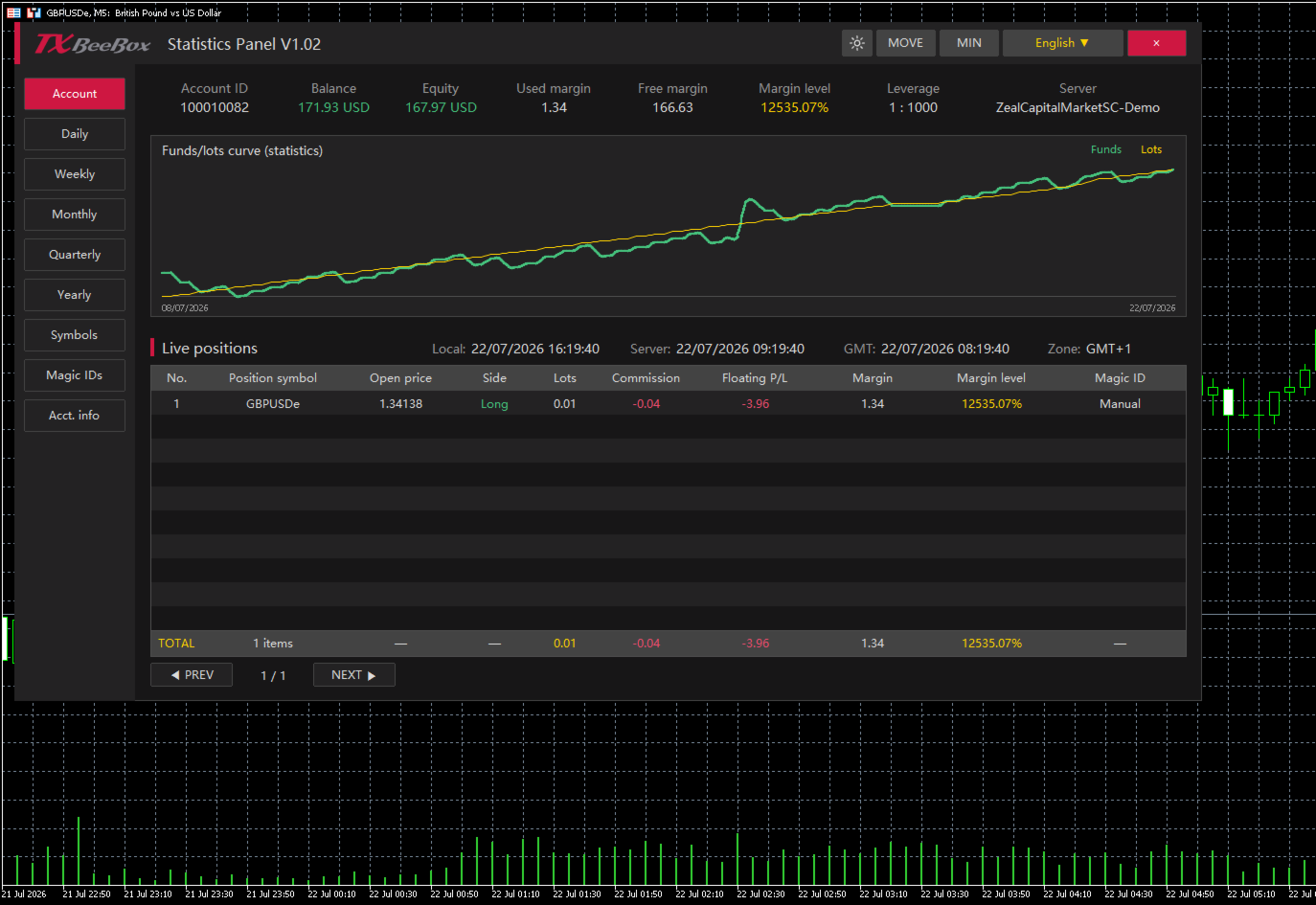
  • Key Account Data: Displays account balance, equity, used margin, free margin, margin level, leverage, and the trading server.

  • Real-Time Position Monitoring: Displays trading symbol, open price, buy/sell direction, lots, commission, floating P&L, used margin, margin level, and Magic ID.

  • Funds and Lots Curves: Plots fund or P&L changes against trading lot size changes on the same timeline, making it easy to compare trading volume with account performance.

  • Multi-Timeframe Statistics: Supports summarizing historical trading data by day, week, month, quarter, and year.

  • Symbol Statistics: Analyzes the contribution of different markets to account results based on the trading symbol.

  • Magic ID Statistics: Separately calculates the performance of different EAs, strategies, and manual trades.

  • Risk and Efficiency Indicators: Provides data such as return rate, maximum floating profit, maximum floating loss, win rate, profit/loss ratio, and holding times.

  • Dark and Light Themes: Allows users to switch display styles based on the chart background or personal preference.

  • Panel Controls: Supports moving, minimizing, closing, language selection, and table pagination.

  • Multi-Timezone Display: Simultaneously displays local time, server time, GMT time, and the current timezone.

Account Overview

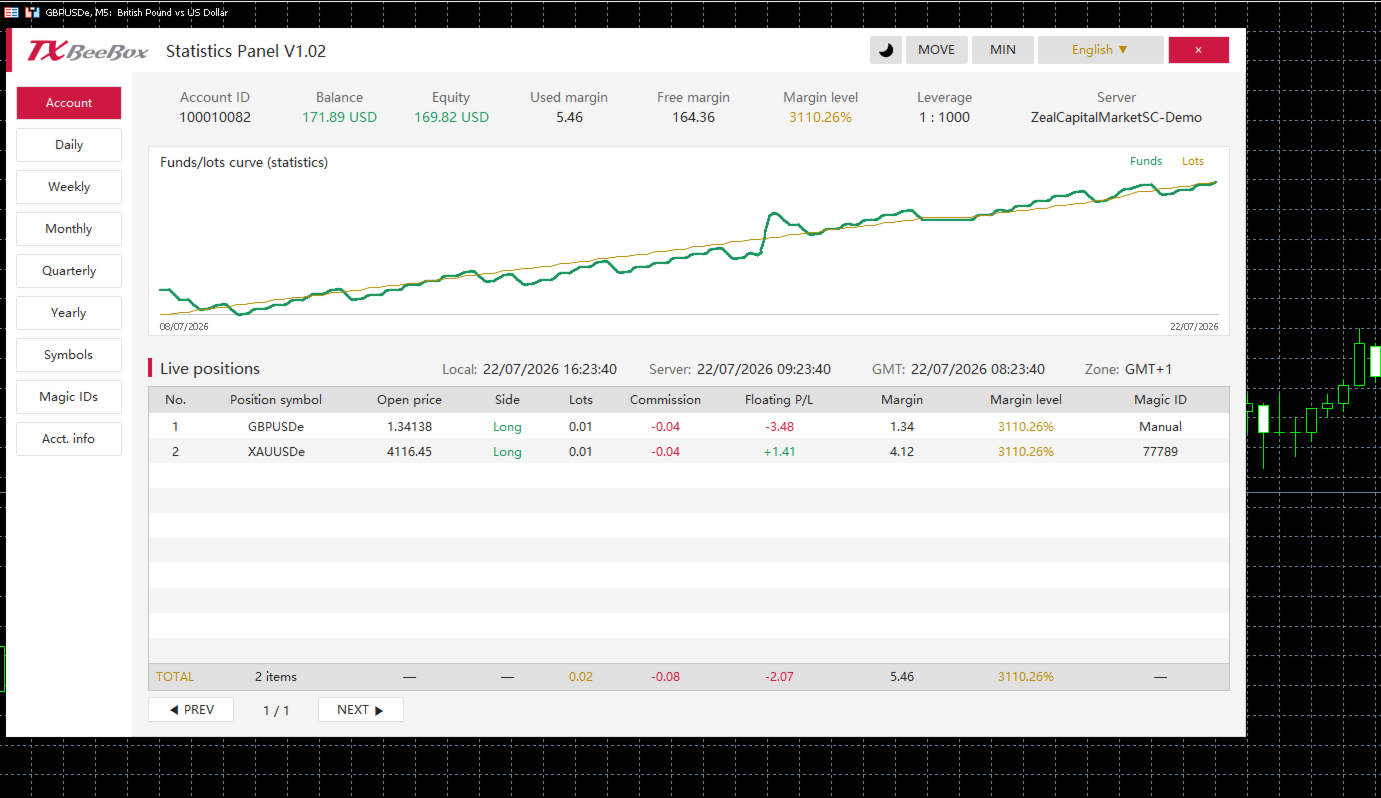
The Account page centrally displays the primary fund data for the current account:

  • Account ID: Trading account number

  • Balance: Account balance

  • Equity: Account equity

  • Used margin: Used margin

  • Free margin: Free margin

  • Margin level: Margin level

  • Leverage: Account leverage

  • Server: Trading server

The account page also includes the funds/lots curve and a real-time position table. The TOTAL row at the bottom of the table summarizes the current number of positions, total lots, total commissions, floating P&L, and margin data.

Multi-Timeframe Performance Statistics

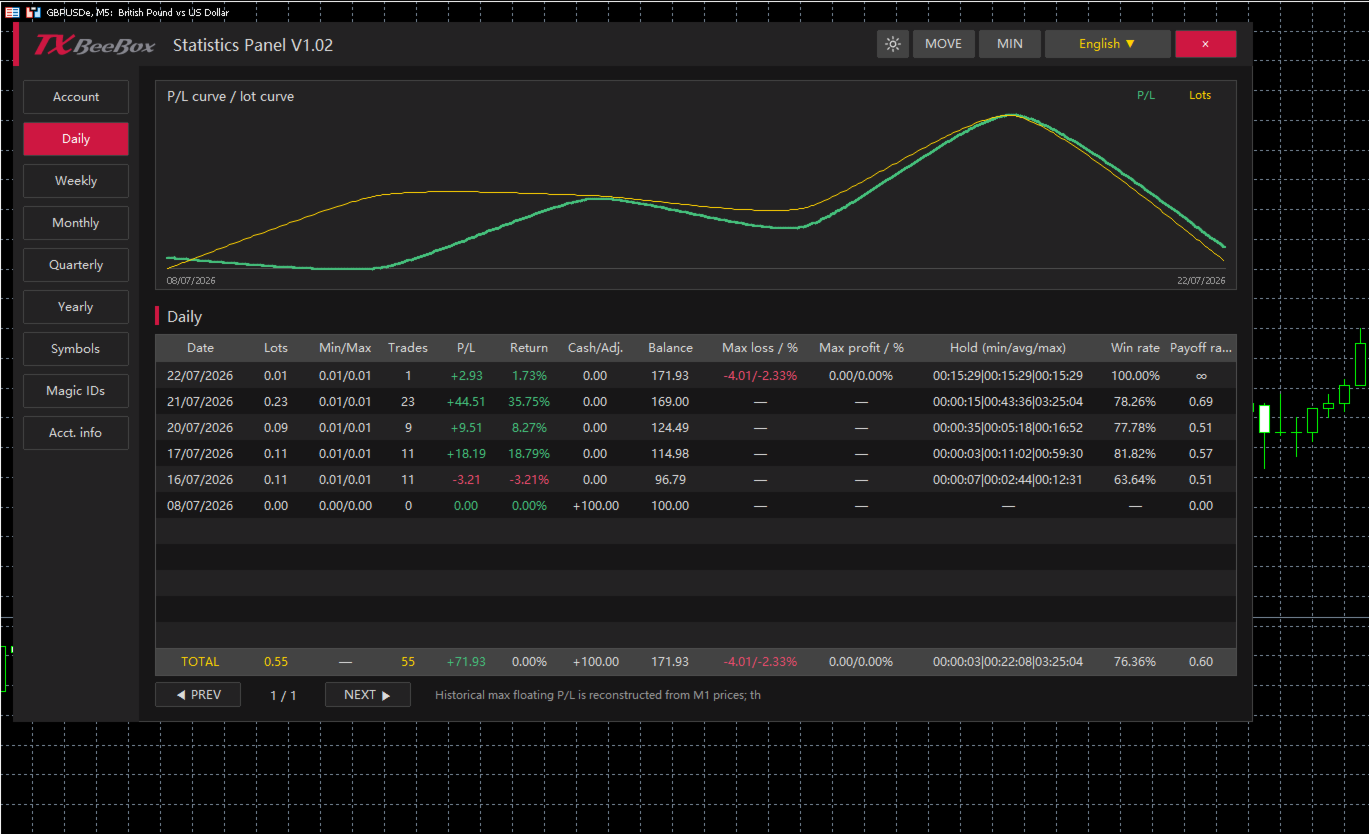
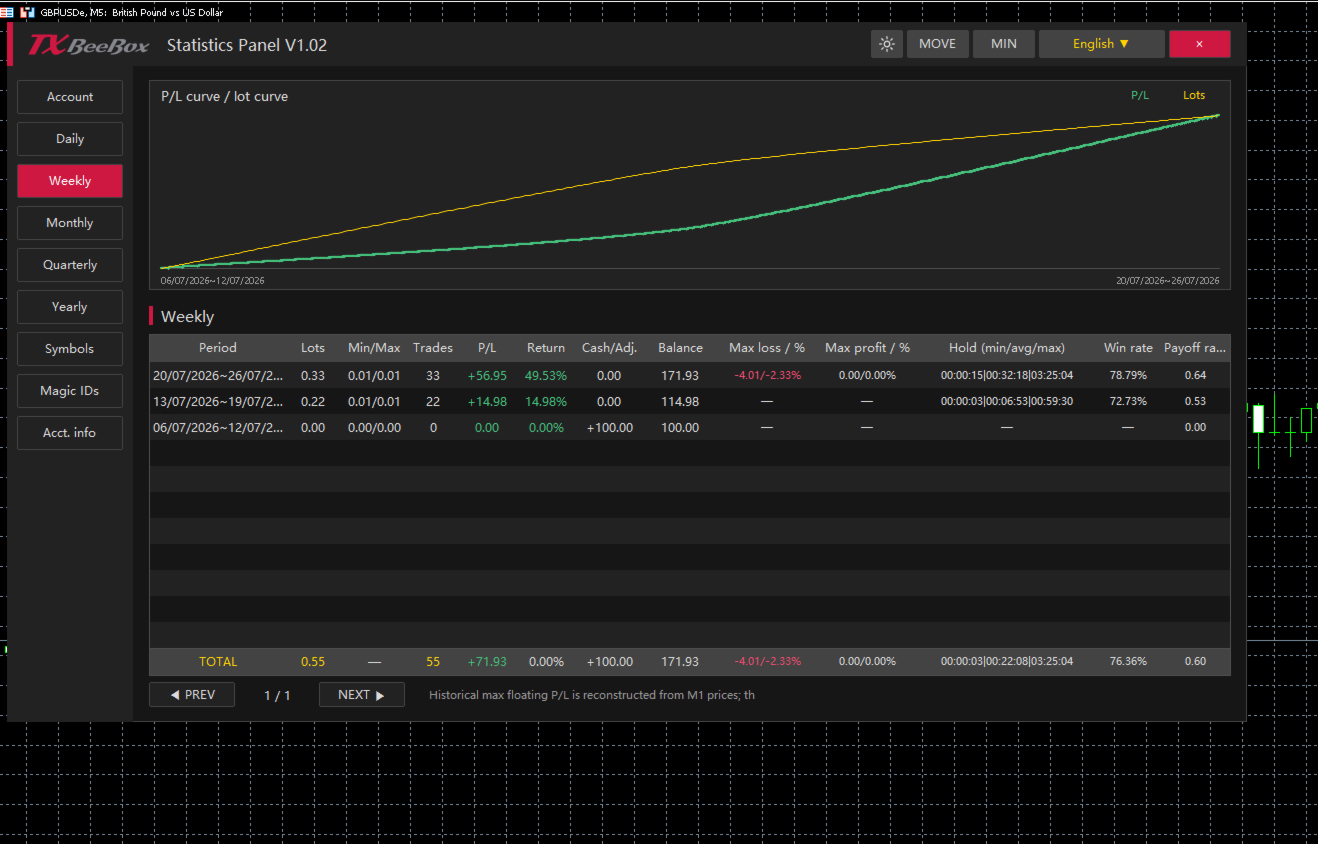
The Daily, Weekly, Monthly, Quarterly, and Yearly pages share a consistent statistical structure, summarizing trading performance by trading day, calendar week, calendar month, quarter, and year, respectively.

For each period, you can view:

  • Cumulative trading lots

  • Minimum and maximum single-trade lot sizes

  • Number of trades

  • Period P&L

  • Period return rate

  • Deposits, withdrawals, or balance adjustments

  • End-of-period balance

  • Maximum floating loss and its percentage

  • Maximum floating profit and its percentage

  • Minimum, average, and maximum holding times

  • Win rate

  • Profit/Loss ratio

Users can first review the Yearly, Quarterly, or Monthly pages to understand long-term trends, and then use the Weekly and Daily pages to pinpoint specific changes.

Symbols and Magic ID Statistics

The Symbols page aggregates data by trading symbol, making it ideal for accounts trading multiple currency pairs, gold, indices, or other markets simultaneously. Users can compare trading volumes, P&L, win rates, profit/loss ratios, and holding times across different symbols.

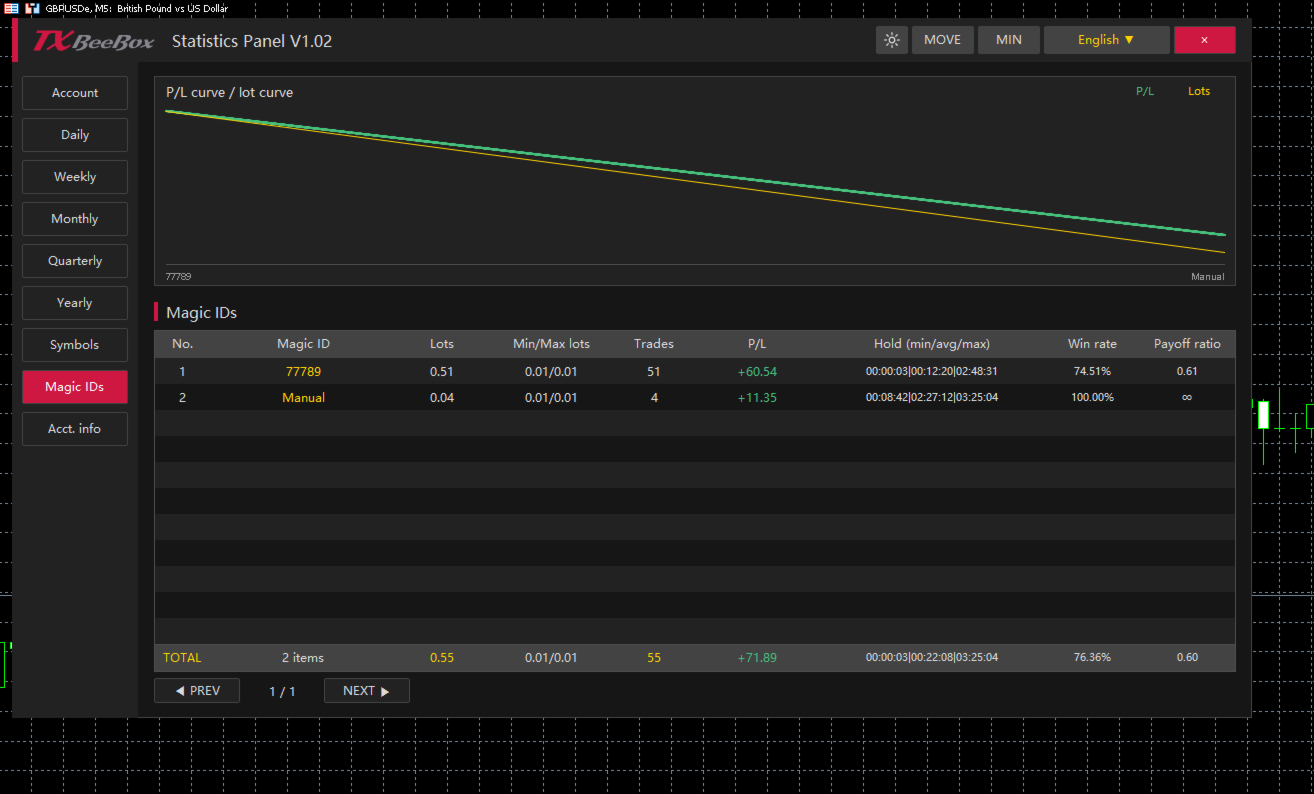
The Magic IDs page categorizes statistical data based on order Magic IDs. Since different EAs typically use different Magic IDs, you can individually review each strategy's:

  • Cumulative lots

  • Minimum and maximum trading lots

  • Number of trades

  • P&L results

  • Minimum, average, and maximum holding times

  • Win rate

  • Profit/Loss ratio

The Manual category in the panel is used to separately group manual trades, making it easy to compare the performance of EA (automated) trading against manual trading.

How to Use

  1. Find the TXBeeBox Statistics Panel in the MT5 Navigator and attach it to any chart.

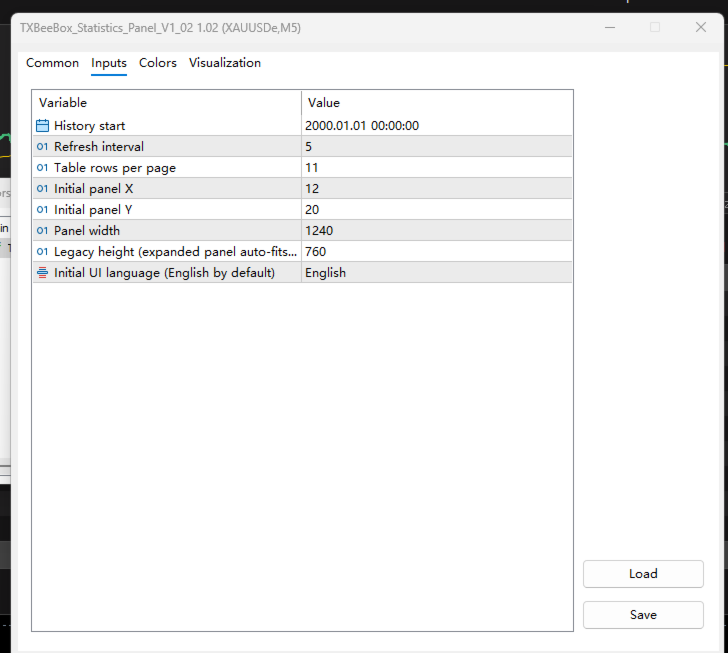
  2. Set your preferences, including the history start time, refresh interval, rows per page, panel position, and panel width.

  3. Open the Account page to view your account status, funds curve, and real-time positions.

  4. Use the Daily, Weekly, Monthly, Quarterly, and Yearly pages to review your performance across multiple timeframes.

  5. Use the Symbols and Magic IDs pages to determine the contribution of specific trading symbols, EAs, or manual trades to your overall account results.

  6. Switch between light and dark themes to match your chart background.

Önerilen ürünler
Powerful and beautiful trading panel helps you in scheduling or placing multiple trades based on your presets in a single click. It is designed to execute orders immediately or schedule trades in advance to be executed at certain time using multiple filters to avoid non favorable market conditions (wide spread, reduced leverage etc.). Additional functionality developed to sycnhronize two instances of the expert over the internet (Master - Slave Mode), which means trader can open the panel in loc
Xiao Dan Kuai Pao is a fast and clean one-click order panel for MetaTrader 5. Open and manage your trades instantly, with Stop Loss and Take Profit placed automatically — no more typing TP distances by hand. Key features: - One-click buttons: BUY, SELL, CLOSE, BREAK EVEN - Custom Stop Loss and Take Profit (in points) — set any distance you want - Flexible risk/reward — combine SL and TP freely to build any ratio, such as 1:1, 1:2, 1:3, 1:4 or 1:5 - Real-time price display (Bid) - Bar countdown t
Just Copier MT5
Agung Imaduddin
4.75 (4)
"Just copier" is designed to copy trading without any complicated settings. The copy can be done in one PC. One EA can be set as master (provider) or slave (receiver). The receiver lot can be set to multiple providers lots. Please also check this product at fxina.hostingerapp.com.  Any type of copy is available. MT4 -> MT5 MT4 -> MT4 MT5 -> MT5 MT5 -> MT4 If you want to copy MT4 -> MT5 or MT5 -> MT4, please purchase "Just copier" for MT4 and "Just copier" for MT5 separately. Just Copier can copy
Risk calculator for MetaTrader 5. Precision Position Calculator is a MetaTrader 5 utility that helps calculate trade volume based on the risk configured by the user. The panel allows the user to work with Entry, Stop Loss and up to three Take Profit levels directly on the chart. Main description Precision Position Calculator is a utility for MetaTrader 5 designed to help calculate the volume of a trade before opening it. The panel allows the user to configure risk, select the order type, set th
Spread Costs refers to the amount of the loss caused by the spread, and Swap Benefits refers to the amount of the income gained by overnight positions. Spread Costs is an important indicator for short-term traders, especially for scalping traders, and Swap Benefits is an important indicator for long-term traders. Since the spreads and swaps on the MetaTrader 5 platform are all expressed in points, we need to convert it into the amount expressed in the account currency. This tool can display the
Recovery Manager Panel MT5 is a manual order management panel for traders who want to manage open positions directly from the chart in a clearer and more organized way. This tool is not a signal robot. It does not predict market direction, generate entry signals, or trade automatically based on market forecasts. Instead, it helps traders work with positions that are already open. You can calculate possible recovery lot sizes, view estimated target levels on the chart, and use available floating
Telegram to MT5 Pro — Advanced Telegram Signal Copier with Auto-Fix, Multi-TP, Risk Control and Full Trade Management Telegram to MT5 Pro — Profesyonel Telegram Sinyal Kopyalayıcı Telegram to MT5 Pro, Telegram’dan gelen sinyalleri MetaTrader 5 hesabına otomatik olarak doğrudan uygulayan yüksek performanslı bir trade kopyalayıcıdır ve risk, işlem yürütme ve trade yönetimi üzerinde tam kontrol sağlar. Sistem iki bileşenden oluşur: • MetaTrader 5 içinde çalışan Expert Advisor (EA) • Telegram’a bağ
Martingale panel MT5
Mohammadbagher Ramezan Akbari
In this article, we would like to introduce the trade panel product with the Martingale panel. This panel is made in such a way that it can meet the needs of traders to a great extent. This trade panel actually consists of two trade panels at the same time, with the first one you can take positions with certain profit and loss limits, and with the second one, you can have positions with profit limits but without loss limits. When positions lose, a new position will be added based on the settings
Yarı Otomatik Martin Sistemi tanıtmak Bu araç, yarı otomatik Martin ticareti için kullanılır, sipariş vermek için panele tıklayın ve EA pozisyonu yönetecektir. Sadece işlemin yönüne karar verin ve gerisini EA yönetimine bırakın Otomatik Martin, ayarlanan ızgaraya göre depo ekleyin, bu işlevi de devre dışı bırakabilirsiniz Tek tıkla tasfiye Bir tuş kilidi işlevi zaman kontrolü Uyarı sesi istemi karakteristik Ticaret tablosu: herhangi biri Takas edilebilir para birimi: herhangi biri Otomatik
Atlas Trade Desk MT5 Atlas Trade Desk MT5 is a visual trade panel, risk manager and lot calculator for manual MetaTrader 5 traders. Plan market and pending orders directly on the chart, calculate position size from your selected risk, adjust Entry, Stop Loss and Take Profit visually, and manage open positions from one clean dashboard. The tool is built for discretionary traders who want faster order preparation, clearer risk control and safer position management without switching between multipl

Trade manager gtm
Gayan Indika Honnanthara Acharige
GTM Panel is a manual trade panel for MetaTrader 5. It does not generate signals and it does not open a single trade on its own. You decide what to trade and when — the panel places it, protects it, follows it, and closes it in one press instead of ten. It is built around one thing most panels treat as an afterthought: pending orders . Four independent limit slots sit beside the market scope, each with its own colour, its own price, its own lots, its own SL and TP, and its own line on the chart.
DragSL Pro – The Ultimate Auto Stop Loss Management Tool! DragSL Pro is an innovative trading script designed to help traders manage their Stop Loss (SL) more easily and efficiently. With its automated features, you can adjust SL for all positions , including both open and pending orders , without the hassle of manual adjustments. Key Features: Drag & Adjust SL Easily – Move Stop Loss for all positions in one execution. Supports Open & Pending Orders – Works for both active trades and pendin
Signal Provider Utility Pro (Telegram & Discord) The Professional Solution for Signal Providers. Automated Broadcasting | Smart GUI Panel | Performance Reports Stop managing your signals manually. Signal Provider Utility Pro is the realiable bridge between your MetaTrader 5 terminal and your community on Telegram and Discord. Designed for high-performance signal services, this tool gives you instant control over your broadcasts without ever needing to open the settings window. From real-time tr
Session Panel for MT5 Session Panel is a free MT5 indicator that gives you a fast and convenient live overview of the major trading sessions directly from the chart. Monitor Tokyo, London, and New York session times, see which session is currently active, track countdowns to the next session, and view session overlap information in one compact dashboard. Built for traders who want better market timing, clearer session awareness, and a cleaner chart workflow in live market conditions. Session Pan
FREE
Volatility Regime Monitor is a professional MetaTrader 5 dashboard for classifying current volatility with transparent, measurable context. It combines ATR, recent bar-range statistics and historical percentiles to show whether the market is compressed, normal or expanding without generating entry signals. MAIN FEATURES • ATR and recent range context • Historical volatility percentile state • Compression, normal and expansion classification • Historical regime table • Transparent thresholds and
Telegram Signal Sender MT5'ı tanıtıyoruz, ticaret sinyallerini doğrudan Telegram kanalınıza göndermeyi otomatikleştirmek için tasarlanmış güçlü bir yardımcı program. Bu araç, takipçilerle iletişimini geliştirmek ve ticaret uyarılarının paylaşımını kolaylaştırmak isteyen hem yeni hem de yerleşik sinyal sağlayıcıları için mükemmeldir. Telegram Signal Sender MT5 ile, traderlar artan etkileşimden ve piyasa fırsatlarının daha hızlı yayılmasından faydalanabilir. Kullanıcılar, yanıt sürelerinde ve koor
Riskinizi otomatik olarak hesaplarken işlemlere hızlı bir şekilde girip çıkmanıza yardımcı olacak Ticaret Yöneticisi. Aşırı Ticaret, İntikam Ticareti ve Duygusal Ticaretten korunmanıza yardımcı olacak özellikler içerir. İşlemler otomatik olarak yönetilebilir ve hesap performans ölçümleri bir grafikte görselleştirilebilir. Bu özellikler, bu paneli tüm manuel yatırımcılar için ideal kılar ve MetaTrader 5 platformunun geliştirilmesine yardımcı olur. Çoklu Dil desteği. MT4 Sürümü  |  Kullanım Kılavu
AW Metatrader to Telegram MT5
AW Trading Software Limited
5 (1)
Hiçbir abonenizin alım satım terminalinizden alım satım etkinliklerinizi kaçırmaması için bildirim göndermek için otomatik bir sistem. Hesabınızdaki herhangi bir alım satım işlemi hakkında Telegram habercisine bildirim gönderen bir yardımcı program. Yardımcı programı Telegram'da bir kanala bağlamak için adım adım talimatlar ->   HERE   / MT4 ->   HERE Avantajlar: Kolay kurulum ve ayrıntılı talimatlar, Ayarlanabilir ekran görüntüleri gönderme imkanı, Emoji kullanarak özelleştirilebilir bildirim
BUY SELL  MOUSE KEYBOARD – The Speed of a Click at the Heart of the Financial Market In today's fast-paced financial market, where every fraction of a second can define profit or loss, relying on outdated tools is simply not an option. Technology is advancing at an exponential rate, and your operations need to keep up with that same momentum. We present BUY SELL  MOUSE KEYBOARD , the smart tool that transforms the complexity of the trading desk into pure agility. Say goodbye to slow order entrie
Bir düzine araç yerine tek EA: işlem asistanı, risk yöneticisi ve 17 gösterge tek panelde. Grafiğe ekleyin — ihtiyacınız olan her şey elinizin altında.   Lansman fiyatı: ilk 20 kopya 49$, sonrası 99$. %50 indirim — sadece şimdi.   TEK TIKLA İŞLEM Lot, bakiyenin yüzdesi olarak riskten otomatik hesaplanır — hesap makinelerine son. Her TF'de fraktal stop veya manuel, R:R'ye göre kâr al, TP1/TP2/TP3 kısmi kapanış, tek tıkla başabaş, swing takip stobu. Bekleyen emir mi? Grafiğe bir tık — Entry/SL/TP
The utility is designed for manually placing the first order in trading with a user-defined magic number that corresponds to the magic number of the currently running EA. You can choose the direction for opening an order and open it using "The First Orders". After that, disable "The First Orders" and enable your trading expert, which picks up the newly placed order and considers it to be its own, managing it accordingly. Trading experience helps traders to better determine the trade direction th
Trade Copilot - Altın (XAUUSD) ve her enstrüman için yarı otomatik risk yönetim paneli Trade Copilot, kendi girişleri üzerindeki kontrolünden vazgeçmeden bir EA disiplinini isteyen manuel trader'lar için tasarlanmış yarı otomatik bir işlem panelidir. Yönü ve seviyeyi siz belirlersiniz; panel risk boyutlandırmasını, stop-loss yerleşimini, take-profit yönetimini ve pozisyon korumasını otomatik olarak yapar. TEMEL ÖZELLİKLER - Riske dayalı lot hesaplama - Risk %, Risk $ veya Sabit Lot seçin; pa
Bu danışman, tek bir tıklamayla birden fazla çiftte işlem yapmanıza olanak tanıyan bir kontrol panelidir. Tıklamak       açık       Bu düğme seçilen çift için bir emir açar. Tıklamak       kapalı       Bu buton seçilen çiftin emrini kapatır. Sipariş lotu kullanıcı tarafından girilen sayıdır. Pozitif sayılar alış emirlerine, negatif sayılar ise satış emirlerine karşılık gelir. Siparişin yalnızca bir kısmını değil tamamını kapatmak için   Kapat düğmesini   tıklayın. Nihai işlem bilet numarasına b
SmartTrade EA is a manual trading panel that docks on the chart. It brings order entry, position management, risk limits, statistics, the economic calendar and price alerts into one interface, so you can open, protect and close a trade without leaving the chart or opening a dialog. It is a tool, not a strategy. It does not place trades on its own and does not generate signals. Every entry is yours. What it handles is the work after the click: moving stops, closing in parts, and keeping you ins
PDA FX One-Click Trade Manager – Your Essential Trading Utility Unlock a new level of trading efficiency with PDA FX One-Click Trade Manager – a must-have utility tool designed for serious forex traders. Whether you're scalping, day trading, or managing swing positions, this panel gives you full control in a clean, lightweight interface. One-Click Execution – Instantly place Buy or Sell orders with minimal delay and full accuracy. Smart TP & SL Management – Modify all open trades with a sing
This Expert Advisor monitors all open positions across all symbols in MetaTrader 5. Whenever a Stop Loss (SL) or Take Profit (TP) is manually set or adjusted on any position, the EA automatically applies that value to all other open positions , regardless of symbol or order type (Buy/Sell). This ensures consistent and synchronized SL and TP levels across your account. Perfect for mobile trading via tablet or smartphone!
Trade Assistant AI MT5 Trade Assistant AI MT5 is a professional manual trading assistant for MetaTrader 5, created for traders who want a cleaner, faster, and more structured way to manage their trading workflow from one chart panel. This tool helps you plan trades, calculate risk, place manual orders, manage open positions, and stay more organized during live market conditions. It is built for traders who want better control, not unnecessary complexity. Important: Trade Assistant AI MT5 is not
The “Summary Risk Target” indicator is designed to show the total number of transactions made on a single pair. The transactions counted include active positions as well as pending orders . By setting a stop loss for each trade, this indicator displays the total potential risk (loss) that may be incurred. This helps traders easily understand their overall risk exposure without the need for manual calculations. Likewise, for take profit , if the TP level is defined—either in terms of pips or at a
FREE
Object Synchronizer MT5 : Better focus/analysis of the price chart in many timeframes. Are you bored to save and load template many times for the same symbol for many chart timeframes? Here is the alternative. With this indicator, you enjoy creating objects across many charts, you can modify the same object in any chart, you can delete the same object in any chart. All objects you created/modified are always synchronized across all chart windows (with the same symbol). Save your time, you can fo
"Scalping Scale in", S/L ve T/P yerleşimi konusunda endişelenmeden sabit mesafelerde başlangıç ​​pozisyonunda ölçeklendirme yapmak isteyen kafa derisi yüzücüler için tasarlanmış yardımcı bir araçtır, çünkü ölçeklendirme sırasında her saniye önemlidir. Nasıl çalışır: EA'nın girişler sekmesinde istediğiniz değerleri ve daha spesifik olarak T/P'nin yerleştirilmesini istediğiniz Risk-Ödül oranı, S/L'nizin ne kadar geniş olmasını istediğinizi (pip cinsinden) - hangisini belirlersiniz? aynı zamanda
Bu ürünün alıcıları ayrıca şunları da satın alıyor
Trade Assistant MT5
Evgeniy Kravchenko
4.41 (216)
It helps to calculate the risk per trade, the easy installation of a new order, order management with partial closing functions, trailing stop of 7 types and other useful functions. Additional materials and instructions Installation instructions - Application instructions - Trial version of the application for a demo account Line function -   shows on the chart the Opening line, Stop Loss, Take Profit. With this function it is easy to set a new order and see its additional characteristics bef
Trade Manager EA’ye hoş geldiniz! Ticaretin daha sezgisel, hassas ve verimli hale gelmesi için tasarlanmış nihai risk yönetim aracı ile tanışın. Bu sadece bir emir verme aracı değil; ticaret planlaması, pozisyon yönetimi ve risk kontrolü için kapsamlı bir çözüm. İster yeni başlayan bir yatırımcı olun, ister deneyimli bir trader ya da hızlı emir gerektiren bir scalper, Trade Manager EA ihtiyaçlarınıza uyum sağlar ve forex, endeksler, emtialar ve kripto paralar dahil tüm piyasalarda esneklik sunar
================================================================================ POC BREAKOUT - V20.72. Full Professional Grade Toolkit ================================================================================ POC Breakout is a full MetaTrader 5 trading dashboard for discretionary traders who want breakout signals, Point of Control (POC) context, volume profiles, order flow, market structure, news, alerts, and advanced trade planning in one professional workspace. Attached directly to you
TradePanel MT5
Alfiya Fazylova
4.88 (167)
Trade Panel, çok işlevli bir ticaret asistanıdır. Uygulama, manuel ticaret için 50'den fazla ticaret fonksiyonu içerir ve çoğu ticaret görevini otomatikleştirmeyi mümkün kılar. Uygulama talimatları + video talimatları: https://www.mql5.com/en/blogs/post/756482 Demo hesabı için uygulamanın deneme sürümü: https://www.mql5.com/en/blogs/post/750865 Uygulamayı nasıl kurulur: https://www.mql5.com/en/blogs/post/756239 Uygulamayı görsel modda nasıl test edilir: https://www.mql5.com/en/blogs/post/770277
Beta Sürümü Telegram to MT5 Signal Trader resmi alfa sürümüne neredeyse hazır. Bazı özellikler hâlâ geliştirilmekte olup küçük hatalarla karşılaşabilirsiniz. Sorun yaşarsanız lütfen bildirin, geri bildiriminiz yazılımın herkes için gelişmesine yardımcı olur. Telegram to MT5 Signal Trader , Telegram kanallarından veya gruplarından gelen işlem sinyallerini otomatik olarak MetaTrader 5 hesabınıza kopyalayan güçlü bir araçtır. Herkese açık ve özel kanalları destekler ve birden fazla sinyal sağlayıc
Local Trade Copier EA MT5
Juvenille Emperor Limited
4.94 (148)
Local Trade Copier EA MT5   ile olağanüstü hızlı işlem kopyalama deneyimi yaşayın. Kolay 1 dakikalık kurulumuyla bu işlem kopyalayıcısı, aynı Windows bilgisayarda veya Windows VPS'te birden fazla MetaTrader terminali arasında işlemleri kopyalamanıza olanak tanır ve 0.5 saniyenin altındaki şimşek hızında kopyalama hızları sunar. Başlangıç seviyesinde veya profesyonel bir tüccar olsanız da,   Local Trade Copier EA MT5 , spesifik ihtiyaçlarınıza göre özelleştirmek için geniş bir seçenek yelpazesi s
That backtest looks great. But will it still be making money tomorrow, next week, next month? EA Overfitter re-runs your EA on 100 price histories it has never seen. One score tells you if the edge is real. A backtest tells you what an EA did on one price history — the one that happened to occur. What you cannot tell from it is how much of that result was the strategy and how much was the particular path. EA Overfitter answers that. It builds up to 100 synthetic price histories your EA has n
Telegram to MT5 Multi-Channel Copier , Telegram kanallarınızdaki alım-satım sinyallerini doğrudan MetaTrader 5'e otomatik kopyalar. Bot yok, tarayıcı uzantısı yok, elle kopyalama yok. Sinyal Telegram'a düşer ve EA birkaç saniye içinde terminalinizde işlemi açar. Ürün iki bileşenden oluşur: Telegram kanallarınızı dinleyen bir Windows uygulaması ve sinyalleri MT5 terminalinizde yürüten bu Expert Advisor. MT4 sürümü de mevcuttur   buradan . Kurulum kılavuzu ve uygulama indirme:   https://www.mql5.c
Farmed Hedge Yield Farming | All Markets (Manual - Hybrid - Semi/Automated EA) VERIFIED TRADING RESULTS - Farmed Hedge Yield Axi Copy:  https://www.mql5.com/en/signals/2356376 - Farmed Hedge Yield Exn Copy:   https://www.mql5.com/en/signals/2356404 - Farmed Hedge Yield V Copy:  https://www.mql5.com/en/signals/2357156 * Before purchasing, please feel free to send me a message if you have any questions about the product or setup. ** After purchase , access the Setup Guide and Advanced Setup G
25% discount on the release of the tool: only for the next 3 buyers Send a message to receive a demo version. AstroTrade Trading Assistant AstroTrade is a comprehensive multi-functional trading utility developed for the MetaTrader 5 platform. It integrates essential tools for trade execution, risk management, and technical monitoring into a single unified interface. The application is designed to assist traders in managing their daily operations through a visual and structured environment. Vi
Telegram To MT5 — Sinyal Kopyalayıcı Telegram kanallarınızdaki işlem çağrılarını gerçek MT5 emirlerine dönüştürün — otomatik olarak, istediğiniz kadar hesapta ve risk ile kurallar tamamen sizin kontrolünüzde. Telegram To MT5, Telegram'da zaten takip ettiğiniz VIP / sinyal kanallarını MetaTrader 5 terminalinize bağlar. Ücretsiz bir eşlik eden masaüstü uygulaması mesajları okur (botlara izin vermeyen kanallardan bile), ve bu Expert Advisor bunları hesabınızda yürütür — kendi risk ayarlarınızı, sem
Exp COPYLOT CLIENT for MT5
Vladislav Andruschenko
3.97 (35)
MetaTrader 5 için profesyonel işlem kopyalayıcı MetaTrader için hızlı, profesyonel ve güvenilir bir işlem kopyalayıcı . COPYLOT , MT4 ve MT5 terminalleri arasında Forex işlemlerini kopyalamanıza olanak tanır ve Hedge ile Netting hesaplarını destekler. COPYLOT MT5 sürümü şunları destekler: - MT5 Hedge → MT5 Hedge - MT5 Hedge → MT5 Netting - MT5 Netting → MT5 Hedge - MT5 Netting → MT5 Netting - MT4 → MT5 Hedge - MT4 → MT5 Netting MT4 sürümü Tam açıklama + DEMO + PDF Nasıl satın alınır Nasıl kurul
HINN MAGIC ENTRY – the ultimate tool for entry and position management! SIMPLE. FASTEST. INTUITIVE. MAX AUTOMATED. Place orders by selecting a level directly on the chart! full description   ::  demo-version  :: 60-sec-video-description Key features: - Market, limit, and pending orders - Automatic lot size calculation - Automatic spread and commission accounting - Unlimited partitial take-profits  - Breakeven and trailing stop-loss and take-profit  functions - Invalidation leves - Intuitive, a
Premium Trade Manager - İçine Koç Yerleştirilmiş İşlem Paneli Premium Trade Manager , grafiğinizin içine bir trading koçu yerleştirir; altında tam bir yürütme motoru çalışır. İşlemi her zamanki gibi kurun, ardından yapay zeka trading koçunuz Max, o kurulumu tam olarak okusun ve canlı hesabınıza göre taahhüt etmeden önce size net bir değerlendirme sunsun: stop disiplinli bir yaklaşıma uyuyor mu, risk büyüklüğü makul mü, yüksek etkili bir haber dakikalar sonra mı geliyor, prop firm limitinize yakl
Trade Dashboard simplifies how you open, manage, and control your trades, with built-in lot size calculation. It allows you to execute trades, manage risk, and control positions directly on the chart, with tools such as partial close, breakeven, and trailing stop. Designed to reduce manual work and help you stay focused on your trading decisions. A demo version is available for testing. Detailed explanations of features are provided within the MQL5 platform. Installation instructions are include
Anchor: The EA Manager Your EAs cannot see each other, but Anchor can. Anchor gives you one place to coordinate your EAs, manage risk, and decide when trading is allowed. It works alongside the trading bots you already use without any changes to them. The Problem One EA opens a trade. Then another starts trading. The next thing you know, you wake up to multiple grids built across your account. Each EA may be doing exactly what it was designed to do, but together they can place far more risk on y
Ultimate Extractor - Professional Trading Analytics for MT5 *****this is the local HTML version of Ultimate Extractor. !!!!!it is not compatible with Cloud!!!! For the online version please reach out to me directly****** Ultimate EA manager also now available when you use cloud pro and above for free!! Ultimate Extractor transforms your MetaTrader 5 trading history into actionable insights with comprehensive analytics, interactive charts, and real-time performance tracking. What It Does Automa
Hızlı. Doğru. Yenilikçi. Teknoloji Odaklı. Devrim niteliğindeki X2 Copy MT5 ile anlık işlem kopyalamayı keşfedin. Sadece 10 saniyelik basit bir kurulumla, tek bir bilgisayar veya Windows VPS üzerindeki MetaTrader terminalleri arasında işlemleri benzeri görülmemiş bir hızla senkronize eden güçlü bir araca sahip olacaksınız. İster birden fazla hesap yönetiyor, ister sinyalleri takip ediyor, isterseniz stratejinizi ölçeklendiriyor olun, X2 Copy MT5 eşsiz hassasiyet ve kontrolle iş akışınıza uyum sa
Trade copier MT5
Alfiya Fazylova
4.59 (54)
Trade Copier, ticaret hesapları arasındaki işlemleri kopyalamak ve senkronize etmek için tasarlanmış profesyonel bir yardımcı programdır. Kopyalama, tedarikçinin hesabından/terminalinden alıcının aynı bilgisayarda veya vps'de kurulu olan hesabına/terminaline gerçekleşir. KAMPANYA - Eğer zaten "Trade copier MT5" aldıysanız, "Trade copier MT4"ü ücretsiz olarak alabilirsiniz (MT4 > MT5 ve MT4 < MT5 kopyalamalar için). Koşullar hakkında daha fazla bilgi almak için lütfen bizimle özel mesaj yoluyla i
Timeless Charts
Samuel Manoel De Souza
5 (8)
Timeless Charts, profesyonel yatırımcılar için hepsi bir arada bir trading aracıdır. Saniye Grafikleri ve Renko gibi özel grafik türlerini, Footprints , Clusters , Hacim Profilleri , VWAP çalışmaları ve gelişmiş piyasa analizi sağlayan sabitlenmiş analiz araçlarıyla gelişmiş emir akışı analiziyle birleştirir. İşlem ve pozisyon yönetimi, entegre işlem yönetim paneli aracılığıyla doğrudan grafik üzerinden gerçekleştirilirken, Market Replay ve Sanal Hesaplar trading becerileri ve stratejileri üzeri
FUTURES ORDERFLOW FOOTPRINT CHART Professional OrderFlow EA for MetaTrader 5 Version 1.01| Professional tool for real traders | Institutional-Grade Visualization STRATEGY TESTER USERS - PLEASE SELECT EVERY REAL TICK WHEN TESTING AND YOU HAVE DOWNLOADED HISTORICAL DATA. IF YOU SEE A WAITING SCREEN AND IT IS NOT DOWNLOADING, IT MEANS YOU HAVE LOW HISTORICAL DATA. TRY 1 MIN AND 5 MIN FIRST ON 1 DAY DATA. ONE DAY DATA SHOULD BE THE NEWEST AND MOST CURRENT DATE. PLEASE WAIT UNTIL THE MARKET HAS ROL
The product will copy all telegram signal to MT5 ( which you are member) , also it can work as remote copier.  Easy to set up, copy order instant, can work with almost signal formats, image signal,  s upport to translate other language to English Work with all type of channel or group, even channel have "Restrict Saving Content", work with  multi channel, multi MT5 Work as remote copier: with signal have ticket number, it will copy exactly via ticket number. Support to backtest signal. How to s
Power Candles Strateji Tarayıcısı - Kendi Kendini Optimize Eden Çoklu Sembol Kurulum Bulucu Power Candles Strateji Tarayıcısı , Power Candles göstergesini çalıştıran aynı kendinden optimize edici motoru, Piyasa İzleyicinizdeki her sembol üzerinde yan yana çalıştırır. Tek bir panel, şu anda istatistiksel olarak hangi sembollerin işlem yapılabilir olduğunu, her birinde hangi stratejinin kazandığını, en uygun Stop Loss / Take Profit çiftini gösterir ve yeni bir sinyal geldiği anda size bildirim gön
MT5 to Telegram Signal Provider , hesabınızı bir sinyal sağlayıcı haline getirerek belirtilen sinyalleri Telegram'ın sohbetine, kanalına veya grubuna göndermeyi sağlayan kullanımı kolay, tamamen özelleştirilebilir bir araçtır. Rakip ürünlerin çoğunun aksine, DLL içe aktarması yapmaz. [ Demo ] [ Kılavuz ] [ MT4 Versiyonu ] [ Discord Versiyonu ] [ Telegram Kanalı ]  New: [ Telegram To MT5 ] Kurulum Adım adım bir kullanıcı kılavuzu mevcuttur. Telegram API'si hakkında bilgi gerekmemektedir; ihtiyac
YuClusters
Yury Kulikov
4.93 (43)
Attention: You can view the program operation in the free version  YuClusters DEMO .  YuClusters is a professional market analysis system. The trader has unique opportunities to analyze the flow of orders, trade volumes, price movements using various charts, profiles, indicators, and graphical objects. YuClusters operates on data based on Time&Sales or ticks information, depending on what is available in the quotes of a financial instrument. YuClusters allows you to build graphs by combining da
Prop Firm Os
Gayathiri Gopalakrishnan
5 (1)
PROP FIRM OS Structured Trading Assistant for MetaTrader 5 PROP FIRM OS is a structured trading assistant designed for MetaTrader 5 users who prefer rule-based market analysis and organized trading workflows. The Expert Advisor combines market analysis tools, scanner functions, dashboard monitoring, alerts, risk-control settings, and trade management features inside one system. PROP FIRM OS is designed to help traders follow selected rules, filters, and monitoring conditions during trading activ
News Filter EA: Advanced Algo Trading Assistant News Filter EA is an advanced algo trading assistant designed to enhance your trading experience. By using the News Filter EA , you can integrate a Forex economic news filter into your existing expert advisor, even if you do not have access to its source code. In addition to the news filter, you can also specify trading days and hours for your expert. The News Filter EA also includes risk management  and equity protection features. MT4 Version Ma
EA Auditor
Stephen J Martret
5 (5)
EA Auditor is an independent analysis tool for traders evaluating Expert Advisors and trading signals on MetaTrader 5. It audits backtest reports, reviews posted developer signals, and cross-verifies the two against each other to help traders assess strategies before committing capital. The MQL5 market offers a wide range of Expert Advisors from many developers, with varying approaches, quality, and transparency. EA Auditor provides a consistent, data-driven framework for reviewing them, answer
Quant AI Agents are independent trading Expert Advisors. Instead of trading using a fixed strategy like other conventional EAs, Quant AI Agents   is a   multi-agent AI trading framework   that turns natural-language strategy prompts into live.  WANT THE SAME RESULTS AS MY LIVE SIGNAL?   Use the exact same brokers I do:   IC MARKETS , IC TRADING   .  Unlike the centralized stock market, Forex has no single, unified price feed.  Every broker sources liquidity from different providers, creating un
Trade Copier Ultimate
Janitha Sandaruwan Amaradasa Wickramasingha Arachchilage
5 (5)
Trade Copier Ultimate - Telegram to MT5 Signal Copier Trade Copier Ultimate automatically copies Telegram trading signals into MetaTrader 5. The EA can read signal messages, detect the symbol, order type, entry price, Stop Loss, Take Profit levels and selected update commands, then execute or manage the trade in MT5 using your lot and risk settings. It is more than a basic Telegram to MT5 copier. TCU also supports Bot API and user-account Bridge workflows, Discord signal routing, local MT5 to MT
Yazarın diğer ürünleri
TXBeeBox TradingPanel Pro TXBeeBox TradingPanel Pro is a multifunctional manual trading and position-management panel designed for MetaTrader 5. It provides fast order entry, centralized position controls, real-time account information and practical risk-management tools in a clean, compact interface. This product is a manual trading utility. It does not generate trading signals, predict market direction or open trades automatically. All entry and position-management commands are initiated by th
Filtrele:
Değerlendirme yok
Değerlendirmeye yanıt