

カスタム指標(第1回):MQL5でシンプルなカスタム指標を開発するためのステップバイステップ入門ガイド
 1 049
1 049
 4
4

はじめに
市場情報を視覚的に表現することは、取引の要です。このような市場データと価格の視覚的なモデル化なしには、取引は成り立たず、効果的でもないでしょう。チャートの黎明期から今日の高度なテクニカル分析ツールに至るまで、トレーダーは金融市場で十分な情報に基づいた判断を下すために、視覚的な手がかりを頼りにしてきました。
MQL5の指標は、この視覚的な分析プロセスを強化するための強力なツールとして機能します。MQL5指標は、数学的計算とアルゴリズムを活用し、市場の動きを統計的に読み取ることで、トレーダーが利益を上げる機会を特定するのに役立ちます。これらの指標は価格チャートに直接適用することができ、トレーダーに市場力学に関する貴重な洞察を提供します。
この連載では、MQL5指標がどのように作成、カスタマイズされ、MetaTrader 5の取引戦略を強化するために利用されているかを探ります。基本的な指標のロジックから高度なカスタマイズオプションまで、基本的なことを説明し、連載を進めるにつれて、指標開発のより高度な概念へと徐々に深く入っていきます。この連載の主な目的は、読者が取引の好みや目標に合わせて独自のMQL5カスタム指標を作成できるようにすることです。
指標とは何か
指標とは、過去の価格データを分析し、将来の値動きを予測するためのツールや道具のことです。指標は主に、取引を実行することよりも市場データの分析に重点を置いています。指標は、ポジションや注文のオープン、変更、クローズをおこなうことはできません。洞察を提供するだけで、取引を執行することはありません。
指標の核心は過去の価格データに適用される数学的計算またはアルゴリズムであり、市場の動きを視覚的に表現すると同時に、リアルタイムデータが更新されるたびにそのステータスを更新します。
これらの視覚的な表現は、折れ線グラフ、ローソク足、ヒストグラム、矢印、価格チャートへのオーバーレイなど、さまざまな形をとることができます。指標は、トレンドを強調したり、反転の可能性を識別したり、買われ過ぎまたは売られ過ぎの状態を示したりすることによって、トレーダーが市場力学を解釈するのに役立ちます。
指標は、トレンドフォロー指標、モメンタム指標、ボラティリティ指標、ボリューム指標など、その機能によってさまざまなカテゴリに分類することができます。
MQL5における指標の種類
MQL5の指標には、テクニカル指標とカスタム指標の2種類があります。
1.テクニカル指標
これらは、MetaTrader 5にプリロードされているデフォルトの指標です。トレーダーが簡単にアクセスでき、市場を分析するためにMetaTrader 5のチャートに読み込むことができる幅広いテクニカル指標が含まれています。これらの指標には、オシレーター、トレンドフォロー、出来高ベースの指標など、人気の高いツールが含まれています。
これらの標準指標のソースコードは、MetaTrader 5プラットフォームに組み込まれているため、表示や変更が容易ではありません。MQL5コードからこれらにアクセスする唯一の方法は、標準言語で定義済みのテクニカル指標MQL5関数を使用することです。この機能により、MQL5を使用してこれらの標準指標をアップグレードまたはカスタマイズし、新しい高度なカスタム指標や取引ツールを作成することができます。この記事を書き進める中で、平滑化されたマルチカラーのローソク足に基づくカスタム指標を開発する際に、テクニカル指標の機能をどのように拡張できるかを示します。
MetaTrader 5の標準的なテクニカル指標の例には、以下のものがあります。
- iMA(単純移動平均):指定した価格系列の単純移動平均を計算する
- iRSI(相対力指数):最近の価格変動の大きさを測定し、買われすぎ、売られすぎの状態を評価する
- iMACD(移動平均収束拡散):2本の移動平均線の収束と乖離を分析することで、トレンドの方向性と反転の可能性を特定する
2.カスタム指標
その名が示すように、カスタム指標は、金融市場を分析するために自分で構築できるテクニカル分析ツールです。これらの指標は、組み込みの指標とは異なり、取引ニーズに基づいてより具体的な計算や視覚化をおこなうことができます。
MQL5プログラマーは、選択した任意のソースから利用可能な任意のデータに基づいて指標を作成できます。また、すでに作成されているカスタム指標をインポートしたり、事前に作成されたMQL5テクニカル指標を拡張・修正して、より洗練された高度なカスタム指標を作成することもできます。
カスタム指標の利点
カスタム指標の特性と利点をいくつか紹介します。
計算における比類のない柔軟性- 任意のテクニカル指標式や取引戦略を利用するためのカスタム指標を設計することができます。
- MQL5では、特定のニーズに合わせた幅広いカスタム指標計算や数学モデルを探求することができます。
- 指標の結果がチャートにどのように表示されるかをカスタマイズできます。
- MQL5では、ラインスタイル、ローソク足、矢印、マルチカラーオブジェクト、その他多くのグラフィカル要素を使用し、取引スタイルに沿った明確で有益なビジュアライゼーションを作成することができます。
- MQL5が提供するのは、ゼロからの指標作成だけではありません。
- 一般的な価格データだけでなく、外部のデータソースを活用して、テクニカル分析やファンダメンタル分析の指標を作成することができます。
- 他のMQL5プログラマーが作成したカスタム指標をインポートして、機能を改善または拡張できます。
- 組み込みの指標を拡張および変更して、独自の取引要件に合わせた高度なカスタム指標を作成できます。
これらの機能を組み合わせることで、MQL5ではテクニカル分析のニーズに合わせたカスタム指標を構築できるだけでなく、従来の価格ベースの指標を超えるデータや計算を組み込むことができます。
MetaTrader 5端末での無料カスタム指標の例:MetaTrader 5端末は指標例も備えています。MQL5での指標開発をよりよく理解するためにアクセスして、使用または研究してください。無料のMetaTrader 5指標の例のソースコードはすぐに利用可能であり、指標の作成を学んだり実験したりしたいMQL5プログラマーにとって貴重なリソースです。MMQL5のサンプル指標は、MetaTrader 5インストールディレクトリ内のMQL5\Indicators\ExamplesフォルダとMQL5\Indicators\Free Indicatorsフォルダに保存されます。
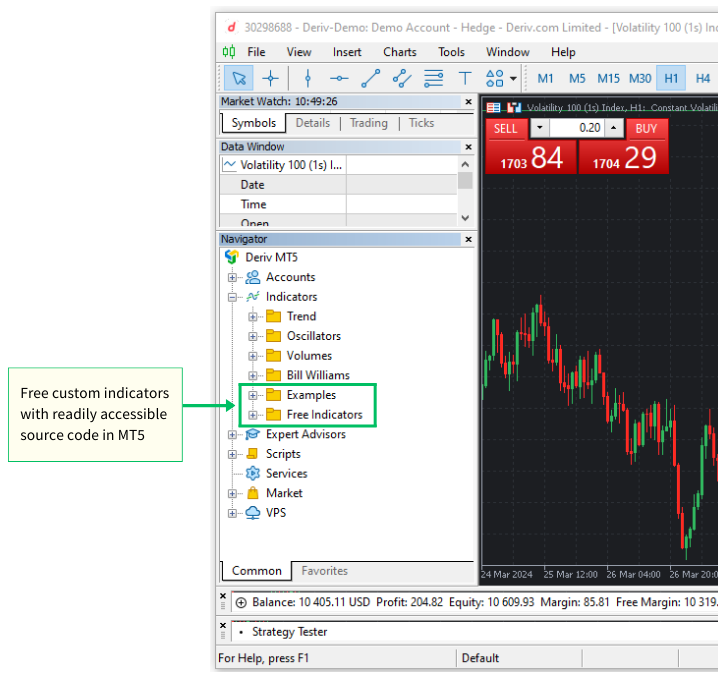
指標の例を調べたり変更したりすることで、MQL5のプログラミングテクニック、指標ロジック、ベストプラクティスについての洞察を得ることができます。この実践的なアプローチは学習を促進し、あなた自身の特定の取引目的に合わせたカスタム指標を開発する力を与えます。
MQL5におけるカスタム指標の基本的な構成要素
MQL5でカスタム指標の開発を勉強する前に、MQL5指標の基本構造を理解することが不可欠です。指標の主な構成要素と機能を理解することで、MetaTrader 5で指標を作成、変更、効果的に利用するための準備が整います。
カスタム指標ファイル (.mq5)
MQL5指標は通常、拡張子が「.mq5」のファイルに保存されます。このファイルには、MQL5プログラミング言語で記述されたソースコードが含まれており、指標のロジックと動作を定義しています。すべての指標は、MetaTrader 5インストールディレクトリ内のMQL5\Indicatorsフォルダに格納されています。
MetaTrader 5取引端末とMetaEditorの両方にあるナビゲータパネルを使用して、Indicatorsフォルダにアクセスします。.また、以下の2つの方法で「MQL5」フォルダからIndicatorフォルダにアクセスすることもできます
MetaTrader 5取引端末から指標ファイルにアクセスする方法
- 上部メニューの[ファイル]をクリックします。
- [データフォルダを開く]を選択するか、キーボードショートカット(Ctrl + Shift + D)を使用します。
- MQL5/Indicatorsフォルダに移動します。
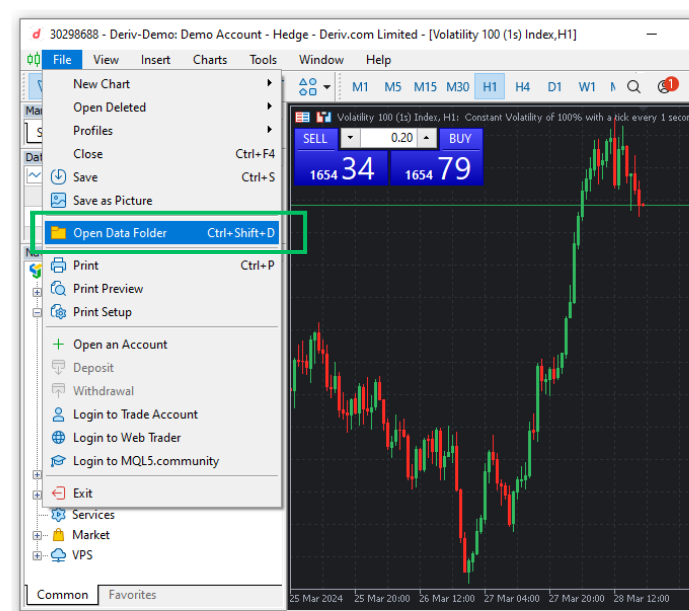
MetaEditorから指標ファイルにアクセスする方法:
- MetaEditorNavigatorパネルはデフォルトでMetaEditorウィンドウの左側にあり、MQL5フォルダに直接アクセスできます。
- ナビゲータパネルが無効になっている場合は、キーボードショートカット(Ctrl + D)を使用するか、MetaEditor 5ウィンドウの上部にあるViewメニューオプションをクリックして有効にすることができます。そこからナビゲーターというオプションを選択します。このオプションを選択すると、MQL5フォルダへのアクセスを許可するナビゲーションパネルが有効になります。
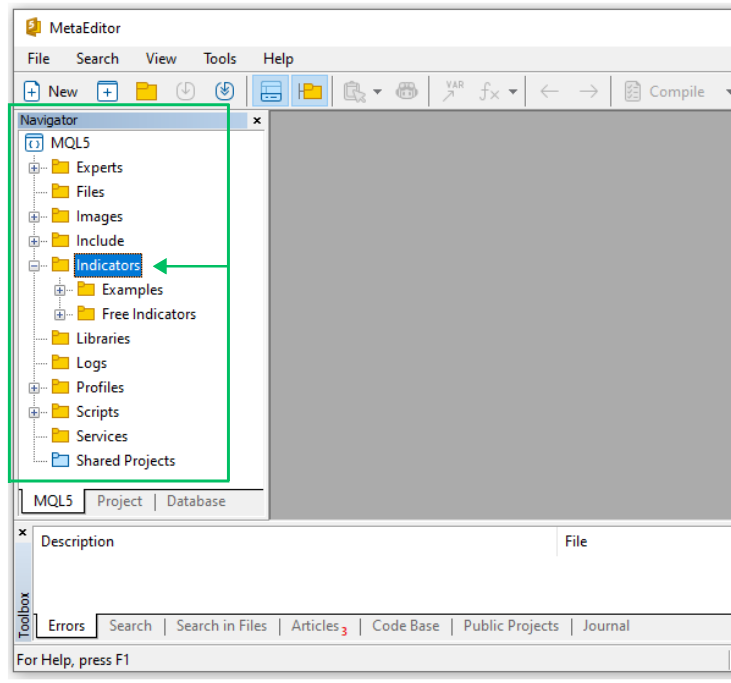
例1:Linear Moving Average Histogram Custom Indicator -(LinearMovingAverageHistogram.mq5) カスタム指標を作成し、カスタム指標を構築するために必要なさまざまなコードコンポーネントを視覚的に理解してみましょう。このハンズオンデモの最初のカスタム指標を「LinearMovingAverageHistogram」と名付けます。線形加重移動平均をヒストグラムとして表示し、現在価格を表す線を価格チャートの下の別ウィンドウに表示します。
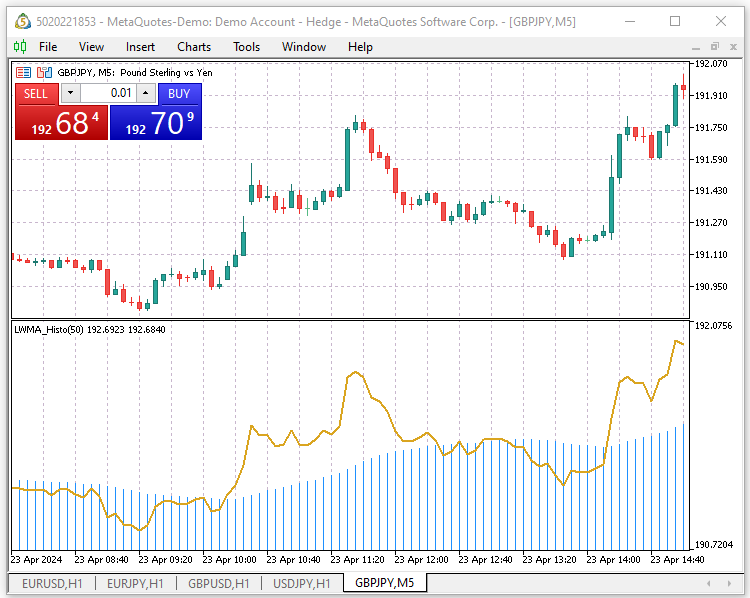
まず、MQL5ウィザードで新しいカスタム指標ファイルを作成します。
MQL5ウィザードを使用して新しいカスタム指標ファイルを作成する方法
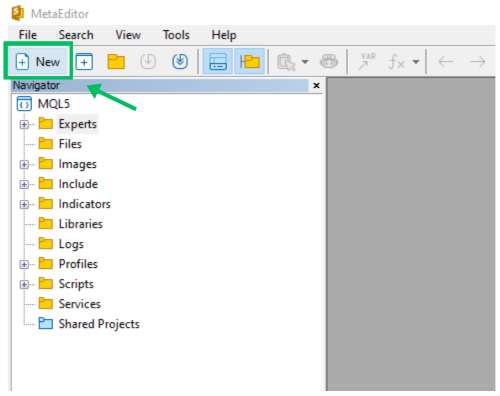
ステップ1:MetaEditor IDEを開き、'New'メニューアイテムボタンを使用して'MQL Wizard'を起動します。
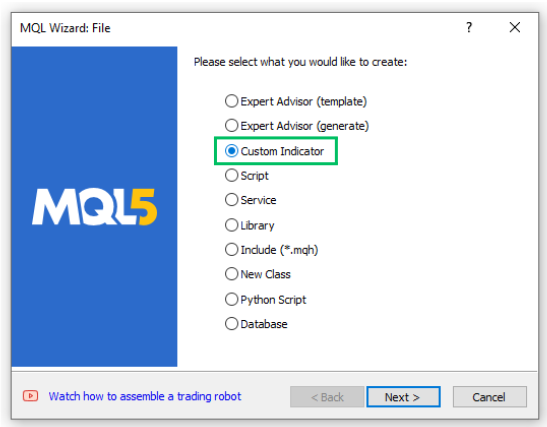
ステップ2:カスタム指標」を選択し、「次へ」をクリックします。
ステップ3:General Propertiesセクションで、新しいカスタム指標のフォルダと名前Indicators\Article\LinearMovingAverageHistogramを入力し、[Next]をクリックして進みます。 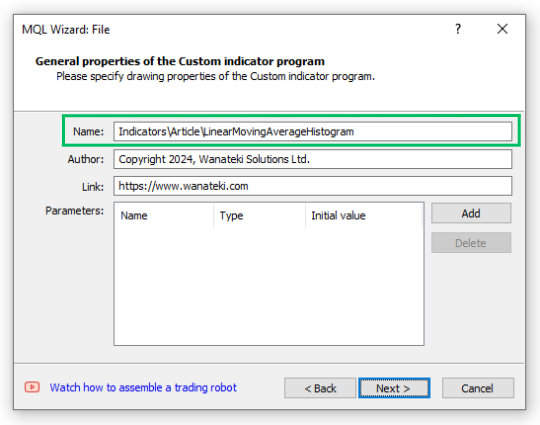
ステップ4:イベントハンドラセクションで、2番目のOnCalculate(...,price)オプションを選択します。OnTimerとOnChartEventの確認ボックスは未選択のままにします。[Next]をクリックして次に進みます。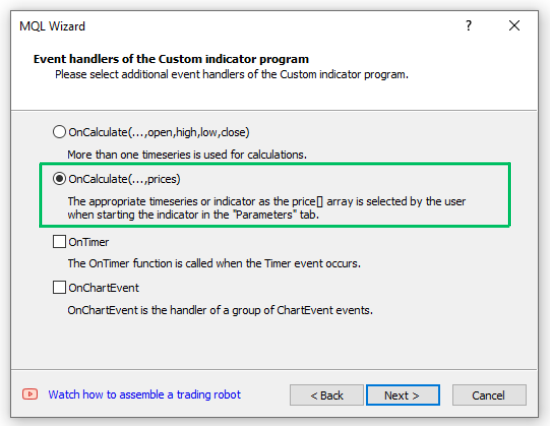
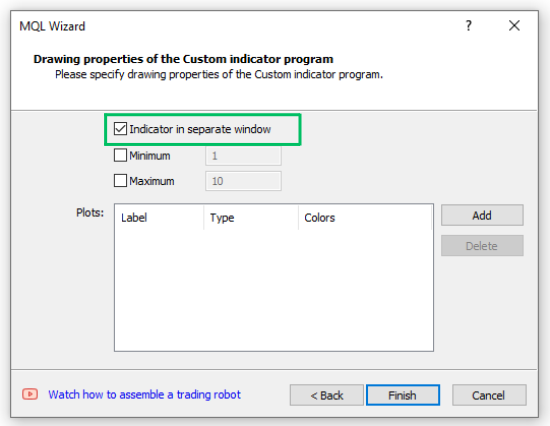
ステップ5:Drawing properties'セクションで、'Indicator in separate window'確認ボックスを選択または有効にします。最小'と'最大'確認ボックスの確認を外すか無効にし、'プロット'テキスト入力ボックスは空のままにします。[「Finish]をクリックして、新しいMQL5カスタム指標ファイルを生成します。
MQL5/Indicatorsフォルダの中に、Articleという名前の新しいサブフォルダがあります。このサブフォルダには、作成したばかりのカスタム指標ファイル「LinearMovingAverageHistogram.mq5」が含まれています。ハンズオン・デモンストレーションの一環として、この記事を通していくつかのカスタム指標をコーディングします。適切な整理を維持するため、すべての指標ファイルをこの新しい「Articles」フォルダに保存します。
これで、必須関数(OnInitと OnCalculate)のみを持つ新しいMQL5カスタム指標ファイルができました。続行する前に、新しいファイルを保存することを忘れないでください。新しく生成されたカスタム指標のコードを以下に示します:
//+------------------------------------------------------------------+
//|                                 LinearMovingAverageHistogram.mq5 |
//|                          Copyright 2024, Wanateki Solutions Ltd. |
//|                                         https://www.wanateki.com |
//+------------------------------------------------------------------+
#property copyright "Copyright 2024, Wanateki Solutions Ltd."
#property link      "https://www.wanateki.com"
#property version   "1.00"
#property indicator_separate_window
//+------------------------------------------------------------------+
//| Custom indicator initialization function                         |
//+------------------------------------------------------------------+
int OnInit()
  {
//--- indicator buffers mapping

//---
   return(INIT_SUCCEEDED);
  }
//+------------------------------------------------------------------+
//| Custom indicator iteration function                              |
//+------------------------------------------------------------------+
int OnCalculate(const int rates_total,
                const int prev_calculated,
                const int begin,
                const double &price[])
  {
//---

//--- return value of prev_calculated for next call
   return(rates_total);
  }
//+------------------------------------------------------------------+
カスタム指標ファイル(.mq5)の基本構成要素指標ファイルは、様々なセクションで構成されています。指標のコードの異なる部分がどのように機能するかを分析してみましょう。ヘッダーセクション指標のヘッダーセクションは、ヘッダーコメント、プロパティディレクティブ、外部インクルードファイル、グローバル変数定義の3つの部分で構成されています。以下は、指標に含まれるヘッダーセクションの内訳です。1.ヘッダーのコメント これは指標コードの最初のセクションです。ファイル名、著作権情報、作者のウェブサイトへのリンクなど、コメントアウトされた指標に関する情報が含まれています。これらのコメントは、指標コードの機能性には一切影響しません。
//+------------------------------------------------------------------+
//|                                 LinearMovingAverageHistogram.mq5 |
//|                          Copyright 2024, Wanateki Solutions Ltd. |
//|                                         https://www.wanateki.com |
//+------------------------------------------------------------------+
2.propertyディレクティブ propertyディレクティブは、指標に関する追加情報を提供します。これには、著作権、指標または作者に関連するリンク、指標の最新バージョン、指標の表示方法に関する具体的な指示が含まれます。最も重要なpropertyディレクティブは#Property indicator_separate_windowです。これは、指標を別ウィンドウで表示するようプラットフォームに指示します。
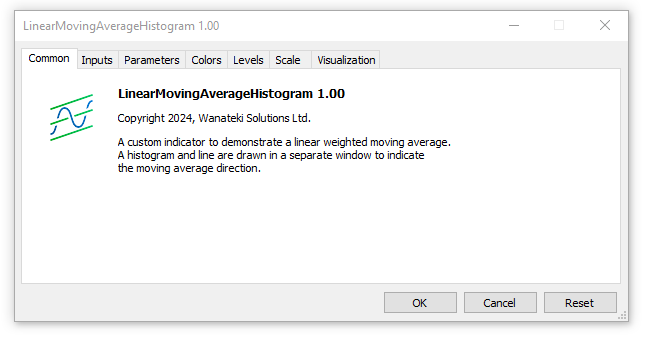
#property copyright "Copyright 2024, Wanateki Solutions Ltd." #property link "https://www.wanateki.com" #property version "1.00" #property indicator_separate_windowcopyright、link、author、description プロパティディレクティブは、チャート上に指標をロードしているときに表示される小さな指標設定サブウィンドウ(パネル)の「Common」タブに表示されます。
3.グローバル変数: すべてのグローバル変数は、propertyディレクティブの下に配置されます。MQL5ウィザードでファイルを生成する際にグローバル変数を指定していないため、指標コードには現在グローバル変数が含まれていません。グローバル変数とユーザー入力変数はすべて#propertyディレクティブの下に定義します。
MQL5スタンダードカスタム指標機能ヘッダーセクションの下には様々な機能があります。すべての指標には、MQL5標準のOnInit関数とOnCalculate 関数が含まれている必要があります。ユーザーが作成した関数はオプションですが、適切なコード構成のために推奨されます。以下は、指標コードの各機能の内訳です。1.指標初期化関数(OnInit()): OnInit()関数は、指標が初期化されるときに呼び出されます。通常、指標バッファのマッピングやグローバル変数の初期化などの設定作業をおこないます。指標バッファについては、記事を深掘りしながら紹介していこう。関数の実行に成功するとINIT_SUCCEEDEDを返し、初期化に失敗するとINIT_FAILEDを返します。
//+------------------------------------------------------------------+
//| Custom indicator initialization function                         |
//+------------------------------------------------------------------+
int OnInit()
  {
//--- indicator buffers mapping

//---
   return(INIT_SUCCEEDED);
  }
2. 指標反復関数(OnCalculate()): MQL5のOnCalculate() 関数は、すべてのカスタム指標計算の主要な中枢です。価格データに変化があるたびに呼び出され、指標の値を更新するよう促します。OnCalculate() には主に2つのバージョンがあります。
//+------------------------------------------------------------------+
//| Custom indicator iteration function                              |
//+------------------------------------------------------------------+
int OnCalculate(const int rates_total,
                const int prev_calculated,
                const int begin,
                const double &price[])
  {
//---

//--- return value of prev_calculated for next call
   return(rates_total);
  }
3. 指標初期化解除関数(OnDeinit()): OnDeinit()関数は私たちのコードには追加されていないが、非常に重要な関数です。指標が終了するときに呼び出され、初期化解除手続きを実行します。通常、テクニカル指標ハンドルのリリースなど、すべてのクリーンアップ作業をおこないます。
//+------------------------------------------------------------------+
//| Indicator deinitialization function                              |
//+------------------------------------------------------------------+
void OnDeinit(const int reason)
  {
   //-- deinitialization code
  }
//+------------------------------------------------------------------+
指標コードをコンパイルすると、「指標に指標プロットが定義されていません」という警告が表示されます。
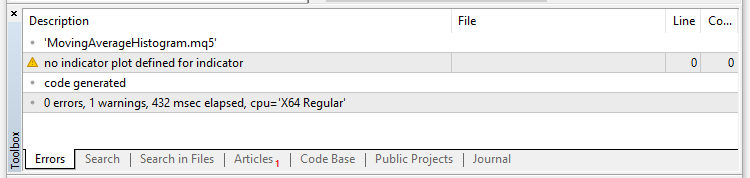
この警告は、カスタム指標のデータがチャート上にどのように表示されるべきかという重要な定義が欠けていることを示しています。予想通り、現在の指標コードは、機能的なコンポーネントを持たない単なる骨組みとして機能しています。これを修正するために、もっと深く掘り下げて、指標に生命を吹き込むために不可欠なコードセグメントを書いてみましょう。
説明プロパティディレクティブ指標のヘッダーセクションに、カスタム指標の簡単な説明を書くことから始めましょう。
#property description "A custom indicator to demonstrate a linear weighted moving average."
#property description "A histogram and line are drawn in a separate window to indicate "
#property description "the moving average direction."
バッファとプロット・プロパティディレクティブ すべてのカスタム指標は、先に詳しく説明したように、常にファイルの先頭に配置されるさまざまなプロパティを持っています。いくつかは任意ですが、以下の3つは常に必須です。
- indicator_separate_windowまたはindicator_chart_window:指標を別ウィンドウにプロットするか、チャートウィンドウに直接プロットするかを指定します。
- indicator_buffers:カスタム指標が使用する指標バッファの数を指定します。
- indicator_plots:カスタム指標が使用するプロットの数を指定します。
新しいカスタム指標データを保存しプロットするために、2つの指標バッファと2つのプロットが必要です。ヒストグラム用の指標バッファと、銘柄の現在価格を表示す るライン用の指標バッファがあります。ヒストグラムのプロットと価格ラインのプロットが続きます。
//--- indicator buffers and plots
#property indicator_buffers 2
#property indicator_plots   2
Label, Type, Style プロパティディレクティブ
次に、指標のラベル、種類、色、スタイル、ヒストグラムと価格ラインの幅など、その他の詳細を指定します。
//--- plots1 details for the ma histogram
#property indicator_label1  "MA_Histogram"
#property indicator_type1   DRAW_HISTOGRAM
#property indicator_color1  clrDodgerBlue
#property indicator_style1  STYLE_SOLID
#property indicator_width1  1

//--- plots2 details for the price line
#property indicator_label2  "Current_Price_Line"
#property indicator_type2   DRAW_LINE
#property indicator_color2  clrGoldenrod
#property indicator_style2  STYLE_SOLID
#property indicator_width2  2
グローバルユーザー入力変数
次に、カスタム指標のユーザー入力変数(移動平均期間とシフト)を指定します。
//--- input parameters for the moving averages
input int            _maPeriod = 50;       // MA Period
input int            _maShift = 0;         // MA Shift
グローバルスコープにおける指標バッファ動的配列の宣言
次に、移動平均ヒストグラムと価格ラインの指標バッファを宣言します。指標バッファは、カスタム指標の基本的な柱の1つであり、指標のデータを動的配列に格納する役割を果たします。まず動的配列を宣言し、それをMQL5の特別な関数SetIndexBufferを使用して指標バッファとして登録し、特別な端末管理配列に変換します。これをおこなった後、端末は配列用のメモリを確保し、他の指標を計算できる新しい時系列アクセス可能な配列として、その配列へのpublicアクセスを提供する責任を負います。
まずヒストグラムとライン指標バッファを動的配列として宣言し、後でOnInit()関数の中で特別なMQL5関数'SetIndexBuffer'を使用してそれらを登録し、端末で管理されたアクセス可能な時系列配列に変換します。
//--- indicator buffer
double maHistogramBuffer[], priceLineBuffer[];
カスタム指標初期化関数GetInit()
次に、カスタム指標の初期化をおこなうカスタム関数を作成します。データを返さないことを意味するvoid 型の空関数を作成することから始めます。関数名はGetInit()とします。SetIndexBuffer(...)特殊関数を配置します。この関数は、先に宣言したmaHistogramBufferとpriceLineBufferの指標バッファ動的配列を、端末管理型時系列配列に変換する役割を果たします。
//+------------------------------------------------------------------+
//| User custom function for custom indicator initialization         |
//+------------------------------------------------------------------+
void GetInit()
  {
//--- set the indicator buffer mapping
   SetIndexBuffer(0, maHistogramBuffer, INDICATOR_DATA);
   SetIndexBuffer(1, priceLineBuffer, INDICATOR_DATA);

  }
//+------------------------------------------------------------------+
次に、指標の精度を銘柄の桁数に合うように設定します。
//--- set the indicators accuracy
   IndicatorSetInteger(INDICATOR_DIGITS, _Digits + 1);
次に、インデックスが描画され始める最初のバーを定義します。
//--- set the first bar from where the index will be drawn
   PlotIndexSetInteger(0, PLOT_DRAW_BEGIN, _maPeriod);
   PlotIndexSetInteger(1, PLOT_DRAW_BEGIN, 0);
移動平均指標のシフトをユーザーが指定した移動平均ハンドルの値に設定し、価格ラインにゼロ値を使用します。これは、指標をプロットまたは描画するときに使用されます。
//--- set the indicator shifts when drawing
   PlotIndexSetInteger(0, PLOT_SHIFT, _maShift);
   PlotIndexSetInteger(1, PLOT_SHIFT, 0);
次に、指標データバッファから指標の値をMT5データウィンドウに表示する名前を設定します。データウィンドウの指標の短縮名を設定するために、スイッチコントロールを使用します。
//--- set the name to be displayed in the MT5 DataWindow
   IndicatorSetString(INDICATOR_SHORTNAME, "LWMA_Histo" + "(" + string(_maPeriod) + ")");
指標の初期化関数を終了するために、描画ヒストグラムに空の値を設定します。
//--- set the drawing histogram and line to an empty value
   PlotIndexSetDouble(0, PLOT_EMPTY_VALUE, 0.0);
   PlotIndexSetDouble(1, PLOT_EMPTY_VALUE, 0.0);
線形加重移動平均を計算するカスタム関数GetLWMA()
次に、線形加重移動平均の計算を担当するGetLWMA(...)というカスタム関数を作成する必要があります。この関数はデータを返さないので、void型になります。関数のパラメータとして、rates_total、prev_calculated、begin、&priceの4つの引数を受け取ります。
//+------------------------------------------------------------------+
//|  Function to calculate the linear weighted moving average        |
//+------------------------------------------------------------------+
void GetLWMA(int rates_total, int prev_calculated, int begin, const double &price[])
  {
   int    weight = 0;
   int    x, l, start;
   double sum = 0.0, lsum = 0.0;
//--- first calculation or number of bars was changed
   if(prev_calculated <= _maPeriod + begin + 2)
     {
      start = _maPeriod + begin;
      //--- set empty value for first start bars
      for(x=0; x < start; x++)
        {
         maHistogramBuffer[x] = 0.0;
         priceLineBuffer[x] = price[x];
        }
     }
   else
      start = prev_calculated - 1;

   for(x = start - _maPeriod, l = 1; x < start; x++, l++)
     {
      sum   += price[x] * l;
      lsum  += price[x];
      weight += l;
     }
   maHistogramBuffer[start-1] = sum/weight;
   priceLineBuffer[x] = price[x];
//--- main loop
   for(x=start; x<rates_total && !IsStopped(); x++)
     {
      sum             = sum - lsum + price[x] * _maPeriod;
      lsum            = lsum - price[x - _maPeriod] + price[x];
      maHistogramBuffer[x] = sum / weight;
      priceLineBuffer[x] = price[x];
     }
  }
指標メイン反復関数 OnCalculate()
カスタム指標の反復関数OnCalculate(...)は、カスタム指標の心臓部であり、新しいティックや価格変化があったときに指標を更新し、プロットする役割を担っています。現在、OnCalculate()関数のショートフォームを使用しています。
int OnCalculate(const int rates_total,
                const int prev_calculated,
                const int begin,
                const double &price[])
  {
   return(rates_total);
  }
この関数は4つの入力パラメータまたは引数を取ります。
- rates_total:price[]配列の要素数の合計値を保持します。先ほどGetLWMA(...)関数でおこなったように、指標値を計算するための入力パラメータとして渡されます。
- prev_calculated:直前の呼び出しでOnCalculate(...)を実行した結果が格納されます。指標の値を計算するアルゴリズムで重要な役割を果たし、OnCalculate(...)関数を呼び出すたびにまたは新しい価格変動が起こったときに、履歴期間全体の計算をおこなわないようにします。
- begin:価格配列の開始値の番号が格納されます。計算のデータは含まれません。私たちのカスタム指標では、この値が_maPeriodです。OnCalculte(...)関数に、すべてのバーが_maPeriodに達するまですべての計算を停止し、指標の計算に十分なバーを確保するように指示するだけです。
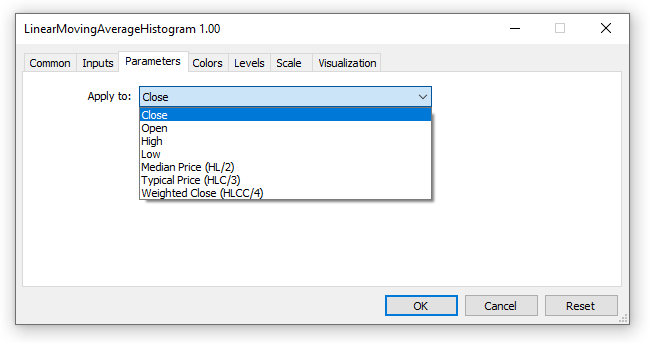
- price:指標データの計算に使用される適用価格が格納されます。カスタム指標をチャートに読み込む際に、ユーザーが指定します。ユーザーは、始値、終値、高値、安値、中央値(HL / 2)、代表値(HLC / 3)、加重終値(HLCC / 4)、以前に読み込まれた指標データの値のいずれかを選択するオプションがあります。
以下はOnCalculate(...)関数のコードです。
//+------------------------------------------------------------------+
//| Custom indicator iteration function                              |
//+------------------------------------------------------------------+
int OnCalculate(const int rates_total,
                const int prev_calculated,
                const int begin,
                const double &price[])
  {
//--- check if we have enough bars to do the calculations
   if(rates_total < _maPeriod - 1 + begin)
      return(0);

//--- first calculation or number of bars was changed
   if(prev_calculated == 0)
     {
      ArrayInitialize(maHistogramBuffer, 0);
      PlotIndexSetInteger(0, PLOT_DRAW_BEGIN, _maPeriod - 1 + begin);
     }
//--- calculate the linear weighted moving average and plot it on the chart
   GetLWMA(rates_total, prev_calculated, begin, price);

//--- return value of prev_calculated for next call
   return(rates_total);
  }
//+------------------------------------------------------------------+
これで、新しく作成したカスタム指標のすべてのコードセグメントが揃いました。LinearMovingAverageHistogramファイルが以下のように、以下のコードのすべての構成要素を持っていることを確認します。
#property version   "1.00"
#property indicator_separate_window

//--- indicator buffers and plots
#property indicator_buffers 2
#property indicator_plots   2

//--- plots1 details for the ma histogram
#property indicator_label1  "MA_Histogram"
#property indicator_type1   DRAW_HISTOGRAM
#property indicator_color1  clrDodgerBlue
#property indicator_style1  STYLE_SOLID
#property indicator_width1  1

//--- plots2 details for the price line
#property indicator_label2  "Current_Price_Line"
#property indicator_type2   DRAW_LINE
#property indicator_color2  clrGoldenrod
#property indicator_style2  STYLE_SOLID
#property indicator_width2  2

//--- input parameters for the moving averages
input int            _maPeriod = 50;       // MA Period
input int            _maShift = 0;         // MA Shift

//--- indicator buffer
double maHistogramBuffer[], priceLineBuffer[];

//+------------------------------------------------------------------+
//| Custom indicator initialization function                         |
//+------------------------------------------------------------------+
int OnInit()
  {
//--- call the custom initialization function
   GetInit();

//---
   return(INIT_SUCCEEDED);
  }
//+------------------------------------------------------------------+
//| Custom indicator iteration function                              |
//+------------------------------------------------------------------+
int OnCalculate(const int rates_total,
                const int prev_calculated,
                const int begin,
                const double &price[])
  {
//--- check if we have enough bars to do the calculations
   if(rates_total < _maPeriod - 1 + begin)
      return(0);

//--- first calculation or number of bars was changed
   if(prev_calculated == 0)
     {
      ArrayInitialize(maHistogramBuffer, 0);
      PlotIndexSetInteger(0, PLOT_DRAW_BEGIN, _maPeriod - 1 + begin);
     }
//--- calculate the linear weighted moving average and plot it on the chart
   GetLWMA(rates_total, prev_calculated, begin, price);

//--- return value of prev_calculated for next call
   return(rates_total);
  }
//+------------------------------------------------------------------+

//+------------------------------------------------------------------+
//| User custom function for custom indicator initialization         |
//+------------------------------------------------------------------+
void GetInit()
  {
//--- set the indicator buffer mapping
   SetIndexBuffer(0, maHistogramBuffer, INDICATOR_DATA);
   SetIndexBuffer(1, priceLineBuffer, INDICATOR_DATA);

//--- set the indicators accuracy
   IndicatorSetInteger(INDICATOR_DIGITS, _Digits + 1);

//--- set the first bar from where the index will be drawn
   PlotIndexSetInteger(0, PLOT_DRAW_BEGIN, _maPeriod);
   PlotIndexSetInteger(1, PLOT_DRAW_BEGIN, 0);

//--- set the indicator shifts when drawing
   PlotIndexSetInteger(0, PLOT_SHIFT, _maShift);
   PlotIndexSetInteger(1, PLOT_SHIFT, 0);

//--- set the name to be displayed in the MT5 DataWindow
   IndicatorSetString(INDICATOR_SHORTNAME, "LWMA_Histo" + "(" + string(_maPeriod) + ")");

//--- set the drawing histogram and line to an empty value
   PlotIndexSetDouble(0, PLOT_EMPTY_VALUE, 0.0);
   PlotIndexSetDouble(1, PLOT_EMPTY_VALUE, 0.0);
  }
//+------------------------------------------------------------------+

//+------------------------------------------------------------------+
//|  Function to calculate the linear weighted moving average        |
//+------------------------------------------------------------------+
void GetLWMA(int rates_total, int prev_calculated, int begin, const double &price[])
  {
   int    weight = 0;
   int    x, l, start;
   double sum = 0.0, lsum = 0.0;
//--- first calculation or number of bars was changed
   if(prev_calculated <= _maPeriod + begin + 2)
     {
      start = _maPeriod + begin;
      //--- set empty value for first start bars
      for(x=0; x < start; x++)
        {
         maHistogramBuffer[x] = 0.0;
         priceLineBuffer[x] = price[x];
        }
     }
   else
      start = prev_calculated - 1;

   for(x = start - _maPeriod, l = 1; x < start; x++, l++)
     {
      sum   += price[x] * l;
      lsum  += price[x];
      weight += l;
     }
   maHistogramBuffer[start-1] = sum/weight;
   priceLineBuffer[x] = price[x];
//--- main loop
   for(x=start; x<rates_total && !IsStopped(); x++)
     {
      sum             = sum - lsum + price[x] * _maPeriod;
      lsum            = lsum - price[x - _maPeriod] + price[x];
      maHistogramBuffer[x] = sum / weight;
      priceLineBuffer[x] = price[x];
     }
  }
カスタム指標を保存してコンパイルすると、警告やエラーが含まれていないことに気付くでしょう。MetaTrader 5取引端末を開き、チャートに読み込んてテストします。
より実践的な例
カスタム指標の基本的な構成要素に慣れたところで、この知識を定着させるために、簡単なカスタム指標をいくつか作成してみましょう。以下の例では、先に定義したすべてのステップに従い、カスタム指標の基本的な基礎をすべて実装します。
例2:SpreadMonitorカスタム指標(SpreadMonitor.mq5)
引き続き、スプレッドデータを使用して、別ウィンドウにマルチカラーヒストグラムを表示するシンプルなカスタム指標を作成してみましょう。この指標は、変動スプレッドを使用する銘柄に有効で、スプレッ ドが時間の経過とともにどのように変動または急上昇するかを、視覚的かつ分析しやすい方法でモニターしやすくします。先ほどと同様にMQLウィザードを使用して、SpreadMonitor.mq5という名前で新しいカスタム指標ファイルを作成します。きちんと整理されたファイル構造を維持するために、Articleフォルダに保存することを忘れないでください。
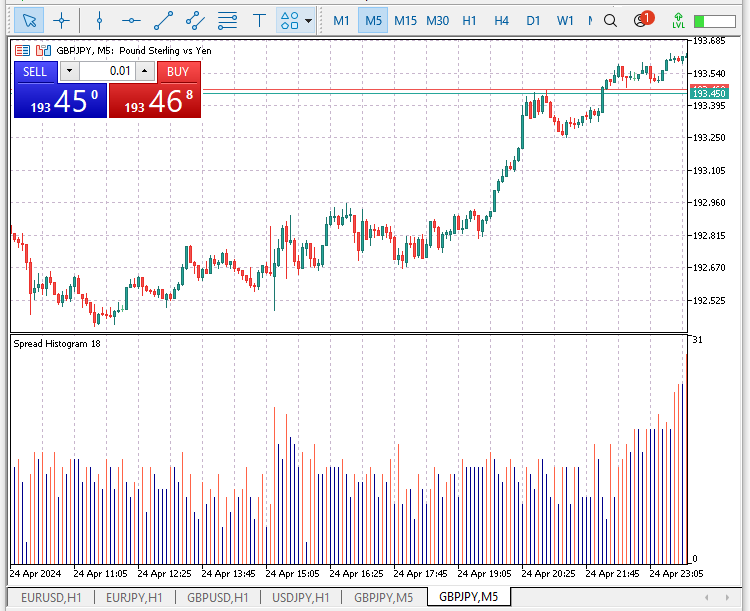
この例では、複数色の指標を作成する方法を示します。現在のスプレッドが前回のスプレッドより高い場合、ヒストグラムは赤色に変化してスプレッドの拡大を意味します。現在のスプレッドが前回のスプレッドより低い場合、ヒストグラムは青色に変化し、スプレッドの縮小を意味します。このカスタム指標機能は、スプレッドが変動している銘柄で最もよく観察され、チャート上に読み込まれた指標をざっと見るだけで、スプレッドが急上昇している期間を簡単に見つけることができます。
MQLウィザードで新しいSpreadMonitor.mq5'カスタム指標ファイルを生成した後、以下のコードを追加します。
指標を表示する場所を指定することから始めます。
//--- indicator window settings
#property indicator_separate_window
指標バッファとプロットの数を指定します。
//--- indicator buffers and plots
#property indicator_buffers 2
#property indicator_plots   1
指標の種類とスタイルを設定し、さまざまな色を指定します。
//--- indicator type and style settings
#property indicator_type1   DRAW_COLOR_HISTOGRAM
#property indicator_color1  clrDarkBlue, clrTomato
#property indicator_style1  0
#property indicator_width1  1
#property indicator_minimum 0.0
グローバルスコープで指標バッファとして使用される動的配列を宣言します。
//--- indicator buffers
double spreadDataBuffer[];
double histoColorsBuffer[];
指標の初期化をおこなうカスタム関数を作成します。
//+------------------------------------------------------------------+
//| User custom function for custom indicator initialization         |
//+------------------------------------------------------------------+
void GetInit(){
}
//+------------------------------------------------------------------+
新しい指標初期化関数GetInit()の内部で、指標バッファを登録し、マッピングします。
//--- set and register the indicator buffers mapping
   SetIndexBuffer(0, spreadDataBuffer, INDICATOR_DATA);
   SetIndexBuffer(1, histoColorsBuffer, INDICATOR_COLOR_INDEX);
MetaTrader 5のDataWindowおよび指標サブウィンドウのラベルとして表示される名前を設定します。
//--- name for mt5 datawindow and the indicator subwindow label
   IndicatorSetString(INDICATOR_SHORTNAME,"Spread Histogram");
指標の桁を設定し、精度と正確さを確認します。
//--- set the indicators accuracy digits
   IndicatorSetInteger(INDICATOR_DIGITS, 0);
次のステップは、スプレッドを計算するカスタム関数を作成することです。関数名をGetSpreadData()とし、3つのパラメータまたは引数を保持するように指定します。この関数はデータを返す必要がないので、void型になります。
//+------------------------------------------------------------------+
//| Custom function for calculating the spread                       |
//+------------------------------------------------------------------+
void GetSpreadData(const int position, const int rates_total, const int& spreadData[])
  {
   spreadDataBuffer[0] = (double)spreadData[0];
   histoColorsBuffer[0] = 0.0;
//---
   for(int x = position; x < rates_total && !IsStopped(); x++)
     {
      double currentSpread = (double)spreadData[x];
      double previousSpread = (double)spreadData[x - 1];

      //--- calculate and save the spread
      spreadDataBuffer[x] = currentSpread;
      if(currentSpread > previousSpread)
        {
         histoColorsBuffer[x] = 1.0; //-- set the histogram to clrTomato
        }
      else
        {
         histoColorsBuffer[x] = 0.0; //-- set the histogram to clrDarkBlue
        }
     }
//---
  }
//+------------------------------------------------------------------+
カスタム指標は、空のOnCalculate()関数では機能しません。この例では、OnCalculate()の長いバージョンを使用します。このバージョンでは、カスタム指標のデータの保存と処理に10個のパラメータを使用します。
//+------------------------------------------------------------------+
//| Custom indicator iteration function                              |
//+------------------------------------------------------------------+
int OnCalculate(const int rates_total,
                const int prev_calculated,
                const datetime &time[],
                const double &open[],
                const double &high[],
                const double &low[],
                const double &close[],
                const long &tick_volume[],
                const long &volume[],
                const int &spread[])
  {
//--- check if we have enough data start calculating
   if(rates_total < 2) //--- don't do any calculations, exit and reload function
      return(0);

//--- we have new data, starting the calculations
   int position = prev_calculated - 1;

//--- update the position variable
   if(position < 1)
     {
      spreadDataBuffer[0] = 0;
      position = 1;
     }
//--- calculate and get the tick volume
   GetSpreadData(position, rates_total, spread);

//--- Exit function and return new prev_calculated value
   return(rates_total);
  }
SpreadMonitorカスタム指標はほぼ完成したので、コンパイルしてMetaTrader 5のチャートに読み込む前に、すべての異なるコードセグメントを結合してファイルを保存しておきましょう。
//--- indicator window settings
#property indicator_separate_window

//--- indicator buffers and plots
#property indicator_buffers 2
#property indicator_plots   1

//--- indicator type and style settings
#property indicator_type1   DRAW_COLOR_HISTOGRAM
#property indicator_color1  clrDarkBlue, clrTomato
#property indicator_style1  0
#property indicator_width1  1
#property indicator_minimum 0.0

//--- indicator buffers
double spreadDataBuffer[];
double histoColorsBuffer[];

//+------------------------------------------------------------------+
//| Custom indicator initialization function                         |
//+------------------------------------------------------------------+
int OnInit()
  {
//--- initialize the indicator
   GetInit();

   return(INIT_SUCCEEDED);
  }

//+------------------------------------------------------------------+
//| Custom indicator iteration function                              |
//+------------------------------------------------------------------+
int OnCalculate(const int rates_total,
                const int prev_calculated,
                const datetime &time[],
                const double &open[],
                const double &high[],
                const double &low[],
                const double &close[],
                const long &tick_volume[],
                const long &volume[],
                const int &spread[])
  {
//--- check if we have enough data start calculating
   if(rates_total < 2) //--- don't do any calculations, exit and reload function
      return(0);

//--- we have new data, starting the calculations
   int position = prev_calculated - 1;

//--- update the position variable
   if(position < 1)
     {
      spreadDataBuffer[0] = 0;
      position = 1;
     }
//--- calculate and get the tick volume
   GetSpreadData(position, rates_total, spread);

//--- Exit function and return new prev_calculated value
   return(rates_total);
  }

//+------------------------------------------------------------------+
//| Custom function for calculating the spread                       |
//+------------------------------------------------------------------+
void GetSpreadData(const int position, const int rates_total, const int& spreadData[])
  {
   spreadDataBuffer[0] = (double)spreadData[0];
   histoColorsBuffer[0] = 0.0;
//---
   for(int x = position; x < rates_total && !IsStopped(); x++)
     {
      double currentSpread = (double)spreadData[x];
      double previousSpread = (double)spreadData[x - 1];

      //--- calculate and save the spread
      spreadDataBuffer[x] = currentSpread;
      if(currentSpread > previousSpread)
        {
         histoColorsBuffer[x] = 1.0; //-- set the histogram to clrTomato
        }
      else
        {
         histoColorsBuffer[x] = 0.0; //-- set the histogram to clrDarkBlue
        }
     }
//---
  }
//+------------------------------------------------------------------+

//+------------------------------------------------------------------+
//| User custom function for custom indicator initialization         |
//+------------------------------------------------------------------+
void GetInit()
  {
//--- set and register the indicator buffers mapping
   SetIndexBuffer(0, spreadDataBuffer, INDICATOR_DATA);
   SetIndexBuffer(1, histoColorsBuffer, INDICATOR_COLOR_INDEX);

//--- name for mt5 datawindow and the indicator subwindow label
   IndicatorSetString(INDICATOR_SHORTNAME,"Spread Histogram");

//--- set the indicators accuracy digits
   IndicatorSetInteger(INDICATOR_DIGITS, 0);
  }
//+------------------------------------------------------------------+
以下はSpreadMonitorカスタム指標をMetaTrader 5 GBPJPY 5分足チャートに読み込んだものです。
例3: Smoothed Multi-Color Candlestickカスタム指標(SmoothedCandlesticks.mq5)
指標は主に取引戦略を視覚的に表現するものであるため、単一の色で視覚的なデータのみを表示する指標よりも、マルチカラーの指標の方が望ましいです。マルチカラーの指標は、トレーダーが指標によって生成された売買シグナルを素早く識別することを容易にし、指標の効率性と使いやすさの向上に役立ちます。
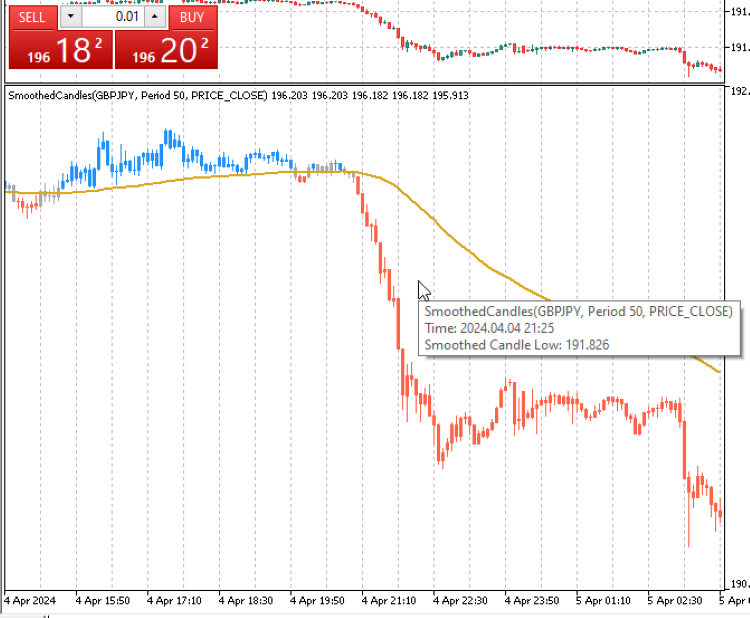
マルチカラーの指標を作成するスキルは、MQL5開発者にとって非常に役立つものです。この例では、平滑化されたマルチカラーのローソク足カスタム指標を作成する方法を説明します。市場のノイズを排除することは、トレーダーにとって常に優先事項です。このシンプルな指標は、平滑化された移動平均の計算を利用し、移動平均のシグナルに応じて色が変化するマルチカラーののローソク足を作成することで、これを実現しています。これにより、解釈しやすいすっきりとしたチャートが作成され、移動平均線のクロスオーバーが起こったかどうかを検出するために十字線チャートツールを使用する必要がなくなります。
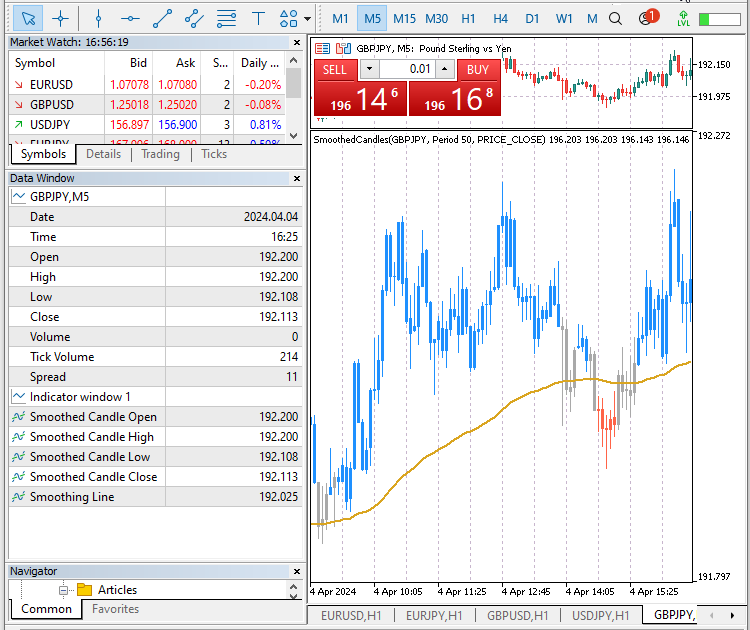
ローソク足は、始値、高値、安値、終値が平滑移動平均線より高いときは緑色になり、始値、高値、安値、終値、が平滑移動平均線より低いときは赤色になります。平滑化移動平均線がローソク足本体のどの部分かに接触している場合、つまりローソク足の高値と安値の間にある場合、ローソク足は濃い灰色に変化し、平滑化指標によってエントリシグナルが生成されていないことを示します。
この例では、先に説明した定義済みのテクニカル指標MQL5関数を通じて、MQL5標準指標を使用する方法も示します。MQL5ウィザードを使用して新しいカスタム指標ファイルを作成し、名前をSmoothedCandlesticks.mq5とします。以前に作成した他のカスタム指標ファイルと一緒にArticleフォルダに保存することを忘れないでください。
指標の#Propertyディレクティブの指定
指標を表示する場所を、チャートウィンドウ内か、価格チャートの下の別ウィンドウのどちらかに指定します。この指標はすべてのシナリオで機能します。別ウィンドウとチャートウィンドウに交互に表示して、視覚的にどのように表示されるかをテストすることができます。
//--- specify where to display the indicator
#property indicator_separate_window
//#property indicator_chart_window
指標バッファを指定します。この指標では、6つの指標バッファを使用してデータをプロットし、表示します。ローソク足の始値、終値、高値、安値の4つの指標バッファを用意します。また、平滑化された移動平均線用の指標バッファと、ローソク足の色を保存するための指標バッファも用意します。これで合計6つの指標バッファを持つことになります。
//--- indicator buffers
#property indicator_buffers 6
指標の描画には、2つの指標プロットが必要です。ローソク足を描画するプロットと、平滑化した移動平均線を描画するプロットです。これで合計2つの指標プロットができたことになります。
//--- indicator plots
#property indicator_plots   2
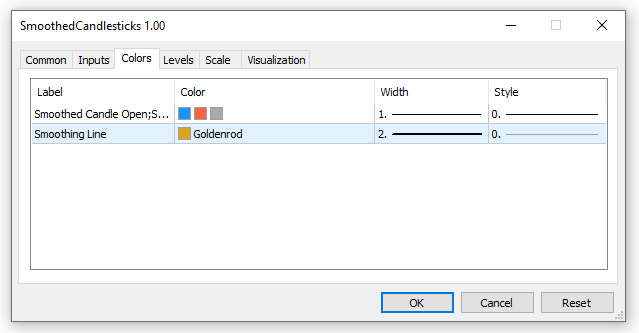
平滑化されたローソクのプロットの詳細を指定します。これには、タイプ、色、ラベルの値が含まれます。ラベルは、価格などの対応するデータとともにデータウィンドウに表示されます。私たちの指標はマルチカラーのローソク足を使用しており、先に説明したように、現在の取引シグナルに応じて変化する合計3つの色を提供する必要があります。ユーザーは、指標パネルで指標をチャートに読み込む前に、指定した色を変更するオプションがあります。
//--- plots1 details for the smoothed candles
#property indicator_type1   DRAW_COLOR_CANDLES
#property indicator_color1  clrDodgerBlue, clrTomato, clrDarkGray
#property indicator_label1  "Smoothed Candle Open;Smoothed Candle High;Smoothed Candle Low;Smoothed Candle Close;"
上記のステップを繰り返し、平滑化移動平均線の2つ目のプロットの詳細を指定します。マルチカラーのの線ではないので、平滑化移動平均線には1色しか指定しません。
//--- plots2 details for the smoothing line
#property indicator_label2  "Smoothing Line"
#property indicator_type2   DRAW_LINE
#property indicator_color2  clrGoldenrod
#property indicator_style2  STYLE_SOLID
#property indicator_width2  2
グローバルスコープにおけるユーザー入力変数
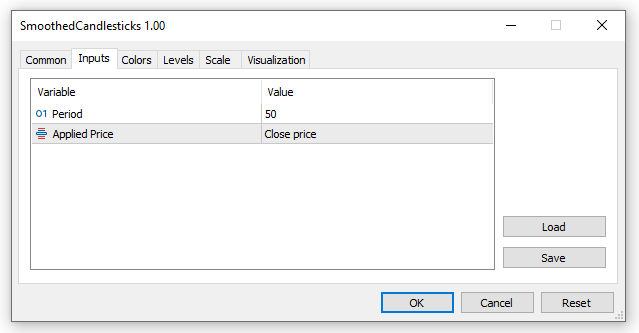
ユーザー入力変数を宣言し、平滑化移動平均期間と計算適用価格を取得・保存します。
//--- user input parameters for the moving averages
input int                _maPeriod = 50;                    // Period
input ENUM_APPLIED_PRICE _maAppliedPrice = PRICE_CLOSE;     // Applied Price
グローバルスコープにおける指標変数、バッファ、テクニカル指標ハンドル
ここでは、指標バッファを格納するために動的配列を宣言します。先に#propertyディレクティブを使用して6つの指標バッファを割り当てました。まず、始値、終値、高値、安値、ローソク足の5つの指標バッファを宣言します。MQL5標準のテクニカル指標iMA関数を使用してこのバッファを管理するため、平滑化線の残りのバッファは以下で宣言します。
//--- indicator buffers
double openBuffer[];
double highBuffer[];
double lowBuffer[];
double closeBuffer[];
double candleColorBuffer[];
次に、平滑化線のバッファと、iMA テクニカル指標関数にアクセスするためのハンドルを宣言します。すでに作成されているMQL5標準テクニカル指標関数を使用することで、ローソク足のすべての平滑化計算がより少ないコードで効率的に実行されるため、時間を節約し、より効率的です。
//Moving average dynamic array (buffer) and variables
double iMA_Buffer[];
int maHandle; //stores the handle of the iMA indicator
ここでは、最後のグローバル変数barsCalculatedを宣言し、値ゼロで初期化します。この整数変数は、iMA平滑化移動平均から計算されたバーの数を格納するために使用されます。OnCalculate()関数で使用します。
//--- integer to store the number of values in the moving average indicator
int barsCalculated = 0;
指標初期化用カスタム関数GetInit()
カスタム指標のヘッダーセクションができたので、すべての初期化タスクを実行するカスタム関数を作成します。関数名をGetInit()とし、指標の初期化が成功したかどうかを示すブール値を返すように指定します。初期化に失敗した場合、指標は終了して閉じます。
初期化関数では、指標バッファの設定と登録、指標の短い名前の保存、平滑化線のiMAハンドルの作成など、基本的な初期化タスクの中でも特に重要なタスクを実行します。
//+------------------------------------------------------------------+
//| User custom function for custom indicator initialization         |
//+------------------------------------------------------------------+
bool GetInit()
  {
//--- set the indicator buffer mapping by assigning the indicator buffer array
   SetIndexBuffer(0, openBuffer, INDICATOR_DATA);
   SetIndexBuffer(1, highBuffer, INDICATOR_DATA);
   SetIndexBuffer(2, lowBuffer, INDICATOR_DATA);
   SetIndexBuffer(3, closeBuffer, INDICATOR_DATA);
   SetIndexBuffer(4, candleColorBuffer, INDICATOR_COLOR_INDEX);

//--- buffer for iMA
   SetIndexBuffer(5, iMA_Buffer, INDICATOR_DATA);

//--- set the price display precision to digits similar to the symbol prices
   IndicatorSetInteger(INDICATOR_DIGITS, _Digits);

//--- set the symbol, timeframe, period and smoothing applied price of the indicator as the short name
   string indicatorShortName = StringFormat("SmoothedCandles(%s, Period %d, %s)", _Symbol,
                               _maPeriod, EnumToString(_maAppliedPrice));
   IndicatorSetString(INDICATOR_SHORTNAME, indicatorShortName);
//IndicatorSetString(INDICATOR_SHORTNAME, "Smoothed Candlesticks");

//--- set line drawing to an empty value
   PlotIndexSetDouble(0, PLOT_EMPTY_VALUE, 0.0);

//--- create the maHandle of the smoothing indicator
   maHandle = iMA(_Symbol, PERIOD_CURRENT, _maPeriod, 0, MODE_SMMA, _maAppliedPrice);

//--- check if the maHandle is created or it failed
   if(maHandle == INVALID_HANDLE)
     {
      //--- creating the handle failed, output the error code
      ResetLastError();
      PrintFormat("Failed to create maHandle of the iMA for symbol %s, error code %d",
                  _Symbol, GetLastError());
      //--- we terminate the program and exit the init function
      return(false);
     }

   return(true); // return true, initialization of the indicator ok
  }
//+------------------------------------------------------------------+
GetInit()関数を作成したら、OnInit()標準指標関数の中で呼び出して、意図したタスクを実行させます。
//+------------------------------------------------------------------+
//| Custom indicator initialization function                         |
//+------------------------------------------------------------------+
int OnInit()
  {
//--- call the custom initialization function
   if(!GetInit())
     {
      return(INIT_FAILED); //-- if initialization failed terminate the app
     }

//---
   return(INIT_SUCCEEDED);
  }
指標メイン反復関数OnCalculate()
次の作業は、すべての指標の計算を実行する標準的なOnCalculate(...)関数をコーディングすることです。この例では、合計10個のパラメータを持つこの標準関数のロングバージョンを使用します。このバージョンのOnCalculate(...)は、現在の時間枠の時系列からの計算に基づいています。以下はそのパラメータです。
- rates_total:指標起動時にチャート上のバーの合計数を保持し、新しいバーやデータが読み込まれると、利用可能なバーの合計の現在の状態を反映するように更新されます。
- prev_calculated:前の呼び出しで処理済みのバー数を保存します。OnCalculate(...)関数を呼び出すたびに、または新しいバーが到着するたびにすべてのバーを計算する必要がないように、すでに計算または処理したデータを知ることが役立ちます。OnCalculate(...)は、呼び出すたびにこの変数の更新版を返します。
- time、open、high、low、close、tick_volume、volume、spread:これらの配列が何を保持しているかは、その名前が保存しているバーデータを表しているので簡単にわかります。私たちのカスタム指標は、これらの配列からのデータに依存し、特に私たちのようなローソク足をベースとした指標のために、これらの配列の活用方法を示します。
OnCalculate(...)関数本体は、平滑化されたマルチカラーのローソク足と平滑化線のプロットに関するすべての関連計算を含んでいるので、コードに追加します。
//+------------------------------------------------------------------+
//| Custom indicator iteration function                              |
//+------------------------------------------------------------------+
int OnCalculate(const int rates_total,
                const int prev_calculated,
                const datetime &time[],
                const double &open[],
                const double &high[],
                const double &low[],
                const double &close[],
                const long &tick_volume[],
                const long &volume[],
                const int &spread[])
  {
//--- declare a int to save the number of values copied from the iMA indicator
   int iMA_valuesToCopy;

//--- find the number of values already calculated in the indicator
   int iMA_calculated = BarsCalculated(maHandle);
   if(iMA_calculated <= 0)
     {
      PrintFormat("BarsCalculated() for iMA handle returned %d, error code %d", iMA_calculated, GetLastError());
      return(0);
     }

   int start;
//--- check if it's the indicators first call of OnCalculate() or we have some new uncalculated data
   if(prev_calculated == 0)
     {
      //--- set all the buffers to the first index
      lowBuffer[0] = low[0];
      highBuffer[0] = high[0];
      openBuffer[0] = open[0];
      closeBuffer[0] = close[0];
      start = 1;


      if(iMA_calculated > rates_total)
         iMA_valuesToCopy = rates_total;
      else   //--- copy the calculated bars which are less than the indicator buffers data
         iMA_valuesToCopy = iMA_calculated;
     }
   else
      start = prev_calculated - 1;

   iMA_valuesToCopy = (rates_total - prev_calculated) + 1;

//--- fill the iMA_Buffer array with values of the Moving Average indicator
//--- reset error code
   ResetLastError();
//--- copy a part of iMA_Buffer array with data in the zero index of the the indicator buffer
   if(CopyBuffer(maHandle, 0, 0, iMA_valuesToCopy, iMA_Buffer) < 0)
     {
      //--- if the copying fails, print the error code
      PrintFormat("Failed to copy data from the iMA indicator, error code %d", GetLastError());
      //--- exit the function with zero result to specify that the indicator calculations were not executed
      return(0);
     }

//--- iterate through the main calculations loop and execute all the calculations
   for(int x = start; x < rates_total && !IsStopped(); x++)
     {
      //--- save all the candle array prices in new non-array variables for quick access
      double candleOpen = open[x];
      double candleClose = close[x];
      double candleHigh = high[x];
      double candleLow  = low[x];

      lowBuffer[x] = candleLow;
      highBuffer[x] = candleHigh;
      openBuffer[x] = candleOpen;
      closeBuffer[x] = candleClose;

      //--- scan for the different trends signals and set the required candle color
      candleColorBuffer[x] = 2.0; // set color clrDarkGray - default (signal for no established trend)
      if(candleOpen > iMA_Buffer[x] && candleClose > iMA_Buffer[x] && candleHigh > iMA_Buffer[x] && candleLow > iMA_Buffer[x])
         candleColorBuffer[x]=0.0; // set color clrDodgerBlue - signal for a long/buy trend

      if(candleOpen < iMA_Buffer[x] && candleClose < iMA_Buffer[x] && candleHigh < iMA_Buffer[x] && candleLow < iMA_Buffer[x])
         candleColorBuffer[x]=1.0; // set color clrTomato - signal for a short/sell trend
     }

//--- return the rates_total which includes the prev_calculated value for the next call
   return(rates_total);
  }
指標初期化関数OnDeinit()
最後の関数は、解放が必要なすべての変数と配列を初期化するための標準関数OnDeinit()です。すべてのバッファ配列は自動的に管理され、iMAハンドルを除いて解放や初期化の必要はありません。指標の終了時に未使用のリソースをすべて解放するために、MQL5関数のIndicatorRelease()を使用して、maHandle変数によって消費されているリソースを解放します。
//+------------------------------------------------------------------+
//| Indicator deinitialization function                              |
//+------------------------------------------------------------------+
void OnDeinit(const int reason)
  {
   if(maHandle != INVALID_HANDLE)
     {
      IndicatorRelease(maHandle);//-- clean up and release the iMA handle
     }
  }
//+------------------------------------------------------------------+
指標はほぼ完成したので、ここにコードセグメントをまとめました。ご自分のコードが、この順序ですべての異なるセグメントを持っていることを確認してください。
//--- specify where to display the indicator
#property indicator_separate_window
//#property indicator_chart_window

//--- indicator buffers
#property indicator_buffers 6

//--- indicator plots
#property indicator_plots   2

//--- plots1 details for the smoothed candles
#property indicator_type1   DRAW_COLOR_CANDLES
#property indicator_color1  clrDodgerBlue, clrTomato, clrDarkGray
#property indicator_label1  "Smoothed Candle Open;Smoothed Candle High;Smoothed Candle Low;Smoothed Candle Close;"

//--- plots2 details for the smoothing line
#property indicator_label2  "Smoothing Line"
#property indicator_type2   DRAW_LINE
#property indicator_color2  clrGoldenrod
#property indicator_style2  STYLE_SOLID
#property indicator_width2  2

//--- user input parameters for the moving averages
input int                _maPeriod = 50;                    // Period
input ENUM_APPLIED_PRICE _maAppliedPrice = PRICE_CLOSE;     // Applied Price

//--- indicator buffers
double openBuffer[];
double highBuffer[];
double lowBuffer[];
double closeBuffer[];
double candleColorBuffer[];

//Moving average dynamic array (buffer) and variables
double iMA_Buffer[];
int maHandle; //stores the handle of the iMA indicator

//--- integer to store the number of values in the moving average indicator
int barsCalculated = 0;

//+------------------------------------------------------------------+
//| Custom indicator initialization function                         |
//+------------------------------------------------------------------+
int OnInit()
  {
//--- call the custom initialization function
   if(!GetInit())
     {
      return(INIT_FAILED); //-- if initialization failed terminate the app
     }

//---
   return(INIT_SUCCEEDED);
  }

//+------------------------------------------------------------------+
//| Custom indicator iteration function                              |
//+------------------------------------------------------------------+
int OnCalculate(const int rates_total,
                const int prev_calculated,
                const datetime &time[],
                const double &open[],
                const double &high[],
                const double &low[],
                const double &close[],
                const long &tick_volume[],
                const long &volume[],
                const int &spread[])
  {
//--- declare a int to save the number of values copied from the iMA indicator
   int iMA_valuesToCopy;

//--- find the number of values already calculated in the indicator
   int iMA_calculated = BarsCalculated(maHandle);
   if(iMA_calculated <= 0)
     {
      PrintFormat("BarsCalculated() for iMA handle returned %d, error code %d", iMA_calculated, GetLastError());
      return(0);
     }

   int start;
//--- check if it's the indicators first call of OnCalculate() or we have some new uncalculated data
   if(prev_calculated == 0)
     {
      //--- set all the buffers to the first index
      lowBuffer[0] = low[0];
      highBuffer[0] = high[0];
      openBuffer[0] = open[0];
      closeBuffer[0] = close[0];
      start = 1;


      if(iMA_calculated > rates_total)
         iMA_valuesToCopy = rates_total;
      else   //--- copy the calculated bars which are less than the indicator buffers data
         iMA_valuesToCopy = iMA_calculated;
     }
   else
      start = prev_calculated - 1;

   iMA_valuesToCopy = (rates_total - prev_calculated) + 1;

//--- fill the iMA_Buffer array with values of the Moving Average indicator
//--- reset error code
   ResetLastError();
//--- copy a part of iMA_Buffer array with data in the zero index of the the indicator buffer
   if(CopyBuffer(maHandle, 0, 0, iMA_valuesToCopy, iMA_Buffer) < 0)
     {
      //--- if the copying fails, print the error code
      PrintFormat("Failed to copy data from the iMA indicator, error code %d", GetLastError());
      //--- exit the function with zero result to specify that the indicator calculations were not executed
      return(0);
     }

//--- iterate through the main calculations loop and execute all the calculations
   for(int x = start; x < rates_total && !IsStopped(); x++)
     {
      //--- save all the candle array prices in new non-array variables for quick access
      double candleOpen = open[x];
      double candleClose = close[x];
      double candleHigh = high[x];
      double candleLow  = low[x];

      lowBuffer[x] = candleLow;
      highBuffer[x] = candleHigh;
      openBuffer[x] = candleOpen;
      closeBuffer[x] = candleClose;

      //--- scan for the different trends signals and set the required candle color
      candleColorBuffer[x] = 2.0; // set color clrDarkGray - default (signal for no established trend)
      if(candleOpen > iMA_Buffer[x] && candleClose > iMA_Buffer[x] && candleHigh > iMA_Buffer[x] && candleLow > iMA_Buffer[x])
         candleColorBuffer[x]=0.0; // set color clrDodgerBlue - signal for a long/buy trend

      if(candleOpen < iMA_Buffer[x] && candleClose < iMA_Buffer[x] && candleHigh < iMA_Buffer[x] && candleLow < iMA_Buffer[x])
         candleColorBuffer[x]=1.0; // set color clrTomato - signal for a short/sell trend
     }

//--- return the rates_total which includes the prev_calculated value for the next call
   return(rates_total);
  }

//+------------------------------------------------------------------+
//| Indicator deinitialization function                              |
//+------------------------------------------------------------------+
void OnDeinit(const int reason)
  {
   if(maHandle != INVALID_HANDLE)
     {
      IndicatorRelease(maHandle);//-- clean up and release the iMA handle
     }
  }
//+------------------------------------------------------------------+

//+------------------------------------------------------------------+
//| User custom function for custom indicator initialization         |
//+------------------------------------------------------------------+
bool GetInit()
  {
//--- set the indicator buffer mapping by assigning the indicator buffer array
   SetIndexBuffer(0, openBuffer, INDICATOR_DATA);
   SetIndexBuffer(1, highBuffer, INDICATOR_DATA);
   SetIndexBuffer(2, lowBuffer, INDICATOR_DATA);
   SetIndexBuffer(3, closeBuffer, INDICATOR_DATA);
   SetIndexBuffer(4, candleColorBuffer, INDICATOR_COLOR_INDEX);

//--- buffer for iMA
   SetIndexBuffer(5, iMA_Buffer, INDICATOR_DATA);

//--- set the price display precision to digits similar to the symbol prices
   IndicatorSetInteger(INDICATOR_DIGITS, _Digits);

//--- set the symbol, timeframe, period and smoothing applied price of the indicator as the short name
   string indicatorShortName = StringFormat("SmoothedCandles(%s, Period %d, %s)", _Symbol,
                               _maPeriod, EnumToString(_maAppliedPrice));
   IndicatorSetString(INDICATOR_SHORTNAME, indicatorShortName);
//IndicatorSetString(INDICATOR_SHORTNAME, "Smoothed Candlesticks");

//--- set line drawing to an empty value
   PlotIndexSetDouble(0, PLOT_EMPTY_VALUE, 0.0);

//--- create the maHandle of the smoothing indicator
   maHandle = iMA(_Symbol, PERIOD_CURRENT, _maPeriod, 0, MODE_SMMA, _maAppliedPrice);

//--- check if the maHandle is created or it failed
   if(maHandle == INVALID_HANDLE)
     {
      //--- creating the handle failed, output the error code
      ResetLastError();
      PrintFormat("Failed to create maHandle of the iMA for symbol %s, error code %d",
                  _Symbol, GetLastError());
      //--- we terminate the program and exit the init function
      return(false);
     }

   return(true); // return true, initialization of the indicator ok
  }
//+------------------------------------------------------------------+
指標のコードを保存してコンパイルすると、エラーも警告もなくコンパイルされます。MetaTrader 5に読み込み、異なるユーザー入力パラメータを使用してどのように動作するかをテストします。
結論
この記事では、指標とは何か、MetaTrader 5プラットフォームで見られるさまざまな種類の指標、カスタム指標のさまざまなコンポーネントとビルディングブロックを学び、MQL5でゼロからいくつかのカスタム指標を開発することで実践しました。
MQL5でのカスタム指標の開発は複雑なトピックであり、1つの記事ですべてを網羅することはできません。読者は、この記事のガイドで得た知識で、独自のシンプルなカスタム指標を開発することができるようになりました。読者がプログラミングのスキルを練習し続けることに挑戦し、コーディングの旅で成功することを祈ります。
MetaQuotes Ltdにより英語から翻訳されました。
元の記事: https://www.mql5.com/en/articles/14481
警告: これらの資料についてのすべての権利はMetaQuotes Ltd.が保有しています。これらの資料の全部または一部の複製や再プリントは禁じられています。
この記事はサイトのユーザーによって執筆されたものであり、著者の個人的な見解を反映しています。MetaQuotes Ltdは、提示された情報の正確性や、記載されているソリューション、戦略、または推奨事項の使用によって生じたいかなる結果についても責任を負いません。

 Candlestick Trend Constraintモデルの構築(第2回):ネイティブ指標の結合
 知っておくべきMQL5ウィザードのテクニック(第17回):多通貨取引
 ニューラルネットワークが簡単に(第69回):密度に基づく行動方策の支持制約(SPOT)
 GMDH (The Group Method of Data Handling):MQL5で組合せアルゴリズムを実装する

- 無料取引アプリ
- 8千を超えるシグナルをコピー
- 金融ニュースで金融マーケットを探索
Romanさん、ご丁寧なフィードバックをありがとうございます!記事がお役に立てて何よりです。MQL5プログラミング言語は常に進化しており、古い記事は最新のアップデートを反映していないかもしれませんが、私のような新しい記事はその課題を解決するのに役立っています。MT4からMT5へのインジケーター変換が成功することを祈っています!
私はプログラミングの経験は浅いので、どの情報もとても役に立ち、重要なものばかりです。
よろしくお願いします。
ジェリット
私はプログラミングの経験は浅いので、どの情報もとても役に立ち、重要なものばかりです。
よろしくお願いします。
ジェリット
お時間を割いていただきありがとうございます!MQL5プログラミングの旅を始めるにあたって、この記事がお役に立てたことを大変うれしく思います。プログラミングの世界はチャンスに満ちています。学び続け、突き進んでください-小さな一歩が大きな進歩につながります。