

MQL5取引ツールキット(第2回):ポジション管理EX5ライブラリの拡張と実装
 997
997
 0
0

はじめに
最初の記事では、MQL5のコードライブラリを詳しく分析しました。ここでは、さまざまなライブラリの種類とその利点、EX5ライブラリの作成、EX5ライブラリのソースコードファイル(mq5)の構成要素について説明しました。これにより、EX5ライブラリとその作成プロセスの基礎をしっかりと身につけることができました。次に、EX5ポジション管理ライブラリの実用的な例を作成し、MQL5でエクスポート可能な関数をコーディングする方法を実演しました。
この記事では、その基礎の上にさらに積み重ねていきます。ポジション管理EX5ライブラリを拡張し、2つの基本的なEAを作成します。これらのEAの例の1つは、グラフィカルな取引と情報パネルを利用し、ポジション管理EX5ライブラリをインポートして実際に実装する方法を実演します。これは、EX5ライブラリを作成し、MQL5コードに統合する方法の実例となります。まずはじめに、すでに開発されコンパイルされた.ex5バイナリライブラリをインポートして使用する手順を説明します。
EX5ライブラリのインポートと実装方法
.EX5ライブラリをMQL5コード(EA、カスタム指標、スクリプト、またはサービス)にインポートして使用するには、ソースコードファイルの先頭セクションにある#propertyディレクティブのすぐ下に#importディレクティブを挿入する必要があります。コンパイルされたバイナリライブラリをインクルードするには、#importディレクティブに続いて、ライブラリが格納されているファイルパスを指定します。デフォルトでは、MQL5は2つの場所でライブラリを検索し、コード内でライブラリを直接参照する手間を省きます。最初の場所はMQL5/Librariesフォルダで、これはライブラリを格納するためのデフォルトの事前定義された場所です。そこでライブラリが見つからなければ、MQL5はMQLプログラム自体があるフォルダを検索します。EX5ライブラリがMQL5/Libraries/フォルダまたはソースコードと同じフォルダに直接保存されている場合は、フォルダパスを指定せずに#importディレクティブの後に二重引用符で囲んだライブラリ名を指定するだけです。
ライブラリフォルダのパスを指定した後、ライブラリ名の後に.ex5という拡張子を付けます。次の新しい行に、コードにインポートするためにエクスポートされたすべての関数プロトタイプの定義または説明を追加します。最後に、#importディレクティブでimportコードセグメントを閉じます。
#import "FilePath/LibraryName.ex5" //-- Opening .EX5 Library import directive

   //-- Function definitions/descriptions prototypes
   int  FunctionPrototype1();
   void FunctionPrototype2(bool y);
   bool FunctionPrototype3(double x);

#import //--- Closing .EX5 Library import directive
#importディレクティブを宣言するときは、ライブラリ名の後に.ex5拡張子を指定して提供する必要があります。拡張子を省略すると、デフォルトで.DLLライブラリをインポートしていることになります。
また、1つのMQL5ファイルに複数の.ex5ライブラリをインポートして実装することもできます。複数の.ex5ライブラリをインポートする場合のコード構造は、1つのライブラリをインポートする場合と似ていますが、唯一の違いは、終了 #importディレクティブの配置です。複数のライブラリをインポートする場合、最初のライブラリの #importディレクティブを閉じ、次にインポートされる.ex5ライブラリの名前を続ける必要があります。これは、最初のimportディレクティブを閉じ、次のimportディレクティブを開始する、といった具合です。最後のライブラリの最後のimportディレクティブを閉じるときは、ライブラリ名なしで終わっていることを確認してください。
#import "FilePath/LibraryName.ex5"  //-- Opening .EX5 Library import directive

   //-- Function definitions/descriptions prototypes for the first library here
   int  FunctionPrototype1();
   void FunctionPrototype2(bool y);

#import "FilePath/SecondLibraryName.ex5"
   //-- Function definitions/descriptions prototypes for the second library here
   bool  FunctionPrototype();
   string FunctionPrototype2(bool z);

#import //--- Closing .EX5 Library import directive
MQL5で複数のライブラリを扱う場合、それぞれにユニークな名前を付ける必要があります。これらのライブラリがすべて異なるフォルダに保存されていても問題はありませんが、エラーが発生しないように、明確な名前をつけることが必要条件です。
各ライブラリは、それ自身の孤立した環境、つまり「名前空間」を作ります。つまり、ライブラリ内の関数は、そのライブラリの名前に関連づけられます。ライブラリ内の関数名は、たとえ組み込み関数名と一致していても、衝突を心配することなく自由に付けることができます。しかし、一般的には、わかりやすくするためにこのような命名は避けることが推奨されています。
異なるライブラリに同じ名前の関数がある場合、システムは特定のルールに基づいて関数を優先します。これにより、同じ名前の関数を呼び出す際の混乱を防ぐことができます。ライブラリの関数プロトタイプのインポートに成功したら、それらをコードにシームレスに統合し、自分で定義した他のローカル関数と同じように扱うことができます。
この記事のさらに下には、EX5ライブラリの実践的な組み込み方と活用法について詳しく説明しています。1つはVIDyA取引戦略ベースのEAをコーディングしたもの、もう1つはグラフィカルユーザーインターフェイス(GUI)を利用したものです。これらのEAは、私たちのカスタムビルドのポジション管理EX5ライブラリを統合し、活用します。これらの実践的な例では、実際のEAにEX5ライブラリを実装するための貴重な洞察を提供します。
よくあるEX5ライブラリ実装のランタイムエラー
インポートされたプロトタイプ関数に関連する一般的なエラーの多くは、最終的にコンパイルされたMQL5アプリを取引端末で読み込む実行時に発生するため、EX5ライブラリのデバッグは困難です。これらのエラーは通常、ヘッダーのインポートライブラリディレクティブセクションのインポート宣言時に、ライブラリファイルのパスや名前、関数のプロトタイプの記述、型、名前、パラメータの全リスト、戻り値などの値が間違っているために発生します。コンパイラは、インポートされたライブラリのソースコードにアクセスできないため、コンパイル時にこのようなインポート宣言エラーを検出することは期待されておらず、またそのようなタスクも課せられていません。なぜなら、インポートされたライブラリはカプセル化されており、すでにバイナリ実行形式(.ex5)モジュールにコンパイルされているからです。
これらのエラーを含むソースコードファイルは正常にコンパイルされますが、コンパイルされたMQL5アプリを取引端末で読み込もうとすると、失敗してランタイムエラーが発生します。これらのエラーは MetaTrader 5端末の[Experts]タブまたは[Journal]タブに表示されます。以下は、発生する可能性のある最も一般的なエラーです。
Unresolved Import Function Call: (cannot find 'Function_Name' in 'Library_Name.ex5')
- 説明:このランタイムエラーは、MetaTrader 5チャートでMQL5アプリを読み込もうとすると発生し、[Experts]タブに表示されます。これは、ライブラリのimportディレクティブセクションに記述された、型、名前、パラメータなどの関数プロトタイプの定義や記述が正しくないことが原因です。
- 解決法:ライブラリのインポートコードセグメントが、必要に応じて正しい関数プロトタイプ定義で適切にコーディングされていることを確認し、コードを再コンパイルします。
Cannot Open File 'Library_Name.ex5': (loading of ExpertAdvisor_Name (GBPJPY,M15) failed [0])

- 説明:このランタイムエラーは、MetaTrader 5チャートでMQL5アプリを読み込もうとすると発生し、[Journal]タブに表示されます。インポートされたEX5ライブラリファイルが見つからず、読み込めない場合に発生します。
- 解決法:ライブラリのインポートコードセグメントにライブラリへの正しいファイルパスが指定されていることを確認し、コードを再コンパイルします。

MQL5でインポートされたライブラリを操作する際に他のエラーが発生することもありますが、上記のランタイムエラーは最も一般的で、初心者の開発者にとって厄介なものです。これらのエラーは見落とされやすく、コンパイル中にコンパイラが検出するように設計されていないため、特に難しいです。
EX5ライブラリのアップデートと再デプロイ方法
EX5ライブラリを更新するたびに再デプロイする場合は、新しい変更がライブラリを使用しているMQL5プロジェクトに正しく統合されるように、正しい順序に従うことが重要です。 コンパイルシーケンスは、MQL5でのライブラリの更新と再デプロイにおいて最も重要なステップです。ライブラリをインポートするすべてのプロジェクトで、すべての新しい変更と更新が利用されるようにするには、以下の手順に従ってください。
- 新しいEX5ファイルをコンパイルする:更新された .mq5ライブラリソースコードファイルをコンパイルして、新しい.ex5実行バイナリファイルを作成します。
- インポートされた関数プロトタイプを更新する:EX5ライブラリを使用するすべてのMQL5プロジェクトで、関数プロトタイプのインポート定義が新しい.ex5ライブラリの更新で変更されている場合は、その定義を更新します。
- プロジェクトをコンパイルする:EX5ライブラリを実装するすべてのMQL5プロジェクトを再コンパイルします。
SetTrailingStopLoss関数
ポジションの管理ライブラリを実装する前に、いくつかの重要な関数を追加して、さらに拡張してみましょう。まず、トレーリングストップロス管理モジュールまたは関数を追加することから始めます。この重要な機能がなければ、私たちのライブラリは完成しません。トレーリングストップロスは、どのような取引戦略においても重要な要素であり、適切に実行されれば、システムの利益率と全体的な成功率を高める可能性があるからです。
トレーリングストップロス関数は、SetTrailingStopLoss()と呼ばれ、ポジションのチケットをフィルタメカニズムとして使用して、既存のポジションのトレーリングSLを設定します。これは、引数またはパラメータとして、ポジションのチケット番号と、希望するトレーリングストップロス(pips(ポイント)単位)を受け取り、特定の条件が満たされたときに、取引サーバー上でポジションのストップロスを更新しようとします。 この関数は、対象となるポジションの状態が常に変化しているため、トレーリングストップロスをリアルタイムで修正するために、毎ティック継続的に呼び出されなければなりません。
まず、取引が許可されているかどうか、提供されたpips(ポイント)単位のトレーリングストップロスが有効かどうかをチェックします。その後、ポジションを選択し、必要なすべての銘柄情報を取得して保存し、トレーリングストップロス価格を計算します。計算された価格が有効であれば、ストップロスを設定する注文を取引サーバーに送ります。注文が正常に実行されれば、この関数はtrueを返し、そうでなければfalseを返します。
まず、関数定義の作成から始めます。トレーリングストップロス関数はbool 型で、2つのパラメータを取ります。
- ulong positionTicket:これから修正するポジションの一意な識別子
- int trailingStopLoss:ポジションの現在価格からpips(ポイント)単位で希望するストップロスのレベル
exportキーワードは、このライブラリ関数をインポートする任意のMQL5ソースコードファイルまたはプロジェクトから呼び出せることを示します。
bool SetTrailingStopLoss(ulong positionTicket, int trailingStopLoss) export
  {
    //-- place the function body here
  }
取引が許可されているかどうか、trailingStopLossパラメータが0より大きいかどうかをチェックする必要があります。どちらの条件も満たされない場合は、関数を終了してfalseを返し、処理を終了します。
if(!TradingIsAllowed() || trailingStopLoss == 0)
     {
      return(false); //--- algo trading is disabled or trailing stop loss is invalid, exit function
     }
次に、提供されたpositionTicketを使用してポジションを確認し、選択します。位置選択に失敗した場合は、エラーメッセージを表示して関数を終了します。
//--- Confirm and select the position using the provided positionTicket
   ResetLastError(); //--- Reset error cache incase of ticket selection errors
   if(!PositionSelectByTicket(positionTicket))
     {
      //---Position selection failed
      Print("\r\n_______________________________________________________________________________________");
      Print(__FUNCTION__, ": Selecting position with ticket:", positionTicket, " failed. ERROR: ", GetLastError());
      return(false); //-- Exit the function
     }
次に、トレーリングストップロスを保存し、検証するための変数を作成します。まず、計算されたトレーリングストップロス価格を保存するためにslPrice変数を作成し、次に銘柄、エントリ価格、出来高、現在のストップロス価格、現在の利益確定価格、ポジションタイプなどのポジションプロパティを保存します。
//-- create variable to store the calculated trailing sl prices to send to the trade server
   double slPrice = 0.0;

//--- Position ticket selected, save the position properties
   string positionSymbol = PositionGetString(POSITION_SYMBOL);
   double entryPrice = PositionGetDouble(POSITION_PRICE_OPEN);
   double volume = PositionGetDouble(POSITION_VOLUME);
   double currentPositionSlPrice = PositionGetDouble(POSITION_SL);
   double currentPositionTpPrice = PositionGetDouble(POSITION_TP);
   ENUM_POSITION_TYPE positionType = (ENUM_POSITION_TYPE)PositionGetInteger(POSITION_TYPE);
同様に、選択した位置に関連するさまざまな銘柄のプロパティを保存し続けます。これらのプロパティは、後でトレーリングストップロスを検証し、計算するためにも使用されます。
//-- Get some information about the positions symbol
   int symbolDigits = (int)SymbolInfoInteger(positionSymbol, SYMBOL_DIGITS); //-- Number of symbol decimal places
   int symbolStopLevel = (int)SymbolInfoInteger(positionSymbol, SYMBOL_TRADE_STOPS_LEVEL);
   double symbolPoint = SymbolInfoDouble(positionSymbol, SYMBOL_POINT);
   double positionPriceCurrent = PositionGetDouble(POSITION_PRICE_CURRENT);
   int spread = (int)SymbolInfoInteger(positionSymbol, SYMBOL_SPREAD);
提供されたトレーリングストップロスの値が銘柄の取引ストップレベルより小さいかどうかを確認します。もしそうなら、トレーリングストップロスを銘柄のストップレベルと等しくなるように調整します。
//-- Check if the trailing stop loss is less than the symbol trade stop levels
   if(trailingStopLoss < symbolStopLevel)
     {
      //-- Trailing stop loss is less than the allowed level for the current symbol
      trailingStopLoss = symbolStopLevel; //-- Set it to the symbol stop level by default
     }
次のステップでは、ポジションが買いか売りかに基づいて、トレーリングストップロス価格を計算します。買いポジションの場合、損切り価格は現在価格より下に設定され、売りポジションの場合、損切り価格は現在価格より上に設定されます。また、計算された損切り価格が有効な範囲内であることも検証します。
//-- Calculate and store the trailing stop loss price
   if(positionType == POSITION_TYPE_BUY)
     {
      slPrice = positionPriceCurrent - (trailingStopLoss * symbolPoint);

      //-- Check if the proposed slPrice for the trailing stop loss is valid
      if(slPrice < entryPrice || slPrice < currentPositionSlPrice)
        {
         return(false); //-- Exit the function, proposed trailing stop loss price is invalid
        }
     }
   else  //-- SELL POSITION
     {
      slPrice = positionPriceCurrent + (trailingStopLoss * symbolPoint);

      //-- Check if the proposed slPrice for the trailing stop loss is valid
      if(slPrice > entryPrice || slPrice > currentPositionSlPrice)
        {
         return(false); //-- Exit the function, proposed trailing stop loss price is invalid
        }
     }
トレーリングストップロスを設定する前に、ポジションの詳細をMetaTrader 5のログに出力してみましょう。これには、銘柄、ポジションタイプ、出来高、エントリ価格、現在のストップロス価格、テイクプロフィット価格、その他の関連情報が含まれます。
//-- Print position properties before setting the trailing stop loss
   string positionProperties = "--> "  + positionSymbol + " " + EnumToString(positionType) + " Trailing Stop Loss Modification Details" +
                               " <--\r\n";
   positionProperties += "------------------------------------------------------------\r\n";
   positionProperties += "Ticket: " + (string)positionTicket + "\r\n";
   positionProperties += "Volume: " + StringFormat("%G", volume) + "\r\n";
   positionProperties += "Price Open: " + StringFormat("%G", entryPrice) + "\r\n";
   positionProperties += "Current SL: " + StringFormat("%G", currentPositionSlPrice) + "   -> New Trailing SL: " + (string)slPrice + "\r\n";
   positionProperties += "Current TP: " + StringFormat("%G", currentPositionTpPrice) + "\r\n";
   positionProperties += "Comment: " + PositionGetString(POSITION_COMMENT) + "\r\n";
   positionProperties += "Magic Number: " + (string)PositionGetInteger(POSITION_MAGIC) + "\r\n";
   positionProperties += "---";
   Print(positionProperties);
tradeRequest 構造体とtradeResult 構造体をゼロにリセットします。次に、損切りと利食いの設定に必要なパラメータを初期化します。
//-- reset the the tradeRequest and tradeResult values by zeroing them
   ZeroMemory(tradeRequest);
   ZeroMemory(tradeResult);

//-- initialize the parameters to set the sltp
   tradeRequest.action = TRADE_ACTION_SLTP; //-- Trade operation type for setting sl and tp
   tradeRequest.position = positionTicket;
   tradeRequest.symbol = positionSymbol;
   tradeRequest.sl = slPrice;
   tradeRequest.tp = currentPositionTpPrice;
最後に、エラーキャッシュをリセットし、注文が成功するまで、または最大101回まで再試行するまで、取引サーバーに注文を送信します。注文が正常に実行された場合は、成功メッセージを表示し、trueを返して関数を終了します。注文リクエストが失敗した場合、エラーを処理し、falseを返し、関数を終了します。
ResetLastError(); //--- reset error cache so that we get an accurate runtime error code in the ErrorAdvisor function

   for(int loop = 0; loop <= 100; loop++) //-- try modifying the sl and tp 101 times untill the request is successful
     {
      //--- send order to the trade server
      if(OrderSend(tradeRequest, tradeResult))
        {
         //-- Confirm order execution
         if(tradeResult.retcode == 10008 || tradeResult.retcode == 10009)
           {
            PrintFormat("Successfully set the Trailing SL for #%I64d %s %s", positionTicket, positionSymbol, EnumToString(positionType));
            PrintFormat("retcode=%u  runtime_code=%u", tradeResult.retcode, GetLastError());
            Print("_______________________________________________________________________________________\r\n\r\n");
            return(true); //-- exit function
            break; //--- success - order placed ok. exit for loop
           }
        }
      else  //-- Order request failed
        {
         //-- order not sent or critical error found
         if(!ErrorAdvisor(__FUNCTION__, positionSymbol, tradeResult.retcode) || IsStopped())
           {
            PrintFormat("ERROR setting the Trailing SL for #%I64d %s %s", positionTicket, positionSymbol, EnumToString(positionType));
            Print("_______________________________________________________________________________________\r\n\r\n");
            return(false); //-- exit function
            break; //-- exit for loop
           }
        }
     }
   return(false);
  }
すべてのSetTrailingStopLoss()関数コードセグメントが以下の順序で完了していることを確認します。
bool SetTrailingStopLoss(ulong positionTicket, int trailingStopLoss) export
  {
//-- first check if the EA is allowed to trade and the trailing stop loss parameter is more than zero
   if(!TradingIsAllowed() || trailingStopLoss == 0)
     {
      return(false); //--- algo trading is disabled or trailing stop loss is invalid, exit function
     }

//--- Confirm and select the position using the provided positionTicket
   ResetLastError(); //--- Reset error cache incase of ticket selection errors
   if(!PositionSelectByTicket(positionTicket))
     {
      //---Position selection failed
      Print("\r\n_______________________________________________________________________________________");
      Print(__FUNCTION__, ": Selecting position with ticket:", positionTicket, " failed. ERROR: ", GetLastError());
      return(false); //-- Exit the function
     }

//-- create variable to store the calculated trailing sl prices to send to the trade server
   double slPrice = 0.0;

//--- Position ticket selected, save the position properties
   string positionSymbol = PositionGetString(POSITION_SYMBOL);
   double entryPrice = PositionGetDouble(POSITION_PRICE_OPEN);
   double volume = PositionGetDouble(POSITION_VOLUME);
   double currentPositionSlPrice = PositionGetDouble(POSITION_SL);
   double currentPositionTpPrice = PositionGetDouble(POSITION_TP);
   ENUM_POSITION_TYPE positionType = (ENUM_POSITION_TYPE)PositionGetInteger(POSITION_TYPE);

//-- Get some information about the positions symbol
   int symbolDigits = (int)SymbolInfoInteger(positionSymbol, SYMBOL_DIGITS); //-- Number of symbol decimal places
   int symbolStopLevel = (int)SymbolInfoInteger(positionSymbol, SYMBOL_TRADE_STOPS_LEVEL);
   double symbolPoint = SymbolInfoDouble(positionSymbol, SYMBOL_POINT);
   double positionPriceCurrent = PositionGetDouble(POSITION_PRICE_CURRENT);
   int spread = (int)SymbolInfoInteger(positionSymbol, SYMBOL_SPREAD);

//-- Check if the trailing stop loss is less than the symbol trade stop levels
   if(trailingStopLoss < symbolStopLevel)
     {
      //-- Trailing stop loss is less than the allowed level for the current symbol
      trailingStopLoss = symbolStopLevel; //-- Set it to the symbol stop level by default
     }

//-- Calculate and store the trailing stop loss price
   if(positionType == POSITION_TYPE_BUY)
     {
      slPrice = positionPriceCurrent - (trailingStopLoss * symbolPoint);

      //-- Check if the proposed slPrice for the trailing stop loss is valid
      if(slPrice < entryPrice || slPrice < currentPositionSlPrice)
        {
         return(false); //-- Exit the function, proposed trailing stop loss price is invalid
        }
     }
   else  //-- SELL POSITION
     {
      slPrice = positionPriceCurrent + (trailingStopLoss * symbolPoint);

      //-- Check if the proposed slPrice for the trailing stop loss is valid
      if(slPrice > entryPrice || slPrice > currentPositionSlPrice)
        {
         return(false); //-- Exit the function, proposed trailing stop loss price is invalid
        }
     }

//-- Print position properties before setting the trailing stop loss
   string positionProperties = "--> "  + positionSymbol + " " + EnumToString(positionType) + " Trailing Stop Loss Modification Details" +
                               " <--\r\n";
   positionProperties += "------------------------------------------------------------\r\n";
   positionProperties += "Ticket: " + (string)positionTicket + "\r\n";
   positionProperties += "Volume: " + StringFormat("%G", volume) + "\r\n";
   positionProperties += "Price Open: " + StringFormat("%G", entryPrice) + "\r\n";
   positionProperties += "Current SL: " + StringFormat("%G", currentPositionSlPrice) + "   -> New Trailing SL: " + (string)slPrice + "\r\n";
   positionProperties += "Current TP: " + StringFormat("%G", currentPositionTpPrice) + "\r\n";
   positionProperties += "Comment: " + PositionGetString(POSITION_COMMENT) + "\r\n";
   positionProperties += "Magic Number: " + (string)PositionGetInteger(POSITION_MAGIC) + "\r\n";
   positionProperties += "---";
   Print(positionProperties);

//-- reset the the tradeRequest and tradeResult values by zeroing them
   ZeroMemory(tradeRequest);
   ZeroMemory(tradeResult);

//-- initialize the parameters to set the sltp
   tradeRequest.action = TRADE_ACTION_SLTP; //-- Trade operation type for setting sl and tp
   tradeRequest.position = positionTicket;
   tradeRequest.symbol = positionSymbol;
   tradeRequest.sl = slPrice;
   tradeRequest.tp = currentPositionTpPrice;

   ResetLastError(); //--- reset error cache so that we get an accurate runtime error code in the ErrorAdvisor function

   for(int loop = 0; loop <= 100; loop++) //-- try modifying the sl and tp 101 times untill the request is successful
     {
      //--- send order to the trade server
      if(OrderSend(tradeRequest, tradeResult))
        {
         //-- Confirm order execution
         if(tradeResult.retcode == 10008 || tradeResult.retcode == 10009)
           {
            PrintFormat("Successfully set the Trailing SL for #%I64d %s %s", positionTicket, positionSymbol, EnumToString(positionType));
            PrintFormat("retcode=%u  runtime_code=%u", tradeResult.retcode, GetLastError());
            Print("_______________________________________________________________________________________\r\n\r\n");
            return(true); //-- exit function
            break; //--- success - order placed ok. exit for loop
           }
        }
      else  //-- Order request failed
        {
         //-- order not sent or critical error found
         if(!ErrorAdvisor(__FUNCTION__, positionSymbol, tradeResult.retcode) || IsStopped())
           {
            PrintFormat("ERROR setting the Trailing SL for #%I64d %s %s", positionTicket, positionSymbol, EnumToString(positionType));
            Print("_______________________________________________________________________________________\r\n\r\n");
            return(false); //-- exit function
            break; //-- exit for loop
           }
        }
     }
   return(false);
  }
CloseAllPositions関数
この関数は非常に柔軟に設計されており、指定されたパラメータに基づいてすべてのポジションをクローズする責任を負う。この関数をCloseAllPositions()と呼ぶことにします。銘柄と マジックナンバーの引数またはパラメータに一致するポジションをスキャンし、そのすべてをクローズしようとします。取引が許可されていない場合、関数は実行を停止し、直ちに終了します。この関数は、すべてのポジションをループし、指定された条件に基づいてそれらをフィルタし、一致するすべてのポジションをクローズします。
すべてのポジションの決済を試みた後、ループに入り、対象となるすべてのポジションが決済されたことを確認し、エラーを処理し、無限ループに陥らないようにします。この関数がすべてのポジションのクローズに成功したら、trueを返し、そうでなければfalseを返して終了します。
CloseAllPositions()関数を定義することから始めましょう。これはブールを返し、デフォルト値で2つのパラメータを受け取ります。
- string symbol:デフォルトはALL_SYMBOLSです。
- ulong magicNumber:デフォルトは0です。
bool CloseAllPositions(string symbol = ALL_SYMBOLS, ulong magicNumber = 0) export
  {
//-- Functions body goes here
  }
取引が許可されているかどうかを確認する必要があります。取引が許可されていない場合は、関数を終了してfalseを返します。
if(!TradingIsAllowed())
     {
      return(false); //--- algo trading is disabled, exit function
     }
関数の戻り値を格納する新しいbool型変数returnThisを作成し、デフォルト値としてfalseを与えます。
bool returnThis = false;
ポジションの総数を取得して保存し、この値をすべてのポジションにアクセスして処理するためのforループで使用します。各反復で、選択されたポジションのプロパティを保存し、このデータを使用して、提供された銘柄とマジックナンバーに基づいてポジションをフィルタします。そのポジションが条件に一致しない場合は、次のポジションに進みます。ポジションが条件に一致したら、ClosePositionByTicket()関数を使用してポジションをクローズします。
int totalOpenPositions = PositionsTotal();
   for(int x = 0; x < totalOpenPositions; x++)
     {
      //--- Get position properties
      ulong positionTicket = PositionGetTicket(x); //-- Get ticket to select the position
      string selectedSymbol = PositionGetString(POSITION_SYMBOL);
      ulong positionMagicNo = PositionGetInteger(POSITION_MAGIC);

      //-- Filter positions by symbol and magic number
      if(
         (symbol != ALL_SYMBOLS && symbol != selectedSymbol) ||
         (magicNumber != 0 && positionMagicNo != magicNumber)
      )
        {
         continue;
        }

      //-- Close the position
      ClosePositionByTicket(positionTicket);
     }
これで、指定されたすべてのポジションを繰り返し、取引サーバーに決済要求を送信しました。この機能を終了する前に、対象となるすべてのポジションが実際に決済されたことを確認する必要があります。そのために、条件に一致するすべてのポジションがクローズされるまで、CloseAllPositions()関数を再帰的に繰り返し呼び出すループを使用します。各反復では、残っているポジションの決済を試み、注文の送信を短時間休止して、取引サーバーに負担がかからないように執行ペースを調整し、ブレーカーカウンターをインクリメントして無限ループを回避します。また、クリティカルエラーやその他の終了条件(スクリプトの停止や最大ループ回数の超過など)もチェックします。これらの条件のいずれかが満たされれば、ループを終了します。
int breakerBreaker = 0; //-- Variable that safeguards and makes sure we are not locked in an infinite loop
   while(SymbolPositionsTotal(symbol, magicNumber) > 0)
     {
      breakerBreaker++;
      CloseAllPositions(symbol, magicNumber); //-- We still have some open positions, do a function callback
      Sleep(100); //-- Micro sleep to pace the execution and give some time to the trade server

      //-- Check for critical errors so that we exit the loop if we run into trouble
      if(!ErrorAdvisor(__FUNCTION__, symbol, GetLastError()) || IsStopped() || breakerBreaker > 101)
        {
         break;
        }
     }
対象となるポジションがすべて決済されたことを再確認し、このステータスをreturn変数に保存してから、最後に関数を終了して終了します。
if(SymbolPositionsTotal(symbol, magicNumber) == 0)
     {
      returnThis = true; //-- Save this status for the function return value
     }

   return(returnThis);
CloseAllPositions()関数のコードセグメントが、以下の順序ですべて完了していることを確認します。
bool CloseAllPositions(string symbol = ALL_SYMBOLS, ulong magicNumber = 0) export
  {
//-- first check if the EA is allowed to trade
   if(!TradingIsAllowed())
     {
      return(false); //--- algo trading is disabled, exit function
     }

   bool returnThis = false;

//-- Scan for symbol and magic number specific positions and close them
   int totalOpenPositions = PositionsTotal();
   for(int x = 0; x < totalOpenPositions; x++)
     {
      //--- Get position properties
      ulong positionTicket = PositionGetTicket(x); //-- Get ticket to select the position
      string selectedSymbol = PositionGetString(POSITION_SYMBOL);
      ulong positionMagicNo = PositionGetInteger(POSITION_MAGIC);

      //-- Filter positions by symbol and magic number
      if(
         (symbol != ALL_SYMBOLS && symbol != selectedSymbol) ||
         (magicNumber != 0 && positionMagicNo != magicNumber)
      )
        {
         continue;
        }

      //-- Close the position
      ClosePositionByTicket(positionTicket);
     }

//-- Confirm that we have closed all the positions being targeted
   int breakerBreaker = 0; //-- Variable that safeguards and makes sure we are not locked in an infinite loop
   while(SymbolPositionsTotal(symbol, magicNumber) > 0)
     {
      breakerBreaker++;
      CloseAllPositions(symbol, magicNumber); //-- We still have some open positions, do a function callback
      Sleep(100); //-- Micro sleep to pace the execution and give some time to the trade server

      //-- Check for critical errors so that we exit the loop if we run into trouble
      if(!ErrorAdvisor(__FUNCTION__, symbol, GetLastError()) || IsStopped() || breakerBreaker > 101)
        {
         break;
        }
     }

//-- Final confirmations that all targeted positions have been closed
   if(SymbolPositionsTotal(symbol, magicNumber) == 0)
     {
      returnThis = true; //-- Save this status for the function return value
     }

   return(returnThis);
  }
CloseAllPositions()関数のオーバーロード
便宜上、CloseAllPositions()関数を、パラメータを受け取らず、呼び出されたときに口座のすべてのポジションをクローズする2番目のバージョンでオーバーロードします。この関数は、PositionsManager.EX5ライブラリにもエクスポートして使用できるようになります。
//+------------------------------------------------------------------+
//| CloseAllPositions(): Closes all positions in the account         |
//+------------------------------------------------------------------+
bool CloseAllPositions() export
  {
   return(CloseAllPositions(ALL_SYMBOLS, 0));
  }
ポジションクローズを並び替え・フィルタする関数
MQL5開発者フォーラムを閲覧していると、初心者MQL5開発者から、マジックナンバー、利益、損失状況などの基準に基づいて特定のポジションを決済または変更するなど、さまざまなポジション操作をフィルタ、並び替え、管理するためのアルゴリズムをコーディングする支援を求める質問によく遭遇します。以下の関数のライブラリは、このニーズに対応し、これらの操作をより簡単かつ迅速に、効果的に実行することを目的としています。
以下の並び替えとフィルタのポジションクローズ関数は、CloseAllPositions()関数と同様のアプローチを実装していますが、それぞれに特有の顕著な違いがあります。指定されたポジションがすべてクローズされるように再帰的なプログラミング戦略を使用し、エンドユーザーの診断のためにEAのログに発生したエラーを出力して記録するトレースログを含みます。これらの関数の利点は、回復可能なエラーを再帰的にスキャンし、注文が成功するように指定された取引要求を複数回送信するため、指定された目標を達成する成功率が高いことです。各関数の動作をより深く理解するために、関数内の各コードコンポーネントの構造と構成を説明する詳細なコードコメントを記載しました。
CloseAllBuyPositions
CloseAllBuyPositions()関数は、指定された銘柄名とマジックナンバーの関数パラメータまたは引数に一致するすべての買いポジションをクローズします。この関数は、指定されたすべてのポジションを正常にクローズした場合はtrueを、クローズしなかった場合はfalseを示すboolを返します。
bool CloseAllBuyPositions(string symbol = ALL_SYMBOLS, ulong magicNumber = 0) export
  {
//-- first check if the EA is allowed to trade
   if(!TradingIsAllowed())
     {
      return(false); //--- algo trading is disabled, exit function
     }

   bool returnThis = false;

//-- Scan for symbol and magic number specific buy positions and close them
   int totalOpenPositions = PositionsTotal();
   for(int x = 0; x < totalOpenPositions; x++)
     {
      //--- Get position properties
      ulong positionTicket = PositionGetTicket(x); //-- Get ticket to select the position
      string selectedSymbol = PositionGetString(POSITION_SYMBOL);
      ulong positionMagicNo = PositionGetInteger(POSITION_MAGIC);
      ulong positionType = PositionGetInteger(POSITION_TYPE);

      //-- Filter positions by symbol, type and magic number
      if(
         (symbol != ALL_SYMBOLS && symbol != selectedSymbol) || (positionType != POSITION_TYPE_BUY) ||
         (magicNumber != 0 && positionMagicNo != magicNumber)
      )
        {
         continue;
        }

      //-- Close the position
      ClosePositionByTicket(positionTicket);
     }

//-- Confirm that we have closed all the buy positions being targeted
   int breakerBreaker = 0; //-- Variable that safeguards and makes sure we are not locked in an infinite loop
   while(SymbolBuyPositionsTotal(symbol, magicNumber) > 0)
     {
      breakerBreaker++;
      CloseAllBuyPositions(symbol, magicNumber); //-- We still have some open buy positions, do a function callback
      Sleep(100); //-- Micro sleep to pace the execution and give some time to the trade server

      //-- Check for critical errors so that we exit the loop if we run into trouble
      if(!ErrorAdvisor(__FUNCTION__, symbol, GetLastError()) || IsStopped() || breakerBreaker > 101)
        {
         break;
        }
     }

   if(SymbolBuyPositionsTotal(symbol, magicNumber) == 0)
     {
      returnThis = true;
     }
   return(returnThis);
  }
CloseAllSellPositions
CloseAllSellPositions()関数は、指定された銘柄名とマジックナンバーの関数パラメータまたは引数に一致するすべての未決済の売りポジションをクローズすることを任務とします。この関数は、指定されたすべてのポジションを正常にクローズした場合はtrueを、クローズしなかった場合はfalseを示すboolを返します。
bool CloseAllSellPositions(string symbol = ALL_SYMBOLS, ulong magicNumber = 0) export
  {
//-- first check if the EA is allowed to trade
   if(!TradingIsAllowed())
     {
      return(false); //--- algo trading is disabled, exit function
     }

   bool returnThis = false;

//-- Scan for symbol and magic number specific sell positions and close them
   int totalOpenPositions = PositionsTotal();
   for(int x = 0; x < totalOpenPositions; x++)
     {
      //--- Get position properties
      ulong positionTicket = PositionGetTicket(x); //-- Get ticket to select the position
      string selectedSymbol = PositionGetString(POSITION_SYMBOL);
      ulong positionMagicNo = PositionGetInteger(POSITION_MAGIC);
      ulong positionType = PositionGetInteger(POSITION_TYPE);

      //-- Filter positions by symbol, type and magic number
      if(
         (symbol != ALL_SYMBOLS && symbol != selectedSymbol) || (positionType != POSITION_TYPE_SELL) ||
         (magicNumber != 0 && positionMagicNo != magicNumber)
      )
        {
         continue;
        }

      //-- Close the position
      ClosePositionByTicket(positionTicket);
     }

//-- Confirm that we have closed all the sell positions being targeted
   int breakerBreaker = 0; //-- Variable that safeguards and makes sure we are not locked in an infinite loop
   while(SymbolSellPositionsTotal(symbol, magicNumber) > 0)
     {
      breakerBreaker++;
      CloseAllSellPositions(symbol, magicNumber); //-- We still have some open sell positions, do a function callback
      Sleep(100); //-- Micro sleep to pace the execution and give some time to the trade server

      //-- Check for critical errors so that we exit the loop if we run into trouble
      if(!ErrorAdvisor(__FUNCTION__, symbol, GetLastError()) || IsStopped() || breakerBreaker > 101)
        {
         break;
        }
     }

   if(SymbolSellPositionsTotal(symbol, magicNumber) == 0)
     {
      returnThis = true;
     }
   return(returnThis);
  }
CloseAllMagicPositions
CloseAllMagicPositions()関数は、指定されたマジックナンバー関数パラメータまたは引数に一致するすべてのポジションをクローズします。この関数は、指定されたすべてのポジションを正常にクローズした場合はtrueを、クローズしなかった場合はfalseを示すboolを返します。
bool CloseAllMagicPositions(ulong magicNumber) export
  {
//-- first check if the EA is allowed to trade
   if(!TradingIsAllowed())
     {
      return(false); //--- algo trading is disabled, exit function
     }

   bool returnThis = false;

//-- Variables to store the selected positions data
   ulong positionTicket, positionMagicNo;
   string positionSymbol;

//-- Scan for magic number specific positions and close them
   int totalOpenPositions = PositionsTotal();
   for(int x = 0; x < totalOpenPositions; x++)
     {
      //--- Get position properties
      positionTicket = PositionGetTicket(x); //-- Get ticket to select the position
      positionMagicNo = PositionGetInteger(POSITION_MAGIC);
      positionSymbol = PositionGetString(POSITION_SYMBOL);

      //-- Filter positions by magic number
      if(magicNumber == positionMagicNo)
        {
         //-- Close the position
         ClosePositionByTicket(positionTicket);
        }
     }

//-- Confirm that we have closed all the positions being targeted
   int breakerBreaker = 0; //-- Variable that safeguards and makes sure we are not locked in an infinite loop
   while(MagicPositionsTotal(magicNumber) > 0)
     {
      breakerBreaker++;
      CloseAllMagicPositions(magicNumber); //-- We still have some open positions, do a function callback
      Sleep(100); //-- Micro sleep to pace the execution and give some time to the trade server

      //-- Check for critical errors so that we exit the loop if we run into trouble
      if(!ErrorAdvisor(__FUNCTION__, positionSymbol, GetLastError()) || IsStopped() || breakerBreaker > 101)
        {
         break;
        }
     }

   if(MagicPositionsTotal(magicNumber) == 0)
     {
      returnThis = true;
     }
   return(returnThis);
  }
CloseAllProfitablePositions
CloseAllProfitablePositions()関数は、指定された銘柄名とマジックナンバーの関数パラメータまたは引数に一致する、利益のあるポジションをすべてクローズします。この関数は、指定されたすべてのポジションを正常にクローズした場合はtrueを、クローズしなかった場合はfalseを示すboolを返します。
bool CloseAllProfitablePositions(string symbol = ALL_SYMBOLS, ulong magicNumber = 0) export
  {
//-- first check if the EA is allowed to trade
   if(!TradingIsAllowed())
     {
      return(false); //--- algo trading is disabled, exit function
     }

//-- Scan for profitable positions that match the specified symbol and magic number to close them
   int totalOpenPositions = PositionsTotal();
   for(int x = 0; x < totalOpenPositions; x++)
     {
      //--- Get position properties
      ulong positionTicket = PositionGetTicket(x); //-- Get ticket to select the position
      string selectedSymbol = PositionGetString(POSITION_SYMBOL);
      ulong positionMagicNo = PositionGetInteger(POSITION_MAGIC);
      double positionProfit = PositionGetDouble(POSITION_PROFIT);

      //-- Filter positions by symbol, magic number and profit
      if(
         ((symbol != ALL_SYMBOLS && symbol != selectedSymbol) || (magicNumber != 0 && positionMagicNo != magicNumber)) ||
         positionProfit <= 0
      )
        {
         continue;
        }

      //-- Close the position
      ClosePositionByTicket(positionTicket);
     }
   return(true);
  }
___
CloseAllProfitableBuyPositions
CloseAllProfitableBuyPositions()関数は、指定された銘柄名とマジックナンバーの関数パラメータまたは引数に一致する、利益の出ている買いポジションをすべてクローズします。この関数は、指定されたすべてのポジションを正常にクローズした場合はtrue、クローズしなかった場合はfalseを示すboolを返します。
bool CloseAllProfitableBuyPositions(string symbol = ALL_SYMBOLS, ulong magicNumber = 0) export
  {
//-- first check if the EA is allowed to trade
   if(!TradingIsAllowed())
     {
      return(false); //--- algo trading is disabled, exit function
     }

//-- Scan for profitable positions that match the specified symbol and magic number to close them
   int totalOpenPositions = PositionsTotal();
   for(int x = 0; x < totalOpenPositions; x++)
     {
      //--- Get position properties
      ulong positionTicket = PositionGetTicket(x); //-- Get ticket to select the position
      string selectedSymbol = PositionGetString(POSITION_SYMBOL);
      ulong positionMagicNo = PositionGetInteger(POSITION_MAGIC);
      double positionProfit = PositionGetDouble(POSITION_PROFIT);

      //-- Filter positions by symbol, magic number, profit and type
      if(
         ((symbol != ALL_SYMBOLS && symbol != selectedSymbol) || (magicNumber != 0 && positionMagicNo != magicNumber)) ||
         positionProfit <= 0 || PositionGetInteger(POSITION_TYPE) != POSITION_TYPE_BUY
      )
        {
         continue;
        }

      //-- Close the position
      ClosePositionByTicket(positionTicket);
     }
   return(true);
  }
CloseAllProfitableSellPositions
CloseAllProfitableSellPositions()関数は、指定された銘柄名とマジックナンバーの関数パラメータまたは引数に一致する、利益の出ているすべての売りポジションをクローズします。この関数は、指定されたすべてのポジションを正常にクローズした場合はtrue、クローズしなかった場合はfalseを示すboolを返します。
bool CloseAllProfitableSellPositions(string symbol = ALL_SYMBOLS, ulong magicNumber = 0) export
  {
//-- first check if the EA is allowed to trade
   if(!TradingIsAllowed())
     {
      return(false); //--- algo trading is disabled, exit function
     }

//-- Scan for profitable positions that match the specified symbol and magic number to close them
   int totalOpenPositions = PositionsTotal();
   for(int x = 0; x < totalOpenPositions; x++)
     {
      //--- Get position properties
      ulong positionTicket = PositionGetTicket(x); //-- Get ticket to select the position
      string selectedSymbol = PositionGetString(POSITION_SYMBOL);
      ulong positionMagicNo = PositionGetInteger(POSITION_MAGIC);
      double positionProfit = PositionGetDouble(POSITION_PROFIT);

      //-- Filter positions by symbol, magic number, profit and type
      if(
         ((symbol != ALL_SYMBOLS && symbol != selectedSymbol) || (magicNumber != 0 && positionMagicNo != magicNumber)) ||
         positionProfit <= 0 || PositionGetInteger(POSITION_TYPE) != POSITION_TYPE_SELL
      )
        {
         continue;
        }

      //-- Close the position
      ClosePositionByTicket(positionTicket);
     }
   return(true);
  }
CloseAllLossPositions
CloseAllLossPositions()関数は、指定された銘柄名とマジックナンバーの関数パラメータまたは引数に一致するすべての負けポジションをクローズします。この関数は、指定されたすべてのポジションを正常にクローズした場合はtrueを、クローズしなかった場合はfalseを 示すboolを返します。
bool CloseAllLossPositions(string symbol = ALL_SYMBOLS, ulong magicNumber = 0) export
  {
//-- first check if the EA is allowed to trade
   if(!TradingIsAllowed())
     {
      return(false); //--- algo trading is disabled, exit function
     }

//-- Scan for loss positions that match the specified symbol and magic number and close them
   int totalOpenPositions = PositionsTotal();
   for(int x = 0; x < totalOpenPositions; x++)
     {
      //--- Get position properties
      ulong positionTicket = PositionGetTicket(x); //-- Get ticket to select the position
      string selectedSymbol = PositionGetString(POSITION_SYMBOL);
      ulong positionMagicNo = PositionGetInteger(POSITION_MAGIC);
      double positionProfit = PositionGetDouble(POSITION_PROFIT);

      //-- Filter positions by symbol, magic number and profit
      if(
         ((symbol != ALL_SYMBOLS && symbol != selectedSymbol) || (magicNumber != 0 && positionMagicNo != magicNumber)) ||
         positionProfit > 0
      )
        {
         continue;
        }

      //-- Close the position
      ClosePositionByTicket(positionTicket);
     }

   return(true);
  }
CloseAllLossBuyPositions
CloseAllLossBuyPositions()関数は、指定された銘柄名とマジックナンバーの関数パラメータまたは引数に一致する、すべての負けの買いポジションをクローズします。この関数は、指定されたすべてのポジションを正常にクローズした場合はtrueを、クローズしなかった場合はfalseを 示すboolを返します。
bool CloseAllLossBuyPositions(string symbol = ALL_SYMBOLS, ulong magicNumber = 0) export
  {
//-- first check if the EA is allowed to trade
   if(!TradingIsAllowed())
     {
      return(false); //--- algo trading is disabled, exit function
     }

//-- Scan for loss positions that match the specified symbol and magic number and close them
   int totalOpenPositions = PositionsTotal();
   for(int x = 0; x < totalOpenPositions; x++)
     {
      //--- Get position properties
      ulong positionTicket = PositionGetTicket(x); //-- Get ticket to select the position
      string selectedSymbol = PositionGetString(POSITION_SYMBOL);
      ulong positionMagicNo = PositionGetInteger(POSITION_MAGIC);
      double positionProfit = PositionGetDouble(POSITION_PROFIT);

      //-- Filter positions by symbol, magic number, profit and type
      if(
         ((symbol != ALL_SYMBOLS && symbol != selectedSymbol) || (magicNumber != 0 && positionMagicNo != magicNumber)) ||
         positionProfit > 0 || PositionGetInteger(POSITION_TYPE) != POSITION_TYPE_BUY
      )
        {
         continue;
        }

      //-- Close the position
      ClosePositionByTicket(positionTicket);
     }

   return(true);
  }
CloseAllLossSellPositions
CloseAllLossSellPositions()関数は、指定された銘柄名とマジックナンバーの関数パラメータまたは引数に一致する、すべての売りポジションをクローズします。この関数は、指定されたすべてのポジションを正常にクローズした場合はtrueを、クローズしなかった場合はfalseを 示すboolを返します。
bool CloseAllLossSellPositions(string symbol = ALL_SYMBOLS, ulong magicNumber = 0) export
  {
//-- first check if the EA is allowed to trade
   if(!TradingIsAllowed())
     {
      return(false); //--- algo trading is disabled, exit function
     }

//-- Scan for loss positions that match the specified symbol and magic number and close them
   int totalOpenPositions = PositionsTotal();
   for(int x = 0; x < totalOpenPositions; x++)
     {
      //--- Get position properties
      ulong positionTicket = PositionGetTicket(x); //-- Get ticket to select the position
      string selectedSymbol = PositionGetString(POSITION_SYMBOL);
      ulong positionMagicNo = PositionGetInteger(POSITION_MAGIC);
      double positionProfit = PositionGetDouble(POSITION_PROFIT);

      //-- Filter positions by symbol, magic number, profit and type
      if(
         ((symbol != ALL_SYMBOLS && symbol != selectedSymbol) || (magicNumber != 0 && positionMagicNo != magicNumber)) ||
         positionProfit > 0 || PositionGetInteger(POSITION_TYPE) != POSITION_TYPE_SELL
      )
        {
         continue;
        }

      //-- Close the position
      ClosePositionByTicket(positionTicket);
     }

   return(true);
  }
ポジションステータス関数
取引システムを開発する際には、様々なポジションに関するリアルタイムのデータを使って口座の状況を把握することが重要です。グリッドベースの戦略を開発するにしても、保守的なプライスアクション戦略を開発するにしても、すべてのポジションの概要を明確かつ分かりやすく把握することは、取引システムの成功に不可欠です。しかし、この情報を提供する標準的な言語関数は存在しません。このEX5ライブラリは、1行の関数呼び出しで位置情報収集を簡素化することを目的としています。以下のエクスポータブル関数は、ポジションを監視し、クローズするか追加するかを決定する際に必要な優位性を提供し、取引システムの基盤の1つを形成します。
GetPositionsData
GetPositionsData()関数は、必要なすべてのポジションステータス情報を収集し、保存する上で重要な役割を果たします。このデータは、ライブラリ全体ですぐにアクセスできるグローバル変数に保存されます。これらの変数は刻々と更新されるため、正確さと信頼性を保つことができます。
以下のグローバル変数宣言を、ライブラリの先頭、取引操作リクエストと結果データ構造のグローバル変数宣言の下に配置します。
string accountCurrency = AccountInfoString(ACCOUNT_CURRENCY);

//-- Position status global variables
//-------------------------------------------------------------------------------------------------------------------
int accountBuyPositionsTotal = 0, accountSellPositionsTotal = 0,
    symbolPositionsTotal = 0, symbolBuyPositionsTotal = 0, symbolSellPositionsTotal = 0,
    magicPositionsTotal = 0, magicBuyPositionsTotal = 0, magicSellPositionsTotal = 0;
double accountPositionsVolumeTotal = 0.0, accountBuyPositionsVolumeTotal = 0.0, accountSellPositionsVolumeTotal = 0.0,
       accountBuyPositionsProfit = 0.0, accountSellPositionsProfit = 0.0,
       symbolPositionsVolumeTotal = 0.0, symbolBuyPositionsVolumeTotal = 0.0,
       symbolSellPositionsVolumeTotal = 0.0, symbolPositionsProfit = 0.0,
       symbolBuyPositionsProfit = 0.0, symbolSellPositionsProfit = 0.0,
       magicPositionsVolumeTotal = 0.0, magicBuyPositionsVolumeTotal = 0.0,
       magicSellPositionsVolumeTotal = 0.0, magicPositionsProfit = 0.0,
       magicBuyPositionsProfit = 0.0, magicSellPositionsProfit = 0.0;
以下のGetPositionsData()関数でポジション状態データを更新保存します。
void GetPositionsData(string symbol, ulong magicNumber)
  {
//-- Reset the acount open positions status
   accountBuyPositionsTotal = 0;
   accountSellPositionsTotal = 0;
   accountPositionsVolumeTotal = 0.0;
   accountBuyPositionsVolumeTotal = 0.0;
   accountSellPositionsVolumeTotal = 0.0;
   accountBuyPositionsProfit = 0.0;
   accountSellPositionsProfit = 0.0;

//-- Reset the EA's magic open positions status
   magicPositionsTotal = 0;
   magicBuyPositionsTotal = 0;
   magicSellPositionsTotal = 0;
   magicPositionsVolumeTotal = 0.0;
   magicBuyPositionsVolumeTotal = 0.0;
   magicSellPositionsVolumeTotal = 0.0;
   magicPositionsProfit = 0.0;
   magicBuyPositionsProfit = 0.0;
   magicSellPositionsProfit = 0.0;

//-- Reset the symbol open positions status
   symbolPositionsTotal = 0;
   symbolBuyPositionsTotal = 0;
   symbolSellPositionsTotal = 0;
   symbolPositionsVolumeTotal = 0.0;
   symbolBuyPositionsVolumeTotal = 0.0;
   symbolSellPositionsVolumeTotal = 0.0;
   symbolPositionsProfit = 0.0;
   symbolBuyPositionsProfit = 0.0;
   symbolSellPositionsProfit = 0.0;

//-- Update and save the open positions status with realtime data
   int totalOpenPositions = PositionsTotal();
   if(totalOpenPositions > 0)
     {
      //-- Scan for symbol and magic number specific positions and save their status
      for(int x = 0; x < totalOpenPositions; x++)
        {
         //--- Get position properties
         ulong  positionTicket = PositionGetTicket(x); //-- Get ticket to select the position
         string selectedSymbol = PositionGetString(POSITION_SYMBOL);
         ulong positionMagicNo = PositionGetInteger(POSITION_MAGIC);

         //-- Filter positions by magic number
         if(magicNumber != 0 && positionMagicNo != magicNumber)
           {
            continue;
           }

         //-- Save the account positions status first
         accountPositionsVolumeTotal += PositionGetDouble(POSITION_VOLUME);

         if(PositionGetInteger(POSITION_TYPE) == POSITION_TYPE_BUY)
           {
            //-- Account properties
            ++accountBuyPositionsTotal;
            accountBuyPositionsVolumeTotal += PositionGetDouble(POSITION_VOLUME);
            accountBuyPositionsProfit += PositionGetDouble(POSITION_PROFIT);
           }
         else //-- POSITION_TYPE_SELL
           {
            //-- Account properties
            ++accountSellPositionsTotal;
            accountSellPositionsVolumeTotal += PositionGetDouble(POSITION_VOLUME);
            accountSellPositionsProfit += PositionGetDouble(POSITION_PROFIT);
           }

         //-- Filter positions openend by EA and save their status
         if(
            PositionGetInteger(POSITION_REASON) == POSITION_REASON_EXPERT &&
            positionMagicNo == magicNumber
         )
           {
            ++magicPositionsTotal;
            magicPositionsProfit += PositionGetDouble(POSITION_PROFIT);
            magicPositionsVolumeTotal += PositionGetDouble(POSITION_VOLUME);
            if(PositionGetInteger(POSITION_TYPE) == POSITION_TYPE_BUY)
              {
               //-- Magic properties
               ++magicBuyPositionsTotal;
               magicBuyPositionsProfit += PositionGetDouble(POSITION_PROFIT);
               magicBuyPositionsVolumeTotal += PositionGetDouble(POSITION_VOLUME);
              }
            else //-- POSITION_TYPE_SELL
              {
               //-- Magic properties
               ++magicSellPositionsTotal;
               magicSellPositionsProfit += PositionGetDouble(POSITION_PROFIT);
               magicSellPositionsVolumeTotal += PositionGetDouble(POSITION_VOLUME);
              }
           }

         //-- Filter positions by symbol
         if(symbol == ALL_SYMBOLS || selectedSymbol == symbol)
           {
            ++symbolPositionsTotal;
            symbolPositionsVolumeTotal += PositionGetDouble(POSITION_VOLUME);
            symbolPositionsProfit += PositionGetDouble(POSITION_PROFIT);
            if(PositionGetInteger(POSITION_TYPE) == POSITION_TYPE_BUY)
              {
               ++symbolBuyPositionsTotal;
               symbolBuyPositionsVolumeTotal += PositionGetDouble(POSITION_VOLUME);
               symbolBuyPositionsProfit += PositionGetDouble(POSITION_PROFIT);
              }
            else //-- POSITION_TYPE_SELL
              {
               ++symbolSellPositionsTotal;
               symbolSellPositionsVolumeTotal += PositionGetDouble(POSITION_VOLUME);
               symbolSellPositionsProfit += PositionGetDouble(POSITION_PROFIT);
              }
           }
        }
     }
  }
上記のグローバル変数にキャプチャして保存したさまざまなポジションステータスプロパティにアクセスするには、外部のコードベースからアクセスできるように、エクスポート可能な簡単な関数を作成する必要があります。以下の関数をコーディングすることでこれを実現します。
BuyPositionsTotal
口座内のすべての買いポジションの総数を整数値で返します。
int BuyPositionsTotal() export
  {
   GetPositionsData(ALL_SYMBOLS, 0);
   return(accountBuyPositionsTotal);
  }
SellPositionsTotal
口座内のすべての未決済売りポジションの合計数を整数値で返します。
int SellPositionsTotal() export
  {
   GetPositionsData(ALL_SYMBOLS, 0);
   return(accountSellPositionsTotal);
  }
PositionsTotalVolume
口座内のすべての未決済ポジションの合計数量/ロット/量をdouble値で返します。
double PositionsTotalVolume() export
  {
   GetPositionsData(ALL_SYMBOLS, 0);
   return(accountPositionsVolumeTotal);
  }
BuyPositionsTotalVolume
口座内のすべての買いポジションの合計数量/ロット/数量をdouble値で返します。
double BuyPositionsTotalVolume() export
  {
   GetPositionsData(ALL_SYMBOLS, 0);
   return(accountBuyPositionsVolumeTotal);
  }
SellPositionsTotalVolume
口座内のすべての未決済売りポジションの合計数量/ロット/量をdouble値で返します。
double SellPositionsTotalVolume() export
  {
   GetPositionsData(ALL_SYMBOLS, 0);
   return(accountSellPositionsVolumeTotal);
  }
BuyPositionsProfit
口座内のすべての買いポジションの利益合計をdouble値で返します。
double BuyPositionsProfit() export
  {
   GetPositionsData(ALL_SYMBOLS, 0);
   return(accountBuyPositionsProfit);
  }
SellPositionsProfit
口座内のすべての未決済売りポジションの合計利益をdouble値で返します。
double SellPositionsProfit() export
  {
   GetPositionsData(ALL_SYMBOLS, 0);
   return(accountSellPositionsProfit);
  }
MagicPositionsTotal
指定されたマジック番号の口座の全ポジション数を整数値で返します。
int MagicPositionsTotal(ulong magicNumber) export
  {
   GetPositionsData(ALL_SYMBOLS, magicNumber);
   return(magicPositionsTotal);
  }
MagicBuyPositionsTotal
口座内の指定したマジックナンバーの買いポジションの総数を整数で返します。
int MagicBuyPositionsTotal(ulong magicNumber) export
  {
   GetPositionsData(ALL_SYMBOLS, magicNumber);
   return(magicBuyPositionsTotal);
  }
MagicSellPositionsTotal
指定されたマジック番号の口座のすべての未決済売りポジションの合計数を整数値で返します。
int MagicSellPositionsTotal(ulong magicNumber) export
  {
   GetPositionsData(ALL_SYMBOLS, magicNumber);
   return(magicSellPositionsTotal);
  }
MagicPositionsTotalVolume
口座内の指定されたマジックナンバーの全ポジションの総取引高/ロット/数量をdouble値で返します。
double MagicPositionsTotalVolume(ulong magicNumber) export
  {
   GetPositionsData(ALL_SYMBOLS, magicNumber);
   return(magicPositionsVolumeTotal);
  }
MagicBuyPositionsTotalVolume
口座内の指定されたマジックナンバーの買いポジションの総取引高/ロット/数量をdouble値で返します。
double MagicBuyPositionsTotalVolume(ulong magicNumber) export
  {
   GetPositionsData(ALL_SYMBOLS, magicNumber);
   return(magicBuyPositionsVolumeTotal);
  }
MagicSellPositionsTotalVolume
口座内の指定されたマジックナンバーのすべての未決済売りポジションの合計数量/ロット/量をdouble値で返します。
double MagicSellPositionsTotalVolume(ulong magicNumber) export
  {
   GetPositionsData(ALL_SYMBOLS, magicNumber);
   return(magicSellPositionsVolumeTotal);
  }
MagicPositionsProfit
口座内の指定されたマジックナンバーの全ポジションの利益合計をdouble値で返します。
double MagicPositionsProfit(ulong magicNumber) export
  {
   GetPositionsData(ALL_SYMBOLS, magicNumber);
   return(magicPositionsProfit);
  }
MagicBuyPositionsProfit
口座内の指定されたマジックナンバーの未決済買いポジションの利益合計をdouble値で返します。
double MagicBuyPositionsProfit(ulong magicNumber) export
  {
   GetPositionsData(ALL_SYMBOLS, magicNumber);
   return(magicBuyPositionsProfit);
  }
MagicSellPositionsProfit
口座内の指定されたマジックナンバーのすべての未決済売りポジションの合計利益をdouble値で返します。
double MagicSellPositionsProfit(ulong magicNumber) export
  {
   GetPositionsData(ALL_SYMBOLS, magicNumber);
   return(magicSellPositionsProfit);
  }
SymbolPositionsTotal
口座内の指定した銘柄の全ポジション数を整数値で返します。
int SymbolPositionsTotal(string symbol, ulong magicNumber) export
  {
   GetPositionsData(symbol, magicNumber);
   return(symbolPositionsTotal);
  }
SymbolBuyPositionsTotal
口座内の指定した銘柄の買いポジションの総数を整数で返します。
int SymbolBuyPositionsTotal(string symbol, ulong magicNumber) export
  {
   GetPositionsData(symbol, magicNumber);
   return(symbolBuyPositionsTotal);
  }
SymbolSellPositionsTotal
口座内の指定した銘柄のすべての売りポジションの合計数を整数値で返します。
int SymbolSellPositionsTotal(string symbol, ulong magicNumber) export
  {
   GetPositionsData(symbol, magicNumber);
   return(symbolSellPositionsTotal);
  }
SymbolPositionsTotalVolume
口座内の指定された銘柄の全ポジションの総取引高/ロット/数量をdouble値で返します。
double SymbolPositionsTotalVolume(string symbol, ulong magicNumber) export
  {
   GetPositionsData(symbol, magicNumber);
   return(symbolPositionsVolumeTotal);
  }
SymbolBuyPositionsTotalVolume
口座内の指定された銘柄のすべての買いポジションの総取引高/ロット/数量をdouble値で返します。
double SymbolBuyPositionsTotalVolume(string symbol, ulong magicNumber) export
  {
   GetPositionsData(symbol, magicNumber);
   return(symbolBuyPositionsVolumeTotal);
  }
SymbolSellPositionsTotalVolume
口座内の指定された銘柄のすべての売りポジションの合計数量/ロット/数量をdouble値で返します。
double SymbolSellPositionsTotalVolume(string symbol, ulong magicNumber) export
  {
   GetPositionsData(symbol, magicNumber);
   return(symbolSellPositionsVolumeTotal);
  }
SymbolPositionsProfit
口座内の指定された銘柄のすべてのポジションの合計利益をdouble値で返します。
double SymbolPositionsProfit(string symbol, ulong magicNumber) export
  {
   GetPositionsData(symbol, magicNumber);
   return(NormalizeDouble(symbolPositionsProfit, 2));
  }
SymbolBuyPositionsProfit
口座内の指定した銘柄のすべての買いポジションの利益合計をdouble値で返します。
double SymbolBuyPositionsProfit(string symbol, ulong magicNumber) export
  {
   GetPositionsData(symbol, magicNumber);
   return(NormalizeDouble(symbolBuyPositionsProfit, 2));
  }
SymbolSellPositionsProfit
口座内で指定された銘柄のすべての未決済売りポジションの合計利益をdouble値で返します。
double SymbolSellPositionsProfit(string symbol, ulong magicNumber) export
  {
   GetPositionsData(symbol, magicNumber);
   return(NormalizeDouble(symbolSellPositionsProfit, 2));
  }
AccountPositionsStatus
口座ポジションのステータスを含むフォーマット済みの文字列を返します。ログに印刷したり、チャートのコメントに表示したりできます。この関数は、formatForCommentというブール値のパラメータを1つ受け取ります。formatForCommentが trueの場合、この関数はチャートウィンドウに表示するためにデータをフォーマットします。Falseに設定すると、EAのログタブに表示されるようにデータがフォーマットされます。
string AccountPositionsStatus(bool formatForComment) export
  {
   GetPositionsData(ALL_SYMBOLS, 0); //-- Update the position status variables before we display their data
   string spacer = "";
   if(formatForComment) //-- Add some formating space for the chart comment string
     {
      spacer = "                                        ";
     }
   string accountPositionsStatus = "\r\n" + spacer + "|---------------------------------------------------------------------------\r\n";
   accountPositionsStatus += spacer + "| " + (string)AccountInfoInteger(ACCOUNT_LOGIN) + " - ACCOUNT POSTIONS STATUS \r\n";
   accountPositionsStatus += spacer + "|---------------------------------------------------------------------------\r\n";
   accountPositionsStatus += spacer + "|     Total Open:   " + (string)PositionsTotal() + "\r\n";
   accountPositionsStatus += spacer + "|     Total Volume: " + (string)accountPositionsVolumeTotal + "\r\n";
   accountPositionsStatus += spacer + "|     Total Profit: " +
   (string)(NormalizeDouble(AccountInfoDouble(ACCOUNT_PROFIT), 2)) + accountCurrency + "\r\n";
   accountPositionsStatus += spacer + "|------------------------------------------------------------------\r\n";
   accountPositionsStatus += spacer + "| BUY POSITIONS: \r\n";
   accountPositionsStatus += spacer + "|     Total Open:   " + (string)accountBuyPositionsTotal + "\r\n";
   accountPositionsStatus += spacer + "|     Total Volume: " + (string)accountBuyPositionsVolumeTotal + "\r\n";
   accountPositionsStatus += spacer + "|     Total Profit: " + (string)(NormalizeDouble(accountBuyPositionsProfit, 2)) +
   accountCurrency + "\r\n";
   accountPositionsStatus += spacer + "|------------------------------------------------------------------\r\n";
   accountPositionsStatus += spacer + "| SELL POSITIONS: \r\n";
   accountPositionsStatus += spacer + "|     Total Open:   " + (string)accountSellPositionsTotal + "\r\n";
   accountPositionsStatus += spacer + "|     Total Volume: " + (string)accountSellPositionsVolumeTotal + "\r\n";
   accountPositionsStatus += spacer + "|     Total Profit: " + (string)(NormalizeDouble(accountSellPositionsProfit, 2)) +
   accountCurrency + "\r\n";
   accountPositionsStatus += spacer + "|---------------------------------------------------------------------------\r\n";
   accountPositionsStatus += spacer + "\r\n";
   return(accountPositionsStatus);
  }
MagicPositionsStatus
口座マジックポジションのステータスを含むフォーマット済み文字列を返します。ログに印刷したり、チャートのコメントに表示したりできます。この関数は2つの引数またはパラメータを受け取ります。unsigned long magicNumberと boolean formatForCommentです。formatForCommentが trueの場合、この関数はチャートウィンドウに表示するためにデータをフォーマットします。Falseに設定すると、EAのログタブに表示されるようにデータがフォーマットされます。
string MagicPositionsStatus(ulong magicNumber, bool formatForComment) export
  {
   GetPositionsData(ALL_SYMBOLS, magicNumber); //-- Update the position status variables before we display their data
   string spacer = "";
   if(formatForComment) //-- Add some formating space for the chart comment string
     {
      spacer = "                                        ";
     }
   string magicPositionsStatus = "\r\n" + spacer + "|---------------------------------------------------------------------------\r\n";
   magicPositionsStatus += spacer + "| " + (string)magicNumber + " - MAGIC POSTIONS STATUS \r\n";
   magicPositionsStatus += spacer + "|---------------------------------------------------------------------------\r\n";
   magicPositionsStatus += spacer + "|     Total Open:   " + (string)magicPositionsTotal + "\r\n";
   magicPositionsStatus += spacer + "|     Total Volume: " + (string)magicPositionsVolumeTotal + "\r\n";
   magicPositionsStatus += spacer + "|     Total Profit: " +
   (string)(NormalizeDouble(magicPositionsProfit, 2)) + accountCurrency + "\r\n";
   magicPositionsStatus += spacer + "|------------------------------------------------------------------\r\n";
   magicPositionsStatus += spacer + "| BUY POSITIONS: \r\n";
   magicPositionsStatus += spacer + "|     Total Open:   " + (string)magicBuyPositionsTotal + "\r\n";
   magicPositionsStatus += spacer + "|     Total Volume: " + (string)magicBuyPositionsVolumeTotal + "\r\n";
   magicPositionsStatus += spacer + "|     Total Profit: " + (string)(NormalizeDouble(magicBuyPositionsProfit, 2)) +
   accountCurrency + "\r\n";
   magicPositionsStatus += spacer + "|------------------------------------------------------------------\r\n";
   magicPositionsStatus += spacer + "| SELL POSITIONS: \r\n";
   magicPositionsStatus += spacer + "|     Total Open:   " + (string)magicSellPositionsTotal + "\r\n";
   magicPositionsStatus += spacer + "|     Total Volume: " + (string)magicSellPositionsVolumeTotal + "\r\n";
   magicPositionsStatus += spacer + "|     Total Profit: " + (string)(NormalizeDouble(magicSellPositionsProfit, 2)) +
   accountCurrency + "\r\n";
   magicPositionsStatus += spacer + "|---------------------------------------------------------------------------\r\n";
   magicPositionsStatus += spacer + "\r\n";
   return(magicPositionsStatus);
  }
SymbolPositionsStatus
口座銘柄のポジションのステータスを含むフォーマット済み文字列を返します。ログに印刷したり、チャートのコメントに表示したりできます。この関数は3つの引数またはパラメータを受け取ります。string symbol、unsigned long magicNumberbool formatForCommentです。formatForComment boolean値がtrueの場合、この関数はチャートウィンドウに表示するためにデータをフォーマットします。Falseに設定すると、EAのログタブに表示されるようにデータがフォーマットされます。
string SymbolPositionsStatus(string symbol, ulong magicNumber, bool formatForComment) export
  {
   GetPositionsData(symbol, magicNumber); //-- Update the position status variables before we display their data
   string spacer = "";
   if(formatForComment) //-- Add some formating space for the chart comment string
     {
      spacer = "                                        ";
     }
   string symbolPositionsStatus = "\r\n" + spacer + "|---------------------------------------------------------------------------\r\n";
   symbolPositionsStatus += spacer + "| " + symbol + " - SYMBOL POSTIONS STATUS \r\n";
   symbolPositionsStatus += spacer + "|---------------------------------------------------------------------------\r\n";
   symbolPositionsStatus += spacer + "|     Total Open:   " + (string)symbolPositionsTotal + "\r\n";
   symbolPositionsStatus += spacer + "|     Total Volume: " + (string)symbolPositionsVolumeTotal + "\r\n";
   symbolPositionsStatus += spacer + "|     Total Profit: " +
   (string)(NormalizeDouble(symbolPositionsProfit, 2)) + accountCurrency + "\r\n";
   symbolPositionsStatus += spacer + "|------------------------------------------------------------------\r\n";
   symbolPositionsStatus += spacer + "| BUY POSITIONS: \r\n";
   symbolPositionsStatus += spacer + "|     Total Open:   " + (string)symbolBuyPositionsTotal + "\r\n";
   symbolPositionsStatus += spacer + "|     Total Volume: " + (string)symbolBuyPositionsVolumeTotal + "\r\n";
   symbolPositionsStatus += spacer + "|     Total Profit: " + (string)(NormalizeDouble(symbolBuyPositionsProfit, 2)) +
   accountCurrency + "\r\n";
   symbolPositionsStatus += spacer + "|------------------------------------------------------------------\r\n";
   symbolPositionsStatus += spacer + "| SELL POSITIONS: \r\n";
   symbolPositionsStatus += spacer + "|     Total Open:   " + (string)symbolSellPositionsTotal + "\r\n";
   symbolPositionsStatus += spacer + "|     Total Volume: " + (string)symbolSellPositionsVolumeTotal + "\r\n";
   symbolPositionsStatus += spacer + "|     Total Profit: " + (string)(NormalizeDouble(symbolSellPositionsProfit, 2)) +
   accountCurrency + "\r\n";
   symbolPositionsStatus += spacer + "|---------------------------------------------------------------------------\r\n";
   symbolPositionsStatus += spacer + "\r\n";
   return(symbolPositionsStatus);
  }
ポジション管理EX5ライブラリのインポートと実装方法
ポジション操作、ステータス抽出、表示モジュールに必要なすべての機能を含む、包括的なポジション管理EX5ライブラリを開発しました。ここで、MQL5プロジェクトでこのライブラリを効果的にインポートし、活用する方法を文書化し、説明します。
実装プロセスを効率化するために、まずはポジション管理ライブラリ内のすべての機能またはモジュールの概要を、実際のコード例の使用例とともに説明しましょう。これにより、ライブラリのユーザーは、PositionsManager.ex5バイナリファイルに含まれるコンポーネントの概要を簡単に知ることができます。
PositionsManager.EX5ライブラリドキュメント
| 関数プロトタイプの説明 | 詳細 | 使用例 |
|---|---|---|
bool ErrorAdvisor( string callingFunc, string symbol, int tradeServerErrorCode ); | ポジションや注文を処理する際の取引サーバーやランタイムエラーを管理。エラーが回復可能で取引リクエストを再送信できる場合はtrueを返し、エラーが重大でリクエストの送信を停止すべき場合はfalseを返す | ResetLastError(); //-- Reset and clear the last error //-------------------------------------------------------------- //-- Insert code to send the order request to the trade server //-------------------------------------------------------------- string symbol = _Symbol; //Symbol being traded int retcode = tradeResult.retcode;//Trade Request Structure (MqlTradeRequest) if(!ErrorAdvisor(__FUNCTION__, symbol, retcode) { //Critical error found //Order can not be executed. Exit function or log this error } |
bool TradingIsAllowed(); | EAがユーザー、取引サーバー、ブローカーから取引実行の許可を得ているかどうかを確認する | if(!TradingIsAllowed()) { //--- algo trading is disabled, exit function return(false); } |
bool OpenBuyPosition( ulong magicNumber, string symbol, double lotSize, int sl, int tp, string positionComment ); | 指定されたパラメータに合致する新規買いポジションを建てる | ulong magicNo = 123; string symbol = _Symbol; double lotSize = SymbolInfoDouble(symbol, SYMBOL_VOLUME_MIN); int sl = 500; //-- pips int tp = 1000; //-- pips string comment = "Buy position"; OpenBuyPosition(magicNo, symbol, lotSize, sl, tp, comment); |
bool OpenSellPosition( ulong magicNumber, string symbol, double lotSize, int sl, int tp, string positionComment ); | 指定されたパラメータに合致する新規売りポジションを建てる | ulong magicNo = 123; string symbol = _Symbol; double lotSize = SymbolInfoDouble(symbol, SYMBOL_VOLUME_MIN); int sl = 500; //-- pips int tp = 1000; //-- pips string comment = "Sell position"; OpenSellPosition(magicNo, symbol, lotSize, sl, tp, comment); |
bool SetSlTpByTicket( ulong positionTicket, int sl, int tp ); | 指定されたチケットに一致するポジションのストップロスを設定する | int sl = 500, int tp = 1000; //-- pips int totalOpenPostions = PositionsTotal(); for(int x = 0; x < totalOpenPostions; x++) { ulong positionTicket = PositionGetTicket(x); if(positionTicket > 0) { SetSlTpByTicket(positionTicket, sl, tp); } } |
bool ClosePositionByTicket( ulong positionTicket ); | 指定されたチケットに一致するポジションをクローズする | //-- Example to close all open positions for(int x = 0; x < totalOpenPostions; x++) { ulong positionTicket = PositionGetTicket(x); if(positionTicket > 0) { ClosePositionByTicket(positionTicket); } } |
bool SetTrailingStopLoss( ulong positionTicket, int trailingStopLoss ); | 指定されたチケットに一致するポジションのトレーリングストップロスを設定する。この関数は、トレーリングストップロスをリアルタイムで更新するために、OnTick()関数内で毎ティック実行されなければならない | //-- Execute this on every tick //-- Example to set 500 pips trailing stop loss for all positions int trailingStopLoss = 500; //-- 500 pips trailing stop loss for(int x = 0; x < totalOpenPostions; x++) { ulong positionTicket = PositionGetTicket(x); if(positionTicket > 0) { SetTrailingStopLoss(positionTicket, trailingStopLoss); } } |
bool CloseAllPositions( string symbol, ulong magicNumber ); | 指定されたパラメータに一致するすべてのポジションをクローズする多目的関数 | //Close all positions CloseAllPositions("", 0); //Only close all positions matching a magic number value of 1 CloseAllPositions("", 1); //Only close all current symbol positions CloseAllPositions(_Symbol, 0); |
bool CloseAllPositions(); | すべてのポジションをクローズする。 | //Close all open positions in the account
CloseAllPositions(); |
bool CloseAllBuyPositions( string symbol, ulong magicNumber ); | 指定したパラメータに合致するすべての買いポジションをクローズする。 | //Close all buy positions for the current symbol CloseAllBuyPositions(_Symbol, 0); //Close all buy positions matching magic number 1 for all symbols CloseAllBuyPositions("", 1); //Close all buy positions in the account CloseAllBuyPositions("", 0); |
bool CloseAllSellPositions( string symbol, ulong magicNumber ); | 指定されたパラメータに合致するすべての売りポジションをクローズする | //Close all sell positions for the current symbol CloseAllSellPositions(_Symbol, 0); //Close all sell positions matching magic number 1 for all symbols CloseAllSellPositions("", 1); //Close all sell positions in the account CloseAllSellPositions("", 0); |
bool CloseAllMagicPositions( ulong magicNumber ); | 指定されたマジックナンバーに一致するすべてのポジションをクローズする | //Close all positions matching magic number 1 CloseAllMagicPositions(1); //Close all positions in the account CloseAllMagicPositions(0); |
bool CloseAllProfitablePositions( string symbol, ulong magicNumber ); | 指定されたパラメータに一致するすべての収益ポジションをクローズする | //Close all profitable positions for the current symbol CloseAllProfitablePositions(_Symbol, 0); //Close all profitable positions matching magic number 1 for all symbols CloseAllProfitablePositions("", 1); //Close all profitable positions in the account CloseAllProfitablePositions("", 0); |
bool CloseAllProfitableBuyPositions( string symbol, ulong magicNumber ); | 指定されたパラメータに一致するすべての利益確定買いポジションをクローズする | //Close all profitable buy positions for the current symbol CloseAllProfitableBuyPositions(_Symbol, 0); //Close all profitable buy positions matching magic number 1 for all symbols CloseAllProfitableBuyPositions("", 1); //Close all profitable buy positions in the account CloseAllProfitableBuyPositions("", 0); |
bool CloseAllProfitableSellPositions( string symbol, ulong magicNumber ); | 指定されたパラメータに一致する、利益の出ている売りポジションをすべてクローズする | //Close all profitable sell positions for the current symbol CloseAllProfitableSellPositions(_Symbol, 0); //Close all profitable sell positions matching magic number 1 for all symbols CloseAllProfitableSellPositions("", 1); //Close all profitable sell positions in the account CloseAllProfitableSellPositions("", 0); |
bool CloseAllLossPositions( string symbol, ulong magicNumber ); | 指定したパラメータに一致するすべての損失ポジションをクローズする | //Close all loss positions for the current symbol CloseAllLossPositions(_Symbol, 0); //Close all loss positions matching magic number 1 for all symbols CloseAllLossPositions("", 1); //Close all loss positions in the account CloseAllLossPositions("", 0); |
bool CloseAllLossBuyPositions( string symbol, ulong magicNumber ); | 指定されたパラメータに一致するすべての損失買いポジションをクローズする | //Close all loss buy positions for the current symbol CloseAllLossBuyPositions(_Symbol, 0); //Close all loss buy positions matching magic number 1 for all symbols CloseAllLossBuyPositions("", 1); //Close all loss buy positions in the account CloseAllLossBuyPositions("", 0); |
bool CloseAllLossSellPositions( string symbol, ulong magicNumber ); | 指定されたパラメータに一致するすべての損切り売りポジションをクローズする | //Close all loss sell positions for the current symbol CloseAllLossSellPositions(_Symbol, 0); //Close all loss sell positions matching magic number 1 for all symbols CloseAllLossSellPositions("", 1); //Close all loss sell positions in the account CloseAllLossSellPositions("", 0); |
int BuyPositionsTotal(); | 買いポジション数を返す | //Get the total number of open buy positions in the account
BuyPositionsTotal(); |
int SellPositionsTotal();
| 売りポジション数を返す | //Get the total number of open sell positions in the account
SellPositionsTotal(); |
double PositionsTotalVolume();
| すべてのポジションの総数量を返す | //Get the total volume of all open positions in the account
PositionsTotalVolume(); |
double BuyPositionsTotalVolume(); | 買いポジションの総数量を返す | //Get the total volume of all open buy positions in the account
BuyPositionsTotalVolume(); |
double SellPositionsTotalVolume(); | 売りポジションの総数量を返す | //Get the total volume of all open sell positions in the account
SellPositionsTotalVolume(); |
double BuyPositionsProfit(); | すべての買いポジションの合計利益を返す | //Get the total profit of all open buy positions in the account
BuyPositionsProfit(); |
double SellPositionsProfit(); | すべての売りポジションの合計利益を返す | //Get the total profit of all open sell positions in the account
SellPositionsProfit(); |
int MagicPositionsTotal( ulong magicNumber ); | 指定したマジックナンバーに一致するポジションの数を返す | //Get the total number of open positions matching magic number 1 MagicPositionsTotal(1); |
int MagicBuyPositionsTotal( ulong magicNumber ); | 指定したマジックナンバーに一致する買いポジションの数を返す | //Get the total number of open buy positions matching magic number 1 MagicBuyPositionsTotal(1); |
int MagicSellPositionsTotal( ulong magicNumber ); | 指定したマジックナンバーに一致する売りポジションの数を返す | //Get the total number of open sell positions matching magic number 1 MagicSellPositionsTotal(1); |
double MagicPositionsTotalVolume( ulong magicNumber ); | 指定されたマジックナンバーに一致するすべてのポジションの出来高の合計を返す | //Get the total volume of open positions matching magic number 1 MagicPositionsTotalVolume(1); |
double MagicBuyPositionsTotalVolume( ulong magicNumber ); | 指定したマジックナンバーに一致するすべての買いポジションの総数量を返す | //Get the total volume of open buy positions matching magic number 1 MagicBuyPositionsTotalVolume(1); |
double MagicSellPositionsTotalVolume( ulong magicNumber ); | 指定されたマジックナンバーに一致するすべての売りポジションの総数量を返す | //Get the total volume of open sell positions matching magic number 1 MagicSellPositionsTotalVolume(1); |
double MagicPositionsProfit( ulong magicNumber ); | 指定されたマジックナンバーに一致するすべてのポジションの利益の合計を返す | //Get the total profit of open positions matching magic number 1 MagicPositionsProfit(1); |
double MagicBuyPositionsProfit( ulong magicNumber ); | 指定されたマジックナンバーに一致するすべての買いポジションの利益の合計を返す | //Get the total profit of open buy positions matching magic number 1 MagicBuyPositionsProfit(1); |
double MagicSellPositionsProfit( ulong magicNumber ); | 指定されたマジックナンバーに一致するすべての未決済の売りポジションの合計利益を返す | //Get total profit of sell positions matching magic number 1 MagicSellPositionsProfit(1); |
int SymbolPositionsTotal( string symbol, ulong magicNumber ); | 指定した銘柄とマジックナンバーに一致するすべてのポジションの合計数を返す | //Get total number of positions matching symbol and magic number 1 MagicPositionsTotal(_Symbol, 1); |
int SymbolBuyPositionsTotal( string symbol, ulong magicNumber ); | 指定した銘柄とマジックナンバーに一致するすべての買いポジションの総数を返す | //Get total number of buy positions matching symbol and magic number 1 SymbolBuyPositionsTotal(_Symbol, 1); |
int SymbolSellPositionsTotal( string symbol, ulong magicNumber ); | 指定した銘柄とマジックナンバーに一致するすべての売りポジションの合計数を返す | //Get total number of sell positions matching symbol and magic number 1 SymbolSellPositionsTotal(_Symbol, 1); |
double SymbolPositionsTotalVolume( string symbol, ulong magicNumber ); | 指定した銘柄とマジックナンバーに一致するすべてのポジションの出来高の合計を返す | //Get the volume of positions matching symbol and magic number 1 SymbolPositionsTotalVolume(_Symbol, 1); |
double SymbolBuyPositionsTotalVolume( string symbol, ulong magicNumber ); | 指定した銘柄とマジックナンバーに一致するすべての買いポジションの総数量を返す | //Get the volume of buy positions matching symbol and magic number 1 SymbolBuyPositionsTotalVolume(_Symbol, 1); |
double SymbolSellPositionsTotalVolume( string symbol, ulong magicNumber ); | 指定された銘柄とマジックナンバーに一致するすべての売りポジションの出来高の合計を返す | //Get the volume of sell positions matching symbol and magic number 1 SymbolSellPositionsTotalVolume(_Symbol, 1); |
double SymbolPositionsProfit( string symbol, ulong magicNumber ); | 指定した銘柄とマジックナンバーに一致するすべてのポジションの利益の合計を返す | //Get the profit of all positions matching symbol and magic number 1 SymbolPositionsProfit(_Symbol, 1); |
double SymbolBuyPositionsProfit( string symbol, ulong magicNumber ); | 指定した銘柄とマジックナンバーに一致するすべての買いポジションの合計利益を返す | //Get the profit of all buy positions matching symbol and magic number 1 SymbolBuyPositionsProfit(_Symbol, 1); |
double SymbolSellPositionsProfit( string symbol, ulong magicNumber ); | 指定された銘柄とマジックナンバーに一致するすべての売りポジションの合計利益を返す | //Get the profit of all sell positions matching symbol and magic number 1 SymbolSellPositionsProfit(_Symbol, 1); |
string AccountPositionsStatus( bool formatForComment ); | MetaTrader 5 の銘柄チャートまたは Experts タブに、すべてのポジションの状態を文字列形式で表示する | //Print the status of all open positions formatted for the chart comments AccountPositionsStatus(true); //Print the status of all open positions formatted for the Experts tab AccountPositionsStatus(false); |
string MagicPositionsStatus( ulong magicNumber, bool formatForComment ); | MetaTrader 5の銘柄チャートまたは[Experts]タブに、指定されたマジックナンバーに一致するすべてのポジションの状況を文字列形式で表示する | //Print the status of all open positions matching //the magic number 1 formatted for the chart comments MagicPositionsStatus(1, true); //Print the status of all open positions matching //the magic number 1 formatted for the Experts tab MagicPositionsStatus(1, false); |
string SymbolPositionsStatus( string symbol, ulong magicNumber, bool formatForComment ); | MetaTrader 5の銘柄チャートまたは[Experts]タブに、指定した銘柄とマジックナンバーに一致するすべてのポジションの状況を文字列形式で表示する | //Print the status of all open positions matching //the symbol and magic number 1 formatted for the chart comments SymbolPositionsStatus(_Symbol, 1, true); //Print the status of all open positions matching //the symbol and magic number 1 formatted for the Experts tab SymbolPositionsStatus(_Symbol, 1, false); |
ライブラリをMQL5プロジェクトに統合するのは簡単です。以下の2つの手順に従って、PositionsManager.ex5をMQL5コードにインポートします。
- ステップ1:ライブラリの実行ファイル(PositionsManager.ex5)をコピーする
PositionsManager.ex5ファイルをMQL5/Libraries/Toolkitフォルダに配置します。このファイルがまだ存在しない場合は、ダウンロードして指定の場所にコピーしたことを確認してください。PositionsManager.ex5のコピーをこの記事の末尾に添付しました。
- ステップ2:関数プロトタイプの記述をインポートする
ポジションマネージャーライブラリのインポートディレクティブと関数プロトタイプの説明を、ソースコードファイルのヘッダーセクションに追加します。以下のコード セグメントを使用して、PositionsManager.ex5ライブラリからすべての関数またはモジュールを効率的にインポートします。空白の EA テンプレート(PositionsManager_Imports_Template.mq5)も作成しました。ご自由に、プロジェクトに必要のない関数をコメントアウトしたり、説明を削除してください。その PositionsManager_Imports_Template.mq5ファイルもこの記事の最後に添付しています。
//+-------------------------------------------------------------------------------------+
//| PositionsManager.ex5 imports template                                               |
//+-------------------------------------------------------------------------------------+
#import "Toolkit/PositionsManager.ex5" //-- Opening import directive
//-- Function descriptions for the imported function prototypes

//-- Error Handling and Permission Status Functions
bool   ErrorAdvisor(string callingFunc, string symbol, int tradeServerErrorCode);
bool   TradingIsAllowed();

//-- Position Execution and Modification Functions
bool   OpenBuyPosition(ulong magicNumber, string symbol, double lotSize, int sl, int tp, string positionComment);
bool   OpenSellPosition(ulong magicNumber, string symbol, double lotSize, int sl, int tp, string positionComment);
bool   SetSlTpByTicket(ulong positionTicket, int sl, int tp);
bool   ClosePositionByTicket(ulong positionTicket);
bool   SetTrailingStopLoss(ulong positionTicket, int trailingStopLoss);
bool   CloseAllPositions(string symbol, ulong magicNumber);
bool   CloseAllPositions();
bool   CloseAllBuyPositions(string symbol, ulong magicNumber);
bool   CloseAllSellPositions(string symbol, ulong magicNumber);
bool   CloseAllMagicPositions(ulong magicNumber);
bool   CloseAllProfitablePositions(string symbol, ulong magicNumber);
bool   CloseAllProfitableBuyPositions(string symbol, ulong magicNumber);
bool   CloseAllProfitableSellPositions(string symbol, ulong magicNumber);
bool   CloseAllLossPositions(string symbol, ulong magicNumber);
bool   CloseAllLossBuyPositions(string symbol, ulong magicNumber);
bool   CloseAllLossSellPositions(string symbol, ulong magicNumber);

//-- Position Status Monitoring Functions
int    BuyPositionsTotal();
int    SellPositionsTotal();
double PositionsTotalVolume();
double BuyPositionsTotalVolume();
double SellPositionsTotalVolume();
double BuyPositionsProfit();
double SellPositionsProfit();

//-- Positions Filtered By Magic Number Status Monitoring Functions
int    MagicPositionsTotal(ulong magicNumber);
int    MagicBuyPositionsTotal(ulong magicNumber);
int    MagicSellPositionsTotal(ulong magicNumber);
double MagicPositionsTotalVolume(ulong magicNumber);
double MagicBuyPositionsTotalVolume(ulong magicNumber);
double MagicSellPositionsTotalVolume(ulong magicNumber);
double MagicPositionsProfit(ulong magicNumber);
double MagicBuyPositionsProfit(ulong magicNumber);
double MagicSellPositionsProfit(ulong magicNumber);

//-- Positions Filtered By Symbol and/or Magic Number Status Monitoring Functions
int    SymbolPositionsTotal(string symbol, ulong magicNumber);
int    SymbolBuyPositionsTotal(string symbol, ulong magicNumber);
int    SymbolSellPositionsTotal(string symbol, ulong magicNumber);
double SymbolPositionsTotalVolume(string symbol, ulong magicNumber);
double SymbolBuyPositionsTotalVolume(string symbol, ulong magicNumber);
double SymbolSellPositionsTotalVolume(string symbol, ulong magicNumber);
double SymbolPositionsProfit(string symbol, ulong magicNumber);
double SymbolBuyPositionsProfit(string symbol, ulong magicNumber);
double SymbolSellPositionsProfit(string symbol, ulong magicNumber);

//-- Log and Data Display Functions
string AccountPositionsStatus(bool formatForComment);
string MagicPositionsStatus(ulong magicNumber, bool formatForComment);
string SymbolPositionsStatus(string symbol, ulong magicNumber, bool formatForComment);

#import //--- Closing import directive
ライブラリをインポートすれば、簡単な関数呼び出しで、ポジションステータスデータを簡単に開いたり、閉じたり、変更したり、取り出したりできます。これを説明するために、次のセクションで3つの基本的なEAを作ってみましょう。
PositionsManager.EX5ライブラリを使用したDual VIDyA Trailing Stop EAの開発
このセクションでは、実際の取引アプリケーションにPositionsManager.EX5ライブラリを実装する実践的な例として、VIDyA (Variable Index Dynamic Average)テクニカル指標に基づくトレーリングストップ取引戦略EAを開発します。
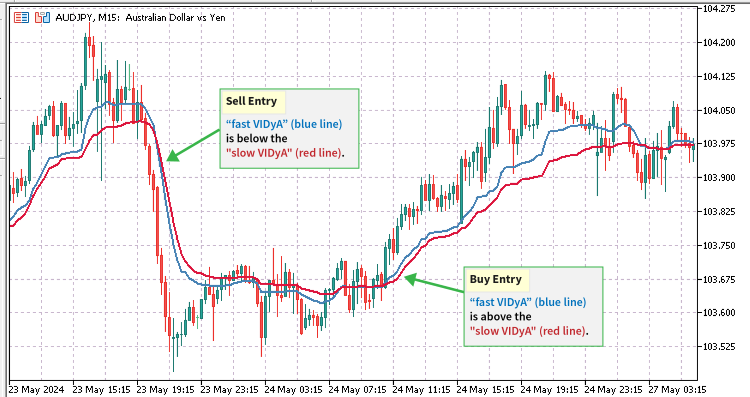
VIDyAトレーリングストップ戦略では、可変指数ダイナミック平均テクニカル指標のペアを使用して売買シグナルを生成します。VIDyA指標はチャート上にラインとして表示されるため、ラインクロスオーバー 戦略を使用して、新たな取引エントリのシグナルを出します。クロスオーバー戦略では、指標ペアは異なる設定でなければなりません。入力値が低い最初のVIDyA指標は、より速く反応しシグナルを生成するため、高速VIDyAと呼ばれます。もう1つは、入力値が高いもので、価格変動への反応がより遅いため、低速VIDyAと呼ばれます。買いエントリの場合、高速VIDyAラインは低速VIDyAラインより上でなければならず、売りエントリの場合、高速VIDyAラインは低速VIDyAラインより下でなければなりません。
MetaEditor IDEの新規ファイルMQL Wizardを使用して新しいEAを作成し、DualVidyaTrader.mq5と呼びます。このEAはPositionsManager.ex5ライブラリを使用するので、最初のステップは、前述のようにライブラリ関数のプロトタイプ記述をインポートして挿入することです。ライブラリのインポートコードセグメントを#propertyディレクティブの下に配置します。ライブラリには多くの関数が含まれているので、そのすべてをインポートしたり使用したりすることはありません。
//--- Import the PositionsManager EX5 Library
#import "Toolkit/PositionsManager.ex5" //-- Open the ex5 import directive
//-- Prototype function descriptions of the EX5 PositionsManager library
bool   OpenBuyPosition(ulong magicNumber, string symbol, double lotSize, int sl, int tp, string positionComment);
bool   OpenSellPosition(ulong magicNumber, string symbol, double lotSize, int sl, int tp, string positionComment);
bool   SetTrailingStopLoss(ulong positionTicket, int trailingStopLoss);
int    MagicPositionsTotal(ulong magicNumber);
int    MagicBuyPositionsTotal(ulong magicNumber);
int    MagicSellPositionsTotal(ulong magicNumber);
bool   CloseAllProfitableBuyPositions(string symbol, ulong magicNumber);
bool   CloseAllProfitableSellPositions(string symbol, ulong magicNumber);
string MagicPositionsStatus(ulong magicNumber, bool formatForComment);
#import //-- Close the ex5 import directive
PositionsManager.ex5ライブラリのインポートコードセグメントの後に、図のようにユーザー入力グローバル変数を挿入します。
input group ""
input ulong magicNo = 1234;
input ENUM_TIMEFRAMES timeframe = PERIOD_H1;
input ENUM_APPLIED_PRICE  appliedPrice = PRICE_CLOSE; // Applied VIDyA Price

//-- Fast Vidya user inputs
input group "-- FAST VIDyA INPUTS"
input int fast_cmoPeriod = 5; // Fast Chande Momentum Period
input int fast_maPeriod = 10; // Fast MA Smoothing Period
input int fast_emaShift = 0; // Fast Horizontal Shift

//-- Slow Vidya user inputs
input group "-- SLOW VIDyA INPUTS"
input int slow_cmoPeriod = 9; //  Slow Chande Momentum Period
input int slow_maPeriod = 12; // Slow MA Smoothing Period
input int slow_emaShift = 0; // Slow Horizontal Shift

input group "-- PROFIT MANAGEMENT"
input bool liquidateProfitOnCrossover = false; // Liquidate Profit On VIDyA Signal
input bool enableTrailingStops = true; // Use Trailing Stop Losses
ストップロス、テイクプロフィット、トレーリングストップロス、ロットまたは出来高の値を格納するために、さらにグローバル変数を作成しましょう。
//-- Get and save the SL, trailingSL and TP values from the spread
int spreadMultiForSl = 1000;
int spreadMultiForTrailingSl = 300;
int spreadMultiForTp = 1000;
int sl = int(SymbolInfoInteger(_Symbol, SYMBOL_SPREAD)) * spreadMultiForSl;
int trailingSl = int(SymbolInfoInteger(_Symbol, SYMBOL_SPREAD)) * spreadMultiForTrailingSl;
int tp = int(SymbolInfoInteger(_Symbol, SYMBOL_SPREAD)) * spreadMultiForTp;

//-- Set the lot or volume to the symbol allowed min value
double lotSize = SymbolInfoDouble(_Symbol, SYMBOL_VOLUME_MIN);
VIDyAテクニカル指標の変数をグローバルスコープに作成し、EAのコードのどの部分からもアクセスできるようにします。
//-- Vidya indicator variables
double fastVidya[], slowVidya[];
int fastVidyaHandle, slowVidyaHandle;
bool buyOk, sellOk, vidyaBuy, vidyaSell;
string vidyaTrend;
グローバル変数セクションの後、EAの起動または初期化中に最初に実行される標準MQL5OnInit()イベント処理関数から呼び出されるEA初期化関数を作成します。この関数をGetInit()と名付けます。VIDyA指標の初期化やスタートアップ処理など、すべてのデータの初期化をこの関数でおこないます。
int GetInit()
  {
   int returnVal = 1;

//-- Helps to regulate and prevent openning multiple trades on a single signal trigger
   buyOk = true;
   sellOk = true;

//-- Create the fast iVIDyA indicator handle
   fastVidyaHandle = iVIDyA(_Symbol, timeframe, fast_cmoPeriod, fast_maPeriod, fast_emaShift, appliedPrice);
   if(fastVidyaHandle < 0)
     {
      Print("Error creating fastVidyaHandle = ", INVALID_HANDLE);
      Print("Handle creation: Runtime error = ", GetLastError());
      //-- Close the EA if the handle is not properly loaded
      return(-1);
     }
   ArraySetAsSeries(fastVidya, true); //-- set the vidya array to series access

//-- Create the slow iVIDyA indicator handle
   slowVidyaHandle = iVIDyA(_Symbol, timeframe, slow_cmoPeriod, slow_maPeriod, slow_emaShift, appliedPrice);
   if(slowVidyaHandle < 0)
     {
      Print("Error creating vidyaHandle = ", INVALID_HANDLE);
      Print("Handle creation: Runtime error = ", GetLastError());
      //-- Close the EA if the handle is not properly loaded
      return(-1);
     }
   ArraySetAsSeries(slowVidya, true); //-- set the vidya array to series access

   return(returnVal);
  }
初期化関数の後で、初期化解除関数を作成し、それをGetDeinit()と呼びます。この関数は標準のMQL5OnDeinit()イベント処理関数内で呼び出され、EAが使用するすべてのリソースのシステム全体のクリーンアップを実行します。これには、VIDyA指標の解放、指標ハンドル配列に結びついたすべてのリソースの解放、チャートコメントやオブジェクトの削除が含まれます。
void GetDeinit()  //-- De-initialize the robot on shutdown and clean everything up
  {
//-- Delete the vidya handles and de-allocate the memory spaces occupied
   IndicatorRelease(fastVidyaHandle);
   ArrayFree(fastVidya);
   IndicatorRelease(slowVidyaHandle);
   ArrayFree(slowVidya);

//-- Delete and clear all chart displayed messages
   Comment("");
  }
次に、VIDyA指標ペアが生成した取引シグナルを検出し、取得するためのカスタム関数を作成する必要があります。この関数はGetVidya()と呼ばれます。シグナル生成が正確かつリアルタイムであることを保証するため、新しいティックが入るたびに実行され、更新されます。
void GetVidya()
  {
//-- Get vidya line directions
   if(CopyBuffer(fastVidyaHandle, 0, 0, 100, fastVidya) <= 0 || CopyBuffer(slowVidyaHandle, 0, 0, 100, slowVidya) <= 0)
     {
      return;
     }

//-- Reset vidya status variables
   vidyaBuy = false;
   vidyaSell = false;
   vidyaTrend = "FLAT";

//-- Scan for vidya crossover buy signal
   if(fastVidya[1] > slowVidya[1])
     {
      //-- Save the vidya signal
      vidyaTrend = "BUY/LONG";
      vidyaBuy = true;
      vidyaSell = false;
     }

//-- Scan for vidya crossover sell signal
   if(fastVidya[1] < slowVidya[1])
     {
      //-- Save the vidya signal
      vidyaTrend = "SELL/SHORT";
      vidyaSell = true;
      vidyaBuy = false;
     }
  }
VIDyAシグナルを取得し更新する関数を作成したので、現在のVIDyAシグナルに基づいて新しいポジションをスキャンし建てるために、新しいティックごとに実行される別のカスタム関数を作成してみましょう。この関数はScanForTradeOpportunities()と呼ばれます。この関数の中で、PositionsManager.ex5ライブラリからインポートしたポジションのオープニングとステータスのプロトタイプ関数を呼び出して実行します。
void ScanForTradeOpportunities()
  {
//-- Get the VIDyA signal
   GetVidya();

   if(MagicPositionsTotal(magicNo) == 0)
     {
      buyOk = true;
      sellOk = true;
     }

//-- Check for a buy entry when a VIDyA buy signal is found
   if(buyOk && vidyaBuy) //-- Open a new buy position
     {
      if(OpenBuyPosition(magicNo, _Symbol, lotSize, sl, tp, "Vidya_BUY: " + IntegerToString(MagicBuyPositionsTotal(magicNo) + 1)))
        {
         buyOk = false;
         sellOk = true;
        }
      //-- Market has a strong buy trend, close all profitable sell positions
      if(liquidateProfitOnCrossover)
        {
         CloseAllProfitableSellPositions(_Symbol, magicNo);
        }
     }

//-- Check for a sell entry when a VIDyA sell signal is found
   if(sellOk && vidyaSell) //-- Open a new sell position
     {
      if(OpenSellPosition(magicNo, _Symbol, lotSize, sl, tp, "Vidya_SELL: " + IntegerToString(MagicSellPositionsTotal(magicNo) + 1)))
        {
         sellOk = false;
         buyOk = true;
        }
      //-- Market has a strong sell trend, close all profitable buy positions
      if(liquidateProfitOnCrossover)
        {
         CloseAllProfitableBuyPositions(_Symbol, magicNo);
        }
     }
  }
また、すべての未決済ポジションのトレーリングストップロスをチェックし、設定する必要があります。これは、PositionsManager.ex5ライブラリにトレーリングストップロスのプロトタイプ関数が含まれているので簡単です。CheckAndSetTrailingSl()という新しい関数を作成して、すべてのポジションをスキャンし、インポートされたSetTrailingStopLoss()プロトタイプ関数のパラメータとして使用するチケットを取得しましょう。
void CheckAndSetTrailingSl()
  {
   int totalOpenPostions = PositionsTotal();
   for(int x = 0; x < totalOpenPostions; x++)
     {
      //--- Get position properties
      ulong  positionTicket = PositionGetTicket(x); //-- Get ticket to select the position
      string selectedSymbol = PositionGetString(POSITION_SYMBOL);
      ulong positionMagicNo = PositionGetInteger(POSITION_MAGIC);
      int positionType = int(PositionGetInteger(POSITION_TYPE));

      //-- modify only the positions we have opened with this EA (magic number)
      if(selectedSymbol != _Symbol && positionMagicNo != magicNo)
        {
         continue;
        }
      //-- Only set the trailing stop loss when the market trend is in the opposing direction of the position type
      if((positionType == POSITION_TYPE_BUY && vidyaBuy) || (positionType == POSITION_TYPE_SELL && vidyaSell))
        {
         continue;
        }
      //--- set the trailing stop loss
      SetTrailingStopLoss(positionTicket, trailingSl); //-- call the imported function from our ex5 library
     }
  }
EAの重要なモジュールをすべて作成したので、新しいティックごとに実行されるMQL5OnTick()イベント処理関数にまとめてみましょう。当社の取引システムを正しい順序でシステマティックに実行するために、以下に指定する順序で配列してください。
void OnTick()
  {
//-- Scan and open new positions based on the vidya signal
   ScanForTradeOpportunities();

//-- Check and set the trailing stop
   if(enableTrailingStops)
     {
      CheckAndSetTrailingSl();
     }

//-- Display the vidya trend and positions status for the EA's magicNo
   Comment(
      "\nvidyaTrend: ", vidyaTrend,
      MagicPositionsStatus(magicNo, true)
   );
  }
最後に、初期化関数と初期化解除関数をそれぞれの標準MQL5イベント処理関数に配置することを忘れないでください。
//+------------------------------------------------------------------+
//| Expert initialization function                                   |
//+------------------------------------------------------------------+
int OnInit()
  {
//---
   if(GetInit() <= 0)
     {
      return(INIT_FAILED);
     }
   return(INIT_SUCCEEDED);
  }
//+------------------------------------------------------------------+
//| Expert deinitialization function                                 |
//+------------------------------------------------------------------+
void OnDeinit(const int reason)
  {
//---
   GetDeinit();
  }
この記事の最後にあるDualVidyaTrader.mq5EAのソースコードファイルにアクセスし、ダウンロードすることができます。取引戦略を実装し、必要に応じてカスタマイズするために必要なコンポーネントがすべて揃っていることを確認するために、完全なソースコードファイルを添付しました。
MetaTrader 5で新しいDualVidyaTrader EAをコンパイルして読み込むと、[Dependencies]タブに、PositionsManager.ex5からンポートされたすべてのライブラリ関数プロトタイプが、EX5ライブラリが保存されている完全なファイルパスとともにリストされていることに気づくでしょう。これにより、EAがチャートに読み込まれる前に、必要なすべての依存関係が正しく参照されるようになります。この記事で前述したようなライブラリ参照エラーが発生した場合、MetaTrader 5 Toolboxウィンドウの[Experts]タブまたは[Journal ]タブに記録されます。
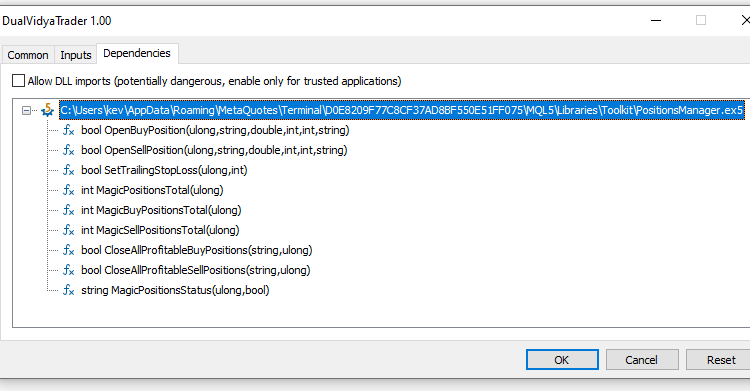
PositionsManager.EX5ライブラリによるポジションマネージャー取引パネル
この2つ目の例では、PositionsManager.ex5ライブラリを使用した基本的なEAのGUI取引パネルを作成します。
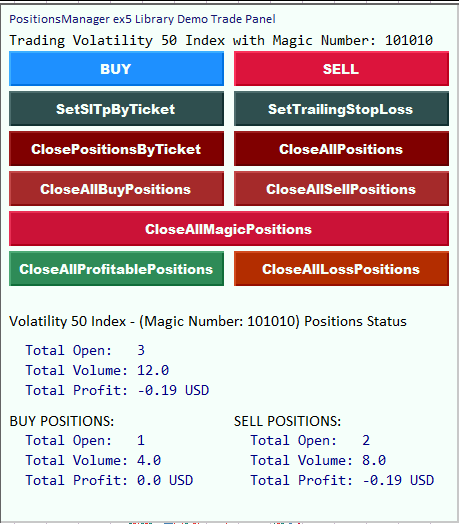
MetaEditor IDEの新規ファイルMQL Wizardを使用して新しいEAを作成し、それをPositionsManagerPanel.mq5と呼びます。#propertyディレクティブのコードセグメントで、PositionsManager.ex5ライブラリをインポートします。インポート関数の説明セクションでは、以下の関数プロトタイプのみをインポートします。
//+------------------------------------------------------------------+
//| EX5 PositionsManager imports                                     |
//+------------------------------------------------------------------+
#import "Toolkit/PositionsManager.ex5" //-- Open import directive
//-- Function descriptions for the imported function prototypes

//--Position Execution and Modification Functions
bool   OpenBuyPosition(ulong magicNumber, string symbol, double lotSize, int sl, int tp, string positionComment);
bool   OpenSellPosition(ulong magicNumber, string symbol, double lotSize, int sl, int tp, string positionComment);
bool   SetSlTpByTicket(ulong positionTicket, int sl, int tp);
bool   ClosePositionByTicket(ulong positionTicket);
bool   SetTrailingStopLoss(ulong positionTicket, int trailingStopLoss);
bool   CloseAllPositions(string symbol, ulong magicNumber);
bool   CloseAllBuyPositions(string symbol, ulong magicNumber);
bool   CloseAllSellPositions(string symbol, ulong magicNumber);
bool   CloseAllMagicPositions(ulong magicNumber);
bool   CloseAllProfitablePositions(string symbol, ulong magicNumber);
bool   CloseAllLossPositions(string symbol, ulong magicNumber);

//--Position Status Monitoring Functions
int    BuyPositionsTotal();
int    SellPositionsTotal();
double PositionsTotalVolume();
double BuyPositionsTotalVolume();
double SellPositionsTotalVolume();
double BuyPositionsProfit();
double SellPositionsProfit();
int    MagicPositionsTotal(ulong magicNumber);
int    MagicBuyPositionsTotal(ulong magicNumber);
int    MagicSellPositionsTotal(ulong magicNumber);
double MagicPositionsTotalVolume(ulong magicNumber);
double MagicBuyPositionsTotalVolume(ulong magicNumber);
double MagicSellPositionsTotalVolume(ulong magicNumber);
double MagicPositionsProfit(ulong magicNumber);
double MagicBuyPositionsProfit(ulong magicNumber);
double MagicSellPositionsProfit(ulong magicNumber);
int    SymbolPositionsTotal(string symbol, ulong magicNumber);
int    SymbolBuyPositionsTotal(string symbol, ulong magicNumber);
int    SymbolSellPositionsTotal(string symbol, ulong magicNumber);
double SymbolPositionsTotalVolume(string symbol, ulong magicNumber);
double SymbolBuyPositionsTotalVolume(string symbol, ulong magicNumber);
double SymbolSellPositionsTotalVolume(string symbol, ulong magicNumber);
double SymbolPositionsProfit(string symbol, ulong magicNumber);
double SymbolBuyPositionsProfit(string symbol, ulong magicNumber);
double SymbolSellPositionsProfit(string symbol, ulong magicNumber);
string AccountPositionsStatus(bool formatForComment);
string MagicPositionsStatus(ulong magicNumber, bool formatForComment);
string SymbolPositionsStatus(string symbol, ulong magicNumber, bool formatForComment);
#import //--- Close import directive
PositionsManagerPanel.mq5には、1つのユーザー入力(マジックナンバー)のみが含まれます。
//--User input variables
input ulong magicNo = 101010;
次に、volumeLot、sl、tpを格納するグローバル変数を作成します。
//-- Global variables
//-----------------------
//-- Get the current symbol spread and multiply it by a significant number
//-- to simulate user-input SL and TP values
double volumeLot = SymbolInfoDouble(_Symbol, SYMBOL_VOLUME_MIN);
int sl = (int)SymbolInfoInteger(_Symbol, SYMBOL_SPREAD) * 50;
int tp = (int)SymbolInfoInteger(_Symbol, SYMBOL_SPREAD) * 100;
グラフィカルユーザーインターフェイスの背景となる、最初のグラフィカルオブジェクトを作成しましょう。この目的のために矩形のラベルを使用します。これを実現するために、CreateRectangleLabel()というカスタム関数を作成します。
//+-----------------------------------------------------------------------+
//| CreateRectangleLabel(): Creates a rectangle label on the chart window |
//+-----------------------------------------------------------------------+
void CreateRectangleLabel()
  {
//--- Detect if we have an object named the same as our rectangle label
   if(ObjectFind(0, "mainRectangleLabel") >= 0)
     {
      //--- Delete the specified object if it is not a rectangle label
      if(ObjectGetInteger(0, "mainRectangleLabel", OBJPROP_TYPE) != OBJ_RECTANGLE_LABEL)
        {
         ObjectDelete(0, "mainRectangleLabel");
        }
     }
   else
     {
      //-- Create the mainRectangleLabel
      ObjectCreate(0, "mainRectangleLabel", OBJ_RECTANGLE_LABEL, 0, 0, 0);
     }
//--- Set up the new rectangle label properties
   ObjectSetInteger(0, "mainRectangleLabel", OBJPROP_CORNER, CORNER_LEFT_UPPER);
   ObjectSetInteger(0, "mainRectangleLabel", OBJPROP_XDISTANCE, 240);
   ObjectSetInteger(0, "mainRectangleLabel", OBJPROP_YDISTANCE, 2);
   ObjectSetInteger(0, "mainRectangleLabel", OBJPROP_XSIZE, 460);
   ObjectSetInteger(0, "mainRectangleLabel", OBJPROP_YSIZE, 520);
   ObjectSetInteger(0, "mainRectangleLabel", OBJPROP_BGCOLOR, clrMintCream);
   ObjectSetInteger(0, "mainRectangleLabel", OBJPROP_BACK, false);
   ObjectSetInteger(0, "mainRectangleLabel", OBJPROP_HIDDEN, true);
  }
また、取引パネルにテキストを表示するためのラベルも必要です。このタスクを処理するために、CreateLabel()という別のカスタム関数を作成します。
//+---------------------------------------------------------+
//| CreateLabel(): Creates a text label on the chart window |
//+---------------------------------------------------------+
void CreateLabel(
   string labelName, int xDistance, int yDistance, int xSize, int ySize,
   string labelText, color textColor, string fontType, int fontSize
)
  {
//--- Detect if we have an object with the same name as our label
   if(ObjectFind(0, labelName) >= 0)
     {
      //--- Delete the specified object if it is not a label
      if(ObjectGetInteger(0, labelName, OBJPROP_TYPE) != OBJ_LABEL)
        {
         ObjectDelete(0, labelName);
        }
     }
   else
     {
      //-- Create the label
      ObjectCreate(0, labelName, OBJ_LABEL, 0, 0, 0);
     }
//--- Set up the new rectangle label properties
   ObjectSetInteger(0, labelName, OBJPROP_CORNER, CORNER_LEFT_UPPER);
   ObjectSetInteger(0, labelName, OBJPROP_XDISTANCE, xDistance);
   ObjectSetInteger(0, labelName, OBJPROP_YDISTANCE, yDistance);
   ObjectSetInteger(0, labelName, OBJPROP_XSIZE, xSize);
   ObjectSetInteger(0, labelName, OBJPROP_YSIZE, ySize);
   ObjectSetString(0, labelName, OBJPROP_TEXT, labelText);
   ObjectSetInteger(0, labelName, OBJPROP_COLOR, textColor);
   ObjectSetString(0, labelName, OBJPROP_FONT, fontType);
   ObjectSetInteger(0, labelName, OBJPROP_FONTSIZE, fontSize);
   ObjectSetInteger(0, labelName, OBJPROP_BACK, false);
   ObjectSetInteger(0, labelName, OBJPROP_HIDDEN, true);
   ObjectSetInteger(0, labelName, OBJPROP_SELECTABLE, false);
   ObjectSetInteger(0, labelName, OBJPROP_SELECTED, false);
  }
取引パネルでさまざまな取引操作をおこなうには、クリック可能なボタンや反応するボタンが必要です。したがって、ボタンの作成を処理するカスタム関数を作成しなければなりません。この関数をCreateButton()と呼ぶことにしましょう。
//+------------------------------------------------------+
//| CreateButton(): Creates buttons on the chart window  |
//+------------------------------------------------------+
void CreateButton(
   string btnName, int xDistance, int yDistance, int xSize, int ySize, string btnText,
   string tooltip, color textColor, string fontType, int fontSize, color bgColor
)
  {
//--- Detect if we have an object named the same as our button
   if(ObjectFind(0, btnName) >= 0)
     {
      //--- Delete the specified object if it is not a button
      if(ObjectGetInteger(0, btnName, OBJPROP_TYPE) != OBJ_BUTTON)
        {
         ObjectDelete(0, btnName);
        }
     }
   else
     {
      //-- Create the button
      ObjectCreate(0, btnName, OBJ_BUTTON, 0, 0, 0);
     }
//--- Set up the new button properties
   ObjectSetInteger(0, btnName, OBJPROP_CORNER, CORNER_LEFT_UPPER);
   ObjectSetInteger(0, btnName, OBJPROP_XDISTANCE, xDistance);
   ObjectSetInteger(0, btnName, OBJPROP_YDISTANCE, yDistance);
   ObjectSetInteger(0, btnName, OBJPROP_XSIZE, xSize);
   ObjectSetInteger(0, btnName, OBJPROP_YSIZE, ySize);
   ObjectSetString(0, btnName, OBJPROP_TEXT, btnText);
   ObjectSetString(0, btnName, OBJPROP_TOOLTIP, tooltip);
   ObjectSetInteger(0, btnName, OBJPROP_COLOR, textColor);
   ObjectSetString(0, btnName, OBJPROP_FONT, fontType);
   ObjectSetInteger(0, btnName, OBJPROP_FONTSIZE, fontSize);
   ObjectSetInteger(0, btnName, OBJPROP_BGCOLOR, bgColor);
  }
次に、上で書いた関数で作成したさまざまなチャートオブジェクトとユーザー入力グラフィカルコンポーネントをすべて読み込むために、もうひとつカスタム関数が必要になります。この関数をLoadChartObjects()と呼ぶことにしましょう。
//+--------------------------------------------------------------------+
//| LoadChartObjects(): Create and load the buttons and chart objects  |
//| for demonstrating how the imported library functions work          |
//+--------------------------------------------------------------------+
void LoadChartObjects()
  {
//-- Create the rectangle label first
   CreateRectangleLabel();

//-- Create the heading label
   CreateLabel(
      "headingLabel", 250, 10, 440, 60,
      "PositionsManager ex5 Library Demo Trade Panel",
      clrMidnightBlue, "Calibri", 10
   );

//-- Create the second heading label
   CreateLabel(
      "headingLabel2", 250, 30, 440, 60,
      ("Trading " + _Symbol + " with Magic Number: " + (string)magicNo),
      clrBlack, "Consolas", 11
   );

//-- "BUY": Button to call the imported ex5 OpenBuyPosition() function
   CreateButton(
      "OpenBuyPositionBtn", 250, 50, 215, 35, "BUY",
      "OpenBuyPosition() Function", clrMintCream, "Arial Black", 10, clrDodgerBlue
   );

//-- "SELL": Button to call the imported ex5 OpenSellPosition() function
   CreateButton(
      "OpenSellPositionBtn", 475, 50, 215, 35, "SELL",
      "OpenSellPosition() Function", clrMintCream, "Arial Black", 10, clrCrimson
   );

//-- "SetSlTpByTicket": Button to call the imported ex5 SetSlTpByTicket() function
   CreateButton(
      "SetSlTpBtn", 250, 90, 215, 35, "SetSlTpByTicket",
      "SetSlTpByTicket() Function", clrMintCream, "Arial Black", 10, clrDarkSlateGray
   );

//-- "SetTrailingStopLoss": Button to call the imported ex5 SetTrailingStopLoss() function when clicked
   CreateButton(
      "SetTrailingStopLossBtn", 475, 90, 215, 35, "SetTrailingStopLoss",
      "SetTrailingStopLoss Function", clrMintCream, "Arial Black", 10, clrDarkSlateGray
   );

//-- "ClosePositionsByTicket": Button to call the imported ex5 ClosePositionByTicket() function
   CreateButton(
      "ClosePositionsBtn", 250, 130, 215, 35, "ClosePositionsByTicket",
      "ClosePositionByTicket() Function", clrMintCream, "Arial Black", 10, clrMaroon
   );

//-- "CloseAllSymbolPositions": Button to call the imported ex5 CloseAllSymbolPositions() function
   CreateButton(
      "CloseAllPositionsBtn", 475, 130, 215, 35, "CloseAllPositions",
      "CloseAllPositions() Function", clrMintCream, "Arial Black", 10, clrMaroon
   );

//-- "CloseAllBuySymbolPositions": Button to call the imported ex5 CloseAllBuySymbolPositions() function
   CreateButton(
      "CloseAllBuyPositionsBtn", 250, 170, 215, 35, "CloseAllBuyPositions",
      "CloseAllBuyPositions() Function", clrMintCream, "Arial Black", 10, clrBrown
   );

//-- "CloseAllSellSymbolPositions": Button to call the imported ex5 CloseAllSellSymbolPositions() function
   CreateButton(
      "CloseAllSellPositionsBtn", 475, 170, 215, 35, "CloseAllSellPositions",
      "CloseAllSellPositions() Function", clrMintCream, "Arial Black", 10, clrBrown
   );

//-- "CloseAllMagicPositions": Button to call the imported ex5 CloseAllMagicPositions() function
   CreateButton(
      "CloseAllMagicPositionsBtn", 250, 210, 440, 35, "CloseAllMagicPositions",
      "CloseAllMagicPositions() Function", clrMintCream, "Arial Black", 10, C'203,18,55'
   );

//-- "CloseAllProfitablePositions": Button to call the imported ex5 CloseAllMagicPositions() function
   CreateButton(
      "CloseAllProfitablePositionsBtn", 250, 250, 215, 35, "CloseAllProfitablePositions",
      "CloseAllProfitablePositions() Function", clrMintCream, "Arial Black", 10, clrSeaGreen
   );

//-- "CloseAllLossPositions": Button to call the imported ex5 CloseAllLossPositions() function
   CreateButton(
      "CloseAllLossPositionsBtn", 475, 250, 215, 35, "CloseAllLossPositions",
      "CloseAllLossPositions() Function", clrMintCream, "Arial Black", 10, C'179,45,0'
   );

//-- Create the bottomHeadingLabel
   CreateLabel(
      "bottomHeadingLabel", 250, 310, 440, 60,
      (_Symbol + " - (Magic Number: " + (string)magicNo + ") Positions Status"),
      clrBlack, "Calibri", 12
   );

//-- Create totalOpenPositionsLabel
   CreateLabel(
      "totalOpenPositionsLabel", 250, 340, 440, 60,
      ("  Total Open:   " + (string)MagicPositionsTotal(magicNo)),
      clrNavy, "Consolas", 11
   );

//-- Create totalPositionsVolumeLabel
   CreateLabel(
      "totalPositionsVolumeLabel", 250, 360, 440, 60,
      ("  Total Volume: " + (string)NormalizeDouble(MagicPositionsTotalVolume(magicNo), 2)),
      clrNavy, "Consolas", 11
   );

//-- Create the totalPositionsProfitLabel
   CreateLabel(
      "totalPositionsProfitLabel", 250, 380, 100, 60,
      (
         "  Total Profit: " + (string)(NormalizeDouble(MagicPositionsProfit(magicNo), 2)) +
         " " + AccountInfoString(ACCOUNT_CURRENCY)
      ),
      clrNavy, "Consolas", 11
   );

//-- Create the buyPositionsHeadingLabel
   CreateLabel(
      "buyPositionsHeadingLabel", 250, 410, 440, 60,
      ("BUY POSITIONS:"),
      clrBlack, "Calibri", 12
   );

//-- Create the totalBuyPositionsLabel
   CreateLabel(
      "totalBuyPositionsLabel", 250, 430, 440, 60,
      ("  Total Open:   " + (string)MagicBuyPositionsTotal(magicNo)),
      clrNavy, "Consolas", 11
   );

//-- Create the totalBuyPositionsVolumeLabel
   CreateLabel(
      "totalBuyPositionsVolumeLabel", 250, 450, 440, 60,
      ("  Total Volume: " + (string)NormalizeDouble(MagicBuyPositionsTotalVolume(magicNo), 2)),
      clrNavy, "Consolas", 11
   );

//-- Create the totalBuyPositionsProfitLabel
   CreateLabel(
      "totalBuyPositionsProfitLabel", 250, 470, 440, 60,
      (
         "  Total Profit: " + (string)(NormalizeDouble(MagicBuyPositionsProfit(magicNo), 2)) +
         " " + AccountInfoString(ACCOUNT_CURRENCY)
      ),
      clrNavy, "Consolas", 11
   );

//-- Create the sellPositionsHeadingLabel
   CreateLabel(
      "sellPositionsHeadingLabel", 475, 410, 440, 60,
      ("SELL POSITIONS:"),
      clrBlack, "Calibri", 12
   );

//-- Create the totalSellPositionsLabel
   CreateLabel(
      "totalSellPositionsLabel", 475, 430, 440, 60,
      ("  Total Open:   " + (string)MagicSellPositionsTotal(magicNo)),
      clrNavy, "Consolas", 11
   );

//-- Create the totalSellPositionsVolumeLabel
   CreateLabel(
      "totalSellPositionsVolumeLabel", 475, 450, 440, 60,
      ("  Total Volume: " + (string)NormalizeDouble(MagicSellPositionsTotalVolume(magicNo), 2)),
      clrNavy, "Consolas", 11
   );

//-- Create the totalSellPositionsProfitLabel
   CreateLabel(
      "totalSellPositionsProfitLabel", 475, 470, 100, 60,
      (
         "  Total Profit: " + (string)(NormalizeDouble(MagicSellPositionsProfit(magicNo), 2)) +
         " " + AccountInfoString(ACCOUNT_CURRENCY)
      ),
      clrNavy, "Consolas", 11
   );

//--- Redraw the chart to refresh it so that it loads our new chart objects
   ChartRedraw();
//---
  }
この次のカスタム関数は、EAの終了時または初期化解除時に、すべてのチャートオブジェクトとデータのクリーンアップと削除をおこないます。これをDeleteChartObjects()と名付けましょう。これはOnDeinit()標準イベント処理MQL5関数に配置され、実行されます。
//+------------------------------------------------------------------------------+
//| DeleteChartObjects(): Delete all the chart objects when the EA is terminated |
//| on De-initialization                                                         |
//+------------------------------------------------------------------------------+
void DeleteChartObjects()
  {
//---
//--- Clean up and delete all the buttons or graphical objects
   ObjectDelete(0, "OpenBuyPositionBtn");
   ObjectDelete(0, "OpenSellPositionBtn");
   ObjectDelete(0, "SetSlTpBtn");
   ObjectDelete(0, "SetTrailingStopLossBtn");
   ObjectDelete(0, "ClosePositionsBtn");
   ObjectDelete(0, "CloseAllPositionsBtn");
   ObjectDelete(0, "CloseAllBuyPositionsBtn");
   ObjectDelete(0, "CloseAllSellPositionsBtn");
   ObjectDelete(0, "CloseAllMagicPositionsBtn");
   ObjectDelete(0, "CloseAllProfitablePositionsBtn");
   ObjectDelete(0, "CloseAllLossPositionsBtn");
   ObjectDelete(0, "mainRectangleLabel");

   ObjectDelete(0, "headingLabel");
   ObjectDelete(0, "headingLabel2");

   ObjectDelete(0, "bottomHeadingLabel");
   ObjectDelete(0, "totalOpenPositionsLabel");
   ObjectDelete(0, "totalPositionsVolumeLabel");
   ObjectDelete(0, "totalPositionsProfitLabel");

   ObjectDelete(0, "buyPositionsHeadingLabel");
   ObjectDelete(0, "totalBuyPositionsLabel");
   ObjectDelete(0, "totalBuyPositionsVolumeLabel");
   ObjectDelete(0, "totalBuyPositionsProfitLabel");

   ObjectDelete(0, "sellPositionsHeadingLabel");
   ObjectDelete(0, "totalSellPositionsLabel");
   ObjectDelete(0, "totalSellPositionsVolumeLabel");
   ObjectDelete(0, "totalSellPositionsProfitLabel");
  }
グラフィカルオブジェクトの作成と管理が終わったので、PositionManager.ex5ライブラリからインポートした関数を実装するカスタム関数を作成しましょう。このグループの最初の関数はModifySlTp()と呼び、ユーザーが入力したマジックナンバーに一致する、このEAによってオープンされたすべてのポジションのストップロス(sl)とテイクプロフィット(tp)を修正する役割を果たします。この関数はチャートの[setSLTP ]ボタンがクリックされるたびに実行されます。
//+-------------------------------------------------------------------------+
// ModifySlTp(): This function demonstrates how to use the imported ex5     |
// bool SetSlTpByTicket(ulong positionTicket, int sl, int tp);              |
// It runs this function when the setSLTP button on the chart is clicked.   |
//+-------------------------------------------------------------------------+
void ModifySlTp()
  {
//-- Get positions that we have openend with the chart buy and sell buttons to test the imported function with
   int totalOpenPostions = PositionsTotal();
//--- Scan open positions
   for(int x = 0; x < totalOpenPostions; x++)
     {
      //--- Get position properties
      ulong  positionTicket = PositionGetTicket(x); //-- Get ticket to select the position
      string selectedSymbol = PositionGetString(POSITION_SYMBOL);
      ulong positionMagicNo = PositionGetInteger(POSITION_MAGIC);

      //-- modify only the positions we have opened with this EA (magic number) using the BUY and SELL buttons on the chart
      if(selectedSymbol != _Symbol && positionMagicNo != magicNo)
        {
         continue;
        }
      //--- modify the sl and tp of the position
      SetSlTpByTicket(positionTicket, sl, tp);//-- call the imported function from our ex5 library
     }
  }
次の関数SetTrailingSl() は、トレーリングストップロスを更新します。これは、チャート上の[SetTrailingStopLoss]ボタンがクリックされたときと、OnTick()イベント処理関数で新しいティックが入力されるたびに実行されます。
//+-----------------------------------------------------------------------------------+
// SetTrailingSl(): This function demonstrates how to use the imported ex5            |
// bool SetTrailingStopLoss(ulong positionTicket, int trailingStopLoss);              |
// It runs this function when the SetTrailingStopLoss button on the chart is clicked. |
//+-----------------------------------------------------------------------------------+
void SetTrailingSl()
  {
   int trailingSl = sl;

//-- Get positions that we have openend with the chart buy and sell buttons to test the imported function with
   int totalOpenPostions = PositionsTotal();
//--- Scan open positions
   for(int x = 0; x < totalOpenPostions; x++)
     {
      //--- Get position properties
      ulong  positionTicket = PositionGetTicket(x); //-- Get ticket to select the position
      string selectedSymbol = PositionGetString(POSITION_SYMBOL);
      ulong positionMagicNo = PositionGetInteger(POSITION_MAGIC);

      //-- modify only the positions we have opened with this EA (magic number) using the BUY and SELL buttons on the chart
      if(selectedSymbol != _Symbol && positionMagicNo != magicNo)
        {
         continue;
        }
      //--- set the trailing stop loss
      SetTrailingStopLoss(positionTicket, trailingSl); //-- call the imported function from our ex5 library
     }
  }
ClosePositionWithTicket()関数は、すべてのポジションをクローズする役割を果たし、チャート上の[ClosePositions]ボタンが押されたときに実行されます。
//+-----------------------------------------------------------------------------------+
// ClosePositionWithTicket(): This function demonstrates how to use the imported ex5  |
// bool ClosePositionByTicket(ulong positionTicket)                                   |
// It runs this function when the ClosePositions button on the chart is clicked.      |
//+-----------------------------------------------------------------------------------+
void ClosePositionWithTicket()
  {
//-- Get positions that we have openend with the chart buy and sell buttons to test the imported function with
   int totalOpenPostions = PositionsTotal();
//--- Scan open positions
   for(int x = 0; x < totalOpenPostions; x++)
     {
      //--- Get position properties
      ulong  positionTicket = PositionGetTicket(x); //-- Get ticket to select the position
      string selectedSymbol = PositionGetString(POSITION_SYMBOL);
      ulong positionMagicNo = PositionGetInteger(POSITION_MAGIC);

      //-- close only the positions we have opened with this EA (magic number) using the BUY and SELL buttons on the chart
      if(selectedSymbol != _Symbol && positionMagicNo != magicNo)
        {
         continue;
        }

      //--- Close the position
      ClosePositionByTicket(positionTicket);//-- call the imported function from our ex5 library
     }
  }
最後の関数はMQL5の標準的なOnChartEvent()関数で、さまざまなボタンが押されたことを検出し、対応するアクションを実行します。PositionsManager.ex5ライブラリからインポートされたほぼすべてのポジション管理関数は、この関数から呼び出され実行されます。
//+------------------------------------------------------------------+
//| ChartEvent function to detect when the buttons are clicked       |
//+------------------------------------------------------------------+
void OnChartEvent(const int id,
                  const long &lparam,
                  const double &dparam,
                  const string &sparam)
  {
//---
//--- Detected a CHARTEVENT_CLICK event
   if(id == CHARTEVENT_OBJECT_CLICK)
     {
      Print(__FUNCTION__, ": ", sparam);

      //--- Buy when OpenBuyPositionBtn button (BUY) is pressed or clicked
      if(sparam == "OpenBuyPositionBtn")
        {
         //-- Call our imported function from the Toolkit/PositionsManager ex5 library
         OpenBuyPosition(magicNo, _Symbol, volumeLot, sl, tp, "ex5 PositionsManager");

         //--- Release and unpress the button
         ObjectSetInteger(0, "OpenBuyPositionBtn", OBJPROP_STATE, false);
        }

      //--- Sell when OpenSellPositionBtn button (SELL) is pressed
      if(sparam == "OpenSellPositionBtn")
        {
         //-- Call our imported function from the Toolkit/PositionsManager ex5 library
         OpenSellPosition(magicNo, _Symbol, volumeLot, sl, tp, "ex5 PositionsManager");
         //OpenSellPosition(magicNo, "NON-EXISTENT-Symbol-Name"/*_Symbol*/, volumeLot, sl, tp, "ex5 PositionsManager");

         //--- Release and unpress the button
         ObjectSetInteger(0, "OpenSellPositionBtn", OBJPROP_STATE, false);
        }

      //--- Modify specified positions SL and TP when SetSlTpBtn button (setSLTP) is pressed
      if(sparam == "SetSlTpBtn")
        {
         ModifySlTp();//-- Modify the SL and TP of the positions generated by the BUY and SELL buttons
         //--- Release and unpress the button
         ObjectSetInteger(0, "SetSlTpBtn", OBJPROP_STATE, false);
        }

      //--- Set the Trailing Stop Loss when SetSlTpBtn button (SetTrailingStopLossBtn) is pressed
      if(sparam == "SetTrailingStopLossBtn")
        {
         SetTrailingSl();//-- Set the Trailing Stop Loss for the positions generated by the BUY and SELL buttons
         //--- Release and unpress the button
         ObjectSetInteger(0, "SetTrailingStopLossBtn", OBJPROP_STATE, false);
        }

      //--- Close specified positions when SetSlTpBtn button (setSLTP) is pressed
      if(sparam == "ClosePositionsBtn")
        {
         ClosePositionWithTicket();//-- Close all the positions generated by the BUY and SELL buttons
         //--- Release and unpress the button
         ObjectSetInteger(0, "ClosePositionsBtn", OBJPROP_STATE, false);
        }

      //--- Close all positions for the current symbol when the CloseAllPositionsBtn button is pressed
      if(sparam == "CloseAllPositionsBtn")
        {
         CloseAllPositions(_Symbol, 0);//-- Close all the open symbol positions
         //--- Release and unpress the button
         ObjectSetInteger(0, "CloseAllPositionsBtn", OBJPROP_STATE, false);
        }

      //--- Close all buy positions for the current symbol when the CloseAllBuyPositionsBtn button is pressed
      if(sparam == "CloseAllBuyPositionsBtn")
        {
         CloseAllBuyPositions(_Symbol, magicNo);//-- Close all the open symbol buy positions
         //--- Release and unpress the button
         ObjectSetInteger(0, "CloseAllBuyPositionsBtn", OBJPROP_STATE, false);
        }

      //--- Close all sell positions for the current symbol when the CloseAllSellPositionsBtn button is pressed
      if(sparam == "CloseAllSellPositionsBtn")
        {
         CloseAllSellPositions(_Symbol, magicNo);//-- Close all the open symbol sell positions
         //--- Release and unpress the button
         ObjectSetInteger(0, "CloseAllSellPositionsBtn", OBJPROP_STATE, false);
        }

      //--- Close all positions with the specified magic number when the CloseAllMagicPositionsBtn button is pressed
      if(sparam == "CloseAllMagicPositionsBtn")
        {
         CloseAllMagicPositions(magicNo);//-- Close all the open positions with the specified magic number
         //--- Release and unpress the button
         ObjectSetInteger(0, "CloseAllMagicPositionsBtn", OBJPROP_STATE, false);
        }

      //--- Close all profitable positions with the specified symbol and magic number when the CloseAllProfitablePositionsBtn button is pressed
      if(sparam == "CloseAllProfitablePositionsBtn")
        {
         CloseAllProfitablePositions(_Symbol, magicNo);//-- Close all the open profitable positions with the specified symbol and magic number
         //--- Release and unpress the button
         ObjectSetInteger(0, "CloseAllProfitablePositionsBtn", OBJPROP_STATE, false);
        }

      //--- Close all loss positions with the specified symbol and magic number when the CloseAllLossPositionsBtn button is pressed
      if(sparam == "CloseAllLossPositionsBtn")
        {
         CloseAllLossPositions(_Symbol, magicNo);//-- Close all the open loss positions with the specified symbol and magic number
         //--- Release and unpress the button
         ObjectSetInteger(0, "CloseAllLossPositionsBtn", OBJPROP_STATE, false);
        }

      //--- Redraw the chart to refresh it
      ChartRedraw();
     }
//---
  }
PositionsTradePanel.mq5EAを実行する前に、OnInit()、OnDeinit()、OnTick()イベント処理関数に必要なコンポーネントをすべて組み込む必要があります。まず、OnInit()関数内のLoadChartObjects()関数を使用して、EAの初期化中にすべてのグラフィカルオブジェクトを読み込みます。
//+------------------------------------------------------------------+
//| Expert initialization function                                   |
//+------------------------------------------------------------------+
int OnInit()
  {
//---
//create buttons to demonstrate how the different ex5 library functions work
   LoadChartObjects();
//---
   return(INIT_SUCCEEDED);
  }
OnTick()関数内で以下の関数を呼び出して実行します。
//+------------------------------------------------------------------+
//| Expert tick function                                             |
//+------------------------------------------------------------------+
void OnTick()
  {
//-- Check for profitable positions and set the trailing stop loss on every new tick
   SetTrailingSl(); //-- Calls the ex5 library function responsible for setting Trailing stops
   LoadChartObjects(); //--- Update chart objects
  }
OnDeinit()イベントハンドラに初期化解除関数を追加し、EA の終了またはクローズ時にすべてのグラフィカルオブジェクトとチャートオブジェクトを削除します。
//+------------------------------------------------------------------+
//| Expert deinitialization function                                 |
//+------------------------------------------------------------------+
void OnDeinit(const int reason)
  {
//---
//-- Clean up the chart
   DeleteChartObjects();

//-- Clear any chart comments
   Comment("");
  }
この記事の最後に、PositionsManagerPanel.mq5EAの完全なソースコードファイルが添付されていますので、より詳しく調べてみてください。
PositionsManagerPanel.mq5 EAを保存、コンパイルし、MetaTrader 5のチャートに読み込みます。[Dependencies]タブには、PositionsManager.ex5 からインポートされたすべてのライブラリ関数プロトタイプと、EX5ライブラリが保存されている完全なファイルパスが表示されます。チャート上に読み込まれたら、いくつかのポジションを建て、取引端末のツールボックスパネルにある[Experts]タブのログで、PositionsManager.ex5プロトタイプ関数から出力されたログデータを確認して、テストしてください。
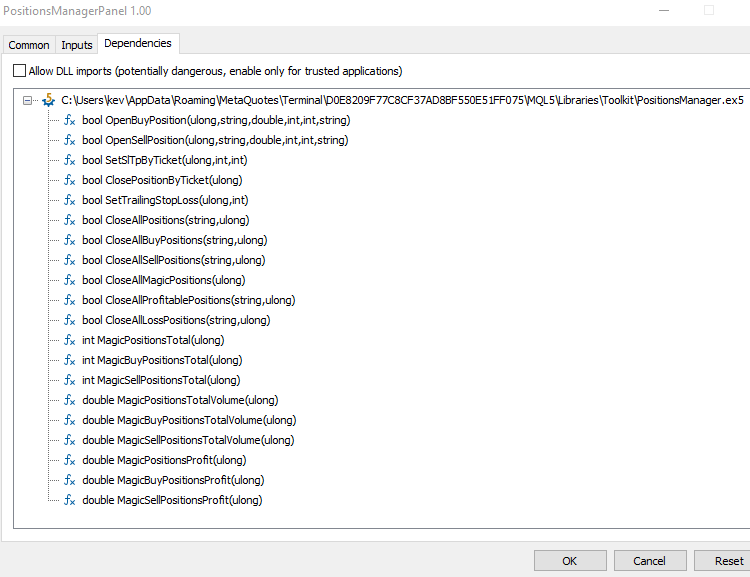
結論
これで、MQL5 EX5ライブラリについて包括的に理解できました。本記事では、EX5ライブラリの作成から統合、外部MQL5プロジェクトへの実装方法、ライブラリに関するさまざまなエラーのデバッグ方法、さらに更新と再デプロイ手順について詳しく説明しました。また、パワフルで多機能なEX5ポジション管理ライブラリを作成し、詳細なマニュアルと実践的な使用例も提供しました。さらに、2つの異なる実用的なMQL5 EAにこのライブラリをインポートして実装する手順を実演し、EX5ライブラリの効果的な活用方法を具体的に示しました。次回は、MQL5アプリケーションの保留注文処理を簡素化するために設計された、包括的な保留注文管理EX5ライブラリを開発する際にも、同様のアプローチを採用します。皆様の取引やプログラミングの成功をお祈りしています。
MetaQuotes Ltdにより英語から翻訳されました。
元の記事: https://www.mql5.com/en/articles/15224
警告: これらの資料についてのすべての権利はMetaQuotes Ltd.が保有しています。これらの資料の全部または一部の複製や再プリントは禁じられています。
この記事はサイトのユーザーによって執筆されたものであり、著者の個人的な見解を反映しています。MetaQuotes Ltdは、提示された情報の正確性や、記載されているソリューション、戦略、または推奨事項の使用によって生じたいかなる結果についても責任を負いません。

 古典的な戦略をPythonで再構築する(第2回):ボリンジャーバンドのブレイクアウト
 データサイエンスと機械学習(第27回):MetaTrader 5取引ボットにおける畳み込みニューラルネットワーク(CNN)に価値はあるか?
 初心者からエキスパートへ:MQL5取引のエッセンシャルジャーニー
 Candlestick Trend Constraintモデルの構築(第7回):EA開発モデルの改良

- 無料取引アプリ
- 8千を超えるシグナルをコピー
- 金融ニュースで金融マーケットを探索