DinexSpace Trade History Exporter
- Utilità
-
Huu Tho Tran
 DinexSpace - studio di automazione del trading per MetaTrader 5.
Validiamo la tua idea di trading con costi reali in due fasi prima di programmarla. Se l'idea non supera la validazione ci fermiamo e non paghi il robot.
Storico live - Versione: 1.0
Trade History Exporter is a script that saves your account's trading history to CSV files, so you can study your own results in Excel, Google Sheets or Python. It only reads history.
What it writes (in MQL5\Files\DinexHistory\, via File → Open Data Folder)
- Deals file, one row per deal: ticket, time, symbol, type (buy, sell, balance, commission …), entry (in, out, reverse, close by), volume, price, commission, swap, fee, profit, magic number, position ID and comment.
- Positions file (optional), one row per position opened and fully closed inside the range: symbol, side, open and close time, volume, average open and close price, profit, swap, commission, fee, net result and magic number.
- File names start with the account number and today's date, so repeated exports do not overwrite older ones from other days.
How to use it
1. Drag the script onto any chart.
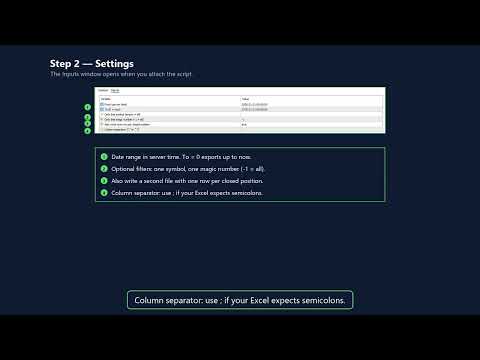
2. Choose the date range (server time), and optionally a single symbol or magic number.
3. Press OK. The Experts log shows how many rows were written and where.
Inputs
From, To (0 = now), symbol filter, magic filter, positions file on/off, column separator ("," or ";" for spreadsheets that use a comma as decimal mark).
Limits
- Only the history available in the terminal is exported. On some accounts you may need to set the History tab to "All history" first.
- Positions that were opened before the start date or are still open are left out of the positions file, but their deals are in the deals file.
- Text fields containing the separator are quoted.
The script never places, changes or closes orders. It writes only inside the terminal's own Files folder.