Lib5 EAPadPRO for MT5

4.5

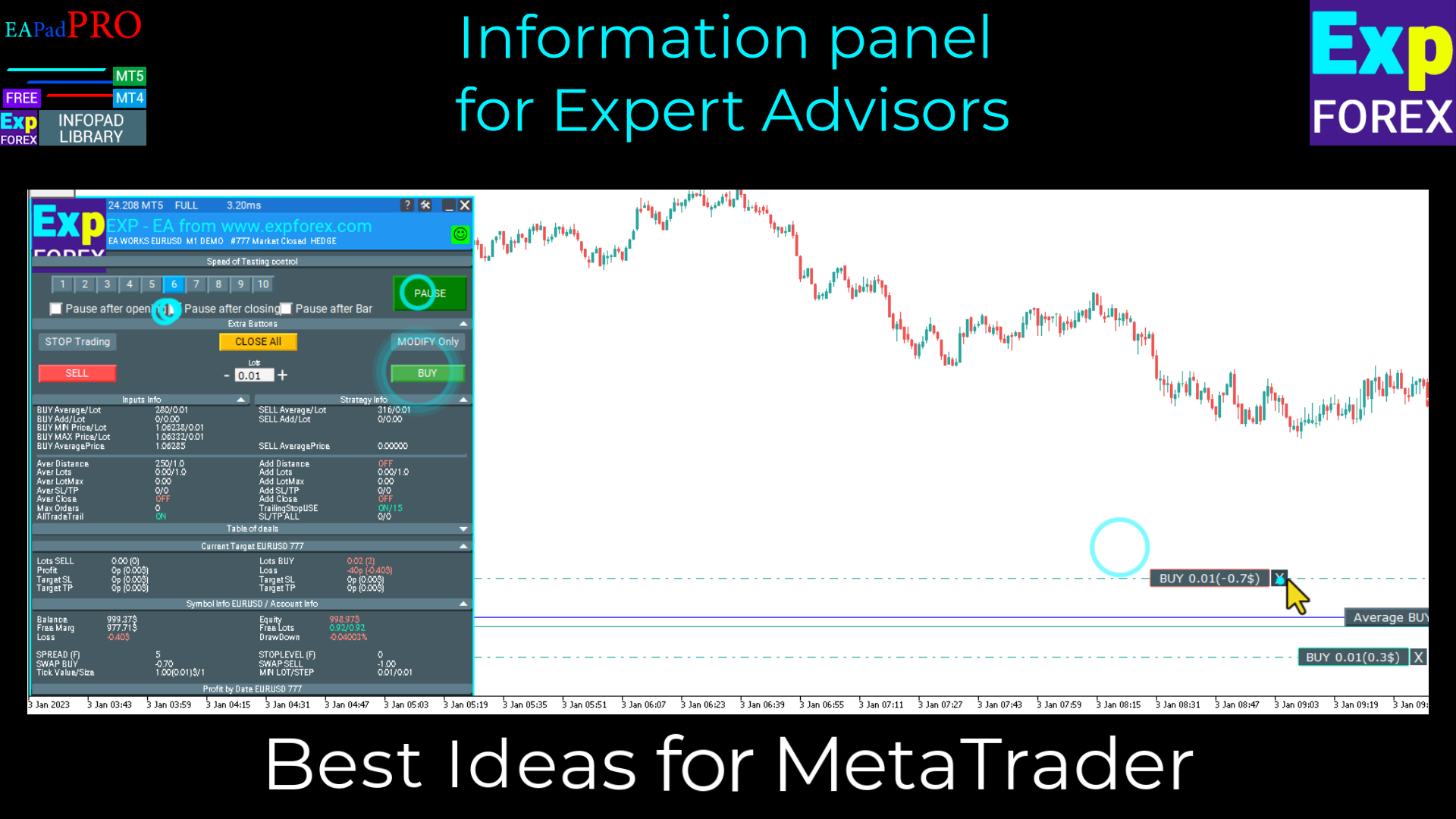
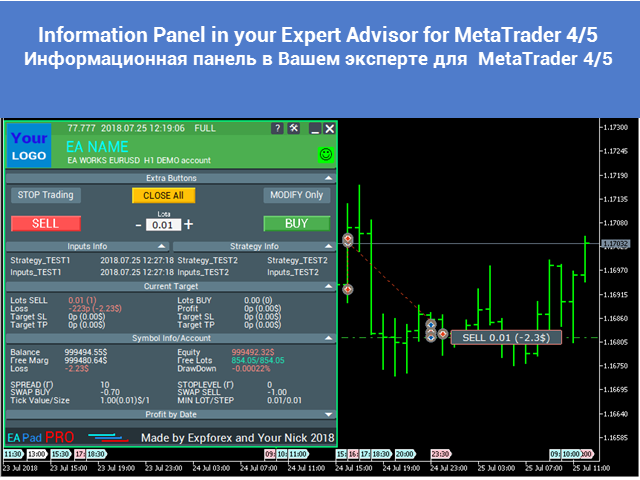
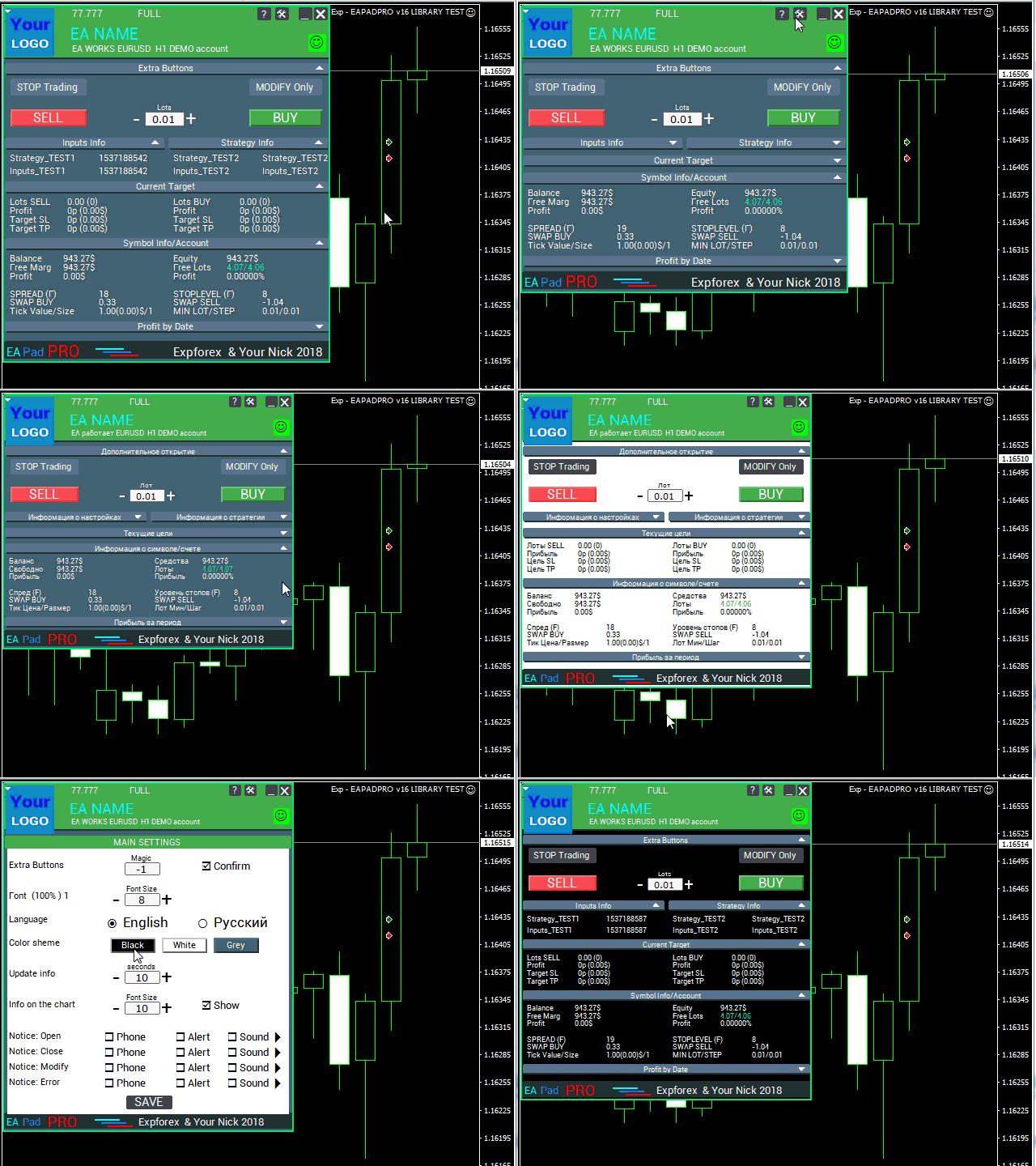
EAPADPRO Library for MetaTrader 5 è una libreria professionale gratuita di interfaccia per aggiungere un pannello informativo moderno al tuo Expert Advisor.

La libreria è pensata per sviluppatori MQL5 che vogliono dare ai propri programmi di trading una presentazione visiva più pulita, più informativa e più professionale direttamente sul grafico di MetaTrader 5.

Gli Expert Advisors per MetaTrader 5 spesso contengono logiche più complesse, molte impostazioni, filtri per Magic number, regole di esecuzione degli ordini e valori interni della strategia. EAPADPRO aiuta a presentare queste informazioni in un pannello strutturato, così l’utente può vedere lo stato attuale del programma in modo più rapido e chiaro.

EAPADPRO per MT5 è una libreria gratuita. Puoi usarla per migliorare l’interfaccia, l’output informativo e la qualità visiva del tuo Expert Advisor.

Guida completa di integrazione passo dopo passo: LIB - EAPADPRO istruzione passo dopo passo

Descrizione dettagliata del pannello EAPADPRO: Pannello informativo EAPADPRO

Versione per MetaTrader 4: EAPADPRO Library for MT4

MQL5 Channel https://www.mql5.com/en/channels/expforex


Interfaccia professionale per MT5 Expert Advisors

EAPADPRO ti permette di aggiungere un dashboard informativo visivo al tuo Expert Advisor senza dover creare da zero un sistema completo di pannello.

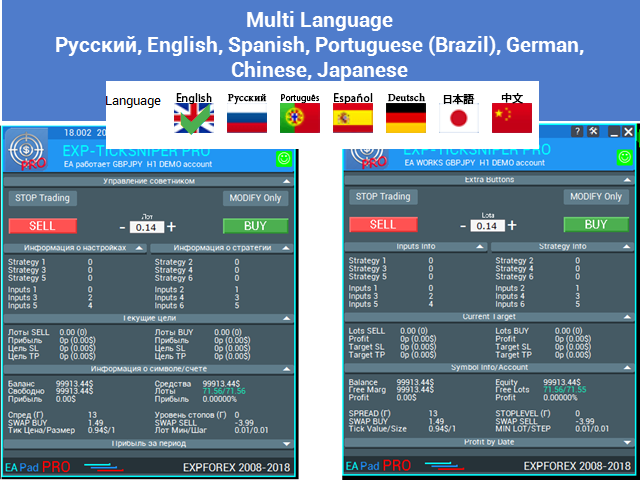
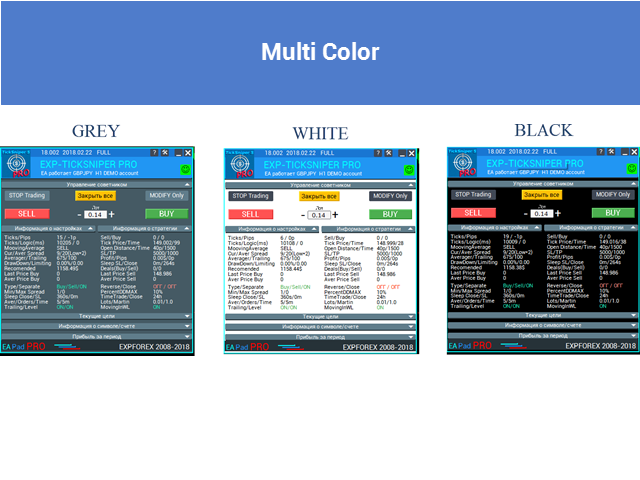
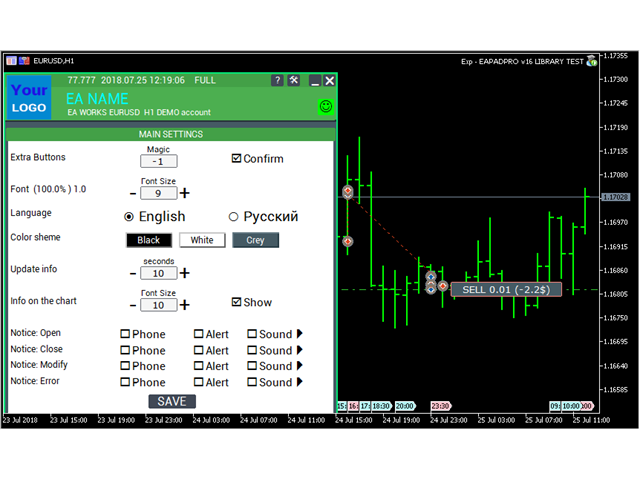
Il pannello può mostrare informazioni importanti sul tuo EA, sul simbolo attuale, sul conto, sui valori della strategia, sulla logica del Magic number, sui permessi di trading, sulle notifiche e sugli elementi opzionali di controllo del trading con un clic.

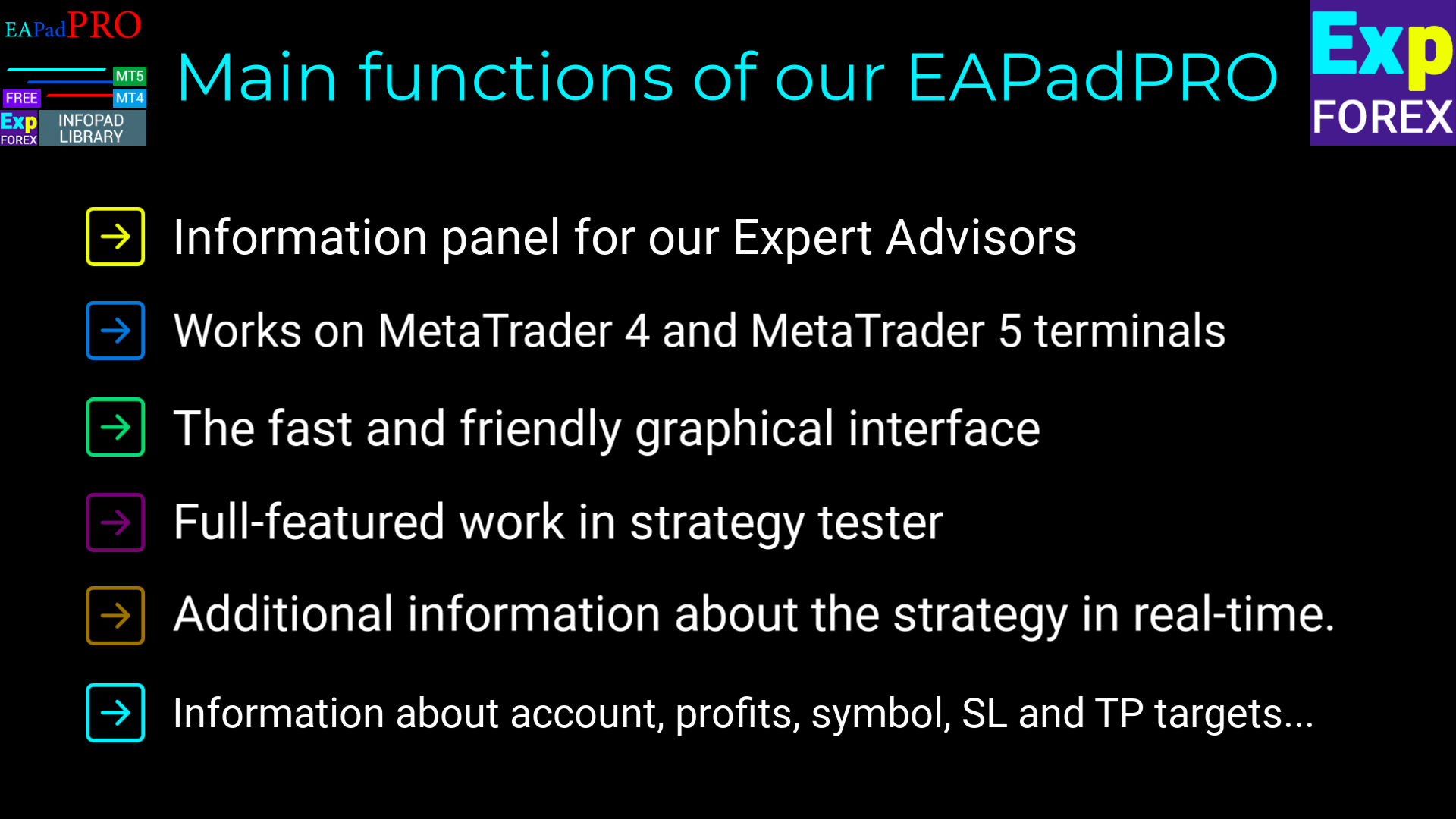
  • Pannello informativo moderno direttamente sul grafico di MetaTrader 5;
  • Visualizzazione del nome dell’Expert Advisor, versione, logo e informazioni sull’autore;
  • Visualizzazione dei parametri input selezionati e dei valori importanti della strategia;
  • Filtro delle informazioni del pannello per Magic number;
  • Supporto per le impostazioni del tipo di esecuzione degli ordini in MT5;
  • Blocco opzionale BUY / SELL con controllo in un clic;
  • Notifiche, log e informazioni sugli errori per maggiore trasparenza;
  • Una presentazione più pulita e professionale del tuo prodotto di trading.


Perché questa libreria è utile?

Un robot di trading può avere una logica potente, ma senza una buona interfaccia l’utente non sempre capisce esattamente cosa sta facendo l’Expert Advisor.

Con EAPADPRO, il tuo EA può mostrare le informazioni chiave direttamente sul grafico. Questo rende il prodotto più comprensibile, più facile da supportare e più interessante per gli utenti che apprezzano un feedback visivo chiaro.

La libreria non fornisce segnali di trading e non modifica la logica della tua strategia. È progettata per migliorare l’interfaccia, la visualizzazione delle informazioni e l’esperienza utente del tuo MetaTrader 5 Expert Advisor.


Processo di integrazione

Il processo di integrazione è composto da 10 passaggi pratici. Ogni passaggio è spiegato in dettaglio nell’istruzione corrispondente.

  1. Installa la libreria EAPADPRO dal MQL5 Market;
  2. Apri il codice sorgente del tuo MetaTrader 5 Expert Advisor;
  3. Apri l’esempio dall’istruzione passo dopo passo;
  4. Aggiungi al tuo EA i blocchi di codice necessari;
  5. Collega le funzioni di inizializzazione, tick, eventi di trading ed eventi del grafico;
  6. Personalizza il pannello per il tuo prodotto;
  7. Compila e testa il risultato in MetaTrader 5.


Personalizzazione di EAPADPRO

Puoi adattare il pannello al tuo Expert Advisor:

  1. versionea — versione del tuo Expert Advisor visualizzata nel pannello;
  2. BMPLOGO — il tuo logo BMP 60x60 visualizzato nel pannello;
  3. icon — icona del tuo Expert Advisor nelle proprietà del terminale;
  4. defEANAME — nome del tuo Expert Advisor visualizzato nel pannello;
  5. YourName — il tuo nome o nickname visualizzato nel pannello;
  6. copyright — informazioni di copyright visualizzate nelle proprietà dell’Expert Advisor;
  7. CreateInputs — funzione per visualizzare nel pannello le variabili esterne input selezionate;
  8. CreateStrategy — funzione per visualizzare nel pannello i valori selezionati della strategia;
  9. MagicForEaPadPRO — filtro delle informazioni del pannello per Magic number;
  10. MagicForEaPadPRO_Open — Magic number assegnato alle posizioni aperte dal pannello;
  11. CommentForEaPadPRO — commento assegnato alle posizioni aperte dal pannello;
  12. TypeFillingForEaPadPRO — tipo di esecuzione degli ordini utilizzato per le operazioni di trading in MT5;
  13. ShowBuySell — opzione per mostrare o nascondere il blocco di trading BUY / SELL con un clic.

Puoi anche configurare variabili esterne:

  1. ShowEaPadPro — mostrare o nascondere il pannello EAPADPRO;
  2. FontName — font utilizzato dal pannello.


Condizioni d’uso

La libreria informativa EAPADPRO per MetaTrader 5 è distribuita gratuitamente, ma con attribuzione obbligatoria all’autore.

Se utilizzi questa libreria in un Expert Advisor, indicatore o altro prodotto di trading che pubblichi, vendi o distribuisci, aggiungi la seguente attribuzione nella descrizione del tuo prodotto:

  1. Il pannello informativo EAPADPRO è stato sviluppato da Expforex.
  2. Tutti i diritti del pannello EAPADPRO appartengono a Vladislav / Expforex.
  3. L’autore del pannello EAPADPRO non è responsabile dell’Expert Advisor, indicatore o strategia che utilizza questo pannello.
  4. Il pannello EAPADPRO è progettato solo per fornire informazioni visive e di trading aggiuntive all’interno di MetaTrader.


Avviso importante

EAPADPRO è una libreria di interfaccia e informazioni. Non apre operazioni da sola se non colleghi e non abiliti le funzioni di controllo corrispondenti nel tuo Expert Advisor.

La libreria non garantisce profitti, non sostituisce la tua strategia di trading e non fornisce segnali di trading.

Usa EAPADPRO per rendere il tuo MetaTrader 5 Expert Advisor più informativo, più comodo per l’utente e più professionale.

Recensioni 11
Benjamin Afedzie
3937
Benjamin Afedzie 2025.07.02 22:08 
 

great product

Seth Tetteh
2583
Seth Tetteh 2024.04.25 12:47 
 

not bad

Nepomnjashchy
78
Nepomnjashchy 2023.12.16 02:08 
 

Пока все классно. тестируют

Prodotti consigliati
Delete Only Pending Orders
Muhammad Usman Siddique
Lo script UZFX - Delete Only Pending Orders per MetaTrader 5 (MT5) è uno strumento semplice ma efficace che rimuove automaticamente tutti gli ordini in sospeso (Buy Limit, Sell Limit, Buy Stop, Sell Stop) dal conto di trading. Questo script è ideale per i trader che desiderano cancellare istantaneamente gli ordini in sospeso senza influenzare le posizioni attive sul mercato. Scopri tutti i miei altri indicatori ed EA per MT4/MT5 >> QUI Caratteristiche: Cancella tutti gli ordini pendenti (Buy
FREE
UZFX - Delete All Drawing and Objects on Chart Instantly è uno script MetaTrader 5 (MT5) semplice ma potente, progettato per rimuovere istantaneamente tutti gli oggetti di disegno dal grafico attivo. Questo script è utile per i trader che hanno bisogno di ripulire rapidamente i loro grafici dai disegni dell'analisi tecnica, dalle linee di tendenza, dagli strumenti di Fibonacci, dalle etichette di testo e da altri oggetti senza doverli cancellare manualmente uno per uno. Caratteristiche: Elim
FREE
Lo script UZFX - Close All Open Buy & Sell Orders Instantly per MetaTrader 5 (MT5) è un potente strumento che consente ai trader di chiudere immediatamente tutte le posizioni attive sul mercato con un'unica esecuzione. Questo script è ideale per la gestione delle operazioni di emergenza, aiutando i trader a uscire rapidamente dal mercato in caso di alta volatilità, eventi di cronaca o aggiustamenti della strategia. Caratteristiche: Chiude tutte le posizioni aperte di acquisto e vendita su tut
FREE
Trading Notes MT5
Suvashish Halder
Trading Notes   is an innovative tool designed for traders to streamline their decision-making process by allowing them to write and display important reminders or short details directly over their trading charts. This essential feature ensures that traders have quick access to their personalized checklist before opening any positions, enhancing their trading efficiency and accuracy. MT4 Version -  https://www.mql5.com/en/market/product/120613 Join To Learn Market Depth -  https://www.mql5.co
FREE
Lo script UZFX - Margine richiesto e dimensione massima del lotto per MetaTrader 5 (MT5) è stato progettato per aiutare i trader a determinare rapidamente il margine richiesto per aprire una posizione a 1 lotto e a calcolare la dimensione massima del lotto che possono negoziare in base al patrimonio netto del conto corrente. Questo strumento è essenziale per la gestione del rischio e il dimensionamento delle posizioni, consentendo ai trader di pianificare le loro operazioni in modo efficiente.
FREE
MarketPro toolkit
Johannes Hermanus Cilliers
Start earning profits by copying All trades are sent by our successful Forex trader & are extremely profitable. You can earn profits by copying trades daily Trial Period included You'll also get access to extremely powerful trading education which is designed in a simple way for you to become a profitable trader, even if you have no trading experience. https://ec137gsj1wp5tp7dbjkdkxfr4x.hop.clickbank.net/?cbpage=vip
FREE
NATS (Niguru Automatic Trailing Stop) will help you achieve more profits, by setting the trailing stop automatically. Pair this NATS application with EA, or can also be used as a complement to manual trading. A trailing stop is a powerful tool in trading that combines risk management and profit optimization.  A trailing stop is a type of market order that sets a stop-loss at a percentage below the market price of an asset, rather than a fixed number. It dynamically adjusts as the asset’s pric
FREE
INTRODUCING MML Data Bridge The demand for bridging external data and machine learning with trading platforms is higher than ever. MetaTrader 5 is a powerful environment for trading and back testing, but without a data bridge, MT5 is largely isolated from using any external data. MML Bridge is a developer tool that allows users to bridge external data into MT5 for back testing, live trading, and optimization. It's built for ease of use, providing users with a simple function API that drip-feeds
FREE
CloseAllOrders at once
Lamont Simone Reynecke
Simple program i created, to help close all your orders instantly when you are busy scalping the market or if you want to avoid news days but still have a lot of orders and pending orders open and can't close them in time.. with this script all you're problems will be solved. Simple drag and drop and the script automatically does it's thing, quick and easy  also a very good tool to use when scalping
FREE
This simple logging library is designed to provide clear and contextual log output with minimal hassle. It exposes five  methods: LogError Message (message) LogWarn Message (message) LogInfo Message (message) LogDebug Message (message) LogTrace Message (message) Each method prints the provided message to the console only if the severity level meets or exceeds the current threshold set by a global variable logLevel. This means you control the verbosity of your application's logs by adjusting logL
FREE
Overview AlgoNLP.mqh   is a standalone MQL5 library that converts   human-written trading instructions   into   structured trade intents   that your Expert Advisor (EA) or indicator can understand. Example input: Buy gold at 2370 with TP 0.3% and SL 1% Output intent: Side: BUY | Type: LIMIT | Symbol: XAUUSD | Entry: 2370 | TP: 0.3% | SL: 1% | Lot: 0.00 This enables you to build   chat-controlled   or   Telegram-integrated EAs   that can interpret plain English commands and execute structured
FREE
Set Stop Loss to Breakeven Instantly
Muhammad Usman Siddique
4 (2)
Lo script UZFX - Set Stop Loss to Breakeven Instantly per MetaTrader 5 (MT5) è un potente strumento che consente ai trader di spostare rapidamente lo stop loss di tutte le posizioni aperte al loro prezzo di entrata, assicurando operazioni prive di rischio. Questo script è particolarmente utile per gestire in modo efficiente le operazioni attive, assicurando che una volta che una posizione si muove favorevolmente, il trader sia protetto da potenziali perdite. (Visitate il profilo e controllate
FREE
Next Arrival : Flip or Die Trading Arena. Flip a trading account:  https://flipordie.com/chapter-1-thirteen-doublings-double-a-trading-account/ https://trenddaytrader.com/smc-ct5f-xauusd-free-gold-trading-robot/ sample  .set file for XAUUSD 5 Minute  is in the comment section. SMC CT5F XAUUSD   is a fully automated   Smart Money Concept (SMC) execution framework   engineered specifically for   Gold( XAUUSD ) . It is not a signal copier, not an indicator, and not a position manager — it is a   r
FREE
The Amazing Chart Manager is a lightweight solution that allows you to restore and preserve your preferred chart colours and settings cluttered by the dirty EAs. Simply drop it on any chart to instantly apply and keep your chosen theme and configuration. Zero indicator buffers. No tick processing. Colours are resolved once on load. 7 THEMES - T.View — TradingView's dark blue with teal and red candles - Black — pure black OLED-friendly with deep green and red - Dim — soft dark theme with mute
FREE
Gives you a trading environment where you can do forward testing without the use of a live trading account. You will be able to trade the same Market without having to wait for the next day, but by just fast forwarding  on the strategy tester and going straight to that session. You can trade it over and over again without having to just look at the charts and have a bias analysis when  back testing on a chart that is not moving
FREE
Exact Time — detailed time on the seconds chart. The utility shows the opening time of the selected candle. This is necessary when working with seconds charts. For example, it can be used on a seconds chart built using the Seconds Chart utility. Inputs Base corner — the chart corner to which an object Is attached. X distance — the horizontal distance from the chart corner. Y distance — the vertical distance from the chart corner. Text font — font name Font size — font size Color — text color
FREE
IMPORTANT NOTE: This is a professional Trade Management Utility and on-chart assistant. It is NOT an automated trading robot. It does not open trades on its own. The UltraFast Trade Manager MT5 is the ultimate execution and risk-management suite designed to give you absolute control over your manual and algorithmic trades. When managing multiple positions, calculating complex net break-even points, or constantly monitoring the economic calendar, hesitation can lead to costly mistakes. This utili
FREE
MACD Colored ZeroLag
Farzin Sadeghi Bonjar
4.73 (11)
It is the MQL5 version of zero lag MACD that was available for MT4 here: https://www.mql5.com/en/code/9993 Also there was a colored version of it here but it had some problems: https://www.mql5.com/en/code/8703 I fixed the MT4 version which has 95 lines of code. It took me 5 days to write the MT5 version.(reading the logs and testing multiple times and finding out the difference of MT5 and MT4!) My first MQL5 version of this indicator had 400 lines of code but I optimized my own code again and n
FREE
Click Trading
Jawad Tauheed
5 (2)
One Click Trading – Auto TP SL Developer TraderLinkz Version 1.00 Category Utility What it does Adds missing TP and SL to your manual trades and pending orders Sets them once per ticket Lets you move TP and SL afterward Works on hedging and netting accounts Scans on every tick and reacts on trade events Why you want it You place faster entries You get consistent risk and exit targets You reduce fat finger errors You keep full manual control Quick start Attach the EA to any chart Keep TP and SL e
FREE
EV Adaptative Stack Trader
Enrique Valeros Muriana
5 (2)
RSI Weighted Scaler Pro 2.8 is a controlled multi-entry trading system designed to exploit RSI-based reversal and exhaustion points with stable, fixed-lot scaling. The EA adds positions only when market conditions remain favorable, without increasing lot sizes or applying aggressive risk models. The strategy uses RSI overbought and oversold levels to generate high-probability entry zones. Traders can enable new-bar confirmation to reduce noise and limit entries using a configurable maximum numbe
FREE
PZ Goldfinch Scalper EA MT5
PZ TRADING SLU
3.31 (55)
This is the latest iteration of my famous scalper, Goldfinch EA, published for the first time almost a decade ago. It scalps the market on sudden volatility expansions that take place in short periods of time: it assumes and tries to capitalize of inertia in price movement after a sudden price acceleration. This new version has been simplified to allow the trader use the optimization feature of the tester easily to find the best trading parameters. [ Installation Guide | Update Guide | Troublesh
FREE
Indicator measures strength of each currency in your list. Main idea: It simply iterates through all combinations of pairs and adds difference between open and close in percent. Parameters: List of currencies - what currencies will be calculated (maximum is 8) Calculation type - from which data will be strength calculated Calculation data input - used as input related to calculation type Symbol suffix - used in case of suffix on symbols, e.g: when your symbols look like EURUSDm, EURUSDmicro etc
FREE
The XU_H4_910440109_S_PS_CF_SQX is an algorithmic trading strategy for MetaTrader, tested on XAUUSD (Gold) using the H4 timeframe from April 1, 2004, to April 24, 2024.  There is no need to set up parameters, all settings are already optimized and fine-tuned. Recommended broker  RoboForex  because of EET timezone. You can find the strategy source code for StrategyQuant at the link:   https://quantmonitor.net/gold-bulls-power-trader/ Key details are: Parameters MagicNumber: 910440109 Main Ch
FREE
Go Long Advanced
Phantom Trading Inc.
4.78 (9)
L'EA Go Long implementa una strategia avanzata di trading intraday basata sul principio del trading giornaliero sistematico con multiple conferme tecniche. Mentre molti trader cercano algoritmi complessi, questo EA combina concetti semplici ma efficaci con una gestione sofisticata del rischio e molteplici filtri tecnici. L'EA apre posizioni a un orario specifico ogni giorno, ma solo quando le condizioni di mercato si allineano con molteplici indicatori tecnici. Questo approccio sistematico aiu
FREE
Trading panel for manual trading. Has a fairly wide functionality. Allows you to automatically calculate the order size, open both market and pending orders. It has a wide range of options for closing orders, it is possible to partially close orders, close orders after reaching a certain profit or loss, separately close profitable and unprofitable, buy and sell, as well as pending orders. The panel also contains a simple implementation of a grid of pending orders, reverse and lock functions, tr
FREE
This tool allows you to export Ticks for any financial instrument available in MetaTrader 5. You can download multiple symbols into the same CSV file. You can also schedule the download frequency (every 5 minutes, 60 minutes, etc.). There is no need to open multiple charts to get the latest data—the tool downloads the data directly. The CSV file will be stored in the following folder: \MQL5\Files . How it works Select the symbols to download: Click an item to select or deselect it. Enter the CSV
FREE
TrendEA FourAverage
Mikhail Sergeev
3 (2)
L'esperto di tendenza è stato creato appositamente per trovare i parametri ottimali per l'indicatore "FourAverage". Il consulente negozia in modalità Sempre in una transazione (chiudendo la transazione per l'acquisto e aprendo immediatamente l'opposto). Questo approccio consente di identificare con la massima precisione la capacità degli indicatori di determinare la tendenza. L'esperto è completamente automatico e ha la capacità di gestire il capitale con il metodo Martingale. Le impostazioni pr
FREE
Universal MarketInfo Service Library for MT4 & MT5 Bring simplicity and power to your trading projects with the Universal MarketInfo Service — a professional library that exposes a unified API for both MetaTrader 4 and MetaTrader 5. No more rewriting code for each platform. With this library, you can: Access symbol data, OHLC prices, spreads, and volatility with a single call. Query account balance, free margin, stop levels, and lot constraints. Work with currency precision, pip values, and n
FREE
What is SMC Market Structure Pro? SMC Market Structure Pro is an automated trading Expert Advisor for MetaTrader 5 , developed based on Smart Money Concept (SMC) and market structure analysis . The EA is designed to help traders follow the natural flow of the market , focusing on price structure instead of indicators or lagging signals. How Does the EA Work? The EA analyzes market structure changes using pure price action: Detects higher highs & higher lows for bullish structure Detects l
FREE
Risk Manager – Account Protection Tool Risk Manager is an Expert Advisor for MetaTrader 5 designed to protect your trading account by applying automatic risk management rules. This tool does not open trades . It continuously monitors your account and enforces predefined limits to help prevent excessive losses and maintain disciplined trading. Risk Manager works in the background and can manage positions opened by manual trading or other Expert Advisors. It is particularly useful for: • Manual tr
FREE
Gli utenti di questo prodotto hanno anche acquistato
WalkForwardOptimizer MT5
Stanislav Korotky
3.78 (9)
WalkForwardOptimizer library allows you to perform rolling and cluster walk-forward optimization of expert advisers (EA) in MetaTrader 5. To use the library include its header file WalkForwardOptimizer.mqh into your EA source code, add call provided functions as appropriate. Once the library is embedded into EA, you may start optimization according to the procedure described in the User guide . When it's finished, intermediate results are saved into a CSV file and some special global variables.
ModernUI Library
Levi Dane Benjamin
Libreria ModernUI per MetaTrader 5 ModernUI è una libreria di interfaccia utente ospitata sul grafico per MetaTrader 5. Aiuta gli sviluppatori MQL5 a creare pannelli EA più puliti, dashboard, finestre di impostazioni, form, tabelle, finestre di dialogo, drawer e interfacce compatte in stile trading direttamente nell’ambiente grafico di MT5. È progettata per gli sviluppatori che vogliono un livello di interfaccia più professionale rispetto a oggetti grafici sparsi, mantenendo comunque il pieno co
If you're a trader looking to use Binance.com and Binance.us exchanges directly from your MetaTrader 5 terminal, you'll want to check out Binance Library MetaTrader 5. This powerful tool allows you to trade all asset classes on both exchanges, including Spot, USD-M   and COIN-M futures, and includes all the necessary functions for trading activity. Important: you need to have source code to properly implement the library. With Binance Library MetaTrader 5, you can easily add instruments from Bi
Native Websocket
Racheal Samson
5 (6)
An   easy to use, fast,  asynchronous   WebSocket library  for MQL5. It supports: ws://   and   wss://  (Secure "TLS" WebSocket) text   and   binary   data It handles: fragmented message  automatically (large data transfer) ping-pong   frames  automatically (keep-alive handshake) Benefits: No DLL required. No OpenSSL installation required. Up to 128 Web Socket Connections from a single program. Various Log Levels for error tracing Can be synchronized to MQL5 Virtual Hosting . Completely native t
BinanceData
Jingfeng Luo
After downloading this service program, it will be used as a service support program for Dom BookHeatMAP Lightning Trading Panel. Dom BookHeatMAP Lightning Trading Panel   download link: https://www.mql5.com/zh/market/product/159414?source=Site+Market+MT5+Search+Rating006%3aDom+BookHeatMAP+Lightning+Trading+Panel Please first drag and drop the downloaded file to the corresponding service folder (` MQL5 \ Services `) in the MT5 data directory, and confirm that the file has been successfully pla
Questa libreria ti consentirà di gestire le operazioni utilizzando qualsiasi tuo EA ed è molto facile da integrare su qualsiasi EA, cosa che puoi fare tu stesso con il codice script menzionato nella descrizione e anche esempi demo su video che mostrano il processo completo. - Ordini con limite di posizionamento, limite SL e limite di take profit - Ordini di mercato, mercato SL, mercato TP - Modifica ordine limite - Annulla Ordine - Interroga gli ordini - Cambia leva, margine - Ottieni inf
GetFFEvents MT5 I tester capability
Hans Alexander Nolawon Djurberg
Want to get all events like Previous/Forecast/Actual values for each news to analyze/predict it? By this simple library you can do it easily,Just import/integrate the library into your system,then get all possible values for each news   Even In Strategy Tester   . Note: Please add the address " https://www.forexfactory.com/ " of news feed at your MT5 tab > Tools > Options > Expert Advisors > Check Allow web request for listed URL. Since the WebRequest() function can't be called from indicator ba
Here   is   the   English translation   of   your   description   for   the EA   (Expert   Advisor): --- This   is a   time -based   automatic trading   EA . It allows   you   to   set the   exact   time   for trading , down   to   the   second , and   specify the   maximum number   of   orders . You   can choose   to   place   either   buy   or   sell   orders . It   is possible to   set take   profit and   stop   loss   points . Additionally , you can   specify   how   long after   placing  
The library is dedicated to help manage your trades, calculate lot, trailing, partial close and other functions. Lot Calculation Mode 0: Fixed Lot. Mode 1: Martingale Lot (1,3,5,8,13) you can use it in different way calculate when loss=1 ,when profit=0. Mode 2: Multiplier Lot (1,2,4,8,16) you can use it in different way calculate when loss=1 ,when profit=0. Mode 3: Plus Lot (1,2,3,4,5) you can use it in different way calculate when loss=1 ,when profit=0. Mode 4: SL/Risk Lot calculate based on s
Friends, join us! Ask questions and connect with like-minded traders: MetaCOT Public Group MetaCOT Information Channel: news, CFTC reports, and signals: MetaCOT Channel Here’s to successful trading and new profitable signals for us all! Attention! Recently, certain countries have been blocking access to the cftc.gov website. As a result, users in these countries are giving the product low ratings. MetaCOT has always adhered to the highest quality standards and is in no way associated with th
This is a simplified and effective version of the library for walk forward analysis of trading experts. It collects data about the expert's trade during the optimization process in the MetaTrader tester and stores them in intermediate files in the "MQL5\Files" directory. Then it uses these files to automatically build a cluster walk forward report and rolling walk forward reports that refine it (all of them in one HTML file). Using the WalkForwardBuilder MT5 auxiliary script allows building othe
OrderBook History Library
Stanislav Korotky
3 (2)
Order Book, known also as Market Book, market depth, Level 2, - is a dynamically updated table with current volumes of orders to buy and to sell specific financial instument at price levels near Bid and Ask. MetaTrader 5 provides the means for receiving market book from your broker, but in real time only, without access to its history. The library OrderBook History Library reads market book state in the past from archive files, created by OrderBook Recorder . The library can be embedded into you
BitMEX Trading API
Romeu Bertho
5 (1)
Cryptocurrency analysis has never been easier with Crypto Charts for MetaTrader 5. Now, trading on BitMEX has never been easier with BitMEX Trading API for MetaTrader 5. BitMEX Trading API library was built to be as easy to use as possible. Just include the library into your Expert Advisor or Script, call the corresponding methods and start trading! Features Trade on BitMEX and BitMEX Testnet. Build and automate your strategies. Concern more with the trading strategy logic and less with the co
Teclado trader, é uma BIBLIOTECA que você pode chamar no OnChartEvent para abrir posição de compra/venda/zerar, os botões padrões são: V = venda C = compra Z = zerar posições a mercado S = zerar posições opostas e depois a mercado X = zerar posições opostas Além da função de teclado, é possível mostrar os estados do ExpertAdvisor usando o MagicId, com informação de: lucro mensal, semanal, diario, e posição aberta, para isto use o OnTick, ou qualquer outro evento (OnTimer / OnTrade / OnBookEven
Goliath Mt5
Nicolokondwani Biscaldi
Goliath MT5 - scalper fully automated Expert Advisor for medium-volatile forex markets P roperties: The Library trades 10 currency pairs (USDCHF, EURCHF, EURGBP, AUDUSD, USDCAD, GBPUSD, EURUSD, NZDUSD, CADCHF, EURAUD, EURCAD, AUDJPY) The Library does not use martingale The Library sets a fixed stop loss and take profit for all orders The Library only trades a user input volume The Library can be installed on any currency pair and any timeframe Recommendations: Before using on a real account, t
Binance Library
Hadil Mutaqin SE
5 (1)
The library is used to develop automatic trading on Binance Spot Market from MT5 platform. Support all order types: Limit, Market, StopLimit and StopMarket Support Testnet mode Automatically display the chart on the screen Usage: 1. Open MQL5 demo account 2. Download Header   file and EA sample   https://drive.google.com/uc?export=download&id=1kjUX7Hyy02EiwTLgVi8qdaCNvNzazjln Copy Binance.mqh to folder \MQL5\Include Copy  BinanceEA-Sample.mq5 to folder \MQL5\Experts 3. Allow WebRequest from MT5
Gold plucking machine   Gold plucking machine is an Expert Advisor designed specifically for trading gold. The operation is based on opening orders using the Fast and Slow lines indicator, thus the EA works according to the "Trend Follow" strategy, which means following the trend. Use grid strategy to place orders without stop loss operation, so please make sure the account has sufficient funds. magic number      -  is a special number that the EA assigns to its orders. Lot Multiplier        - 
The library is used to develop automatic trading on Binance Futures Market from MT5 platform. Support Binance Futures USD-M and COIN-M Support Testnet mode Support all order types: Limit, Market, StopLimit, StopMarket, StopLoss and TakeProfit Automatically display the chart on the screen Usage: 1. Open MQL5 demo account 2. Download Header file and EA sample https://drive.google.com/uc?export=download&id=17fWrZFeMZoSvH9-2iv4WDJhcyxG2eW17 Copy BinanceFutures.mqh to folder \MQL5\Include Copy  Bina
MT4/5通用交易库(  一份代码通用4和5 ) #ifdef __MQL5__      #define KOD_TICKET ulong      #define KOD_MAGIC   long #else        #define KOD_TICKET long      #define KOD_MAGIC   int #endif class ODLIST; #import "K Trade Lib Pro 5.ex5"       //祝有个美好开始,运行首行加入    void StartGood() ;    //简单开单    long OrderOpen( int type, double volume, int magic, string symbol= "" , string comment= "" , double opprice= 0 , double sl= 0 , double tp= 0 , int expiration= 0 , bool slsetmode= false , bool tpsetmode= false );    //复杂开单
1. What is this The MT5 system comes with very few optimization results. Sometimes we need to study more results. This library allows you to output more results during backtest optimization. It also supports printing more strategy results in a single backtest. 2. Product Features The results of the optimized output are quite numerous. CustomMax can be customized. The output is in the Common folder. It is automatically named according to the name of the EA, and the name of the same EA will be au
T5L Library is necessary to use the EAs from TSU Investimentos, IAtrader and others. It contains all the functions framework needed to Expert Advisors working properly.  ツ - The Expert Advisors from  TSU Investimentos does not work without this library,  the T5L library can have updates during the year - At this Library you will find several funcionalities like order sends, buy and sell, trigger entry points check, candlestick analyses, supply and demmand marking and lines, and much more. 
AO Core
Andrey Dik
3.67 (3)
AO Core is the core of the optimization algorithm, it is a library built on the author's HMA (hybrid metaheuristic algorithm) algorithm. Pay attention to the MT5 Optimization Booster product , which makes it very easy to manage the regular MT5 optimizer . An example of using AO Core is described in the article: https://www.mql5.com/ru/articles/14183 https://www.mql5.com/en/blogs/post/756510 This hybrid algorithm is based on a genetic algorithm and contains the best qualities and properties of p
EA Toolkit
Esteban Thevenon
EA Toolkit   is a library that allows any developer to quickly and easily program Advisor experts. It includes many functions and enumerations such as trailing stop, lot, stop loss management, market trading authorisations, price table updates, trading conditions and many more. Installation + Documentation : You will find all the information to install this library and the documentation of its functions on this GitHub : https://github.com/Venon282/Expert-Advisor-Toolkit WARNING : The installat
A Simple Moving Average (SMA) is a statistical indicator used in time series analysis. This indicator represents the arithmetic mean of a sequence of values over a specific period of time. SMA is used to smooth short-term fluctuations in data, helping to highlight the overall trend or direction of changes. This aids analysts and traders in better understanding the general dynamics of the time series and identifying potential trends or changes in direction.  More information you can find in Wiki 
Hello everyone! I am a professional MQL programmer , Making EAs, Indicators and Trading Tools for my clients all over the world. I build 3-7 programs every week but I seldomly sell any ready-made Robots. Because I am fastidious and good strategy is so few...  this EA is the only one so far I think its good enough to be published here.  As we all know, the Ichimoku indicator has become world popular for decades, but still, only few people knows the right way of using it, and if we check the clo
Applying these methods, I managed to arrive at a nuanced conclusion that is crucial to understanding the importance of unique strategies in contemporary trading. Although the neural network advisor showed impressive efficiency in the initial stages, it proved to be highly unstable in the long run. Various factors such as market fluctuations, trend changes, external events, etc. cause its operation to be chaotic and eventually lead to instability. With these experiences, I accepted the challenge
Introducing "TG Risk Service Manager" — your comprehensive toolkit for swift and precise risk management and lot size calculations in the dynamic world of trading. Designed to streamline development processes and enhance trading strategies, this indispensable library equips developers with essential tools for optimizing risk assessment and trade profitability. Metatrader4 Version |  All Products  |  Contact   Key Features: Efficient Lot Size Calculation : Harness the power of precise lot size c
Introducing "TG Trade Service Manager" — your all-in-one solution for seamless trade management in both MQL4 and MQL5 environments. With a focus on speed, reliability, and convenience, this powerful library simplifies the complexities of trade execution and management, empowering developers with a single interface for enhanced efficiency. Metatrader4 Version   |   All Products   |   Contact   Key Features: Unified Interface : TG Trade Service Manager" provides a unified interface for   MQL4   an
OpenAI Library MT5
VitalDefender Inc.
La seguente libreria si propone come un mezzo per poter utilizzare le API di OpenAI direttamente sulla metatrader, nella maniera più semplice possibile. Per maggiori approfondimenti sulle potenzialità della libreria, leggere il seguente articolo: https://www.mql5.com/it/blogs/post/756106 I file necessari per usare la libreria li trovate qui: Manuale IMPORTANTE: Per utilizzare l'EA è necessario aggiungere il seguente URL per consentire l'accesso all'API OpenAI c ome mostrato nelle immagini allega
This trailing stop application will helping trader to set the trailing stop value for many open positions, that apply a grid or martingale strategy as a solution. So if you apply a grid or martingale strategy (either using an EA or trading manually), and you don't have an application to set a trailing stop, then this application is the solution. For EAs with a single shot strategy, just use the FREE trailing stop application which I have also shared on this forum.
Altri dall’autore
Exp COPYLOT CLIENT for MT5
Vladislav Andruschenko
3.91 (33)
Copiatore professionale di trade per MetaTrader 5 Un copiatore di trade veloce, professionale e affidabile per MetaTrader . COPYLOT consente di copiare operazioni Forex tra terminali MT4 e MT5 con supporto per conti Hedge e Netting . La versione MT5 di COPYLOT supporta: - MT5 Hedge → MT5 Hedge - MT5 Hedge → MT5 Netting - MT5 Netting → MT5 Hedge - MT5 Netting → MT5 Netting - MT4 → MT5 Hedge - MT4 → MT5 Netting Versione MT4 Descrizione completa + DEMO + PDF Come acquistare Come installare Come ot
Exp5 AI Sniper for MT5
Vladislav Andruschenko
2 (3)
AI Sniper per MetaTrader 5 — robot di trading intelligente progettato per la precisione AI Sniper è un robot di trading potente e intelligente per MetaTrader 5 , sviluppato per trader che desiderano molto più di un Expert Advisor tradizionale. Combina logica di mercato avanzata, comportamento adattivo e timing di ingresso preciso per individuare opportunità BUY e SELL ad alta probabilità in mercati dinamici e volatili. AI Sniper è un sistema di trading auto-ottimizzante per MT5, progettato per a
Exp4 AI Sniper for MT4
Vladislav Andruschenko
2.33 (3)
AI Sniper per MetaTrader 4 — robot di trading intelligente progettato per la precisione AI Sniper è un robot di trading intelligente e adattivo, sviluppato specificamente per MetaTrader 4 . Non è stato creato per essere semplicemente l’ennesimo bot Forex, ma per offrire ai trader una soluzione più precisa, più strutturata e nettamente più professionale. AI Sniper per MT4 combina logica algoritmica avanzata, lettura del mercato in tempo reale ed esecuzione accuratamente progettata per individuare

Exp TickSniper PRO FULL
Vladislav Andruschenko
3.95 (57)
TickSniper per MetaTrader 5 — scalper ad alta velocità con adattamento automatico dei parametri Un Expert Advisor completamente automatico, progettato per adattare la propria logica operativa allo strumento corrente senza richiedere configurazioni manuali complesse. TickSniper per MetaTrader 5 è stato creato per i trader che cercano un sistema veloce, intelligente e quasi pronto all’uso, senza dover ottimizzare manualmente decine di parametri per ogni coppia di valute. L’Expert Advisor analizza
VirtualTradePad PRO SE MT4 — pannello di trading avanzato e workspace grafico per MetaTrader 4 VirtualTradePad PRO SE è un pannello di trading professionale e un ambiente di gestione delle operazioni per MetaTrader 4 . Aiuta i trader ad aprire, gestire, proteggere, chiudere e analizzare le operazioni più rapidamente da un’unica interfaccia basata sul grafico. Il prodotto è stato creato per trader manuali attivi che hanno bisogno di qualcosa di più di un semplice insieme di pulsanti. PRO SE combi
Exp COPYLOT CLIENT for MT4
Vladislav Andruschenko
4.69 (65)
Copiatore professionale di operazioni per MetaTrader 4 Un copiatore di operazioni veloce, affidabile e professionale per MetaTrader 4 . COPYLOT consente di copiare operazioni Forex tra i terminali MetaTrader 4 e MetaTrader 5 , offrendo una sincronizzazione flessibile per diversi tipi di conto e modalità operative. La versione COPYLOT MT4 supporta: MetaTrader 4 → MetaTrader 4 MetaTrader 5 Hedge → MetaTrader 4 MetaTrader 5 Netting → MetaTrader 4   Versione MT5 Descrizione completa + DEMO + PDF Com
Exp THE X FULL
Vladislav Andruschenko
4.79 (28)
Expert Advisor automatico universale per MetaTrader 5 che lavora su indicatori standard. UniversalEA Il costruttore EA è dotato di un ampio set di funzioni. Puoi selezionare uno dei 20 segnali per aprire una posizione e 5 dei 20 filtri per ordinare i segnali degli indicatori standard inclusi nel pacchetto MetaTrader. Inoltre, puoi regolare i parametri dell'indicatore, selezionare un intervallo di tempo e specificare una barra del segnale per ciascun segnale. Puoi anche scaricare The X EA per il
VirtualTradePad One Click Trading Panel
Vladislav Andruschenko
4.59 (74)
Pannello di trading per MetaTrader 5 — controllo professionale del trading in un clic dal grafico e dalla tastiera Un pannello di trading avanzato progettato per trader attivi, pensato per aprire, gestire e chiudere operazioni molto più velocemente rispetto all’interfaccia standard di MetaTrader. Questa soluzione è dedicata a chi desidera controllare posizioni, ordini pendenti, profitto totale ed esecuzione da un unico spazio di lavoro professionale. Non si tratta di un semplice utilitario. È u
Averager FULL
Vladislav Andruschenko
4.64 (14)
Averager per MetaTrader 5 — sistema professionale di mediazione e gestione di serie di posizioni Un Expert Advisor potente, progettato per mediare posizioni entrate in drawdown, con la possibilità di aprire operazioni aggiuntive sia nella direzione del trend sia contro trend. Questo prodotto non è un semplice strumento di mediazione, ma una soluzione flessibile per gestire una serie di operazioni, migliorare il prezzo medio di entrata e portare l’intero paniere verso un punto di uscita comune i
CloseIfProfitorLoss with Trailing
Vladislav Andruschenko
4.87 (31)
Close If Profit or Loss with Trailing per MetaTrader 4 — chiusura automatica per profitto totale o perdita totale Un’utilità pratica per MetaTrader 4 che chiude automaticamente le posizioni quando il profitto totale o la perdita totale raggiunge il livello impostato. L’Expert Advisor monitora le operazioni aperte, calcola il risultato flottante, può usare Trailing Profit e aiuta a gestire le posizioni più rapidamente rispetto a una reazione manuale. MetaTrader 4 è ancora molto utilizzato da tra
Profit or Loss Pad
Vladislav Andruschenko
4.27 (11)
Close If Profit or Loss with Trailing per MetaTrader 5 — chiusura automatica per profitto totale o perdita totale Un'utilità professionale di gestione del rischio per MetaTrader 5, progettata per chiudere automaticamente le posizioni quando il profitto totale o la perdita totale raggiunge il livello configurato. L'Expert Advisor monitora le posizioni aperte, calcola il risultato flottante, può applicare il trailing del profitto e chiudere le operazioni secondo le regole impostate. Non è un semp
Exp5 The xCustomEA for MT5
Vladislav Andruschenko
4.27 (11)
The xCustomEA per MetaTrader 5 — Expert Advisor universale per indicatori personalizzati Trasforma praticamente qualsiasi indicatore personalizzato in una strategia di trading automatizzata. The xCustomEA per MetaTrader 5 è un Expert Advisor universale progettato per leggere i segnali dei tuoi indicatori personalizzati ed eseguire operazioni in base alla logica che definisci. È sufficiente indicare il nome dell’indicatore, i buffer di segnale e i parametri principali, e l’EA utilizzerà queste in
Exp SafetyLock PRO
Vladislav Andruschenko
4.57 (28)
SAFETYLOCK for MetaTrader 4 è una utility premium di protezione del trading progettata per difendere le posizioni aperte dalle improvvise inversioni del mercato, posizionando automaticamente un ordine di sicurezza opposto. Non appena un trader o un Expert Advisor (EA) apre una posizione, SAFETYLOCK for MT4 crea un corrispondente ordine pendente (Buy Stop o Sell Stop) nella direzione opposta. Se il mercato si muove contro il trade originale, l'ordine pendente viene attivato e crea un lock protett
Exp5 Swing PRO for MT5
Vladislav Andruschenko
5 (1)
La strategia di trading basata sul modello Swing prevede l'immissione di due ordini pendenti opposti con lotti aumentati. Quando il prezzo di mercato si muove in una certa direzione, uno degli ordini viene attivato mentre la dimensione del lotto dell'altro viene aumentata. Questo approccio consente ai trader di ottenere profitti riducendo al minimo i rischi, rendendolo un modo affidabile per negoziare forex, azioni e materie prime. L’uso di questa strategia nel trading finanziario è stato ampiam
Exp Assistant 5
Vladislav Andruschenko
4.77 (125)
Impostazione automatica, stop loss, take profit, trailing stop, livelli di pareggio, attivazione di stop loss e take profit   virtuali   . Exp Assistant   ti aiuterà a organizzare il mantenimento delle tue posizioni. Questo programma, l'Expert Advisor, è progettato per impostare automaticamente il   Reale o il Virtuale       Livelli   di Stop Loss e Take Profit   per le tue posizioni durante il trading. Puoi gestire facilmente tutte le operazioni dell'Expert Advisor dal pannello di controllo sul
FREE
Exp5 Tester PAD for Strategy Tester
Vladislav Andruschenko
4.53 (30)
L'utilità ti consente di testare manualmente le tue strategie nel tester di strategia. Trading con un clic sul grafico di visualizzazione. Funzionalità comode e complete per testare le abilità di trading sono ora disponibili anche nel tester di strategia. Forex Tester Pad è un simulatore di trading per tester di strategia. Trading utilizzando gli indicatori. Le principali funzioni della nostra utilità Versione MT4 Descrizione completa +DEMO +PDF Come comprare Come installare     Come ottenere
FREE
Assistant EA premium per chiusura parziale e trailing stop per MetaTrader 5. Chiude automaticamente una parte di una posizione in profitto durante un rollback e continua a gestire il volume rimanente con una logica di trailing intelligente. Exp Trail Partial Close PRO for MT5 è un Expert Advisor professionale per la gestione delle operazioni, progettato per proteggere il profitto flottante passo dopo passo. L’EA monitora una posizione aperta in profitto, fissa i livelli di profitto mentre il p
Exp5 Duplicator
Vladislav Andruschenko
4.78 (9)
Duplicator per MetaTrader 5 — sistema professionale di duplicazione delle posizioni all'interno di un solo terminale Un Expert Advisor affidabile pensato per i trader che vogliono duplicare automaticamente posizioni già aperte in MetaTrader 5, aumentare il volume complessivo, applicare regole personalizzate sul lotto e gestire i duplicati con una logica precisa. È uno strumento pratico per il trading manuale, per i sistemi automatici e per una gestione più flessibile delle posizioni già esisten
Exp5 COPYLOT MASTER for MT5
Vladislav Andruschenko
4.42 (12)
Exp5 - COPYLOT MASTER è una copiatrice commerciale per МetaТrader 5 e MetaTrader 4. Copia le operazioni Forex da qualsiasi conto. Installazione Questo Expert Advisor è un master copiatore. Installa l'Expert Advisor nel terminale da cui vuoi copiare le operazioni. Specificare qualsiasi nome di etichetta di testo come pathWrite, ad esempio "COPY". Installa COPYLOT MASTER per MT5 sul terminale da cui vuoi copiare le operazioni. Quindi installa   COPYLOT Client MT4   sul   terminale MT4 su cui vuoi
FREE
Exp Swing
Vladislav Andruschenko
4.51 (59)
Utilizza il modello di una famosa strategia chiamata Swinger (Pendulum, Cheburashka) - posizionamento alternativo di ordini pendenti con aumento del lotto. La strategia consiste nel piazzare due ordini pendenti opposti. Quando il prezzo si muove in una determinata direzione, viene attivato un ordine pendente, mentre la dimensione del lotto dell'altro ordine viene aumentata. L'EA prevede tre tipologie di apertura degli ordini pendenti (TypeofTrade) Apertura automatica dopo il posizionamento (Ape
FREE
SAFETYLOCK for MetaTrader 5 — sistema premium di blocco protettivo e gestione del rischio SAFETYLOCK for MT5 è una utility professionale per MetaTrader 5 che crea automaticamente un ordine pendente protettivo opposto per una posizione già aperta. Quando un trader o un altro Expert Advisor apre una posizione, SAFETYLOCK può posizionare un Buy Stop o Sell Stop protettivo alla distanza specificata. Se il mercato si muove contro la posizione originale, questo ordine viene attivato e forma una strutt
VirtualTradePad mt4 Extra
Vladislav Andruschenko
4.85 (61)
Pannello di trading per il trading in 1 clic.   Lavorare con posizioni e ordini!   Trading dal grafico o dalla tastiera. Utilizzando il nostro pannello di trading, puoi fare trading con un clic dal grafico ed eseguire operazioni di trading 30 volte più velocemente rispetto al controllo MetaTrader standard. Calcoli automatici di parametri e funzioni che semplificano la vita di un trader e lo aiutano a condurre le proprie attività di trading in modo molto più rapido e conveniente. Suggerimenti gra
Exp TickSniper
Vladislav Andruschenko
3.97 (30)
TickSniper per MetaTrader 4 — scalper ad alta velocità con adattamento automatico dei parametri Un Expert Advisor completamente automatico, progettato per adattare i propri parametri operativi a ogni coppia di valute senza richiedere configurazioni manuali complesse. TickSniper per MetaTrader 4 è stato creato per i trader che desiderano un sistema veloce, intelligente e praticamente pronto all’uso, senza perdere tempo nell’ottimizzazione manuale di decine di impostazioni per ogni strumento. L’E
Exp Tick Hamster MT4
Vladislav Andruschenko
3.62 (13)
Tick Hamster per MetaTrader 4 — Expert Advisor completamente automatico Trading senza configurazioni complicate. Tick Hamster è un Expert Advisor automatico per MetaTrader 4, progettato per i trader che cercano una soluzione semplice, pronta all’uso e con ottimizzazione interna automatica per qualsiasi simbolo di trading. Questo robot è pensato per chi desidera iniziare rapidamente, evitare impostazioni tecniche complesse e utilizzare un sistema capace di adattare automaticamente la propria logi
Ind5 Extra Report Pad
Vladislav Andruschenko
4.76 (34)
Traders Diary: questo è un pannello di statistiche che fornisce l'analisi del tuo conto di trading per MetaTrader 5. I risultati dell'analisi vengono visualizzati sul grafico in tempo reale. Il trading multivaluta è molto popolare. Versione MT4 Descrizione completa +PDF Come comprare Come installare     Come ottenere i file di registro     Come testare e ottimizzare     Tutti i prodotti di Expforex Tuttavia, maggiore è la quantità di operazioni, più difficile è analizzare la redditività di
FREE
Exp4 Duplicator
Vladislav Andruschenko
4.5 (22)
Duplicator per MetaTrader 4 — sistema professionale di duplicazione di operazioni e ordini all'interno di un solo terminale Un Expert Advisor potente pensato per i trader che vogliono duplicare automaticamente operazioni già aperte, aumentare il volume, applicare la propria logica sui lotti e gestire i duplicati con regole precise. È uno strumento pratico per il trading manuale, per i sistemi automatici e per la gestione flessibile di posizioni già presenti nel terminale. Duplicator non apre op

Exp Tick Hamster MT5
Vladislav Andruschenko
3.59 (17)
Tick Hamster per MetaTrader 5 — Expert Advisor di trading completamente automatico Trading senza configurazioni complicate. Tick Hamster per MetaTrader 5 è stato creato per i trader che cercano una soluzione semplice, pronta all’uso e capace di ottimizzare automaticamente la propria logica interna per qualsiasi simbolo di trading. Questo prodotto è pensato per chi vuole iniziare rapidamente, evitare lunghi elenchi di parametri e utilizzare un sistema che si adatti in modo automatico alle condizi

Exp COPYLOT MASTER for MT4
Vladislav Andruschenko
4.52 (27)
Copiatore commerciale per МetaТrader 4. Copia le operazioni, le posizioni e gli ordini forex da qualsiasi conto. # È una delle migliori fotocopiatrici   commerciali   МТ4   -   МТ4, МТ5   -   МТ5, МТ4   -   МТ5, МТ5   -   МТ4 oggi. #       L'algoritmo di copia unico copia esattamente tutte le operazioni dal conto principale al conto cliente. Elevata velocità di funzionamento. Difficile gestione degli errori. Un potente set di funzionalità. #       Tutte queste qualità sono combinate in un unico
FREE
Exp Assistant 4
Vladislav Andruschenko
4.88 (76)
AutoSetting stop loss, take profit, trailing stop, livelli di pareggio, abilitazione di stop virtuali. Exp Assistant   ti aiuterà a organizzare il mantenimento delle tue posizioni. Questo Expert Advisor imposterà tutti i livelli di stop loss e take profit necessari per le tue posizioni. Tutte le operazioni di Expert Advisor sono gestite dal pannello di controllo sulla carta. Se hai posizioni aperte, ma il tuo Expert Advisor non può impostare stop loss, take profit, trailing stop o pareggio e se
FREE
Exp4 Tester PAD for Strategy Tester
Vladislav Andruschenko
4.9 (20)
L'utilità ti consente di testare manualmente le tue strategie nel tester di strategia. Trading con un clic sul grafico di visualizzazione. L'ultima versione dell'utilità offre funzionalità avanzate che consentono ai trader di testare manualmente le proprie strategie di trading. Con il tester di strategia ora puoi valutare l'efficacia delle tue strategie di trading in un ambiente simulato. Questa funzionalità ti consente di analizzare le prestazioni delle tue tecniche di trading e di perfezionarl
FREE
Filtro:
Benjamin Afedzie
3937
Benjamin Afedzie 2025.07.02 22:08 
 

great product

wilaim67
44
wilaim67 2025.06.20 05:54 
 

L'utente non ha lasciato alcun commento sulla valutazione.

Vladislav Andruschenko
307411
Risposta dello sviluppatore Vladislav Andruschenko 2026.02.06 18:05
This is spam
Seth Tetteh
2583
Seth Tetteh 2024.04.25 12:47 
 

not bad

Shigeo Sorihashi
99
Shigeo Sorihashi 2024.03.24 11:17 
 

よくわからないです?効果が今ひとるわからないのです。申し訳ありません。もう一つ成果が出ていないように思うのです。しっくりこないのです。ごめんなさい!

Vladislav Andruschenko
307411
Risposta dello sviluppatore Vladislav Andruschenko 2024.03.24 12:47
なぜ
This is spam
Nepomnjashchy
78
Nepomnjashchy 2023.12.16 02:08 
 

Пока все классно. тестируют

Pasadena.VP
14
Pasadena.VP 2022.03.15 17:33 
 

Пока тестирую. К каждому терминалу надо привыкать. Пока привыкаю. Немного неудобно - закрытие открытых позиций

Xiaoyu Huang
9218
Xiaoyu Huang 2021.07.22 03:58 
 

good !

geo6688
44
geo6688 2021.03.07 05:51 
 

супер!

hrhugd
57
hrhugd 2020.09.27 10:54 
 

L'utente non ha lasciato alcun commento sulla valutazione.

Barour Bilal
2466
Barour Bilal 2019.06.17 00:20 
 

L'utente non ha lasciato alcun commento sulla valutazione.

[Eliminato] 2019.01.07 17:45 
 

L'utente non ha lasciato alcun commento sulla valutazione.

Rispondi alla recensione