Object Trader

Object Trader è un expert advisor che trasforma gli oggetti grafici di MetaTrader 5 in strumenti di trading dal vivo. Non è più necessario calcolare manualmente i livelli per gli ordini in sospeso o regolare costantemente lo stop loss. Basta disegnare linee e rettangoli, e l'expert advisor farà il resto.

È progettato per i trader che apprezzano l'analisi visiva e desiderano implementare rapidamente e con precisione le proprie idee di trading sul grafico.

Come Funziona

Tutto il lavoro si basa su tre tipi di oggetti grafici, a cui si assegna un nome nell'interfaccia dell'expert advisor.

1. Trading con Rettangolo

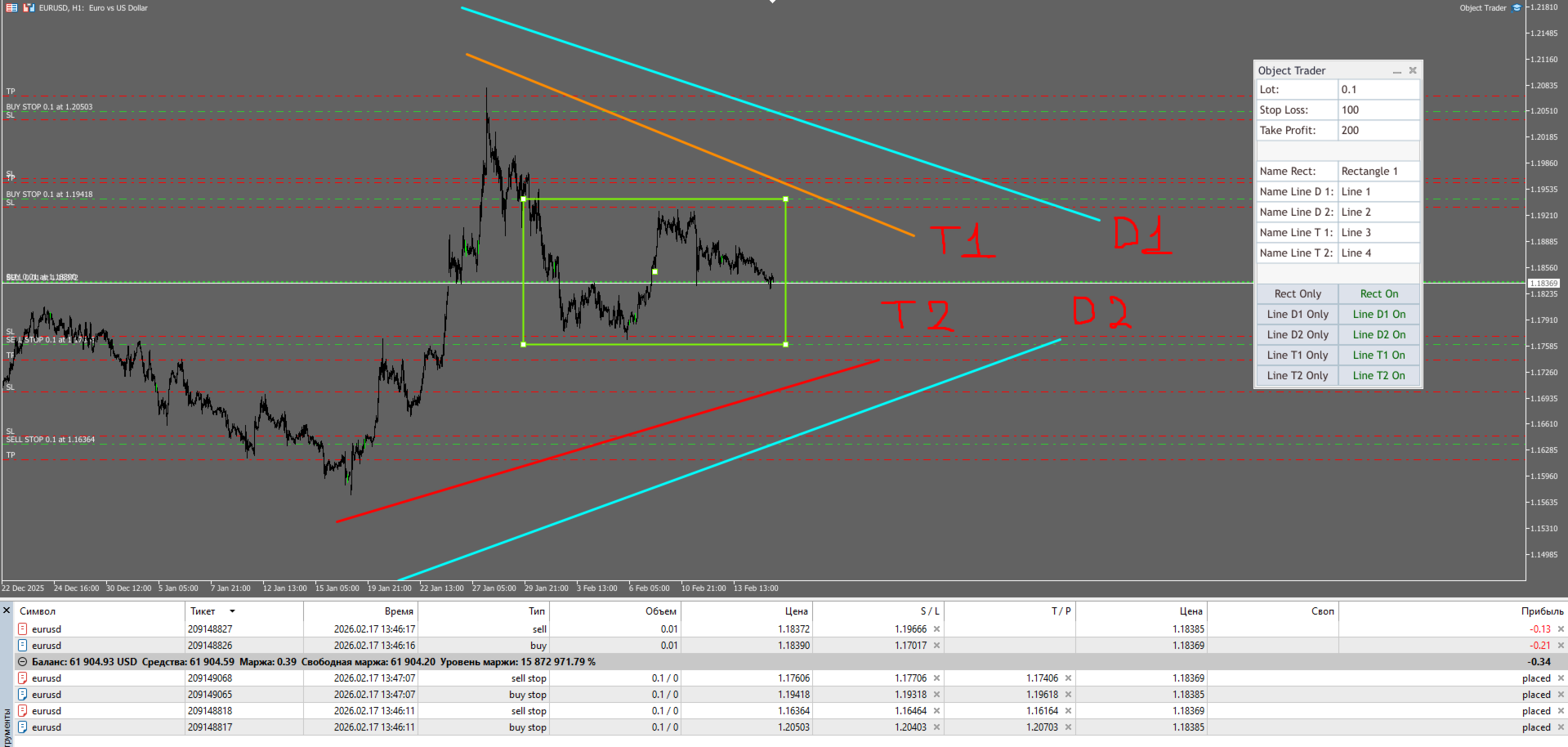
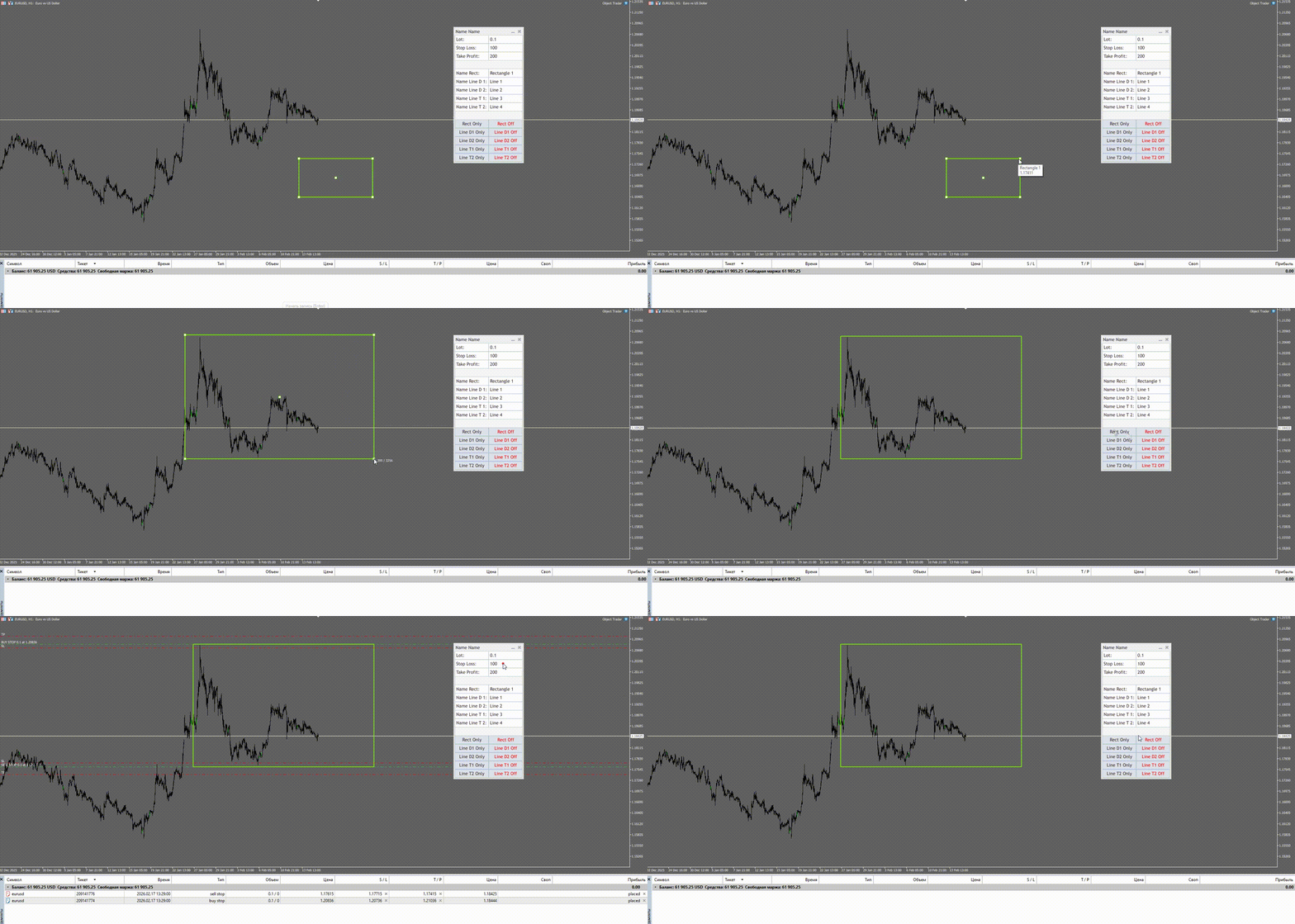
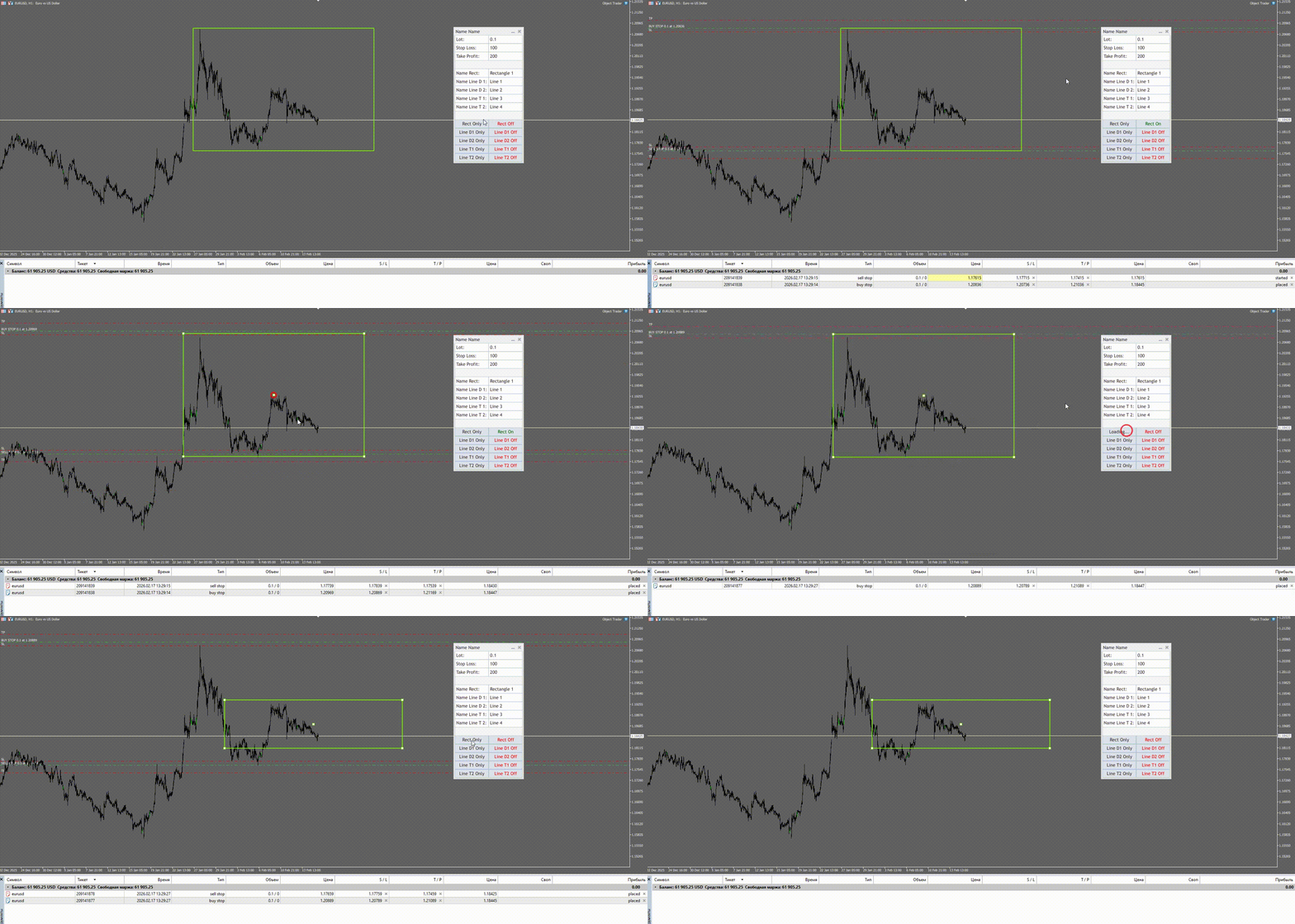
Concetto: Si disegna un rettangolo sul grafico. Il suo bordo superiore diventa il livello per un ordine Buy Stop, e il suo bordo inferiore diventa il livello per un ordine Sell Stop.

Come usarlo:

  1. Disegna un rettangolo sul grafico (usa lo strumento "Rettangolo").

  2. Nel pannello dell'expert advisor, inserisci il nome esatto del tuo rettangolo nel campo "Name Rect:" (es., "Zona 1").

  3. Clicca sul pulsante "Rect Only".

Cosa succede: L'expert advisor piazza istantaneamente due ordini stop in sospeso con il lotto, lo stop loss e il take profit specificati nei campi "Lot:", "Stop Loss:" e "Take Profit:".

2. Trading con Linea (Line Deneme 1 e Line Deneme 2)

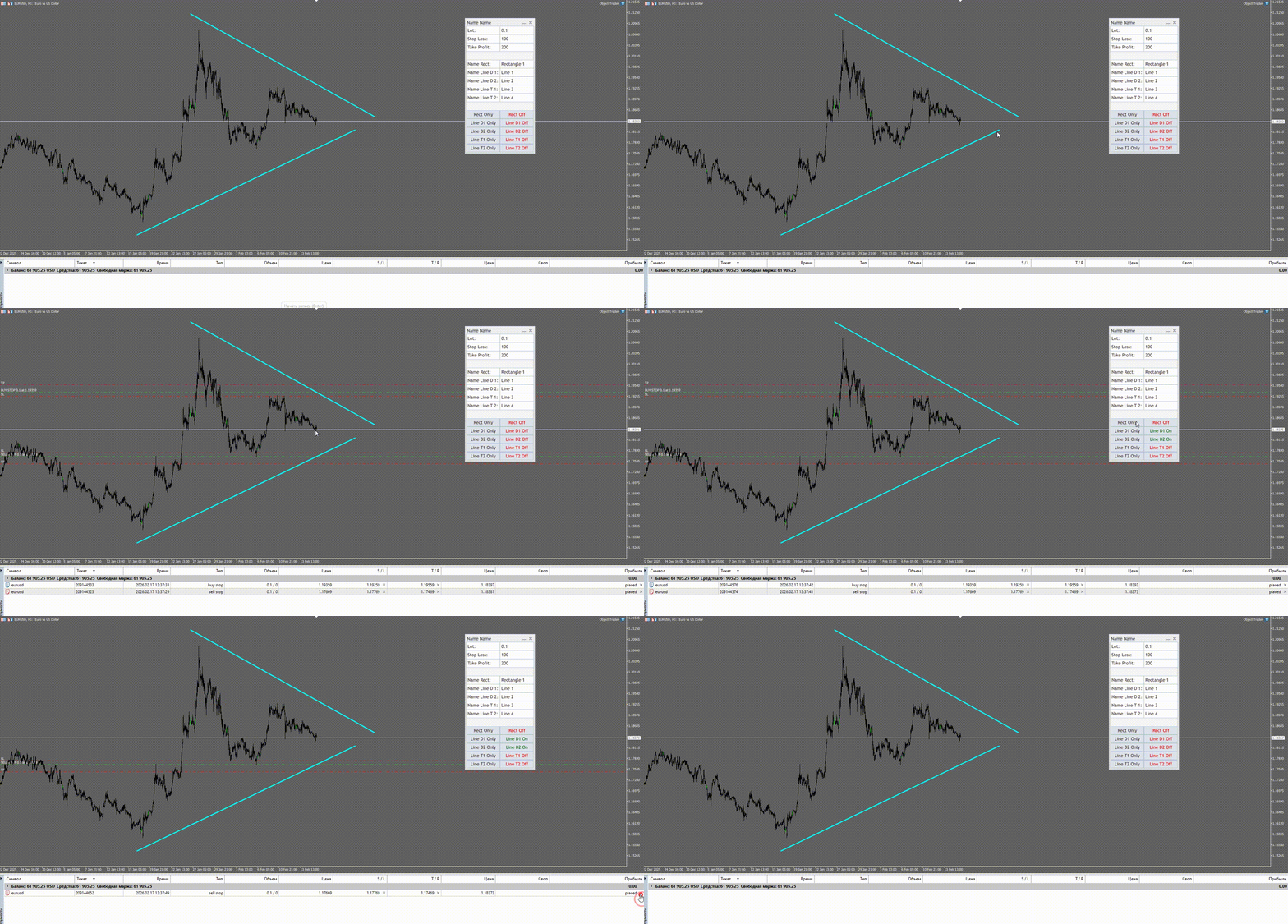
Concetto: Si disegna una linea orizzontale. Il suo prezzo diventa il livello di ingresso. La direzione dell'operazione è determinata automaticamente: se la linea è sopra il prezzo corrente (Ask), viene piazzato un Buy Stop; se è sotto, un Sell Stop.

Come usarlo:

  1. Disegna una linea orizzontale sul grafico (usa lo strumento "Linea Orizzontale").

  2. Assegnale un nome e inseriscilo nel campo "Name Line D 1:" (per la prima linea) o "Name Line D 2:" (per la seconda).

  3. Clicca sul pulsante "Line D1 Only" o "Line D2 Only".

Cosa succede: L'expert advisor piazza un ordine in sospeso (Buy o Sell Stop) in base alla posizione della linea rispetto al mercato.

3. Trailing Stop Visivo (Line Trailing 1 e Line Trailing 2)

Concetto: Si gestisce lo stop loss di una posizione già aperta utilizzando una linea orizzontale. Non appena il prezzo della linea diventa superiore allo stop corrente (per posizioni Buy), lo stop loss viene spostato a quel livello.

Come usarlo:

  1. Apri una posizione (manualmente o usando le funzioni descritte sopra).

  2. Disegna una linea orizzontale che fungerà da stop loss dinamico. Assegnale un nome e inseriscilo nel campo "Name Line T 1:" o "Name Line T 2:".

  3. Clicca sul pulsante "Line T1 Only" o "Line T2 Only".

Cosa succede: Il programma esamina tutte le posizioni aperte e sposta il loro Stop Loss al livello della tua linea, se questo migliora lo stop corrente.

Pannello di Controllo (GUI)

Tutte le impostazioni si trovano in una finestra compatta che può essere spostata sul grafico.

  • Lot, Stop Loss, Take Profit: Campi per inserire il volume del lotto, i valori di stop loss e take profit (in punti) per i nuovi ordini.

  • Nomi Oggetti: Campi per inserire i nomi del tuo rettangolo e delle tue linee.

  • Pulsanti "Only": Una volta premuti, piazzano o aggiornano gli ordini per l'oggetto corrispondente.

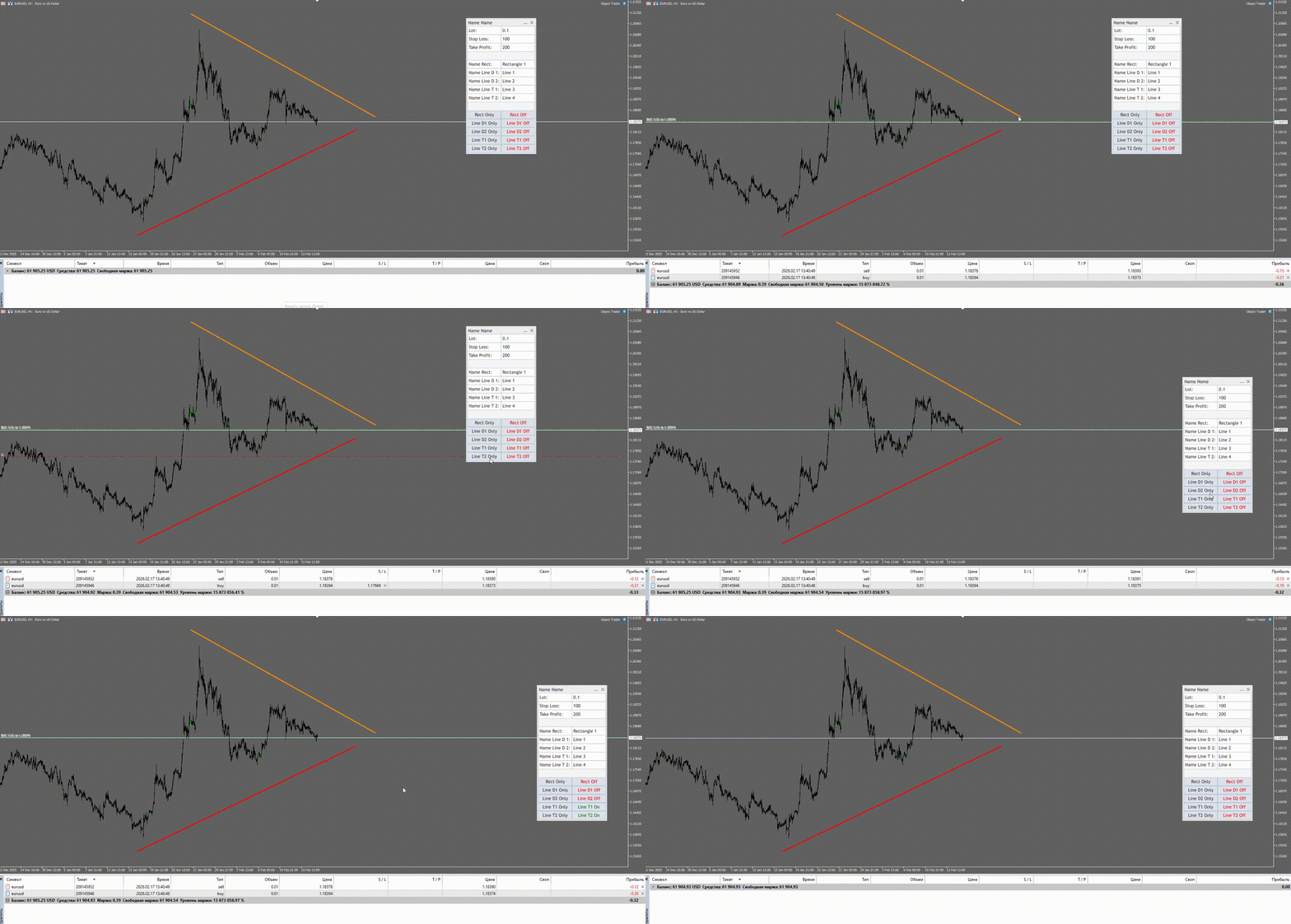
  • Pulsanti "On/Off": Attivano o disattivano la modalità automatica. Quando il pulsante è verde ("On"), l'expert advisor monitorerà l'oggetto sul grafico. Se sposti la linea o il rettangolo, l'expert advisor aggiornerà automaticamente i livelli dei tuoi ordini in sospeso!

Caratteristiche Principali

  • Piazzamento Visivo degli Ordini: Piazza ordini Buy Stop e Sell Stop semplicemente disegnando rettangoli e linee.

  • Due Canali Indipendenti: Lavora simultaneamente con due diverse linee di ingresso (con diversi numeri magici).

  • Trailing Stop Visivo: Gestisci la protezione del profitto semplicemente trascinando una linea sul grafico.

  • Aggiornamento Automatico degli Ordini: Attiva la modalità "On" per un oggetto e qualsiasi modifica della sua posizione sul grafico verrà applicata istantaneamente ai tuoi ordini.

  • Interfaccia User-Friendly: Tutte le impostazioni sono sempre a portata di mano in un'unica finestra.

Parametri di Input

  • Magic_Rect — Numero magico per gli ordini piazzati utilizzando il rettangolo.

  • Magic_Line_1 — Numero magico per gli ordini piazzati utilizzando la prima linea (Line Deneme 1).

  • Magic_Line_2 — Numero magico per gli ordini piazzati utilizzando la seconda linea (Line Deneme 2).

L'uso di diversi numeri magici consente all'expert advisor di gestire correttamente gli ordini, anche se sono stati piazzati utilizzando oggetti diversi.

Guida Rapida

  1. Allega l'expert advisor a qualsiasi grafico (es., EURUSD, H1).

  2. Il pannello di controllo apparirà sul grafico.

  3. Inserisci i valori desiderati nei campi "Lot:", "SL:" e "TP:".

  4. Disegna un rettangolo o una linea orizzontale sul grafico.

  5. Nel campo corrispondente ("edit rect", "edit line..."), inserisci il nome dell'oggetto disegnato.

  6. Clicca sul pulsante "Only" per quell'oggetto per piazzare gli ordini.

  7. Se necessario, premi il pulsante "On/Off" (diventerà verde) per abilitare l'aggiornamento automatico degli ordini quando l'oggetto viene spostato.

Importante da Sapere

  • L'expert advisor funziona solo con ordini in sospeso Buy Stop e Sell Stop.

  • Assicurati che i nomi degli oggetti nei campi di input corrispondano esattamente ai nomi sul grafico (distingue tra maiuscole/minuscole).

  • Affinché il trailing stop funzioni correttamente, la linea deve incrociare il livello di prezzo corrente della posizione.
Prodotti consigliati
Signals for Telegram
Elidio Xavier Guimaraes
It is a utility that posts customized messages on Telegram based on account trading activity. Once the utility is on the chart, with each new position opened from the same chart symbol the utility is added, a customized message will be sent to the Telegram group defined in the input parameters. The utility will post to the Telegram group if a new position is opened and if it is the same symbol as the chart the utility is running on. If you are using an Expert Advisor for Buy and Sell and want to
KeyboardTrading
Maksim Galichev
The script allows you to quickly control positions from the keyboard.: Arrow ↑ → Open BUY Arrow → Open a SELL Arrow → → Close ALL positions Key functions: Automatic closing of opposing positions When a BUY is opened, all SALES are closed, and vice versa. Positions in the same direction remain intact (they can be accumulated). Flexible settings: LotSize. Take Profit in points (TP_Points). Stop Loss is disabled (but can be added if necessary). Safety: Checking the connection to the market. Sup
Pannello di trading, Gestione del rischio, Trading manuale, Trailing stop, Stop loss, Take profit, Esecuzione rapida, Order management JoOrderTrade Pro – Pannello di Trading Avanzato per MetaTrader 5 Avvisi estremamente importanti Perché lo strumento funzioni correttamente, è OBBLIGATORIO attivare l’opzione "Algo Trading" nelle impostazioni di MetaTrader 5. Senza questa attivazione, il pannello non funzionerà. Importante: Non attivare la funzione “OA” senza comprenderne pienamente lo scopo
Don't want to risk or loose your personal trading account or prop trading firm account because of a simple Margin Call or exceeded Loss Limit? Then this Utility Expert Advisor is the solution for you! This Expert Advisor monitors your account Equity or Balance or even both! If the Equity and/ or Balance fall under your defined stop limits, the EA closes all of your positions and keeps you so on track. Options and Variables: Monitored Values: Choose which values should get monitored Equity: if
Synchronizer
PATRICK PAARSCH
This Expert Advisor monitors all open positions across all symbols in MetaTrader 5. Whenever a Stop Loss (SL) or Take Profit (TP) is manually set or adjusted on any position, the EA automatically applies that value to all other open positions , regardless of symbol or order type (Buy/Sell). This ensures consistent and synchronized SL and TP levels across your account. Perfect for mobile trading via tablet or smartphone!
HotKeys MT5
Alexey Valeev
This utility provides the ability to use hot keys in manual trading instantly responding to the current market situation. You can assign hot keys to open/close positions by their type, open/close all positions on the current chart and remove all orders on the current chart. You can also assign hot keys for five predefined trade volumes and switch between them if necessary with no need to change the volume manually from time to time. It is also possible to set the auto calculation of a trade volu
Salve commercianti! Sono il tuo assistente commerciale. Permettetemi di dirvi la mia competenza: 1. Sono bravo nella gestione delle tue posizioni, indipendentemente da quale estremità hai posto un ordine, posso aiutarti per la prima volta ad aggiungere una linea di stop loss ragionevole e lo stop loss mobile. 2. Posso aiutarti a evitare l’ascesa e la caduta e a sradicare le debolezze umane dalle radici dei principi. 3. Ti invierò un messaggio di notifica al tuo client MT5 mobile al miglior punt
Trade Control Panel
Jerry Jilun Anak Liban
Trade Control Panel Function Normal One Click Function Close All Close All Profit Close All Loss Close All Pending Order Close All Sell Close All Buy Advance One Click Function 1.  Close Partial Lot Sell by Percent It will help you partial close for all open position by desire percent you wanted. No longer partial close one by one for every open position Manual input for desire percent 2. Close Partial Lot Buy by Percent It will help you partial close for all open position by desire percent
SL Maker
Linas Kucinskas
EA Functionality -------------------------------------------------------------------------------------------------------------------------------- - The EA automatically sets SL (Stop Loss) of the specified size in points for each position immediately after opening position; - EA will close all open positions if their losses exceed the set amount; - Close all positions biggest then set limit; Position automatically closed if it bigger than set limit; - New function how much you can loss per day.
Script for deleting pending orders If you need to delete all pending orders you placed, this script will do it for you! Allow AutoTrading before running the script. Usage: Run the script on a chart. Input parameters: Language of messages displayed (EN, RU, DE, FR, ES) - language of messages displayed (English, Russian, German, French, Spanish). Use Magic: (0 - ignore Magic, else - only this Magic) - if set to zero, the magic number is not considered. Otherwise the script deletes only orders wit
Auto Breakeven MT5
Volodymyr Hrybachov
A utility for automatically setting breakeven levels, transfers trades to breakeven   when passing a given distance   . Allows you to minimize risks. Created by a professional trader for traders.       Utility       works with any market orders opened manually by a trader or using advisors. Can filter trades by magic number. The utility can work with any number of orders simultaneously. MT4 version https://www.mql5.com/ru/market/product/57076 WHAT THE UTILITY CAN DO: install virtulnoe levels   b
Questo consulente è una dashboard che ti consente di scambiare più coppie con un solo clic. Clicca su       aprire       Questo pulsante apre un ordine per la coppia selezionata. Clicca su       chiudere       Questo pulsante chiude l'ordine per la coppia selezionata. Il lotto dell'ordine è il numero inserito dall'utente. I numeri positivi corrispondono agli ordini di acquisto, mentre i numeri negativi corrispondono agli ordini di vendita. Fare clic   sul pulsante Chiudi   per chiudere l'intero
Auto Trailing Stop MT5
Volodymyr Hrybachov
2 (1)
Utility for automatic closing of deals by trailing stop levels. Allows you to get the most out of your profit. Created by a professional trader for traders.       Utility       works with any market orders opened manually by a trader or using advisors. Can filter trades by magic number. The utility can work with any number of orders simultaneously. MT4 version https://www.mql5.com/en/market/product/56487 WHAT THE UTILITY CAN DO: set virtual   trailing stop   levels       from 1 pip set          
AutoShield SL TP Manager
Muhammad Nadeem Satti
Take the manual stress out of risk management with AutoShield. This utility automatically applies Stop Loss and Take Profit levels to every trade you open, ensuring no position is ever left unprotected . Universal Protection: Automatically detects and updates both active positions and pending orders . Multi-Pair Compatibility: Choose to manage only the current chart or every open symbol on your account simultaneously . Clean Visual Interface: Features a customizable on-chart display showing your
Is your trade at a loss? Does not matter ! You can use this Extra martingale tool.  In the set loss of your trade or your EA's trade , this tool will open another trade at a better price. It can also open multiple trades at different distances and with different lot sizes. Each trade will be assigned a TakeProfit. This tool has a lot of settings. You can set variable lot sizes, variable trade distances, variable TakeProfit sizes, maximum total profit or loss in money. You can also close trades
EA SB8 Panel Trade
Juan Manuel Bernal Martin
SB-8 – Manual Trading Panel with Fixed Risk & TradingView-Style Visualization for MT5 SB-8 is an advanced manual trading panel for MetaTrader 5 , designed to execute trades visually, quickly and without calculations . It is especially built for traders coming from TradingView , who often find MT5 confusing when it comes to risk management and trade visualization. With SB-8, you don’t calculate lot size, percentages or risk . You simply move the Stop Loss line , and the panel handles everything a
Trailing Stop loss last X candles swing high and low.  X is a value of candles you can set as an input parameter. This Trailing stop loss moves the SL below the last X candles low(if BUY positions) or high(for SELL positions) If we are in a trend and we open a position following the trend, the SL will be automatically placed at the low or high of the last X bars. contact me if you need further assistence
This Expert Advisor (EA) for MetaTrader 5 (MT5) has been designed to automatically manage Stop Loss (SL) and Take Profit (TP). Main Features Automatic Detection of Manual Positions : Monitors new manual positions without SL/TP and applies the configured rules Multiple Orders : Opening of multiple orders under the same conditions as the original position Hidden SL/TP : The hidden mode allows creating SL/TP invisible to your broker  Equity Protection": Allows defining a threshold for the accou
AZ Trade Recovery Assistant MT5 combines manual trading flexibility with intelligent automated management.This advanced on-chart panel isn’t just for trade execution — it’s a complete trade management assistant. You can open or close positions instantly, adjust lot size, manage trailing stops, and modify Take Profit or Stop Loss — all directly from the panel. It’s built for traders who want full control of their trades with smart automation running in the background. What truly makes this assist
The utility is designed to display on the chart the margin zones built on the basis of margin requirements for futures of the Chicago Mercantile exchange (CME). These margin zones are good levels of resistance and support, as seen in the screenshots. How to use To trade on margin zones, use the following rules: buy after the day has closed above one of the zones to the next zone; sell after the day has closed below one of the zones to the next zone; after opening a sell trade, place limit sell
Kalifx Trade manager
Calvin Andile Mahlangu
KALI-FX Trade Manager – Advanced Exit & Risk Management Utility for MetaTrader 5 The KALI-FX Trade Manager is a compact utility designed to automate trade-exit and risk management with precision and consistency. It integrates breakeven control , trailing stop logic , partial closing , automatic SL/TP assignment , and   Equity Protection System — ensuring every position and the overall account are handled according to predefined safety parameters. This tool supports both manual and EA-initiated
UTS Trade Guardian
Dawid Aaron Zinserling
UTS TradeGuardian – Smart Trade Management EA (MT5) UTS TradeGuardian is a powerful trade-management Expert Advisor for MetaTrader 5 , designed to protect, manage, and optimize manually opened trades —whether you open them from MT5 on PC, mobile, or tablet . This EA does not open trades for you . Instead, it acts as a professional trade guardian , automatically managing your positions once they are open. What UTS TradeGuardian Does Automatic Stop Loss & Take Profit Once a position is opened
Super Assistant
Tuan Nghia Phan
* Super Assistant is an useful management tool that helps traders perform management tasks on MT4/MT5 account remotely via Telegram such as: - Get info (account, details of positions, pending orders, floating PL, price, economic news, etc) - Open trade (open instantly with preset parameters) - Manage trade (set SLTP automatically, break-even mode, max risk, close time every day, etc) - Close trade (close all, buy, sell, win positions by one click, set awaiting close by PL, time) - Set up notifi
Traders Panel
Timothy George Wright
Trader's Panel is a simple EA for managing trades once open. Your options for managing open trades are to close an entire open trade, close a percent of an open trade, which can be input from the trader panel, and then set stop loss to break even on an open trade. The Trader's Panel hovers at top left of screen right below the one click order buttons. **Note that this EA does not open trades. It only manages trades once they are open.
Trailing Stop Manager PRO — Gestione professionale del trailing stop (MT5) Trailing Stop Manager PRO è un Expert Advisor per MetaTrader 5 che automatizza la gestione del trailing stop sulle posizioni aperte. Può gestire tutte le posizioni del conto oppure solo quelle filtrate per simbolo e/o MagicNumber. L’EA include diversi modelli di gestione: trailing fisso in pips, trailing basato sull’ATR, break-even automatico, chiusura parziale e una dashboard visiva. Obiettivo dello strumento Standardizz
Lot calculator tool MT5
Ernestas Kvedaras
3.67 (3)
More stable MetaTrader 4 version is available here:  Lot Calculator Tool . This tool helps you to automatically calculate and manage risk, conveniently place orders visually, schedule orders, trail stops, move them to break-even and more. Features Place market or pending orders using draggable lines Schedule orders Calculate and limit risk using various methods See current spread See time till next candle Set custom order comments Trail stops Move stops to break-even See order profit/loss in p
Synchronized Cross for MT5
Steven Van Ingelgem
3 (1)
The Synchronized Cross indicator allows you to link cross hairs from multiple chart windows. This means that as you move the cross hair in one chart, all other cross hairs will move together by automatically staying on the same time. If, for example you are moving your mouse cursor in a M5 timeframe (see screenshots), the crosshair will show as a line in the higher timeframes, and as an area in the lower timeframes. Thus making it easier to correlate timeframes. The input parameters are self exp
Horizontal Line Trade Assistant EA  Semi-Automated Trading Assistant      IMPORTANT :     On the main/purchased program a user can click on the Horizontal line and change it to Buy or Sell, and drag by double clicking on it. Please keep in mind that this option is not available on demo version, due to some restrictions/limitations of Strategy Tester, some Object related operations are not available in the  Strategy Tester. But, it will not prevent you from Testing, please drop an Object to chart
Signals Executor for Telegram is a Utility that allows you to execute and manage positions from messages sent in Telegram Chats. Chat messages are processed to check for the existence of commands, and the command will be executed if its parameters are valid. You need the Telegram Bot Token and Chat Id to configure the input parameters. It is possible to restrict the sending of commands through the User Id, which must be configured in the input parameters. Valid Commands: Buy and Sell: Market or
Overview Breakout Meter is a price action tool that identifies key breakout zones based on recent daily price activity. It highlights areas where momentum is likely to trigger, helping traders anticipate breakouts or reversals with minimal configuration. How It Works The EA analyzes a user-defined number of recent daily candles and marks high and low zones where price has shown strong reactions. It automatically updates levels with new data and removes outdated zones to keep charts clear. Users
Gli utenti di questo prodotto hanno anche acquistato
Trade Assistant MT5
Evgeniy Kravchenko
4.42 (208)
It helps to calculate the risk per trade, the easy installation of a new order, order management with partial closing functions, trailing stop of 7 types and other useful functions. Additional materials and instructions Installation instructions - Application instructions - Trial version of the application for a demo account Line function -   shows on the chart the Opening line, Stop Loss, Take Profit. With this function it is easy to set a new order and see its additional characteristics bef
Forex Trade Manager MT5
InvestSoft
4.96 (615)
Benvenuto a Trade Manager EA, lo strumento definitivo per la gestione del rischio , progettato per rendere il trading più intuitivo, preciso ed efficiente. Non è solo uno strumento per l'esecuzione degli ordini, ma una soluzione completa per la pianificazione delle operazioni, la gestione delle posizioni e il controllo del rischio. Che tu sia un principiante, un trader avanzato o uno scalper che necessita di esecuzioni rapide, Trade Manager EA si adatta alle tue esigenze, offrendo flessibilità s
TradePanel MT5
Alfiya Fazylova
4.86 (148)
Trade Panel è un assistente commerciale multifunzionale. L'applicazione contiene più di 50 funzioni di trading per il trading manuale e consente di automatizzare la maggior parte delle operazioni di trading. Attenzione, l'applicazione non funziona nel tester di strategia. Prima dell'acquisto, puoi testare la versione demo su un conto demo. Versione demo qui . Istruzioni complete qui . Commercio. Ti consente di eseguire operazioni di trading con un clic: Apri ordini e posizioni pendenti con calco
Versione Beta Telegram to MT5 Signal Trader è quasi pronto per il rilascio ufficiale in versione alpha. Alcune funzionalità sono ancora in fase di sviluppo e potresti riscontrare piccoli bug. Se riscontri problemi, ti preghiamo di segnalarli, il tuo feedback aiuta a migliorare il software per tutti. Il prezzo aumenterà dopo 20 vendite. Copie rimanenti a $90:   2/20 . Telegram to MT5 Signal Trader è uno strumento potente che copia automaticamente segnali di trading da canali o gruppi Telegram a
Trade Dashboard MT5
Fatemeh Ameri
4.96 (114)
Tired of complex order placement and manual calculations? Trade Dashboard is your solution. With its user-friendly interface, placing orders becomes effortless, by a single click, you can open trades, set stop loss and take profit levels, manage trade lot size, and calculate risk to reward ratios, allowing you to only focus on your strategy. Say goodbye to manual calculations and streamline your trading experience with Trade Dashboard. Download  Demo Version  right now. You can find  Details of
FarmedHedge Pair Trading Dashboard
Tanapisit Tepawarapruek
5 (1)
Farmed Hedge Yield Farming - Professional Pair Trading Dashboard (Manual - Hybrid - Semi/Automated EA) VERSION 3 - WILD HARVEST UPDATE Trading Approach: - Manual Trading: Primary focus - Auto Pilot: Optional supplementary feature - Full Automation: Not the main purpose Recommended Timeframe: H1-H4 DEMO VERSION Download the free demo to test functionality. Use Strategy Tester with Visual Mode to see how it works. VERIFIED TRADING RESULTS - Farmed Hedge Yield Axi Copy: https://www.mql5.com/en/si
MarketCoachPanel
Maria Makarchuk
4 (1)
MarketCoach Panel — инструмент дисциплины и контроля риска для трейдера MarketCoach Panel — это вспомогательная панель для MetaTrader 5, разработанная для повышения дисциплины в торговле, контроля риска и принятия более осознанных решений. Приложение не совершает сделки и не является торговым советником. Оно помогает трейдеру анализировать текущую ситуацию и соблюдать собственные правила стратегии. Основные возможности • Расчёт лота по риску Автоматический расчёт объёма позиции на основе: проце
Exp COPYLOT CLIENT for MT5
Vladislav Andruschenko
3.82 (34)
Trade copyr per MT5 è un trade copyr per la piattaforma МetaТrader 5   . Copia le negoziazioni forex   tra       eventuali conti   MT5   -   MT5, MT4   -   MT5 per la versione COPYLOT MT5 (o MT4   -   MT4 MT5   -   MT4 per la versione COPYLOT MT4) Fotocopiatrice affidabile! Versione MT4 Descrizione completa   +DEMO +PDF Come comprare Come installare     Come ottenere i file di registro     Come testare e ottimizzare     Tutti i prodotti di Expforex Puoi anche copiare le operazioni nel termina
PhantomBreak Radar — индикатор для MetaTrader 5, предназначенный для выявления ложных пробоев уровней (fake breakout) и рыночных ловушек. Инструмент помогает трейдерам находить моменты, когда цена прокалывает экстремум диапазона, но затем возвращается обратно — формируя потенциальную точку входа в противоположном направлении. Индикатор автоматически анализирует ценовой диапазон за выбранный период, отслеживает выход за его границы и фиксирует повторный вход цены внутрь диапазона. В таких ситуаци
Copy Cat More Trade Copier MT5 (Gatto Copiatore MT5) è un copiatore di trade locale e un framework completo di gestione del rischio ed esecuzione progettato per le sfide di trading odierne. Dalle sfide delle prop firm alla gestione di portafogli personali, si adatta a ogni situazione con una combinazione di esecuzione robusta, protezione del capitale, configurazione flessibile e gestione avanzata dei trade. Il copiatore funziona sia in modalità Master (mittente) che Slave (ricevente), con sincro
The product will copy all telegram signal to MT5 ( which you are member) , also it can work as remote copier.  Easy to set up, copy order instant, can work with almost signal formats, image signal,  s upport to translate other language to English Work with all type of channel or group, even channel have "Restrict Saving Content", work with  multi channel, multi MT5 Work as remote copier: with signal have ticket number, it will copy exactly via ticket number. Support to backtest signal. How to s
Ultimate Extractor
Clifton Creath
5 (9)
Ultimate Extractor - Professional Trading Analytics for MT5 *****this is the local HTML version of Ultimate Extractor. Check out Ultimate Extractor Cloud on mql5 for the Cloud version****** Ultimate Extractor transforms your MetaTrader 5 trading history into actionable insights with comprehensive analytics, interactive charts, and real-time performance tracking. What It Does Automatically analyzes your MT5 trading history across all Expert Advisors and generates detailed HTML reports with inte
Telegram to MT5 Coppy
Sergey Batudayev
5 (8)
Da Telegram a MT5:   la soluzione definitiva per la copia del segnale Semplifica il tuo trading con Telegram su MT5, il moderno strumento che copia i segnali di trading direttamente dai canali e dalle chat di Telegram sulla tua piattaforma MetaTrader 5, senza bisogno di DLL. Questa potente soluzione garantisce un'esecuzione precisa dei segnali, ampie opzioni di personalizzazione, fa risparmiare tempo e aumenta la tua efficienza. [ Instructions and DEMO ] Caratteristiche principali Integrazione d
VirtualTradePad One Click Trading Panel
Vladislav Andruschenko
4.59 (73)
Pannello di trading per il trading in 1 clic.   Lavorare con posizioni e ordini!   Trading dal grafico o dalla tastiera. Con il nostro pannello di trading, puoi eseguire operazioni con un solo clic direttamente dal grafico ed eseguire operazioni di trading 30 volte più velocemente rispetto al controllo MetaTrader standard. I calcoli automatici di parametri e funzioni rendono il trading più veloce e conveniente per i trader. Suggerimenti grafici, etichette informative e informazioni complete sugl
Trade Manager DashPlus
Henry Lyubomir Wallace
5 (13)
DashPlus è uno strumento avanzato di gestione delle operazioni progettato per migliorare l'efficienza e l'efficacia del trading sulla piattaforma MetaTrader 5. Offre una suite completa di funzionalità, tra cui calcolo del rischio, gestione degli ordini, sistemi di griglia avanzati, strumenti basati su grafici e analisi delle prestazioni. Caratteristiche Principali 1. Griglia di Recupero Implementa un sistema di griglia flessibile e di media per gestire le operazioni in condizioni di mercato avve
MT5 to Telegram Signal Provider è un'utilità facile da usare e completamente personalizzabile che consente l'invio di segnali specificati a una chat, canale o gruppo Telegram, rendendo il tuo account un fornitore di segnali. A differenza della maggior parte dei prodotti concorrenti, non utilizza importazioni DLL. [ Dimostrativo ] [ Manuale ] [ Versione MT4 ] [ Versione Discord ] [ Canale Telegram ]  New: [ Telegram To MT5 ] Configurazione Una guida utente passo-passo è disponibile. Nessuna cono
Anchor: The EA Manager A coordination system for traders running multiple EAs. Anchor ensures only one EA can trade at a time, preventing conflicting positions and keeping your portfolio safer. Attach Anchor to any chart. Configure your EAs and their magic numbers. Anchor handles the rest. Built for portfolios. Built for discipline. Built for prop firms. The Problem Running multiple EAs on the same account creates risk. Two gold EAs can open opposite positions on the same candle. Three EA
Trade Manager DaneTrades
Levi Dane Benjamin
4.36 (28)
Trade Manager per aiutarti a entrare e uscire rapidamente dalle operazioni calcolando automaticamente il tuo rischio. Incluse funzionalità che ti aiutano a prevenire l'eccessivo trading, il vendetta trading e il trading emotivo. Le operazioni possono essere gestite automaticamente e i parametri di performance del conto possono essere visualizzati in un grafico. Queste caratteristiche rendono questo pannello ideale per tutti i trader manuali e aiuta a migliorare la piattaforma MetaTrader 5. Suppo
Il Local Trade Copier EA è una soluzione per i singoli trader o account manager che devono eseguire segnali commerciali da fonti esterne o che devono gestire più account contemporaneamente, senza la necessità di un account MAM o PAMM. Copia da un massimo di 8 account master su account slave illimitati [ Guida all'installazione | Guida all'aggiornamento | Risoluzione dei problemi | Domande frequenti | Tutti i prodotti ] 100% self-hosted Facile da installare e utilizzare Nessun programma di insta
Smart Stop Manager MT5
Daniel Stein
4.33 (3)
Smart Stop Manager – Esecuzione automatica dello stop-loss con precisione professionale Panoramica Smart Stop Manager è il livello di esecuzione della linea Smart Stop, progettato per i trader che richiedono una gestione dello stop-loss strutturata, affidabile e completamente automatizzata su più posizioni aperte. Monitora continuamente tutte le operazioni attive, calcola il livello di stop ottimale utilizzando la logica di struttura di mercato Smart Stop e aggiorna gli stop automaticamente se
Custom Alerts AIO: Monitora tutti i mercati — senza alcuna configurazione Panoramica Custom Alerts AIO è una soluzione di monitoraggio dei mercati pronta all’uso che non richiede alcuna configurazione. Tutti gli indicatori necessari — FX Power, FX Volume, FX Dynamic, FX Levels, IX Power — sono integrati internamente. Non vengono mostrati grafici, rendendolo ideale per generare alert in tempo reale in modo discreto ed efficiente. Supporta tutte le classi di asset offerte dal tuo broker: Forex,

YuClusters
Yury Kulikov
4.93 (43)
Attention: You can view the program operation in the free version  YuClusters DEMO .  YuClusters is a professional market analysis system. The trader has unique opportunities to analyze the flow of orders, trade volumes, price movements using various charts, profiles, indicators, and graphical objects. YuClusters operates on data based on Time&Sales or ticks information, depending on what is available in the quotes of a financial instrument. YuClusters allows you to build graphs by combining da
Risk Manager Pro MT5
Roman Zhitnik
5 (8)
The Expert Advisor is a comprehensive risk manager helping users to control their trading activities. With this tool being a safeguard you can easily configure various risk parameters. When any limit is exceeded, the risk manager can force close opened positions, close other EAs, and even close the terminal to prevent emotional trading that doesn't correspond to your trading strategy. Risk Manager Settings Account Protection Check min equity limit to close all (account currency) - check the min
DrawDown Limiter
Haidar Lionel Haj Ali
5 (20)
Drawdown Limiter EA You are in the right place if you were searching for Drawdown control, Drawdown limiter, Balance protection, Equity Protection or Daily Drawdown Limit related to Prop Firm, FTMO, or Funded account trading, or if you want to protect your trading account. Have you suffered from controlling your drawdown when trading funded accounts? This EA is meant for you. Prop firms usually set a rule called “Trader Daily Drawdown”, and if it is not respected, you are disqualified.  I am an
Smart Stop Scanner – Analisi multi-asset degli stop-loss basata sulla reale struttura di mercato Panoramica Smart Stop Scanner offre un monitoraggio professionale dei livelli di stop-loss su più mercati. Il sistema identifica automaticamente le zone di stop più rilevanti basandosi sulla reale struttura di mercato, sulle rotture significative e sulla logica del price action, presentando tutte le informazioni in un pannello chiaro, coerente e ottimizzato per schermi ad alta risoluzione (DPI-awar
Entry In The Zone and SMC Multi Timeframe is a real-time market analysis tool developed based on Smart Money Concepts (SMC). It is designed to analyze market structure, price direction, reversal points, and key zones across multiple timeframes in a systematic way. The system displays Points of Interest (POI) and real-time No Repaint signals, with instant alerts when price reaches key zones or when signals occur within those zones. It functions as both an Indicator and a Signal System (2-in-1), c
Take a Break MT5
Eric Emmrich
4.83 (23)
One tool to protect all your EAs — news filter, equity protection, time filter and more — free demo available Take a Break has evolved from a basic news filter into a comprehensive account protection solution. It pauses your other Expert Advisors during news events or based on custom filters. When trading resumes, it automatically restores your entire chart setup , including all EA settings. Typical use cases: One news filter for all your EAs. Pause trading during news or high volatility — and c
Mentfx Mmanage mt5
Anton Jere Calmes
4.25 (8)
The added video will showcase all functionality, effectiveness, and uses of the trade manager. Drag and Drop Trade Manager. Draw your entry and have the tool calculate the rest. Advanced targeting and close portions of a trade directly available in tool (manage trades while you sleep). Market order or limit order on either side with factored spread. Just draw the entry, the tool does the rest. Hotkey setup to make it simple. Draw where you want to enter, and the stop loss, the tool calculates al
AlgoRadar
Stephen J Martret
5 (2)
AlgoRadar - Real-Time Trade Analytics The most powerful on-chart performance analyzer for MetaTrader 5. One Chart. Every EA. Every Account. MT4 and MT5 Combined The only analyzer that displays all your EAs across multiple accounts, brokers, and VPS — including both MT4 and MT5 — on a single live MT5 chart. Your complete trading operation, visible at a glance. Why AlgoRadar? No external software. No digging through files. Live stats right on your chart. Unlike other portfolio analyzers that for
VOLUME BUBBLES ORDERFLOW FOOTPRINT PROFESSIONAL Expert Advisor for MetaTrader 5 Complete Feature Documentation Introduction: Volume Bubbles OrderFlow Footprint Professional is an advanced order flow visualization tool designed for the MetaTrader 5 platform. It provides institutional-grade market analysis through real-time volume bubbles visualization, volume profiling, and sophisticated order flow analysis. This Expert Advisor transforms raw market data into actionable trading intelligence, hel
Altri dall’autore
Simple and intuitive tool for visual trend filtering based on a moving average. The indicator displays a single line on the chart but changes its color depending on the price's position relative to this line, helping you quickly determine the prevailing market direction. How It Works The indicator calculates a moving average (default EMA 50) on the selected timeframe. It then analyzes the relationship between the candle's closing price and the line's value: If the   close price is above the lin
FREE
The HighLow Alarm indicator automatically displays the High and Low values of the previous trading day on your chart. This tool helps you visually assess key daily levels, from which the price often bounces or which it breaks, and it works on any timeframe. How It Works The indicator accesses the daily timeframe (D1) data and, for each bar on the current chart, calculates the High and Low of the previous daily session. The result is displayed as two horizontal lines: Green line   — The High leve
FREE
A clear trend indicator based on two moving averages with dynamic color change for quick visual assessment of market conditions. How it works: The indicator displays two moving averages (fast and slow) with customizable periods on the chart. The line colors change automatically based on the closing price position relative to the fast MA: If   Price > fast MA , both lines turn   green , indicating an uptrend. If   Price < fast MA , both lines turn   red , indicating a downtrend. Key features: In
FREE
Trade Sketch
Maksim Novikov
Trade Sketch Costruttore visuale di ordini pendenti Limit e Stop. Inserisci ordini semplicemente trascinando blocchi grafici, senza inserire prezzi manualmente. Il calcolo del rischio e del profitto potenziale viene aggiornato in tempo reale. Principio di funzionamento Il controllo avviene tramite un pannello. Per iniziare, premi il pulsante «Lines ON» sul pannello sinistro e indica il lotto nel campo «Lot». Sul grafico appariranno delle zone colorate; spostandole progetterai la tua operazione.

FREE
Swift Close
Maksim Novikov
Swift Close Utility for closing Buy and Sell positions in MetaTrader 5. Purpose This utility is designed for batch closing of Buy or Sell positions on the current symbol. Operating Modes Close BUY   — Close all open Buy positions on the current symbol. Close SELL   — Close all open Sell positions on the current symbol. Magic Number Filtering The   MagicNumber   parameter allows the utility to target only positions opened by an Expert Advisor with the specified magic number. If   MagicNumber =
FREE
Swift Trade
Maksim Novikov
Swift Trade Pannello di Trading per MetaTrader 5 Descrizione concisa Swift Trade è un pannello di trading efficiente e dal design pulito, progettato per aiutarvi a eseguire operazioni con un solo clic sulla piattaforma MetaTrader 5. Impostare Stop Loss e Take Profit non è mai stato così semplice e veloce. Funzionalità principale Il pannello è progettato per aprire ordini a mercato (Buy e Sell) con parametri di Stop Loss e Take Profit predefiniti dall'utente, velocizzando l'intero processo di en
FREE
Secure Trade Copier Expert Advisor for synchronizing trading positions between MetaTrader 5 terminals. Purpose The Expert Advisor operates in two modes: MASTER and SLAVE. MASTER mode records information about open positions into a file. SLAVE mode reads this file and synchronizes positions in its own terminal. Operating Modes MASTER:   Leading terminal. Writes position data to a shared file. SLAVE:   Following terminal. Reads the file and copies positions. Synchronized Data Opening of new posit

Adaptive Grid MA Adaptive Grid MA è un expert advisor di trading completamente automatizzato sviluppato per la piattaforma MetaTrader 5. La strategia di trading si basa sul classico metodo di mediazione delle posizioni (martingala) utilizzando segnali di incrocio di medie mobili (EMA) per l'ingresso nel mercato. Come Funziona L'EA analizza l'incrocio di due medie mobili esponenziali (EMA) con periodi regolabili (predefiniti 50 e 100). I segnali per aprire una posizione iniziale vengono generati
Three Bar Matrix Sistema di trading automatizzato basato sull'analisi di pattern a tre candele. Utilizza un meccanismo di averaging delle posizioni con moltiplicazione controllata del lotto per operare in tendenza. Adatto a trader esperti che comprendono i rischi delle strategie a griglia. Concetto Generale Three Bar Matrix analizza la combinazione delle ultime tre candele completate nel timeframe corrente. Il segnale di trading viene generato quando specifiche relazioni tra corpi e ombre delle
RSI MA Cross
Maksim Novikov
Expert Advisor multivalutario su 7 coppie principali (EURUSD, AUDUSD, GBPUSD, NZDUSD, USDCAD, USDCHF, USDJPY). La logica di trading si basa sulla combinazione di RSI e due medie mobili. Come funziona Un segnale viene generato a due condizioni: RSI esce dalle zone di ipercomprato (>80) o ipervenduto (<20) La MA veloce incrocia la MA lenta (conferma del trend) Dopo il primo ingresso, è possibile un averaging con Step e moltiplicazione del lotto per Multiplier. Impostazioni Scelta di timeframe, met
Filtro:
Nessuna recensione
Rispondi alla recensione