Extra Martingale MT5

  • Is your trade at a loss?
  • Does not matter !
  • You can use this Extra martingale tool.

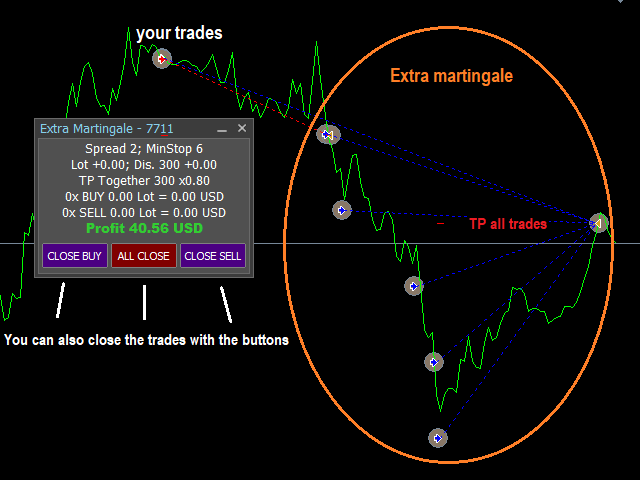
 In the set loss of your trade or your EA's trade, this tool will open another trade at a better price. It can also open multiple trades at different distances and with different lot sizes. Each trade will be assigned a TakeProfit.

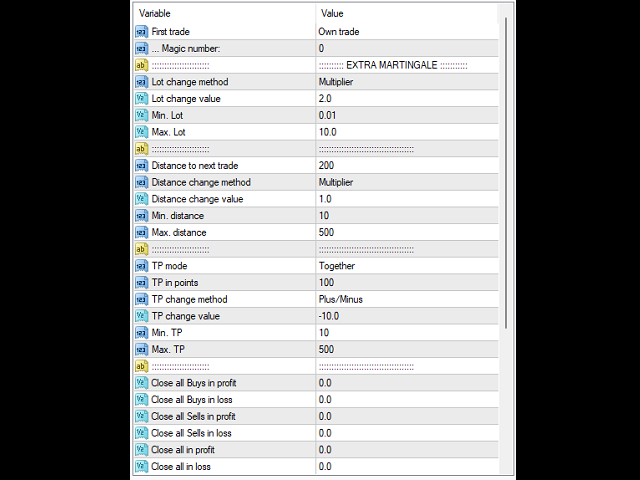
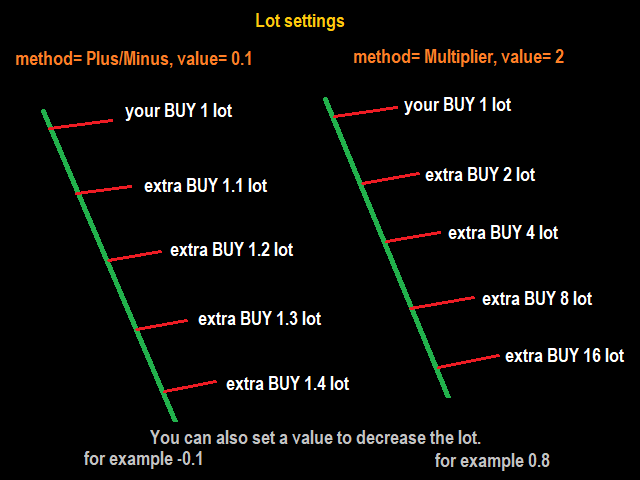
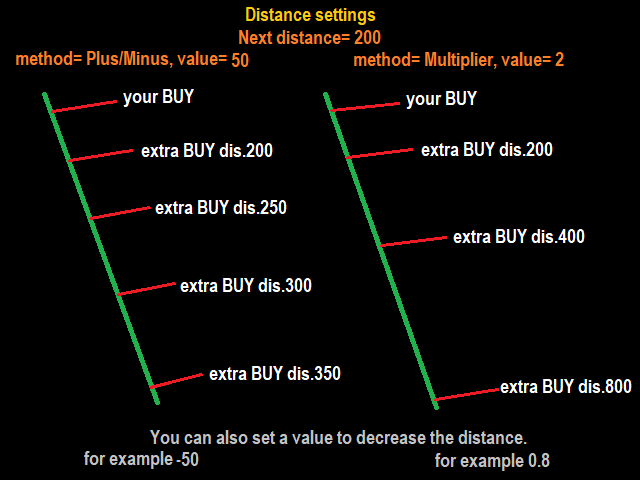
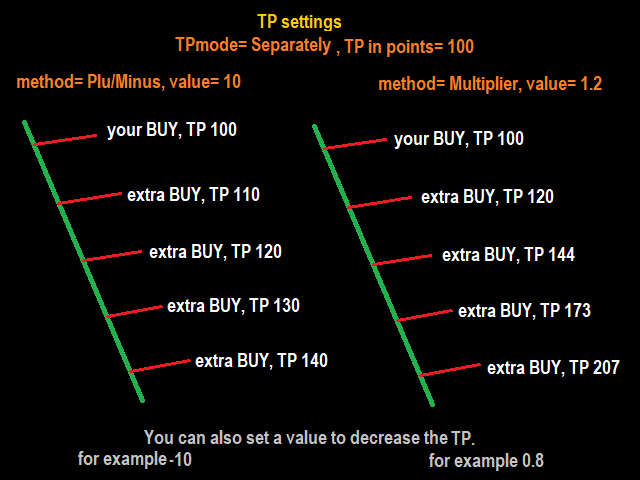
This tool has a lot of settings. You can set variable lot sizes, variable trade distances, variable TakeProfit sizes, maximum total profit or loss in money.

You can also close trades in bulk using the built-in buttons.

Look at the pictures to better understand how it works.

Try it also in the strategy tester. Only in the strategy tester, the first test trades will be opened to see how it works with different settings and in different situations.

The built-in buttons do not work in the strategy tester!

Install this tool as an Expert Advisor.

Prodotti consigliati
Telegram Broadcast MT5
Volodymyr Hrybachov
3.67 (3)
The TELEGRAM BROADCAST utility helps you instantly publish your trade to the Telegram channel. If you have long wanted to create your own Telegram channel with FOREX signals, then this is what you need. TELEGRAM BROADCAST can send messages: Opening and closing deals; Placing and deleting pending orders; Modification of stop loss and take provision (last order); Stop loss and take prov triggered; Activation and deletion of a pending order: Sending trading reports; Sending a message for deposits
BossFXTradePanelEA (MT5)  [First 10 copies sold at 50 USD price will increase to 99USD] BossFXTradePanelEA is a fully interactive trade management panel designed for MetaTrader 5, providing traders with an easy-to-use, one-click interface to execute and manage trades. This EA simplifies trade execution , risk management, and position control by combining market orders, stop loss, take profit, trailing stops, and breakeven functionalities into a single, intuitive panel.  Key features include: On
One Click Breakeven Function: For multiple orders of the same currency but different order types (sell or buy), under the condition that the overall position is profitable, set the same stop-loss level or take-profit level. For example: there are currently 10 EURUSD orders, including 7 sell orders and 3 buy orders. When the overall position is profitable, if the overall take-profit for sell orders is set to 50 points: (1) When the total profit of the 7 sell orders is greater than the total loss
Complete Pending Orders Grid System opens any combinations of Buy Stop, Sell Stop, Buy Limit and Sell Limit pending orders and closes all existing pending orders. You just need to drop this script on the chart of a desired currency pair. Before placing all pending orders, the input window is opened allowing you to modify all input parameters: DeleteAllPendings – if 'true', then all pending orders (for current currency) are deleted. BuyStop – if 'true', Buy Stop order is opened. SellStop – if 'tr
Salve commercianti! Sono il tuo assistente commerciale. Permettetemi di dirvi la mia competenza: 1. Sono bravo nella gestione delle tue posizioni, indipendentemente da quale estremità hai posto un ordine, posso aiutarti per la prima volta ad aggiungere una linea di stop loss ragionevole e lo stop loss mobile. 2. Posso aiutarti a evitare l’ascesa e la caduta e a sradicare le debolezze umane dalle radici dei principi. 3. Ti invierò un messaggio di notifica al tuo client MT5 mobile al miglior punt
TrendLine Pending Order Tool
Marcelo Guimaraes de Lima
Questa utility apre gli ordini quando la candela tocca la linea di tendenza posizionata manualmente, come se fosse un ordine pendente più articolato.  Può essere utilizzato su qualsiasi asset, quando apre l'ordine elimina la linea che ha toccato e crea Freccia. In questo caso viene utilizzata per operazioni di inversione del prezzo, apre un ordine di vendita quando la candela rialzista tocca la linea bottom-up e apre un ordine di acquisto quando la candela ribassista tocca la linea top-down. 
FREE
Entry TP and SL Time Trader Manager Expert for MetaTrader 5 The Entry TP and SL Time Trader Manager is a robust semi-automated trading tool for MetaTrader 5, designed to simplify trade setup, manage exit strategies, and execute orders with precise timing. This expert advisor enables traders to optimize their trading plans by setting key parameters such as entry levels, trade size, and scheduled execution times, ensuring a more efficient trading experience.   Specification Table – Entry TP and SL
Pannello di trading, Gestione del rischio, Trading manuale, Trailing stop, Stop loss, Take profit, Esecuzione rapida, Order management JoOrderTrade Pro – Pannello di Trading Avanzato per MetaTrader 5 Avvisi estremamente importanti Perché lo strumento funzioni correttamente, è OBBLIGATORIO attivare l’opzione "Algo Trading" nelle impostazioni di MetaTrader 5. Senza questa attivazione, il pannello non funzionerà. Importante: Non attivare la funzione “OA” senza comprenderne pienamente lo scopo
Click Sent Order
Supanat Wiboonpanit
This program is a GUI for issuing orders that can be done more quickly. Faster TP SL setting This program is not an automated trading platform. Trading is risky, please manage your risk. We do not accept any responsibility. It should be tried with Demo before using it with Real. Normally, the setting sets the risk to 1:1 to shift manually or to enter the risk to x:1, where x can be entered and everything can move freely. Thank you to all customers who have purchased our products. We would like t
Smart Charts
Fyodor Korotkov
Hello, boys and girls! Script allows you either to quickly save opened charts and then close all charts opened by visual tester mode or just faster close all charts. Feel free to take a look at video manual about how to use this script on my YouTube channel. Also, feel free to join my telegram channel , where time to time I publish some exclusive stuffs. Feel free to leave feedback and thoughts how to improve this script - I'd highly appreciate that. All the best.
Dom Book HeatMAP Lightning Trading Panel Professional-Grade Microstructure Lightning Trading Panel · User Manual Important notice: Before placing an order, please contact me first, and I will provide you with professional answers and services Major update explanation: On January 10, 2016, automatic trading EA and control panel were added. For detailed parameter configuration, please refer to the latter half of this article. Important Note: 1、As this is a heatmap, footprint map, and DOM tradin
Synchronizer
PATRICK PAARSCH
This Expert Advisor monitors all open positions across all symbols in MetaTrader 5. Whenever a Stop Loss (SL) or Take Profit (TP) is manually set or adjusted on any position, the EA automatically applies that value to all other open positions , regardless of symbol or order type (Buy/Sell). This ensures consistent and synchronized SL and TP levels across your account. Perfect for mobile trading via tablet or smartphone!
The utility is designed to display on the chart the margin zones built on the basis of margin requirements for futures of the Chicago Mercantile exchange (CME). These margin zones are good levels of resistance and support, as seen in the screenshots. How to use To trade on margin zones, use the following rules: buy after the day has closed above one of the zones to the next zone; sell after the day has closed below one of the zones to the next zone; after opening a sell trade, place limit sell
Overview The Expert Advisor sends notifications to a mobile phone, via e-mail or plays a sound in case any changes are detected on the trading account: opening/closing positions, changing order or position parameters, balance or leverage. Also, the Expert Advisor can inform that Equity on the trading account has dropped below a specified value or Free Margin is small compared to Margin. The Expert Advisor does not trade, it only monitors your account. Launching the Expert Advisor You should all
KeyboardTrading
Maksim Galichev
The script allows you to quickly control positions from the keyboard.: Arrow ↑ → Open BUY Arrow → Open a SELL Arrow → → Close ALL positions Key functions: Automatic closing of opposing positions When a BUY is opened, all SALES are closed, and vice versa. Positions in the same direction remain intact (they can be accumulated). Flexible settings: LotSize. Take Profit in points (TP_Points). Stop Loss is disabled (but can be added if necessary). Safety: Checking the connection to the market. Sup
Strategy Manager is a  Multi-Time-Frame & Multi-Currency  Dashboard for  Metatrader 4 and 5. Thanks to a free, external graphical user interface, build your own strategy by combining any indicators and loading them into the dashboard to see the result ! In addition, you can precisely  set-up your Auto-trading & Notifications and use indicators for Stop-Loss, partial profit or limit. Filter your automatic trading & notifications with forex calendar and more. Open and Manage your orders directly w
Un grafico. Controllo totale. Smetti di perdere tempo a gestire oggetti, colori e impostazioni su ogni grafico separatamente. Con       Chart Sync Manager   , puoi       sincronizza, copia e controlla tutti i tuoi grafici MetaTrader       all'istante, utilizzando un solo pannello e poche scorciatoie. Disegna una volta, aggiorna ovunque. Apri e chiudi i grafici con un solo clic. Mantieni pulito il tuo spazio di lavoro con       gestione degli oggetti basata sui simboli   . E non perdere mai detta
Multi Strategy Dashboard EA MT5
Kevin Beltran Keena
5 (1)
Multi instrument and multi time frame EA, with the best indicators.  The MSD EA can be used for automated and manual trading. Click on the '?' button on the dashboard to obtain information about the various elements of the MSD EA. Uses ATR Take Profits, ATR Stop Losses and ATR Trailing Stops. Comes with an FX Currency Strength meter and a Market Sessions indicator. Has the option to place Trade Lines (Buy, Sell, Close, Alarm). When the price reaches the trendline, the EA will perform the approp
Trading Pal MT5
Tan Bao Shen Chen
Why choose Trading Pal EA: This is a EA utility that auto-manage your   positions ' Stop-Loss (SL) and Take-Profits (TP) dynamically. When opening a single   position , it is easy to set the SL and TP manually. But when dealing with multiple   positions , it can be very tedious or   overwhelming   to fill in so many SL and TP values consistently, especially in a short span of time, like in scalping. Over time and after many such trades, trading itself can become a chore. That is where this EA c
ChallengeBot
Maksim Kononenko
Tested on pair EURUSD Prop Firm Challenge Features This is the core highlight of this Expert Advisor. It ensures strict adherence to proprietary trading firm rules: Daily Loss Limit:   The bot monitors all closed trades for the current day and compares the real-time Equity with the starting daily balance. If the drawdown exceeds the   DAILY_LOSS_LIMIT , the bot immediately closes all positions, deletes pending orders, and halts trading to protect the account. Pass Criteria (Profit Target):   Onc
FREE
Questo consulente è una dashboard che ti consente di scambiare più coppie con un solo clic. Clicca su       aprire       Questo pulsante apre un ordine per la coppia selezionata. Clicca su       chiudere       Questo pulsante chiude l'ordine per la coppia selezionata. Il lotto dell'ordine è il numero inserito dall'utente. I numeri positivi corrispondono agli ordini di acquisto, mentre i numeri negativi corrispondono agli ordini di vendita. Fare clic   sul pulsante Chiudi   per chiudere l'intero
Afribold Cybernetic Affluence
Itumeleng Mohlouwa Kgotso Tladi
AfriBold Cybernetic Affluence  Your Key to Autonated Trading In the dynamic world of financial markets, navigating the intricate patterns and making informed decisions can be a daunting task. Even seasoned traders face challenges in consistently outperforming the market. This is where the AfriBold Cybernetic Affluence emerges as a powerful tool, designed to automate your trading strategies. Harnessing the Power of AI The AfriBold Cybernetic Wealth Expert Advisor is a cutting-edge trading tool
News Hedging Pro  is a unique robot that allows you to trade during the most critical news announcement periods by your predefined strategy. You can preset the strategy to trade, and then it will trade that news automatically when the news comes. News release gives opportunity to have pips since the price usually has big move at that time. Now with this tool, trading news become easier, more flexible and more exciting than ever. No waiting, no confusing anymore. Product Links Fully  Description
UTralVirtualMT5
Viktor Shpakovskiy
Utility per la gestione delle posizioni aperte e degli ordini pendenti. Il trailing stop integrato ha cinque modalità e sette strumenti. C'è uno stop loss virtuale e un take profit virtuale, che possono essere spostati liberamente sul grafico. Con l'aiuto del simulatore di trading integrato, puoi verificare come funziona l'EA nel tester di strategia. La guida all'Advisor UTralVirtualMT5 è disponibile nella sezione "Commenti". Nel tester MT5, il movimento manuale delle linee virtuali SL e TP seco
EA Nation
Joseph Anthony Aya-ay Yutig
The Expert Advisors' strategy came from a Facebook Group EA Nation. The group has over 40k members. It opens a hedge trade for every new candle and opens grid when the position is on the losing side of the trade.  Average Grid = N                     = the sum of 6 bars before the current bar/ N Timeframe = it opens a new hedge trade when a new bar appears Auto Lot = 1 Lot means in $10,000 Lot Size will be 0.01 NO MORE HEDGE = When one side reaches to N trades, it won't open a hedge trade un
Panel Trader MT5
Maksim Vershinin
Trading panel for fast and convenient trading. The panel allows you to quickly open and close orders. Separate closing of orders for Sell and Buy positions. It is also possible to close all orders completely. The trading panel displays information about profit, total volume and number of orders for Sell and Buy positions. Sometimes some positions may not be closed due to market volatility. In this case, click close the position again.
MultiChart Pro
Pablo Filipe Soares De Almeida
MultiChart Pro – Strumento di Gestione dei Grafici per MetaTrader 5 Questo Expert Advisor (EA) consente di automatizzare l’apertura e la configurazione dei grafici in MetaTrader 5. Supporta fino a quattro grafici con specifici timeframe e template, inclusi quelli offline. Funzionalità Apertura Grafici: Apre fino a tre grafici aggiuntivi (es. D1, M1, M15) e un grafico offline (es. 10 secondi), configurando anche il grafico corrente (es. M5). Applicazione Template: Applica template definiti dall’u
Closes a losing position. Due to the previous continuous, profitable series. SymbolsWork: Currency instruments (pairs) for the EA to work with. There may be variations when setting a pair. If set simply as EURUSD , GBPUSD: or AUDUSD:ALL , the EA opens both buy and sell orders. If a specific order type is set after a colon USDJPY:BUY , then the EA opens only buy orders and in case of eurjpy:sell , it performs only sell orders. The pairs are separated by commas. For example, the following entry "E
Overview Breakout Meter is a price action tool that identifies key breakout zones based on recent daily price activity. It highlights areas where momentum is likely to trigger, helping traders anticipate breakouts or reversals with minimal configuration. How It Works The EA analyzes a user-defined number of recent daily candles and marks high and low zones where price has shown strong reactions. It automatically updates levels with new data and removes outdated zones to keep charts clear. Users
Nesco
Gennady Sergienko
4.17 (29)
Ciao, sono   NESCO   / - Sono un esperto di robot completamente automatici e analizzo in modo indipendente il mercato e prendo decisioni commerciali. Alcune delle mie funzioni sono scritte utilizzando   GPT-4_COPILOT   e ottimizzate da   MQL5_CLOUD_NETWORK   . Ho il mio server per ricevere eventi finanziari nel mondo. Posso lavorare per te 24 ore su 24, 5 giorni su 7 senza il tuo intervento e avvisarti con un messaggio al telefono se è necessaria la tua attenzione; La mia caratteristica princ
Gli utenti di questo prodotto hanno anche acquistato
Trade Assistant MT5
Evgeniy Kravchenko
4.41 (205)
It helps to calculate the risk per trade, the easy installation of a new order, order management with partial closing functions, trailing stop of 7 types and other useful functions. Additional materials and instructions Installation instructions - Application instructions - Trial version of the application for a demo account Line function -   shows on the chart the Opening line, Stop Loss, Take Profit. With this function it is easy to set a new order and see its additional characteristics bef
Forex Trade Manager MT5
InvestSoft
4.97 (586)
Benvenuto a Trade Manager EA, lo strumento definitivo per la gestione del rischio , progettato per rendere il trading più intuitivo, preciso ed efficiente. Non è solo uno strumento per l'esecuzione degli ordini, ma una soluzione completa per la pianificazione delle operazioni, la gestione delle posizioni e il controllo del rischio. Che tu sia un principiante, un trader avanzato o uno scalper che necessita di esecuzioni rapide, Trade Manager EA si adatta alle tue esigenze, offrendo flessibilità s
Versione Beta Telegram to MT5 Signal Trader è quasi pronto per il rilascio ufficiale in versione alpha. Alcune funzionalità sono ancora in fase di sviluppo e potresti riscontrare piccoli bug. Se riscontri problemi, ti preghiamo di segnalarli, il tuo feedback aiuta a migliorare il software per tutti. Il prezzo aumenterà dopo 20 vendite. Copie rimanenti a $90:   2/20 . Telegram to MT5 Signal Trader è uno strumento potente che copia automaticamente segnali di trading da canali o gruppi Telegram a
TradePanel MT5
Alfiya Fazylova
4.86 (148)
Trade Panel è un assistente commerciale multifunzionale. L'applicazione contiene più di 50 funzioni di trading per il trading manuale e consente di automatizzare la maggior parte delle operazioni di trading. Attenzione, l'applicazione non funziona nel tester di strategia. Prima dell'acquisto, puoi testare la versione demo su un conto demo. Versione demo qui . Istruzioni complete qui . Commercio. Ti consente di eseguire operazioni di trading con un clic: Apri ordini e posizioni pendenti con calco
Ultimate Extractor
Clifton Creath
5 (9)
Ultimate Extractor - Professional Trading Analytics for MT5 *****this is the local HTML version of Ultimate Extractor. Check out Ultimate Extractor Cloud on mql5 for the Cloud version****** Ultimate Extractor transforms your MetaTrader 5 trading history into actionable insights with comprehensive analytics, interactive charts, and real-time performance tracking. What It Does Automatically analyzes your MT5 trading history across all Expert Advisors and generates detailed HTML reports with inte
YuClusters
Yury Kulikov
4.93 (43)
Attention: You can view the program operation in the free version  YuClusters DEMO .  YuClusters is a professional market analysis system. The trader has unique opportunities to analyze the flow of orders, trade volumes, price movements using various charts, profiles, indicators, and graphical objects. YuClusters operates on data based on Time&Sales or ticks information, depending on what is available in the quotes of a financial instrument. YuClusters allows you to build graphs by combining da
The product will copy all telegram signal to MT5 ( which you are member) , also it can work as remote copier.  Easy to set up, copy order instant, can work with almost signal formats, image signal,  s upport to translate other language to English Work with all type of channel or group, even channel have "Restrict Saving Content", work with  multi channel, multi MT5 Work as remote copier: with signal have ticket number, it will copy exactly via ticket number. Support to backtest signal. How to s
ManHedger MT5
Peter Mueller
4.8 (5)
THIS EA IS A SEMI-AUTO EA, IT NEEDS USER INPUT. Manual & Test Version Please TEST this product before BUYING  and watch my video about it. The price of the ManHedger will increase to 250$ after 20 copies sold. Contact me for user support or bug reports or if you want the MT4 version! MT4 Version  I do not guarantee any profits or financial success using this EA. With this Expert Advisor, you can: Implement your own Zone Recovery strategy to capitalize on trending markets. Create Grid trading s
Telegram To MT5 Receiver
Levi Dane Benjamin
4.53 (15)
Copia i segnali da qualsiasi canale di cui sei membro (compresi quelli privati e ristretti) direttamente sul tuo MT5.  Questo strumento è stato progettato con l'utente in mente offrendo molte funzionalità necessarie per gestire e monitorare gli scambi. Questo prodotto è presentato in un'interfaccia grafica facile da usare e visivamente accattivante. Personalizza le tue impostazioni e inizia ad utilizzare il prodotto in pochi minuti! Guida per l'utente + Demo  | Versione MT4 | Versione Discord
EasyInsight AIO MT5
Alain Verleyen
4.91 (11)
EASY Insight AIO – La soluzione all-in-one per un trading intelligente e senza sforzo Panoramica Immagina di poter analizzare l’intero mercato — Forex, Oro, Cripto, Indici e persino Azioni — in pochi secondi, senza dover controllare manualmente i grafici, installare indicatori o affrontare configurazioni complicate. EASY Insight AIO è il tuo strumento definitivo di esportazione per il trading alimentato dall’IA, pronto all’uso. Offre una panoramica completa del mercato in un unico file CSV pul
Advanced trading tool: One click smart orders that execute under your conditions Developed by trader for trading community:  position size calculator (lot size), open position after price action, strategy builder, set and forget trading, mobile notifications Risk Management -  Risk percentage position size calculator, gain percentage, target risk reward ratio, spread and commissions are included in calculations 7 Advanced order types  - Set and forget trading with price action automation (OCO,
Crypto Charting
Rajesh Kumar Nait
5 (5)
Crypto Charting for MT5 – Integrazione grafici criptovalute in MetaTrader 5 Panoramica Crypto Charting for MT5 offre dati OHLC in tempo reale tramite WebSocket. Supporta più exchange e aggiorna automaticamente i dati in MT5. Funzionalità Dati in tempo reale via WebSocket Aggiornamento automatico dei dati storici Sincronizzazione pianificata dopo interruzioni Compatibile con tutti i timeframe MT5 Dati OHLCV completi Supporto per il tester di strategia Riconnessione automatica Exchange supportati
Strumento di trading Binance per MT5 1. Questo prodotto include grafici in tempo reale da websocket, grafici storici e aggiornamenti automatici al riavvio del terminale MT5 per un funzionamento fluido senza alcun intervento manuale, consentendoti di fare trading su Binance senza intoppi. Trading, grafici in tempo reale e dati storici disponibili per Spot e Futures Funzionalità del grafico: 1. Grafico OHLC in tempo reale tramite Websocket (WSS) 2. Cronologia degli aggiornamenti tramite API 3.
HINN Lazy Trader
ALGOFLOW OÜ
5 (2)
Lazy Trader is your personal risk management assistant that independently finds the best market entries, manages positions, and helps you extract maximum profit from every trading idea! It monitors charts from M1 to W1 , finds optimal entry points based on your parameters, and manages trades without your involvement: - Got an idea on the daily chart? No need to wait for lower timeframes to form a signal — Lazy Trader will check everything and open all necessary positions while you live your lif
LAUNCH PROMOTION - 40% OFF! Regular Price: $599 Launch Price: $359 (Limited Time!) FarmHedge Yield Farming - Professional Pair Trading Dashboard (Manual - Hybrid - Fully Automated EA) FarmHedge is a powerful statistical arbitrage Expert Advisor designed for pair trading. It analyzes correlations between currency pairs and identifies mean-reversion opportunities using Farm Index analysis. VERIFIED TRADING RESULTS Farmed Hedge Yield O: https://www.mql5.com/en/signals/2354372 Farme
Everything for chart Technical Analysis indicator MT5 in one tool Draw your supply demand zone with rectangle and support resistance with trendline and get alerts to mobile phone or email alert -  Risk reward indicator mt5 Video tutorials, manuals, DEMO download   here .   Find contacts on my   profile . 1.   Extended rectangles and trendlines Object will be extended to the right edge of the chart when price will draw new candles on chart. This is rectangle extender or trendline extender. 2. Pri
Trade Manager DashPlus
Henry Lyubomir Wallace
5 (12)
DashPlus è uno strumento avanzato di gestione delle operazioni progettato per migliorare l'efficienza e l'efficacia del trading sulla piattaforma MetaTrader 5. Offre una suite completa di funzionalità, tra cui calcolo del rischio, gestione degli ordini, sistemi di griglia avanzati, strumenti basati su grafici e analisi delle prestazioni. Caratteristiche Principali 1. Griglia di Recupero Implementa un sistema di griglia flessibile e di media per gestire le operazioni in condizioni di mercato avve
Ultimate Trailing Stop EA MT5
BLAKE STEVEN RODGER
4.13 (8)
This EA Utility allows you to manage (with advanced filtering) unlimited open orders (manual or EA) with 16 trailing stop methods: fixed, percent, ATR Exit, Chandelier Exit, Moving Average, Candle High Low Exit, Bollinger Bands, Parabolic, Envelope, Fractal, Ichimoku Kijun-Sen, Alligator, Exit After X Minutes or Bars, RSI and Stochastic. The trailing stop can be either real or virtual, and you can exit fully or with a partial close percent on touch or bar close.  Moreover, you can add (override
R Levels Trade Manager Mt5
Snapdragon Systems Ltd
Introduction The SDS_TradeManager EA is a powerful EA designed to manage your positions once you have been filled. It basically works a break-even stop and also a trailing stop where the trigger levels and trail levels are all specified in "R's", that is to say multiples of the initial trade risk. Many successful professional traders think about all their trades and profit taking in terms of multiples of the initial risk R. So for example, if your initial risk on your trade is 50 pips and you wa
The panel was created to manage trading positions: to open new trades and close existing ones. To open new transactions, you can set the position volume, Stop Loss in points, risk in dollars or as a percentage, Take Profit in points or Profit in dollars, you can set the Profit/Risk parameter. It is possible to place a panel on the active chart to visually set the parameters of a new transaction, select a market order or a pending one. If you fix the RR parameter, then when Risk changes, Profit w
Mt5 To InterativeBrokers Copier allows you to copy deals from MT5 account to Interactive Brokers. With this, you can run your EA strategy on a MT5 Demo/Real Account, then copy all the deals to Interactive Brokers account real time. Features: 1. Copy or Invert-Copy deals Realtime from MT5 to IB Account. 2. Synchronizing positions of both accounts periodicaly, in case any missing copying. 3. You can choose only Buy position or Sell position. Symbols Setup: General Format:  {MT Symbol} -> {IB S
Comprehensive on chart trade panel with the unique ability to be controllable from mobile as well. Plus has a library of downloadable configuration, e.g. exit rules, extra panel buttons, pending order setup and more. Please see our product video. Works with all symbols not just currency pairs. Features On chart panel plus controllable from free app for Windows, iPhone and Android Built-in script engine with library of downloadable configuration, e.g. add 'Close All Trades in Profit' button, exit
Bots Builder Pro MT5
Andrey Barinov
4.17 (6)
This is exactly what the name says. Visual strategy builder . One of a kind. Turn your trading strategies and ideas into Expert Advisors without writing single line of code. Generate mql source code files with a few clicks and get your fully functional Expert Advisors, which are ready for live execution, strategy tester and cloud optimization. There are very few options for those who have no programming skills and can not create their trading solutions in the MQL language. Now, with Bots Builde
Unlimited Trade Copier Pro MT5 is a tool to copy trade remotely to multiple MT4, MT5 and cTrader accounts at different computers/locations over internet. This is an ideal solution for you if you are a signal provider and want to copy your trades to other receivers globally on your own rules. One provider can copy trades to multiple receivers and one receiver can get trade from multiple providers as well. The provider can even set the subscription expiry for each receiver, so that receiver will n
Trade Assistant 38 in 1
Makarii Gubaydullin
4.91 (22)
Strumento multifunzionale: Calcolatore di Lotto, Ordini Grid, Rapporto R/R, Gestore di Trade, Zone di Domanda e Offerta, Price Action e molto altro Versione Demo   |   Manuale Utente L'Assistente di Trading   non funziona nel tester di strategie : puoi scaricare la   Versione Demo QUI  per testare l' utilità . Contattami   per qualsiasi domanda  / idee di miglioramento / in caso di bug riscontrato Se hai bisogno di una versione MT4, è disponibile qui Semplifica, accelera e automatizza il tuo  
EchoTrade Telegram to MT5 Copier
Perpetual Chinemerem Vincent
5 (1)
EchoTrade Telegram to MT5 Copier Seamless, Instant, and Reliable Signal Copying - Direct from Telegram to MetaTrader 5! The product does not run in the strategy tester but you can get free trial version here  for testing before purchase. Tired of manually executing trades from Telegram signals? EchoTrade automates the process, instantly copying trades from any Telegram channel or group directly into your MT5 account—accurately, efficiently, and without delay. Key Features: Universal Compatibi
EmoGuardian
Samuel Bandi Roccatello
5 (5)
DEMO DISPONIBILE su richiesta!! Contattami per provare GRATIS durante 20 giorni Smettila di perdere conti prop!!  Evita le violazioni, gli avvisi sulla gestione de rischio (1% etc...).  Evita l'overtrading, la FOMO e i comportamenti compulsivi, imponendo limiti di rischio avanzati al tuo conto di trading utilizzando EmoGuardian. Aggiungi automaticamente Stop Loss alle posizioni, gestisci le perdite di EA, carica/scarica automaticamente gli EA. Limita il rischio per posizione, per tradedd, per i
Strategy Builder offers an incredible amount of functionality. It combines a trade panel with configurable automation (covert indicators into an EA), real-time statistics (profit & draw down) plus automatic optimization of SL, TP/exit, trading hours, indicator inputs. Multiple indicators can be combined into an single alert/trade signal and can include custom indicators, even if just have ex4 file or purchased from Market. The system is easily configured via a CONFIG button and associated pop-u
Crypto Ticks and Depth
Rajesh Kumar Nait
5 (1)
Crypto Ticks per MetaTrader 5 – Dati in tempo reale e integrazione libro ordini per criptovalute Panoramica Crypto Ticks trasmette dati tick-by-tick e profondità del book ordini dalle principali borse di criptovalute direttamente su MetaTrader 5. Ideale per scalping, trading algoritmico e test di strategie. Exchange supportati Binance: Spot (con profondità libro su grafico attivo) e Futures (multi-simbolo) KuCoin: Spot e Futures Bybit: Futures e Inverse Futures XT.com: Spot e Futures Caratteris
Click and Go Trade Manager MT5
Victor Christiaanse
5 (2)
Click and Go Trade Manager: The Ultimate MT5 Execution Suite Precision Execution. Professional Performance Tracking. Total Control. In the world of   Smart Money Concepts (SMC) , ICT, and high-frequency scalping,   precision is your only edge.   Most traders lose not because their analysis is wrong, but because their execution is slow and their psychology is undisciplined. The Hard Truth:   If you are still manually calculating lot sizes or dragging lines while the price moves against you,   you
Altri dall’autore
This tool monitors WilliamsPR indicators on all time frames in the selected markets. Displays a table with signals to open a BUY trade (green) or SELL trade (red). You can set the conditions for the signal. You can easily add or delete market names / symbols. If the conditions for opening a trade on multiple time frames are met, you can be notified by e-mail or phone message (according to the settings in MT5 menu Tools - Options…) You can also set the conditions for sending notifications. The li
ZORRO 3 in 1
Vladimir Pokora
This robot combines three ways of trading and for all uses the same successful money management. All three ways of trading can be used simultaneously or separately. Auto search and trading SR levels and their breakout. News trading - at a specified time placed pending orders for BUY and SELL. Manual opening trades using buttons in the chart. For these your trades will use the same money management as for automated trading. Is recommended ECN broker with minimal spread and with minimal slip and
Golem
Vladimir Pokora
This robot searches for important support and resistance on the market, and trades breakouts of these levels. It uses hidden pending orders and tight TrailingStop. The default setting is for EURUSD H1. This EA can also be used in other markets and time frames. For safer trading, it includes protection against large slippage and high spread. No hedge, no martingale, no grid or any other type of dangerous practices. Stop loss is set for every order. Use True ECN broker with a low spread and a low
Objects Copier MT4
Vladimir Pokora
5 (1)
This utility copies graphic objects from the MASTER chart to the SLAVE chart. Install it as an indicator. The version for MT5 is here: https://www.mql5.com/en/market/product/61935 It can work in the following modes: Master CHART to Slave CHART in one MT4 or MT5 Master MT4 to Slave MT4 (one or more) Master MT4 to Slave MT5 (one or more) Master MT5 to Slave MT5 (one or more) Master MT5 to Slave MT4 (one or more) You can use multiple Master-Slave groups by setting the ID parameter . You can copy al
This tool monitors Stochastic indicators on all time frames in the selected markets. Displays a table with signals to open a BUY trade (green) or SELL trade (red). You can set the conditions for the signal. You can easily add or delete market names / symbols. If the conditions for opening a trade on multiple time frames are met, you can be notified by e-mail or phone message (according to the settings in MT4 menu Tools - Options…) You can also set the conditions for sending notifications. The li
Multi MACD
Vladimir Pokora
This tool monitors MACD indicators on all time frames in the selected markets. Displays a table with signals to open a BUY trade (green) or SELL trade (red). You can set the conditions for the signal. You can easily add or delete market names / symbols. If the conditions for opening a trade on multiple time frames are met, you can be notified by e-mail or phone message (according to the settings in MT4 menu Tools - Options…) You can also set the conditions for sending notifications. The list of
MultiRSI
Vladimir Pokora
This tool monitors RSI indicators on all time frames in the selected markets. Displays a table with signals to open a BUY trade (green) or SELL trade (red). You can set the conditions for the signal. You can easily add or delete market names / symbols. If the conditions for opening a trade on multiple time frames are met, you can be notified by e-mail or phone message (according to the settings in MT4 menu Tools - Options…) You can also set the conditions for sending notifications. The list of s
Multi CCI
Vladimir Pokora
This tool monitors CCI indicators on all time frames in the selected markets. Displays a table with signals to open a BUY trade (green) or SELL trade (red). You can set the conditions for the signal. You can easily add or delete market names / symbols. If the conditions for opening a trade on multiple time frames are met, you can be notified by e-mail or phone message (according to the settings in MT4 menu Tools - Options…) You can also set the conditions for sending notifications. The list of s
This tool monitors WilliamsPR indicators on all time frames in the selected markets. Displays a table with signals to open a BUY trade (green) or SELL trade (red). You can set the conditions for the signal. You can easily add or delete market names / symbols. If the conditions for opening a trade on multiple time frames are met, you can be notified by e-mail or phone message (according to the settings in MT4 menu Tools - Options…) You can also set the conditions for sending notifications. The li
Trend Trader MT4
Vladimir Pokora
This EA trades according to your trendline. It can trade in several modes: will open only one trade and then be stopped trades only in the direction of the trendline opens more trades after each touch with the trendline trades in both directions it can place a pending order or open a market order MT5 version: https://www.mql5.com/en/market/product/74901 See the screenshots below for a better understanding of its features. This can draw a test trendline when running a test in the strategy teste
Turbogen
Vladimir Pokora
This is a fully automatic forex robot optimized for EURUSD M30. It can trade on both sides at the same time. It uses a dynamic grid and a sophisticated martingale system. It has separate money management for first trade and for martingale trades. This system is not slip sensitive and will work well for all brokers. Settings Start and end of trading Trading TimeFrame Use RSI filter RSI settings ::::::: Money management Lots – starting lot Autolot balance – automatic calculation of the initial lot
ClosePart
Vladimir Pokora
With this tool, you can easily and quickly close part of the trade . Click near the trade to display the closing panel. There are ten preset values for partial closing, but you can set your own values. You can also resize the panel according to Windows settings (125%, 150% ...) See the animation below for how it works. ********************************************************** Note: This tool does not work in the tester.
Timeron
Vladimir Pokora
This EA trades the breakout of a range created for a set period of time. It can also trade in the opposite direction, a bounce from the upper or lower limit of the range. You can set the input parameters in points or in percentages of the range size.   The EA can only open the first trade, or even the second opposite trade or many other opposite trades until the expiration time. You can also set a lot increase after a losing trade.   This EA also has a built-in trend filter using the Moving Ave
TrendTunnel
Vladimir Pokora
This indicator draws a trend line and a trend tunnel on the chart. You can choose several calculation methods, alerts, notifications, and other settings. It can also draw trendlines from another TimeFrame. You can also use this indicator for your ExpertAdvisor. The current values of the lines are stored in the memory buffer from where the EA can load them. You can trade the price bounce from the upper and lower lines .   Settings TimeFrame – trend timeframe Description – show description of line
Extra Martingale
Vladimir Pokora
5 (1)
Is your trade at a loss? Does not matter ! You can use this Extra martingale tool.  In the set loss of your trade or your EA's trade , this tool will open another trade at a better price. It can also open multiple trades at different distances and with different lot sizes. Each trade will be assigned a TakeProfit. This tool has a lot of settings. You can set variable lot sizes, variable trade distances, variable TakeProfit sizes, maximum total profit or loss in money. You can also close trades
SuperOrders
Vladimir Pokora
You can place an unlimited number of invisible pending orders using this tool. Orders will be filled under the following conditions: Spread is not greater than the set Max. spread Slippage is not greater than the set Max. slippage The set trading time was not exceeded The expiration time was not reached TRADING button is not switched to PAUSE   If these conditions are not met, the order will be cancelled. You can also set up a Test Zone with an Off line for each order. The order will be cancel
Traderon
Vladimir Pokora
This robot uses an algorithm, that monitors and evaluates the situation in the market, its speed and power. At the appropriate time, it places pending orders on the market, and then moves them to better prices. It uses a money management with tight StopLoss and other functions. The default setting is for EURUSD M5, but it will have good results on other markets and other time frames. A fast ECN broker with minimal fees and precise quotations in points is recommended. Settings StartTrading - st
MultiSAR
Vladimir Pokora
This tool monitors Parabolic SAR indicators on all time frames in the selected markets. Displays a table with signals to open a BUY trade (green) or SELL trade (red). You can easily add or delete market names / symbols. If the conditions for opening a trade on multiple time frames are met, you can be notified by e-mail or phone message (according to the settings in MT4 menu Tools - Options…) You can also set the conditions for sending notifications. The list of symbols/ markets you have entered
This is a fully automatic trading robot. It is designed for trading major currency pairs. It looks for various trading opportunities such as support and resistance, swings, gaps and others. As a filter for opening a trade, it uses various indicators and back analysis of trend on daily and monthly charts. It has been tested in MetaTrader 5 on real data with 100% accuracy for the last ten years. MT5 version here .   The default setting is for TF M30 and is the same for all major currency pairs. It
Golderon MT4
Vladimir Pokora
Golderon EA – A Specialized Algorithmic Trading System for Gold (XAU/USD) MT5 version here Introducing Golderon EA , a fully automated trading system (Expert Advisor) meticulously engineered for trading gold (XAU/USD). This expert system is the result of extensive research, advanced algorithmic modeling, and precise optimization based on over ten years of real historical market data. Golderon EA implements an intradaily swing trading strategy , optimized for M15, M30, and H1 timeframes , ident
Objects Copier
Vladimir Pokora
This utility copies graphic objects from the MASTER chart to the SLAVE chart. Install it as an indicator. The version for MT4 is here: https://www.mql5.com/en/market/product/61937 It can work in the following modes: Master CHART to Slave CHART in one MT4 or MT5 Master MT4 to Slave MT4 (one or more) Master MT4 to Slave MT5 (one or more) Master MT5 to Slave MT5 (one or more) Master MT5 to Slave MT4 (one or more) You can use multiple Master-Slave groups by setting the ID parameter . You can copy al
This tool monitors Stochastic indicators on all time frames in the selected markets. Displays a table with signals to open a BUY trade (green) or SELL trade (red). You can set the conditions for the signal. You can easily add or delete market names / symbols. If the conditions for opening a trade on multiple time frames are met, you can be notified by e-mail or phone message (according to the settings in MT5 menu Tools - Options…) You can also set the conditions for sending notifications. The li
This tool monitors MACD indicators on all time frames in the selected markets. Displays a table with signals to open a BUY trade (green) or SELL trade (red). You can set the conditions for the signal. You can easily add or delete market names / symbols. If the conditions for opening a trade on multiple time frames are met, you can be notified by e-mail or phone message (according to the settings in MT5 menu Tools - Options…) You can also set the conditions for sending notifications. The list of
Multi RSI MT5
Vladimir Pokora
This tool monitors RSI indicators on all time frames in the selected markets. Displays a table with signals to open a BUY trade (green) or SELL trade (red). You can set the conditions for the signal. You can easily add or delete market names / symbols. If the conditions for opening a trade on multiple time frames are met, you can be notified by e-mail or phone message (according to the settings in MT5 menu Tools - Options…) You can also set the conditions for sending notifications. The list of s
Multi CCI MT5
Vladimir Pokora
This tool monitors CCI indicators on all time frames in the selected markets. Displays a table with signals to open a BUY trade (green) or SELL trade (red). You can set the conditions for the signal. You can easily add or delete market names / symbols. If the conditions for opening a trade on multiple time frames are met, you can be notified by e-mail or phone message (according to the settings in MT5 menu Tools - Options…) You can also set the conditions for sending notifications. The list of s
Trend Trader MT5
Vladimir Pokora
This EA trades according to your trendline. It can trade in several modes: will open only one trade and then be stopped trades only in the direction of the trendline opens more trades after each touch with the trendline trades in both directions it can place a pending order or open a market order See the screenshots below for a better understanding of its features. Unfortunately, it is not possible to draw your own trend line in the MT5 strategy tester. This EA will draw its own trendline for t
ClosePart MT5
Vladimir Pokora
With this tool, you can easily and quickly close part of the trade. Click near the trade to display the closing panel. There are ten preset values for partial closing, but you can set your own values. You can also resize the panel according to Windows settings (125%, 150% ...) See the animation below for how it works. ********************************************************** Note: This tool does not work in the tester.
This indicator draws a trend line and a trend tunnel on the chart. You can choose several calculation methods, alerts, notifications, and other settings. It can also draw trendlines from another TimeFrame. You can also use this indicator for your ExpertAdvisor. The current values of the lines are stored in the memory buffer from where the EA can load them. You can trade the price bounce from the upper and lower lines .   Settings TimeFrame – trend timeframe Description – show description of line

Multi SAR MT5
Vladimir Pokora
5 (1)
This tool monitors Parabolic SAR indicators on all time frames in the selected markets. Displays a table with signals to open a BUY trade (green) or SELL trade (red). You can easily add or delete market names / symbols. If the conditions for opening a trade on multiple time frames are met, you can be notified by e-mail or phone message (according to the settings in MT5 menu Tools - Options…) You can also set the conditions for sending notifications. The list of symbols/ markets you have entered
FX TradingBot
Vladimir Pokora
This is a fully automatic trading robot. It is designed for trading major currency pairs. It looks for various trading opportunities such as support and resistance, swings, gaps and others. As a filter for opening a trade, it uses various indicators and back analysis of trend on daily and monthly charts. It has been tested in MetaTrader 5 on real data with 100% accuracy for the last ten years. MT4 version here .   The default setting is for TF M30 and is the same for all major currency pairs. It
Filtro:
Nessuna recensione
Rispondi alla recensione