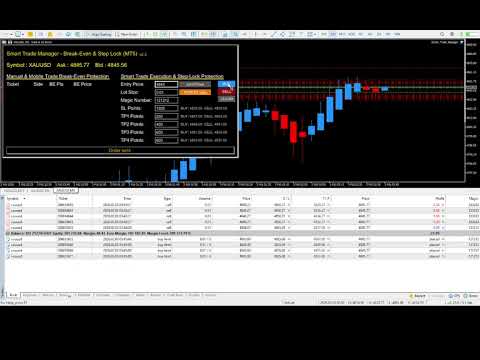
Smart Trade Manager Break Even Step Lock
- Utilità
- Davide Visentin
- Versione: 2.6
- Aggiornato: 6 febbraio 2026
- Attivazioni: 5
🆕 NEW in v2.6: Intelligent ATR-Based Protection
Smart Trade Manager v2.6 introduces adaptive break-even and automatic stop-loss/take-profit management that adjusts to market volatility in real-time!
| ATR-Based Break-Even | Auto Stop-Loss & Take-Profit |
|---|---|
| ✅ Adapts to market volatility automatically | ✅ Adds SL to mobile trades if you forgot |
| ✅ Philosophy B: MIN(ATR, Fixed) = fastest protection | ✅ Three TP modes: ATR, Fixed, or Risk:Reward ratio |
| ✅ Works across Gold, Forex, Crypto, Indices | ✅ One-time operation (you control after) |
| ✅ Distance locked at position open (predictable) | ✅ Perfect for traders opening from phone |
| ✅ ATR ratio dropdown: 0.5× to 3.0× | ✅ Separate ATR settings for BE/SL/TP |
What is ATR-Based Protection?
ATR (Average True Range) measures market volatility. Instead of using fixed distances that work poorly across different instruments, v2.6 adapts automatically:
- Gold (volatile): ATR 1.5× might = 1875 points ($18.75) - wider protection
- EUR/USD (calm): ATR 1.5× might = 128 points (12.8 pips) - tighter protection
- Philosophy B: Uses MIN(ATR, Fixed) - whichever triggers FASTER for maximum safety
Why this matters: A fixed 500-point stop works great for Forex but gets you whipsawed on Gold. ATR adapts to each instrument's natural movement, giving you intelligent protection that respects market conditions.
Auto Stop-Loss Feature
Opened a trade from your phone without setting SL? Smart Trade Manager v2.6 detects it and adds one automatically (ATR-based or fixed distance - your choice).
Example Scenario:
- You open BUY trade from MT5 mobile app during lunch
- Forgot to set SL (happens to everyone!)
- EA detects missing SL within 1 second
- Calculates: ATR(14) × 2.0 = 2500 points for Gold
- Adds SL at Entry - $25.00 automatically
- You're protected even though you forgot!
Auto Take-Profit with Risk:Reward Mode
v2.6 introduces three TP modes for automatic take-profit:
- ATR Mode: TP = ATR × 3.0 (adaptive to volatility)
- Fixed Mode: TP = 1000 points (classic approach)
- Risk:Reward Mode: TP = SL distance × 2.0 (e.g., 1:2 R:R ratio) ⭐
Risk:Reward Example: If Auto-SL set stop at $25 below entry, Auto-TP with 2:1 R:R sets target at $50 above entry - perfect mathematical scaling!
---Why Smart Trade Manager Exists
I noticed that professional traders structure their exits using multiple take-profit levels (TP1, TP2, TP3, TP4) — a logical approach that secures partial profits while leaving runners for bigger moves.
I adopted this methodology in my own trading, but quickly discovered the execution problem:
- ❌ Manually placing multiple orders for each setup was slow and tedious
- ❌ Constantly monitoring to move stops to break-even
- ❌ Adjusting stops manually as each TP hit
- ❌ Unable to protect trades opened from mobile phone
- ❌ Missing break-even opportunities while sleeping or working
So I built Smart Trade Manager to execute this proven trade structure efficiently and protect my positions automatically — even when I'm away from the desk.
What Makes This EA Unique
Smart Trade Manager is the only EA that combines professional multi-target execution with 24/7 mobile trade protection AND intelligent ATR-based risk management:
| LEFT PANEL: Mobile Trade Guardian | RIGHT PANEL: Multi-Target Execution |
|---|---|
| 🆕 ATR-based or Fixed break-even distance | Execute professional 1-4 target setups with 1 click |
| 🆕 Auto-add SL if missing (ATR or Fixed) | Choose 1, 2, 3, or 4 take-profit levels (flexible) |
| 🆕 Auto-add TP (ATR, Fixed, or R:R ratio) | Instant break-even when TP1 hits |
| Philosophy B: MIN(ATR, Fixed) for fastest protection | Progressive Step-Lock (stops advance to TP1 → TP2 → TP3) |
| Works with ANY trade source (mobile, web, other EAs) | PRICE or POINTS input mode (instant conversion) |
| Runs 24/7 on VPS — never miss protection | Market or Limit order execution |
The Problems This Solves
Problem #1: Multi-Target Manual Execution Is Painfully Slow
Without Smart Trade Manager:
- Manually place 1-4 separate orders
- Set individual SL and TP for each
- Wait for TP1 to hit
- Manually move SL to break-even on remaining positions
- Wait for TP2, manually adjust again
- Continue monitoring constantly...
Time: 3-5 minutes per trade + constant monitoring
With Smart Trade Manager:
- Enter values in right panel (30 seconds)
- Click BUY or SELL
- Walk away — everything is automatic
Time: 30 seconds. Zero monitoring needed.
Problem #2: Mobile Trades Have No Protection
Scenario: You're traveling, open a trade from MT5 mobile. Trade goes +30 pips profit. You're in a meeting. Market reverses. Hits original stop-loss for a loss.
You just lost a winning trade because you couldn't move SL to break-even.
With Smart Trade Manager v2.6 on VPS:
- Open trade from mobile MT5 app (even forget SL!)
- EA detects new position automatically
- Adds SL if missing (Auto-SL feature)
- Price moves favorably → EA moves SL to break-even (ATR-based)
- Market reverses → Trade closes at break-even, not loss
Problem #3: Fixed Distances Don't Work Across Instruments
Old Way (Fixed Points):
- Set 500-point BE on Gold → Too tight, whipsawed constantly
- Set 500-point BE on EUR/USD → Too wide, gave back profits
- Constant manual adjustment needed per symbol
v2.6 Way (ATR-Based):
- Set 1.5× ATR on Gold → Automatically calculates ~1875 points (adapts to volatility)
- Set 1.5× ATR on EUR/USD → Automatically calculates ~128 points (adapts to volatility)
- Works perfectly across Forex, Gold, Crypto, Indices with ONE setting
Key Features Overview
| LEFT PANEL (Mobile Protection) | RIGHT PANEL (Multi-Target Execution) |
|---|---|
| ✓ Protect ALL manual trades automatically | ✓ Execute setups with 1-4 TP levels (your choice) |
| ✓ 🆕 ATR-based or Fixed BE distance | ✓ Market or Limit order entry |
| ✓ 🆕 Auto-add SL if missing | ✓ PRICE or POINTS input mode |
| ✓ 🆕 Auto-add TP (ATR, Fixed, or R:R) | ✓ Break-Even when TP1 hits |
| ✓ Philosophy B: MIN(ATR, Fixed) | ✓ Step-Lock profit progression |
| ✓ Works with mobile, web, other EAs | ✓ Market mode safety checks (v2.4) |
| ✓ 24/7 VPS operation | ✓ Auto-clear after successful send |
| ✓ Set-and-forget protection | ✓ Real-time PRICE/POINTS validation |
v2.6 Configuration Guide
Left Panel Settings (New in v2.6)
Break-Even Settings
- BE Distance Mode: Choose ATR, Fixed, or BOTH (MIN) - default: BOTH
- ATR Multiplier BE: 0.5× to 3.0× (dropdown) - default: 1.5×
- ATR Period BE: ATR calculation period - default: 14
- Fixed BE Distance: Fallback or minimum distance - default: 500 points
Philosophy B Explained: When "BOTH" mode selected, EA uses MIN(ATR distance, Fixed distance) - whichever is SMALLER. This ensures fastest protection in volatile markets while respecting your safety floor in calm markets.
Auto Stop-Loss Settings
- Auto-Add SL: Enable/disable - default: ON
- SL Distance Mode: ATR or Fixed - default: ATR
- ATR Multiplier SL: 0.5× to 3.0× - default: 2.0×
- ATR Period SL: ATR calculation period - default: 14
- Fixed SL Points: Fixed distance if ATR mode disabled - default: 500
One-Time Operation: Auto-SL checks each new position ONCE. If SL exists, skips. If missing, adds it. After that, YOU control the SL (EA never re-adds).
Auto Take-Profit Settings
- Auto-Add TP: Enable/disable - default: OFF (opt-in)
- TP Distance Mode: ATR, Fixed, or Risk:Reward - default: Risk:Reward
- ATR Multiplier TP: 0.5× to 3.0× - default: 3.0×
- ATR Period TP: ATR calculation period - default: 14
- Fixed TP Points: Fixed distance - default: 1000
- Risk:Reward Ratio: TP = SL distance × ratio - default: 2.0 (1:2 R:R)
Risk:Reward Mode: If Auto-SL added a 500-point stop, Auto-TP with 2.0 R:R sets target at 1000 points (500 × 2.0). Perfect mathematical scaling!
ATR Distance Examples by Instrument
| Symbol | ATR(14) Typical | 1.5× ATR (BE) | 2.0× ATR (SL) | 3.0× ATR (TP) |
|---|---|---|---|---|
| XAUUSD (Gold) | $12.50 | 1875 pts ($18.75) | 2500 pts ($25.00) | 3750 pts ($37.50) |
| EURUSD | 85 pips | 128 pts (12.8 pips) | 170 pts (17 pips) | 255 pts (25.5 pips) |
| BTCUSD | $450 | $675 | $900 | $1350 |
| US30 (Dow) | 380 pts | 570 pts | 760 pts | 1140 pts |
Note: ATR values change with market conditions. The EA adapts automatically!
Important: Flexible TP Structure
You are NOT required to use all 4 take-profit levels!
Smart Trade Manager supports:
- ✅ 1 TP only — Simple single-target trades
- ✅ 2 TPs — Take partial profit + runner
- ✅ 3 TPs — More granular scaling
- ✅ 4 TPs — Maximum profit optimization
Choose what works for your strategy! The EA adapts to however many targets you enter.
IMPORTANT - Lot Sizing: The lot size you enter is applied to EACH take-profit level. Example: If you enter 1.0 lot with 4 TPs, the EA opens 4 positions of 1.0 lot each = 4.0 lots total exposure. Plan your position sizing accordingly!
Dual Input Mode: PRICE or POINTS
PRICE Mode (Default)
Enter exact price levels. Perfect for traders who mark levels on charts.
Example: Entry 2450.00, SL 2430.00, TP1 2460.00
POINTS Mode
Enter distances in points from entry. Perfect for risk-reward ratio trading.
Example: Entry Market, SL 500 points, TP1 250 points
Switch anytime — values convert automatically. Button shows mode: 🟣 Purple = PRICE, 🟠 Orange = POINTS
v2.4 Market Entry Safety Features (Still Included)
Version 2.4 safety features remain active to protect against volatile conditions:
Maximum Spread Protection
Setting: Max Spread For Market Entry (default: 50 points)
What it does: Blocks market orders when spread exceeds threshold.
Slippage Protection
Setting: Max Slippage Before Rejecting (default: 100 points)
What it does: Checks broker's minimum stop distance before allowing market entry.
Partial Fill Protection
Setting: Cancel Partial Fills (default: ON)
What it does: If not all 4 positions placed, cancels successful ones to prevent incomplete structures.
Quick Start Guide
Installation
- Purchase from MQL5 Market (auto-downloads to MT5)
- Navigate to: MQL5/Experts/Market/
- Open chart (XAUUSD, EURUSD, etc.)
- Enable "Algo Trading" in MT5 toolbar (critical!)
- Drag EA onto chart
- Allow live trading in settings
- Configure ATR settings (or use defaults)
- Click OK
- Verify: Smiley face visible, panels displayed
Using Right Panel: Multi-Target Execution
- Enter lot size per position (applies to EACH TP level)
- Choose PRICE or POINTS mode (click toggle button)
- Enter SL and TP1 (mandatory)
- Enter TP2, TP3, TP4 (optional)
- Click BUY or SELL
- Done! EA manages break-even and Step-Lock automatically
Using Left Panel: Mobile Trade Protection
- Open trade from MT5 mobile app (or desktop, web)
- EA detects it automatically
- If SL missing → Auto-SL adds one (if enabled)
- If TP missing → Auto-TP adds one (if enabled)
- When price moves favorably → SL moves to break-even (ATR-based or fixed)
- Trade is now risk-free!
Understanding Step-Lock Protection
Example Trade:
- XAUUSD BUY Entry: 2450.00
- SL: 2430.00
- TP1: 2460.00, TP2: 2470.00, TP3: 2480.00, TP4: 2520.00
Progression:
- TP1 hits: SL → 2450.00 (break-even, trade risk-free)
- TP2 hits: SL → 2460.00 (TP1 level, profit locked)
- TP3 hits: SL → 2470.00 (TP2 level, more profit locked)
- TP4 or reversal: Maximum profit or protected exit
Troubleshooting
ATR Not Calculating
- ✓ Check Experts tab for initialization errors
- ✓ Verify sufficient price history (needs 14+ bars for ATR 14)
- ✓ EA will fallback to fixed distance if ATR fails
- ✓ Restart MT5 if indicator handle fails
Auto-SL/TP Not Adding
- ✓ Verify feature enabled in settings
- ✓ Check if position already has SL/TP (one-time only)
- ✓ Look in Experts tab for "[Auto-SL]" / "[Auto-TP]" messages
- ✓ For R:R mode TP: verify SL exists first
EA Not Executing Trades
- ✓ Verify AutoTrading enabled (green button in toolbar)
- ✓ Check "Allow live trading" in EA settings
- ✓ Check Experts tab for error messages
- ✓ Verify smiley face is happy 😊
Symbol Compatibility
Extensively Tested:
- ✅ XAUUSD (Gold) — Primary development instrument
- ✅ EURUSD, GBPUSD, USDJPY, AUDUSD — Major forex pairs
- ✅ XAGUSD (Silver)
Expected to Work:
- • All major/minor forex pairs
- • Cryptocurrency pairs (BTCUSD, ETHUSD, etc.)
- • Indices (US30, NAS100, SPX500, etc.)
- • Most MT5 symbols
⚠️ CRITICAL: Always demo test 2+ weeks with your broker and symbols before live trading!
VPS Recommendation
Why VPS is essential:
- 24/7 uptime (your desktop sleeps)
- Protects mobile trades even when you're offline
- Never misses break-even opportunities
- Low latency to broker servers
- ATR calculations never interrupted
Who Should Use This EA
Perfect For:
- ✅ Traders using multi-target exit strategies (1-4 TPs)
- ✅ Mobile traders who can't monitor 24/7
- ✅ Anyone tired of manual stop-loss adjustments
- ✅ Traders wanting rule-based, adaptive protection
- ✅ Traders working across multiple instruments (ATR adapts!)
NOT For:
- ❌ Those seeking automated strategies or signals
- ❌ Complete beginners unfamiliar with trade management
- ❌ Those expecting guaranteed profits
What This EA Does
- ✓ Executes multi-target trades efficiently (1-4 TPs, your choice)
- ✓ 🆕 Adapts protection to market volatility with ATR
- ✓ 🆕 Automatically adds SL to mobile trades if missing
- ✓ 🆕 Automatically adds TP (ATR, Fixed, or R:R modes)
- ✓ Automatically protects manual and mobile trades with break-even
- ✓ Progressively locks profits using Step-Lock logic
- ✓ Operates 24/7 on VPS
- ✓ Supports PRICE and POINTS input modes
- ✓ Protects against volatile market conditions
- ✓ Eliminates manual stop adjustment work
What This EA Does NOT Do
- ❌ Does NOT generate signals or analyze markets
- ❌ Does NOT automate trading strategies
- ❌ Does NOT guarantee profits or prevent losses
- ❌ Does NOT make trading decisions for you
- ❌ Does NOT calculate position sizes based on account risk
This is a trade execution and risk management utility, NOT a trading strategy. All decisions are yours.
RISK DISCLAIMER — READ CAREFULLY
Trading Risk Warning:
Trading leveraged financial instruments involves substantial risk of loss and may not be suitable for all investors. You can lose some or all of your invested capital. Never trade with money you cannot afford to lose. Past performance is not indicative of future results.
Software Scope:
Smart Trade Manager is a trade execution and risk management utility ONLY. It does NOT provide trading signals, market analysis, or profit guarantees. It executes YOUR trading decisions and manages stops according to YOUR configuration.
No Guarantee:
The developer makes NO GUARANTEE regarding profitability, performance, or suitability. Results vary based on your decisions, market conditions, broker execution, spread costs, slippage, VPS reliability, ATR calculation accuracy, and many other factors beyond software control.
Mandatory Testing:
You MUST demo test for minimum 2 weeks with your specific broker and symbols before live trading. Verify break-even behavior, Step-Lock progression, order execution, ATR calculations, Auto-SL/TP functionality under various market conditions.
Limitation of Liability:
The developer assumes ZERO LIABILITY for any direct, indirect, incidental, or consequential damages including trading losses, missed executions, software bugs, broker issues, VPS outages, platform instability, user misconfiguration, incorrect ATR calculations, or any other cause resulting in financial loss. This software is provided "AS IS" without warranty of any kind.
User Responsibility:
By using this software, you acknowledge and agree that:
- You accept full responsibility for all trading decisions and outcomes
- You understand the risks of leveraged trading
- You will conduct thorough demo testing before live trading
- You will NOT hold the developer liable for any losses
- You possess adequate knowledge and experience to use this software
- You will implement appropriate risk management at all times
- You understand total exposure with multiple TPs (1 lot × 4 TPs = 4 lots total)
- You understand ATR is a historical indicator and may not predict future volatility
⚠️ IF YOU DO NOT AGREE, DO NOT PURCHASE OR USE THIS SOFTWARE. ⚠️
Ready to Transform Your Trade Management?
Join traders who have eliminated manual execution work and achieved consistent, adaptive, rule-based trade protection.
Next Steps:
- Purchase from MQL5 Market
- Install on demo account
- Test thoroughly (minimum 2 weeks)
- Configure ATR settings for your symbols
- Go live with confidence
Questions? Contact through MQL5 Market private messaging.
Free Updates: All future improvements provided free to registered users.
Smart Trade Manager v2.6
Professional Multi-Target Execution + Intelligent ATR-Based Protection
© 2026 Davide Visentin