Stop Master Pro
- Experts
-
Wasim Akram
 I design automated trading solutions that blend traditional market strategies with modern technology. I believe in building tools that empower traders to control the market, not just follow it.
 - Versione: 1.17
- Aggiornato: 17 dicembre 2025
- Attivazioni: 5
Stop Master Pro | The Risk-to-Lot Execution Engine
Convert Risk into Precision: Instantly Turn Dollar Risk ($) into Exact Lot Sizes. Instant Order Placement for Manual Traders.
Click here to download the official Stop Master Pro User Manual (English)
Product Description
Stop Master Pro is a professional-grade execution tool designed for the discerning manual trader. It is not a "robot" that makes decisions; it is a precision instrument that empowers you to execute your trading plan with speed and accuracy.
You provide the Strategy. Stop Master Pro provides the Execution.
Experience electric execution speed. The moment a candle closes, the EA detects the direction and places a Buy Stop on Bullish closes or a Sell Stop on Bearish closes. It instantly locks in your entry before the market moves.
Key Features
- Manual Trader Focused: Designed for traders who make their own trading decisions.
- Instant Risk Calculation: Enter your desired risk in Dollars ($), and the EA calculates the Lot Size.
- Precise Order Placement: Place Buy Stop and Sell Stop orders at the exact price levels you define.
- Fast Execution: Benefit from speedy order placement.
- Universal Points Logic: Works flawlessly on any asset class (Forex, Metals, Crypto) without manual adjustments.
User Manual & Input Guide
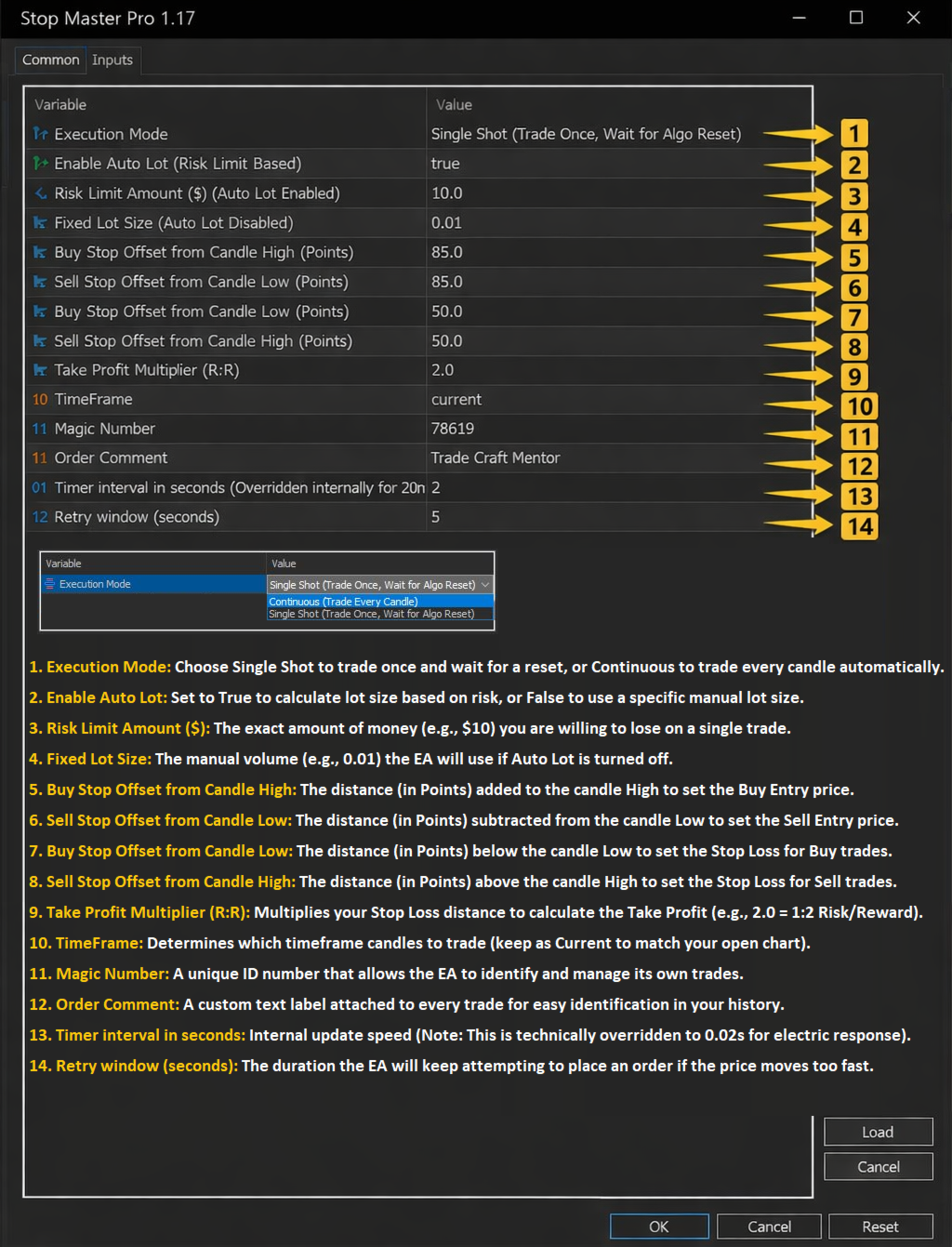
1. Execution Mode
- Single Shot Mode: (Recommended): The EA places orders for the current setup once. After the orders are placed, the EA pauses internal operations. To trade again, you must toggle the "Algo Trading" button Off and On to reset the system.
- Continuous Mode: The EA runs continuously. It will scan every new candle and place new pending orders automatically if the setup criteria are met, without waiting for a reset.
Important Note: If your internet disconnects or the Meta Trader terminal restarts, the "Single Shot" memory will reset. If you want to ensure the EA stays paused and does not place new orders after a restart, simply change the Chart Timeframe (e.g., switch from M5 to M15).
Smart Timeframe Logic: By default ('Current'), the EA automatically adapts to match your chart's timeframe for instant plug-and-play. However, if you manually select a specific timeframe in the settings (e.g., M5) but attach it to a different chart (e.g., H1), the Safety Lock will activate and stop trading to prevent errors."
2. Money Management (Risk Control)
- Enable Auto Lot:
- TRUE: The EA calculates Lot Size based on your Risk Limit Amount.
- FALSE: The EA uses the Fixed Lot Size you provide.
- Risk Limit Amount ($): The exact amount of money you want to risk on this trade setup.
- Example: Enter 50.0. If the trade hits Stop Loss, you lose $50. The EA adjusts the Lot Size automatically.
- Fixed Lot Size: Used only if Enable Auto Lot is set to FALSE.
3. Order Parameters (Points Logic)
Important: All distances are in POINTS for maximum precision.
- Buy Stop Offset from Candle High (Points): The distance (in Points) above the previous candle's High to place the Buy Stop order.
- Sell Stop Offset from Candle Low (Points): The distance (in Points) below the previous candle's Low to place the Sell Stop order.
- Stop Loss Offset from Candle High (Points): The distance (in Points) above the entry price to set the Sell Stop Loss.
- Stop Loss Offset from Candle Low (Points): The distance (in Points) below the entry price to set the Buy Stop Loss.
- Take Profit Multiplier (R:R): The Risk-to-Reward ratio.
- Example: A value of 2.0 means the Take Profit will be twice as far from the entry as the Stop Loss.
4. EA Settings
- Timeframe: The timeframe the EA uses to analyze the previous candle (e.g., M5).
- Magic Number: A unique identifier for the EA's trades.
- Trade Comment: A comment added to all orders.
- Timer Interval: The frequency (in seconds) at which the EA checks for new candles. Lower values mean faster execution, but higher CPU usage.
- Retry Time Window: If an order fails to place immediately, the EA will retry for this many seconds.
How to Use (Workflow)
- Analyze: Perform your manual analysis on the chart.
- Setup: Drag Stop Master Pro onto the chart and set your Risk ($) and Price Offsets (Points).
- Execute: When the candle closes and you are ready to trade, turn Algo Trading ON.
- Relax: Stop Master Pro places the pending orders with the correct Lot Size.
- Reset: If using "Single Shot," toggle the Algo Trading button to reset the EA for the next opportunity.