Adaptive trader
- Experts
- Versione: 4.3
- Attivazioni: 5

📋 Overview
The Adaptive AI Trader is a sophisticated Expert Advisor (EA) for MetaTrader 5 that combines neural network technology with traditional technical analysis to execute automated trades. This EA is designed for both novice and experienced traders who want to leverage AI-powered trading strategies.
🚀 Key Features
🤖 AI-Powered Trading
-
Neural Network Prediction: Uses machine learning to predict price movements
-
Adaptive Learning: Continuously improves through back propagation
-
Confidence Scoring: Only trades when AI confidence meets threshold
🎯 Advanced Analysis
-
Multi-Time frame Confirmation: Analyzes multiple time frames (M15, H1, H4)
-
Price Action Filters: Identifies pin bars, engulfing patterns, and trends
-
Volatility & Volume Filters: Ensures optimal market conditions
🛡️ Risk Management
-
Dynamic Position Sizing: Adjusts lot size based on account balance and risk
-
Circuit Breakers: Automatic shutdown on excessive drawdown
-
Breakeven & Trailing Stops: Protects profits automatically
⚙️ Installation Guide
Step 1: File Placement
-
Copy the AdaptiveAI.ex5 file to your MetaTrader 5 Experts folder:
text[MT5 Data Folder]/MQL5/Experts/
Step 2: Compilation
-
Refresh expert advisors.
(go to the navigator window and right-click on the 'Expert Advisors' folder, then
Step 3: Chart Setup
-
Open a chart for your desired trading symbol (e.g., EURUSD)
-
Drag the EA from the Navigator panel onto the chart
-
Configure the input parameters (see below)
-
Enable "Allow Algo Trading" (check the auto-trading button)
🎛️ Parameter Configuration Guide
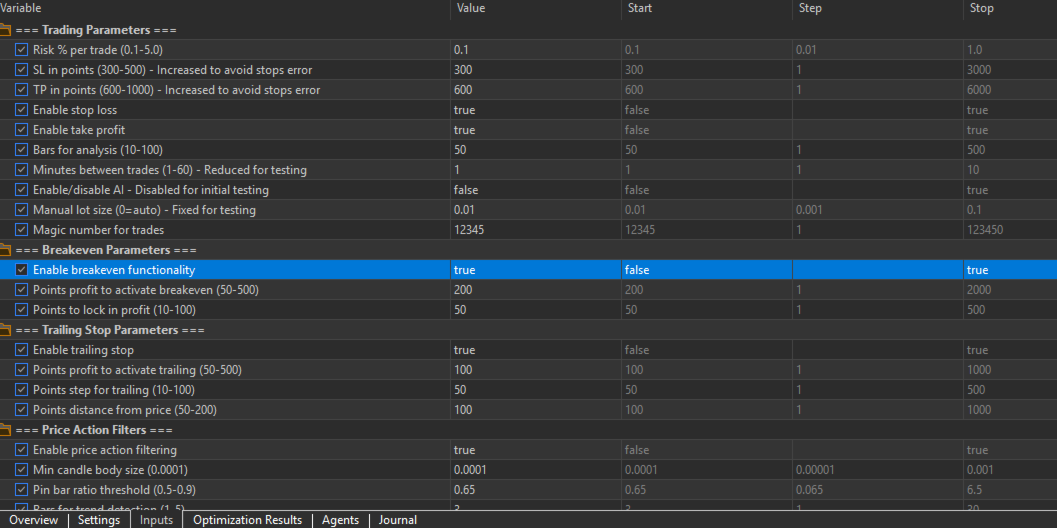
🎯 Trading Parameters
| Parameter | Recommended Value | Description |
|---|---|---|
| RiskPerTrade | 0.5-2.0 | Risk % of account per trade |
| StopLoss | 200-500 | Stop loss in points |
| TakeProfit | 400-1000 | Take profit in points |
| TradeDelayMinutes | 1-5 | Minimum time between trades |
🤖 AI Configuration
| Parameter | Recommended Value | Description |
|---|---|---|
| UseAI | true/false | Enable neural network |
| AdaptiveThreshold | 0.6-0.8 | Minimum AI confidence to trade |
| HiddenLayerSize | 10-20 | Neural network complexity |
📊 Analysis Settings
| Parameter | Recommended Value | Description |
|---|---|---|
| UseMultiTimeframe | true | Confirm signals across timeframes |
| UsePriceActionFilter | true | Enable candlestick pattern analysis |
| UseVolatilityFilter | true | Filter low-volatility markets |
🛡️ Risk Management
| Parameter | Recommended Value | Description |
|---|---|---|
| UseBreakeven | true | Move SL to breakeven at profit |
| UseTrailingStop | true | Protect profits with trailing stop |
| MaxDailyDrawdown | 5.0-10.0 | Maximum daily loss % before stop |
| MaxDailyTrades | 10-50 | Maximum trades per day |
🏁 Getting Started
For Beginners - Safe Configuration
RiskPerTrade = 0.5 UseAI = false UseMultiTimeframe = true UseBreakeven = true UseTrailingStop = true MaxDailyDrawdown = 5.0 ForceTestTrades = true EnableDebug = true
For Advanced Users - AI-Enabled
RiskPerTrade = 1.0 UseAI = true AdaptiveThreshold = 0.7 UseMultiTimeframe = true UseDynamicRisk = true MaxDailyDrawdown = 10.0
📈 Operation Modes
1. Testing Mode (Recommended Start)
-
Set ForceTestTrades = true
-
EA will execute test trades every few bars
-
Perfect for demo account validation
-
No AI involvement - uses simple trend following
2. AI-Assisted Mode
-
Set UseAI = true and AdaptiveThreshold = 0.7
-
Neural network provides signals with confidence scoring
-
Falls back to technical analysis if AI confidence low
-
Best for live trading once tested
3. Manual Override Mode
-
Set ManualLotSize to your preferred lot size
-
AI and risk calculations disabled for fixed sizing
-
Useful for specific trading scenarios
🔧 Monitoring & Optimization
Real-Time Monitoring
-
Check Experts tab for debug messages
-
Monitor trade execution and modifications
-
Watch for circuit breaker activations
Performance Metrics
-
Win Rate: Updated after each closed trade
-
Drawdown: Real-time equity and balance tracking
-
Trade Count: Daily and total trade statistics
Optimization Tips
-
Start Small: Begin with 0.5% risk per trade
-
Use Demo: Test thoroughly before live deployment
-
Monitor Drawdown: Adjust MaxDailyDrawdown based on comfort level
-
Timeframe Selection: Works best on M15-H1 timeframes for most pairs
🚨 Important Safety Features
Circuit Breakers
-
Daily Drawdown Limit: Stops trading if daily loss exceeds set percentage
-
Overall Drawdown Limit: Permanent shutdown if total drawdown too high
-
Trade Limit: Prevents overtrading with daily maximum
Broker Compliance
-
Automatic Stop Validation: Checks broker minimum stop levels
-
Margin Validation: Ensures sufficient margin before trades
-
Spread Monitoring: Rejects trades during wide spreads
🐛 Troubleshooting
Common Issues & Solutions
| Issue | Solution |
|---|---|
| EA not trading | Check auto-trading enabled, verify symbol permissions |
| Compilation errors | Ensure all included files are present, check MQL5 version |
| Invalid stops errors | Increase StopLoss distance, check broker requirements |
| No debug messages | Set EnableDebug = true , check Experts tab |
Error Messages Explained
-
"Trade context not free": MT5 is processing another trade
-
"Insufficient margin": Not enough funds for the calculated lot size
-
"Spread too wide": Market conditions not optimal for trading
📊 Performance Tracking
The EA automatically tracks:
-
✅ Win rate percentage
-
📊 Current and maximum drawdown
-
🔢 Trade count statistics
-
💰 Balance and equity changes
View these metrics in the Experts tab when EnableDebug = true .
🎯 Best Practices
✅ Do's
-
Test extensively on demo account first
-
Start with small risk (0.5-1.0%)
-
Monitor first few live trades closely
-
Use appropriate symbol and timeframe (recommended: EURUSD M15)
-
Keep EnableDebug = true during initial deployment
❌ Don'ts
-
Don't risk more than 2% per trade
-
Don't run on multiple charts without testing
-
Don't ignore circuit breaker warnings
-
Don't use without understanding the risk parameters
🔄 Updates & Maintenance
Regular Checks
-
Verify broker stop levels haven't changed
-
Monitor EA performance monthly
-
Adjust parameters if market conditions change significantly
-
Keep MT5 platform updated