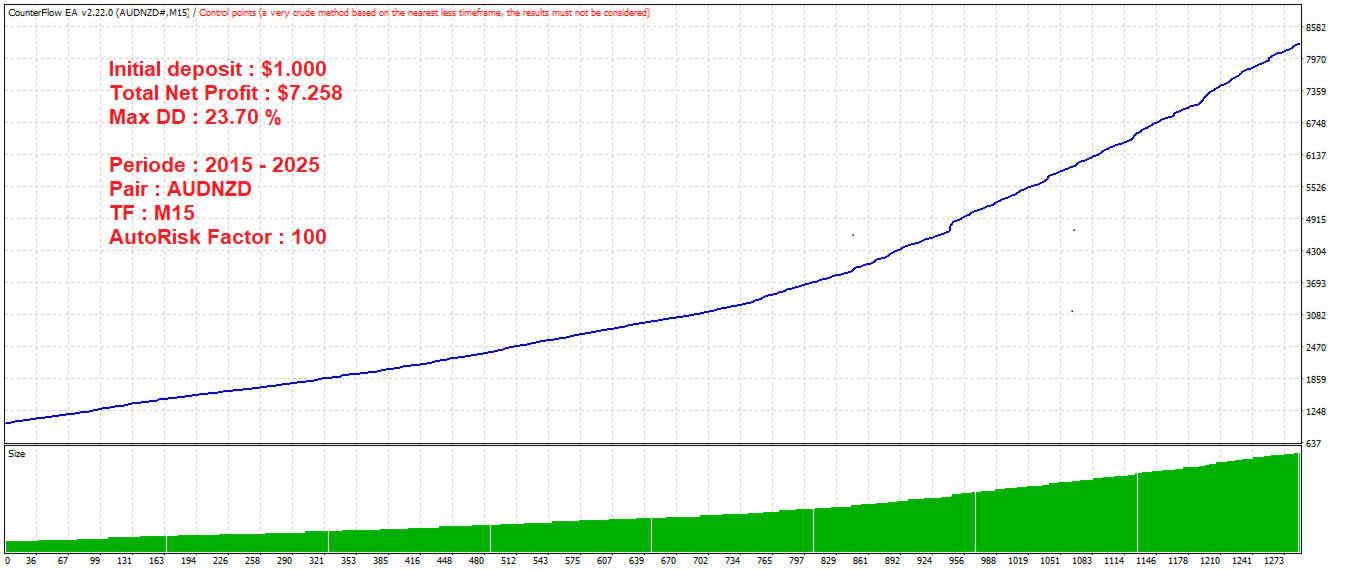
CounterFlow EA
- Experts
- Versione: 3.9
- Aggiornato: 7 maggio 2026
- Attivazioni: 10

CounterFlow EA v3.09 MT4
Professional, Adaptive, Intelligent, and Secure
The most advanced version of CounterFlow EA for MetaTrader 4 — engineered to capture optimal profits while keeping your account protected.
For MT5 Version: https://www.mql5.com/en/market/product/164570
Why CounterFlow EA v3.09?
Most grid EAs on the market are blind — they open trades without truly understanding the market context, resulting in deep drawdowns and unpredictable performance. CounterFlow EA v3.09 MT4 is fundamentally different.
v3.09 introduces a multi-layer market intelligence system that evaluates market conditions from multiple perspectives and timeframes before committing to any trade. The result is fewer bad entries, optimal profits, and calmer equity curves.
What's New in Version 3.09
Version 3.09 is a major upgrade from previous versions, introducing significant features and technical enhancements to improve safety and execution:
- Higher Timeframe Confirmation Filter: Before opening any trade, the EA checks a higher timeframe to confirm that the market is in a suitable condition. This helps reduce bad entries and avoid getting caught in strong trending markets.
- Dual Timeframe Support: You can set both a Primary and Secondary HTF for even stricter confirmation, or use just one for a balanced approach.
- Smarter Take Profit Strategy: The EA targets a larger profit on the first trade of each pair to capture the full potential of mean-reversion moves. If a trade has been open for an extended period, it automatically scales down the target to an achievable goal.
- Trending Market Guard: Automatically pauses new entries when a strong, sustained trending market is identified, resuming only when the market returns to a ranging state.
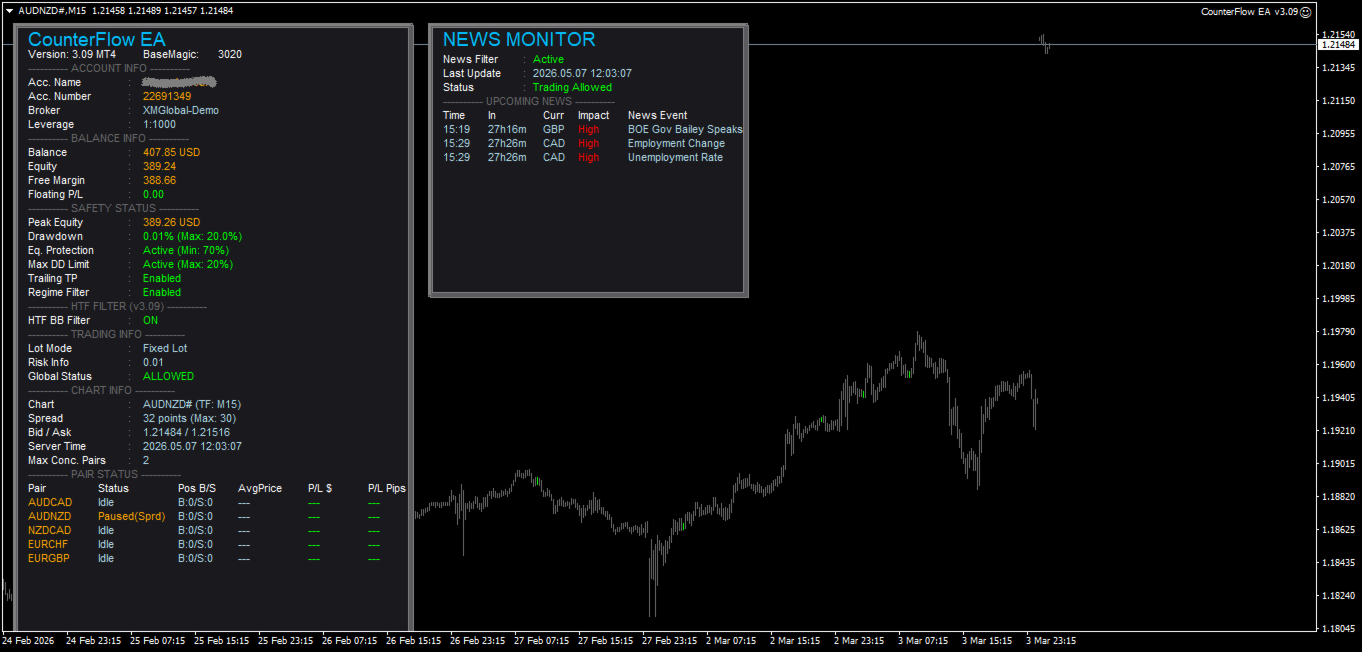
- Currency Over-Exposure Protection: Tracks exposure across all open pairs to prevent simultaneous trades that create dangerous single-currency concentration risk (e.g., AUDCAD and AUDNZD).
- News Filter Stability Updates: Automatically pauses trading before high-impact economic news events (like NFP, CPI, FOMC) and resumes afterwards. The resumption logic has been refined for maximum stability.
- Enhanced Safety Architecture: Refines all existing safety layers to make them more robust for real trading conditions.
- Improved Live Dashboard: Displays the HTF filter and safety status in real-time.
Key Features
1. Safety First — Capital Protection
- Equity Protection: Set a minimum equity floor. If your account equity drops below that level, the EA immediately closes all trades and pauses trading.
- Maximum Drawdown Limiter: Define a maximum drawdown percentage from your account peak. Once hit, the EA pauses trading and waits for a recovery window before resuming.
- Absolute Drawdown Stop: A hard safety ceiling. If overall losses from your starting balance reach a critical level, the EA stops trading permanently for that session.
- Basket Stop Loss: If the total floating loss of all open trades on one pair exceeds your set limit, the EA closes them all immediately.
- Catastrophic Stop Loss: Every single order is protected with a server-side stop loss to protect your account even if your connection drops.
2. Intelligent Entry Conditions
- HTF Confirmation Filter: Checks higher timeframes to ensure macro-trend alignment before entering a trade.
- Trend Rejection System: Automatically pauses trading when strong trending conditions are detected to avoid trading against one-way market moves.
- Real-Time News Filter: Pauses trading during high-impact news events and resumes afterwards.
- Time and Day Filter: Trade only during your preferred hours and days of the week.
3. Smart Profit Capture
- Global Basket Take Profit: Set a profit target in percentage or dollar amount for all open trades combined.
- Trailing Take Profit: Once trades are in profit, the EA trailing mechanism follows the price to maximize gains before closing.
- Break-Even Exit: When drawdown reaches a defined level, the EA can close trades at the break-even point to limit further losses.
- Trade Time Limits: Closes long-held positions or reduces their take profit targets over time to prevent old trades from dragging on.
Recommended Setup
- Broker: ECN or Raw Spread broker with low spreads and fast execution (e.g., IC Markets, Tickmill, Exness, Pepperstone).
- Account Type: Low Spread/ECN account. Avoid standard accounts with wide spreads.
- Leverage: Minimum 1:500 recommended.
- Currency Pairs: Optimized for mean-reversion pairs (AUDCAD, AUDNZD, NZDCAD, EURCHF, EURGBP).
- Timeframe: M15 (highly recommended) or H1.
- Minimum Balance:
- $500 for 1 pair (Conservative / Low Risk)
- $1,000+ for 2–3 pairs (Recommended for steady growth)
- $3,000+ for full 5-pair portfolio
- VPS: Highly recommended for 24/5 uninterrupted operation. Use a VPS with latency under 20ms.
- News Filter Setup: To enable the news filter, go to Tools -> Options -> Expert Advisors -> Allow WebRequest and add: https://nfs.faireconomy.media
- Settings: Default settings are pre-optimized and ready for immediate use.
Risk Disclaimer
Trading Forex and CFDs involves high risk and may not be suitable for all investors. The use of leverage can work against you as well as for you. You may lose some or all of your initial investment. Past performance and backtesting results do not guarantee future results.
CounterFlow EA is a trading tool designed to assist in trade execution. All investment decisions and risk management responsibility lie entirely with the user. The author is not liable for any financial losses arising from the use of this software. Always test on a Demo account first and use responsible money management before trading with real capital.
For parameter optimization inquiries, setup troubleshooting, or technical questions, please utilize the product Comments section or initiate an internal platform private message.