Richer Araujo / Fil d'actualité
- Informations
|
12+ années
expérience
|
0
produits
|
0
versions de démo
|
|
0
offres d’emploi
|
0
signaux
|
0
les abonnés
|
Brazil
Eleni Anna Branou
Basket EA MT4/5© is a powerful profit-harvesting tool and a comprehensive account protection system, all combined into a simple and easy-to-use solution. Its core purpose is to give you complete control over your trading account’s overall profit and loss by managing all open positions at the basket level, rather than individually. The EA offers a full range of basket-level features, including take profit, stop loss, break even, and trailing stop loss. These can be configured as a percentage of your account balance, a fixed amount in your account’s currency, or a target in average points across all managed trades. This flexibility allows traders to tailor risk and profit strategies to their unique needs. Basket EA MT4/5© also supports intelligent trade filtering, allowing you to include or exclude specific trades from management based on their magic number, symbol, or comment. This ensures that only the trades you want managed by the EA are affected, while others are left untouched.
For added protection, the EA includes advanced account safeguarding mechanisms. When a specified equity take profit or stop loss level or a maximum drawdown from the account's balance high is reached, the EA can automatically close all open trades, delete any pending orders, and shut down all charts, removing any Expert Advisors running on them. This feature helps protect your capital during unexpected market movements or when reaching your predefined account targets.
✔️ Does not use Martingale, Grid, Averaging, or other high-risk techniques
✔️ Allows exclusion of specific Magic Numbers, trade comments, or symbol trades from management
✔️ Basket Take Profit in % for all managed trades combined
✔️ Basket Stop Loss in % for all managed trades combined
✔️ Basket Break Even in % for all managed trades combined
✔️ Basket Trailing Stop Loss in % for all managed trades combined
✔️ Basket Take Profit in money for all managed trades combined
✔️ Basket Stop Loss in money for all managed trades combined
✔️ Basket Break Even in money for all managed trades combined
✔️ Basket Trailing Stop Loss in money for all managed trades combined
✔️ Basket Take Profit in average points for all managed trades combined
✔️ Basket Stop Loss in average points for all managed trades combined
✔️ Basket Break Even in average points for all managed trades combined
✔️ Basket Trailing Stop Loss in average points for all managed trades combined
✔️ Option to reset all Basket settings after each account balance update or after a Basket target is hit
✔️ Option to close all managed trades at break even after recovering from a drawdown
✔️ Option to close all managed trades at a specific time on a chosen day or daily
✔️ Account protection feature that closes all trades and charts when equity-based TP or SL is reached
✔️ Maximum drawdown % from balance high that closes all trades and charts/EAs if triggered
✔️ Optional on-chart panel to monitor profit/loss and close trades by type or all at once
✔️ Terminal, push notification, and email alerts when any Basket or protection condition is triggered
✔️ 100% automated Expert Advisor
✔️ Fully compatible with MQL5 VPS
⭐️⭐️⭐️⭐️⭐️ Basket EA EA MT4©: https://www.mql5.com/en/market/product/45192
⭐️⭐️⭐️⭐️⭐️ Basket EA EA MT5©: https://www.mql5.com/en/market/product/72782
📥 Download the Basket EA MT4© demo version in your demo account now: https://c.mql5.com/6/988/Basket_EA_MT4_2_20_Demo.ex4
📥 Download the Basket EA MT5© demo version in your demo account now: https://c.mql5.com/6/988/Basket_EA_MT5_2_00_Demo.ex5
✅ Basket EA MT4/5© detailed Settings/Inputs guide: https://www.mql5.com/en/blogs/post/746117
💎💎💎💎💎 Check out all my Expert Advisors and Utilities: https://www.mql5.com/en/users/eleanna74/seller
20 July 2026
For added protection, the EA includes advanced account safeguarding mechanisms. When a specified equity take profit or stop loss level or a maximum drawdown from the account's balance high is reached, the EA can automatically close all open trades, delete any pending orders, and shut down all charts, removing any Expert Advisors running on them. This feature helps protect your capital during unexpected market movements or when reaching your predefined account targets.
✔️ Does not use Martingale, Grid, Averaging, or other high-risk techniques
✔️ Allows exclusion of specific Magic Numbers, trade comments, or symbol trades from management
✔️ Basket Take Profit in % for all managed trades combined
✔️ Basket Stop Loss in % for all managed trades combined
✔️ Basket Break Even in % for all managed trades combined
✔️ Basket Trailing Stop Loss in % for all managed trades combined
✔️ Basket Take Profit in money for all managed trades combined
✔️ Basket Stop Loss in money for all managed trades combined
✔️ Basket Break Even in money for all managed trades combined
✔️ Basket Trailing Stop Loss in money for all managed trades combined
✔️ Basket Take Profit in average points for all managed trades combined
✔️ Basket Stop Loss in average points for all managed trades combined
✔️ Basket Break Even in average points for all managed trades combined
✔️ Basket Trailing Stop Loss in average points for all managed trades combined
✔️ Option to reset all Basket settings after each account balance update or after a Basket target is hit
✔️ Option to close all managed trades at break even after recovering from a drawdown
✔️ Option to close all managed trades at a specific time on a chosen day or daily
✔️ Account protection feature that closes all trades and charts when equity-based TP or SL is reached
✔️ Maximum drawdown % from balance high that closes all trades and charts/EAs if triggered
✔️ Optional on-chart panel to monitor profit/loss and close trades by type or all at once
✔️ Terminal, push notification, and email alerts when any Basket or protection condition is triggered
✔️ 100% automated Expert Advisor
✔️ Fully compatible with MQL5 VPS
⭐️⭐️⭐️⭐️⭐️ Basket EA EA MT4©: https://www.mql5.com/en/market/product/45192
⭐️⭐️⭐️⭐️⭐️ Basket EA EA MT5©: https://www.mql5.com/en/market/product/72782
📥 Download the Basket EA MT4© demo version in your demo account now: https://c.mql5.com/6/988/Basket_EA_MT4_2_20_Demo.ex4
📥 Download the Basket EA MT5© demo version in your demo account now: https://c.mql5.com/6/988/Basket_EA_MT5_2_00_Demo.ex5
✅ Basket EA MT4/5© detailed Settings/Inputs guide: https://www.mql5.com/en/blogs/post/746117
💎💎💎💎💎 Check out all my Expert Advisors and Utilities: https://www.mql5.com/en/users/eleanna74/seller
20 July 2026
Eleni Anna Branou
Matrix Arrow Indicator MT4/5© is a unique 10 in 1 trend following 100% non-repainting multi-timeframe indicator that can be used on all symbols/instruments: forex, commodities, cryptocurrencies, indices, stocks. Matrix Arrow Indicator MT4/5© will determine the current trend at its early stages, gathering information and data from up to 10 standard indicators, which are: Average Directional Movement Index (ADX), Commodity Channel Index (CCI), Classic Heiken Ashi candles, Moving Average, Moving Average Convergence Divergence (MACD), Relative Vigor Index (RVI), Relative Strength Index (RSI), Parabolic SAR, Stochastic Oscillator, Williams' Percent Range.
When all indicators give a valid buy or sell signal, a corresponding arrow will be printed on the chart, at the opening of the next candle/bar indicating a strong uptrend/downtrend. The user can choose which indicators will use and can adjust the parameters of each indicator separately. Matrix Arrow Indicator MT4/5© gathers information only from the selected indicators and prints the arrow based only on their data. Matrix Arrow Indicator MT4/5© can also send terminal, push notification or email alerts for all new signals. Matrix Arrow Indicator MT4/5© is a super friendly & efficient solution whether you are a scalper, intraday or swing trader!
Matrix Arrow Indicator MT4/5© comes with a free add on, the Matrix Arrow Indicator Multi Timeframe Panel MT4/5© that offers the option to show the Matrix Arrow Indicator signals for 5 customizable timeframes of 16 modifiable symbols/instruments. It gives also the option to change the current chart it is attached onto, by clicking any one of the 16 modifiable symbol buttons. This will allow you to work much faster between different symbols and never miss a trading opportunity again.
✔️ 100% Non-Repainting indicator
✔️ 10 in 1 unique and extremely efficient Matrix and Arrow indicator
✔️ Works on all timeframes and all symbols/instruments
✔️ Super accurate entry Arrow signals that indicate a strong trend
✔️ Exit dot signals define neutral periods with no clear trend
✔️ Equally effective in trending and ranging markets
✔️ Each one indicator can be turned ON/OFF
✔️ Each and every parameter of all 10 indicators are fully adjustable
✔️ Matrix and Arrow colors are fully customizable
✔️ Free add on Panel with Matrix Arrow signals for 16 symbols and 5 timeframes
✔️ Terminal, Push Notification and Email Alerts available
✔️ Ideal for beginners but also a great asset for experienced traders
🔥🔥🔥🔥🔥 Matrix Arrow Indicator MT4/5© Demonstration Video: https://vimeo.com/1157978887?fl=tl&fe=ec
⭐️⭐️⭐️⭐️⭐️ Matrix Arrow Indicator MT4©: https://www.mql5.com/en/market/product/69726
⭐️⭐️⭐️⭐️⭐️ Matrix Arrow Indicator MT5©: https://www.mql5.com/en/market/product/69725
👉 Matrix Arrow Indicator MT4/5© Real Trading Examples: https://www.mql5.com/en/blogs/post/745715
✅ Matrix Arrow Indicator MT4/5© Installation Guide: https://www.mql5.com/en/blogs/post/745711
✅ Matrix Arrow Indicator MT4/5© Settings/Inputs: https://www.mql5.com/en/blogs/post/745707
💎💎💎💎💎 Check out all my Expert Advisors, Indicators and Utilities: https://www.mql5.com/en/users/eleanna74/seller
20 July 2026
When all indicators give a valid buy or sell signal, a corresponding arrow will be printed on the chart, at the opening of the next candle/bar indicating a strong uptrend/downtrend. The user can choose which indicators will use and can adjust the parameters of each indicator separately. Matrix Arrow Indicator MT4/5© gathers information only from the selected indicators and prints the arrow based only on their data. Matrix Arrow Indicator MT4/5© can also send terminal, push notification or email alerts for all new signals. Matrix Arrow Indicator MT4/5© is a super friendly & efficient solution whether you are a scalper, intraday or swing trader!
Matrix Arrow Indicator MT4/5© comes with a free add on, the Matrix Arrow Indicator Multi Timeframe Panel MT4/5© that offers the option to show the Matrix Arrow Indicator signals for 5 customizable timeframes of 16 modifiable symbols/instruments. It gives also the option to change the current chart it is attached onto, by clicking any one of the 16 modifiable symbol buttons. This will allow you to work much faster between different symbols and never miss a trading opportunity again.
✔️ 100% Non-Repainting indicator
✔️ 10 in 1 unique and extremely efficient Matrix and Arrow indicator
✔️ Works on all timeframes and all symbols/instruments
✔️ Super accurate entry Arrow signals that indicate a strong trend
✔️ Exit dot signals define neutral periods with no clear trend
✔️ Equally effective in trending and ranging markets
✔️ Each one indicator can be turned ON/OFF
✔️ Each and every parameter of all 10 indicators are fully adjustable
✔️ Matrix and Arrow colors are fully customizable
✔️ Free add on Panel with Matrix Arrow signals for 16 symbols and 5 timeframes
✔️ Terminal, Push Notification and Email Alerts available
✔️ Ideal for beginners but also a great asset for experienced traders
🔥🔥🔥🔥🔥 Matrix Arrow Indicator MT4/5© Demonstration Video: https://vimeo.com/1157978887?fl=tl&fe=ec
⭐️⭐️⭐️⭐️⭐️ Matrix Arrow Indicator MT4©: https://www.mql5.com/en/market/product/69726
⭐️⭐️⭐️⭐️⭐️ Matrix Arrow Indicator MT5©: https://www.mql5.com/en/market/product/69725
👉 Matrix Arrow Indicator MT4/5© Real Trading Examples: https://www.mql5.com/en/blogs/post/745715
✅ Matrix Arrow Indicator MT4/5© Installation Guide: https://www.mql5.com/en/blogs/post/745711
✅ Matrix Arrow Indicator MT4/5© Settings/Inputs: https://www.mql5.com/en/blogs/post/745707
💎💎💎💎💎 Check out all my Expert Advisors, Indicators and Utilities: https://www.mql5.com/en/users/eleanna74/seller
20 July 2026
Eleni Anna Branou
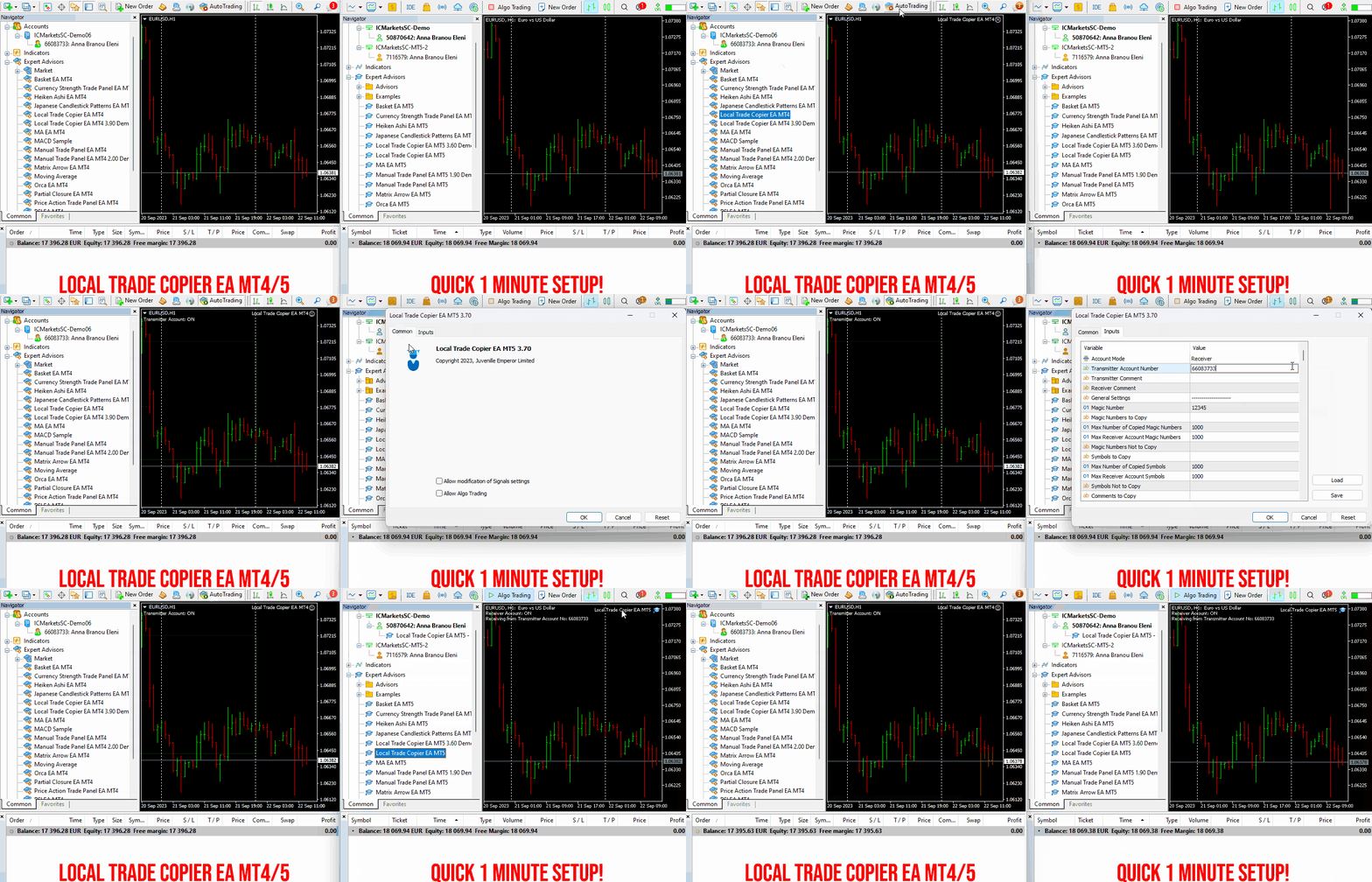
Experience exceptionally fast trade copying with the Local Trade Copier EA MT4/5©. With its quick 1-minute setup time, this trade copier allows you to copy trades between multiple MetaTrader terminals on the same Windows computer or Windows VPS with lightning-fast copying speeds of under 0.5 seconds. Whether you're a beginner or a professional trader, the Local Trade Copier EA MT4/5© offers a wide range of options to customize it to your specific needs. It's the ultimate solution for anyone looking to increase their potential for profit. Try it out today and see why it's the fastest and easiest trade copier on the market!
✔️ High-Speed Copying: Achieve transfers under 0.5 seconds between local MT4 and MT5 terminals*.
✔️ Versatile Support: Supports MT4>MT4, MT4>MT5, MT5>MT4, MT5>MT5 copying*.
✔️ User-Friendly Interface: Simple 1-minute setup for straightforward usage.
✔️ Compatibility: Works on Windows computers and Windows VPSs.
✔️ Flexible Copying: Copies between real>real, real>demo, demo>real, and demo>demo accounts, across all brokers.
✔️ Multi-Account Transfers: Allows one or more transmitter accounts to copy to one or more receiver accounts.
✔️ Customizable Lot Sizes and Risk: Offers a diverse range of 18 options for lot size and risk management per trade.
✔️ Read-Only Account Copying: Can copy from a read-only investor password transmitter account.
✔️ Comprehensive Trade Multiplication: Copies and multiplies trades from any source, including manual trades.
✔️ No Conflicts: Enables manual trading or expert advisor use without conflicts.
✔️ Stable Settings: Does not lose settings if connection is lost or terminals are restarted.
✔️ High Accuracy, Low Computing: Ensures high accuracy copying with minimal computing power.
✔️ Comment Options: Provides transmitter and receiver comment options.
✔️ Trade Filtering: Filters copied trades by magic number, symbol, comment, number, or volume.
✔️ Day and Time Control: Allows day and time control settings for copying.
✔️ Flexible Trade Copying: Copies long/short, old/new trades, market trades, or pending orders.
✔️ Take Profit and Stop Loss Handling: Copies or not take profit and stop loss levels from original transmitter trades.
✔️ Customized TP/SL Management: Offers various options for take profit and stop loss management.
✔️ Trade Closure Options: Provides options for synchronized trade closure and correct partial closure on receiver copied trades.
✔️ Trade Reopening: Allows reopening of closed receiver trades if original transmitter trades are still open.
✔️ Advanced Price Management: Offers better price options, reverse copying, and original TP/SL levels.
✔️ Trade Splitting: Splits copied trades automatically or at set smaller parts.
✔️ Risk Control: Implements maximum risk % control per symbol, currency, or account level.
✔️ Lot Size Management: Provides minimum/maximum lot size options for receiver copied trades.
✔️ Flexible Lot Size Ignoring: Can ignore minimum/maximum transmitter or receiver lot size options.
✔️ Account Protection: Offers emergency account protection measures.
✔️ Drawdown Management: Implements maximum daily drawdown and profit settings, with pause options.
✔️ Drawdown Control: No copying if transmitter or receiver drawdown exceeds a certain percentage level.
✔️ Notification Options: Provides email and push notifications for copied trades or receiver balance, equity, and margin levels.
✔️ Broker Compatibility Features: Includes prefix and suffix auto-detection and setup, and mapping of special symbols.
✔️ Activations: Offers 20 activations for installation across multiple terminals, computers, and VPSs.
✔️ Self-Copier Mode: Compatible with MQL5 VPS in self-copier mode.
✔️ Fully Automated: Operates as a 100% automated expert advisor.
* you must purchase both MT4 & MT5 versions of Local Trade Copier EA for copying between MT4<>MT5 terminals
🔥🔥🔥🔥🔥 Watch the Local Trade Copier EA MT4/5© Quick Setup Video: https://vimeo.com/1158003543?fl=tl&fe=ec
⭐️⭐️⭐️⭐️⭐️ Local Trade Copier EA MT4©: https://www.mql5.com/en/market/product/68950
⭐️⭐️⭐️⭐️⭐️ Local Trade Copier EA MT5©: https://www.mql5.com/en/market/product/68951
📥 Download the Local Trade Copier EA MT4© demo version in your demo account now: https://c.mql5.com/6/987/Local_Trade_Copier_EA_MT4_4_50_Demo.ex4
📥 Download the Local Trade Copier EA MT5© demo version in your demo account now: https://c.mql5.com/6/985/Local_Trade_Copier_EA_MT5_4_30_Demo.ex5
✅ Local Trade Copier EA MT4/5© installation guide: https://www.mql5.com/en/blogs/post/745683
✅ Local Trade Copier EA MT4/5© detailed inputs/settings guide: https://www.mql5.com/en/blogs/post/745681
💎💎💎💎💎 Check out all my Expert Advisors, Indicators and Utilities: https://www.mql5.com/en/users/eleanna74/seller
19 July 2026
✔️ High-Speed Copying: Achieve transfers under 0.5 seconds between local MT4 and MT5 terminals*.
✔️ Versatile Support: Supports MT4>MT4, MT4>MT5, MT5>MT4, MT5>MT5 copying*.
✔️ User-Friendly Interface: Simple 1-minute setup for straightforward usage.
✔️ Compatibility: Works on Windows computers and Windows VPSs.
✔️ Flexible Copying: Copies between real>real, real>demo, demo>real, and demo>demo accounts, across all brokers.
✔️ Multi-Account Transfers: Allows one or more transmitter accounts to copy to one or more receiver accounts.
✔️ Customizable Lot Sizes and Risk: Offers a diverse range of 18 options for lot size and risk management per trade.
✔️ Read-Only Account Copying: Can copy from a read-only investor password transmitter account.
✔️ Comprehensive Trade Multiplication: Copies and multiplies trades from any source, including manual trades.
✔️ No Conflicts: Enables manual trading or expert advisor use without conflicts.
✔️ Stable Settings: Does not lose settings if connection is lost or terminals are restarted.
✔️ High Accuracy, Low Computing: Ensures high accuracy copying with minimal computing power.
✔️ Comment Options: Provides transmitter and receiver comment options.
✔️ Trade Filtering: Filters copied trades by magic number, symbol, comment, number, or volume.
✔️ Day and Time Control: Allows day and time control settings for copying.
✔️ Flexible Trade Copying: Copies long/short, old/new trades, market trades, or pending orders.
✔️ Take Profit and Stop Loss Handling: Copies or not take profit and stop loss levels from original transmitter trades.
✔️ Customized TP/SL Management: Offers various options for take profit and stop loss management.
✔️ Trade Closure Options: Provides options for synchronized trade closure and correct partial closure on receiver copied trades.
✔️ Trade Reopening: Allows reopening of closed receiver trades if original transmitter trades are still open.
✔️ Advanced Price Management: Offers better price options, reverse copying, and original TP/SL levels.
✔️ Trade Splitting: Splits copied trades automatically or at set smaller parts.
✔️ Risk Control: Implements maximum risk % control per symbol, currency, or account level.
✔️ Lot Size Management: Provides minimum/maximum lot size options for receiver copied trades.
✔️ Flexible Lot Size Ignoring: Can ignore minimum/maximum transmitter or receiver lot size options.
✔️ Account Protection: Offers emergency account protection measures.
✔️ Drawdown Management: Implements maximum daily drawdown and profit settings, with pause options.
✔️ Drawdown Control: No copying if transmitter or receiver drawdown exceeds a certain percentage level.
✔️ Notification Options: Provides email and push notifications for copied trades or receiver balance, equity, and margin levels.
✔️ Broker Compatibility Features: Includes prefix and suffix auto-detection and setup, and mapping of special symbols.
✔️ Activations: Offers 20 activations for installation across multiple terminals, computers, and VPSs.
✔️ Self-Copier Mode: Compatible with MQL5 VPS in self-copier mode.
✔️ Fully Automated: Operates as a 100% automated expert advisor.
* you must purchase both MT4 & MT5 versions of Local Trade Copier EA for copying between MT4<>MT5 terminals
🔥🔥🔥🔥🔥 Watch the Local Trade Copier EA MT4/5© Quick Setup Video: https://vimeo.com/1158003543?fl=tl&fe=ec
⭐️⭐️⭐️⭐️⭐️ Local Trade Copier EA MT4©: https://www.mql5.com/en/market/product/68950
⭐️⭐️⭐️⭐️⭐️ Local Trade Copier EA MT5©: https://www.mql5.com/en/market/product/68951
📥 Download the Local Trade Copier EA MT4© demo version in your demo account now: https://c.mql5.com/6/987/Local_Trade_Copier_EA_MT4_4_50_Demo.ex4
📥 Download the Local Trade Copier EA MT5© demo version in your demo account now: https://c.mql5.com/6/985/Local_Trade_Copier_EA_MT5_4_30_Demo.ex5
✅ Local Trade Copier EA MT4/5© installation guide: https://www.mql5.com/en/blogs/post/745683
✅ Local Trade Copier EA MT4/5© detailed inputs/settings guide: https://www.mql5.com/en/blogs/post/745681
💎💎💎💎💎 Check out all my Expert Advisors, Indicators and Utilities: https://www.mql5.com/en/users/eleanna74/seller
19 July 2026
Bernhard Schweigert
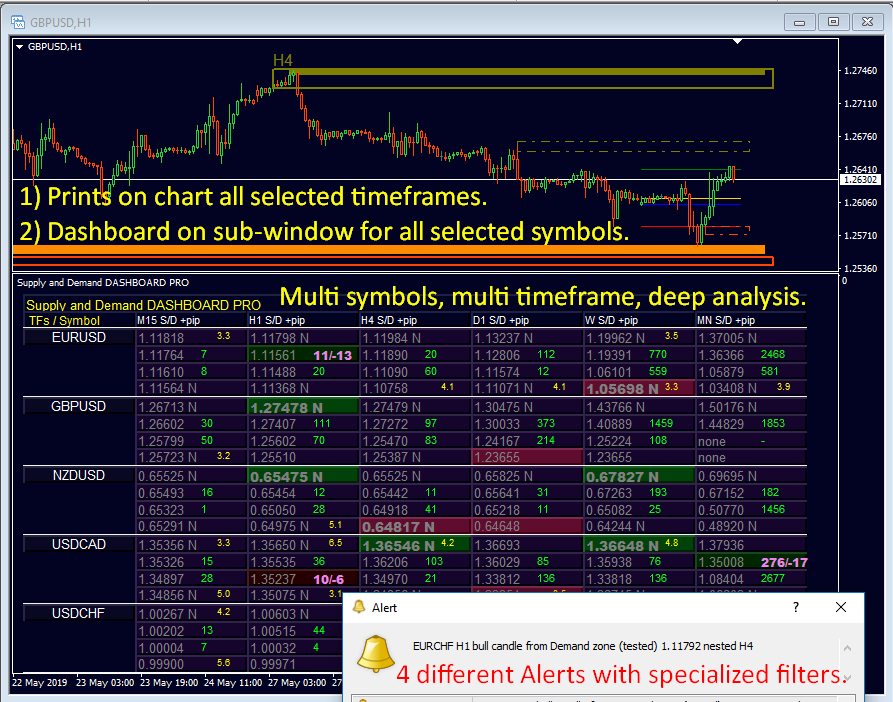
🔥 The Most Advanced Supply & Demand Indicator on the Market! 🔥
Advanced Supply Demand – Version 8
MT4 & MT5
━━━━━━━━━━━━━━━━━━━━━━━━━━━━━━
Trusted by Thousands | 350+ ⭐⭐⭐⭐⭐ Reviews!
https://www.mql5.com/en/market/product/20582
━━━━━━━━━━━━━━━━━━━━━━━━━━━━━━
✅ What’s New in Version 8?
• Detects nested Supply & Demand zones
• FAKE BREAKOUT ALERT – A powerful signal for false moves
• Zone size display
• Engulfing pattern detection
• Major highs & lows marked
• Two zone strength filters (XY-adjustable) – filter out weak zones with precision
• Show 2 timeframes on one chart
• 4 alert types to keep you informed
• Broken zones remain visible on the chart for reference
━━━━━━━━━━━━━━━━━━━━━━━━━━━━━━
Need Help? Read the User Manual
Covers all settings, FAQs, and trading tips. Updated continuously:
👉 https://www.mql5.com/en/blogs/post/720245
Includes guidance on stop loss, take profit, and identifying key market levels.
━━━━━━━━━━━━━━━━━━━━━━━━━━━━━━
Limited Time: 30% OFF
Get the full power of Advanced Supply Demand at a reduced price:
👉 https://www.mql5.com/en/accounting/buy/market/20582?period=1
Advanced Supply Demand – Version 8
MT4 & MT5
━━━━━━━━━━━━━━━━━━━━━━━━━━━━━━
Trusted by Thousands | 350+ ⭐⭐⭐⭐⭐ Reviews!
https://www.mql5.com/en/market/product/20582
━━━━━━━━━━━━━━━━━━━━━━━━━━━━━━
✅ What’s New in Version 8?
• Detects nested Supply & Demand zones
• FAKE BREAKOUT ALERT – A powerful signal for false moves
• Zone size display
• Engulfing pattern detection
• Major highs & lows marked
• Two zone strength filters (XY-adjustable) – filter out weak zones with precision
• Show 2 timeframes on one chart
• 4 alert types to keep you informed
• Broken zones remain visible on the chart for reference
━━━━━━━━━━━━━━━━━━━━━━━━━━━━━━
Need Help? Read the User Manual
Covers all settings, FAQs, and trading tips. Updated continuously:
👉 https://www.mql5.com/en/blogs/post/720245
Includes guidance on stop loss, take profit, and identifying key market levels.
━━━━━━━━━━━━━━━━━━━━━━━━━━━━━━
Limited Time: 30% OFF
Get the full power of Advanced Supply Demand at a reduced price:
👉 https://www.mql5.com/en/accounting/buy/market/20582?period=1
Eleni Anna Branou
Matrix Arrow EA MT4/5© is a unique expert advisor that can trade the Matrix Arrow Indicator's MT4/5© signals with a trade panel on the chart, manually or 100% automatically. Matrix Arrow Indicator MT4/5© will determine the current trend at its early stages, gathering information and data from up to 10 standard indicators, which are: Average Directional Movement Index (ADX), Commodity Channel Index (CCI), Classic Heiken Ashi candles, Moving Average, Moving Average Convergence Divergence (MACD), Relative Vigor Index (RVI), Relative Strength Index (RSI), Parabolic SAR, Stochastic Oscillator, Williams' Percent Range.
When all indicators give a valid buy or sell signal, a corresponding arrow will be printed on the chart, at the opening of the next candle/bar indicating a strong uptrend/downtrend. The user can choose which indicators will use and can adjust the parameters of each indicator separately. With Matrix Arrow EA MT5 you can trade the Matrix Arrow Indicator MT4/5© signals, directly from a trade panel on the chart manually or 100% automatically with a 100% algorithmic trading option!
✔️ Martingale, Grid, Averaging or other dangerous techniques are not used
✔️ Features on chart Trade Panel for manual or 100% algorithmic trading
✔️ SL, TP, BE and Trailing SL levels in Points and in Percentage of the Average Daily Range
✔️ New optimized set files for trading 12 popular symbols/instruments
✔️ Based on the 100% Non-Repainting Matrix Arrow Indicator MT5
✔️ Working, Entry & Exit Confirmation timeframes available
✔️ Works on all timeframes and all symbols/instruments
✔️ Super accurate Arrow signals that indicate a strong trend
✔️ Exit dot signals define neutral periods with no clear trend
✔️ Equally effective in trending and ranging markets
✔️ Each one indicator can be turned ON/OFF
✔️ Each and every parameter of all 10 indicators are fully adjustable
✔️ Ideal for beginners but also a great asset for experienced traders
✔️ 100% automated Expert Advisor
✔️ MQL5 VPS compatible
🔥🔥🔥🔥🔥 Matrix Arrow EA MT4/5© Backtests & Optimized Set Files: https://www.mql5.com/en/blogs/post/745695
⭐️⭐️⭐️⭐️⭐️ Matrix Arrow EA MT4©: https://www.mql5.com/en/market/product/70812
⭐️⭐️⭐️⭐️⭐️ Matrix Arrow EA MT5©: https://www.mql5.com/en/market/product/70813
✅ How to Test the Matrix Arrow EA MT4/5©: https://www.mql5.com/en/blogs/post/745701
✅ Matrix Arrow EA MT4/5© Installation Guide: https://www.mql5.com/en/blogs/post/745703
📢📢📢📢📢 ATTENTION: If you want to trade the Matrix Arrow signals with your Matrix Arrow EA MT4/5©, you must purchase the Matrix Arrow Indicator MT4/5© separately! Otherwise the Matrix Arrow EA MT4/5© will work as a manual trade panel only.
Buy now the Matrix Arrow Indicator MT4©: https://www.mql5.com/en/market/product/69726
Buy now the Matrix Arrow Indicator MT5©: https://www.mql5.com/en/market/product/69725
💎💎💎💎💎 Check out all my Expert Advisors, Indicators and Utilities: https://www.mql5.com/en/users/eleanna74/seller
19 July 2026
When all indicators give a valid buy or sell signal, a corresponding arrow will be printed on the chart, at the opening of the next candle/bar indicating a strong uptrend/downtrend. The user can choose which indicators will use and can adjust the parameters of each indicator separately. With Matrix Arrow EA MT5 you can trade the Matrix Arrow Indicator MT4/5© signals, directly from a trade panel on the chart manually or 100% automatically with a 100% algorithmic trading option!
✔️ Martingale, Grid, Averaging or other dangerous techniques are not used
✔️ Features on chart Trade Panel for manual or 100% algorithmic trading
✔️ SL, TP, BE and Trailing SL levels in Points and in Percentage of the Average Daily Range
✔️ New optimized set files for trading 12 popular symbols/instruments
✔️ Based on the 100% Non-Repainting Matrix Arrow Indicator MT5
✔️ Working, Entry & Exit Confirmation timeframes available
✔️ Works on all timeframes and all symbols/instruments
✔️ Super accurate Arrow signals that indicate a strong trend
✔️ Exit dot signals define neutral periods with no clear trend
✔️ Equally effective in trending and ranging markets
✔️ Each one indicator can be turned ON/OFF
✔️ Each and every parameter of all 10 indicators are fully adjustable
✔️ Ideal for beginners but also a great asset for experienced traders
✔️ 100% automated Expert Advisor
✔️ MQL5 VPS compatible
🔥🔥🔥🔥🔥 Matrix Arrow EA MT4/5© Backtests & Optimized Set Files: https://www.mql5.com/en/blogs/post/745695
⭐️⭐️⭐️⭐️⭐️ Matrix Arrow EA MT4©: https://www.mql5.com/en/market/product/70812
⭐️⭐️⭐️⭐️⭐️ Matrix Arrow EA MT5©: https://www.mql5.com/en/market/product/70813
✅ How to Test the Matrix Arrow EA MT4/5©: https://www.mql5.com/en/blogs/post/745701
✅ Matrix Arrow EA MT4/5© Installation Guide: https://www.mql5.com/en/blogs/post/745703
📢📢📢📢📢 ATTENTION: If you want to trade the Matrix Arrow signals with your Matrix Arrow EA MT4/5©, you must purchase the Matrix Arrow Indicator MT4/5© separately! Otherwise the Matrix Arrow EA MT4/5© will work as a manual trade panel only.
Buy now the Matrix Arrow Indicator MT4©: https://www.mql5.com/en/market/product/69726
Buy now the Matrix Arrow Indicator MT5©: https://www.mql5.com/en/market/product/69725
💎💎💎💎💎 Check out all my Expert Advisors, Indicators and Utilities: https://www.mql5.com/en/users/eleanna74/seller
19 July 2026
Eleni Anna Branou
RSI EA ΜΤ4/5© is a unique, fully automated Expert Advisor for trading the well known and extremely efficient Relative Strength Indicator, being able at the same time to control your trading account's profit and/or loss at a basket level, for all your open positions combined. RSI EA MT4/5© has 4 different strategies for trading the Relative Strength Indicator, open trades on RSI extremes on live bar, open trades on RSI extremes on closed candle and open trades on RSI level crossing. This last strategy is a unique approach of the Relative Strength Indicator, since its a trend following strategy and not a reversal one. A Moving Average filter is also available in order to skip opening trades that are not following the current trend. This EA comes with optimized set files for many symbols.
✔️ Martingale, Grid, Averaging or other dangerous techniques are not used
✔️ RSI Level Live Bar (once per candle) trade opening
✔️ RSI Level Closed Candle trade opening
✔️ RSI Level Crossing trade opening
✔️ Single or multiple orders per trading session
✔️ Net Asset Risk option, ideal for night scalping
✔️ Moving Average Trend Filter
✔️ SL, TP, BE and Trailing SL levels in Points and in Percentage of the Average Daily Range
✔️ Hard and Virtual Take Profit and Stop Loss levels
✔️ Basket TP, SL, BE and Trailing SL in % for all open positions combined
✔️ Optimized set files for many symbols
✔️ 100% automated Expert Advisor
✔️ MQL5 VPS compatible
🔥🔥🔥🔥🔥 RSI EA MT4/5© Backtests & New Set Files: https://www.mql5.com/en/blogs/post/745685
⭐️⭐️⭐️⭐️⭐️ RSI EA MT4©: https://www.mql5.com/en/market/product/45228
⭐️⭐️⭐️⭐️⭐️ RSI EA MT5©: https://www.mql5.com/en/market/product/67625
💎💎💎💎💎 Check out all my Expert Advisors, Indicators and Utilities: https://www.mql5.com/en/users/eleanna74/seller
19 July 2026
✔️ Martingale, Grid, Averaging or other dangerous techniques are not used
✔️ RSI Level Live Bar (once per candle) trade opening
✔️ RSI Level Closed Candle trade opening
✔️ RSI Level Crossing trade opening
✔️ Single or multiple orders per trading session
✔️ Net Asset Risk option, ideal for night scalping
✔️ Moving Average Trend Filter
✔️ SL, TP, BE and Trailing SL levels in Points and in Percentage of the Average Daily Range
✔️ Hard and Virtual Take Profit and Stop Loss levels
✔️ Basket TP, SL, BE and Trailing SL in % for all open positions combined
✔️ Optimized set files for many symbols
✔️ 100% automated Expert Advisor
✔️ MQL5 VPS compatible
🔥🔥🔥🔥🔥 RSI EA MT4/5© Backtests & New Set Files: https://www.mql5.com/en/blogs/post/745685
⭐️⭐️⭐️⭐️⭐️ RSI EA MT4©: https://www.mql5.com/en/market/product/45228
⭐️⭐️⭐️⭐️⭐️ RSI EA MT5©: https://www.mql5.com/en/market/product/67625
💎💎💎💎💎 Check out all my Expert Advisors, Indicators and Utilities: https://www.mql5.com/en/users/eleanna74/seller
19 July 2026
Eleni Anna Branou
Heiken Ashi EA MT4/5© is a fully automated trading system that takes Classic or Smoothed Heiken Ashi candles to the next level. It enters trades based on Heiken Ashi color changes, offering a highly customizable approach to fit different trading styles. The EA provides great flexibility, allowing you to select which Heiken Ashi candle (from the 2nd to the 10th) should trigger the first trade. Additionally, it includes a distance limitation feature to prevent excessive entries at similar price levels. A built-in Heiken Ashi trailing stop dynamically adjusts stop-loss levels based on past Heiken Ashi candles, helping to adapt to different market conditions. To improve trade quality, the EA includes Moving Average and MACD filters to reduce false signals. This EA comes with specialy optimized set files for many symbols/instruments.
✔️ The EA offers flexible trade execution, allowing either one trade per color change or multiple trades per trend.
✔️ Custom entry selection lets users open trades based on the 2nd to 10th Heiken Ashi candle.
✔️ Distance control helps prevent excessive trades at similar price levels.
✔️ A built-in Heiken Ashi trailing stop dynamically adjusts the stop-loss for better trend-following adaptability.
✔️ Advanced filters, including Moving Average and MACD, help reduce false signals.
✔️ ADR-based risk management calculates SL, TP, BE, and Trailing SL as a percentage of the Average Daily Range.
✔️ Basket TP and SL options enable efficient management of all open positions.
✔️ The EA avoids risky strategies such as Martingale and Grid, ensuring a safer trading approach for long-term success.
✔️ It is 100% compatible with MQL5 VPS, allowing smooth operation when running 24/7.
🔥🔥🔥🔥🔥 Heiken Ashi EA MT4/5© Backtests & New Optimized Set Files: https://www.mql5.com/en/blogs/post/745696
✅ How to Test the Heiken Ashi EA MT4/5©: https://www.mql5.com/en/blogs/post/750887
⭐️⭐️⭐️⭐️⭐️ Heiken Ashi EA MT4©: https://www.mql5.com/en/market/product/45283
⭐️⭐️⭐️⭐️⭐️ Heiken Ashi EA MT5©: https://www.mql5.com/en/market/product/64877
💎💎💎💎💎 Check out all my Expert Advisors, Indicators and Utilities: https://www.mql5.com/en/users/eleanna74/seller
19 July 2026
✔️ The EA offers flexible trade execution, allowing either one trade per color change or multiple trades per trend.
✔️ Custom entry selection lets users open trades based on the 2nd to 10th Heiken Ashi candle.
✔️ Distance control helps prevent excessive trades at similar price levels.
✔️ A built-in Heiken Ashi trailing stop dynamically adjusts the stop-loss for better trend-following adaptability.
✔️ Advanced filters, including Moving Average and MACD, help reduce false signals.
✔️ ADR-based risk management calculates SL, TP, BE, and Trailing SL as a percentage of the Average Daily Range.
✔️ Basket TP and SL options enable efficient management of all open positions.
✔️ The EA avoids risky strategies such as Martingale and Grid, ensuring a safer trading approach for long-term success.
✔️ It is 100% compatible with MQL5 VPS, allowing smooth operation when running 24/7.
🔥🔥🔥🔥🔥 Heiken Ashi EA MT4/5© Backtests & New Optimized Set Files: https://www.mql5.com/en/blogs/post/745696
✅ How to Test the Heiken Ashi EA MT4/5©: https://www.mql5.com/en/blogs/post/750887
⭐️⭐️⭐️⭐️⭐️ Heiken Ashi EA MT4©: https://www.mql5.com/en/market/product/45283
⭐️⭐️⭐️⭐️⭐️ Heiken Ashi EA MT5©: https://www.mql5.com/en/market/product/64877
💎💎💎💎💎 Check out all my Expert Advisors, Indicators and Utilities: https://www.mql5.com/en/users/eleanna74/seller
19 July 2026
Eleni Anna Branou
Experience exceptionally fast trade copying with the Local Trade Copier EA MT4/5©. With its quick 1-minute setup time, this trade copier allows you to copy trades between multiple MetaTrader terminals on the same Windows computer or Windows VPS with lightning-fast copying speeds of under 0.5 seconds. Whether you're a beginner or a professional trader, the Local Trade Copier EA MT4/5© offers a wide range of options to customize it to your specific needs. It's the ultimate solution for anyone looking to increase their potential for profit. Try it out today and see why it's the fastest and easiest trade copier on the market!
✔️ High-Speed Copying: Achieve transfers under 0.5 seconds between local MT4 and MT5 terminals*.
✔️ Versatile Support: Supports MT4>MT4, MT4>MT5, MT5>MT4, MT5>MT5 copying*.
✔️ User-Friendly Interface: Simple 1-minute setup for straightforward usage.
✔️ Compatibility: Works on Windows computers and Windows VPSs.
✔️ Flexible Copying: Copies between real>real, real>demo, demo>real, and demo>demo accounts, across all brokers.
✔️ Multi-Account Transfers: Allows one or more transmitter accounts to copy to one or more receiver accounts.
✔️ Customizable Lot Sizes and Risk: Offers a diverse range of 18 options for lot size and risk management per trade.
✔️ Read-Only Account Copying: Can copy from a read-only investor password transmitter account.
✔️ Comprehensive Trade Multiplication: Copies and multiplies trades from any source, including manual trades.
✔️ No Conflicts: Enables manual trading or expert advisor use without conflicts.
✔️ Stable Settings: Does not lose settings if connection is lost or terminals are restarted.
✔️ High Accuracy, Low Computing: Ensures high accuracy copying with minimal computing power.
✔️ Comment Options: Provides transmitter and receiver comment options.
✔️ Trade Filtering: Filters copied trades by magic number, symbol, comment, number, or volume.
✔️ Day and Time Control: Allows day and time control settings for copying.
✔️ Flexible Trade Copying: Copies long/short, old/new trades, market trades, or pending orders.
✔️ Take Profit and Stop Loss Handling: Copies or not take profit and stop loss levels from original transmitter trades.
✔️ Customized TP/SL Management: Offers various options for take profit and stop loss management.
✔️ Trade Closure Options: Provides options for synchronized trade closure and correct partial closure on receiver copied trades.
✔️ Trade Reopening: Allows reopening of closed receiver trades if original transmitter trades are still open.
✔️ Advanced Price Management: Offers better price options, reverse copying, and original TP/SL levels.
✔️ Trade Splitting: Splits copied trades automatically or at set smaller parts.
✔️ Risk Control: Implements maximum risk % control per symbol, currency, or account level.
✔️ Lot Size Management: Provides minimum/maximum lot size options for receiver copied trades.
✔️ Flexible Lot Size Ignoring: Can ignore minimum/maximum transmitter or receiver lot size options.
✔️ Account Protection: Offers emergency account protection measures.
✔️ Drawdown Management: Implements maximum daily drawdown and profit settings, with pause options.
✔️ Drawdown Control: No copying if transmitter or receiver drawdown exceeds a certain percentage level.
✔️ Notification Options: Provides email and push notifications for copied trades or receiver balance, equity, and margin levels.
✔️ Broker Compatibility Features: Includes prefix and suffix auto-detection and setup, and mapping of special symbols.
✔️ Activations: Offers 20 activations for installation across multiple terminals, computers, and VPSs.
✔️ Self-Copier Mode: Compatible with MQL5 VPS in self-copier mode.
✔️ Fully Automated: Operates as a 100% automated expert advisor.
* you must purchase both MT4 & MT5 versions of Local Trade Copier EA for copying between MT4<>MT5 terminals
🔥🔥🔥🔥🔥 Watch the Local Trade Copier EA MT4/5© Quick Setup Video: https://vimeo.com/1158003543?fl=tl&fe=ec
⭐️⭐️⭐️⭐️⭐️ Local Trade Copier EA MT4©: https://www.mql5.com/en/market/product/68950
⭐️⭐️⭐️⭐️⭐️ Local Trade Copier EA MT5©: https://www.mql5.com/en/market/product/68951
📥 Download the Local Trade Copier EA MT4© demo version in your demo account now: https://c.mql5.com/6/987/Local_Trade_Copier_EA_MT4_4_50_Demo.ex4
📥 Download the Local Trade Copier EA MT5© demo version in your demo account now: https://c.mql5.com/6/985/Local_Trade_Copier_EA_MT5_4_30_Demo.ex5
✅ Local Trade Copier EA MT4/5© installation guide: https://www.mql5.com/en/blogs/post/745683
✅ Local Trade Copier EA MT4/5© detailed inputs/settings guide: https://www.mql5.com/en/blogs/post/745681
💎💎💎💎💎 Check out all my Expert Advisors, Indicators and Utilities: https://www.mql5.com/en/users/eleanna74/seller
19 July 2026
.
✔️ High-Speed Copying: Achieve transfers under 0.5 seconds between local MT4 and MT5 terminals*.
✔️ Versatile Support: Supports MT4>MT4, MT4>MT5, MT5>MT4, MT5>MT5 copying*.
✔️ User-Friendly Interface: Simple 1-minute setup for straightforward usage.
✔️ Compatibility: Works on Windows computers and Windows VPSs.
✔️ Flexible Copying: Copies between real>real, real>demo, demo>real, and demo>demo accounts, across all brokers.
✔️ Multi-Account Transfers: Allows one or more transmitter accounts to copy to one or more receiver accounts.
✔️ Customizable Lot Sizes and Risk: Offers a diverse range of 18 options for lot size and risk management per trade.
✔️ Read-Only Account Copying: Can copy from a read-only investor password transmitter account.
✔️ Comprehensive Trade Multiplication: Copies and multiplies trades from any source, including manual trades.
✔️ No Conflicts: Enables manual trading or expert advisor use without conflicts.
✔️ Stable Settings: Does not lose settings if connection is lost or terminals are restarted.
✔️ High Accuracy, Low Computing: Ensures high accuracy copying with minimal computing power.
✔️ Comment Options: Provides transmitter and receiver comment options.
✔️ Trade Filtering: Filters copied trades by magic number, symbol, comment, number, or volume.
✔️ Day and Time Control: Allows day and time control settings for copying.
✔️ Flexible Trade Copying: Copies long/short, old/new trades, market trades, or pending orders.
✔️ Take Profit and Stop Loss Handling: Copies or not take profit and stop loss levels from original transmitter trades.
✔️ Customized TP/SL Management: Offers various options for take profit and stop loss management.
✔️ Trade Closure Options: Provides options for synchronized trade closure and correct partial closure on receiver copied trades.
✔️ Trade Reopening: Allows reopening of closed receiver trades if original transmitter trades are still open.
✔️ Advanced Price Management: Offers better price options, reverse copying, and original TP/SL levels.
✔️ Trade Splitting: Splits copied trades automatically or at set smaller parts.
✔️ Risk Control: Implements maximum risk % control per symbol, currency, or account level.
✔️ Lot Size Management: Provides minimum/maximum lot size options for receiver copied trades.
✔️ Flexible Lot Size Ignoring: Can ignore minimum/maximum transmitter or receiver lot size options.
✔️ Account Protection: Offers emergency account protection measures.
✔️ Drawdown Management: Implements maximum daily drawdown and profit settings, with pause options.
✔️ Drawdown Control: No copying if transmitter or receiver drawdown exceeds a certain percentage level.
✔️ Notification Options: Provides email and push notifications for copied trades or receiver balance, equity, and margin levels.
✔️ Broker Compatibility Features: Includes prefix and suffix auto-detection and setup, and mapping of special symbols.
✔️ Activations: Offers 20 activations for installation across multiple terminals, computers, and VPSs.
✔️ Self-Copier Mode: Compatible with MQL5 VPS in self-copier mode.
✔️ Fully Automated: Operates as a 100% automated expert advisor.
* you must purchase both MT4 & MT5 versions of Local Trade Copier EA for copying between MT4<>MT5 terminals
🔥🔥🔥🔥🔥 Watch the Local Trade Copier EA MT4/5© Quick Setup Video: https://vimeo.com/1158003543?fl=tl&fe=ec
⭐️⭐️⭐️⭐️⭐️ Local Trade Copier EA MT4©: https://www.mql5.com/en/market/product/68950
⭐️⭐️⭐️⭐️⭐️ Local Trade Copier EA MT5©: https://www.mql5.com/en/market/product/68951
📥 Download the Local Trade Copier EA MT4© demo version in your demo account now: https://c.mql5.com/6/987/Local_Trade_Copier_EA_MT4_4_50_Demo.ex4
📥 Download the Local Trade Copier EA MT5© demo version in your demo account now: https://c.mql5.com/6/985/Local_Trade_Copier_EA_MT5_4_30_Demo.ex5
✅ Local Trade Copier EA MT4/5© installation guide: https://www.mql5.com/en/blogs/post/745683
✅ Local Trade Copier EA MT4/5© detailed inputs/settings guide: https://www.mql5.com/en/blogs/post/745681
💎💎💎💎💎 Check out all my Expert Advisors, Indicators and Utilities: https://www.mql5.com/en/users/eleanna74/seller
19 July 2026
.
Widianto Pramana
Most EA listings show you a profit chart and ask you to trust it. I wanted to try something different with Hermes Velocity: an M5 scalping system built around a layered order structure, tested across 10.5 years of data (Jan 2016 – Jun 2026), and documented with the good, the risky, and the boring parts included — not just the highlight reel.
It's now live on the MQL5 Market (v1.4, reviewed and approved). Over the next week I'll be sharing exactly how it works, the real backtest numbers across multiple pairs, and the honest trade-offs of the strategy — including where it can go wrong.
I'd rather start this conversation with questions than a sales pitch.
https://www.mql5.com/en/market/product/184352
It's now live on the MQL5 Market (v1.4, reviewed and approved). Over the next week I'll be sharing exactly how it works, the real backtest numbers across multiple pairs, and the honest trade-offs of the strategy — including where it can go wrong.
I'd rather start this conversation with questions than a sales pitch.
https://www.mql5.com/en/market/product/184352
Eleni Anna Branou
Matrix Arrow Indicator MT4/5© is a unique 10 in 1 trend following 100% non-repainting multi-timeframe indicator that can be used on all symbols/instruments: forex, commodities, cryptocurrencies, indices, stocks. Matrix Arrow Indicator MT4/5© will determine the current trend at its early stages, gathering information and data from up to 10 standard indicators, which are: Average Directional Movement Index (ADX), Commodity Channel Index (CCI), Classic Heiken Ashi candles, Moving Average, Moving Average Convergence Divergence (MACD), Relative Vigor Index (RVI), Relative Strength Index (RSI), Parabolic SAR, Stochastic Oscillator, Williams' Percent Range.
When all indicators give a valid buy or sell signal, a corresponding arrow will be printed on the chart, at the opening of the next candle/bar indicating a strong uptrend/downtrend. The user can choose which indicators will use and can adjust the parameters of each indicator separately. Matrix Arrow Indicator MT4/5© gathers information only from the selected indicators and prints the arrow based only on their data. Matrix Arrow Indicator MT4/5© can also send terminal, push notification or email alerts for all new signals. Matrix Arrow Indicator MT4/5© is a super friendly & efficient solution whether you are a scalper, intraday or swing trader!
Matrix Arrow Indicator MT4/5© comes with a free add on, the Matrix Arrow Indicator Multi Timeframe Panel MT4/5© that offers the option to show the Matrix Arrow Indicator signals for 5 customizable timeframes of 16 modifiable symbols/instruments. It gives also the option to change the current chart it is attached onto, by clicking any one of the 16 modifiable symbol buttons. This will allow you to work much faster between different symbols and never miss a trading opportunity again.
✔️ 100% Non-Repainting indicator
✔️ 10 in 1 unique and extremely efficient Matrix and Arrow indicator
✔️ Works on all timeframes and all symbols/instruments
✔️ Super accurate entry Arrow signals that indicate a strong trend
✔️ Exit dot signals define neutral periods with no clear trend
✔️ Equally effective in trending and ranging markets
✔️ Each one indicator can be turned ON/OFF
✔️ Each and every parameter of all 10 indicators are fully adjustable
✔️ Matrix and Arrow colors are fully customizable
✔️ Free add on Panel with Matrix Arrow signals for 16 symbols and 5 timeframes
✔️ Terminal, Push Notification and Email Alerts available
✔️ Ideal for beginners but also a great asset for experienced traders
🔥🔥🔥🔥🔥 Matrix Arrow Indicator MT4/5© Demonstration Video: https://vimeo.com/1157978887?fl=tl&fe=ec
⭐️⭐️⭐️⭐️⭐️ Matrix Arrow Indicator MT4©: https://www.mql5.com/en/market/product/69726
⭐️⭐️⭐️⭐️⭐️ Matrix Arrow Indicator MT5©: https://www.mql5.com/en/market/product/69725
👉 Matrix Arrow Indicator MT4/5© Real Trading Examples: https://www.mql5.com/en/blogs/post/745715
✅ Matrix Arrow Indicator MT4/5© Installation Guide: https://www.mql5.com/en/blogs/post/745711
✅ Matrix Arrow Indicator MT4/5© Settings/Inputs: https://www.mql5.com/en/blogs/post/745707
💎💎💎💎💎 Check out all my Expert Advisors, Indicators and Utilities: https://www.mql5.com/en/users/eleanna74/seller
19 July 2026
When all indicators give a valid buy or sell signal, a corresponding arrow will be printed on the chart, at the opening of the next candle/bar indicating a strong uptrend/downtrend. The user can choose which indicators will use and can adjust the parameters of each indicator separately. Matrix Arrow Indicator MT4/5© gathers information only from the selected indicators and prints the arrow based only on their data. Matrix Arrow Indicator MT4/5© can also send terminal, push notification or email alerts for all new signals. Matrix Arrow Indicator MT4/5© is a super friendly & efficient solution whether you are a scalper, intraday or swing trader!
Matrix Arrow Indicator MT4/5© comes with a free add on, the Matrix Arrow Indicator Multi Timeframe Panel MT4/5© that offers the option to show the Matrix Arrow Indicator signals for 5 customizable timeframes of 16 modifiable symbols/instruments. It gives also the option to change the current chart it is attached onto, by clicking any one of the 16 modifiable symbol buttons. This will allow you to work much faster between different symbols and never miss a trading opportunity again.
✔️ 100% Non-Repainting indicator
✔️ 10 in 1 unique and extremely efficient Matrix and Arrow indicator
✔️ Works on all timeframes and all symbols/instruments
✔️ Super accurate entry Arrow signals that indicate a strong trend
✔️ Exit dot signals define neutral periods with no clear trend
✔️ Equally effective in trending and ranging markets
✔️ Each one indicator can be turned ON/OFF
✔️ Each and every parameter of all 10 indicators are fully adjustable
✔️ Matrix and Arrow colors are fully customizable
✔️ Free add on Panel with Matrix Arrow signals for 16 symbols and 5 timeframes
✔️ Terminal, Push Notification and Email Alerts available
✔️ Ideal for beginners but also a great asset for experienced traders
🔥🔥🔥🔥🔥 Matrix Arrow Indicator MT4/5© Demonstration Video: https://vimeo.com/1157978887?fl=tl&fe=ec
⭐️⭐️⭐️⭐️⭐️ Matrix Arrow Indicator MT4©: https://www.mql5.com/en/market/product/69726
⭐️⭐️⭐️⭐️⭐️ Matrix Arrow Indicator MT5©: https://www.mql5.com/en/market/product/69725
👉 Matrix Arrow Indicator MT4/5© Real Trading Examples: https://www.mql5.com/en/blogs/post/745715
✅ Matrix Arrow Indicator MT4/5© Installation Guide: https://www.mql5.com/en/blogs/post/745711
✅ Matrix Arrow Indicator MT4/5© Settings/Inputs: https://www.mql5.com/en/blogs/post/745707
💎💎💎💎💎 Check out all my Expert Advisors, Indicators and Utilities: https://www.mql5.com/en/users/eleanna74/seller
19 July 2026
Eleni Anna Branou
Moving Average EA ΜΤ4/5© is a fully automated Expert Advisor that takes the trading of Moving Average to a whole new level. Moving Average EA MT4/5© can either open one buy trade when MA turns up (blue color MA) or one sell trade when MA turns down (red color MA) or can open a new same direction trade on every new candle, as long as the slope direction of the Moving Average remains unchanged. A series of unique settings make this EA extremely versatile. This EA comes with provided set files for many symbols, specially optimized for ECN Raw Spread ICMarkets accounts (New York based GMT+3 time zone servers). Other brokers or account types may be used, but you may need to make any necessary time adjustments to fit your broker/account.
✔️ Martingale, Grid, Averaging or other dangerous techniques are not used
✔️ New trade on every change of the Moving Average slope direction
✔️ Option for a new same direction trade on each new candle
✔️ Offset setting for a better trade placement after a price retracement
✔️ Hard and Virtual Take Profit and Stop Loss levels
✔️ SL, TP, BE and Trailing SL levels in Percentage of the Average Daily Range
✔️ Basket TP, SL, BE and Trailing SL in % for all open positions combined
✔️ Optimized set files for many symbols/instruments
✔️ 100% automated Expert Advisor
✔️ MQL5 VPS compatible
🔥🔥🔥🔥🔥 Moving Average EA MT4/5© Backtests & New Set Files: https://www.mql5.com/en/blogs/post/745753
⭐️⭐️⭐️⭐️⭐️ Moving Average EA ΜΤ4©: https://www.mql5.com/en/market/product/45633
⭐️⭐️⭐️⭐️⭐️ Moving Average EA ΜΤ5©: https://www.mql5.com/en/market/product/47673
💎💎💎💎💎 Check out all my Expert Advisors, Indicators and Utilities: https://www.mql5.com/en/users/eleanna74/seller
19 July 2026
✔️ Martingale, Grid, Averaging or other dangerous techniques are not used
✔️ New trade on every change of the Moving Average slope direction
✔️ Option for a new same direction trade on each new candle
✔️ Offset setting for a better trade placement after a price retracement
✔️ Hard and Virtual Take Profit and Stop Loss levels
✔️ SL, TP, BE and Trailing SL levels in Percentage of the Average Daily Range
✔️ Basket TP, SL, BE and Trailing SL in % for all open positions combined
✔️ Optimized set files for many symbols/instruments
✔️ 100% automated Expert Advisor
✔️ MQL5 VPS compatible
🔥🔥🔥🔥🔥 Moving Average EA MT4/5© Backtests & New Set Files: https://www.mql5.com/en/blogs/post/745753
⭐️⭐️⭐️⭐️⭐️ Moving Average EA ΜΤ4©: https://www.mql5.com/en/market/product/45633
⭐️⭐️⭐️⭐️⭐️ Moving Average EA ΜΤ5©: https://www.mql5.com/en/market/product/47673
💎💎💎💎💎 Check out all my Expert Advisors, Indicators and Utilities: https://www.mql5.com/en/users/eleanna74/seller
19 July 2026
Eleni Anna Branou
Basket EA MT4/5© is a powerful profit-harvesting tool and a comprehensive account protection system, all combined into a simple and easy-to-use solution. Its core purpose is to give you complete control over your trading account’s overall profit and loss by managing all open positions at the basket level, rather than individually. The EA offers a full range of basket-level features, including take profit, stop loss, break even, and trailing stop loss. These can be configured as a percentage of your account balance, a fixed amount in your account’s currency, or a target in average points across all managed trades. This flexibility allows traders to tailor risk and profit strategies to their unique needs. Basket EA MT4/5© also supports intelligent trade filtering, allowing you to include or exclude specific trades from management based on their magic number, symbol, or comment. This ensures that only the trades you want managed by the EA are affected, while others are left untouched.
For added protection, the EA includes advanced account safeguarding mechanisms. When a specified equity take profit or stop loss level or a maximum drawdown from the account's balance high is reached, the EA can automatically close all open trades, delete any pending orders, and shut down all charts, removing any Expert Advisors running on them. This feature helps protect your capital during unexpected market movements or when reaching your predefined account targets.
✔️ Does not use Martingale, Grid, Averaging, or other high-risk techniques
✔️ Allows exclusion of specific Magic Numbers, trade comments, or symbol trades from management
✔️ Basket Take Profit in % for all managed trades combined
✔️ Basket Stop Loss in % for all managed trades combined
✔️ Basket Break Even in % for all managed trades combined
✔️ Basket Trailing Stop Loss in % for all managed trades combined
✔️ Basket Take Profit in money for all managed trades combined
✔️ Basket Stop Loss in money for all managed trades combined
✔️ Basket Break Even in money for all managed trades combined
✔️ Basket Trailing Stop Loss in money for all managed trades combined
✔️ Basket Take Profit in average points for all managed trades combined
✔️ Basket Stop Loss in average points for all managed trades combined
✔️ Basket Break Even in average points for all managed trades combined
✔️ Basket Trailing Stop Loss in average points for all managed trades combined
✔️ Option to reset all Basket settings after each account balance update or after a Basket target is hit
✔️ Option to close all managed trades at break even after recovering from a drawdown
✔️ Option to close all managed trades at a specific time on a chosen day or daily
✔️ Account protection feature that closes all trades and charts when equity-based TP or SL is reached
✔️ Maximum drawdown % from balance high that closes all trades and charts/EAs if triggered
✔️ Optional on-chart panel to monitor profit/loss and close trades by type or all at once
✔️ Terminal, push notification, and email alerts when any Basket or protection condition is triggered
✔️ 100% automated Expert Advisor
✔️ Fully compatible with MQL5 VPS
⭐️⭐️⭐️⭐️⭐️ Basket EA EA MT4©: https://www.mql5.com/en/market/product/45192
⭐️⭐️⭐️⭐️⭐️ Basket EA EA MT5©: https://www.mql5.com/en/market/product/72782
📥 Download the Basket EA MT4© demo version in your demo account now: https://c.mql5.com/6/988/Basket_EA_MT4_2_20_Demo.ex4
📥 Download the Basket EA MT5© demo version in your demo account now: https://c.mql5.com/6/988/Basket_EA_MT5_2_00_Demo.ex5
✅ Basket EA MT4/5© detailed Settings/Inputs guide: https://www.mql5.com/en/blogs/post/746117
💎💎💎💎💎 Check out all my Expert Advisors and Utilities: https://www.mql5.com/en/users/eleanna74/seller
19 July 2026
For added protection, the EA includes advanced account safeguarding mechanisms. When a specified equity take profit or stop loss level or a maximum drawdown from the account's balance high is reached, the EA can automatically close all open trades, delete any pending orders, and shut down all charts, removing any Expert Advisors running on them. This feature helps protect your capital during unexpected market movements or when reaching your predefined account targets.
✔️ Does not use Martingale, Grid, Averaging, or other high-risk techniques
✔️ Allows exclusion of specific Magic Numbers, trade comments, or symbol trades from management
✔️ Basket Take Profit in % for all managed trades combined
✔️ Basket Stop Loss in % for all managed trades combined
✔️ Basket Break Even in % for all managed trades combined
✔️ Basket Trailing Stop Loss in % for all managed trades combined
✔️ Basket Take Profit in money for all managed trades combined
✔️ Basket Stop Loss in money for all managed trades combined
✔️ Basket Break Even in money for all managed trades combined
✔️ Basket Trailing Stop Loss in money for all managed trades combined
✔️ Basket Take Profit in average points for all managed trades combined
✔️ Basket Stop Loss in average points for all managed trades combined
✔️ Basket Break Even in average points for all managed trades combined
✔️ Basket Trailing Stop Loss in average points for all managed trades combined
✔️ Option to reset all Basket settings after each account balance update or after a Basket target is hit
✔️ Option to close all managed trades at break even after recovering from a drawdown
✔️ Option to close all managed trades at a specific time on a chosen day or daily
✔️ Account protection feature that closes all trades and charts when equity-based TP or SL is reached
✔️ Maximum drawdown % from balance high that closes all trades and charts/EAs if triggered
✔️ Optional on-chart panel to monitor profit/loss and close trades by type or all at once
✔️ Terminal, push notification, and email alerts when any Basket or protection condition is triggered
✔️ 100% automated Expert Advisor
✔️ Fully compatible with MQL5 VPS
⭐️⭐️⭐️⭐️⭐️ Basket EA EA MT4©: https://www.mql5.com/en/market/product/45192
⭐️⭐️⭐️⭐️⭐️ Basket EA EA MT5©: https://www.mql5.com/en/market/product/72782
📥 Download the Basket EA MT4© demo version in your demo account now: https://c.mql5.com/6/988/Basket_EA_MT4_2_20_Demo.ex4
📥 Download the Basket EA MT5© demo version in your demo account now: https://c.mql5.com/6/988/Basket_EA_MT5_2_00_Demo.ex5
✅ Basket EA MT4/5© detailed Settings/Inputs guide: https://www.mql5.com/en/blogs/post/746117
💎💎💎💎💎 Check out all my Expert Advisors and Utilities: https://www.mql5.com/en/users/eleanna74/seller
19 July 2026
Vladislav Andruschenko
MetaTrader 4 ve MetaTrader 5’te Uzman Danışmanların (Expert Advisor, EA) Test Edilmesi ve Optimizasyonu Alım satım robotlarını test etme, parametreleri optimize etme, SET dosyalarını kaydetme ve sonuçları Strateji Test Cihazında (Strategy Tester) kontrol etme konusunda pratik bir rehber...
Vladislav Andruschenko
Test e ottimizzazione degli Expert Advisor in MetaTrader 4 e MetaTrader 5 Guida pratica per testare i robot di trading, ottimizzare i parametri, salvare i file SET e verificare i risultati nel Tester strategico (Strategy Tester...
Vladislav Andruschenko
Test et optimisation des Expert Advisors dans MetaTrader 4 et MetaTrader 5 Guide pratique pour tester des robots de trading, optimiser leurs paramètres, enregistrer des fichiers SET et analyser les résultats dans le testeur de stratégie (Strategy Tester...
Vladislav Andruschenko
MetaTrader 4 및 MetaTrader 5에서 전문가 어드바이저(EA, EA) 테스트와 최적화 트레이딩 로봇 테스트, 매개변수 최적화, SET 파일 저장, 전략 테스터(Strategy Tester) 결과 확인을 위한 실전 가이드입니다. 이 글에서는 MetaTrader 4와 MetaTrader 5에서 EA를 테스트하는 방법, 전략 테스터를 준비하는 방법, 시각적 테스트를 실행하는 방법, 입력 매개변수를 최적화하는 방법, 그리고 최종 SET 파일을 저장하여 데모 계좌에서 추가로 검증하는 방법을 설명합니다...
Vladislav Andruschenko
Testen und Optimierung von Expert Advisors in MetaTrader 4 und MetaTrader 5 Ein praktischer Leitfaden zum Testen von Trading-Robotern, zur Optimierung von Parametern, zum Speichern von SET-Dateien und zur Auswertung der Ergebnisse im Strategietester (Strategy Tester...
Vladislav Andruschenko
MetaTrader 4/MetaTrader 5におけるエキスパートアドバイザ(Expert Advisor/EA)のテストと最適化 売買ロボットのテスト、パラメータの最適化、SETファイルの保存、ストラテジーテスター(Strategy Tester)での結果確認を解説する実践ガイドです...
Vladislav Andruschenko
在 MetaTrader 4 和 MetaTrader 5 中测试与优化智能交易系统(Expert Advisor,EA) 一份实用指南:介绍如何测试交易机器人、优化参数、保存 SET 参数文件,以及在策略测试器(Strategy Tester)中检查测试结果...
Vladislav Andruschenko
Teste e otimização de Expert Advisors no MetaTrader 4 e MetaTrader 5 Um guia prático para testar robôs de negociação, otimizar parâmetros, salvar arquivos SET e analisar os resultados no Testador de Estratégias (Strategy Tester...
: