Vladislav Andruschenko
- i love my job at https//expforex.com/
- Ukraine
- 313287
|
14+ years
experience
|
44
products
|
2346
demo versions
|
|
93
jobs
|
0
signals
|
0
subscribers
|
👋 Welcome to Expforex
I’m Vladislav, a professional MQL4/MQL5 developer creating MetaTrader tools since 2007.
Expforex develops practical trading solutions for MetaTrader 4 and MetaTrader 5:
Expert Advisors, trading panels, trade copiers, risk-control utilities, account reports, testing tools and automation systems.
✅ MetaTrader development since 2007
✅ Tools for MT4 and MT5
✅ Documentation, video guides and product support
✅ Professional utilities for traders, developers and money managers
━━━━━━━━━━━━━━━━━━━━
⭐ VirtualTradePad PRO SE — Premium MetaTrader Trading Workspace
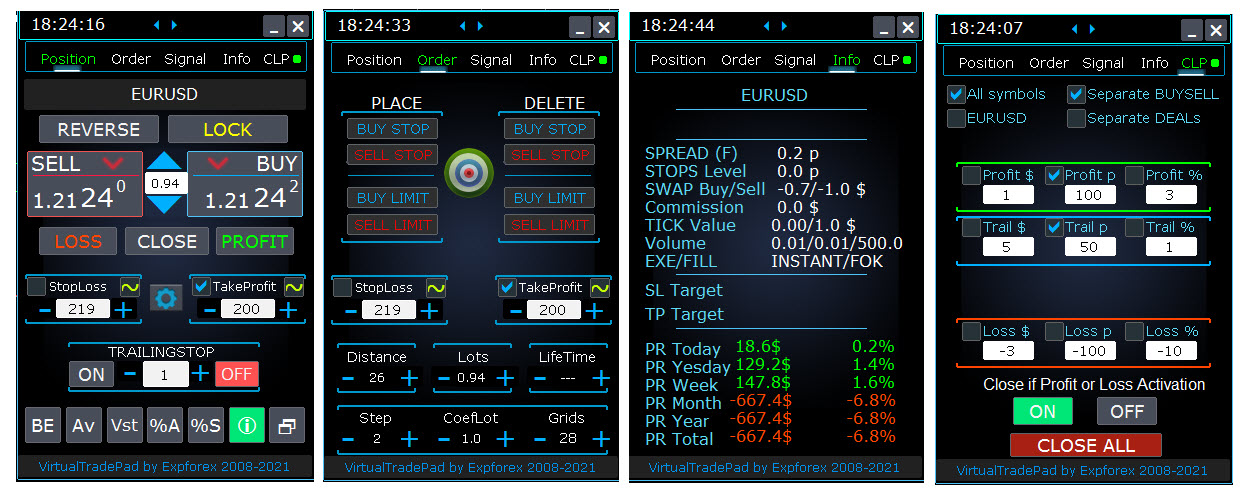
Professional manual trading panel for MT4 and MT5 with chart-based control, position management, order tools, partial closing, averaging, signal workspace, testing preparation and advanced trading modules.
https://expforex.com/vtpprosehero/
━━━━━━━━━━━━━━━━━━━━
🌐 Official Expforex website https://www.expforex.com/
🚀 Complete Expforex product hub https://www.mql5.com/en/blogs/post/755532
🛒 All products on MQL5 Market https://www.mql5.com/en/users/vladon/seller#products
📘 All MQL5 guides https://www.mql5.com/en/users/vladon/blog
━━━━━━━━━━━━━━━━━━━━
💬 Questions, ideas or need help?
I always recommend starting with the full guide and product documentation — most answers, examples and setup details are already explained there.
If you need personal help with a product, please write your question in the Comments section of the exact product page. This makes it easier to check the product version, settings, screenshots and logs, and give a more accurate answer.
Your feedback, ideas and trading scenarios also help improve Expforex products.
━━━━━━━━━━━━━━━━━━━━
🔗 Social links
📢 MQL5 Channel https://www.mql5.com/en/channels/expforex
▶️ YouTube https://www.youtube.com/Expforex
📘 Facebook https://www.facebook.com/ExpForex/
𝕏 X / Twitter https://x.com/expforex
📱 Telegram https://t.me/Expforex
🎵 TikTok https://www.tiktok.com/@expforex
📧 Contact https://expforex.com/contacts/
I’m Vladislav, a professional MQL4/MQL5 developer creating MetaTrader tools since 2007.
Expforex develops practical trading solutions for MetaTrader 4 and MetaTrader 5:
Expert Advisors, trading panels, trade copiers, risk-control utilities, account reports, testing tools and automation systems.
✅ MetaTrader development since 2007
✅ Tools for MT4 and MT5
✅ Documentation, video guides and product support
✅ Professional utilities for traders, developers and money managers
━━━━━━━━━━━━━━━━━━━━
⭐ VirtualTradePad PRO SE — Premium MetaTrader Trading Workspace
Professional manual trading panel for MT4 and MT5 with chart-based control, position management, order tools, partial closing, averaging, signal workspace, testing preparation and advanced trading modules.
https://expforex.com/vtpprosehero/
━━━━━━━━━━━━━━━━━━━━
🌐 Official Expforex website https://www.expforex.com/
🚀 Complete Expforex product hub https://www.mql5.com/en/blogs/post/755532
🛒 All products on MQL5 Market https://www.mql5.com/en/users/vladon/seller#products
📘 All MQL5 guides https://www.mql5.com/en/users/vladon/blog
━━━━━━━━━━━━━━━━━━━━
💬 Questions, ideas or need help?
I always recommend starting with the full guide and product documentation — most answers, examples and setup details are already explained there.
If you need personal help with a product, please write your question in the Comments section of the exact product page. This makes it easier to check the product version, settings, screenshots and logs, and give a more accurate answer.
Your feedback, ideas and trading scenarios also help improve Expforex products.
━━━━━━━━━━━━━━━━━━━━
🔗 Social links
📢 MQL5 Channel https://www.mql5.com/en/channels/expforex
▶️ YouTube https://www.youtube.com/Expforex
📘 Facebook https://www.facebook.com/ExpForex/
𝕏 X / Twitter https://x.com/expforex
📱 Telegram https://t.me/Expforex
🎵 TikTok https://www.tiktok.com/@expforex
📧 Contact https://expforex.com/contacts/



Vladislav Andruschenko


·
1
Chua Wee Kiat
2021.05.10
Hi, I can pay to create a version to hide the ticket number in the comment area?
Vladislav Andruschenko


·
2
Show all comments (6)
Denilson Menezes
2021.07.28
Hello, I believe I have found the error. my platform is Metatrader 5 and I made the purchase of the Virtual trade pad, however, I am not able to cancel to make a new purchase. What is the orientation in this case?


Vladislav Andruschenko


·
2
660
Vahid Bigdeli
2021.03.11
Hi How can I contact you regarding Exp5 The xCustomEA for MT5 ? I need small modifications because my indicator does not have arrows and just have normal buffers like bollinger band .


Vladislav Andruschenko
·
1
srazi65
2021.02.22
I am fan of this EA. However, will buy the day, when Pending Sell/Buy Trades are also added in EA to be handled Virtually. Independent from Server / Broker distances.
srazi65
2021.02.23
Thanks for response. Is it possible if i buy for 3 months "Exp 5 - Virtual trade Pad EXTRA" by paying 30 USD and before expiration of the period if i pay 30 USD more, its all mine for life time. Think of it !!!
Vladislav Andruschenko
2021.02.24
Thank. Unfortunately, this cannot be done. There is no such option in the market. But you can write to me and I will make a discount.