Vladislav Andruschenko / Profile
- Information
|
14+ years
experience
|
44
products
|
2318
demo versions
|
|
93
jobs
|
0
signals
|
0
subscribers
|
I’m Vladislav, a professional MQL4/MQL5 developer creating MetaTrader tools since 2007.
Expforex develops practical trading solutions for MetaTrader 4 and MetaTrader 5:
Expert Advisors, trading panels, trade copiers, risk-control utilities, account reports, testing tools and automation systems.
✅ MetaTrader development since 2007
✅ Tools for MT4 and MT5
✅ Documentation, video guides and product support
✅ Professional utilities for traders, developers and money managers
━━━━━━━━━━━━━━━━━━━━
⭐ VirtualTradePad PRO SE — Premium MetaTrader Trading Workspace
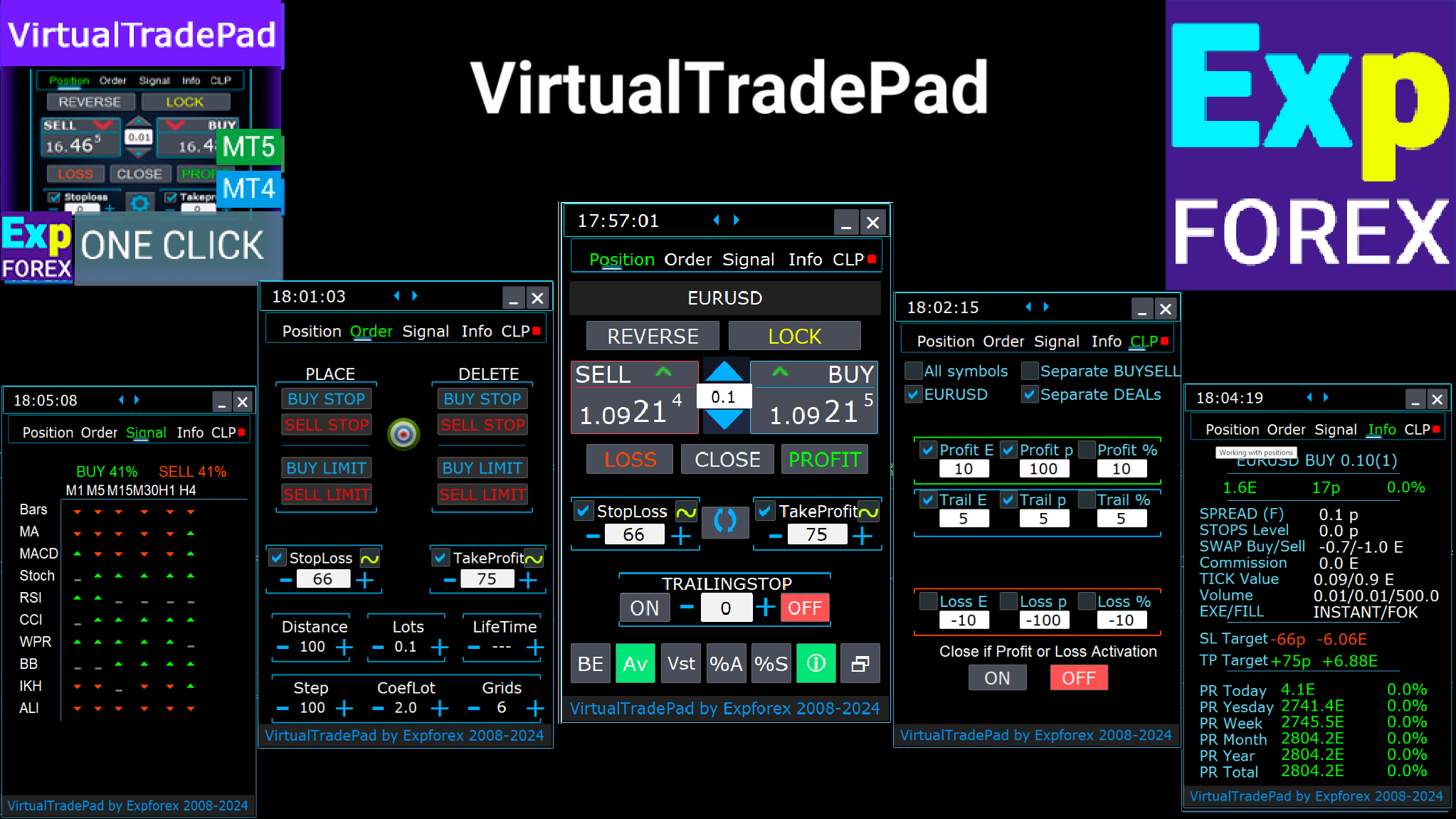
Professional manual trading panel for MT4 and MT5 with chart-based control, position management, order tools, partial closing, averaging, signal workspace, testing preparation and advanced trading modules.
https://expforex.com/vtpprosehero/
━━━━━━━━━━━━━━━━━━━━
🌐 Official Expforex website
https://www.expforex.com/
🚀 Complete Expforex product hub
https://www.mql5.com/en/blogs/post/755532
🛒 All products on MQL5 Market
https://www.mql5.com/en/users/vladon/seller#products
📘 All MQL5 guides
https://www.mql5.com/en/users/vladon/blog
━━━━━━━━━━━━━━━━━━━━
💬 Questions, ideas or need help?
I always recommend starting with the full guide and product documentation — most answers, examples and setup details are already explained there.
If you need personal help with a product, please write your question in the Comments section of the exact product page. This makes it easier to check the product version, settings, screenshots and logs, and give a more accurate answer.
Your feedback, ideas and trading scenarios also help improve Expforex products.
━━━━━━━━━━━━━━━━━━━━
🔗 Social links
📢 MQL5 Channel
https://www.mql5.com/en/channels/expforex
▶️ YouTube
https://www.youtube.com/Expforex
https://www.facebook.com/ExpForex/
𝕏 X / Twitter
https://x.com/expforex
🎵 TikTok
https://www.tiktok.com/@expforex
📧 Contact
https://expforex.com/contacts/
🔛 COPYLOT: MT4: https://www.mql5.com/en/market/product/6226
🔛 COPYLOT: MT5: https://www.mql5.com/en/market/product/11953
Copylot MetaTrader 5:
Бета тестирование: Добавлена возможность копировать отложенные ордера (PendingOrdersCopy).
Внимание: Отложенные ордера можно копировать только с счета, типа ХЕДЖ.
Внимание: Функция PendingOrdersCopy по умолчанию отключена!
Если Вы обнаружили ошибку ,просьба сообщить нам в разделе обсуждения с прикреплением полных лог файлов и описанием Ваших действий.
Спасибо за понимание.
Copylot MetaTrader 5:
Beta testing: Added the ability to copy pending orders (PendingOrdersCopy ).
Note: Pending orders can be copied only from an account HEDGE.
Note: PendingOrdersCopy is disabled by default!
If you find an error, please let us know in the discussion section with the attachment of full log files and a description of your actions.
Thank you for understanding.
https://youtu.be/hKIs_T19rAk
Профессиональный отчет вашего счета БЕСПЛАТНО
📖 ExtraReportPad MT4: https://www.mql5.com/ru/market/product/15056
📖 ExtraReportPad MT5: https://www.mql5.com/ru/market/product/36730
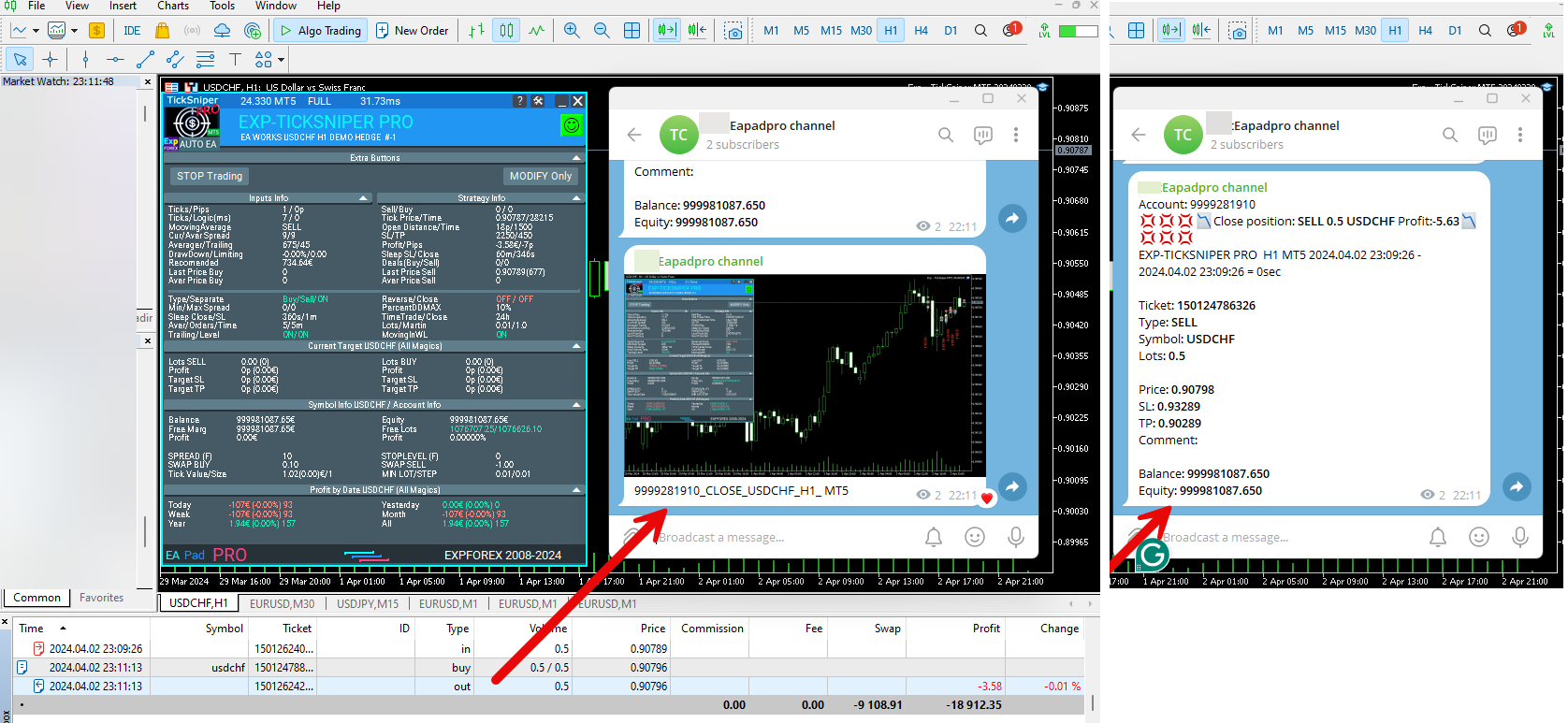
Traders Diary: This is a statistics panel providing analysis of your trading account for MetaTrader 5. The analysis results are displayed on the chart in real time. Multicurrency trading is very popular. MT4 version Full Description +PDF How To Buy How To Install How to get Log Files How To Test and Optimize All products from Expforex However, greater the amount of trades, the more difficult it is to
📖 ExtraReportPad https://www.mql5.com/en/market/product/15056
Averager, grid, additional opening of positions on Trend and against Trend:
➕ Averager: МТ4: https://www.mql5.com/ru/market/product/1289
➕ Averager: МТ5: https://www.mql5.com/ru/market/product/1112
📹 https://www.youtube.com/watch?v=17qRLxQ-ylM
🆕 The xCustomEA MetaTrader 4: https://www.mql5.com/ru/market/product/32115
🆕 The xCustomEA MetaTrader 5: https://www.mql5.com/ru/market/product/32116
➕ Averager: MT4: https://www.mql5.com/en/market/product/1289
➕ Averager: MT5: https://www.mql5.com/en/market/product/1112
- Добавлен мультимагик:
MagicNumber Магический номер позиций (сделок) для сопровождения и учета.
MagicNumber Магические номера можно указать через запятую:
0 - ордера открытый вручную;
123,345,147 - все позиции с MagicNumber номерами 123,345,147;
-1 - все MagicNumber, без исключения.
- Добавлены новые переменные:
CloseAveragingAfterCloseMainDeals - Закрывать позиции усреднения (открытые против тренда), когда главные позиции были закрыты.
Функция будет закрывать позиции усреднения только тогда, когда все главные позиции (по текущему символу и магическому номеру) будут закрыты!
Внимание: Новая функция работает отдельно для направлений BUY и SELL !
CloseAdditionalAfterCloseMainDeals - Закрывать позиции дополнительного открытия (открытые по тренду), когда главные позиции были закрыты.
Функция будет закрывать позиции дополнительного открытия только тогда, когда все главные позиции (по текущему символу и магическому номеру) будут закрыты!
Внимание: Новая функция работает отдельно для направлений BUY и SELL !
DistanceDifferent/ADDITIONALDistanceDifferent: Дистанция новых позиций усреднения (против тренда) или дополнительного открытия (по тренду), заданных через запятую!
Вы можете указать нужные значения дистанции в формате xx,yy,zz,aa
где:
xx - Дистанция в пунктах для открытия первой позиции усреднения / дополнительного открытия;
yy - Дистанция в пунктах для открытия второй позиции усреднения / дополнительного открытия;
zz - Дистанция в пунктах для открытия третей позиции усреднения / дополнительного открытия;
aa - Дистанция в пунктах для открытия четвертой и остальных позиций усреднения / дополнительного открытия;
Вы можете задать любое количество дистанций.
- Added multi magic:
MagicNumber Magic number of positions (transactions) for tracking and accounting.
MagicNumber Magic numbers can be specified separated by commas:
0 - orders opened manually;
123,345,147 - all positions with MagicNumber numbers 123,345,147;
-1 - all MagicNumber, without exception.
- Added new variables:
CloseAveragingAfterCloseMainDeals - Close averaging positions (open against the trend) when the main positions are closed.
The function will close the averaging positions only when all the main positions (according to the current symbol and magic number) are closed!
Attention: The new function works separately for the BUY and SELL directions!
CloseAdditionalAfterCloseMainDeals - Close additional open positions (opened with the trend) when the main positions were closed.
The function will close the position of the additional opening only when all the main positions (according to the current symbol and magic number) are closed!
Attention: The new function works separately for the BUY and SELL directions!
DistanceDifferent / ADDITIONALDistanceDifferent: Distance of new positions of averaging (against the trend) or additional opening (to the trend), separated by commas!
You can specify distance values in the format xx, yy, zz, aa
Where:
xx - Distance in points for opening the first position of averaging / additional opening;
yy - distance in points for opening the second position of averaging / additional opening;
zz - Distance in points for opening the third position of averaging / additional opening;
aa - Distance in points for opening the fourth and other positions of averaging / additional opening;
You can set any number of distances.


⌨️ VIRTUALTRADEPAD: MT4: https://www.mql5.com/en/market/product/2892
⌨️ VIRTUALTRADEPAD: MT5: https://www.mql5.com/en/market/product/167
Глобальное обновление 2019
- Улучшение графической части панели. Ре-дизайн отдельных элементов;
- Добавлена возможность изменять размеры панели: GeneralSize!
- GeneralSize по умолчанию = 12, Увеличение размера панели.
- Прошлый размер панели при GeneralSize = 10!
- Текстовые метки открытых позиций оптимизированы. Исправлена ошибка, когда текстовые метки рисовались поверх панели VirtualTradePad;
- В блоки Стоплосс и тейкпрофит добавлен элемент управления: Установка StopLoss/TakeProfit всех позиций/ордеров на указанный уровень на графике:
При нажатии на кнопку, у Вас появится линия уровня StopLoss/TakeProfit.
Вы можете указать цену, по которой будут модифицироваться все StopLoss/TakeProfit позиций/ордеров!
Если Вы работаете с вкладкой Positions, тогда StopLoss/TakeProfit будет установлен на позиции!
Если Вы работаете с вкладкой Orders, тогда StopLoss/TakeProfit будет установлен на отложенные ордера!
Внимание! советник может установить StopLoss/TakeProfit , только на ту цену, которая удовлетворяет правилам установки StopLoss/TakeProfit!
Global Update 2019
- Improved graphics part of the panel. Re-design of individual elements;
- Added the ability to resize the panel: GeneralSize!
- GeneralSize default = 12, Increasing the size of the panel.
- Last panel size with GeneralSize = 10!
- Text labels of open positions optimized. Fixed error when text labels were drawn on top of the VirtualTradePad panel;
- The following control has been added to the Stoploss and Take Profit blocks: Setting StopLoss / TakeProfit for all positions/orders on the instructions level on the chart:
When you click on the button, you will have a line level StopLoss / TakeProfit.
You can specify the price at which all StopLoss/TakeProfit positions/orders will be modified!
If you are working with the Positions tab, then StopLoss / TakeProfit will be set to the position!
If you are working with the Orders tab, then StopLoss / TakeProfit will be placed on pending orders!
Attention! The Expert Adviser can set StopLoss / TakeProfit, only on the price that meets the rules for setting StopLoss / TakeProfit!
https://www.youtube.com/watch?v=nXP0hdr2a9U&feature=youtu.be
Копировщик сделок и позиций между терминалами
🔛 COPYLOT: МТ4: https://www.mql5.com/ru/market/product/6226
🔛 COPYLOT: МТ5: https://www.mql5.com/ru/market/product/11953
Надеюсь, Вам понравится!
Спасибо за просмотры и лайки!
Универсальный советник на пользовательских индикаторах
🆕 The xCustomEA MetaTrader 4: https://www.mql5.com/ru/market/product/32115
🆕 The xCustomEA MetaTrader 5: https://www.mql5.com/ru/market/product/32116
================================================================================
Только сейчас обнаружил, что индикатор Pipfinite врет!!!! показывает стрелку и ALERT на предыдущем баре!!!
Т.е. проверяет текущий бар - будет ли он прибыльный, и только потом ставит стрелку!!
Намучился с этим вопросом!
================================================================================
xCustomEA allowed me to reveal a big mistake in the Pipfinite indicator!
Universal Expert Advisor on Custom Indicators
🆕 The xCustomEA MetaTrader 4: https://www.mql5.com/en/market/product/32115
🆕 The xCustomEA MetaTrader 5: https://www.mql5.com/en/market/product/32116
================================================================================
Only now I realized that the Pipfinite indicator is lying !!!!
shows an arrow and ALERT on the previous bar !!!
Those. checks the current bar - whether it will be profitable, and only then puts the arrow !!
Worn out with this question!
Оптимизация функции вызова истории сделок для ускорения работы копировщика снижения нагрузки на ресурсы компьютера.
Important update for Copylot Client MT5:
Optimization of the deals history function to speed up the work of the copyist to reduce the load on computer resources.
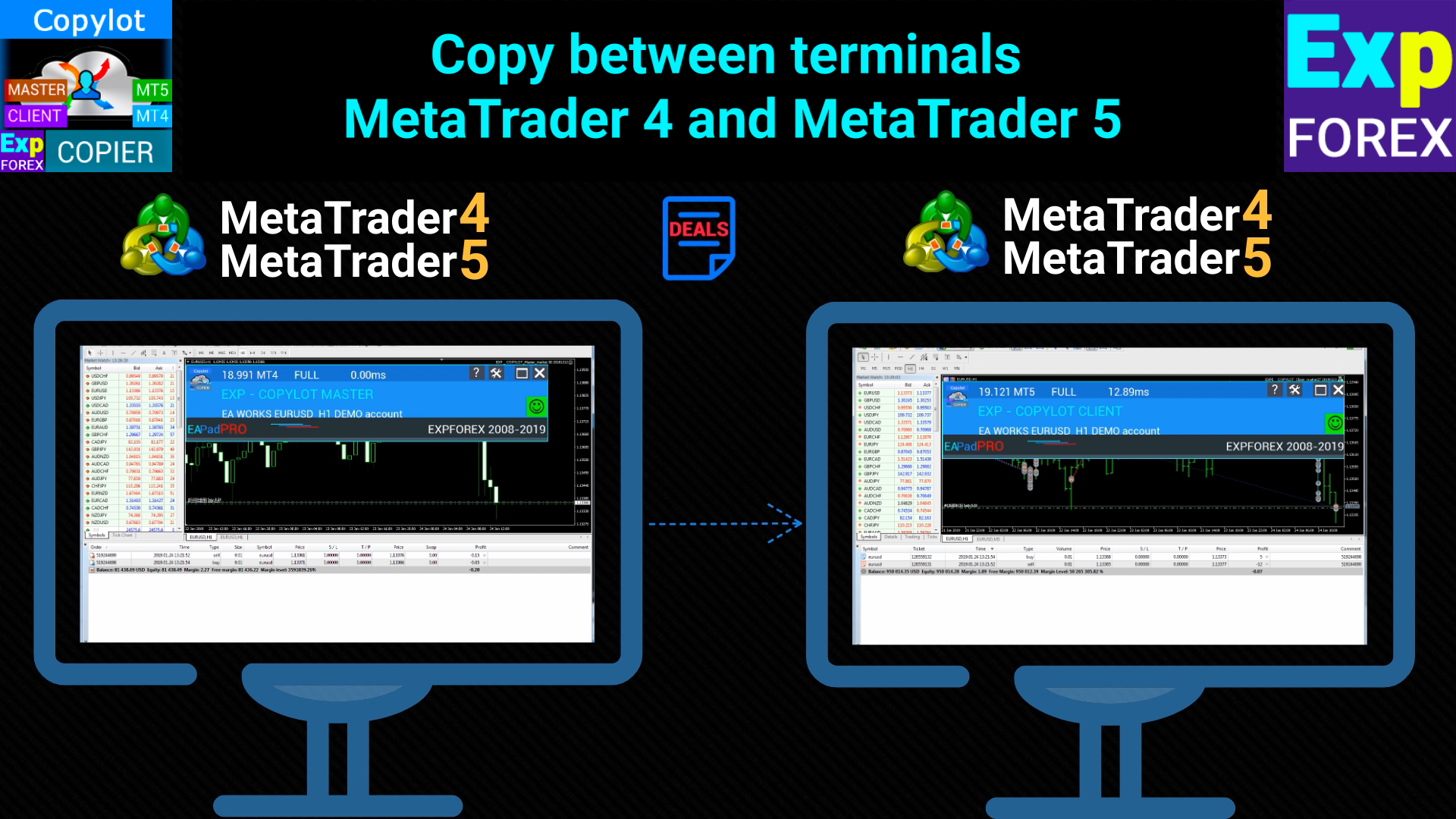
Professional Trade Copier for MetaTrader 5 Fast, professional, and reliable trade copier for MetaTrader . COPYLOT allows you to copy Forex trades between MT4 and MT5 terminals with support for Hedge and Netting accounts. COPYLOT MT5 version supports: - MT5 Hedge to MT5 Hedge - MT5 Hedge to MT5 Netting - MT5 Netting to MT5 Hedge - MT5 Netting to MT5 Netting - MT4 to MT5 Hedge - MT4 to MT5 Netting MT4 version Full Description +DEMO +PDF How To Buy How To Install How to get Log Files How To Test
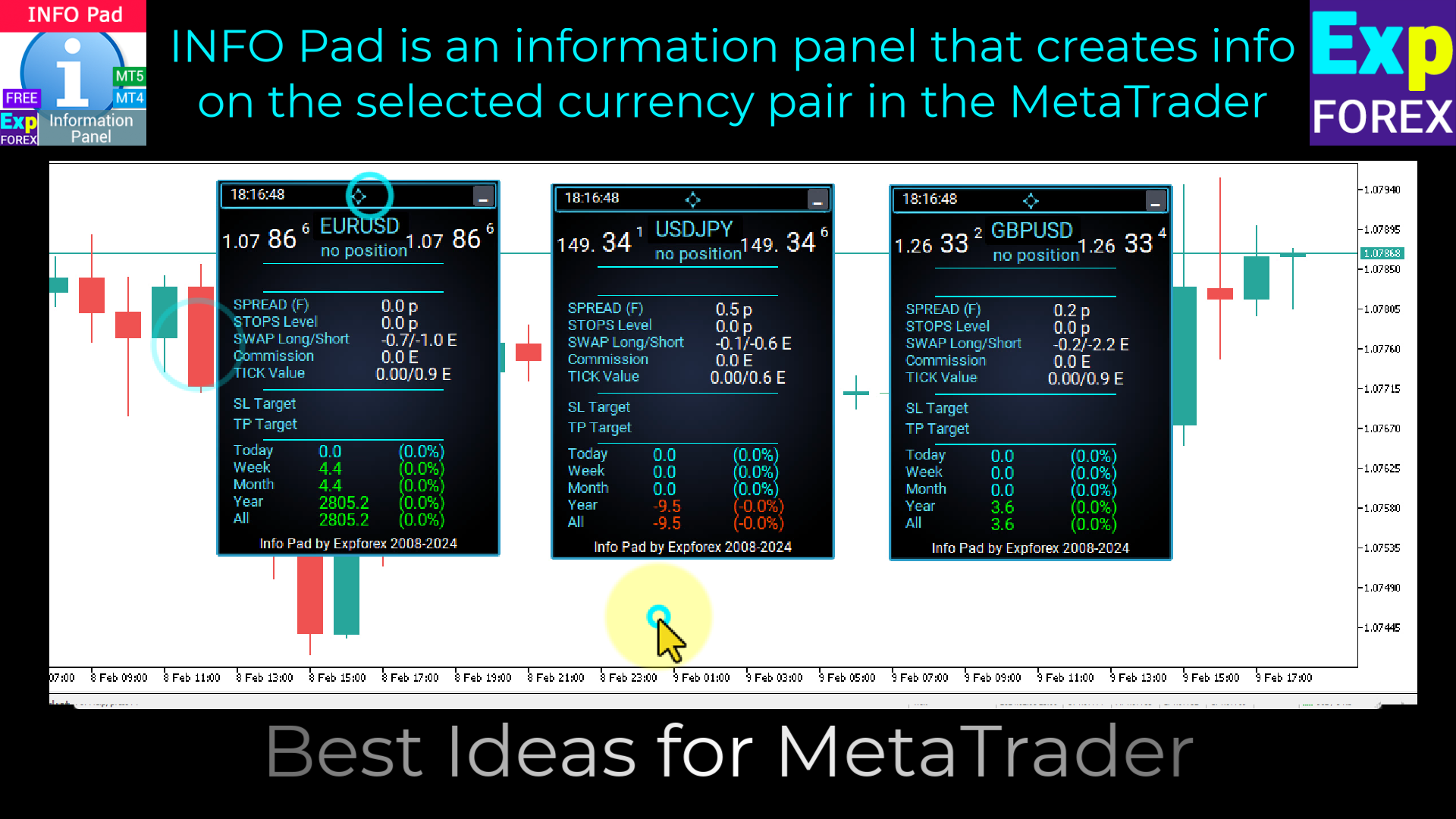
INFOPad is an information panel that creates information on the selected currency pair in the MetaTrader 4 terminal. There are 5 functions of this indicator: Shows the main and main information on the selected symbol: Ask BID, Spread, Stop Level, Swap, Tick value, Commission prices; Shows the future targets of SL target and TP Target (The number of points of the established stop loss and take profit, the dollar amount); It shows the profit received for the periods: Today, Week, Month, Year
INFOPad is an information panel that creates information on the selected currency pair in the MetaTrader 5 terminal. There are 5 functions of this indicator: Shows the main and main information on the selected symbol: Ask BID, Spread, Stop Level, Swap, Tick value, Commission prices; Shows the future targets of SL target and TP Target (The number of points of the established stop loss and take profit, the dollar amount); It shows the profit received for the periods: Today, Week, Month, Year