
Vladislav Andruschenko
- i love my job at https//expforex.com/
- Ukraine
- 313325
|
14+ years
experience
|
44
products
|
2346
demo versions
|
|
93
jobs
|
0
signals
|
0
subscribers
|
👋 Welcome to Expforex
I’m Vladislav, a professional MQL4/MQL5 developer creating MetaTrader tools since 2007.
Expforex develops practical trading solutions for MetaTrader 4 and MetaTrader 5:
Expert Advisors, trading panels, trade copiers, risk-control utilities, account reports, testing tools and automation systems.
✅ MetaTrader development since 2007
✅ Tools for MT4 and MT5
✅ Documentation, video guides and product support
✅ Professional utilities for traders, developers and money managers
━━━━━━━━━━━━━━━━━━━━
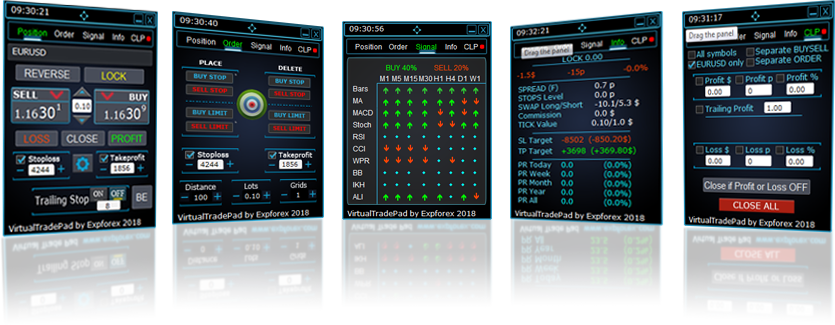
⭐ VirtualTradePad PRO SE — Premium MetaTrader Trading Workspace
Professional manual trading panel for MT4 and MT5 with chart-based control, position management, order tools, partial closing, averaging, signal workspace, testing preparation and advanced trading modules.
https://expforex.com/vtpprosehero/
━━━━━━━━━━━━━━━━━━━━
🌐 Official Expforex website https://www.expforex.com/
🚀 Complete Expforex product hub https://www.mql5.com/en/blogs/post/755532
🛒 All products on MQL5 Market https://www.mql5.com/en/users/vladon/seller#products
📘 All MQL5 guides https://www.mql5.com/en/users/vladon/blog
━━━━━━━━━━━━━━━━━━━━
💬 Questions, ideas or need help?
I always recommend starting with the full guide and product documentation — most answers, examples and setup details are already explained there.
If you need personal help with a product, please write your question in the Comments section of the exact product page. This makes it easier to check the product version, settings, screenshots and logs, and give a more accurate answer.
Your feedback, ideas and trading scenarios also help improve Expforex products.
━━━━━━━━━━━━━━━━━━━━
🔗 Social links
📢 MQL5 Channel https://www.mql5.com/en/channels/expforex
▶️ YouTube https://www.youtube.com/Expforex
📘 Facebook https://www.facebook.com/ExpForex/
𝕏 X / Twitter https://x.com/expforex
📱 Telegram https://t.me/Expforex
🎵 TikTok https://www.tiktok.com/@expforex
📧 Contact https://expforex.com/contacts/
I’m Vladislav, a professional MQL4/MQL5 developer creating MetaTrader tools since 2007.
Expforex develops practical trading solutions for MetaTrader 4 and MetaTrader 5:
Expert Advisors, trading panels, trade copiers, risk-control utilities, account reports, testing tools and automation systems.
✅ MetaTrader development since 2007
✅ Tools for MT4 and MT5
✅ Documentation, video guides and product support
✅ Professional utilities for traders, developers and money managers
━━━━━━━━━━━━━━━━━━━━
⭐ VirtualTradePad PRO SE — Premium MetaTrader Trading Workspace
Professional manual trading panel for MT4 and MT5 with chart-based control, position management, order tools, partial closing, averaging, signal workspace, testing preparation and advanced trading modules.
https://expforex.com/vtpprosehero/
━━━━━━━━━━━━━━━━━━━━
🌐 Official Expforex website https://www.expforex.com/
🚀 Complete Expforex product hub https://www.mql5.com/en/blogs/post/755532
🛒 All products on MQL5 Market https://www.mql5.com/en/users/vladon/seller#products
📘 All MQL5 guides https://www.mql5.com/en/users/vladon/blog
━━━━━━━━━━━━━━━━━━━━
💬 Questions, ideas or need help?
I always recommend starting with the full guide and product documentation — most answers, examples and setup details are already explained there.
If you need personal help with a product, please write your question in the Comments section of the exact product page. This makes it easier to check the product version, settings, screenshots and logs, and give a more accurate answer.
Your feedback, ideas and trading scenarios also help improve Expforex products.
━━━━━━━━━━━━━━━━━━━━
🔗 Social links
📢 MQL5 Channel https://www.mql5.com/en/channels/expforex
▶️ YouTube https://www.youtube.com/Expforex
📘 Facebook https://www.facebook.com/ExpForex/
𝕏 X / Twitter https://x.com/expforex
📱 Telegram https://t.me/Expforex
🎵 TikTok https://www.tiktok.com/@expforex
📧 Contact https://expforex.com/contacts/










The standard price is 250 dollars.
But on Black Friday the price will be -50% and will be 125 dollars.
Then the standard price will be restored.
Следующие скидки -50% на Черную пятницу