Easy Trade Manager Pro

EASY TRADE MANAGER

MQL5 MARKET PRODUCT LISTING & USER MANUAL


1. Short Description

Easy Trade Manager is a manual trade assistant for MetaTrader 5. It automatically calculates your lot size based on your chosen risk, allows you to set Stop Loss and Take Profit levels by dragging them on the chart, and places orders for you.

It does not trade automatically. You remain in control of every trade.

2. Product Description

Easy Trade Manager is a visual position-sizing and order-placement utility for MetaTrader 5.

Designed for manual traders, it makes order entry faster, more consistent and less prone to calculation errors by handling lot-size calculations and displaying your complete trade setup directly on the chart before execution.

Simply select your preferred risk per trade, position your Stop Loss and Take Profit levels, and let Easy Trade Manager calculate the appropriate lot size.

Your trade setup is displayed using draggable chart lines and colour-coded zones, accompanied by live calculations showing points, monetary values and account percentages. You can review and adjust everything before placing an order.

The tool supports Forex, indices and metals, with pip values handled according to the relevant trading instrument.

3. Main Features

1. Risk-Based Lot Sizing

  • Calculate lot sizes automatically based on your selected risk percentage.

  • Choose Balance, Equity or Free Margin as your risk calculation base.

  • Lot size adjusts according to the distance between Entry and Stop Loss.

  • Include broker commission per lot for more accurate risk calculations.

2. Interactive On-Chart Trade Setup

  • Entry, Stop Loss and Take Profit are displayed as draggable lines.

  • Green and red shaded zones visually represent your potential reward and risk areas.

  • Drag individual Stop Loss or Take Profit levels to adjust your trade.

  • Move the entire trade setup horizontally or vertically.

  • Dashboard figures update in real time as you adjust your levels.

3. Risk-to-Reward Management

  • Set your preferred Reward-to-Risk (R/R) and Risk-to-Stop-Loss (R/SL) ratios.

  • Take Profit automatically adjusts when you move Stop Loss.

  • Alternatively, drag Take Profit manually and the reward ratio updates accordingly.

4. Automatic Order Type Detection

Easy Trade Manager automatically determines the appropriate order type based on your selected Entry price:

  • Market orders

  • Buy Limit orders

  • Sell Limit orders

  • Buy Stop orders

  • Sell Stop orders

5. Two Operating Modes

  • Calculator Mode: Automatically calculates lot size using your selected risk percentage.

  • Manual Mode: Allows you to enter Lot Size, Entry, Stop Loss and Take Profit manually.

6. Live On-Chart Information

View important trade information directly on your chart, including:

  • Entry price

  • Stop Loss price

  • Take Profit price

  • Lot size

  • Risk amount

  • Risk percentage

  • Distance in pips

  • Monetary values

  • Achieved reward-to-risk ratio

7. Trade Confirmation

A confirmation prompt appears before an order is placed. This feature is enabled by default but can be disabled in the settings for one-click order placement.

8. Automatic Settings Preservation

Your preferred risk settings, ratios, lot size and operating mode are saved and restored when the terminal restarts.

9. Adjustable Interface

  • Move the dashboard anywhere on the chart.

  • Minimise and restore the dashboard.

  • Adjust dashboard scaling.

  • Customise font sizes.

  • Show or hide the on-chart trading widget with one button.

10. Strategy Tester Compatibility

Easy Trade Manager can be used in MetaTrader 5 Strategy Tester visual mode to measure and place trades using historical data.

If you scroll away from the current price and the on-chart widget disappears from view, simply switch the widget off and on again to bring it back into view.

4. Take Control of Your Manual Trading

Easy Trade Manager is designed to help you execute your own trading decisions in a more controlled and organised way.

It does not generate trading signals, predict market movements or execute trades automatically.

You choose the direction, entry, risk and trade levels. Easy Trade Manager handles the calculations and order placement.

PART 2: USER INSTRUCTION MANUAL

1. Installation

Follow these steps to install and start using Easy Trade Manager.

  1. Purchase or rent Easy Trade Manager from the MQL5 Market.

  2. Install the product through your MetaTrader 5 terminal.

  3. Open a chart for the trading instrument you want to use.

  4. Open the Navigator window.

  5. Drag Easy Trade Manager onto the chart or double-click the product.

  6. In the settings window, open the Common tab and allow algorithmic trading.

  7. Adjust the input settings if necessary.

  8. Click OK to load the tool.

  9. Ensure that the AutoTrading button on the MetaTrader 5 toolbar is switched on.

The Easy Trade Manager dashboard will appear in the top-left corner of your chart.

2. Understanding the Dashboard

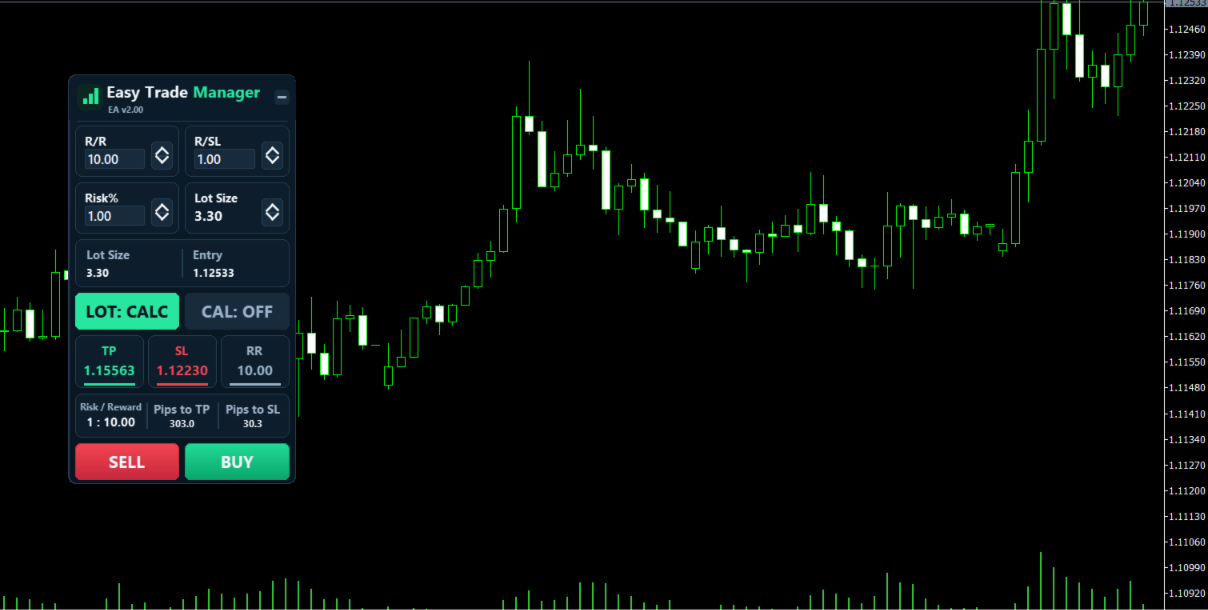
The dashboard is the main control panel displayed on your chart.

Its components are arranged as follows:

Component Function
Title Bar Displays the product name. You can drag the dashboard using this bar.
Minimise Button Minimises or restores the dashboard.
R/R Sets your preferred reward ratio.
R/SL Sets your preferred risk ratio.
Risk % Specifies the percentage of your account you want to risk.
Lot Size Displays the calculated lot size or allows manual entry, depending on the selected mode.
LOT Button Switches between Calculator Mode and Manual Mode.
CAL Button Shows or hides the on-chart trading widget.
TP Displays or allows editing of the Take Profit price.
SL Displays or allows editing of the Stop Loss price.
RR Displays the achieved reward-to-risk ratio.
Risk / Reward Summarises the monetary risk and potential reward.
Pips to TP Shows the distance to Take Profit.
Pips to SL Shows the distance to Stop Loss.
SELL Places a Sell order.
BUY Places a Buy order.

Editing dashboard values

Where editing is permitted, you can change a value directly:

  1. Click on the displayed number.

  2. Enter your preferred value.

  3. Press Enter to apply the change.

3. Understanding the On-Chart Trading Widget

The on-chart widget provides a visual representation of your proposed trade.

To display it, click the CAL button on the dashboard.

The widget displays three main horizontal lines:

  • Entry Line

  • Stop Loss Line

  • Take Profit Line

The areas between these levels are colour-coded:

  • Green Zone: Represents the potential reward area.

  • Red Zone: Represents the potential risk area.

Each level displays relevant information, including distance in pips, monetary value, account percentage and price.

3.1 On-Chart Controls


The Entry line contains a small toolbar with the following controls:

Move Handle

Allows you to move the entire trade setup.

  • Drag left or right to reposition the widget.

  • Drag up or down to move Entry, Stop Loss and Take Profit together.

Flip

Switches the trade direction between Buy and Sell by mirroring the Stop Loss and Take Profit levels around the Entry price.

M

Moves the Entry price to the current market price while adjusting Stop Loss and Take Profit accordingly.

C

Cancels and hides the on-chart widget.

Order Bar

Displays the order type, lot size and Entry price.

Click the order bar to place the trade.

3.2 Adjusting Stop Loss and Take Profit

To adjust your trade levels:

  1. Drag the green Take Profit bar to your preferred price.

  2. Drag the red Stop Loss bar to your preferred price.

  3. Observe the updated calculations on the dashboard and chart.

In Calculator Mode, Take Profit automatically follows your selected reward ratio when you move Stop Loss.

If you manually drag Take Profit, the reward ratio automatically adjusts to match the new level.

To hide the widget, click CAL again or use the C button.

4. Calculator Mode vs Manual Mode

The LOT button allows you to switch between two operating modes.

4.1 Calculator Mode (LOT: CALC)

In Calculator Mode, Easy Trade Manager automatically calculates the appropriate lot size based on:

  • Your selected Risk %.

  • Your selected risk calculation base.

  • The distance between Entry and Stop Loss.

  • Applicable broker commission settings.

The lot size updates automatically whenever you adjust the Stop Loss distance.

You only need to select your risk and position your trade levels.

4.2 Manual Mode (LOT: MANUAL)

In Manual Mode, you control the trade parameters yourself.

You can manually enter:

  • Lot Size

  • Entry Price

  • Stop Loss

  • Take Profit

The Risk % setting is not used to calculate the lot size in this mode.

This mode is suitable for traders who prefer to determine their position size independently.

5. How to Place a Trade

Follow these steps to execute a trade using Easy Trade Manager.

Step 1: Set Your Risk

Enter your preferred Risk % on the dashboard.

Step 2: Set Your Reward and Risk Ratios

Adjust the R/R and R/SL values according to your trading strategy.

Step 3: Open the On-Chart Widget

Click CAL to display the trade setup on your chart.

Step 4: Position Your Trade Levels

Drag the Stop Loss and Take Profit bars to your preferred price levels.

The lot size and monetary risk calculations will update automatically in Calculator Mode.

Step 5: Review Your Trade

Check the following information:

  • Entry Price

  • Stop Loss

  • Take Profit

  • Lot Size

  • Risk Amount

  • Reward-to-Risk Ratio

Step 6: Select Your Trade Direction

Click BUY or SELL on the dashboard, or click the order bar on the chart.

Step 7: Confirm Your Order

If trade confirmation is enabled, a confirmation window will appear displaying the order details.

  • Confirm to place the order.

  • Cancel to abort the order.

Automatic Order Type Selection

Easy Trade Manager automatically selects the appropriate order type based on the position of your Entry price relative to the current market price.

  • An Entry at the current market price results in a Market Order.

  • An Entry away from the current price may result in a Buy/Sell Limit or Stop Pending Order, depending on its position.

The tool also checks that Stop Loss and Take Profit are positioned on the correct sides of the Entry price before placing an order.

6. Using Easy Trade Manager in the Strategy Tester

Easy Trade Manager supports MetaTrader 5 Strategy Tester in visual mode.

This allows you to measure and place trades using historical market data.

Important notes:

  • The trade confirmation prompt is not displayed in Strategy Tester mode.

  • If you scroll far away from the current market price and the widget is no longer visible, click CAL to switch it off.

  • Click CAL again to switch it back on.

The widget will reappear in the centre of the visible chart area.

PART 3: INPUT SETTINGS

The following settings are available when loading Easy Trade Manager.

Input Description
Panel X Sets the starting horizontal position of the dashboard in pixels.
Panel Y Sets the starting vertical position of the dashboard in pixels.
Default Risk % Sets the initial risk percentage when the tool starts.
Default R/R Sets the default reward ratio.
Default R/SL Sets the default risk ratio.
Risk Base Determines whether risk is calculated from Balance, Equity or Free Margin.
Commission per Lot Sets the broker's round-turn commission per lot in the deposit currency. This is included in the lot calculation.
Magic Number Identifies orders placed by Easy Trade Manager.
On-Chart Zone Width Sets the width of the on-chart trading widget in pixels.
Confirm Before Placing Trades Enables or disables the confirmation prompt before placing an order. Enabled by default.
Dashboard Size Scale Adjusts the overall dashboard size. A value of 1.0 represents the original size.
Font Sizes Allows you to fine-tune the dashboard text size.

Settings Preservation

Your preferred settings, including risk, ratios, lot size and operating mode, are saved and restored when MetaTrader 5 restarts.

To return to the input defaults, change one of the default inputs in the settings window.

PART 4: IMPORTANT NOTES

Please take note of the following before using Easy Trade Manager:

  1. Easy Trade Manager is a manual trading utility. It does not generate signals or execute trades automatically.

  2. You remain responsible for selecting your trading direction, Entry, Stop Loss and Take Profit levels.

  3. Test the tool on a demo account first to familiarise yourself with its controls.

  4. Ensure that algorithmic trading permissions are enabled and AutoTrading is switched on.

  5. For technical support, use the built-in MQL5 chat and the product comments section.

Recommended products
Telegram to mt5 pro
Janet Abu Khalil
4 (4)
Telegram to MT5 Pro — Advanced Telegram Signal Copier with Auto-Fix, Multi-TP, Risk Control and Full Trade Management Telegram to MT5 Pro — Professional Telegram Signal Copier Telegram to MT5 Pro is a high-performance trade copier that automatically executes signals from Telegram directly into your MetaTrader 5 account, with full control over risk, execution, and trade management. The system consists of two components: • The Expert Advisor (EA) running inside MetaTrader 5 • A companion desktop
This product is an automatic-close support EA that helps discretionary traders carry out the closing rules they have set for themselves. You can set closing conditions based on a specified time, candle confirmation, or MA cross/approach, and use TIME, CANDLE, and MA CROSS individually or at the same time. It can also display 1H, 4H, Daily, Weekly, and Monthly MAs on the current chart. It is not a product that automates trading decisions or entries. It helps you carry out the closing rules you ha
Trade Control Panel
Jerry Jilun Anak Liban
Trade Control Panel Function Normal One Click Function Close All Close All Profit Close All Loss Close All Pending Order Close All Sell Close All Buy Advance One Click Function 1.  Close Partial Lot Sell by Percent It will help you partial close for all open position by desire percent you wanted. No longer partial close one by one for every open position Manual input for desire percent 2. Close Partial Lot Buy by Percent It will help you partial close for all open position by desire percent
Pro Trade Manager Panel puts your whole manual-trading workflow on one on-chart panel for MetaTrader 5: plan the trade visually, let the panel size the position from your risk, send the orders, then manage and protect them. Works on Forex, metals, indices and other symbols. VISUAL TRADE PLANNING Entry, Stop Loss and Take Profit boxes drawn on the chart; drag them to adjust. 1, 2 or 3 take-profit levels (split lot). Optional Step SL: SL moves to entry after TP1 and to TP1 after TP2. One-click BUY
Atlas Trade Desk
Bernhard Wurzlbauer
Atlas Trade Desk MT5 Atlas Trade Desk MT5 is a visual trade panel, risk manager and lot calculator for manual MetaTrader 5 traders. Plan market and pending orders directly on the chart, calculate position size from your selected risk, adjust Entry, Stop Loss and Take Profit visually, and manage open positions from one clean dashboard. The tool is built for discretionary traders who want faster order preparation, clearer risk control and safer position management without switching between multipl
Synchronizer
PATRICK PAARSCH
This Expert Advisor monitors all open positions across all symbols in MetaTrader 5. Whenever a Stop Loss (SL) or Take Profit (TP) is manually set or adjusted on any position, the EA automatically applies that value to all other open positions , regardless of symbol or order type (Buy/Sell). This ensures consistent and synchronized SL and TP levels across your account. Perfect for mobile trading via tablet or smartphone!
FREE
Ronin Shield - Daily Loss Limiter & Account Guard (MT5) When your loss limit is hit, your trading day is over. A utility built to stop the "just one more trade" moment during prop firm challenges. Attach it to just one chart and it protects the whole account: every symbol and every position, including manual trades and other EAs. No need to open a chart for each symbol. No external DLLs. No web requests. ============================== THREE PROTECTION LINES ============================== 1.
The real‑time view of what is happening inside the market. Footprint Secrets brings detailed analysis directly into MetaTrader 5. It shows where volume is trading, how buyers and sellers are interacting, and how liquidity shifts as the market evolves. Designed for traders who want a precise, real‑time understanding of market behavior. Check out the free preview version here:  https://www.mql5.com/en/market/product/172398 Benefits for the Trader See the real activity behind price . Footprint ch
Effortlessly take control of your trading routine with the revolutionary Trades Time Manager. This potent tool automates order execution at designated times, transforming your trading approach. Craft personalized task lists for diverse trading actions, from buying to setting orders, all without manual intervention. Trades Time Manager Installation & Inputs Guide If you want to get notifications about the EA add our URL to MT4/MT5 terminal (see screenshot). MT4 Version   https://www.mql5.com/en/m
Session panel
Timo Mario Hoffmann
Session Panel for MT5 Session Panel is a free MT5 indicator that gives you a fast and convenient live overview of the major trading sessions directly from the chart. Monitor Tokyo, London, and New York session times, see which session is currently active, track countdowns to the next session, and view session overlap information in one compact dashboard. Built for traders who want better market timing, clearer session awareness, and a cleaner chart workflow in live market conditions. Session Pan
FREE
Telecontrol MT5
MIKHAIL VINOGRADOV
3 (1)
Telegram Controls (Telecontrol) — performs communication between the bot Telegram and the terminal MetaTrader 5 . It helps aggregate data from multiple terminals and manage them using a bot in Telegram . The service is convenient for working on multiple MT5 terminals, allowing each terminal to be individually configured for optimal display and perception of information. All terminal data is collected in one Telegram channel, and the settings panel allows quick adjustments and saving of changes i
FREE
All In One Trade Manager is a trade manager and one-click trading panel for manual traders on MetaTrader 5. It works as a trading assistant, risk manager and position size calculator in one dashboard. It brings together everything below in one panel: order entry with risk sizing automatic trade management advanced order types account protection statistics Its entry checks run in the background and tell you, before you click BUY or SELL, when something speaks against the trade. Also available
Gerenciador de ordens manuais
Rodrigo Oliveira Malaquias
Robot Manual Order Manager is a tool that allows you to automatically include Stop Loss, Breakeven, Take Profit and partials in open trades. Be it a market order or a limit order. Besides, it automatically conducts your trade, moving your stop or ending trades, according to the parameters you choose. To make your operations more effective, the Manual Orders Manager Robot has several indicators that can be configured to work on your trade. Among the options you can count on the features: Conducti
Hybrid Assisted Trading Engine Manual Trading. Machine Discipline. The Hybrid Assisted Trading Engine is an institutional-grade manual trade management system designed to protect traders from emotional mistakes — without taking control away from them. You decide when to enter . The engine decides how the trade is managed . What It Does This system continuously monitors your manual trades and enforces professional-level trade management rules in real time: Smart Breakeven logic R-based trai
# Ronin Copier - Tactical Prop Sync **Zero-Latency, Zero-DLL Local Trade Copier Built for Serious Prop Traders.** **EARLY ADOPTER PROMOTION (LIMITED COPIES):** - **First 10 copies:** **$59** (Current Stage) - **Next 10 copies:** **$99** - **Final Price:** **$199** *Price increases automatically as review milestones are reached.* --- Managing multiple MT5 accounts across prop firms (FTMO, FundedNext, Alpha Capital, etc.) or private brokers? **Ronin Copier** provides seamless, millisecond-
MT5 to Telegram & Discord Notifier MT5 to Telegram & Discord Notifier is a lightweight and practical notification utility for MetaTrader 5 that automatically sends real-time trade updates to your Telegram and Discord channels. It is designed for traders who want to stay informed about trading activity without constantly watching the terminal. Once connected, the notifier delivers instant alerts whenever a position is opened or closed, helping you monitor live activity, improve communication, an
Pattern Screener Pro scans every symbol in your Market Watch on the timeframes you choose and lists the chart and candlestick patterns it finds in a panel on the chart. Click a result to switch the chart to that symbol and see the pattern drawn. Chart patterns Double top and double bottom Triple top and triple bottom Head and shoulders, inverse head and shoulders Ascending, descending and symmetrical triangles Rising and falling wedges Bull and bear flags Candlestick patterns Bullish and bearish
ALIEN Telegram Master PRO MT5 Advanced Telegram Signal & Trading Account Monitoring System One Expert Advisor. All Charts. Multiple Trading Instruments. Multiple Telegram Channels. Four Languages. ALIEN Telegram Master PRO MT5 is a professional Telegram notification and trading activity monitoring system for MetaTrader 5. The Expert Advisor automatically monitors trading activity, indicator BUY/SELL signals, manual and automated trades, Stop Loss and Take Profit modifications, pending orders, an
FREE
Zentriq Trade Manager
Mark Frederick Siebert
Experience trading without friction. Zentriq Trade Manager is a modern, high-performance trade management utility engineered with a high-DPI canvas interface, anticipatory workflow design, and an integrated Macroeconomic News Filter. Designed for discretionary traders, scalpers, and prop firm traders who demand speed, precision, zero-clutter ergonomics, and automated news event protection. User Manual Get the most out of Zentriq Trade Manager with the complete user manual: Complete User Manual:
Smart Basket Manager
Tamer Mohamed Montaser Mohamed Tawfik Moussa
Smart Basket Manager Overview Smart Basket Manager is a trade management utility for MetaTrader 5. It is designed for traders who open several positions on a symbol and want to manage them together as one basket. It does not open trades and does not generate entry signals. It manages positions that already exist, according to the rules below. What it does Basket profit protection. When the combined profit of the managed positions reaches a start level, the utility locks a percentage of the highe
Forget about enabling templates when you launch the window. Auto Template Master Service  is a professional utility tool that runs as a system service in MetaTrader 5, and it will do it for you. Unlike traditional indicators or expert advisors (EAs), the program runs in the background of the entire terminal and doesn't require you to add it to each window individually. As soon as you open a new chart of any instrument (Forex, Stocks, Crypto), the service immediately detects the new window and a
Trend Pyramid v5.00 | Gold XAUUSD Floating‑Profit Pyramid EA   This floating‑profit pyramid gold EA only adds positions after existing orders generate floating profit, avoiding blind position‑adding under loss conditions. It adopts EMA20 plus ADX24 dual‑indicator filter to filter false oscillation signals and reduce invalid order openings. Multiple hard risk controls are built‑in to protect your account.   Core advantages   1. Add positions only on floating profit, no position‑adding at loss: a
Trade Panel HotKey – MT5 Scalping Utility Fast Trade Panel HotKey is a lightweight MT5 trading utility designed for traders who need to open, manage, and close positions as quickly as possible . The main purpose of this tool is to reduce the time between a trading decision and execution. Instead of moving the mouse, opening order windows, or manually modifying multiple positions, most important actions can be performed instantly through customizable keyboard hotkeys or directly from the compact
https://youtu.be/OKOJXSCGY-4Per2 Trade Manager — Manual Trading Panel for MetaTrader 5 Per2 Trade Manager is a trading utility designed for manual order execution, risk management, and position management directly on MetaTrader 5 charts. The tool helps traders manage their trades through an intuitive on-chart interface. Key Features Place market and pending orders directly from the chart. Set Stop Loss and Take Profit using interactive price lines. Calculate position size based on a predefined m
MQL Tool "Ofir Email to Telegram": Never Miss a Trading Alert Again! Tired of missing important alerts from your indicators and Expert Advisors (EAs)? Ofir Email to Telegram is the solution you've been waiting for! This revolutionary MQL tool automatically forwards all email alerts from your indicators and EAs directly to your Telegram account. Never again will you miss a trading opportunity or important notification! Here are just a few of the benefits of Ofir Email to Telegram: Quick and easy
Telegram Sender Osw MT5
William Oswaldo Mayorga Urduy
User Manual: Telegram Sender Osw Telegram Sender Osw is an Expert Assistant (EA) designed to automate the sending of trading signals from MetaTrader to Telegram. Ideal for signal providers and account management, it sends critical data (Price, Stop Loss, Take Profit, Volume) instantly and professionally. 1. Parameter Configuration General and Connectivity Enable EA: Activates (true) or pauses (false) the system. Bot Token: Alphanumeric code obtained from @BotFather. Chat ID: Identifier of th
Clonify PRO MT5
Andrej Hermann
5 (1)
Clonify PRO - Local Trade Copier for MT5 and MT4            (  Local trade copier for MT4   https://www.mql5.com/ru/market/product/15992   ) Professional tool for copying trades between MT5 and MT4 accounts (via the shared "Common" folder). FEATURES: 1. SENDER: Exports trades in real-time Sends everything (no filters) Requires no additional settings 2. RECEIVER: Copies trades. Magic Number: Uses the sender's account ID (default) or a custom number. Lot Modes: Analogous: Exactly the same volume
Maria Trade Manager MT5
Murodillo Eshkuvvatov
User guide (PDF): https://polymaria.net/manuals/maria-trade-manager-mt5-user-guide.pdf Maria Trade Manager is a trade desk for manual traders, right on your MetaTrader 5 chart. Before you click BUY or SELL, the panel draws the trade plan on the chart: entry, stop loss and take profit zones with the money at risk, the reward and the risk:reward ratio. Drag a line to change the plan, then open the order with one click. After the trade is open the panel keeps protecting it with breakeven, trailing
Introducing the "Auto Timed Close Operations", a useful utility for MetaTrader 5 traders! This utility has been developed to help traders of all levels automatically close their open positions at the exact moment they desire. With the "Auto Timed Close Operations", you gain the required control over your trades and can avoid unwanted surprises at the end of the day or at any other predefined time. We know how important it is to protect your profits and limit your losses, and that's exactly what
My Trade History PRO Reviewing your trades is the first step to becoming a successful trader. Successful traders do not just trade - they review, analyse and learn from every position. My Trade History PRO makes that review easy and visual. Whether you trade manually, follow a signal or run an EA, the indicator gives you a complete on-chart history of your trades together with practical analytics - for MetaTrader 4 and MetaTrader 5 with the same feature set. MT4 version: https://www.mql5.com/en/
Buyers of this product also purchase
FarmedHedge Pair Trading Dashboard
Tanapisit Tepawarapruek
5 (7)
Farmed Hedge Yield Farming | All Markets (Manual - Hybrid - Semi/Automated EA) VERIFIED TRADING RESULTS - Farmed Hedge Yield Axi Copy:  https://www.mql5.com/en/signals/2356376 - Farmed Hedge Yield Exn Copy:   https://www.mql5.com/en/signals/2356404 - Farmed Hedge Yield V Copy:  https://www.mql5.com/en/signals/2357156 IMPORTANT NOTICE: FarmedHedge is a MANUAL-FOCUSED TRADING UTILITY ,not a fully automated EA. Results shown on this Signal include manual trades and overall strategic management.
Telegram to MT5 MultiChannel Copier
Sergio Marquez Uroz
4.68 (22)
Telegram to MT5 Multi-Channel Copier   automatically copies trading signals from your Telegram and Discord channels straight to MetaTrader 5. No bots, no browser extensions, no manual copying. A signal arrives in Telegram or Discord and the EA opens the trade in your terminal within seconds. And before you copy a channel, the built-in backtester shows you what that channel would have done in your account. The product has two components: a Windows application that listens to your Telegram channel
News Trade EA MT5
Konstantin Kulikov
4.55 (11)
Present to you the useful robot that I have been using for several years. It can be used in both semi-automatic mode and fully automatic mode. >>> Chat <<< The program contains flexible settings for trading on the news of the economic calendar. It cannot be checked in the strategy tester. Only real work. Download the latest archive of settings: https://www.mql5.com/en/blogs/post/747929 Signals monitoring: https://www.mql5.com/en/signals/author/test-standart When creating your own sets of setti
================================================================================ POC BREAKOUT - V20.72. Full Professional Grade Toolkit ================================================================================ POC Breakout is a full MetaTrader 5 trading dashboard for discretionary traders who want breakout signals, Point of Control (POC) context, volume profiles, order flow, market structure, news, alerts, and advanced trade planning in one professional workspace. Attached directly to you
The product will copy all telegram signal to MT5 ( which you are member) , also it can work as remote copier.  Easy to set up, copy order instant, can work with almost signal formats, image signal,  s upport to translate other language to English Work with all type of channel or group, even channel have "Restrict Saving Content", work with  multi channel, multi MT5 Work as remote copier: with signal have ticket number, it will copy exactly via ticket number. Support to backtest signal. How to s
EA Overfitter
Stephen J Martret
5 (3)
That backtest looks great. But will it still be making money tomorrow, next week, next month? EA Overfitter re-runs your EA on 100 price histories it has never seen. One score tells you if the edge is real. A backtest tells you what an EA did on one price history — the one that happened to occur. What you cannot tell from it is how much of that result was the strategy and how much was the particular path. EA Overfitter answers that. It builds up to 100 synthetic price histories your EA has n
Power Candles Strategy Scanner - Self-Optimizing Multi-Symbol Setup Finder Self-optimizing settings work one chart at a time, and finding where they pay off right now means opening chart after chart. Power Candles Strategy Scanner runs the same self-optimizing engine as the Power Candles indicator on every symbol in your Market Watch, side by side. One panel ranks where it pays off: the winning strategy per symbol, its optimized Stop Loss and Take Profit. An alert fires the moment a fresh signal
Welcome to Entry In The Zone with SMC Multi Timeframe  —  COMPLETE SMC ANALYSIS SYSTEM — ALL IN ONE INDICATOR  Entry In The Zone with SMC Multi Timeframe  An indicator designed for market analysis based on Smart Money Concepts (SMC), displaying Market Structure, Key Zones (Order Blocks, Supply & Demand Zones, and Fair Value Gaps), Liquidity, and real-time BUY / SELL signals. It supports both Single-Timeframe and Multi-Timeframe analysis, along with the Confluence at Zone feature, which helps you
RETAILBERG FOOTPRINT CHART PRO — Order-Flow Workspace for MetaTrader 5 Version 7.00  |  Professional System  |  31 tools  |  One chart A full 150-page illustrated User Manual is included. Please read the full manual to understand this feature packed footprint chart elements and ui. https://www.mql5.com/en/blogs/post/777982 DEMO / STRATEGY TESTER — PLEASE READ FIRST
Master Your Trading Discipline   Stop losing your hard-earned gains to overtrading and emotional decisions. The Discipline Tool is your ultimate trading assistant, ensuring strict risk management in real-time. Key Protection Features: Advanced Drawdown Defense : Automatically halts trading if your daily drawdown exceeds a preset threshold (percentage or dollar amount). Real-Time Equity Lock : Safeguard profits by referencing peak equity, ensuring drawdown stays within control. Hard Profit Target
Dealer Panel
Mian Rameez Ali
Dealer's Panel No signal decides anything here — a hand does. One click, and the panel calculates what's underneath: lot size from risk, target from a 30-step balance ladder that remembers exactly how far an account has climbed. Toggle between market and pending without touching an input field. Set a stop, and the take-profit can write itself — a fixed share of the balance, translated into price with no arithmetic left for the trader to get wrong. One trade live at a time; it won't let a seco
REVDEN AI Desk: Run Your Trading From One Conversation With Your Own AI, on REVDEN's Market Context Imagine running your trading from one conversation. REVDEN AI Desk brings it into MetaTrader 5: you ask your own AI how it reads the market, and it answers from REVDEN's full context on the symbols you trade, with their state, their risk picture and the releases ahead. Its proposals arrive with entry, stop, target and risk, and you approve the ones that fit. Your rules change the same way: write w
Quant AI Agents
Ho Tuan Thang
5 (1)
Quant AI Agents are independent trading Expert Advisors. Instead of trading using a fixed strategy like other conventional EAs, Quant AI Agents   is a   multi-agent AI trading framework   that turns natural-language strategy prompts into live.  WANT THE SAME RESULTS AS MY LIVE SIGNAL?   Use the exact same brokers I do:   IC MARKETS , IC TRADING   .  Unlike the centralized stock market, Forex has no single, unified price feed.  Every broker sources liquidity from different providers, creating un
EasyInsight AIO MT5
Alain Verleyen
4.92 (12)
EASY Insight AIO – All-In-One Power for AI-Driven Trading Want to skip the setup and start scanning the entire market – Forex, Gold, Crypto, Indices, and even Stocks – in seconds? EASY Insight AIO is the complete plug-and-play solution for AI-powered trade analysis. It includes all core Stein Investments indicators built-in and automatically exports clean, structured CSV files – perfect for backtesting, AI prompts, and live market decision-making. No need to install or configure indicators manu
YuClusters
Yury Kulikov
4.93 (43)
Attention: You can view the program operation in the free version  YuClusters DEMO .  YuClusters is a professional market analysis system. The trader has unique opportunities to analyze the flow of orders, trade volumes, price movements using various charts, profiles, indicators, and graphical objects. YuClusters operates on data based on Time&Sales or ticks information, depending on what is available in the quotes of a financial instrument. YuClusters allows you to build graphs by combining da
MT5 Trading Deck
Manuel Michiels
5 (2)
One button. One trade. MT5 Trading Deck is a hotkey trading panel for MetaTrader 5 that turns the platform into a keyboard-driven execution cockpit. Stop loss, take profit and lot size are pre-calculated for every key; the moment you press, a market order is live on the broker. A complete technical user manual is attached in the product Comments section. It documents every input parameter, the full hotkey map, the recommended Stream Deck XL layout, and the advanced workflows for Pre-Limit orders
Premium Trade Manager - The Trade Panel With a Coach Built In Premium Trade Manager puts a trading coach inside your chart, with a full execution engine underneath it. Set the trade up the way you always do, then let Max, your AI trading coach, read that exact setup against your live account and give you a straight verdict before you commit: is the stop disciplined, is the risk sane, is a high-impact release minutes away, are you near a prop-firm limit. Below sits the engine that runs everything
EA Auditor
Stephen J Martret
5 (7)
EA Auditor is an independent analysis tool for traders evaluating Expert Advisors and trading signals on MetaTrader 5. It audits backtest reports, reviews posted developer signals, and cross-verifies the two against each other to help traders assess strategies before committing capital. The MQL5 market offers a wide range of Expert Advisors from many developers, with varying approaches, quality, and transparency. EA Auditor provides a consistent, data-driven framework for reviewing them, answer
Ultimate Extractor
Clifton Creath
5 (7)
Ultimate Extractor - Professional Trading Analytics for MT5 *****this is the local HTML version of Ultimate Extractor. !!!!!it is not compatible with Cloud!!!! For the online version please reach out to me directly****** Ultimate EA manager also now available when you use cloud pro and above for free!! Ultimate Extractor transforms your MetaTrader 5 trading history into actionable insights with comprehensive analytics, interactive charts, and real-time performance tracking. What It Does Automa
Advanced Daily Trading Limiter PRO
AL MOOSAWI ABDULLAH JAFFER BAQER
Advanced Daily Trading Limiter PRO Professional Risk Management. Uncompromising Trading Discipline. One undisciplined trading session can erase weeks of consistent profits. Whether it's overtrading, revenge trading, or exceeding a prop firm's daily risk limits, emotional decisions often become a trader's biggest obstacle—not the market itself. Advanced Daily Trading Limiter PRO is a comprehensive risk management and discipline enforcement utility for MetaTrader 5, designed to help traders stay
AI Trading Assistant | Discord/Telegram → MetaTrader 5 Automation An advanced automation framework that enables natural language trade instructions sent from Discord or Telegram to be executed automatically on MetaTrader 5 using n8n workflows and a custom Expert Advisor. This solution integrates modern workflow automation with MetaTrader 5, allowing users to send trade instructions such as: “buy EURUSD 1% risk 30 pip SL 3R TP” “sell GBPUSD now 2% 20 SL 60 TP” “buy limit EURUSD at 1.0850 with 1%
The Patch
Mian Rameez Ali
The Patch It never opens a trade. It walks behind the ones that did. Every open position, every pending order — checked twice a second for the one thing that's easy to forget: a stop, a target. Found bare, it doesn't ask. It writes the missing number in, measured in points from wherever the position began, and moves on to the next. No strategy, no opinion on direction. Just the quiet assumption that nothing should ever sit on the market unprotected — not because someone decided it shouldn't,
FUTURES ORDERFLOW FOOTPRINT CHART Professional OrderFlow EA for MetaTrader 5 Version 1.01| Professional tool for real traders | Institutional-Grade Visualization STRATEGY TESTER USERS - PLEASE SELECT EVERY REAL TICK WHEN TESTING AND YOU HAVE DOWNLOADED HISTORICAL DATA. IF YOU SEE A WAITING SCREEN AND IT IS NOT DOWNLOADING, IT MEANS YOU HAVE LOW HISTORICAL DATA. TRY 1 MIN AND 5 MIN FIRST ON 1 DAY DATA. ONE DAY DATA SHOULD BE THE NEWEST AND MOST CURRENT DATE. PLEASE WAIT UNTIL THE MARKET HAS ROL
Floor Watch
Syed Tauqeer Hussain Shah
Floor Watch One number, watched every thirty seconds: how far equity has fallen since the day began — or since its highest point, if it's told to trail the peak instead of the open. Cross the line and it doesn't argue. Every open position closes, every pending order vanishes, and anything that slips through afterward gets shut the moment it appears. Not asked. Removed. The floor holds until the clock turns 5 AM Pakistan time — then, and only then, does the day start over. One rule. No except
Daily Trading Limiter
AL MOOSAWI ABDULLAH JAFFER BAQER
5 (8)
• Please test the product in the Strategy Tester before purchasing to understand how it works. • If you face any issues, contact me via private message—I’m always available to help. • After purchase, send me a screenshot of your order to receive a FREE EA as a gift. Daily Trading Limiter — the rule you cannot break Every trader knows the number. Three trades. Two percent. One bad day and stop. And every trader has watched themselves take the fourth trade anyway. The problem was never knowing th
Buy once. Get all my MT4 and MT5 indicators and trading robots (EAs) - available now and released in the future - at no extra cost. Contact me after purchase for instructions to receive them. The price is planned to rise by 50$ after every 10 purchases, up to 999$. The Market price at checkout applies. Keep the indicator you trust. Automate the work around it. Your signal. Your rules. Your execution. Already have an MT5 indicator you rely on, but still need to watch the chart, wait for a signal
Titan Machinist - Your Professional Management System for MetaTrader                                                                                                                                 Transform Your Trading with Automated Position Management Tired of having to manually manage every single trade? Titan Machinist is the ultimate solution to automate your trade management, allowing you to trade like a true professional. Suitable for any trading technique: one s
Trading Chaos Expert
Hennadii Stanilevych
5 (11)
This software has no equals in the world and represents a universal trade "console" covering trading signals, automated market entry, setting of Stop Loss and Take Profit, as well as Trailing Profit for multiple trades at the same time in a single open window. Intuitive control of the Expert Advisor in "three clicks" ensures a comprehensive use of all its functions on different computers, including tablets PCs. Interacting with additional signal indicators that mark the chart to give a real mark
Copy your MT5 trades to Interactive Brokers You keep using MT5. Every order you open or close is sent to your IB account. In real time. No coding. No changes to your strategy or EA. Try it first Rent 1 month: $30. Test on a live or paper account. What it does Real-time copying: same direction, reverse, or one side only. Map any MT5 symbol to any IB symbol. Set a lot ratio for each. Forex, Futures, Stocks, CFDs, Metals and Crypto. Position sync: both accounts checked, any difference fixed. Optio
Easy Strategy Builder 5
Gheis Mohammadi
5 (4)
The  Easy Strategy Builder (ESB)  is a " Do It Yourself " solution that allows you to create a wide range of the automated trading strategies without any line of codes. This is the world’s easiest method to automate your strategies that can be used in STP, ECN and FIFO brokers. No drag and drop is needed. Just by set conditions of your trading strategy and change settings on desired values and let it work in your account. ESB has hundreds of modules to define unlimited possibilities of strategi
Filter:
No reviews
Reply to review