Position Projection Tool Pro
- Indicators
- Version: 1.0
- Activations: 10

📊 Position Projection Tool Pro — The Ultimate Visual Trade Planner
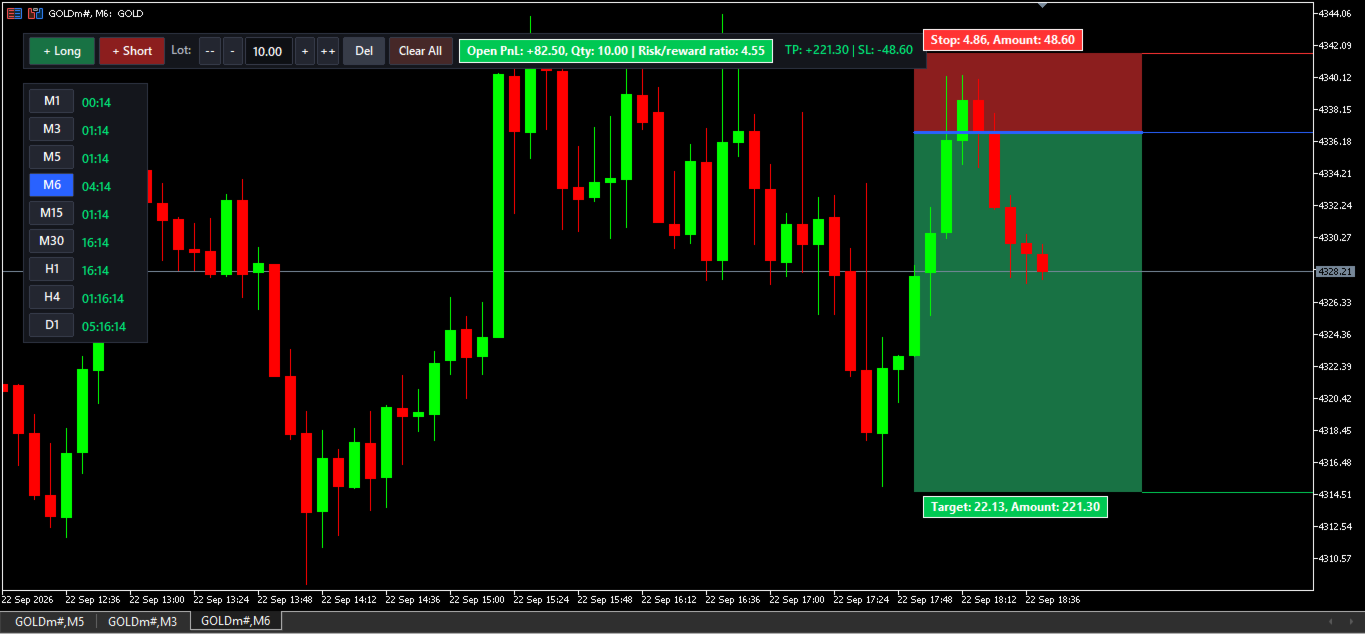
Visualize your Take Profit, Stop Loss, and Risk/Reward BEFORE you enter a trade. The Position Projection Tool Pro is an advanced on-chart utility for MetaTrader 5 that calculates your exact profit and loss in real-time based on your specific lot size and account currency.
Packed with premium features, this tool includes zero-lag drag-and-drop mechanics, extended price lines, and a custom vertical Multi-Timeframe (MTF) switcher with individual live candle countdown timers.
━━━━━━━━━━━━━━━━━━━━━━━━━━━━━━━
🔥 KEY FEATURES
━━━━━━━━━━━━━━━━━━━━━━━━━━━━━━━
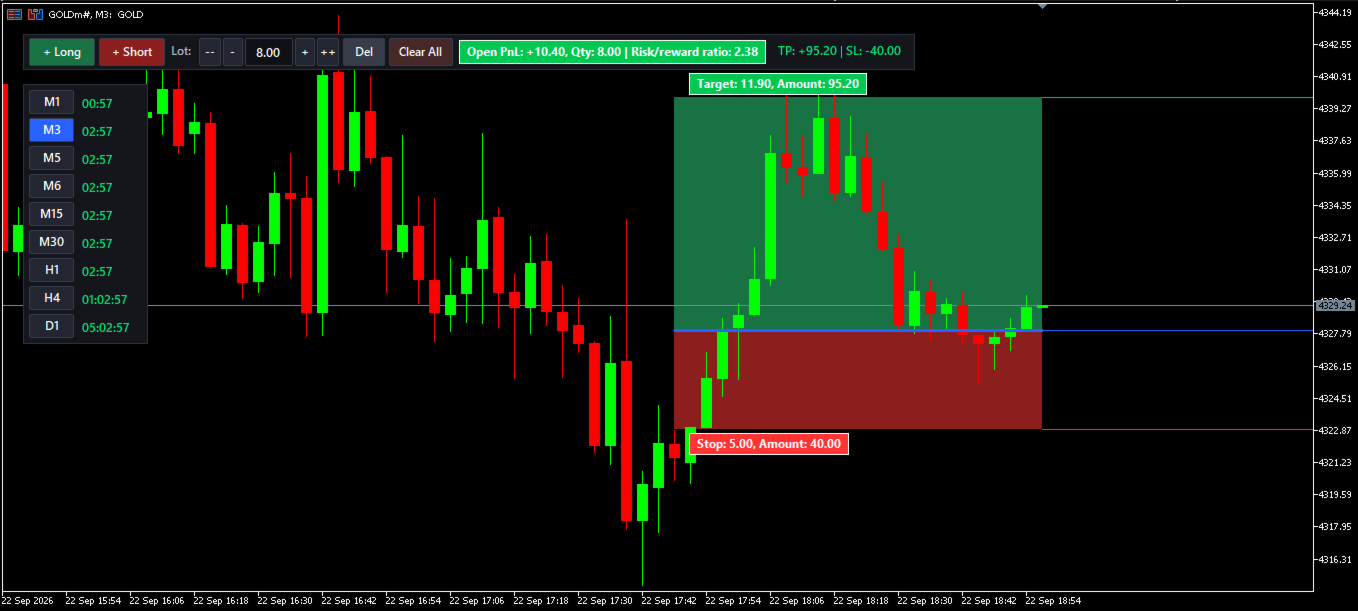
✅ Visual Profit & Loss Zones
• Green box = Profit zone (Take Profit area)
• Red box = Loss zone (Stop Loss area)
• Extended Price Lines (Ray Right) shoot across the screen to exactly pinpoint your Target, Entry, and Stop prices.
✅ Real-Time Dollar Amount Calculation
• See EXACT profit and loss amounts in your account currency.
• Uses MT5's native OrderCalcProfit() for broker-accurate results.
• Works flawlessly on Forex, Gold (XAUUSD), Indices, Crypto, and Stocks.
✅ Interactive Vertical MTF Switcher & Live Timers
• A sleek, customizable vertical panel on your chart lets you instantly switch timeframes (M1, M3, M5, M6, M15, M30, H1, H4, D1).
• Fully supports M6 and other custom timeframes natively!
• ⏱️ Live Candle Timers: Every timeframe button has its own dedicated countdown timer next to it, updating every second so you know exactly when the next candle opens.
✅ Multiple Projections on One Chart
• Place UNLIMITED Long and Short projection boxes.
• Each box is fully independent with its own lot size, TP, SL, and entry.
• Click any box to select it — the main toolbar instantly shows that specific box's data.
✅ Smooth Drag & Drop (Zero Lag)
• Drag ANYWHERE inside the box to reposition the entire projection.
• Drag the Target or Stop labels to extend your zones.
• Perfect state memory: Projections persist even when changing timeframes, recompiling, or editing settings!
✅ Smart On-Chart Toolbar
• [+ Long] and [+ Short] buttons for instant placement.
• Lot size editor with [--] [-] [edit] [+] [++] controls.
• Live status pill showing: Open PnL, Qty, Risk/Reward Ratio.
• TP and SL dollar amounts displayed beside the pill.
✅ Fully Customizable (35+ Settings)
• Turn Extended Price lines on/off and edit their colors/styles.
• Hide/Show specific timeframe buttons on the MTF panel.
• Customize colors, sizes, fonts, and positions for both the toolbar and the TF switcher panel.
━━━━━━━━━━━━━━━━━━━━━━━━━━━━━━━
📋 HOW TO USE
━━━━━━━━━━━━━━━━━━━━━━━━━━━━━━━
1. Attach the indicator to your chart.
2. Click [+ Long] or [+ Short] on the main toolbar.
3. A projection box appears. Click and drag anywhere inside it to move it to your entry price.
4. Drag the green/red labels to adjust your TP and SL levels.
5. Read your projected profit and loss in real dollars on the labels or the toolbar.
6. Click the buttons on the Vertical MTF Switcher to instantly change chart timeframes while watching the live candle countdown timers.
7. Use the "Del" button to remove the selected box, or "Clear All" to wipe the chart.
━━━━━━━━━━━━━━━━━━━━━━━━━━━━━━━
⚙️ HIGHLIGHTED SETTINGS
━━━━━━━━━━━━━━━━━━━━━━━━━━━━━━━
• Extended Price Lines: Toggle visibility, colors, and line style (Solid, Dashed, Dotted).
• Chart Timeframe Switcher: Independent X/Y positioning, button sizes, active/inactive colors, and toggles to show/hide specific periods (M1, M5, M6, H1, etc.).
• Default Trading Params: Set your default Risk/Reward ratio, Lot Size, and Box Width.
━━━━━━━━━━━━━━━━━━━━━━━━━━━━━━━
💡 COMPATIBILITY
━━━━━━━━━━━━━━━━━━━━━━━━━━━━━━━
• MetaTrader 5 (Build 4150+)
• All instruments and brokers.