Smart Risk Manager EA MT5
- Utilities
- Version: 2.12
- Activations: 5

Smart Risk Panel MT5 is an advanced execution and risk management panel designed for manual traders and Prop Firm traders (FundingPips, FTMO, FundedNext, etc.).
Built with a NON-BLOCKING architecture, the EA runs smoothly without freezing your chart—even during high volatility or fast-moving markets.
==================================================
🔥 KEY FEATURES
==================================================
• Auto Lot Calculation: Automatically calculates your exact lot size based on a fixed risk percentage (%) or fixed cash amount ($).
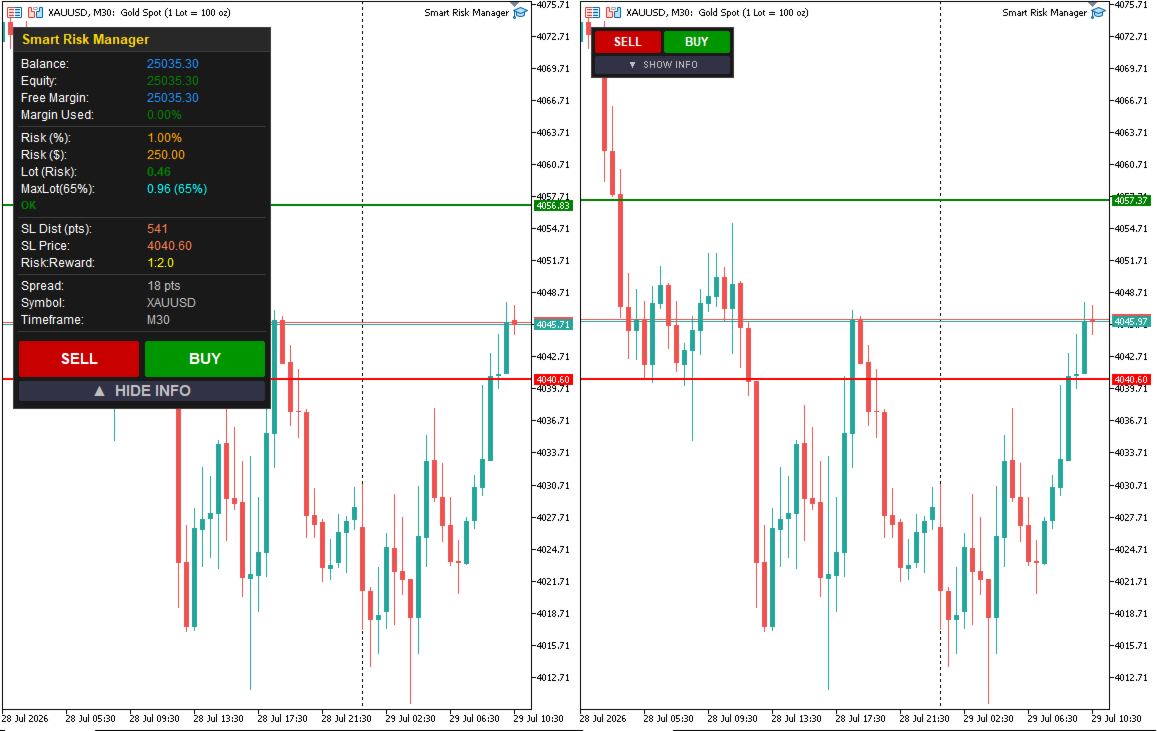
• Drag-and-Drop Global SL Line: Simply drag the visual Stop Loss line on your chart to automatically update your lot size and Take Profit in real-time.
• Auto Risk-to-Reward (TP) Line: Automatically draws a Take Profit line based on your target Risk-to-Reward ratio (e.g., 1:2).
• Prop Firm & Margin Safety Limiter: Features a built-in Margin Buffer and Lot Usage Limiter to protect your account balance from over-leveraging and accidental margin calls.
• Auto-Follow Pending Orders: Automatically syncs SL, TP, and lot sizes for pending orders relative to the Global SL line.
• Non-Blocking Architecture: Engineered with asynchronous task queues and timer-based routines so your terminal never lags.
• Smart Filling Mode Auto-Detection: Detects broker-supported filling modes (IOC, FOK, RETURN) for reliable execution across different brokers.
• Compact UI Toggle: Clean, modern interface with a customizable view—switch between Full Info Panel and Compact Mode with a single click.
==================================================
🛡️ PERFECT FOR PROP FIRM TRADERS
==================================================
Prop firms have strict drawdown and margin limits. Smart Risk Panel ensures that every trade executed respects your maximum allowable risk per trade. The Lot Limiter caps trade sizes based on available margin, preventing unexpected trade rejections or account breaches.
==================================================
⚙️ INPUT PARAMETERS
==================================================
[=== Risk Settings ===]
- Risk Mode: Select between Risk Percent (%) or Fixed Money Amount ($).
- Risk Percent (%): Target risk percentage per trade.
- Risk Fixed Money (USD): Target cash risk per trade.
- Risk : Reward Ratio: Automatic Take Profit distance based on SL.
[=== Pending Order Auto-Follow ===]
- Enable Auto-Follow Global SL Line: Sync pending orders to Global SL.
- Auto Set TP / Lot on Pending Orders: Toggle dynamic TP/Lot scaling.
[=== Margin Safety ===]
- Margin Buffer (%): Reserve percentage of free margin for safety.
- Enable Margin-Based Lot Limiter: Prevent over-leveraging.
- Max Lot Usage Limit (%): Cap maximum allowable margin used per trade.
[=== Trade Settings ===]
- Magic Number: Unique ID for EA-managed orders.
- Slippage (points): Allowed execution slippage.
- TP Modify Retry Count: Retries failed modifications automatically.
[=== Panel Appearance ===]
- Show Info Panel: Set default view (Full / Compact).
- Colors & Dimensions: Fully customizable UI colors, font sizes, and button dimensions.
==================================================
🚀 HOW TO USE
==================================================
1. Attach Smart Risk Panel MT5 to any chart.
2. Adjust your target Risk % or Fixed USD amount in the input settings.
3. Drag the RED "Global SL" line on the chart to your desired Stop Loss level.
4. The panel will instantly compute your required Lot Size, SL distance in points, and place the GREEN TP line.
5. Click BUY or SELL for instant execution.