
EquityReboundEA
- Experts
- Version: 1.10
- Activations: 10

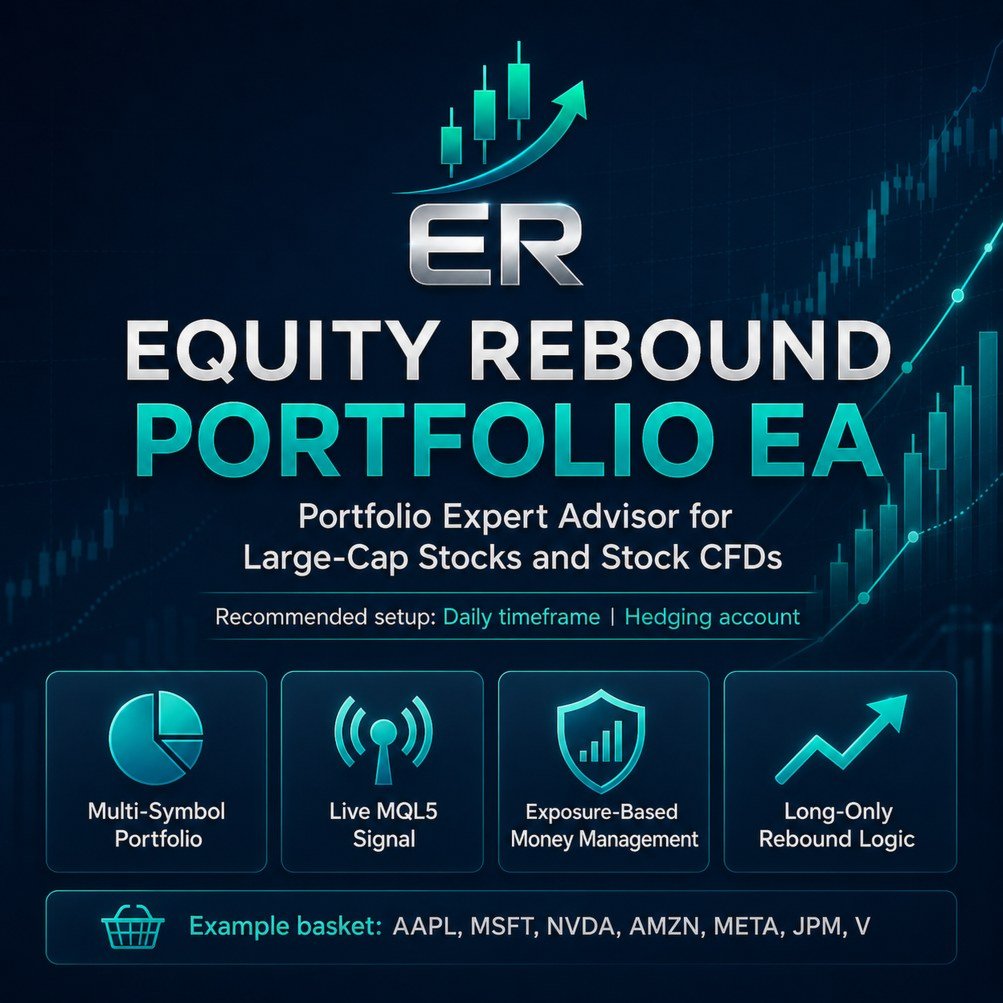
Portfolio Expert Advisor for large-cap stocks and stock CFDs
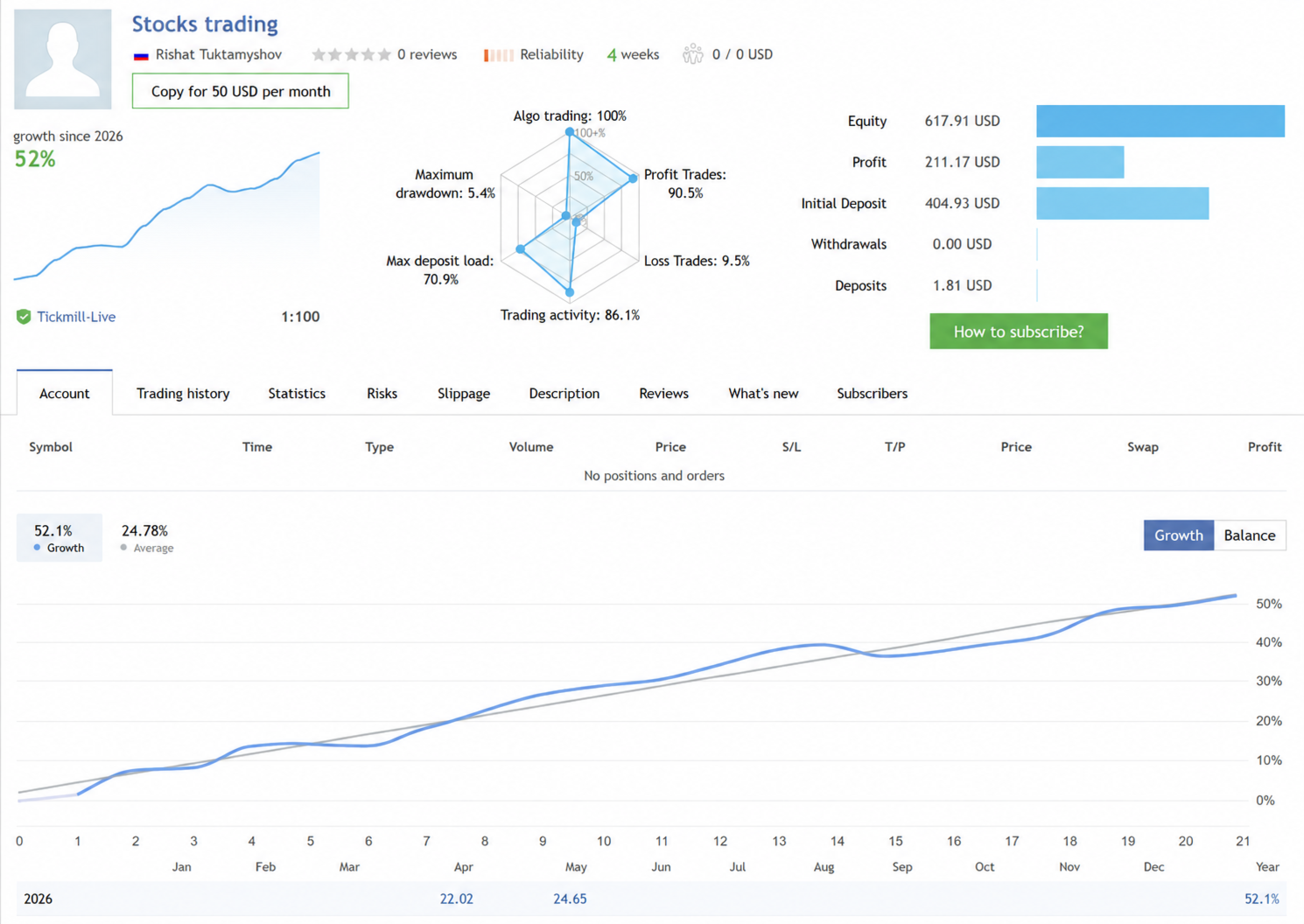
Live monitoring
A live MQL5 signal is available for this Expert Advisor:
The signal can be used to observe the EA’s real-time trading behavior, execution, drawdown dynamics and current portfolio performance.
Backtests and live monitoring do not guarantee future results. They are provided for research and evaluation purposes only.
Overview
Equity Rebound Portfolio EA is a multi-symbol Expert Advisor for MetaTrader 5. The main intended use case is trading liquid large-cap stocks and stock CFDs on the Daily timeframe.
The EA scans a list of symbols, analyzes completed candles and opens long positions when its internal rebound model detects a potential setup. Position size and total exposure are controlled at the portfolio level.
Main recommended setup:
Market: large-cap stocks and stock CFDs
Direction: long only
Recommended timeframe: D1
Recommended account type: hedging
Trading style: portfolio pullback and rebound trading
Money management: exposure-based allocation
The EA can technically work on other symbols and timeframes, but the main research and live monitoring are based on stock portfolio trading.
Trading concept
Large-cap stocks often move in waves. Strong companies may experience temporary pullbacks, short-term weakness and recovery phases.
The EA is designed to search for such situations using completed candle data. It does not trade every tick and does not try to predict every market movement.
The internal entry logic is proprietary and is not exposed as separate strategy switches in the settings. This helps keep the product easier to use and reduces unnecessary over-optimization.
Key features
Multi-symbol portfolio trading
The EA can monitor several symbols from one chart.
Designed mainly for liquid stocks and stock CFDs
The recommended use case is a basket of large-cap companies.
Daily timeframe recommended
For the main stock portfolio model, the recommended timeframe is D1.
Long-only trading logic
The EA opens buy positions only.
Proprietary rebound model
The exact internal sub-models are not exposed in the settings.
Portfolio-level exposure control
The EA controls total gross exposure using the MaxLeverage parameter.
Fixed balance allocation per new trade
Each new trade targets a selected percentage of the account balance.
Multiple entries on the same symbol
The EA may open additional positions on the same symbol if a new signal appears and the portfolio exposure limit allows it.
No classic martingale multiplier
The EA does not use a traditional martingale formula that increases lot size after losses.
No fixed grid of pending orders
The EA does not place a fixed grid of pending orders at predefined price intervals.
Recommended account type
The recommended account type is hedging.
The EA may open more than one independent position on the same symbol if a new signal appears and the portfolio exposure limit allows it. This behavior is part of the portfolio logic.
On netting accounts, MetaTrader 5 combines positions on the same symbol into one net position. Because of this, the EA may behave differently from the tested and monitored hedging setup.
Portfolio mode
To use the EA in portfolio mode, enter your broker’s exact symbols in the InpSymbols field.
Example:
AAPL,MSFT,NVDA,AMZN,META,GOOGL,JPM,V,MA
Some brokers use suffixes. In that case, enter symbols exactly as they appear in Market Watch.
Examples:
AAPL.NAS,MSFT.NAS,NVDA.NAS,AMZN.NAS,V.NYSE,JPM.NYSE
AAPL.US,MSFT.US,NVDA.US,AMZN.US
If InpSymbols is empty, the EA trades only the current chart symbol.
Recommended timeframe
For the main stock portfolio mode, the recommended setting is:
InpSignalTimeframe = PERIOD_D1
The EA also supports:
InpSignalTimeframe = PERIOD_CURRENT
This allows the EA to work on the current chart timeframe. However, the main recommended setup for this product is stock portfolio trading on D1.
Money management
The EA uses exposure-based portfolio money management.
TradeAllocationPctOfBalance defines the target exposure for each new trade.
Example:
TradeAllocationPctOfBalance = 25
This means that each new trade targets approximately 25% of the current account balance.
MaxLeverage defines the maximum total gross exposure of all EA positions.
Example:
MaxLeverage = 1.0
If the account balance is 10,000 USD, the EA will try not to exceed approximately 10,000 USD of total gross exposure.
Example:
MaxLeverage = 1.5
If the account balance is 10,000 USD, the EA will try not to exceed approximately 15,000 USD of total gross exposure.
This approach is more flexible than simply limiting the number of open positions because different stocks have different prices, contract sizes and volume steps.
Example settings
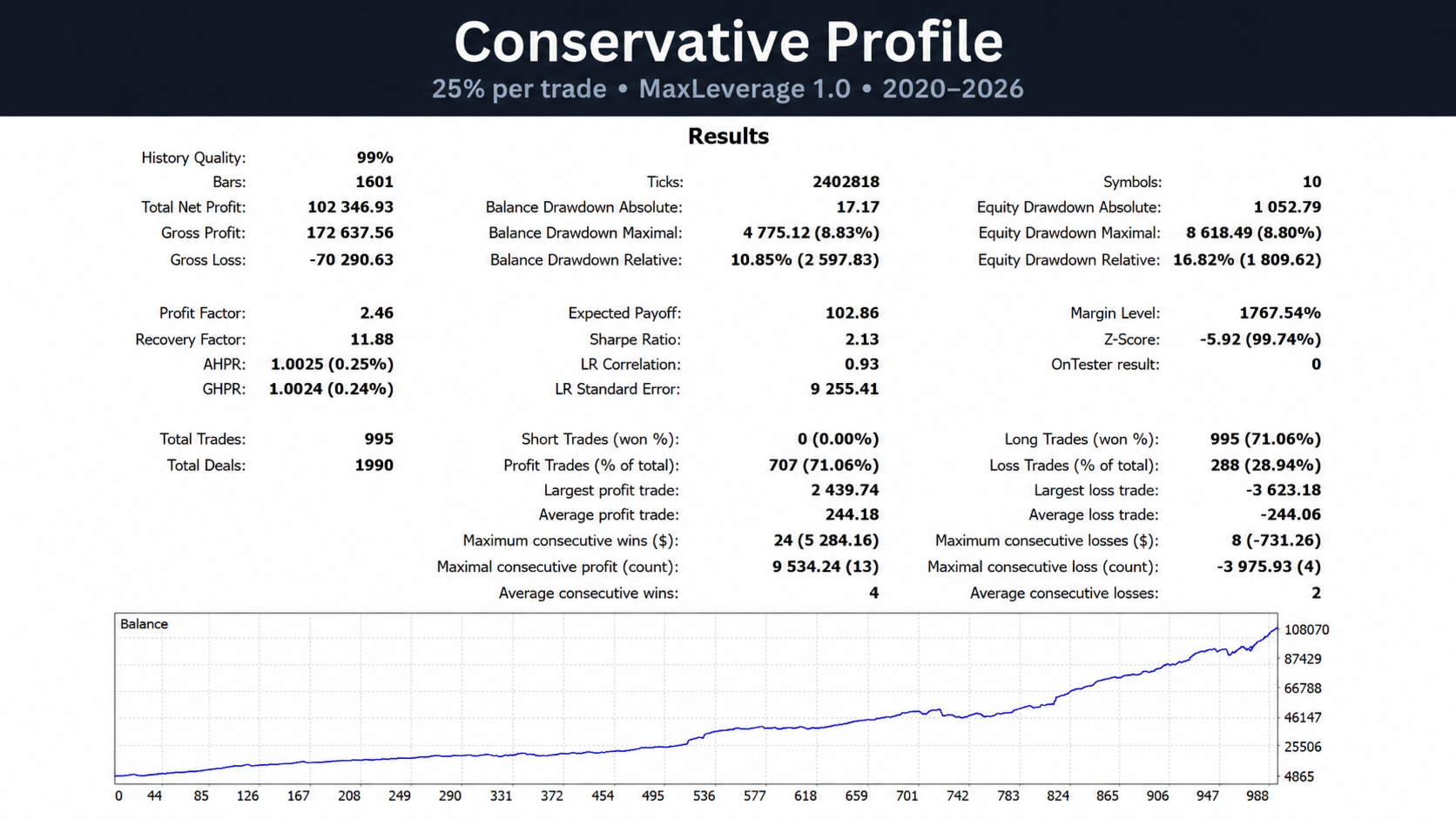
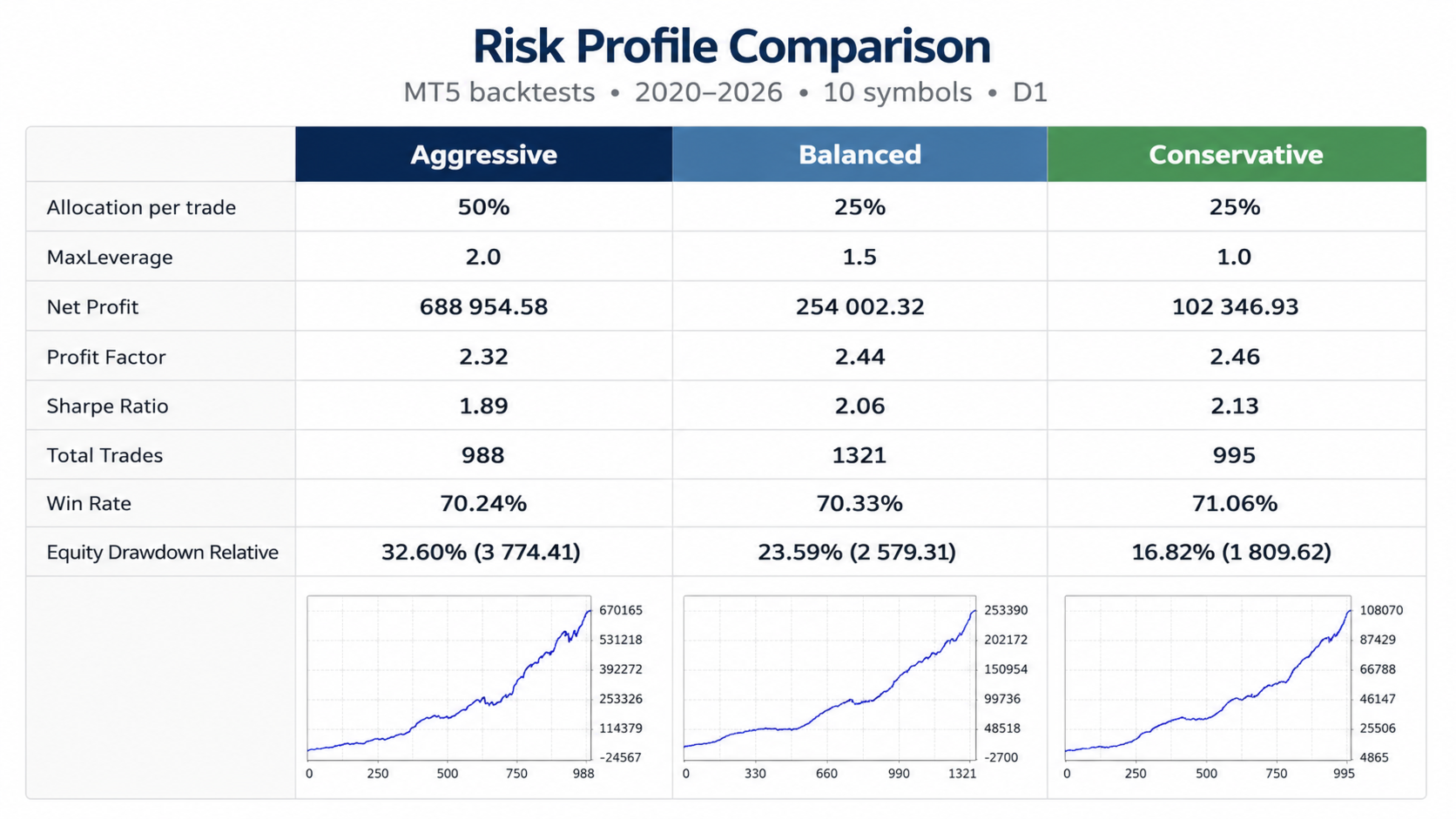
Conservative portfolio mode
TradeAllocationPctOfBalance = 25
MaxLeverage = 1.0
AllowPartialTradeIfExposureLimited = false
InpSignalTimeframe = PERIOD_D1
With these settings, each new trade targets around 25% of the account balance, while total gross exposure is limited to approximately 100% of the account balance.
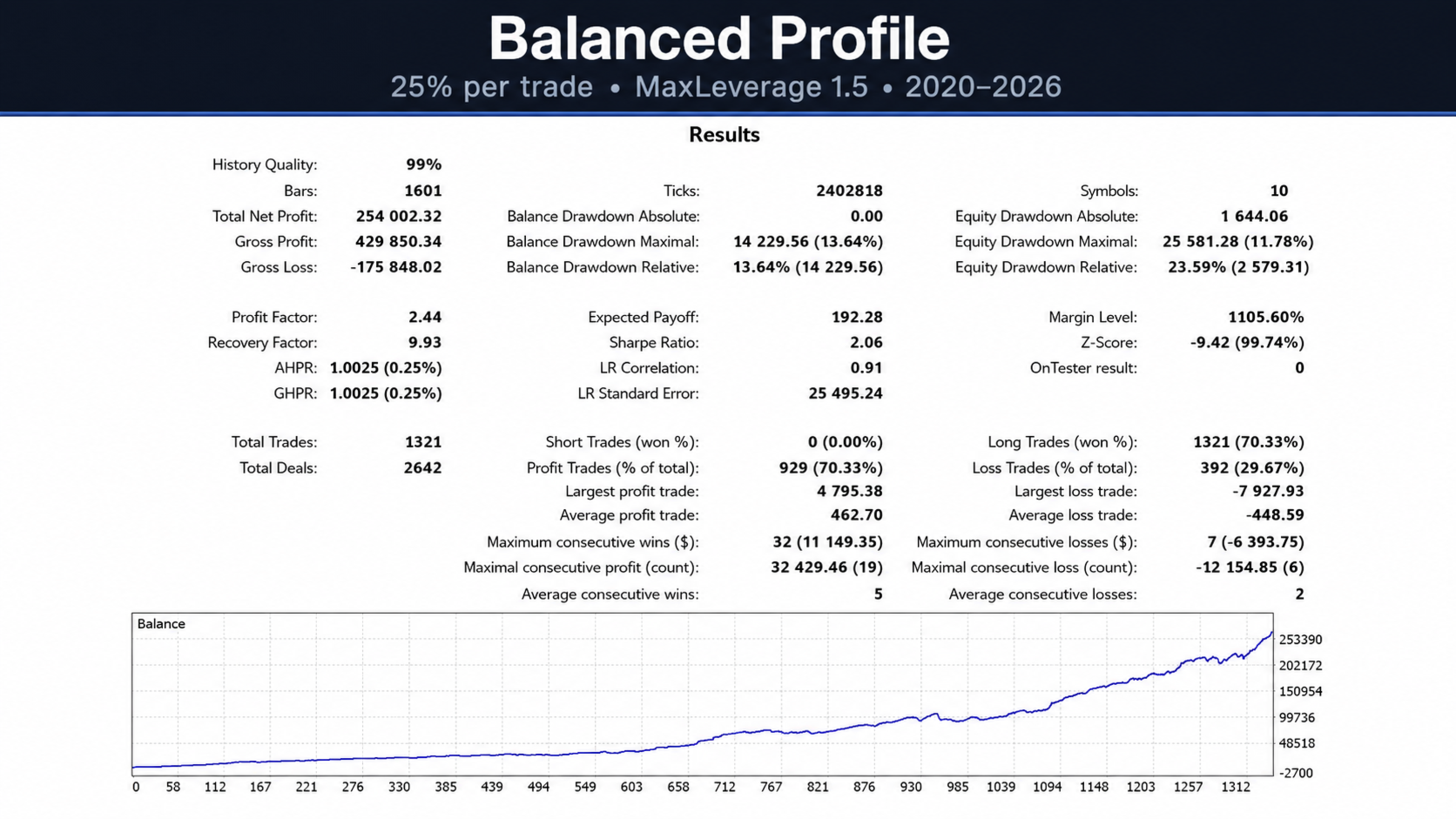
Balanced portfolio mode
TradeAllocationPctOfBalance = 25
MaxLeverage = 1.5
AllowPartialTradeIfExposureLimited = false
InpSignalTimeframe = PERIOD_D1
With these settings, each new trade targets around 25% of the account balance, while total gross exposure is limited to approximately 150% of the account balance.
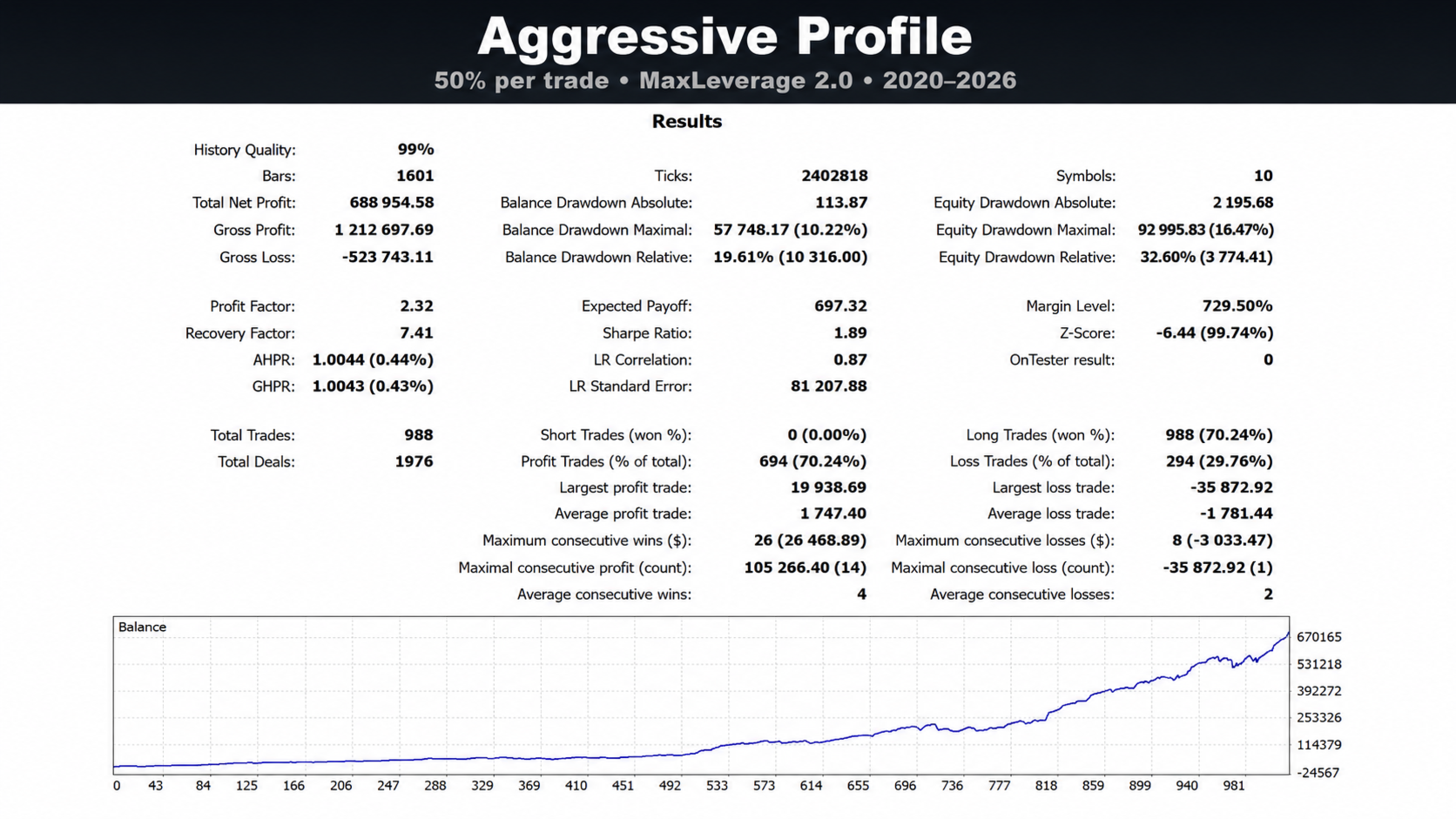
Aggressive portfolio mode
TradeAllocationPctOfBalance = 50
MaxLeverage = 2.0
AllowPartialTradeIfExposureLimited = false
InpSignalTimeframe = PERIOD_D1
With these settings, each new trade targets around 50% of the account balance, while total gross exposure may reach approximately 200% of the account balance.
Higher allocation and higher MaxLeverage may increase potential returns, but they also increase drawdown and risk.
Recommended instruments
The EA is designed mainly for liquid large-cap stocks and stock CFDs.
Examples of possible instruments:
AAPL
MSFT
NVDA
AMZN
GOOGL
META
JPM
V
WMT
AVGO
Use only the exact symbols available from your broker.
Input parameters
InpSymbols — list of symbols to trade. Leave empty to trade only the current chart symbol.
InpSignalTimeframe — timeframe used for signals. Recommended for stock portfolio mode: PERIOD_D1.
InpAllowMultiplePositionsPerSymbol — allows additional entries on the same symbol when new signals appear.
TradeAllocationPctOfBalance — target exposure for each new trade as a percentage of account balance.
MaxLeverage — maximum total gross exposure for all EA positions.
AllowPartialTradeIfExposureLimited — allows a smaller trade if the remaining exposure is not enough for the full target position.
Magic Number — unique identifier used by the EA to manage its own positions.
TimerSeconds — how often the EA checks the symbol list for a new candle. The default value of 30 means the EA checks approximately every 30 seconds.
InpDebugLog — enables detailed technical logs for debugging and analysis. For normal use, it can remain disabled.
InpTradeComment — trade comment displayed in the terminal history.
Backtesting
Backtesting should be performed in MetaTrader 5 Strategy Tester using high-quality broker history.
Recommended tests:
Recent market test: 2023 to present
Medium-term test: 2021 to present
Stress test: 2020 market crash
Portfolio test on a basket of large-cap stocks
Individual symbol tests
Broker comparison, if possible
For stock CFDs, historical data quality is very important.
Stock and stock CFD history may be affected by stock splits, dividends, corporate actions, broker-specific history and contract specification changes.
If the broker’s history does not correctly adjust for stock splits or other corporate actions, the Strategy Tester may show artificial price jumps or unrealistic results.
How to use
- Attach the EA to any chart in MetaTrader 5.
- Enable Algo Trading.
- Add the required stock or stock CFD symbols to Market Watch.
- Enter the symbol list in InpSymbols.
- Use the exact broker symbol names.
- Set InpSignalTimeframe = PERIOD_D1 for the recommended stock portfolio mode.
- Set TradeAllocationPctOfBalance.
- Set MaxLeverage.
- Run a Strategy Tester backtest.
- Test on a demo account before using real money.
Risk notice
Trading stocks, stock CFDs, Forex, metals and other leveraged instruments involves risk.
Past performance does not guarantee future results.
The EA can open several positions at the same time and may also open additional positions on the same symbol if new signals appear and the portfolio exposure limit allows it. This can increase both potential profit and drawdown.
Before using the EA on a real account, test it in Strategy Tester, run it on a demo account, check symbol specifications, understand contract size and leverage, start with conservative settings and monitor total exposure and drawdown.
The developer does not guarantee profit. The user is fully responsible for trading decisions, settings, risk and account management.
Summary
Equity Rebound Portfolio EA is a portfolio Expert Advisor for MetaTrader 5, designed mainly for large-cap stocks and stock CFDs.
The EA combines multi-symbol scanning, Daily timeframe stock portfolio logic, proprietary rebound entries, exposure-based money management, multiple entries per symbol on hedging accounts and live MQL5 monitoring.
It is not a risk-free system and it does not guarantee profit. It is a structured algorithmic trading tool for users who understand portfolio risk and want to test a stock-focused approach in MetaTrader 5.




























User didn't leave any comment to the rating