
Mirage Trading System
- Indicators
-
Ich Khiem Nguyen
 AlphaOnChart is now available on Android! If you trade and use an Android phone, do not miss this.
I just launched the Android version to help traders get ready-to-execute daily trade plans, key levels, and real-time M15 chart alerts right on their phones. - Version: 1.20
- Updated: 24 March 2026
- Activations: 10
Mirage Trading System is a MetaTrader 5 indicator that detects false breakout reversal patterns (Fakey) after bar-close confirmation. It identifies moments when price sweeps beyond a key level, traps traders on the wrong side, and reverses — a setup used widely in price action and Smart Money Concepts (SMC) analysis.
The indicator handles pattern detection, entry/exit level calculation, risk management, multi-timeframe scanning, and performance tracking in a single tool. It runs on any symbol and any timeframe supported by MetaTrader 5.
How It Works
A detailed user guide is available on the author’s MQL5 Blog. Additional updates are available through the author’s MQL5 Channel.
Depending on the current support policy, buyers may receive additional access to selected companion tools developed by the author.
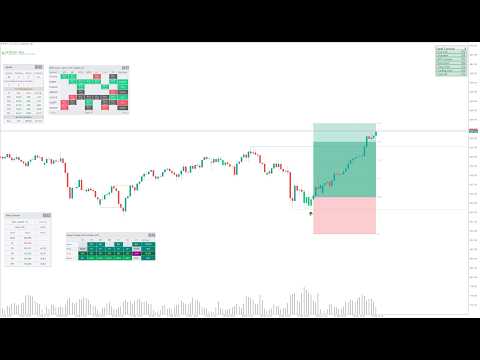
When a candle closes and confirms a false breakout pattern, the indicator places a signal arrow on the chart. Each signal includes an Entry level, Stop Loss, and up to four Take Profit targets calculated using a configurable Risk-to-Reward ratio. The system tracks whether price reaches Entry, hits a TP level, or stops out — displaying the result on a built-in Signal Dashboard with win/loss statistics and net pip tracking.
Signals pass through a lifecycle of states: Preview, Pending, Active, and then Win, Loss, Expired, Cancelled, or Blocked. This structure allows the indicator to manage each signal independently and provide clear status information at every stage.
Built-In Market Structure Analysis
The indicator includes an automatic market structure engine that identifies swing highs and lows, Break of Structure (BOS), and Change of Character (CHoCH). Structure analysis runs directly inside the indicator using fractal-based swing detection with ATR-filtered minimum swing distance. You can configure the structure timeframe independently from the chart timeframe to align signals with higher-timeframe trend context.
Seven Signal Filters
Every detected pattern passes through seven independent filters before appearing on the chart. Each filter can be enabled or disabled individually:
Spacing Filter — prevents signal clustering by enforcing a minimum distance between consecutive signals.
Quality Filter — scores each pattern from 0.0 to 1.0 based on candle proportions, body-to-wick ratios, and market context. Only signals meeting a configurable threshold are displayed.
Extreme Zone Filter — blocks signals at the top or bottom of a Donchian price channel to avoid buying at highs or selling at lows.
Direction Filter — allows only signals that align with the current market structure trend (uptrend, downtrend, or range).
StoplossHunt Filter — checks whether price swept a nearby swing high or low (liquidity sweep) before the pattern formed. Signals without a prior sweep are rejected.
Signal Zone Filter — verifies that the signal appeared near a structurally significant price zone, such as a recent BOS or CHoCH event, or after a sweep of support/resistance.
Opposite Signal Filter — blocks new signals in the opposite direction when an active trade is already running.
Stop Loss and Take Profit Calculation
The system provides two Stop Loss methods. Donchian SL places the stop at the actual high or low of the market within a configurable number of candles, reflecting real market structure. ATR SL calculates the stop based on average volatility using an internal ATR engine. Take Profit levels are defined as multiples of the risk distance (R), with four independent TP levels (TP1 through TP4) that can each be set to a custom R:R ratio or disabled by setting the value to zero.
Trailing Stop Loss
An optional Trailing Stop Loss (TSL) system follows price using either Donchian or ATR trailing logic. TSL activation can be delayed until the trade reaches a specified R:R level, preventing premature exits during early-stage pullbacks. The trailing stop moves only in the direction of profit and locks at breakeven after TP1 is hit when the lock feature is enabled.
Multi-Timeframe Scanner and Dashboard
The MTF Scanner monitors multiple symbols and timeframes simultaneously. It displays results in a grid-style dashboard showing signal direction, status, and quality for each symbol-timeframe combination. Clicking a cell navigates directly to the corresponding chart and signal. The scanner supports up to 10 symbols per page with pagination for larger watchlists.
A separate Signal Dashboard on the current chart tracks win/loss count, net pips, open signal count, and the result of the most recently closed signal.
Alerts and Push Notifications
Two independent notification systems are included. Local Alerts display popup dialogs on the MT5 terminal when a signal event occurs on the current chart. MTF Scanner Notifications send Push Notifications to the MetaTrader 5 mobile app via MetaQuotes servers, covering events across all scanned symbols. Configurable events include New Pattern Detected, Entry Price Hit, Take Profit Hit, Stop Loss Hit, and Trailing Stop Triggered. Each system has independent cooldown timers.
Visualization Options
Signal presentation is configurable: entry/exit lines, price labels, pip distance labels, zone fill (colored risk/reward rectangles), signal arrows, candle highlighting, quality score display, and a tracking path showing post-signal price movement. All visual components can be enabled or disabled independently. A minimal mode is available for clean chart displays on small screens.
Recommended Usage
The indicator is designed for manual trading. It detects patterns and calculates levels, but does not place or manage orders automatically. Traders use the signals as a starting point for their own analysis and decision-making. A separate EA integration is required for automated order execution.
Recommended timeframes are H1 and H4 for most currency pairs and gold (XAUUSD). Lower timeframes (M5, M15) are suitable for scalping with adjusted filter settings. Higher timeframes (D1, W1) work for swing and position trading.
Documentation
Complete documentation is available in the Traders' Blog section, including detailed user guides for every feature: Market Structure, Signal Zone Filter, StoplossHunt Filter, Risk/Reward and SL Methods, Trailing Stop Loss, MTF Scanner and Dashboard, Visualization and Signal Dashboard, Signal Types and Lifecycle, Opposite Signal Filter, Quality Filter, and Alerts and Notifications.
Input Parameters
All input parameters are organized into clearly labeled groups: Pattern Detection, Market Structure, Risk/Reward, Trailing Stop Loss, Signal Quality Filters (7 filters), MTF Scanner, MTF Dashboard, Visualization, Alerts, and MTF Scanner Notifications. Default values are optimized for H1 XAUUSD trading and can be adjusted for other instruments and timeframes.












































Amazing indicator, very helpful. I recommend it.