I treat a platform change as a new operating environment. Even when a developer offers versions for both terminals, the files, account settings and broker’s symbol specification deserve a fresh check. The useful comparison is whether your particular EA works as expected on the account you intend to use.
Choose the supported EA version before choosing a platform
MT4 versus MT5 is first a compatibility question, not a prediction about trading returns. An Expert Advisor needs a version built for its trading platform, an appropriate broker account and a supported operating setup. A longer feature list cannot make an incompatible EA work.
If you already use an EA, start with its current developer documentation. If you are evaluating one, establish the exact platform and account requirements before comparing a backtest or buying a hosting plan. This guide gives you a practical way to make that comparison without assuming either platform is a universal winner.
MT4 and MT5 EAs are not interchangeable
MT4 uses MQL4 and MT5 uses MQL5. Similar-looking interfaces and product names do not establish that an EA works on both. The official MQL4-to-MQL5 migration reference describes changes programmers must handle when adapting code, including data access and event handling.
Ask the developer whether a separately supported version exists for the platform you intend to use. Do not treat renaming a file or copying a settings file as a conversion. Even where two versions share a strategy description, compare their documented inputs and behaviour rather than assuming equivalence.
For a SmiteFX product, follow the current product link from the systems directory, then read that exact listing's platform and setup requirements. This article does not announce new MT4 or MT5 support for any SmiteFX system.
Compare testing tools by the question you need answered
Both platforms provide strategy-testing facilities. The MT4 tester setup guide covers selection of the EA, symbol, timeframe, modelling method and test period. A test result needs those settings to be interpretable.
The MT5 Strategy Tester supports multi-currency testing, parallel optimisation, real-tick modes and execution-delay settings. Those capabilities can help investigate a supported strategy, but they do not establish that its rules are profitable or that a live account will receive the simulated fills.
Make the comparison reproducible: retain the EA version, inputs, account assumptions, data period and costs with each report. A more elaborate test is not automatically better evidence if its assumptions are unclear. Our backtesting versus forward-testing guide explains why subsequent observation answers a different question from historical modelling.
Check the account's position-accounting mode
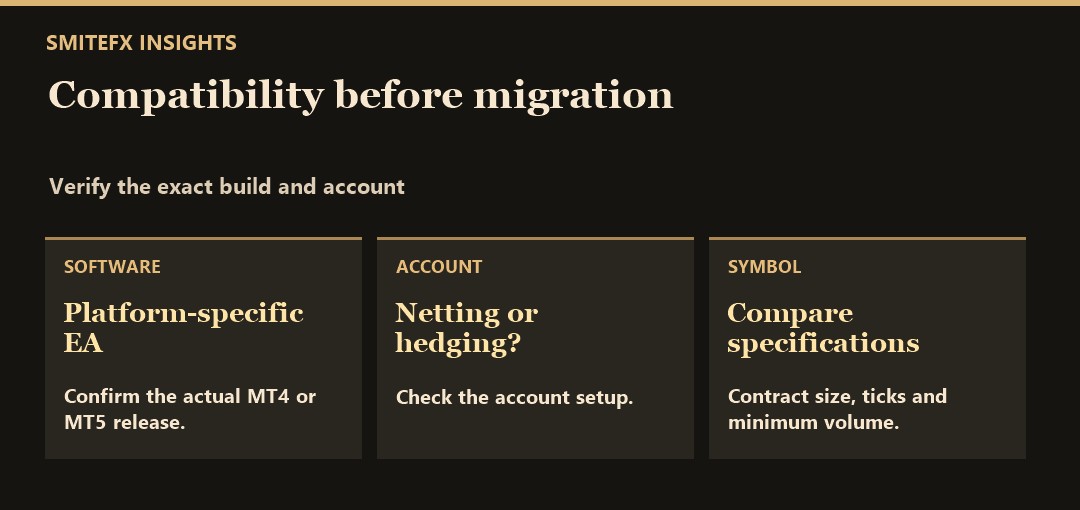
MT5 accounts can use different position-accounting modes. In retail netting, one position exists per symbol; retail hedging permits multiple positions for the same symbol. The platform's account-property documentation identifies these modes.
That matters when an EA expects to manage trades separately. Do not assume that the platform name alone establishes the broker account's mode or that an EA supports every mode. Confirm the developer's requirement and the actual account configuration.
Consider this hypothetical operational example, not a trading recommendation: a program expects to track two independent entries on the same symbol. If a different account combines activity into one net position, the program's entry and exit accounting needs to support that behaviour. A similar headline lot size does not prove equivalent operation. No measured SmiteFX result or proprietary system rule is implied by this example.
Compare broker and symbol settings, not just platform names
The same instrument label is not a complete contract specification. Check the broker's symbol name, contract size, minimum volume, volume step, tick size, trading sessions and supported order handling. The MQL5 symbol-property reference documents these as distinct properties.
For an XAUUSD EA review, write down the exact broker symbol rather than assuming that every gold-labelled instrument has identical units or settings. The gold breakout guide explains why a signal boundary and an executed order are different events.
Changing platform and broker together also changes more than one variable. If results differ, a platform comparison alone cannot identify the cause. Retain the source account, quote conditions and executed deals before drawing a conclusion.
Plan the operating setup and monitoring
Confirm where the supported terminal and EA will actually run. Remote hosting can support continuity, but hosting does not remove market risk or guarantee a fill. Account monitoring should include connection state, automated-trading permissions, terminal messages and the EA's documented operating conditions.
The MT5 platform settings guide describes automated-trading permissions and related controls. Do not enable unfamiliar libraries or external access simply to dismiss an error; establish why the supported software needs them.
Keep one accountable record of the active version, intended account and settings. After an update or migration, confirm the setup still matches the developer's instructions. Do not infer successful operation merely because a terminal is open or an EA is attached to a chart.
Use a migration checklist before risking capital
For an existing EA, a platform change is an operational change that needs verification, not a cosmetic upgrade. Before considering a live transition:
- Confirm the separately supported EA version, licence terms and installation instructions.
- Check the intended broker account, position-accounting mode and exact symbols.
- Match the documented inputs carefully; record differences rather than assuming a settings file transfers unchanged.
- Test the supported version with stated data and cost assumptions, then observe it in an appropriate non-live environment.
- Review order handling, logs and how the intended workflow would be monitored or stopped.
- Record what remains unverified. A completed checklist is not a guarantee of suitability or future performance.
Keep the old and proposed configurations clearly identified. Running both against the same live account without a deliberate plan could create unintended exposure. A migration should not be used as an experiment with capital whose risk you have not assessed.
Decide with a compatibility note, not a universal winner
A useful decision note answers five questions: Which EA version? Which platform? Which broker account and symbols? Which testing evidence? Which monitoring responsibilities? If one answer is missing, resolve it before treating the setup as ready.
For SmiteFX, start with the EA evaluation checklist, inspect the relevant system's current official listing and ask about any unsupported assumption. If you are considering copy trading, use its specific setup guide rather than assuming a self-hosted EA's platform requirements apply to the receiving account.
Neither MT4 nor MT5 removes leverage, drawdown or execution risk. Historical, backtested and forward results do not guarantee future returns. This article is technical education, not personalised financial advice or an instruction to trade. See the SmiteFX risk disclosure.
Write a migration acceptance note
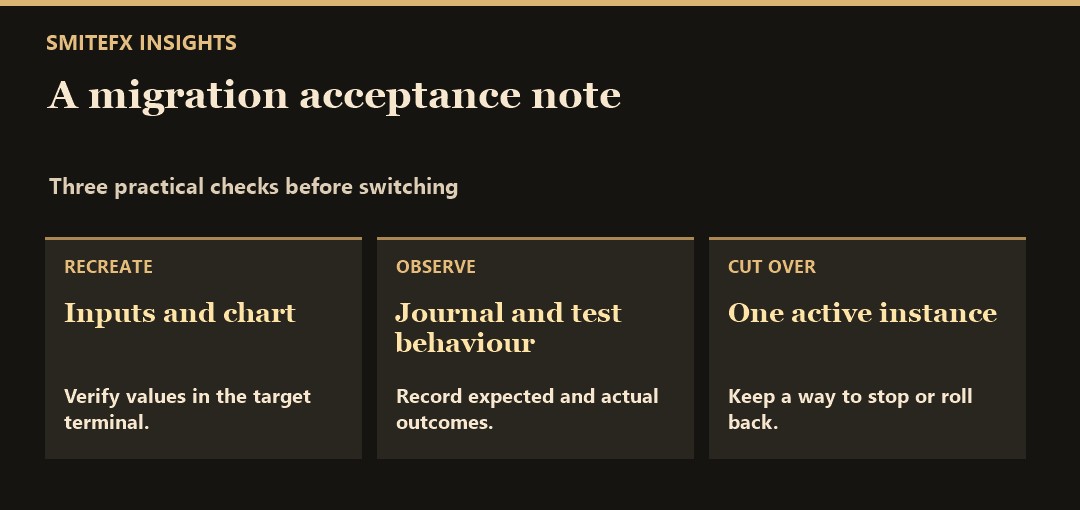
Suppose an EA was running on MT4 and you want to move to MT5. Start by locating the explicit MT5 release and confirming the version and instructions. Save your old input settings as a reference, then recreate the supported settings on the new build and verify the values. Do not assume the old preset imports with equivalent meanings.
Run a controlled test on the new terminal using the correct symbol suffix, point size, contract size and minimum volume. Record the position accounting mode and check how the robot handles simultaneous entries and partial closes. Before using a live account, make sure the old instance is no longer sending orders for that setup and that the new one has a clean Journal. Write down what you will do if the first expected test action is missing or duplicated.
For a SmiteFX product reference, see Frontier MT5. This listing is a reference for the MT5 build. If you already use a version on another platform, compare its own documentation before moving a preset or assuming the same behaviour.
Sources and review date
Primary platform documentation reviewed on 22 October 2026. Broker availability and product support must be checked for the intended account and exact EA version.