Copy MT5 trades on one VPS: hedging, netting and FIFO accounts in Local Trade Copier 3.1.10

Copying trades between MT5 accounts on the same Windows VPS needs no cloud service. With Local Trade Copier (LTC) by Algonexis Technologies, every account runs in its own MT5 terminal on that VPS: LTC Server on one chart of the master, LTC Client on one chart of each client, all with the same Signal Provider ID. Version 3.1.10, released on 6 November 2026, adds MT5 netting accounts as masters. That makes the account mode on both sides worth a closer look.
Written for Local Trade Copier 3.1.10.
I have developed Local Trade Copier since 2010. Below is what changes when the master or a client is a hedging, netting or US FIFO account, checked against the 3.1.10 source code.
How the trade gets from one terminal to the other
LTC Server writes every master trade to a small file in a folder on the VPS disk. LTC Client reads that folder, works out the lot size for its own account and sends the order through its own terminal to its own broker. Closes, partial closes and SL/TP changes travel the same way. No copier server logs in to the accounts; each terminal is logged in by its owner.
The only connection LTC makes by itself is LTC Server's licence check, at start and about once an hour. It sends no trades and no passwords. LTC Client has no licence check.
Terminal settings that every MT5 account needs
- Tools > Options > Experts: tick "Allow algorithmic trading" and "Allow DLL imports". The DLL reads and writes the trade files.
- The Algo Trading button in the toolbar must be green, and "Allow Algo Trading" stays ticked on the EA's Common tab.
- If the EA window shows no OK button, DLL imports are off. Tick "Allow DLL imports" on the Dependencies tab.
- Client accounts need the trading password. With an investor password, LTC Client reports "Trading is forbidden for this account".
- Some brokers disable automated trading on an account. LTC Client then reports "Automated trading is forbidden for this account … at the trade server/broker side", and only the broker can change that.
A netting account as the master (new in 3.1.10)
A netting account has one position per symbol, so a buy of 0.10 followed by a buy of 0.05 is one 0.15 position. LTC Server 3.1.10 detects the netting mode by itself and rebuilds the trades from the position's deals. Every opening deal goes to the clients as a separate trade. When the master reduces the position, the oldest copies close first, and a reversal closes them all and opens one new trade in the other direction.
There is no new input. The Experts tab confirms it with the line "This is a NETTING account (one position per symbol)". Older LTC Server versions stopped on such accounts with "Software can only work on HEDGING accounts".
One thing to watch: LTC Server needs the full deal history of the position. If the terminal hides part of it, the position is sent as one trade and an ATTENTION line explains why.
Hedging, netting and US FIFO accounts as clients
LTC Client MT5 has no setting for the account mode. It reads it from the account at start: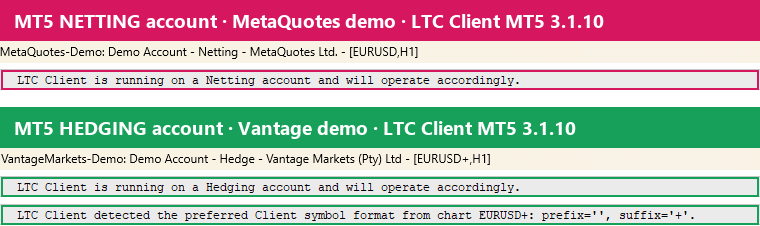
| Client account | How copies look | What LTC Client does |
|---|---|---|
| MT5 hedging | One position per copy | Follows every master trade on its own |
| MT5 netting | One position per symbol | Tracks each copy's lots and reduces the position when a master trade closes; SL/TP come from the most recent open master trade |
| US FIFO | No hedging, oldest trade closes first | Obeys FIFO rules; on MT4 the FIFO_Restrictions input detects them automatically |
A netting master and a FIFO client match well, because the master's reductions close the oldest copy first. Version 3.1.10 also closes the oldest copy first when several close at once on a FIFO account, and retries a refused close on time. In FIFO + Netting mode with an MT5 master, copies are no longer closed right after they open, and partial closes are copied. On netting clients, quick SL/TP changes on the master are now applied within about 5 seconds.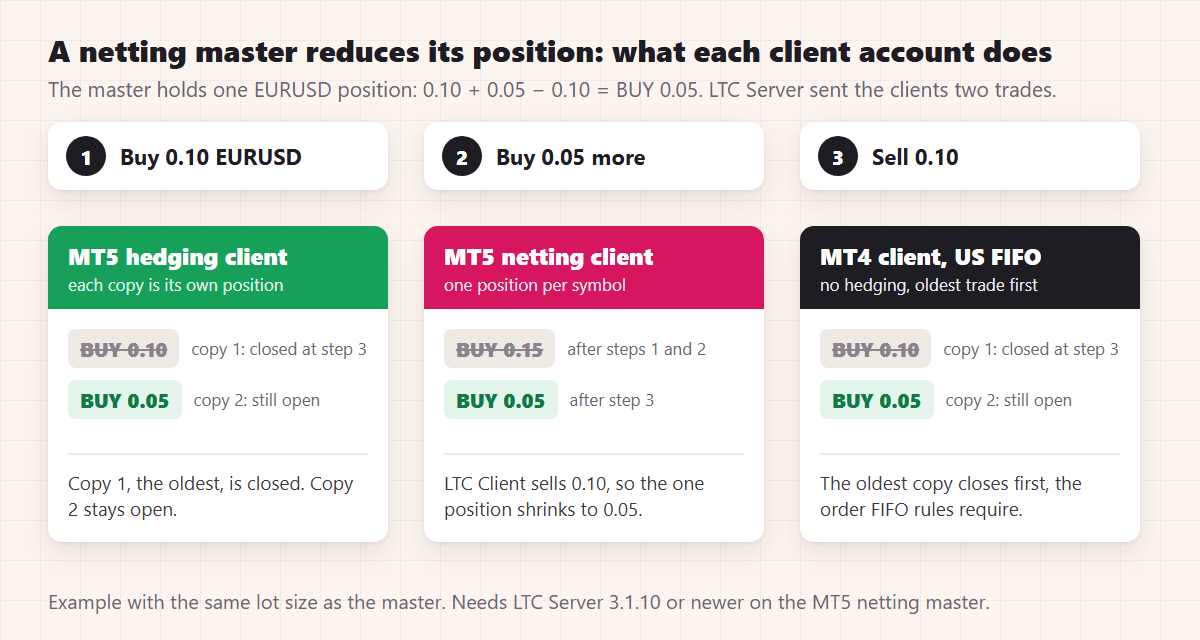
MT5 to MT4 on the same VPS
LTC Client MT4 reads the same folder and file format, so an MT4 account can copy from an MT5 master on the same VPS. The exception is the MT5 stop-limit order: MT4 has no such order type, so it isn't copied.
Symbol mapping by description
When a client broker names a symbol differently, LTC Client tries the CustomSymbolMapping input first (for example GOLD=XAUUSD ), then automatic mapping from the chart suffix and known alternative names. Since 3.1.10 there is a third step: a symbol with exactly the same description as the master's symbol, such as "Apple Inc.". If several symbols match, it uses the one in Market Watch, if only one of them is; otherwise nothing is copied and the log asks for a custom mapping. This needs LTC Server 3.1.10, because the Server now sends the description.
Restarts
A partial close made on an MT5 master while LTC Server was not running is now applied as soon as LTC Server starts again. On FIFO accounts the same holds when LTC Client was the one that was off. While the VPS is off nothing is copied, and open copies keep the SL/TP already set at the broker.
Speed
In Algonexis' November 2026 tests on demo accounts (a Windows VPS, LTC 3.1.8 at default settings), a new trade from an MT5 master was open on the MT5 client accounts a median of about 0.8 seconds after the master's fill, and 9 of 10 copies took about 1.2 seconds or less. Closes followed in a median of about half a second. Most of that time is LTC Server noticing the master trade; the client broker's execution adds the rest.
The full tutorial, with the setup steps and a list of common error messages, is on mt4copier.com: Copy MT5 trades on the same VPS: hedging, netting and FIFO accounts.
Rimantas Petrauskas has built trading tools for MetaTrader traders since 2009 and created Local Trade Copier in 2010.