Does Owl Smart Levels Repaint? Fixed Signal Prices, Moving ZigZag Extremes and Cancelled Signals

A perfect-looking historical chart screenshot cannot tell you whether a signal stayed unchanged in real time. If you trade levels and pullbacks by hand, that distinction matters. As the developer of Owl Smart Levels for MT4/MT5, I want to explain precisely what stays fixed, what can move and why a signal can disappear.
What stays fixed—and what moves
A fractal counts only after the candles to its right have closed. The default settings are five candles to the left and four to the right. Once confirmed, that fractal is not redrawn.
On Owl’s own ZigZag line, finished legs do not redraw, but the end point of a running leg moves to each new extreme. This movement concerns the ZigZag line, not the signals.
Owl draws a signal when the Main, Older and Oldest timeframes agree. The default Main timeframe is M15. The signal includes an entry level (default 38.2), a stop at the 0 level and a target at 161.8.
Those three prices never move after that signal is created. Owl has no repainting of signals as such. A newer signal, formed on a later fractal, replaces the current one.
Why a signal disappears
A signal ends when any of these conditions applies:
- Price touches its stop or target.
- Its lifetime expires: a configurable number of Main-timeframe bars, default 24 for all markets, with weekends not counted.
- For a buy, a new low fractal forms above the entry; for a sell, a new high fractal forms below it.
- The Main-timeframe ZigZag turns, or an older timeframe disagrees.
While Older and Oldest disagree, Owl shows a shaded red zone and removes any signal already shown. The zone disappears when those timeframes agree again.
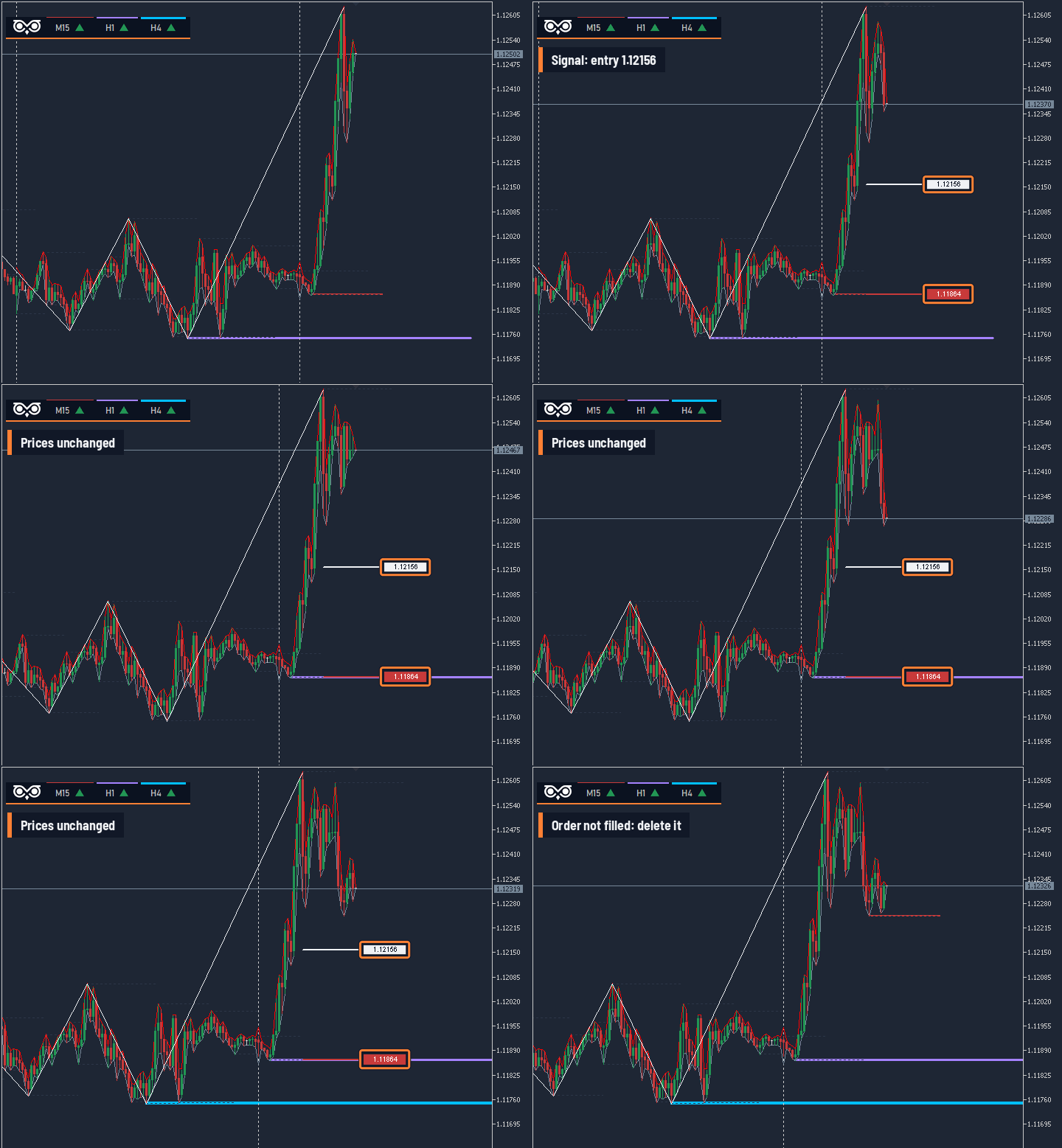 Figure 1. EURUSD M15: the entry and stop stayed at the same prices. A new low fractal formed above the entry, and Owl removed the signal before the pending order was filled. The purple line is the H1 level.
Owl only draws; you place the order. Signal rebuilds—replacement or removal—happen while the pending order is still unfilled. You move the pending order to the new signal or delete it, with no trading loss because it has not been filled. The user guide says to remove the pending order when Owl removes the signal: the trade idea is no longer valid.
If the order has been filled and the signal disappears, the rule is to close the trade: the move has not developed. This does not mean that an opened trade cannot lose.
Even when it looks from outside as if Owl rebuilds its values, the strategy and user guide give clear rules for every case. You can check this behaviour yourself in the Strategy Tester’s visual mode.
Download the demo and watch the indicator work in the Strategy Tester's visual mode: Owl Smart Levels MT5 | MT4 version