How to copy trades you place in the MT4 or MT5 mobile app to other accounts

The MetaTrader 4 and MetaTrader 5 apps for Android and iPhone can't run Expert Advisors, so a trade copier can't run on a phone. You can still copy the trades you place in the app. The trick is a MetaTrader feature: one account can be logged in on several devices at once, and every device shows the same trades. Keep the master account logged in on your PC or VPS, where the copier runs, and a trade you open on the phone is copied from there. I call this setup MOBILE-TO-MANY COPYCAT™. The examples use Local Trade Copier.
How it works
- You open a trade in the app. It goes to your broker's trade server.
- The broker shows the trade on every device logged in to that account, including the terminal on your PC or VPS.
- LTC Server on that terminal sees the new trade and sends it to LTC Client on each client account on the same computer.
- Each LTC Client sizes the lot for its own account and opens the copy.
New trades, pending orders, SL/TP changes, partial closes and closes made in the app are all copied. It works only while the master account stays logged in on the PC or VPS. A VPS that runs 24/5 is the practical choice. If only the master terminal drops offline, the trade is copied when it reconnects. If the whole computer was off, LTC Client treats trades that are already open when it starts as old and doesn't copy them, unless CopyExistingMasterTradesOnStart = true.
Setup
- On the PC or VPS, log in to the master account in its own terminal and attach LTC Server to any chart. This terminal can even use the investor (read-only) password, because LTC Server only reads the trades.
- Client accounts: in each client terminal on the same computer, attach LTC Client to a chart of one of that broker's own symbols. The default "AA (Auto-Adjust to account size)" sizes each copy to the client's balance.
- On the phone, log in to the same master account with the trading password.
- Test: in the app, place a BUY LIMIT far below the price. It should appear on the PC or VPS and on every client. Move it, then delete it.
- Optional push messages: enter the MetaQuotes ID from the app in Tools > Options > Notifications of each client terminal. Then set AlertLevel = "Alert on successful trade open/close" and AlertByPushNotifications = true in LTC Client. The phone then confirms every copy.
Several master accounts from one phone
The app can hold several accounts but shows one at a time. Each master needs its own terminal with LTC Server on the PC or VPS. To give each master its own clients, use the group number: Signal Provider ID = 1 on master 1 and Signal_Provider_ID (SPID) = 1 on its clients, 2 on master 2 and its clients, and so on. Without groups, every client copies every master.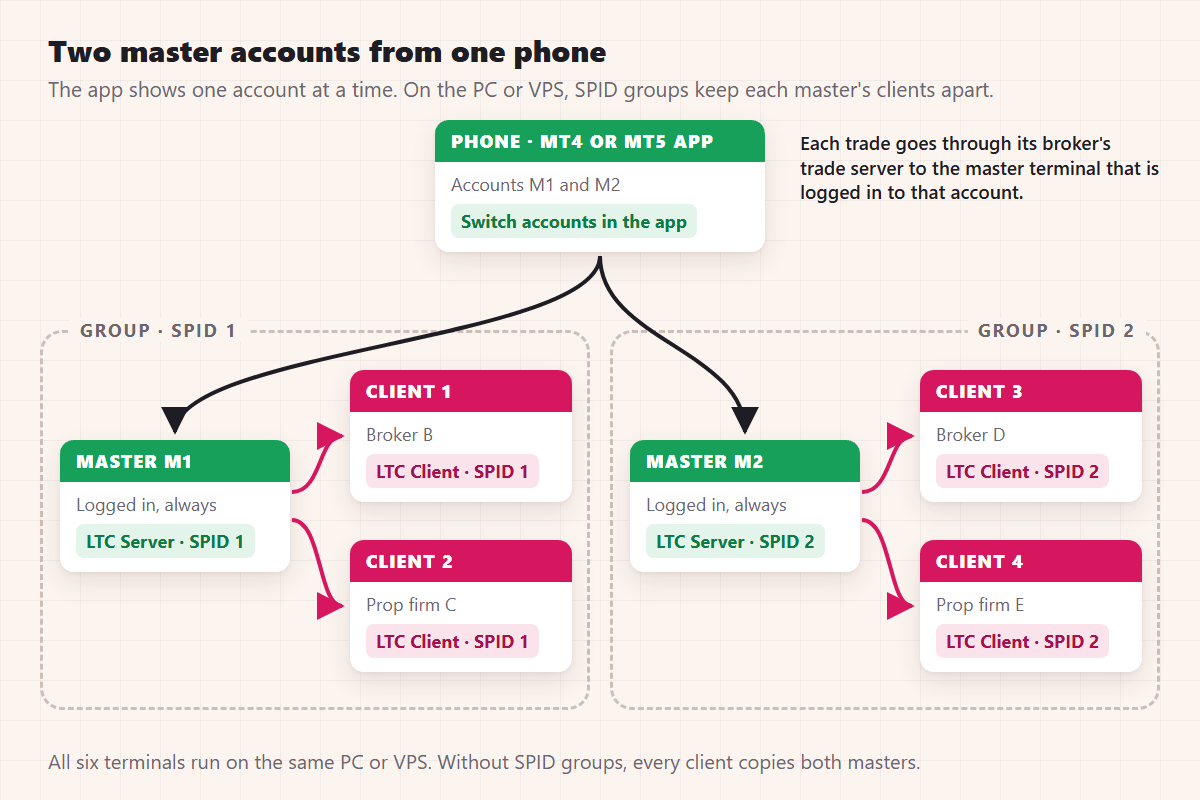
Common problems
- Not copied: the terminal on the PC or VPS was closed, offline or logged in to another account. On a VPS, close the Remote Desktop window instead of signing out of Windows, because signing out closes MetaTrader.
- Copied late: the terminal was offline when you traded. The trade is copied when it connects again, and the client's Experts tab shows an "ATTENTION! Delay of approx. …" line. With the default Deviation Type ("Copy at any price"), the copy opens at the current price. To skip trades that moved too far, choose "Copy if the price is within the range of X" and set IgnoreTradesWhenTooFar = true; without it, the copy waits until the price comes back into range.
- EA trades copied, phone trades not: a filter blocks manual trades. Phone trades have magic number 0. Check FilterMagicNumber, ExcludeMagicNumber and FilterTradeComment in both EAs.
- The app won't trade: it is logged in with the investor password. Use the trading password.
To check client accounts from the phone, add them to the app with their investor passwords. Then you can't trade them by mistake.
Rimantas Petrauskas, developer of Local Trade Copier since 2010.




