
QRM PRO User Manual – Pre-Trade Risk Governance for MetaTrader 5 (v1.002)

1. What QRM PRO does
QRM PRO is a pre-trade risk panel for MetaTrader 5, built for traders working under prop firm rules.
A lot-size calculator answers one question: which volume matches my risk? QRM PRO answers a broader one: is this trade compatible with my account, my open positions, my challenge limits and the current market conditions?
Before every trade it:
- calculates the lot from your risk % and stop distance;
- checks every limit that could end your challenge;
- shows the decision, APPROVED or BLOCKED, with the reason;
- writes the decision to an audit file.
QRM PRO does not generate signals, does not forecast the market and does not manage open positions.
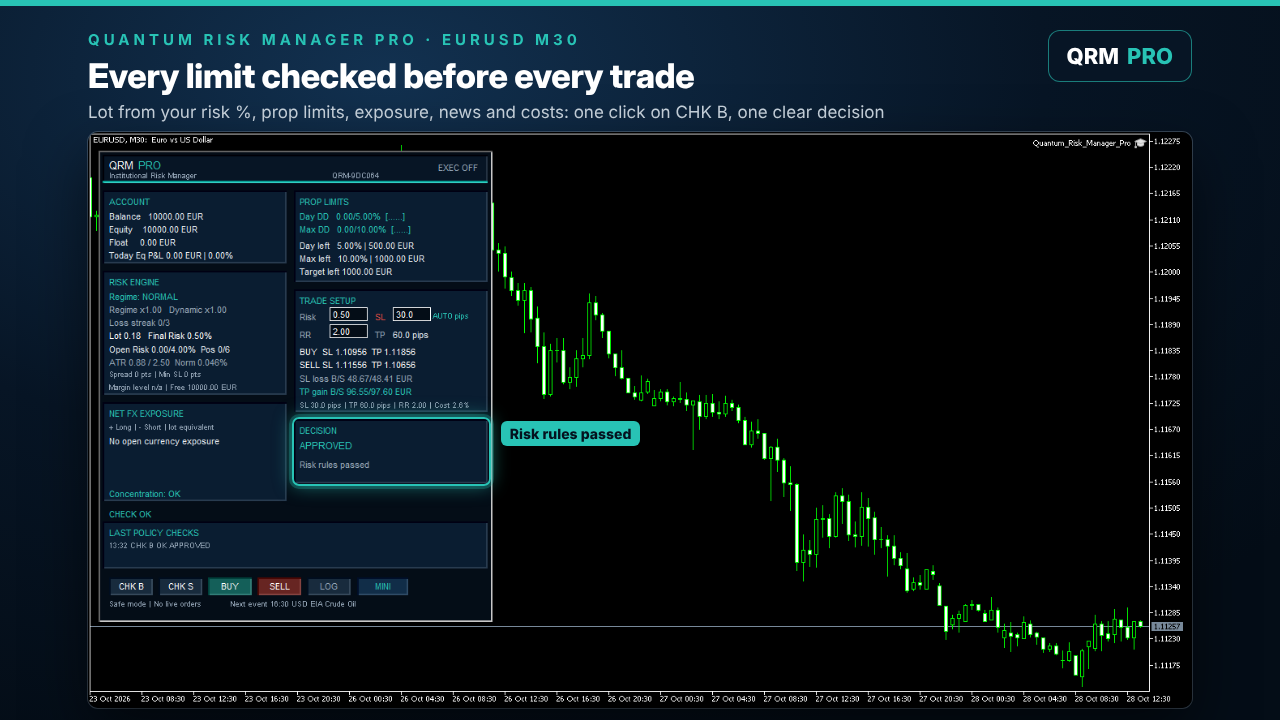
Image 1: Every limit checked before the trade: the decision is APPROVED, with the final risk and lot.
2. Quick start
- Attach QRM PRO to the chart of the symbol you want to trade.
- In the panel, set Risk %, SL and RR (reward/risk).
- Press CHK B (buy) or CHK S (sell). QRM runs all the checks. A CHK never opens a position.
- Read the DECISION box: APPROVED, or BLOCKED with the reason.
- Analysis only (default): place the trade yourself with the lot shown. With order execution enabled: press BUY / SELL. The order is sent with stop loss and take profit already set.
If you change symbol, timeframe, direction, risk, SL or RR after a CHK, the check is no longer valid and must be repeated.
3. Stop distance: pips and points
QRM shows the stop in pips for forex and in points for CFDs, indices and metals, and always calculates in MT5 points internally. You set a default for each case in the inputs (Default stop loss – pips and Default stop loss – points).
The risk in money is calculated with the broker's own contract data ( OrderCalcProfit ), so it is correct for forex, metals, indices and cross pairs in any account currency.
4. The checks
Prop challenge limits
- Daily drawdown and maximum drawdown, each with a safety buffer (default 0.20%) before the limit. The projected loss of the new trade is included: QRM blocks a trade that could breach the limit if the stop is hit.
- Profit target: progress is shown in the panel.
- The challenge start balance and the daily baseline are stored, so they survive terminal restarts. You can also set the start balance manually.
The drawdown model is static (from the start balance and the daily baseline). Trailing or high-watermark drawdown rules are not modelled: if your challenge uses them, set more conservative limits.
Exposure
- Total open risk: the sum of the risk of all open positions plus the new one (default max 4%).
- Max open positions (default 6).
- Positions without stop loss: if one is open, new trades are blocked, because the total risk cannot be measured.
- Single-currency exposure: shown in the NET FX EXPOSURE box (lots per currency, long and short), as information.
Adaptive risk (reduction only)
The risk you set is the maximum. QRM can only reduce it:
| Condition | Effect |
|---|---|
| Losing streak (default 3 losses) | risk × 0.50 |
| Daily loss above 2% | risk × 0.50 |
| Total drawdown ≥ 8% (DEFENSIVE regime) | risk × 0.50 until drawdown falls to 4% (RECOVERY, × 0.75), then normal from 2% |
| High-impact news window | risk × 0.50 (see below) |
| Volatility shock (ATR 14 ≥ 2.5 × ATR 50) | trade blocked |
The panel shows the final risk and every multiplier applied.
News risk filter
QRM reads the MT5 economic calendar. From 30 minutes before to 60 minutes after a high-impact event on one of the symbol's currencies, the risk is multiplied by 0.50. The event is shown at the bottom of the panel (for example EVENT x0.50 GBP … ).
Trading costs
Spread, slippage and commission are measured as a percentage of the stop-loss amount. Above the threshold (default 10%):
- WARN (default): a warning in the panel and in the audit, the trade is not blocked;
- BLOCK: the trade is blocked (status COST).
The commission is estimated from the symbol's deal history. If there is no history, the fallback value in the Advanced group is used.
Broker and margin
- Stop distance below the broker's minimum stop or freeze level.
- Lot below the broker's minimum lot for the chosen risk.
- Margin level after the trade below 300%, or a new trade whose margin exceeds 25% of equity.
- Stop or target prices outside the symbol's valid price range.
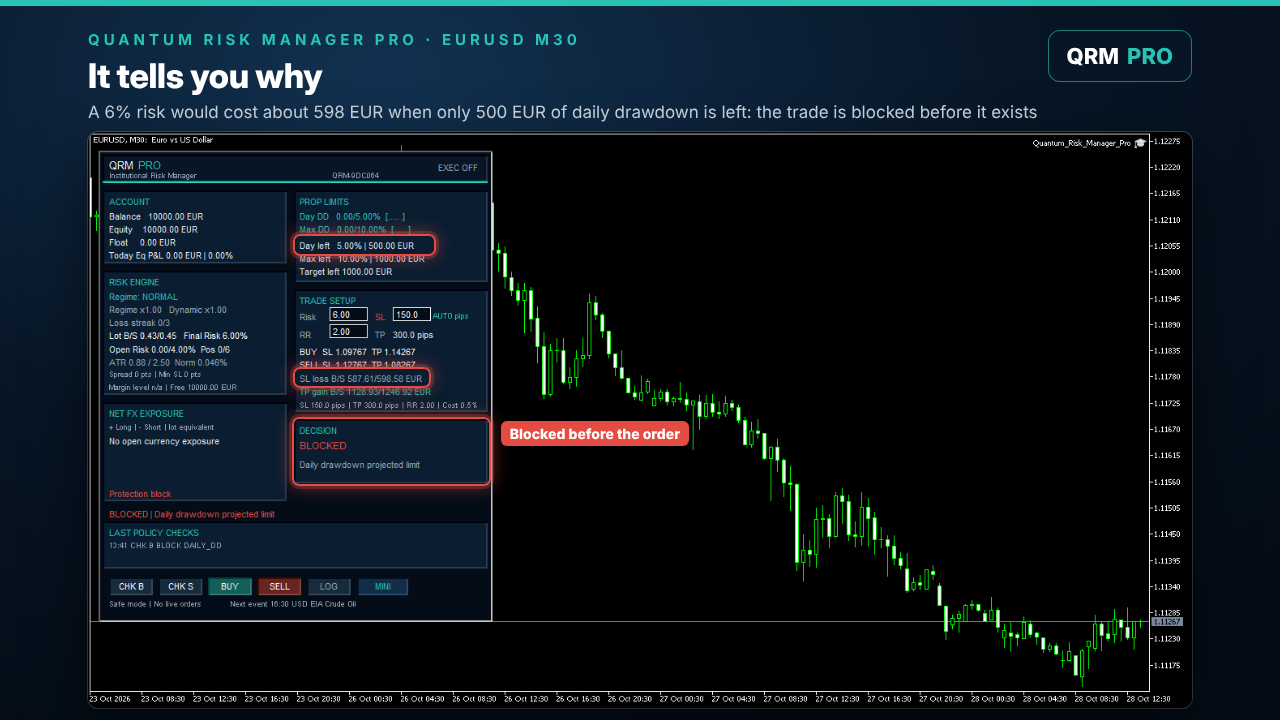
Image 2: A blocked trade: the projected loss would breach the daily drawdown limit, and QRM shows why.
5. Decision codes
| Code | Meaning |
|---|---|
| APPROVED | all checks passed |
| DAILY_DD / MAX_DD | the trade could breach the daily / total drawdown limit |
| PORT_CAP | total open risk above the limit |
| MAX_POS | maximum number of open positions reached |
| NO_SL | an open position has no stop loss |
| SHOCK | volatility shock |
| COST | trading cost above the threshold (BLOCK mode) |
| MIN_STOP | stop below the broker minimum |
| MIN_LOT_RISK / LOT | the risk is too small for the minimum lot, or the lot is invalid |
| MARGIN_LEVEL / MARGIN_USAGE | margin safety limits |
| INVALID_SL_RANGE | stop or target outside the symbol's price range |
| EXEC_OFF | order execution is disabled in the inputs (analysis mode) |
| EA_OFF / TERMINAL_OFF | Algo Trading is disabled on the EA or in the terminal |
| MARKET_CLOSED | the market is closed |
If an order is rejected by the broker, the code shows the broker's reason (for example REQUOTE, NO_MONEY, INVALID_STOPS).
6. Order execution
Execution is disabled by default: QRM works as an analysis panel. To let it send orders, all three must be on:
- Allow order execution = true in the inputs;
- Allow Algo Trading in the EA's Common tab;
- the Algo Trading button in the terminal toolbar.
QRM opens positions with stop loss and take profit. It does not close or modify positions after entry.
7. Companion indicators (optional)
QRM works fully on its own. Each companion indicator is optional, and if it is missing or not up to date, its effect is neutral.
VolBand Pro: stop distance from the volatility forecast
Set Use VolBand PRO stop loss = YES and attach VolBand Pro to the same chart (M15, M30 or H1):
- the SL field becomes read-only and shows VB pips: the stop comes from VolBand Pro's forecast of the next-hour range;
- the lot is sized on that stop, and every other check stays the same;
- if VolBand Pro is missing, the timeframe is not validated or the forecast is out of date, QRM automatically returns to your manual stop, and the SL label turns red with the reason in the tooltip. Your manual stop is kept.
VolBand Pro manual: https://www.mql5.com/en/blogs/post/778651
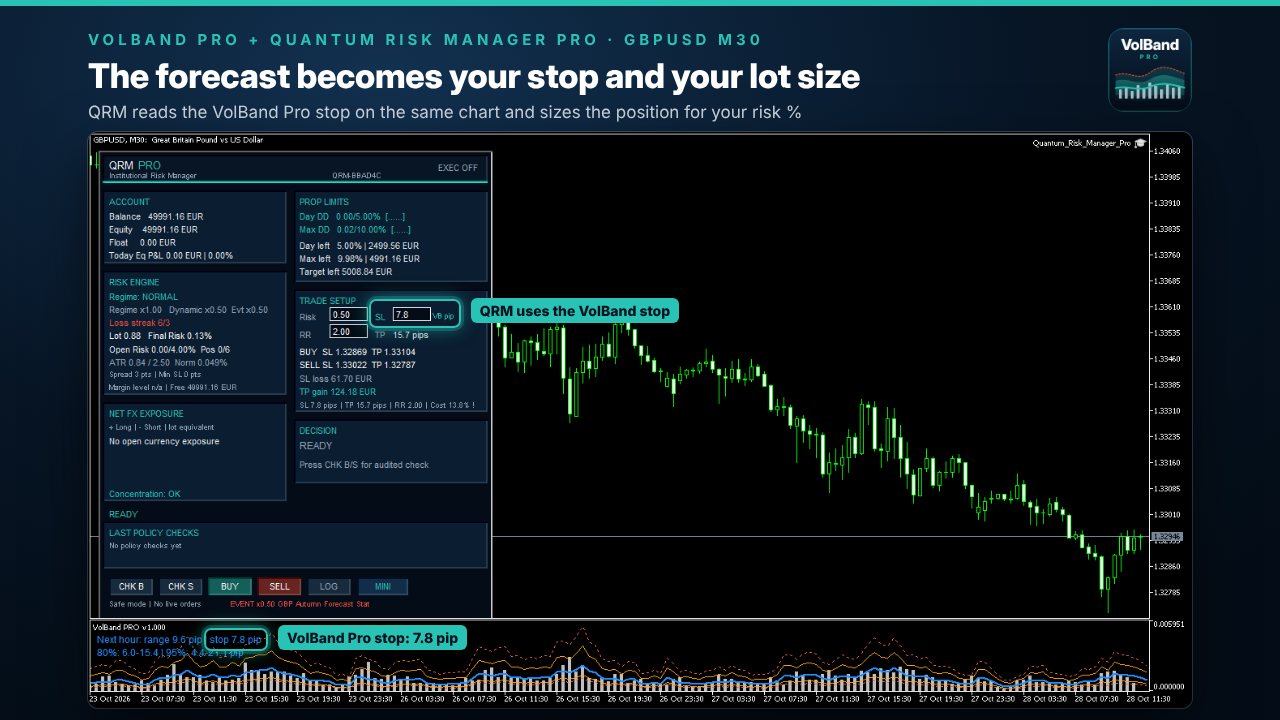
Image 3: With VolBand Pro on the same chart, the SL field shows “VB pips” and the lot is sized on the forecast stop.
QIF PRO: market regime
With Use QIF PRO market regime = true, QRM reads QIF PRO on the completed bar:
- Information mode (default): the regime is shown and audited, the risk is unchanged;
- Adaptive mode: the risk is reduced by regime (× 0.25 high risk or low confidence, × 0.50 NEUTRAL, × 0.75 CHARGE, × 1.00 RELEASE). It is never increased.
VEO PRO: chase context
With Use VEO PRO impulse context = true, QRM checks whether the trade is chasing an already extended move:
- WARN (default): show and audit, never change risk;
- REDUCE: risk × 0.50 on a chasing entry.
VEO PRO is free: https://www.mql5.com/en/market/product/203846
8. Audit files
QRM writes three CSV files in the terminal's Common\Files folder (File → Open Data Folder, then up two levels → Common → Files):
| File | Content |
|---|---|
| QRM_PRO_v1_000_AUDIT.csv | every decision: time, symbol, direction, risk, lot, checks, multipliers, reason, stop source |
| QRM_PRO_v1_000_RISK_PASSPORT.csv | one line per trade: the risk profile at the moment of the decision |
| QRM_PRO_v1_000_SYMBOL_DIAGNOSTICS.csv | the symbol's broker data: contract, tick value, minimum stop, lots, margin |
The LOG button updates the files without sending orders. The file names keep the v1_000 prefix so that your history continues across versions.
The audit records the stop source of every decision: sl_src=VOLBAND (with the forecast bar and stop) or sl_src=MANUAL_FALLBACK (with the reason).
9. Settings: 38 inputs in 7 groups
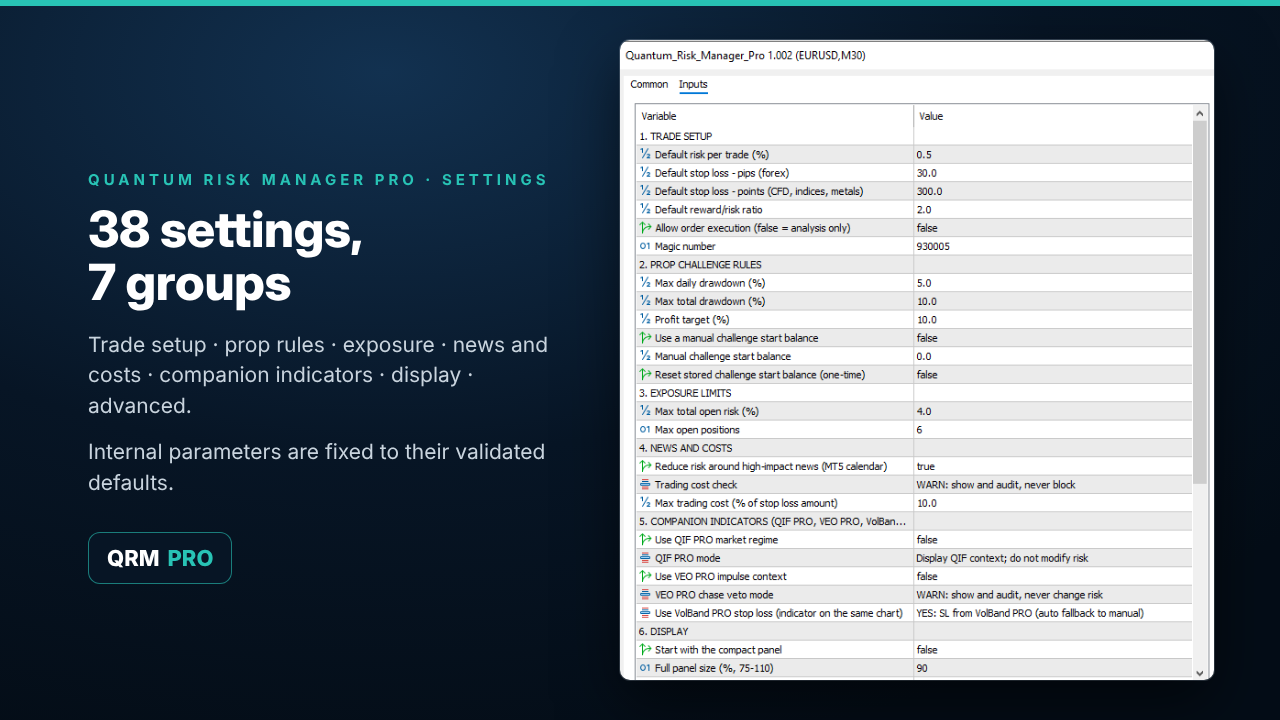
Image 4: 38 settings in 7 groups. Internal parameters are fixed to validated defaults.
1. Trade setup: default risk %, default stop (pips for forex, points for other instruments), reward/risk, order execution, magic number.
2. Prop challenge rules: max daily drawdown (default 5%), max total drawdown (10%), profit target (10%), manual start balance, one-time reset of the stored start balance.
3. Exposure limits: max total open risk (4%), max open positions (6).
4. News and costs: news risk filter (on), trading cost check (WARN), cost threshold (10%).
5. Companion indicators: QIF PRO (on/off, mode), VEO PRO (on/off, mode), VolBand PRO stop (NO/YES).
6. Display: compact panel at start, panel size, text size, pop-up alerts.
7. Advanced (validated defaults, change only if your challenge requires it): safety buffer before limits, news multiplier, losing-streak and daily-loss reductions, fallback commission, include commission in the risk amount, max execution slippage, single-currency exposure.
All other internal parameters are fixed to their validated values.
Prop firm rules differ. Always set groups 2 and 3 to the rules of your own challenge.
10. Panels
- FULL panel: account, prop limits, risk engine, trade setup, exposure, decision and policy checks.
- MINI panel: compact view for small screens. Switch with the MINI button. Both panels share the same state.
11. Limitations
- QRM manages risk. It does not generate signals and does not guarantee passing a challenge.
- Static drawdown model: trailing and high-watermark drawdown rules are not modelled.
- QRM does not close or modify positions, and cannot guarantee that the broker accepts an order.
- The news filter depends on the MT5 economic calendar provided by your broker's server.
Trading involves risk. QRM PRO is an operational-support tool, not financial advice. Every trading decision remains the user's responsibility.




