

Price has turned at your line, but that alone does not show whether it is a reversal or a bounce. Two chart checks help you judge the level before entry.
Tell a reversal from a bounce
By hand, the hardest part is separating a real trend reversal from a bounce off support or resistance after a correction.
A signal appears only after a pattern has formed. Price moves one way, pulls back, and forms a level.
You enter in the move’s direction after the pullback, not at the start of a new trend. Check two things: was there a move and pullback, and do M15, H1 and H4 point the same way.
The figure below shows both checks on a real chart: the move, the pullback and the timeframe panel.
Read the six marks in Figure 1
The figure shows a real EURUSD M15 chart from Owl Smart Levels, an indicator for MT4 and MT5.
Look at the marks in order. Mark 1 shows dotted fractal lines at local highs and lows, which are reference points on the chart.
Mark 2 is the indicator’s ZigZag, a line built on those points that shows the move’s direction. Mark 3 is the entry line.
Mark 4 is the StopLoss line, and mark 5 is the TakeProfit line. Here, the stop is below entry and take profit is above it.
Mark 6 is the panel with direction arrows on several timeframes. You can see whether M15, H1 and H4 agree.
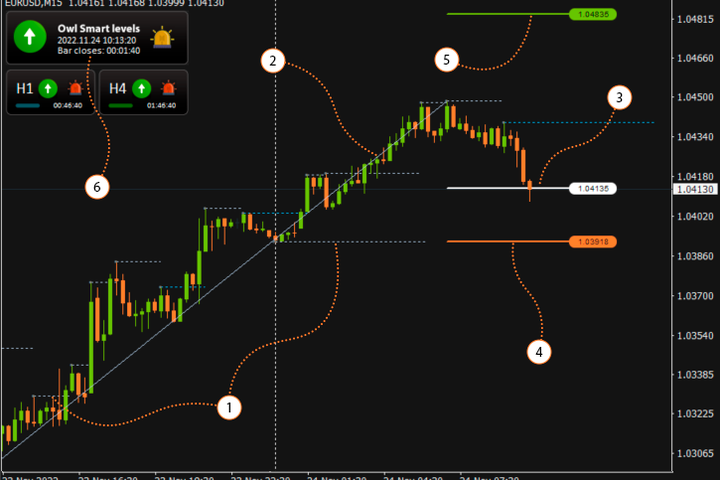 Figure 1. On a real chart, the level appears only after a rise and a pullback, when all three timeframes point up.
Now check what happened before the marked level.
Look for the move before the level
Look at mark 2: the ZigZag climbs to a high. Price then pulls back from that high.
One turn at a line does not make it a level for entry. First look for a directional move followed by a pullback.
Once you see that structure, compare the direction across the timeframes.
Check the three timeframes
For a buy, the ZigZag must point up on all three timeframes in the panel. For a sell, it must point down on all three.
In Figure 1, the panel at mark 6 shows up arrows on M15, H1 and H4.
Both checks are now done, so you decide whether the level suits your trade.
Decide whether the level suits your trade
A signal alone is not a reason to trade. Signals can look the same while the conditions behind them differ, and you sort them out.
The indicator builds a level only when its conditions are met. Extra filters and decisions about closing or deleting the order stay with you.
On your own levels, you filter out the extra ones yourself with these two checks.
You can first look at the plotted marks on history.
Review the plotted signals on history
Download the test version of Owl Smart Levels for the Strategy Tester (MT4 version). In the tester's visual mode you will see on history which signals and levels the indicator draws.
After looking, take one familiar level and run the same two checks yourself.
Check it on your own chart today
- Take one of your levels and look at the candles before it: was there a move and a pullback?
- Check the direction on your three timeframes.
If price has turned here before, that is a reason to look closer at the level, not to enter.




