Native Trade Copier: Fast and Lightweight Local Copy Trading Between MT4 and MT5

When using a trade copier, one of the most important questions is not only whether a trade can be copied, but also how quickly the copied trade reaches the Slave account.
For traders running multiple MetaTrader terminals, especially on the same VPS or server, an unnecessary external communication layer can add additional processing and communication steps.
This is where Native Trade Copier (NTC) takes a different approach.
NTC is a lightweight local trade copier for MT4 and MT5, designed to copy trades between MetaTrader terminals with minimal overhead.
It supports:
- MT4 → MT4
- MT4 → MT5
- MT5 → MT4
- MT5 → MT5
Because the copier can operate locally between terminals, it does not require every trade to travel through an external cloud server just to reach another terminal.
The Real Challenge: Copy Speed
Consider a simple trading setup:
Master Account → Slave Account
The Master opens a position.
The copier detects the transaction.
The Slave then sends the corresponding order.
Even when everything happens within a very short period, there are several factors that can affect the result:
- Trade detection
- Communication between terminals
- Order generation
- Broker execution
- Market price movement
For fast-moving instruments such as XAUUSD, even a small difference in execution price can become visible.
This is particularly relevant for traders running:
- Multiple trading accounts
- Signal accounts
- Prop firm accounts
- Master/Slave setups
- EA portfolios
- MT4 and MT5 simultaneously
- Multiple brokers from the same VPS
Real Example: Master vs Slave Execution
The following screenshot shows a real NTC copy-trading example.
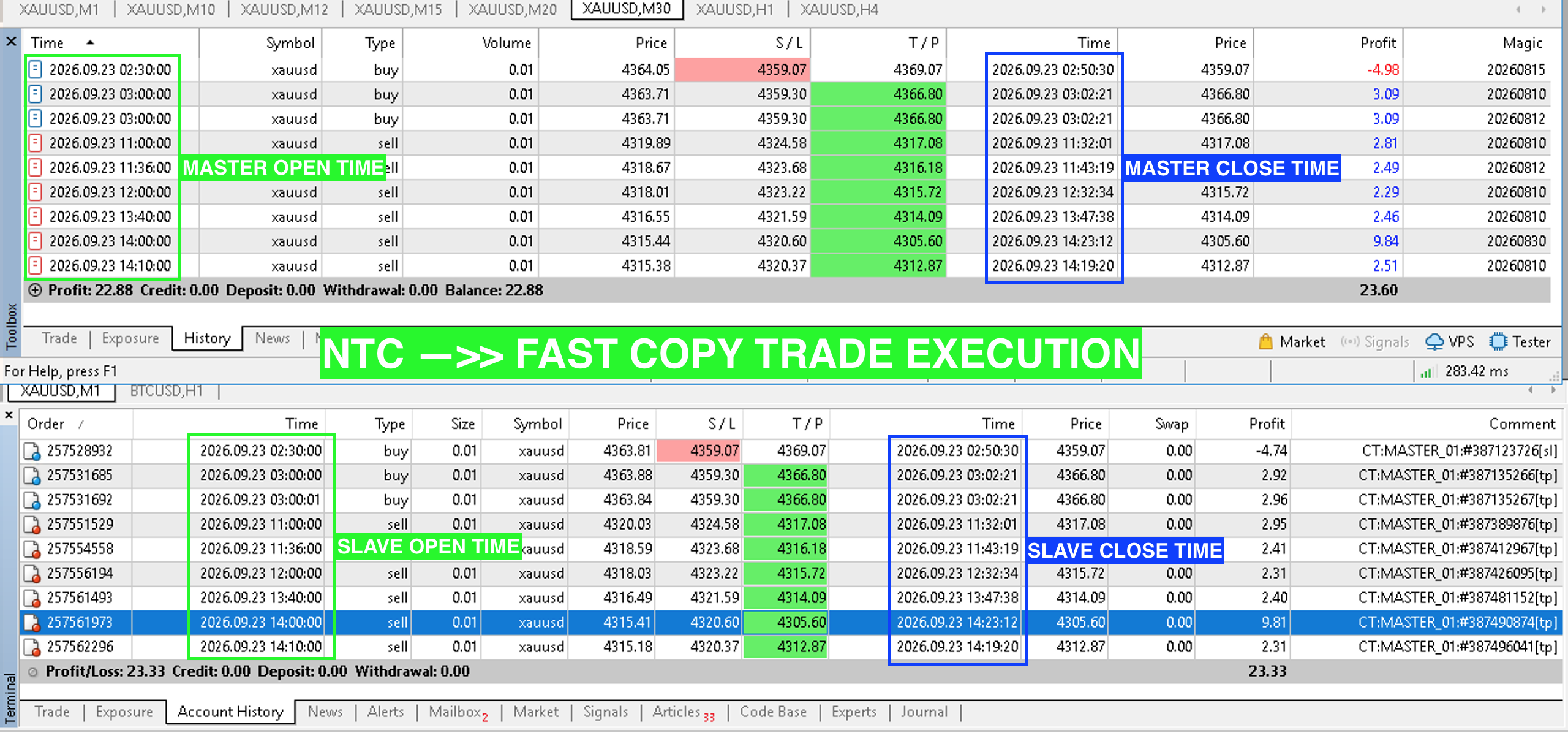
The upper section shows the Master account, while the lower section shows the Slave account.
The green boxes highlight the open times, while the blue boxes highlight the close times.
For example, one of the Master trades was opened at:
11:00:00
The corresponding Slave trade was also opened at approximately:
11:00:00
The same pattern can be seen throughout the example, with several trades showing matching or near-matching timestamps between Master and Slave.
The closing transactions also show very close execution timing.
This is the type of execution behavior that a local copier is designed to achieve.
The screenshot demonstrates the timing observed in this particular test. It should not be interpreted as a guarantee of identical execution prices or zero latency under all market conditions.
Why Can Local Copying Be Fast?
One of the design principles behind NTC is keeping the communication path simple.
Instead of:
Master → Internet → Cloud Server → Internet → Slave
a local setup can work more like:
Master Terminal → Local NTC → Slave Terminal
When the MT4/MT5 terminals are running on the same VPS or server, the communication does not need to leave the machine simply to deliver the trading instruction to another terminal.
This can reduce unnecessary communication steps.
Of course, the final execution speed is still affected by the broker, market conditions, terminal load, VPS performance, and available network connection.
Lightweight by Design
Another important consideration is resource consumption.
A trade copier should not become another heavy application competing with MetaTrader terminals for CPU and memory.
NTC is designed to work as a lightweight local copier, making it suitable for environments where multiple MT4/MT5 terminals are running simultaneously.
For example:
VPS │ ├── MT4 - Master ├── MT5 - Slave 1 ├── MT5 - Slave 2 ├── MT4 - Slave 3 └── Native Trade Copier
The copier operates alongside the terminals instead of requiring a separate cloud infrastructure for every copy operation.
This approach can be particularly useful for traders who already run their MetaTrader environment on a VPS.
MT4 and MT5 Compatibility
One of the practical advantages of NTC is that the Master and Slave do not have to use the same MetaTrader platform.
MT4 → MT5
A trader can run an EA on MT4 and copy the resulting trades to an MT5 account.
MT5 → MT4
The opposite configuration is also possible.
MT4 → MT4
Useful for traders operating several MT4 accounts.
MT5 → MT5
Suitable for traders managing multiple MT5 accounts.
This makes NTC useful when a trader has accounts with different brokers or different MetaTrader versions.
Copy Trading Is Not the Same as Signal Following
There is also an important distinction between local trade copying and traditional signal-following systems.
A local copier operates directly between trading terminals.
For example:
MT4/MT5 Master ↓ NTC ↓ MT4/MT5 Slave
The purpose is to replicate trading actions from one terminal to another.
This is different from a traditional signal service where a signal may be distributed to many users through an external infrastructure.
For traders operating their own Master and Slave accounts, a local copier can therefore provide a much simpler architecture.
Why Execution Price Can Still Be Different
Fast copying does not mean the Master and Slave will always receive exactly the same price.
This is an important point that is often misunderstood.
Suppose the Master opens XAUUSD at:
4319.89
The Slave may receive:
4320.03
The difference can happen because the two accounts may have:
- Different brokers
- Different liquidity providers
- Different spreads
- Different execution conditions
- Different account types
- Different market depth
- Different network routes
Therefore, the objective of a copier should not simply be described as "same price."
The more realistic objective is:
Detect the Master transaction quickly and send the corresponding order to the Slave with minimal additional processing.
Local VPS Makes a Difference
For local copy trading, the VPS environment itself is also important.
Running the Master and Slave terminals on a VPS does not automatically mean the environment is optimized for trading.
A typical Windows VPS may still have:
- Background Windows services
- Unnecessary applications
- CPU scheduling overhead
- Multiple terminals competing for resources
- Network latency to the broker
- Poor server location relative to the broker
For this reason, traders running multiple MetaTrader terminals should consider the entire execution environment, not only the copier software.
A lightweight copier combined with a properly configured trading VPS can help create a more efficient architecture.
A Simple Architecture for Multi-Account Trading
┌───────────────┐ │ MT5 MASTER │ └───────┬───────┘ │ ▼ ┌───────────────┐ │ NTC │ │ Native Copier │ └───────┬───────┘ │ ┌────────────┼────────────┐ ▼ ▼ ▼ ┌─────────┐ ┌─────────┐ ┌─────────┐ │ MT5 #1 │ │ MT4 #2 │ │ MT5 #3 │ │ Slave │ │ Slave │ │ Slave │ └─────────┘ └─────────┘ └─────────┘
The same architecture can be reversed if the Master is running on MT4.
This gives traders flexibility to build their own multi-account trading environment without requiring the Master and Slave terminals to use the same MetaTrader version.
Built for Traders Who Need More Than "Copy"
Trade copying is easy to describe:
Open on Master → Open on Slave
But the actual implementation involves much more.
A useful copier should consider:
- Speed of trade detection
- Communication overhead
- CPU and memory usage
- MT4/MT5 compatibility
- Multiple accounts
- Different brokers
- Execution differences
- VPS environment
Native Trade Copier focuses on the infrastructure behind that process.
Instead of adding another complicated external layer, NTC provides a lightweight way to connect MetaTrader terminals locally.
Final Thoughts
For traders running multiple MT4 and MT5 accounts, copy execution speed and system efficiency can be important parts of the overall trading infrastructure.
The screenshot above provides an example where Master and Slave transaction timestamps are very close, including several trades where the recorded open and close times match or differ by only a very small amount.
However, actual results will always depend on the VPS, broker, market conditions, terminal load, and execution environment.
That is why a good trade copier should not simply promise "zero latency."
It should instead focus on something more practical:
Keep the copy path simple, keep the software lightweight, and execute the Slave order as quickly as the trading environment allows.
Try Native Trade Copier
Native Trade Copier is available for traders who want to build a lightweight local MT4/MT5 copy-trading setup.
Supported:
- MT4 → MT4
- MT4 → MT5
- MT5 → MT4
- MT5 → MT5
- Local VPS/server environment
- Lightweight resource usage
Learn more and try Native Trade Copier (Free for VPSTrading.net users):
https://ntc.vpstrading.net