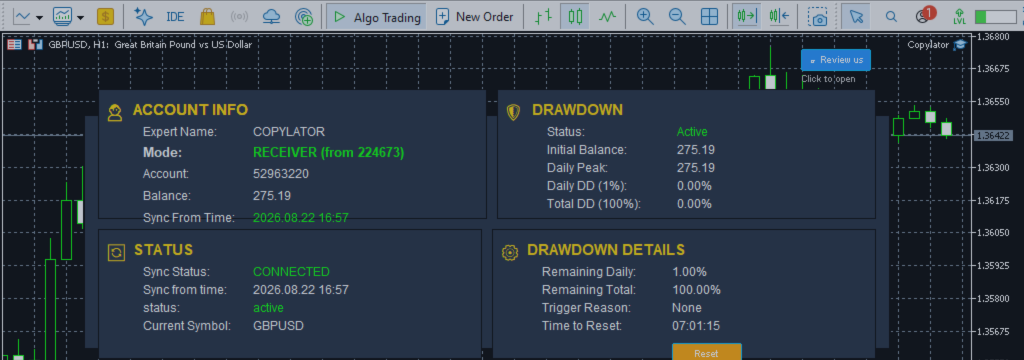
MT5 Trade Copier: Combining Multiple Filters for Risk Management in Copy Trading

Product link:
https://www.mql5.com/en/ market/product/191385
A professional MT5 Trade Copier should do more than simply replicate every trade from one account to another. In many trading environments, the ability to decide which trades should be copied and which should be rejected is just as important as the copying process itself.
By combining multiple filters such as spread, trade direction, day, and time, traders can create a more controlled trade-replication environment. Instead of blindly copying every signal, the Receiver can apply predefined conditions before allowing a trade to be replicated.
COPYLATOR includes several filtering capabilities designed to give traders greater control over which trades are accepted by the Receiver, including maximum spread, Buy-only/Sell-only, day filters, and GMT-based time filters.
Why Filters Matter in Trade Copying
Not every market condition is equally suitable for trade execution.
A Sender may open a position during a period of high spread, outside your preferred trading session, or in a direction that does not match your portfolio strategy. If every trade is copied automatically, the Receiver may be exposed to conditions that the trader would normally avoid.
Filters create a decision layer between the incoming trade and the Receiver:
Incoming Trade │ ▼ ┌───────────────────┐ │ Spread Filter │ └─────────┬─────────┘ ▼ ┌───────────────────┐ │ Direction Filter │ └─────────┬─────────┘ ▼ ┌───────────────────┐ │ Day Filter │ └─────────┬─────────┘ ▼ ┌───────────────────┐ │ Time Filter │ └─────────┬─────────┘ ▼ Copy / Reject
The result is a more controlled copying process where trades can be accepted only when they satisfy the configured conditions.
1. Spread Filter
The Spread Filter is one of the most useful protections for avoiding trade execution during unfavorable market conditions.
COPYLATOR provides a MaxSpread parameter that defines the maximum acceptable spread in points. When the current spread exceeds the configured limit, the incoming trade can be rejected instead of being copied.
For example:
MaxSpread = 30 points
On a 5-digit broker, 30 points equals approximately 3.0 pips.
This distinction is important because the parameter is measured in points, not pips.
Why Use a Spread Filter?
- Reduce exposure to unusually high transaction costs.
- Avoid copying during periods of abnormal spread expansion.
- Improve control during low-liquidity conditions.
- Reduce the possibility of poor execution caused by unfavorable spreads.
However, the spread filter should not be considered a guarantee of better profitability. A lower spread does not necessarily mean that a trade will be profitable.
2. Direction Filter
The direction filter allows traders to control whether Buy trades, Sell trades, or both directions are copied.
COPYLATOR provides:
- CopyLongOnly: Copy only Buy trades.
- CopyShortOnly: Copy only Sell trades.
This can be particularly useful when a trader wants to apply a directional bias to a Receiver account.
| Configuration | Result |
|---|---|
| Buy Only | Only Buy trades are copied |
| Sell Only | Only Sell trades are copied |
| Both Directions | Buy and Sell trades can be copied |
3. Day Filter
The Day Filter allows traders to determine which weekdays are permitted for copying.
COPYLATOR provides individual controls for Monday through Friday, allowing traders to enable or disable copying on specific days.
For example:
Monday = ON Tuesday = ON Wednesday = ON Thursday = ON Friday = OFF
In this configuration, trades received on Friday can be excluded from the copying process.
Why Can Day Filtering Be Useful?
Some strategies behave differently depending on the day of the week. A trader may prefer to avoid certain sessions or days because of reduced liquidity, changing market behavior, scheduled events, or a particular strategy's historical characteristics.
The day filter allows those preferences to be incorporated directly into the automated copying process.
4. Time Filter
The Time Filter provides another layer of control by restricting copying to a specific daily trading window.
COPYLATOR supports a GMT-based time window using:
StartHourGMT
StartMinuteGMT
EndHourGMT
EndMinuteGMT
For example:
Start: 08:00 GMT End: 16:00 GMT
Trades arriving outside this configured window can be excluded from copying.
Combining Spread and Time Filters
Using a single filter can be useful, but combining filters can provide more precise control.
Consider the following configuration:
MaxSpread     = 20 points
Time Window   = 08:00 – 16:00 GMT
A trade must therefore arrive during the permitted time window and satisfy the configured spread condition before it can be copied.
This can help traders avoid copying trades during both:
- Unwanted trading hours
- Unfavorable spread conditions
Combining Direction and Day Filters
Direction and day filters can also be combined.
For example, a trader may want to copy only Buy positions while disabling copying on Friday.
CopyLongOnly = true CopyShortOnly = false Monday = ON Tuesday = ON Wednesday = ON Thursday = ON Friday = OFF
This creates a more selective copying strategy without requiring manual intervention.
Combining All Four Filters
The greatest flexibility comes from combining Spread + Direction + Day + Time.
For example:
| Filter | Example Setting |
|---|---|
| Maximum Spread | 20 points |
| Direction | Buy Only |
| Allowed Days | Monday–Thursday |
| Trading Window | 08:00–16:00 GMT |
Conceptually, the Receiver applies the following logic:
Is Spread acceptable?
        │
       YES
        │
        ▼
Is Direction allowed?
        │
       YES
        │
        ▼
Is Today allowed?
        │
       YES
        │
        ▼
Is Current Time allowed?
        │
       YES
        │
        ▼
    COPY TRADE
If any required condition fails, the trade can be rejected by the configured filter rather than being copied.
Filters for Multiple Signal Providers
Multiple filters become especially useful when a trader works with several Sender accounts or signal sources.
Instead of treating every signal identically, different Receiver configurations can be used to create different filtering policies.
Sender A ──────► Receiver A │ ├─ Buy Only ├─ Max Spread └─ Time Filter Sender B ──────► Receiver B │ ├─ Sell Only ├─ Day Filter └─ Time Filter Sender C ──────► Receiver C │ └─ All Directions
This provides a flexible framework for distributing different signal sources according to the trader's own rules.
Filters Are Not the Same as Drawdown Protection
It is important to distinguish trade filters from drawdown protection.
Filters decide whether an incoming trade meets predefined conditions. Drawdown Protection is designed to respond to account-level loss conditions.
COPYLATOR's Drawdown Protection can block new copying when configured daily or total drawdown limits are exceeded. Depending on the configuration, it can also close open positions and delete pending orders.
| Feature | Primary Purpose |
|---|---|
| Spread Filter | Control copying based on spread |
| Direction Filter | Control Buy/Sell direction |
| Day Filter | Control permitted weekdays |
| Time Filter | Control permitted trading hours |
| Drawdown Protection | Protect the Receiver from excessive losses |
Filters and Risk Management
Filtering trades does not eliminate trading risk. Instead, filters provide additional control over the circumstances in which copying is allowed.
A well-designed risk-management configuration can combine:
- Trade selection filters
- Lot-size controls
- Maximum lot limits
- Drawdown Protection
- SL/TP synchronization
- Trading-day restrictions
- Trading-time restrictions
This creates multiple layers of protection rather than relying on a single setting.
Example of a Conservative Filter Configuration
Consider a trader who wants to reduce unnecessary trade copying during less favorable conditions.
MaxSpread        = 20 points
CopyLongOnly     = true
CopyShortOnly    = false

Monday           = ON
Tuesday          = ON
Wednesday        = ON
Thursday         = ON
Friday           = OFF

StartHourGMT     = 08:00
EndHourGMT       = 16:00
This configuration attempts to restrict copying to Buy trades received from Monday through Thursday, during the selected GMT window, while also applying a maximum spread condition.
The configuration should be tested carefully because the optimal values depend on the symbol, broker, strategy, and trading environment.
Time Filters and Automatic Closing
COPYLATOR also provides the CloseOrdersAtEnd option for the time-filter configuration.
When enabled, copied positions can be automatically closed at the end of the configured time window.
This can be useful for strategies that are designed to operate only during specific trading sessions and should not keep copied positions open outside those hours.
Important Considerations
- Spread values are broker-dependent: the same numerical MaxSpread setting can behave differently across symbols and brokers.
- Points are not pips: MaxSpread is measured in points.
- Time zones matter: the Time Filter uses GMT settings.
- Filters can reduce trade frequency: a highly restrictive configuration may reject many valid trades.
- Filtering does not guarantee profitability: it only changes which trades are accepted.
- Backtesting and demo testing are important: test the exact configuration before using it with real funds.
Best Practices
- Start with simple filters rather than using overly restrictive conditions.
- Measure the actual spread behavior of each symbol with your broker.
- Remember that MaxSpread uses points, not pips.
- Test Buy-only and Sell-only configurations independently.
- Use day filters when your strategy has known weekday preferences.
- Use time filters to control exposure to specific trading sessions.
- Combine filters with appropriate lot management.
- Use Drawdown Protection as an additional account-level safety layer.
- Test the complete configuration on a demo account before live deployment.
Conclusion
Combining multiple filters can transform an MT5 Trade Copier from a simple replication tool into a more controlled trade-management system.
The Spread Filter can help control copying during high-spread conditions. The Direction Filter determines whether Buy or Sell trades are accepted. The Day Filter controls which weekdays are permitted, while the Time Filter limits copying to a defined GMT trading window.
When these controls are combined with Flexible Lot Management, Real-Time SL/TP Synchronization, Symbol Mapping, and Drawdown Protection, traders gain considerably more control over how trades are distributed to Receiver accounts. COPYLATOR provides these filtering and risk-management capabilities as part of its MT5 trade-copying environment.
The goal should not be to create the most restrictive configuration possible. Instead, traders should build a filter combination that matches their strategy, broker conditions, account type, and risk tolerance.
As always, test the configuration on a demo account first and verify the behavior with the intended broker and symbols before deploying it on live accounts.
Product link:
https://www.mql5.com/en/ market/product/191385




