
Product link:
https://www.mql5.com/en/ market/product/191385
Reverse Mode is a powerful feature in an MT5 Trade Copier that allows copied trades to be executed in the opposite direction of the original trade.
When Reverse Mode is enabled, a Buy trade from the Sender can be replicated as a Sell trade on the Receiver, while a Sell trade can be replicated as a Buy. However, simply changing the trade direction is not enough. The Stop Loss (SL) and Take Profit (TP) levels must also be adjusted correctly.
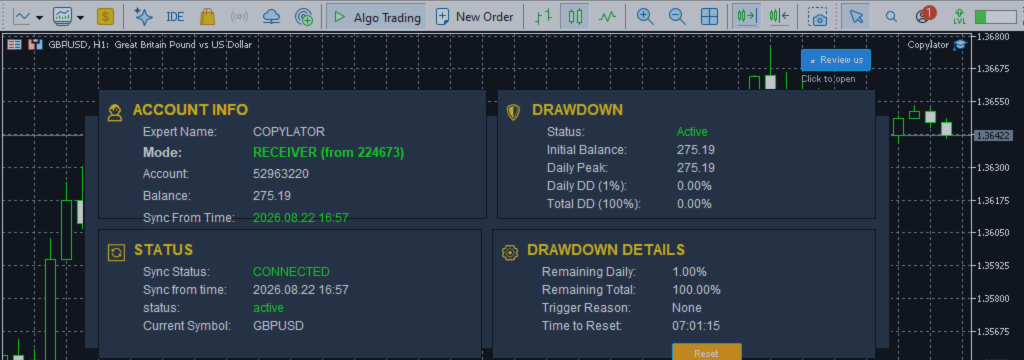
COPYLATOR – MT5 Trade Copier supports Reverse Trade Mode with automatic SL/TP adjustment, helping maintain the intended risk and reward distances when the trade direction is reversed.
What Is Reverse Mode in an MT5 Trade Copier?
Normally, a trade copier attempts to replicate the same trading direction from the Sender to the Receiver.
| Sender | Normal Copy | Reverse Mode |
|---|---|---|
| Buy | Buy | Sell |
| Sell | Sell | Buy |
This functionality can be useful for traders who want to implement a contrarian approach, hedge another strategy, or intentionally trade against the direction of a signal account.
Why SL/TP Must Also Be Reversed
One of the most important aspects of Reverse Mode is that the SL and TP cannot simply be copied to the Receiver without adjustment.
The correct position of SL and TP depends on the direction of the trade:
- Buy: SL should normally be below the entry price and TP above the entry price.
- Sell: SL should normally be above the entry price and TP below the entry price.
When the direction changes, the protective and profit-taking levels must move to the corresponding opposite sides of the entry price.
Buy to Sell: SL/TP Reversal
Consider a Sender Buy position:
Entry: 1.1000 SL: 1.0950 TP: 1.1100
The original trade has a 50-pip SL distance and a 100-pip TP distance.
When the trade is reversed into a Sell position, the levels are mirrored around the entry:
Entry: 1.1000
SL:    1.1050
TP:    1.0900
The direction has changed, but the distances remain:
- Risk distance = 50 pips
- Reward distance = 100 pips
- Risk/reward relationship = 1:2
Sell to Buy: SL/TP Reversal
The same principle applies in the opposite direction.
Suppose the Sender has:
Sell Entry: 1.1000 SL: 1.1050 TP: 1.0900
After Reverse Mode changes the position into a Buy:
Buy Entry: 1.1000
SL:        1.0950
TP:        1.1100
The SL and TP distances remain unchanged while their positions are mirrored around the entry price.
The Core Principle: Preserve the Distances
Correct Reverse Mode implementation should focus on preserving the distance between entry and SL and the distance between entry and TP, rather than simply copying the original price levels.
Conceptually:
Original Buy: TP ↑ │ Entry │ ↓ SL Reversed Sell: SL ↑ │ Entry │ ↓ TP
This mirroring maintains the original SL/TP distances while changing the trade direction.
Automatic SL/TP Adjustment in COPYLATOR
COPYLATOR automatically adjusts SL and TP when CopyWithReversal is enabled. This eliminates the need to manually calculate the reversed stop and target levels for every copied position.
The product supports real-time SL/TP synchronization as well. If SL or TP is manually modified on the Sender, the corresponding Receiver trade can be updated accordingly, including cases where SL/TP is added after the trade has already been opened.
Reverse Mode and Pending Orders
Reverse Mode becomes more technically demanding when pending orders are involved.
Supported pending order types include:
- Buy Limit
- Sell Limit
- Buy Stop
- Sell Stop
For a pending order, the future execution price must be considered when calculating the appropriate SL and TP levels.
A professional copier therefore needs to process the pending order's relevant entry or trigger price and ensure that the resulting SL and TP remain logically positioned for the reversed direction.
Because broker rules and account types can affect pending-order behavior, traders should always test Reverse Mode with their specific broker and account configuration before using it on a live account.
Broker Stop-Level Requirements
Even when the mathematical SL/TP reversal is correct, the broker may reject an order if the resulting levels do not satisfy its minimum distance requirements.
Before an order is accepted, the relevant prices may need to respect:
- Minimum stop distance
- Symbol trading rules
- Price precision and digits
- Broker execution conditions
- Current market conditions
This is particularly important for fast-moving markets where the available distance between the current price and a requested stop level can change rapidly.
Reverse Mode and Custom SL/TP
Some traders prefer to use fixed SL and TP distances instead of copying the Sender's original levels.
COPYLATOR supports custom SL/TP distances in addition to copying SL/TP values from the Sender.
For example:
Custom Stop Loss  = 50 points
Custom Take Profit = 100 points
Reverse Mode       = Enabled
In this type of configuration, the final SL and TP must still respect the direction of the Receiver trade. A reversed Buy/Sell position cannot use SL and TP positions intended for the original direction.
Reverse Mode on Hedging Accounts
Hedging accounts allow multiple positions on the same symbol and can manage positions individually.
COPYLATOR supports Reverse Mode on Hedging accounts, allowing individual copied trades to be handled independently. This is particularly useful when several positions exist simultaneously on the same symbol.
Each position can retain its own entry, SL, TP, volume, and corresponding trade relationship.
Reverse Mode on Netting Accounts
Netting accounts operate differently because only one net position per symbol can exist.
As a result, some advanced copying behaviors—including certain Reverse Mode and pending-order scenarios—may not be applicable in the same way as on Hedging accounts.
COPYLATOR automatically detects the account type and adjusts or ignores features that are not applicable to the account structure, helping prevent incompatible operations.
Reverse Mode and Real-Time SL/TP Synchronization
Reverse Mode becomes even more useful when combined with real-time SL/TP synchronization.
For example, a Sender may initially open a position without an SL or TP and add them later. COPYLATOR can synchronize these changes to matching Receiver trades while applying the appropriate reversed configuration.
This is important because trading strategies frequently modify risk parameters after entry.
Common Reverse Mode Mistakes
1. Copying Original SL/TP Prices Unchanged
Simply transferring the original price levels can place the SL or TP on the wrong side of the Receiver's entry price.
2. Ignoring the Entry Price
SL and TP should be calculated relative to the actual Receiver entry or relevant pending-order price.
3. Ignoring Broker Stop Levels
A mathematically correct level can still be rejected if it violates the broker's minimum distance requirements.
4. Forgetting Pending Orders
Pending orders require additional handling because the trade has not yet been executed.
5. Not Testing the Account Type
Hedging and Netting accounts have fundamentally different position-management behavior.
Practical Example
| Parameter | Sender Buy | Receiver Reverse Sell |
|---|---|---|
| Entry | 1.1000 | 1.1000 |
| SL | 1.0950 | 1.1050 |
| TP | 1.1100 | 1.0900 |
| SL Distance | 50 pips | 50 pips |
| TP Distance | 100 pips | 100 pips |
This example demonstrates the fundamental objective of Reverse Mode: change the direction while preserving the relative SL/TP distances.
How COPYLATOR Handles Reverse Trading
- Buy ↔ Sell: Automatically reverses market-trade direction.
- Automatic SL/TP Adjustment: Repositions SL and TP for the reversed direction.
- Real-Time Synchronization: Keeps subsequent SL/TP changes synchronized.
- Pending Order Support: Supports market and pending trade replication where applicable.
- Hedging & Netting Detection: Automatically detects the account structure.
- Flexible Lot Management: Reverse Mode can be combined with fixed lot, multiplier, balance-ratio scaling, and maximum lot settings.
When Can Reverse Mode Be Useful?
Reverse Mode can be useful in several trading scenarios:
- Contrarian trading strategies
- Hedging another trading system
- Testing the inverse behavior of a strategy
- Portfolio diversification
- Research and strategy comparison
- Signal inversion experiments
However, reversing a strategy does not automatically make it profitable. A strategy that loses money in one direction does not necessarily produce an equally profitable strategy when reversed.
Best Practices for Reverse Mode
- Test Reverse Mode on a demo account first.
- Verify that SL and TP are positioned correctly after reversal.
- Check the broker's minimum stop-distance requirements.
- Test market and pending orders separately.
- Verify behavior on both Hedging and Netting account types when relevant.
- Monitor copied positions during the first live deployment.
- Use conservative lot sizing when testing an inverted strategy.
Conclusion
Reverse Mode is more than simply changing Buy to Sell or Sell to Buy. Correct implementation requires the entire trade structure—including SL and TP—to be adapted to the new direction.
By maintaining the original distances between entry, Stop Loss, and Take Profit, the copier can reproduce the intended risk/reward geometry in the opposite direction.
With automatic Reverse Mode and SL/TP adjustment, real-time SL/TP synchronization, flexible lot management, symbol mapping, and automatic Hedging/Netting detection, COPYLATOR – MT5 Trade Copier provides a structured solution for traders who need reliable reverse trade replication across MT5 terminals.
As with any automated trading configuration, Reverse Mode should be tested carefully with the intended broker, symbol, account type, and trading conditions before live deployment.
Product link:
https://www.mql5.com/en/ market/product/191385




