
This article is for informational and educational purposes only. It does not constitute financial advice or an investment recommendation. Trading in financial markets carries a high risk of loss.
Introduction
An Expert Advisor that works well in the Strategy Tester can still fail in its first week on a live account, and often the strategy has nothing to do with it. A different time zone, a symbol with another name, an account type that handles positions differently or a terminal that stops overnight are enough to change the results completely.
This is the third article in a series on evaluating an Expert Advisor. It is divided into three sections. The first covers the differences between the backtest and your broker. The second explains how to prepare the environment where the EA will run. The third shows how to plan the incubation period and the rules for pausing the EA, before the first live trade.
1. Your broker is not the backtest
Repeat the test with your broker's data
If the backtest was made by someone else, or with another broker, the first step is to repeat it in your own terminal, with your symbol and your account conditions. Spreads, swaps, commissions and price history differ between brokers, and the article on hidden costs in backtests explains how much they can change a result.
Server time and sessions
Many EAs only trade at certain hours, or close positions before a given time. Those hours are usually expressed in the broker's server time, which is different for each broker and can change twice a year with daylight saving time.
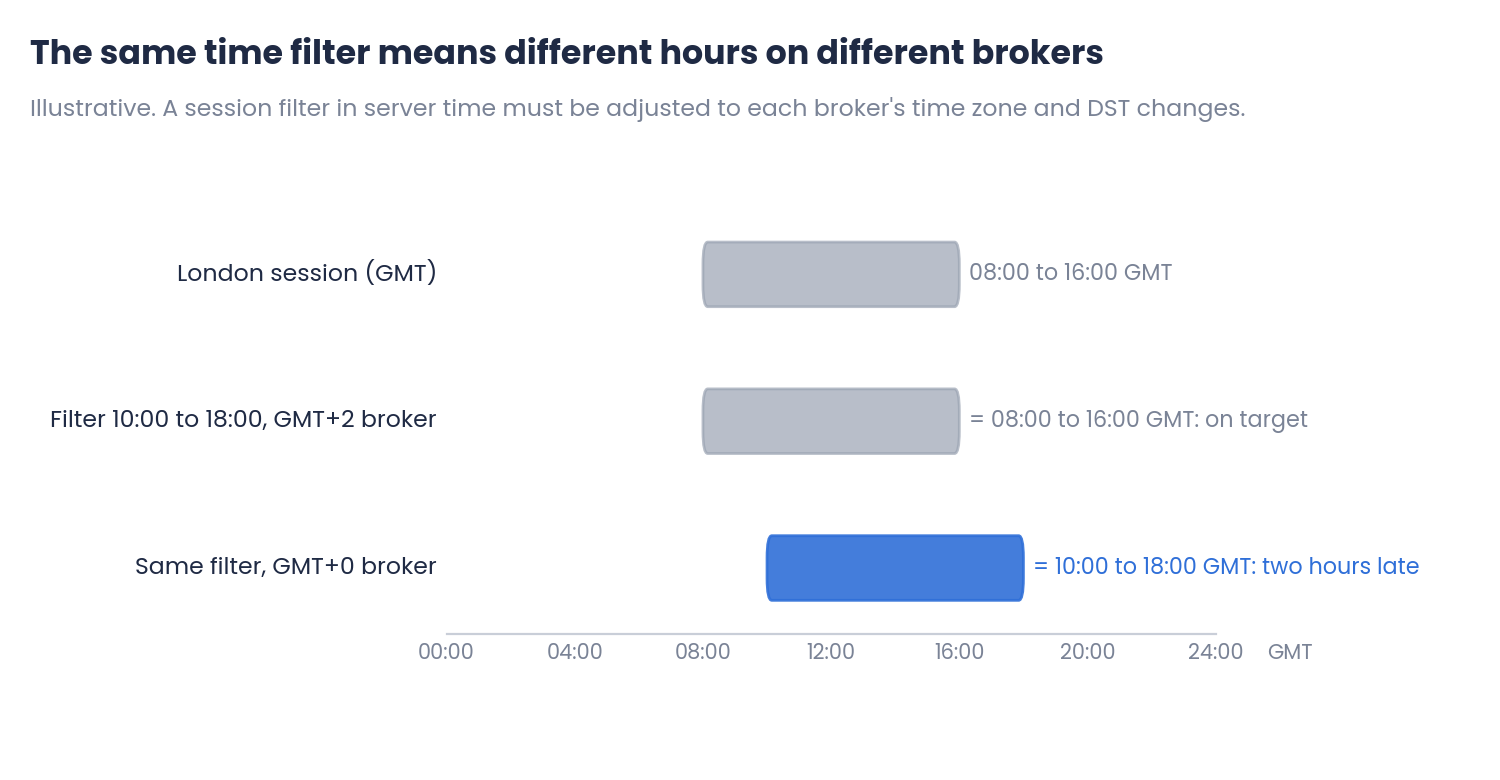
Figure 1. The same session filter on two brokers with different time zones (illustrative)
A filter designed for the London session on a GMT+2 broker trades two hours late on a GMT+0 broker. The EA does not show any error; it simply trades a different part of the day. Daylight saving changes in Europe and the United States do not happen on the same dates either, so a filter that is correct in summer can be shifted for a few weeks in spring and autumn.
Symbol and account settings
- Symbol name: brokers often add suffixes or prefixes (EURUSD.m, EURUSDpro). An EA set to trade a fixed symbol name will not find it.
- Contract and digits: contract size, number of decimals and tick value change the meaning of every distance in points and every lot size.
- Minimum lot and lot step: the lot the EA calculates must be valid for the symbol.
- Stop level: some symbols require a minimum distance between the price and the stop loss or take profit.
- Hedging or netting: on a netting account there is only one position per symbol. An EA that opens several positions, or positions in both directions, behaves very differently.
- Filling mode: if the EA uses a filling type the broker does not accept, orders are rejected.
2. Preparing the environment
Where the EA runs
An EA only works while the terminal is open and connected. A home computer that sleeps, restarts for updates or loses its connection can miss entries and, worse, exits. A VPS close to the broker's server reduces latency and keeps the terminal running continuously. If you use the MQL5 VPS, remember that changes made in your local terminal are not applied there until you migrate again.
With several EAs on the same terminal, every resource counts. Keeping the charts light, as explained in the article on clean charts in MT5, helps the terminal respond quickly.
Before the first trade
| Check | What to verify |
|---|---|
| 1. Algorithmic trading | Enabled in the terminal and in the EA's settings |
| 2. Chart and timeframe | The EA is on the correct symbol and timeframe |
| 3. Inputs | The same values as the backtest, saved in a set file |
| 4. Magic number | Different for each EA, so they do not manage each other's trades |
| 5. Lot or risk | Calculated for your account, not copied from the backtest |
| 6. Logs | No errors in the Experts and Journal tabs after loading |
Check the logs again after the first trades: rejected orders and invalid stops usually appear there first.
How to choose the lot or the risk for your account is covered in the previous article of this series, Choosing Risk and Capital for an EA.
3. Planning the incubation period
Demo or minimum lot
A demo account is useful to check that everything works: the EA opens trades, respects its hours and has no errors. But execution on demo can be better than on a live account, especially in fast markets. A live account with the minimum lot shows the real execution with very little money at risk, and it is usually the better final step before increasing the size.
How long to incubate
The length of the incubation should be measured in trades, not in days. A few weeks may be enough for an EA that trades several times a day, and far too little for one that trades once a week.
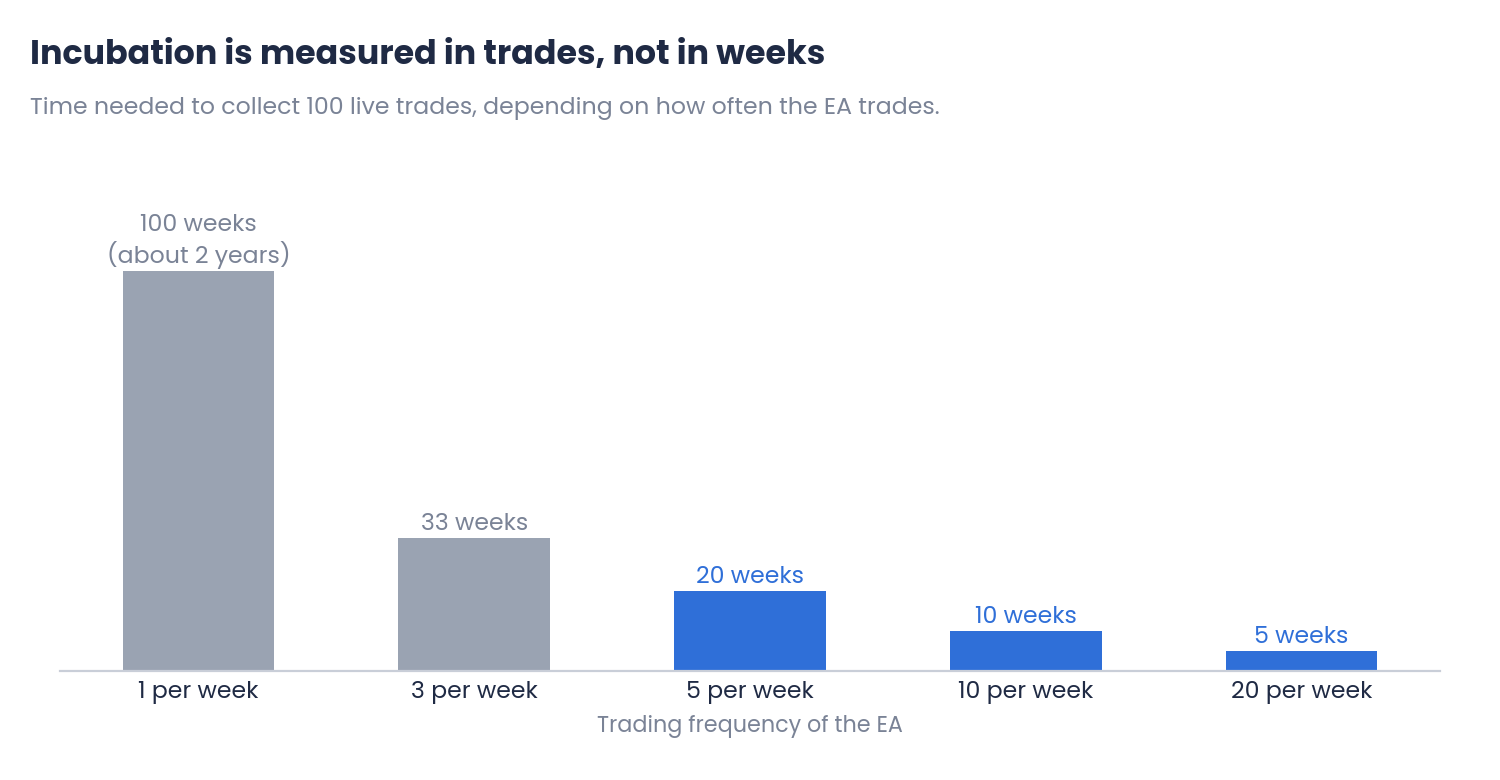
Figure 2. Weeks needed to collect 100 live trades, by trading frequency
As shown in the first article of this series, with few trades the results are very uncertain: 30 trades can make a good strategy look bad, or a bad one look good. For EAs that trade rarely, the incubation tells you more about whether it works technically than about whether its edge is real.
Write the rules before you start
The worst moment to decide whether to stop an EA is in the middle of a drawdown. Before the first live trade, write down what you expect and what would make you pause it:
- Expected range: the win rate, the average trade and the drawdown you consider normal, based on the backtest and its planning margin.
- Pause rules: for example, a drawdown larger than twice the backtest maximum, or a losing streak clearly longer than the longest in the backtest.
- Technical rules: repeated errors, trades outside the expected hours or results very different from a backtest of the same period.
- Review date: after how many trades you will compare the live results with the backtest and decide whether to increase the size.
How to make that comparison, and how to tell a normal bad period from an EA that has stopped working, is the subject of the next article in this series.
Common mistakes
- Copying the settings without checking the broker. Server time, symbol name and account type can change everything.
- Running the EA on a computer that sleeps or restarts. Missed exits can be more expensive than missed entries.
- Starting with the final lot size. The first weeks are for checking that everything works.
- Judging the EA after a few trades. The incubation needs enough trades to say something.
- Deciding the pause rules during a drawdown. They should be written before the first trade.
Conclusions
- Your broker is not the backtest: repeat the test with your own data and check the server time, the symbol name, the contract, the minimum lot, the account type and the filling mode.
- Preparing the environment: run the EA on a terminal that is always connected, keep the charts light, and check inputs, magic numbers, lot size and logs before the first trade.
- Planning the incubation: start on demo and then with the minimum lot, measure the incubation in trades, and write the expected range and the pause rules before going live.
In the first weeks of an EA, many problems come from the environment where it runs. A short checklist before going live avoids most of them. Test any EA with your own data on demo or in the Strategy Tester, and combine it with disciplined risk management.
References
- MetaTrader 5 Help: Expert Advisors settings, trading accounts (hedging and netting) and virtual hosting.
- MQL5 Reference: symbol properties (SYMBOL_VOLUME_MIN, SYMBOL_TRADE_STOPS_LEVEL, SYMBOL_FILLING_MODE) and account properties (ACCOUNT_MARGIN_MODE).
Disclaimer
This content is for informational and educational purposes only. It does not constitute financial advice or a recommendation to buy or sell any instrument or product. Backtest and demo results are not a forecast of live results. The charts and examples are illustrative, and every strategy, account and broker is different. Trading forex, CFDs and other leveraged products carries a high risk of loss. Every trading decision, and its outcome, is the sole responsibility of the reader. The author accepts no liability for any loss arising from the use of this information.