MSX AI Multi Symbol Scalper — Understanding Default Inputs, Portfolio Deployment & .SET File Configuration Guide

Understanding Default Inputs, Portfolio Deployment & .SET File Philosophy
Introduction
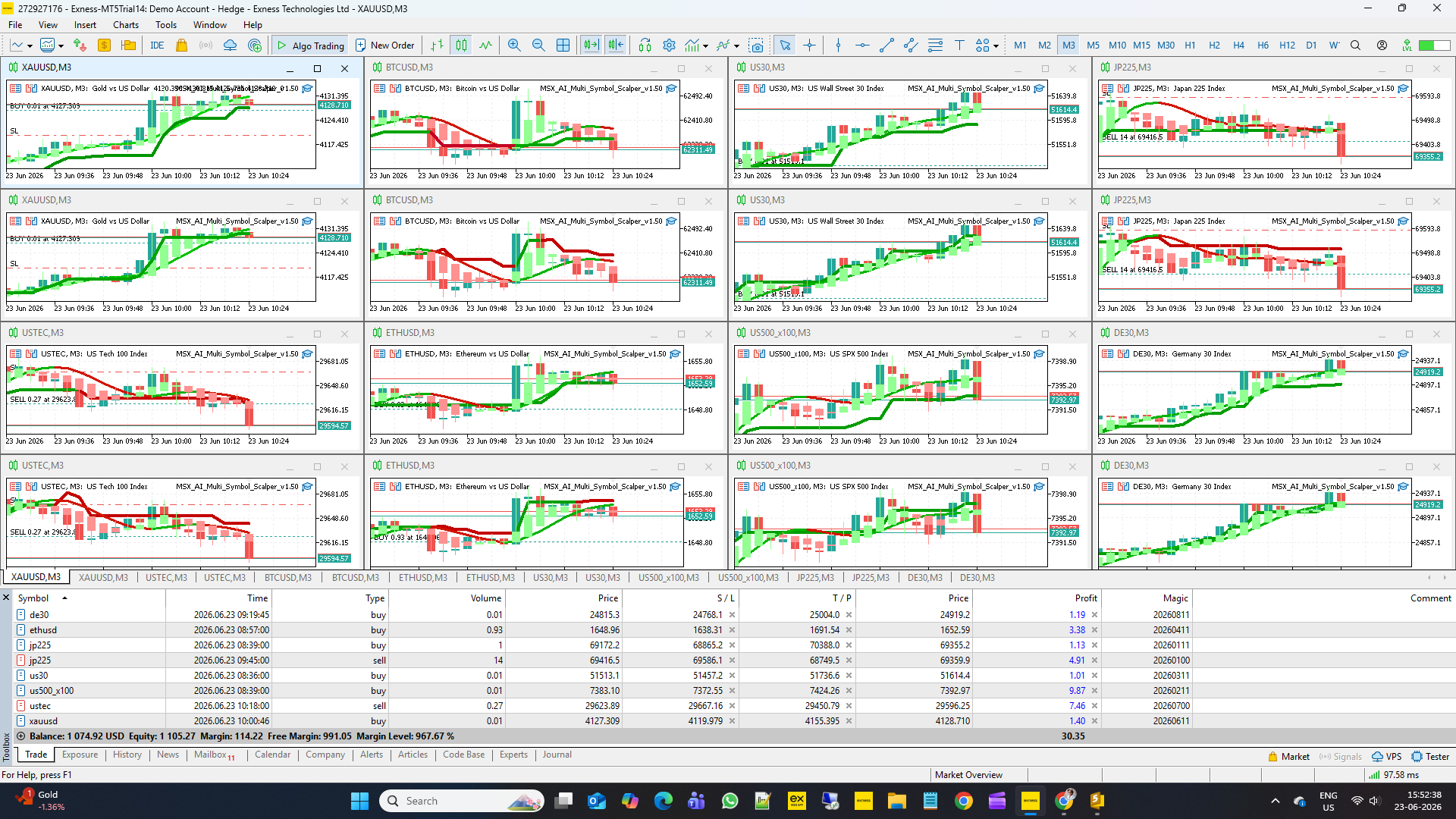
MSX AI Multi Symbol Scalper was originally designed as a multi-symbol portfolio trading framework rather than a single-chart Expert Advisor.
The system can operate on a single chart, but its full architecture was developed to support multiple independent EA instances running simultaneously across different symbols, timeframes, and trading directions within the same MetaTrader 5 account.
Typical deployments may include:
• XAUUSD BUY Engine
• XAUUSD SELL Engine
• BTCUSD BUY Engine
• BTCUSD SELL Engine
• USTEC BUY Engine
• USTEC SELL Engine
and additional charts up to 16 independent EA instances or more, depending on account size, available margin, broker conditions, and risk objectives.
Important Note About Default Inputs
The default input values included with the EA are intentionally conservative.
Their primary purpose is:
• MetaTrader installation safety
• MQL5 Market validation compliance
• Initial functionality testing
• Demonstration of EA architecture
The default settings should NOT be considered optimized trading settings.
In many cases, running the EA using default values may not reflect the intended portfolio deployment model or the performance characteristics of a properly configured setup.
Users are strongly encouraged to:
• Learn the input architecture
• Create their own configuration
• Or use professionally prepared .set files
according to their account size, symbol selection, risk tolerance, and trading objectives.
About Included .SET Files
As part of the EA package, one complete portfolio deployment configuration may be provided free of charge based on the author's default strategy framework.
These reference .set files are intended as a starting point and educational example.
Depending on the selected deployment model, they may include configurations for:
• Single chart operation
• Multi-symbol operation
• BUY-only deployments
• SELL-only deployments
• Portfolio configurations up to 16 independent EA instances
Custom .SET File Service
Some traders require specialized configurations.
Examples include:
• Prop firm challenges
• Copy trading systems
• Signal provider accounts
• Conservative capital preservation
• Aggressive growth strategies
• Broker-specific optimization
• Custom symbol portfolios
Because these projects require additional design, testing, risk balancing, and deployment planning, customized .set files may be offered as a separate paid service.
Service availability, complexity, and pricing may vary depending on workload and project requirements.
QUICK INPUT REFERENCE GUIDE
The purpose of this section is to provide a brief explanation of every available input.
Future blog posts will discuss each section in greater detail.
━━━━━━━━━━━━━━━━━━━━━━━━━━━━━━
GENERAL SETTINGS
━━━━━━━━━━━━━━━━━━━━━━━━━━━━━━
Inp_MagicNumber = 20260700
Unique identifier used by the EA to manage its own positions.
Inp_TradeComment = "MSX AI Multi Symbol Scalper"
Trade comment attached to positions for identification.
Inp_DebugMode = false
Enables detailed internal event logging.
Inp_OneTradePerTrend = false
Restricts trading to one position per trend when enabled.
Enable_Hard_Reversal_Exit = true
Closes positions when a confirmed opposite trend appears.
Enable_Soft_Reversal_Exit = false
Allows earlier exits when trend strength weakens.
Allow_Pullback_ReEntry = false
Allows new entries after reversal exits when enabled.
━━━━━━━━━━━━━━━━━━━━━━━━━━━━━━
TRADE DIRECTION CONTROL
━━━━━━━━━━━━━━━━━━━━━━━━━━━━━━
Inp_TradeBothSide = true
Allows both BUY and SELL trading.
Inp_TradeOnlyBuy = false
Restricts trading to BUY positions only.
Inp_TradeOnlySell = false
Restricts trading to SELL positions only.
Inp_InstanceTag = "DEFAULT"
Provides unique identification for individual EA instances.
━━━━━━━━━━━━━━━━━━━━━━━━━━━━━━
SPREAD & SLIPPAGE CONTROL
━━━━━━━━━━━━━━━━━━━━━━━━━━━━━━
Inp_Use_MaxSpread = false
Enables spread filtering when true.
Inp_MaxSpreadPoints = 500
Maximum allowed spread before entries are blocked.
Inp_Use_MaxSlippage = false
Enables slippage protection.
Inp_MaxSlippagePts = 30
Maximum permitted execution deviation.
━━━━━━━━━━━━━━━━━━━━━━━━━━━━━━
LOT SIZING & MONEY MANAGEMENT
━━━━━━━━━━━━━━━━━━━━━━━━━━━━━━
Inp_LotMode = LOT_FIXED
Selects Fixed Lot or Risk Percent sizing.
Inp_FixedLot = 0.01
Fixed volume used when Fixed Lot mode is active.
Inp_RiskPercent = 1.0
Percentage of capital risked per trade.
Inp_MaxLotCap = 0.10
Maximum allowed lot size regardless of calculation.
Inp_FreeMarginReservePct = 30.0
Reserves a percentage of free margin for safety.
Inp_MinMarginLevelPct = 150.0
Minimum projected margin level required before entry.
━━━━━━━━━━━━━━━━━━━━━━━━━━━━━━
MASTER SMOOTHED HMA SETTINGS
━━━━━━━━━━━━━━━━━━━━━━━━━━━━━━
Inp_HMA_Period = 14
Primary Hull Moving Average period.
Inp_HMA_Smooth = 3
Additional smoothing applied to HMA calculations.
━━━━━━━━━━━━━━━━━━━━━━━━━━━━━━
HYBRID HEIKEN ASHI SETTINGS
━━━━━━━━━━━━━━━━━━━━━━━━━━━━━━
Inp_DS_Period = 2
Controls Heiken Ashi smoothing sensitivity.
━━━━━━━━━━━━━━━━━━━━━━━━━━━━━━
SUPERTREND SETTINGS
━━━━━━━━━━━━━━━━━━━━━━━━━━━━━━
ST_Use_HeikinAshi_Source = true
Uses Heiken Ashi prices inside SuperTrend calculations.
HA_SourcePrice = PRICE_MEDIAN
Defines price source used for Heiken Ashi calculations.
ATRPeriod = 5
ATR period used by the SuperTrend engine.
Multiplier = 1.5
SuperTrend sensitivity multiplier.
SourcePrice = PRICE_MEDIAN
Price source used by the SuperTrend engine.
Use_ATR_Spike_Filter = true
Filters abnormal volatility spikes.
Spike_ATR_Fraction = 1.20
Minimum ATR expansion required for spike filtering.
Show_Trend_Strength = false
Displays trend strength information when enabled.
ST_Min_Reversal_Strength = 0.7
Minimum strength required for SuperTrend reversal.
Use_Reversal_Strength_Filter = false
Enables additional reversal quality filtering.
Min_Reversal_Strength = 0.4
Minimum reversal strength threshold.
━━━━━━━━━━━━━━━━━━━━━━━━━━━━━━
STOP LOSS & TAKE PROFIT
━━━━━━━━━━━━━━━━━━━━━━━━━━━━━━
Inp_Use_ATR_SLTP = false
Uses ATR-based dynamic stops when enabled.
Inp_ATR_Period = 14
ATR period used for dynamic stop calculations.
Inp_ATR_SL_Mult = 3.0
ATR multiplier for Stop Loss.
Inp_ATR_TP_Mult = 9.0
ATR multiplier for Take Profit.
Inp_Fixed_SL_Points = 15000
Fixed Stop Loss distance in points.
Inp_Fixed_TP_Points = 30000
Fixed Take Profit distance in points.
━━━━━━━━━━━━━━━━━━━━━━━━━━━━━━
TRADE MANAGEMENT
━━━━━━━━━━━━━━━━━━━━━━━━━━━━━━
Inp_Use_PartialClose = false
Enables partial profit taking.
Inp_Partial_Trigger_Pct = 25.0
Profit percentage required before partial close activates.
Inp_MaxCloseRatio = 50.0
Maximum percentage of position volume closed.
━━━━━━━━━━━━━━━━━━━━━━━━━━━━━━
CAPITAL PROTECTION
━━━━━━━━━━━━━━━━━━━━━━━━━━━━━━
Inp_Use_PerTrade_Loss = false
Enables per-trade loss protection.
Inp_MaxLoss_Percent = 2.0
Maximum allowed floating loss per trade.
Inp_Use_Daily_Loss = false
Enables daily loss protection.
Inp_Daily_Loss_Pct = 6.0
Maximum daily loss threshold.
Inp_Use_Daily_Profit = false
Enables daily profit lock.
Inp_Daily_Profit_Pct = 3.0
Daily profit target percentage.
Inp_Use_Max_Drawdown = true
Enables drawdown protection.
Inp_Max_Drawdown_Pct = 6.0
Maximum allowable drawdown.
Inp_Use_Master_Daily_Loss = false
Activates account-wide daily loss protection.
Inp_Master_Daily_Loss_Pct = 10.0
Master account daily loss threshold.
Inp_Use_Master_Daily_Profit = false
Activates account-wide daily profit target.
Inp_Master_Daily_Profit_Pct = 5.0
Master account daily profit threshold.
Inp_Use_Master_Drawdown = false
Activates account-wide drawdown protection.
Inp_Master_Drawdown_Pct = 10.0
Maximum account-wide drawdown allowed.
━━━━━━━━━━━━━━━━━━━━━━━━━━━━━━
MULTI-SESSION CONTROL
━━━━━━━━━━━━━━━━━━━━━━━━━━━━━━
Inp_Block_New_Trade_Near_Session_End = false
Blocks new entries near session close.
Inp_Session_End_Block_Minutes = 15
Minutes before session end when entries stop.
Inp_ClosePositionAtSessionEnd = false
Closes positions when trading session ends.
Inp_Session_Tokyo_Enable = true
Enables Tokyo trading session.
Inp_Session_Tokyo_Start = "00:15"
Tokyo session start time.
Inp_Session_Tokyo_End = "09:00"
Tokyo session end time.
Inp_Session_London_Enable = true
Enables London trading session.
Inp_Session_London_Start = "09:00"
London session start time.
Inp_Session_London_End = "17:00"
London session end time.
Inp_Session_NewYork_Enable = true
Enables New York trading session.
Inp_Session_NewYork_Start = "17:00"
New York session start time.
Inp_Session_NewYork_End = "20:45"
New York session end time.
Inp_Session_Other_Enable = true
Enables custom session.
Inp_Session_Other_Start = "20:45"
Custom session start time.
Inp_Session_Other_End = "21:45"
Custom session end time.
━━━━━━━━━━━━━━━━━━━━━━━━━━━━━━
WEEKEND PROTECTION
━━━━━━━━━━━━━━━━━━━━━━━━━━━━━━
Inp_Weekend_Filter_Enable = false
Activates weekend protection system.
Inp_Friday_Weekend_Protection_Start = "20:45"
Time when weekend protection begins.
Inp_Weekend_Entry_Block_Minutes = 15
Minutes before protection start where entries are blocked.
Inp_Sunday_Resume_Trading = "21:45"
Time when trading resumes after weekend opening.
Final Notes
This blog serves as a quick-reference guide for the complete input architecture of MSX AI Multi Symbol Scalper.
Future blog posts will explain each section in greater detail, including:
• Portfolio deployment examples
• Risk allocation models
• BUY/SELL engine separation
• Capital protection architecture
• Multi-symbol portfolio construction
• Recommended deployment structures from 1 to 24 EA instances
Understanding the purpose of each input is the first step toward building a stable and disciplined automated trading portfolio.
Visit for all old and latest published Articles main page: MSX AI Multi Symbol Scalper — Knowledge Base & Article IndexWelcome to the official MSX AI Multi Symbol Scalper Knowledge Base.
This Knowledge Base serves as the official documentation center for MSX AI Multi Symbol Scalper. It provides organized educational articles covering installation, deployment, configuration, trading architecture, money management, capital protection and portfolio administration.