Welcome to the official guide for Peak Pips MT5. If you are looking for a reliable way to catch market trends and measure your success with real data, you are in the right place. Peak Pips MT5 is a professional trend momentum indicator designed to give you clear, non-repainting Buy and Sell signals directly on your charts.
Highlights:
- Catch big market moves early
- Works perfectly for XAUUSD, BTCUSD, the Germany 40 Index (DE40 and DE30), plus all Forex pairs, global Indices, and Metals
- Backed by 23 years of backtesting with Dukascopy 100% tick data
- Constantly scans the market to find new breakouts fast
- Live / Historical Performance Tracker
- Multi-Timeframe Scanner
- Zero Repainting
- Available for both MetaTrader 5 (MT5) and MetaTrader 4 (MT4)
Live Performance Tracking
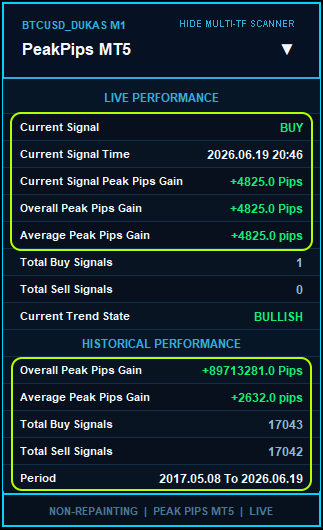
Many indicators only show you arrows and leave you to guess if they actually work in the long run. Peak Pips takes a completely different approach. It features a built-in live performance dashboard that calculates the exact peak pips gained for every historical and current signal. This means the indicator proves its performance to you instantly right on the chart.
Multi-Timeframe Scanner
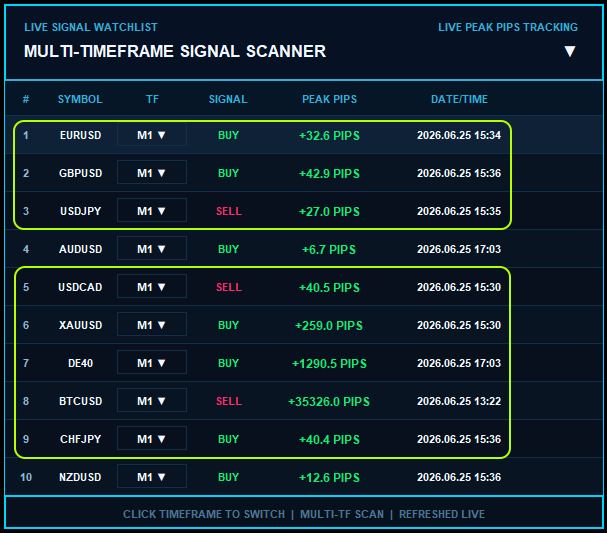
Alongside the performance dashboard, the indicator includes a complete Multi-Timeframe Scanner. This scanner can monitor up to 50 symbols at once across multiple timeframes. You will never miss a good setup because the scanner tracks every trend and sends you an alert the moment a new signal is confirmed.
Whether you are a day trader looking for quick momentum bursts or a swing trader riding long trends, Peak Pips MT5 is built to make your chart analysis simple, objective, and highly effective. Keep reading to discover exactly how these unique features will upgrade your daily trading routine.
What Makes Peak Pips MT5 Unique?
Most trading tools leave you guessing, but Peak Pips MT5 is built differently. It is designed to give you instant proof, fast performance, and a completely clean chart layout right out of the box. Whether you are actively scanning multiple markets for new setups or testing years of historical data, everything is built to make your trading process smooth and transparent. Here is exactly what sets this indicator apart from the rest:
1. Fully Interactive Multi-Timeframe Scanner
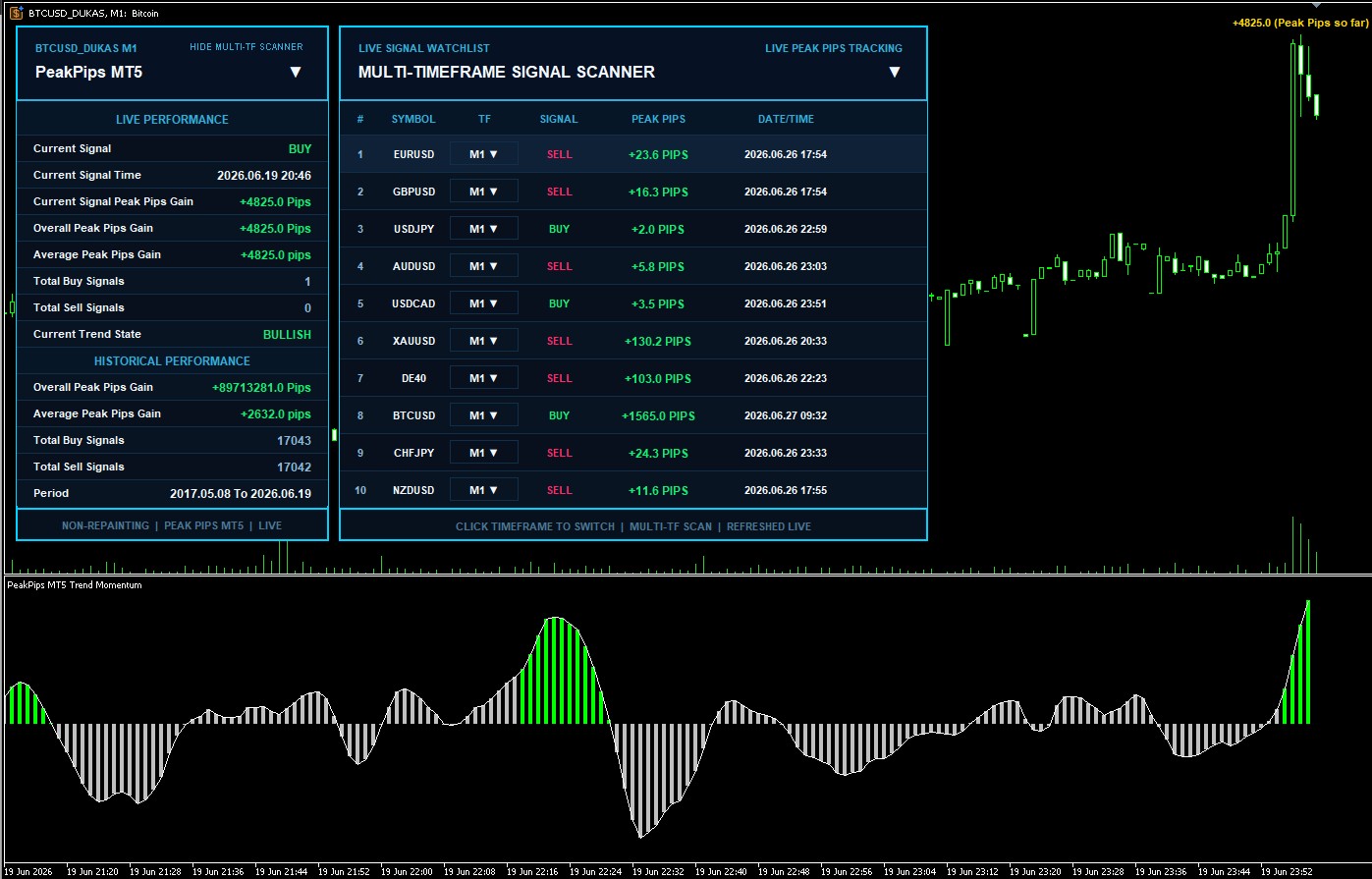
The indicator features a built-in scanner panel directly on your chart, capable of monitoring up to 50 symbols simultaneously. For every symbol, it displays the current trend direction, the exact signal time, and the peak pips gained. You can also interact with a drop-down menu inside the scanner to switch timeframes instantly without leaving your current chart window.
2. Real-Time Peak Pips Tracking
To help you evaluate performance objectively, the main dashboard tracks the Peak Pips for every signal. This is a measure of Maximum Favorable Excursion. The panel calculates the overall peak pips gained, the average pips per signal, and the exact count of Buy and Sell signals for both historical data and live market conditions.
3. Deep Historical Data and Smart Caching
The indicator is built to handle massive amounts of chart history seamlessly. Whether you load a few months or over 23 years of data, Peak Pips MT5 uses a smart caching system and a dedicated progress loading screen. This ensures the user interface remains fast and responsive while preparing large datasets, giving you a smooth experience even with extensive historical analysis.
4. Strategy Tester Speed Optimization
Backtesting complex panel indicators can often slow down the MT5 Strategy Tester. Peak Pips MT5 addresses this through custom speed optimization techniques. It uses Chart Visual Virtualization to only draw text and arrows that are currently visible on your screen. It also safely uses the cached historical statistics to prevent redundant background calculations. This allows you to run fast visual backtests smoothly.
5. Clean Workspace Management
The indicator is programmed to maintain a readable chart environment. It dynamically places pip text labels at the exact highs or lows of a trend. Furthermore, the code detects if a user interface panel is covering a signal on your screen and safely hides the text to prevent visual clutter and overlapping objects.
Understanding the Interface
The Peak Pips MT5 interface is built to give you total control and complete data transparency. It is divided into chart visuals and two interactive panels. Here is exactly what every part of the interface displays.
1. Chart Visuals and Histogram
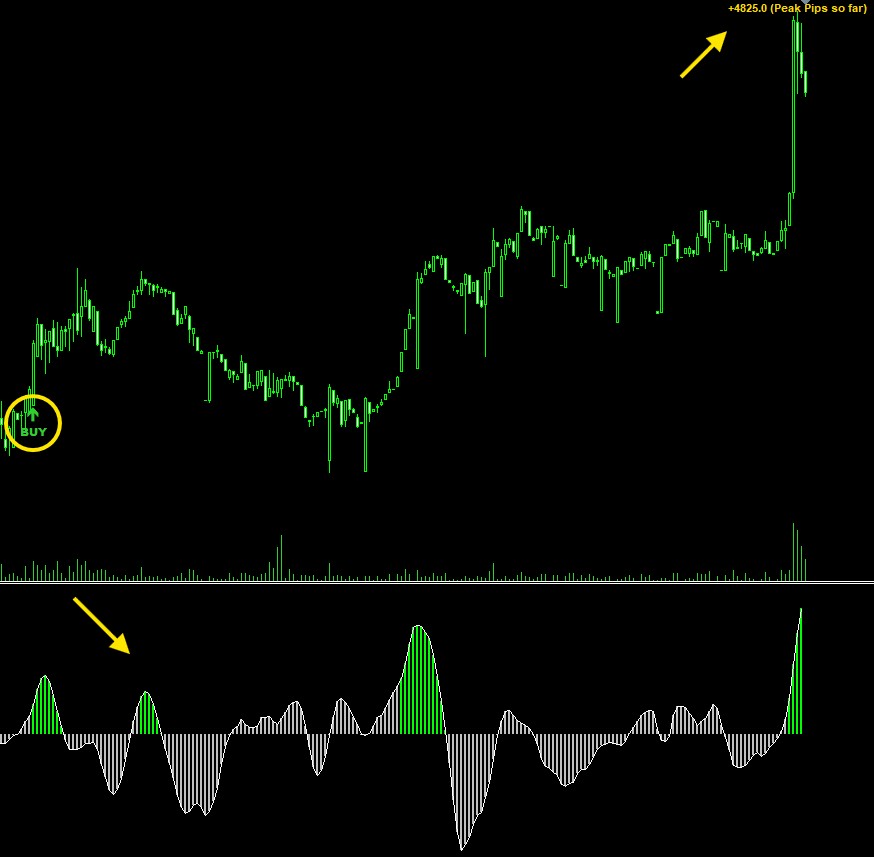
At the bottom of your screen, the Peak Pips Histogram and Signal Line show the current market state. When a trend is confirmed, a BUY or SELL text label with an arrow appears on the main chart, along with a vertical dotted guide line connecting the price action to the histogram below.
2. The Main Performance Panel Data
This is your primary dashboard. At the top right of this panel header, there is a dedicated button labeled HIDE MULTI-TF SCANNER or SHOW MULTI-TF SCANNER. This allows you to completely hide or show the secondary scanner panel directly from the main panel with one simple click.
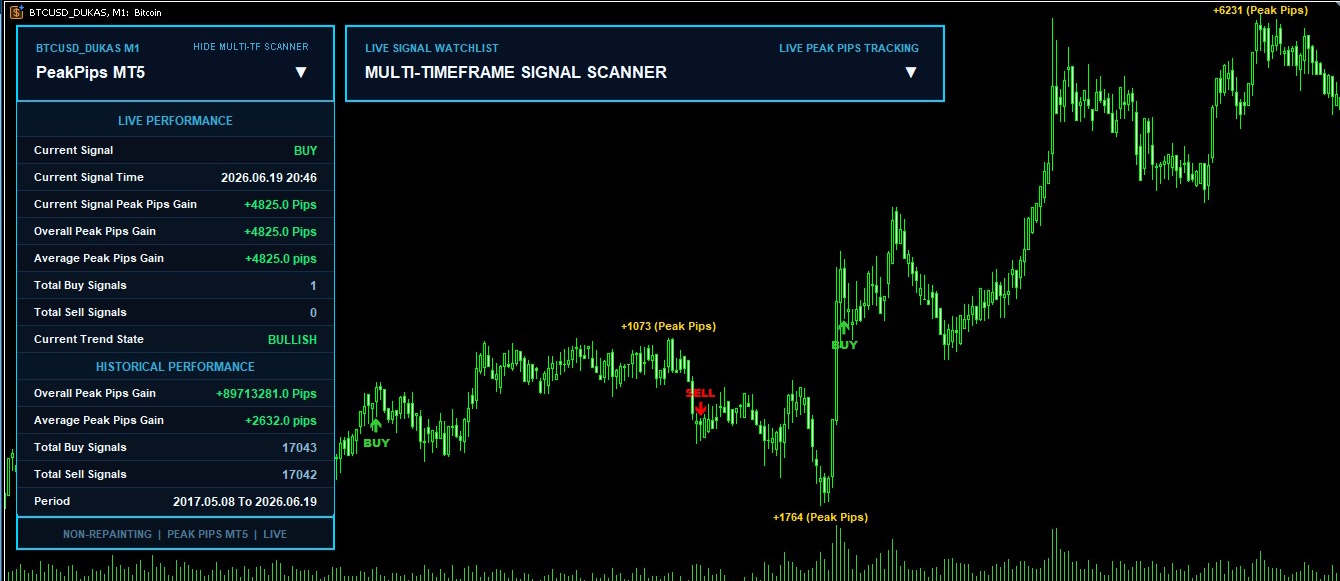
The main panel is divided into two data sections.
The Live Performance section displays:
| Current Signal | Shows BUY, SELL, or NONE. |
| Current Signal Time | The exact date and time the active signal triggered. |
| Current Signal Peak Pips Gain | The maximum favorable pips gained for the active signal. |
| Overall Peak Pips Gain | The maximum favorable pips gained for the active signal. |
| Average Peak Pips Gain | The average pips gained per live signal. |
| Total Buy Signals | The count of all live buy signals. |
| Total Sell Signals | The count of all live sell signals. |
| Current Trend State | Shows BULLISH, BEARISH, or NEUTRAL. |
The Historical Performance section displays:
| Overall Peak Pips Gain | The total pips gained from all historical signals. |
| Average Peak Pips Gain | The average pips gained per historical signal. |
| Total Buy Signals | The count of historical buy signals. |
| Total Sell Signals | The count of historical sell signals. |
| Period | The exact start and end dates of the loaded history. |
The footer clearly confirms the non-repainting status of the indicator.
How to Trade with Peak Pips MT5 / MT4
The indicator provides objective rules for entering and managing your trades. Here is the straightforward process for trading with the signals.
1. Identifying Trend States
Before entering a trade, look at the histogram at the bottom of your chart. It acts as your primary trend filter.
- Bullish State: The histogram bars shift to the bullish color. This indicates upward momentum.
- Bearish State: The histogram bars shift to the bearish color. This indicates downward momentum.
- Neutral State: The histogram shows a neutral color, meaning the market is ranging or losing momentum. You should avoid entering new trades during a neutral state.
2. Clear Rules for Market Entry
Wait for a fully confirmed signal before taking action. A signal is confirmed only after the current candle closes.
- Buy Entry: Wait for the BUY text and arrow to appear on the chart, supported by a bullish histogram. Enter your long position on the open of the next candle.
- Sell Entry: Wait for the SELL text and arrow to appear, supported by a bearish histogram. Enter your short position on the open of the next candle.
Since the indicator is strictly non repainting, you never have to worry about the arrow moving or disappearing after the candle has closed.
The Ultimate Backtesting Guide
- Watch the histogram and chart signals appear. Observe how the Average Peak Pips Gain metric changes over time. This data will tell you exactly how the asset behaves and help you decide the best trailing stop distance for your live trading.
Conclusion and Next Steps
https://www.mql5.com/en/users/sindhubairavi
Download Peak Pips for MetaTrader 5 (MT5)
https://www.mql5.com/en/market/product/181252
Download Peak Pips for MetaTrader 4 (MT4)
Thank you for reading this guide, and happy trading!