

Golden Commander is a professional trading robot for the MetaTrader 4 terminal, developed specifically for trading Gold (XAUUSD). Gold is famous for its high volatility, false level breakouts, and prolonged trends. The unique architecture of the EA was designed specifically to handle these characteristics.
In version 2.00, we completely streamlined the strategy into a smart recovery system (Smart Recovery), integrated smart filtering based on key support/resistance levels, and increased the overall stability of the robot during terminal restarts.
1. Quick Start Guide (3-Step Setup)
- Step 1: Drag the EA onto the XAUUSD chart strictly on the M15 timeframe.
- Step 2: In the EA's properties window on the "Common" tab, check the box "Allow Live Trading". (No DLL import is needed — the robot runs on 100% secure native code).
- Step 3: Configure the risk parameter RiskPercent (default value of 0.7 automatically calculates a safe initial lot of about 0.01 per $1,000 of deposit, or 10,000 cents on a cent account).
2. EA Architecture: How It Works
The robot operates as an automated system combining high accuracy of the first entry with a mathematically calculated recovery process:
- First Entry (Precision): Initiated in the direction of the higher timeframe (H1) trend, confirmed on the working M15 timeframe using Bollinger Bands volatility filters and the RSI oscillator. The robot executes a sniper entry at price reversals.
- Target Management: If the price goes in our favor immediately, the robot secures profits using the basket's target take profit or utilizes an intelligent trailing stop (GridTrailing) to maximize returns.
- Grid Recovery: If the price turns against the first order, the robot automatically switches to recovery mode, building an adaptive grid of orders to bring the series of trades to a total profit.
- Smart S/R Filter: Instead of "blindly" adding orders at a fixed step, the robot tracks strong historical support and resistance levels (from the H1 timeframe). If the price is near a level, the robot delays opening the next grid order to wait for a bounce or a breakout, protecting the account from entering right before strong price momentum.
- Breakout Protection: The robot is protected from averaging into a strong news trend. Grid entries are only allowed after the M15 candle closes inside/near the level zone (confirming the level is holding) and when momentum fades according to the WPR oscillator.
3. Detailed Guide to the Interactive Control Panel
The on-chart dashboard allows you to track parameters and control trading in real time:
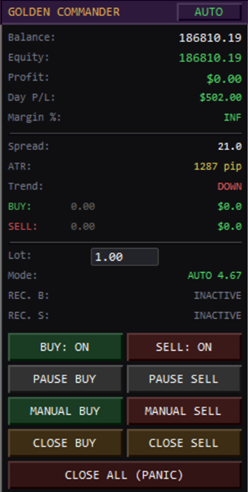
- Moving the Panel: Left-click and hold the panel header (labeled GOLDEN COMMANDER) and drag it anywhere on the chart. Coordinates are saved automatically. When logging in from a phone via remote desktop (RDP), the panel will automatically snap to the screen border (Auto-Clamping) to prevent controls from getting lost.
- Status Button (in the panel header):
- AUTO: The robot automatically searches for entries based on signals and manages trades.
- MANUAL: Automatic first entries are disabled. You can open a trade manually (including using the buttons on the panel), and the robot will manage it.
- PAUSED: Emergency auto-pause (yellow color). Activated automatically by the robot when drawdown limits (daily/total) or the daily profit target are reached. The robot closes trades and stops trading to protect the account. To exit the pause, simply click this button on the panel to return the robot to AUTO mode.
- "Statistics" Section (Balance, Equity, Profit, Day P/L, Margin %): Displays the current state of the trading account.
- "Market Data" Section (Spread, ATR, Trend, BUY/SELL): Displays the current spread (turns red if MaxSpread is exceeded), ATR volatility, H1 trend direction (BULLISH / BEARISH / FLAT), and current volumes.
- "Lot and Recovery Parameters" Section:
- Lot: Field for entering the lot size. Double-click the value to set the volume for manual trades.
- Mode: Lot calculation mode: FIX (fixed lot from settings) or AUTO (dynamic lot calculated from RiskPercent).
- REC. B / REC. S (Recovery Buy / Sell): Displays the status of the recovery grid for buys and sells (INACTIVE, ACTIVE with the number of orders, or PAUSED).
- "Control Buttons" Section:
- BUY: ON/OFF and SELL: ON/OFF: Permission to open new trades in a specific direction. If disabled (OFF), new cycles will not open, but the robot will safely close any currently open trades.
- PAUSE BUY and PAUSE SELL: Allows you to pause the recovery grid. New grid orders will not open (helps wait out high-impact news).
- MANUAL BUY / MANUAL SELL: Opens a manual trade with the specified lot size. The robot will take control immediately.
- CLOSE BUY / CLOSE SELL: Closes all buys or all sells at the current market price.
- CLOSE ALL (PANIC): Instantly closes absolutely all orders for Gold on the account.
4. Reference: Difference Between Pips and Points on Gold
To configure settings correctly, it is important to understand how your broker quotes Gold:
- Point: The minimum price change step. For a 2-digit gold broker (e.g., 2350.15) 1 Point = 0.01. For a 3-digit broker (e.g., 2350.155) 1 Point = 0.001.
- Pip: A standardized step. In this EA, 1 Pip = 10 Points.
Example: If the GridStepPips parameter is set to 200.0, this means a step of 2,000 points (gold price movement of $20.00).
5. Detailed Breakdown of All EA Settings
5.1. GENERAL SETTINGS
- CustomComment: Comment for the EA's orders.
- AutoStart: Autostart. If set to true, the robot starts searching for entries immediately after being placed on the chart.
- MagicNumber: Unique identifier for the EA's trades.
- Slippage: Maximum allowed price slippage when opening orders.
- MaxSpread: Spread filter. Prevents opening new trades during abnormal spread widening.
- TradeFriday: Allow trading on Fridays. If set to false, no new trade cycles will open before the weekend.
- EntryTF: Working timeframe for searching initial entry signals (M15 recommended).
- UseSessionFilter: Enables hourly trading restrictions.
- SessionStartHour / SessionEndHour: Start and end times for signal searching.
5.2. RECOVERY PARAMETERS
- UseDynamicGridStep: Enables dynamic calculation of grid distances based on ATR volatility.
- GridStepPips: Base step spacing between orders in pips.
- GridMultiplier: Lot multiplier for each subsequent grid order.
- MaxGridOrders: Maximum number of orders in a single grid.
- GridTargetProfit: Target profit of the grid in pips from the breakeven point.
- GridDistanceMult: Step expansion factor. The grid step increases by this multiplier with each new order.
- GridATR_Multiplier: ATR volatility multiplier used when UseDynamicGridStep is enabled.
- UseGridNewBar: Opens new grid orders only when a new M15 bar appears.
- UseGridCandleConfirm: Additional candle close confirmation filter before opening a recovery order.
5.3. FILTERS & SAFETY PARAMETERS
- UseTrendFilter: Filters the first entry by the H1 trend direction.
- UseBB_GridEntry: Uses Bollinger Bands and RSI filters for the first entry.
- BB_Period / BB_Deviation: Bollinger Bands period and deviation settings.
- BB_RSI_BuyTrigger / BB_RSI_SellTrigger: RSI levels for the first buy/sell entry.
- UseWPR_GridAveraging: Uses the Williams' Percent Range filter to confirm recovery orders.
- WPR_Period / WPR_BuyTrigger / WPR_SellTrigger: WPR indicator settings.
- UseMACDForGrid: Filters recovery orders based on the MACD trend indicator.
- UseGridTrailing: Enables a trailing stop to secure profits for the entire basket of orders.
- GridTrailStartPips: Profit distance in pips to activate trailing.
- GridTrailDistPips: Trailing stop distance.
- GridTrailStepPips: Trailing stop step.
5.4. SUPPORT/RESISTANCE ENGINE
- SR_TF: Timeframe for calculating S/R levels (H1 recommended).
- SR_ScanBars: Number of history bars to analyze for levels.
- SR_LeftRightBars: Number of neighboring bars to define local peaks/troughs.
- SR_ZoneHeightPips: Height of the S/R zone in pips.
- ShowSRLines: Displays S/R levels on the chart.
- SupportColor / ResistanceColor: Colors for support and resistance zones.
- UseSR_GridFilter: Filters recovery orders by S/R levels (delays entry until the level is touched).
- SR_GridTolerancePips: Allowed price overshoot beyond the level to activate the order.
- SR_WaitRangePips: Search range for levels near the calculated grid step.
- SR_MaxWaitBars: Maximum time to wait for a bounce at the level in M15 bars.
5.5. RISK PROTECTION & SAFETY
- DailyStopPct: Daily maximum loss limit in % of balance (0 = disabled).
- DailyProfitPct: Daily profit target in % of balance (trading stops when reached).
- MaxFloatingLossPct: Maximum allowed floating drawdown in % of balance.
- MinMarginLevel: Minimum margin level in %, below which no new orders are opened.
- MaxGridDrawdownUSD: Maximum loss per grid in deposit currency for emergency closure.
- UseCooldown: Pauses trading after closing trades in loss.
- MaxConsecLosses: Maximum number of consecutive losing cycles to activate cooldown.
- CooldownBars: Duration of the cooldown pause in M15 bars.
- UseHolidayFilter: Avoids trading during dangerous New Year holiday periods.
- HolidayStartDay/Month, HolidayEndDay/Month: Start and end dates for the holiday filter.
5.6. UI & DISPLAY SETTINGS
- ShowPanel: Displays the control panel on the chart.
- PanelScale: Control panel scale (for UltraHD monitors).
- ShowHistoryLines: Renders lines and profit labels for closed trades on the chart.
- UseVirtualLevels: Uses virtual levels (hides the basket's TP/SL from the broker).
- ShowVirtualLines: Draws virtual TP/SL lines on the chart.
6. Trading Recommendations
- Account Type: ECN, Pro, or Raw Spread accounts with floating spreads and Market Execution are highly recommended. The spread for XAUUSD should ideally be within 15–30 points.
- VPS: For uninterrupted virtual order tracking, the robot must run 24/7. Use a VPS server with low latency (ping < 20 ms).
7. Risk Warning
Trading Gold and other financial instruments carries high risks. Past performance does not guarantee future results. Before running the EA on a live account, make sure to test it in the strategy tester.
Contacting the Author: If you have any questions regarding setup or optimization, feel free to send me a private message on MQL5.
My Developer Profile: https://www.mql5.com/en/users/daft765