Why I Built an Auto-Journaling EA for MT5 (And What I Found in the Data)

Most traders know they should keep a trading journal. Almost none of them do it consistently.
Not because they're lazy — because manual journaling is brutal under live-money conditions. You finish a trade at 3am, the adrenaline's still there, the P&L is either up or down, and the last thing you want to do is open a spreadsheet and reconstruct what you were thinking. So you tell yourself you'll do it later. Later never comes. The trade context fades. The patterns you needed to see stay invisible.
I built Chart Reporter because I needed it myself.

The 3am Problem
Here's what manual journaling actually looks like in practice.
You're running a live MT5 account. A trade opens at 02:47. You've modified your stop twice during the session. News drops at 03:02 — you held through it, which is either discipline or stubbornness depending on how it closed. The trade exits at 03:19.
To journal that properly, you need to record: entry price, exit price, stop levels at each modification, your reasoning at entry, what the news event was, whether you hesitated, account drawdown at the time of the trade, and which strategy variant you ran it under.
That's fifteen minutes of cognitive work at 3am, after the trade is already closed. On a losing night. With another session opening in six hours.
Most traders log the P&L and nothing else. Which means they have a perfect record of outcomes and zero record of decisions. That's like trying to improve your cooking by only tracking whether people finished the meal.
What an Auto-Journaling EA Actually Does
Chart Reporter uses an MT5 Expert Advisor that hooks directly into your broker connection's trade event stream.
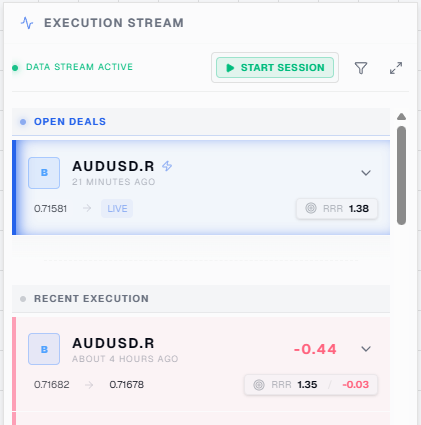
When a trade opens, it captures: entry price, account balance, drawdown at the moment of entry, and a timestamp that's cross-referenceable against an economic calendar. When you modify a stop or take-profit, it logs the modification. When the trade closes, it writes the full trade record — including how the position evolved through any modifications — to your Chart Reporter dashboard automatically.
No human action required. No spreadsheet, no copy-paste from a broker statement, no trying to remember what you were thinking at entry. The EA captures it as it happens.
Why It Has to Be an EA (Not a Separate App)
The architecture matters here.
External journaling apps — even good ones — require you to export a statement and upload it after the fact. They get outcomes. They miss intra-trade context: order modification history, account drawdown at the moment of entry, the sequence of price action during the hold period.
EAs run inside your broker connection. They see what the broker sees, in real time. The moment your trade closes, that context is preserved automatically — not reconstructed from a statement twelve hours later.
If you're running EAs, this matters even more. There's no human logging process to fall back on. The EA is the only architecture that can capture trade context without adding a human step to the process.
(see it in action during my live streams)
What the Dashboard Reveals
The patterns that matter aren't in individual trades — they're in aggregate behaviour over time.
Chart Reporter's dashboard surfaces patterns that are invisible in a P&L-only record.
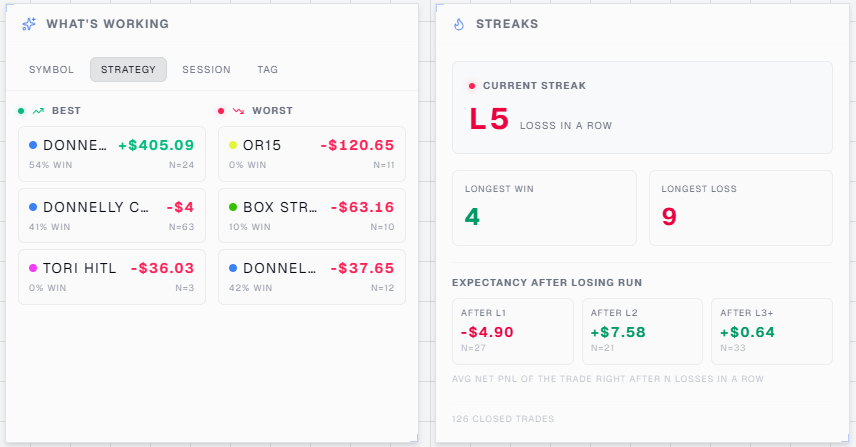
For manual traders: win rate by time of day (most traders have a session where their edge collapses — they just don't know which session), and drawdown-correlated decision quality (your execution changes under pressure, but the data shows you exactly where the threshold sits).
For EA traders: all of the above, plus per-strategy performance comparison broken down by magic number. If you're running three EAs simultaneously, each gets its own performance record. Win rate, drawdown profile, average RRR, time-of-day pattern — all separated automatically. When one strategy starts underperforming its historical baseline, it shows up in the data immediately.
These patterns only emerge when you have structured, automatically-captured trade context across 50 or more trades. You can't see them in a spreadsheet. You definitely can't see them in a broker statement.
Who It's For
Chart Reporter works for two kinds of MT5 traders — and the core problem it solves is the same for both.
If you trade manually, it removes the decision-logging overhead entirely. Every trade is captured automatically: entry, exit, stop modifications, account drawdown at the moment of the trade. No spreadsheet. No copy-paste from a broker statement. No trying to reconstruct your thinking at midnight. You get a clean, structured record of what you actually did — and over time, patterns emerge in your own decision-making that you couldn't see before.
If you run EAs, Chart Reporter goes further. The platform automatically identifies each strategy by its MT5 magic number. If you're running three EAs simultaneously — a trend-follower, a mean-reversion system, and a scalper — each gets its own performance record without any manual tagging. You can compare them side by side: win rate, drawdown profile, average RRR, time-of-day pattern. The moment one strategy starts underperforming its historical baseline, it shows up immediately.
Both traders get the same core benefit: a complete, automatic record of every trade as it happens — without the discipline tax of doing it manually.
Where to Find It
Chart Reporter is live on the MQL5 Marketplace: Chart Reporter — Auto-Journaling EA for MT5.
The auto-journaling EA installs like any standard MT5 EA — no external software, no API keys, no separate account setup required. Full documentation and the web dashboard are at chartreporter.com.
Disclaimer: Trading and investing involve risk, including the possible loss of capital. Chart Reporter provides journaling and analytics tools only and does not provide investment advice, recommendations, or performance guarantees.